Main LogoLight Logo
  • Reviews
  • Top 10
  • How To
  • Tech News
  • OS
    • Windows
    • MAC
    • iOS
    • Android
  • Categories
    • Driver Updater
    • Cyber Security
    • Games
    • Fitness
    • Entertainment
    • Tips & Tricks
Top 10 Windows
by Prachi Dani

15 Best Free Data Recovery Software For Windows 10/8/7 In 2024

February 5, 2024
1

Do not panic if you have lost or accidentally deleted important data from your Windows device. This post shares the best free data recovery software for Windows 10 and older versions of the OS to help you recover all types of lost or deleted files in no time.

Have you ever thought about how you would react if you lose essential data stored on your computer system? It sounds frustrating and helpless!! Right?

Well, there can be multiple scenarios, where you can lose your relevant data, it can be a system crash, virus attack, corrupted hardware, or unforeseen issue like manual deletion of data.

System backup is the only way that can save from the adverse effects of data loss. But what happens if you don’t have a system backup? Data recovery software comes into the picture in such situations.

Keep on reading to know about the data recovery programs in detail and how they can save you from losing your important files and folders.

Table of Contents hide
What is Data Recovery Software?
List of Top 15 Best Free Data Recovery Software For Windows in 2024
1. Stellar Data Recovery for Windows
2. Recuva
3. Disk Drill
4. Glary Undelete
5. Recoverit Data Recovery
6. EaseUS Data Recovery Wizard
7. Wise Data Recovery
8. FreeUndelete
9. Testdisk
10. Photorec
11. Data Rescue 6
12. ADRC Recovery Tool
13. SoftPerfect File Recovery
14. MiniTool Data Recovery Software Free
15. Puran File Recovery
Frequently Asked Questions Related to Best Data Recovery Software for Windows

What is Data Recovery Software?

Data recovery software, also known as file recovery software, is a dedicated program that helps users recover various types of lost or deleted files, including photos, audios, videos, archives, documents, and more.

Since Windows data recovery software comes in a variety of flavors, identifying and sorting the best out of them becomes a really tough job. To make things easier for you, we have prepared a comprehensive list of the top paid as well as free file recovery software for Windows 10 and older versions of the operating system.

Now, without wasting any time, let’s scroll through our below list of best data recovery software of 2024 and pick the one that stands different from the rest.

List of Top 15 Best Free Data Recovery Software For Windows in 2024

To help you quickly and easily recover deleted files in Windows 10 and older versions, we have below shared a comprehensive list of the best software for data recovery you could try in 2024.

1. Stellar Data Recovery for Windows
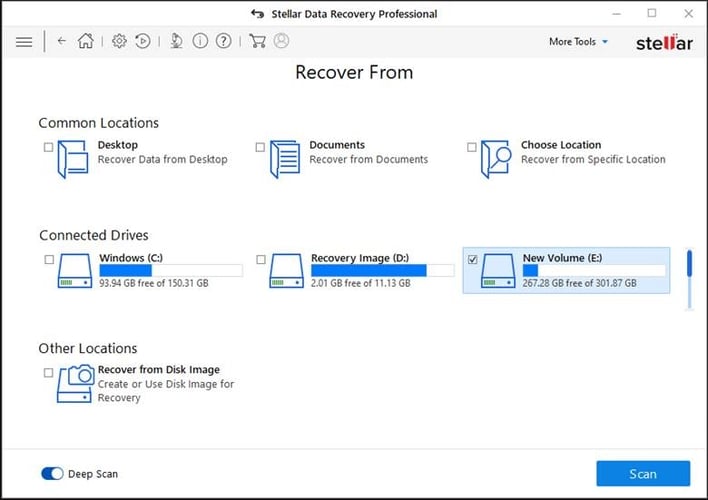
Stellar Data Recovery for Windows

One of the most powerful and best data recovery software solution for Windows to try is Stellar Data Recovery. With the help of this tool, you can recover lost or deleted data from a variety of storage devices, including hard drives, USB sticks, memory cards, and many others.

The program is quite easy to use and helps recover up to 1 GB of data for free. If you’re looking for a freemium file recovery software with impressive functionality and an easy-to-understand interface, then this Stellar Data Recovery is a good pick for you.

Key Features of Stellar Data Recovery:

  • You can use this software to recover files from various storage devices.
  • The software claims to offer accurate and reliable results.
  • You can recover a variety of lost or deleted files, including photos, videos, email, excel workbook, and more.
  • The software can easily recover data, even from corrupt and virus-infected drives.
  • With this free data recovery tool, you can even retrieve data from formatted drives.
  • With the Pro version of the software, you can quickly repair corrupt video files of a wide array of video formats.

Get For : Windows  MAC  iPhone  Android


2. Recuva
Recuva

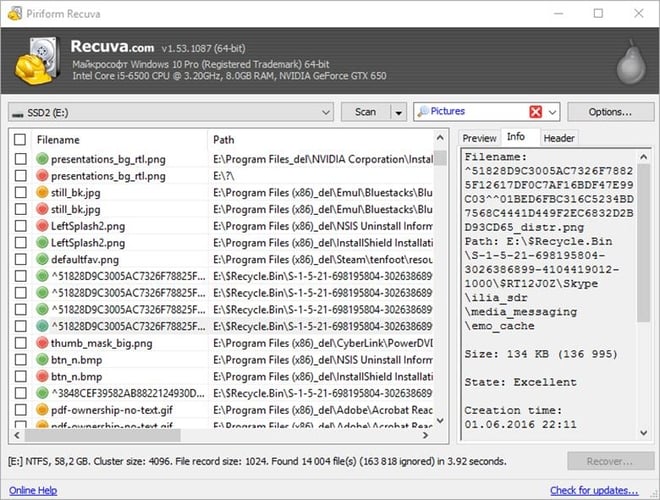
The second spot on our list of best free data recovery software for Windows 10 goes to Recuva. Developed by Piriform (the maker of CCleaner), the software allows users to retrieve lost or accidentally files from external drives, hard drives, memory cards, and DVD/CDs.

Recuva is compatible with almost all Windows versions including Windows 7/8/8.1/10/ Vista and XP along with 2008/2003 servers. It also comes in a portable version and can recover your music, audio, video files, pictures, and other vital documents.

See Also: CCleaner Review: Product Details, Features, Price & More

It also comes in a portable version and can recover your music, audio, video files, pictures, and other vital documents.

Key Features of Recuva:

  • Using this best free data recovery program, you can easily recover files including audio, video, images, and other documents.
  • It comes with an advanced deep scan mode that helps perform a thorough scanning of the drives to find deeply buried files.
  • Recuva is compatible with all the Windows OS.
  • The software supports internal as well as external drives for recovery.
  • The software has a very easy and clean user interface.

DOWNLOAD


3. Disk Drill

Disk Drill

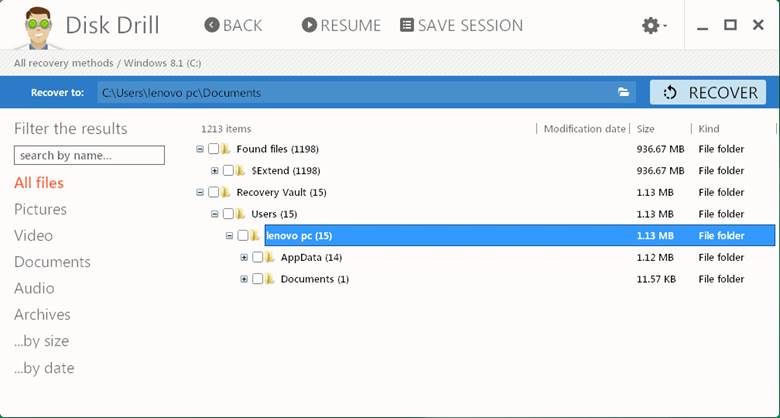
Disk Drill is another trusted and best Windows data recovery software tool available in the market currently. The software comes in two versions: free and paid. The free version (Disk Drill Basic) helps recover up to 500MB of data, whereas the paid version (Disk Drill Pro) allows its users to recover an unlimited amount of data.

Disk Drill file recovery software works incredibly well with both old and modern versions of the Windows operating systems and can quickly recover documents, music, video files along with multiple photographs.

Must Read: Must-Have Software for Windows 10

With the software, you can even preview your lost files before they are restored, perform partition recovery, filter files by size or date, run a quick system scan, and save your scan results. Below are some other features of Disk Drill software that attract users.

Key Features of Disk Drill:

  • The software offers up to 500 MB of free data recovery.
  • It encompasses a Recovery Vault to keep important files and folders safe.
  • It helps take byte-level backup of the entire hard disk.
  • It allows you to completely recover lost, deleted, or accidentally formatted partitions.
  • It boasts a S.M.A.R.T. monitoring system that provides updates on disk health.
  • The program helps undelete files from virtually all types of storage devices.

DOWNLOAD


4. Glary Undelete

Glary Undelete

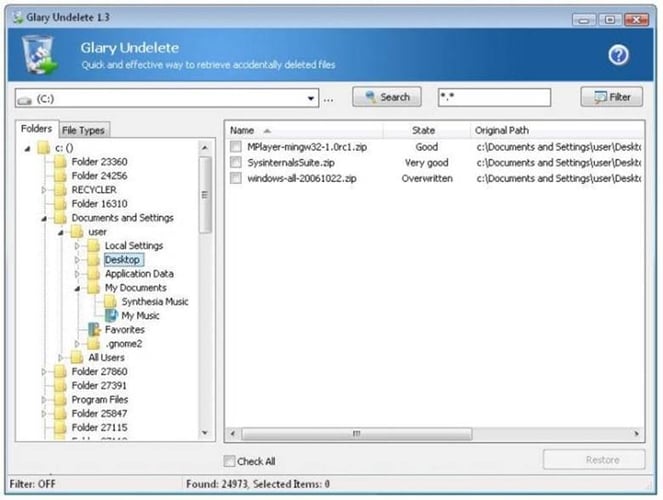
Glary Undelete is another good option to consider in the category of best free data recovery software for Windows 10, 8, 7, and older versions. Using Glary file undelete software is a breeze thanks to its clean and straightforward UI.

It lets you effortlessly recover deleted files from your hard drive, removable media, USB drives, memory cards, and more. The most beautiful thing about Glary Undelete is that it’s 100% virus-free and supports all the major Windows operating systems.

Key Features of Glary Undelete:

  • It is an easy-to-use, powerful, and free file recovery software for Windows.
  • The software supports various file systems like NTFS, NTFS+, FAT, EFS, etc.
  • It allows users to get back lost or deleted data from removable devices like USB keys, SD cards, external hard disks, and more.
  • It allows automatic sorting of each file based on the name, size, and creation date.
  • With this Windows data recovery program, you can retrieve all the files that have been emptied Recycle Bin in just a few simple clicks.

DOWNLOAD


5. Recoverit Data Recovery

Recoverit Data Recovery

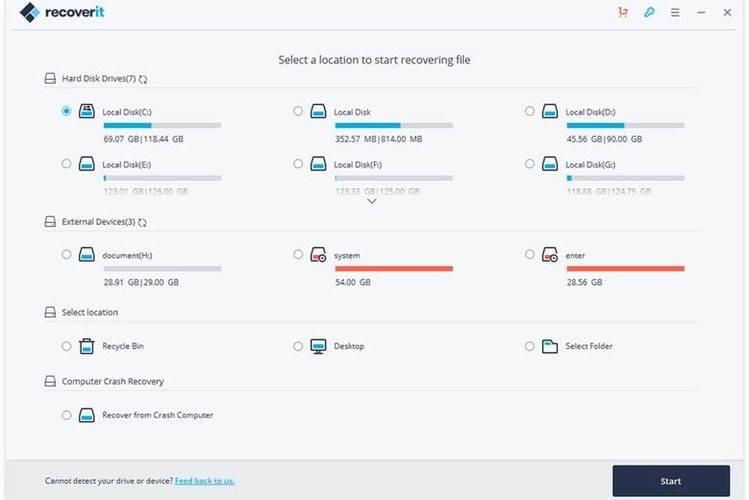
If you are looking for a paid data recovery program for Windows with advanced functionalities, then Recoverit Data Recovery from Wondershare can be a perfect pick. It seamlessly covers a wide range of storage devices including memory sticks, hard drives, USB flash drives, camcorders and many more.

The biggest highlight of this stunning application is that you can pause and resume the file recovery process at any point in time. It supports almost all Windows versions.

Key Features of Recoverit Data Recovery:

  • Wondershare’s data recovery tool allows you to restore any type of file easily.
  • The software is capable of recovering data from all types of storage devices.
  • You can easily pause and resume the recovery process at any point in time
  • The software supports more than 1000 file formats.
  • It provides a quick preview of files before recovery.
  • With its premium version, you can perform advanced file recovery, repair corrupt videos, create a bootable disk, and a lot more.

DOWNLOAD


6. EaseUS Data Recovery Wizard

EaseUS Data Recovery Wizard

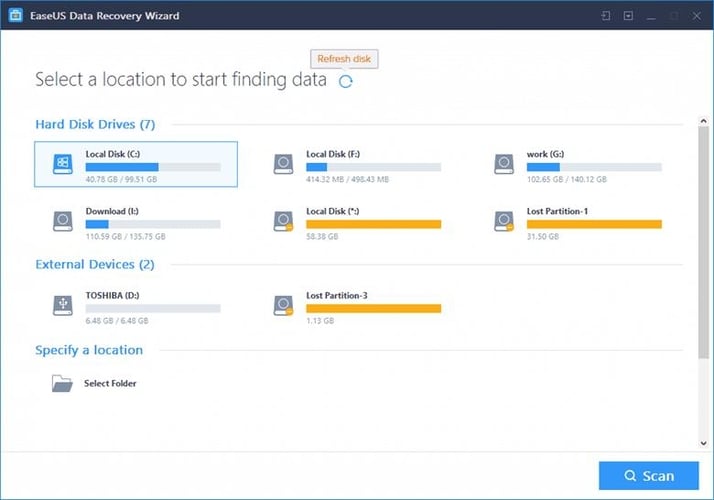
Have you accidentally deleted your essential files and data? Are you suffering from data loss? EaseUS Data Recovery Wizard Professional can come to your rescue.

This multi-functional tool can help you recover your lost data, including photos, emails, text files and many more. Use it to retrieve data even from a corrupted, formatted, infected and also crashed hard drive.

Not just this, it goes a step ahead and helps you recover your deleted files even from the recycle bin.

Below are some of the notable features that make EaseUS Data Recovery Wizard a strong candidate for the best free Windows data recovery software of 2024.

Key Features of EaseUS Data Recovery Wizard:

  • The interface of the software is neat and clean and has 20 menu languages.
  • The program has two advanced scanning modes: Quick Scan & Deep Scan.
  • It allows you to quickly recover 1000+ types of file formats.
  • It helps retrieve files from lost, deleted, or formatted partitions.
  • It allows to restore deleted files from an internal/external HDD, memory card, USB pen drives, and other supported storage media devices.
  • You also have the option to preview the deleted files before recovering them.

DOWNLOAD


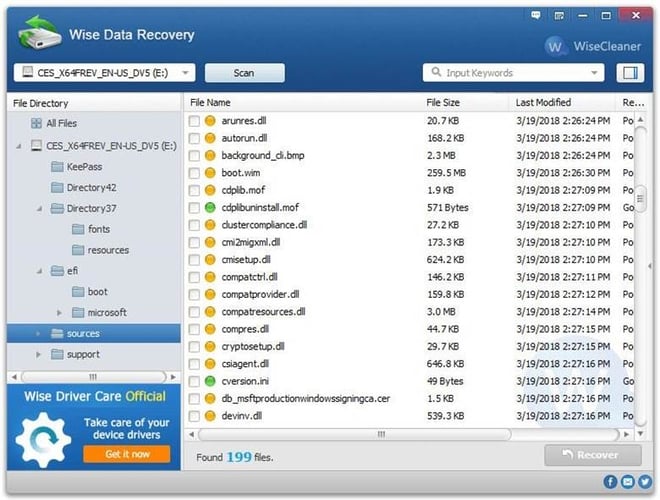
7. Wise Data Recovery

Wise Data Recovery

If you are looking for an all-rounder professional data recovery tool for Windows, then Wise Data Recovery can be an excellent option to pick.

You can use it to recover deleted files like photos: audio, video files, emails, documents from NTFS, FAT and exFAT disks.

By far the top feature of Wise Data Recovery is that it’s a portable application, and therefore it requires no installation. Here are the other features that make it one of the best software to recover deleted files in Windows 10 and older versions of the OS.

Key Features of Wise Data Recovery:

  • Wise Data Recovery is 100% free of viruses and is a small program.
  • It allows you to recover 1000+ types of file formats.
  • It can also restore data from HDD, SSD, USB thumb drives, digital cameras, and other storage devices.
  • It offers fast data scanning speed to save your time.
  • It lets you recover files in complex scenarios such as unexpected system crash, formatted hard drives, etc.

DOWNLOAD


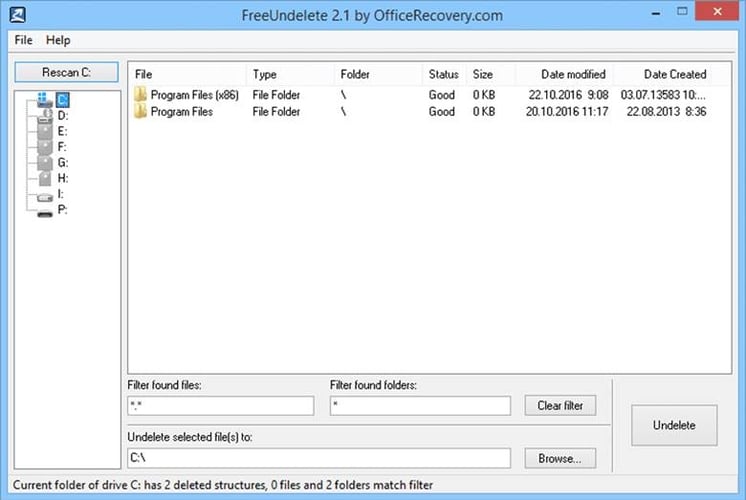
8. FreeUndelete

FreeUndelete

FreeUndelete is a completely free data recovery software for Windows 10 and older editions of the operating system. With the help of this file undelete software, you can easily retrieve your important data that have been deleted from the Windows Recycle Bin.

It comes with a simple and easy-to-use interface and supports various versions of Windows including Windows XP/ 7/2000/2008/2003 and NT4 servers.

Here are some of the salient features that FreeUndelete software offers to its users.

Key Features of FreeUndelete:

  • This Windows file recovery software is absolutely free for personal use.
  • It has a simple and uncluttered UI.
  • It allows users to save the recovered files into a new location to prevent overwriting.
  • It supports file systems like NTFS 1.0, NTFS 2.0, FAT 12, etc.
  • It offers its users full install and uninstall support.

DOWNLOAD

Also Read: List of Best Duplicate Photo Finder & Cleaner Software


9. Testdisk
Testdisk

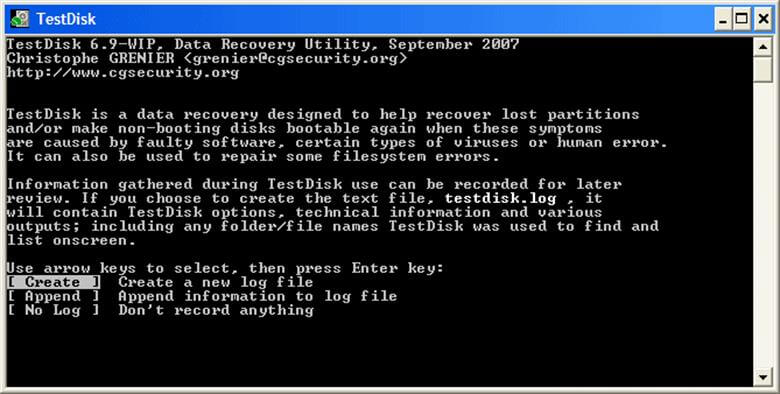
Here comes another open-source tool on our list of best free data recovery utility for Windows 10 and older versions.

Testdisk comes with a robust mechanism that helps you locate and completely recover lost disk partitions in the blink of an eye. You can use it to recover files from ext2, NTFS, exFAT and FAT file systems.

It works on almost all major Windows versions and has a multitude of features for both beginners and advanced users.

Below we have described some of the top features that helped Testdisk hold a significant position in the list of best data recovery software in 2024 to retrieve deleted files from Windows.

Key Features of Testdisk:

  • Testdisk has the capability to restore the deleted partition and fix the partition table.
  • It helps in restoring the FAT 32 and NTFS boot sector from its backup.
  • It also rebuilds the boot sector for FAT 12/ FAT 16/ FAT 32.
  • It can also fix MFT with the help of an MFT mirror.
  • It also helps in restoring files from file systems like FAT, exFAT, NTFS, etc.

DOWNLOAD


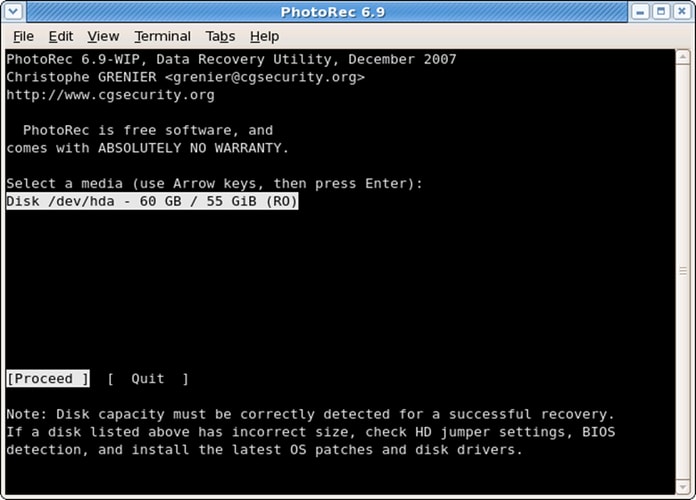
10. Photorec

Photorec

Next on our list of best free windows data recovery software is Photorec. It is a companion tool to the aforementioned TestDisk program.

Its data recovery functionality is quite extensive and comprehensive; whether it’s a portable drive or a digital camera, it can support almost everything.

It is compatible will all significant Windows versions and can restore your lost photos, videos, audio files, documents, and files.

Key Features of Photorec:

  • Photorec is open-source and absolutely free software for data recovery.
  • It can work with various types of operating systems like, Windows, Mac OS, Linux, etc.
  • It also supports a huge list of file systems like FAT, exFAT, NTFS, HFS+, etc.
  • It can recover permanently deleted data from HDD, CD-ROMs, USB flash drives, SD cards, and more.

DOWNLOAD


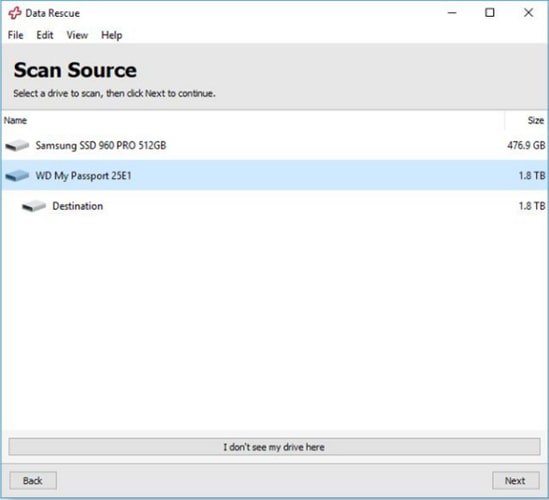
11. Data Rescue 6

Data Rescue 6

Data Rescue 6 from Prosoft Engineering comes next on our list of best data recovery software for Windows 10 and older versions.

This program gives hard competition to other rival products due to the fact that it makes the process of file recovery straightforward. It’s ideal for novice users. Simplicity is one of its major highlights and it comes with a clean and convenient interface.

Read More: Best FTP Client Program For Windows

It supports data recovery functions of all types, including both external and internal storage devices.

Key Features of Data Rescue 6:

  • Data Rescue 6 has a straightforward and neat interface.
  • It is compatible with Windows 7 and later versions.
  • It has two scan modes: Quick Scan & Deep Scan.
  • Using the software, you can quickly recover every type of file easily.
  • The software keeps the data stored, and you can anytime view previous scan results.

DOWNLOAD


12. ADRC Recovery Tool

ADRC Recovery Tool

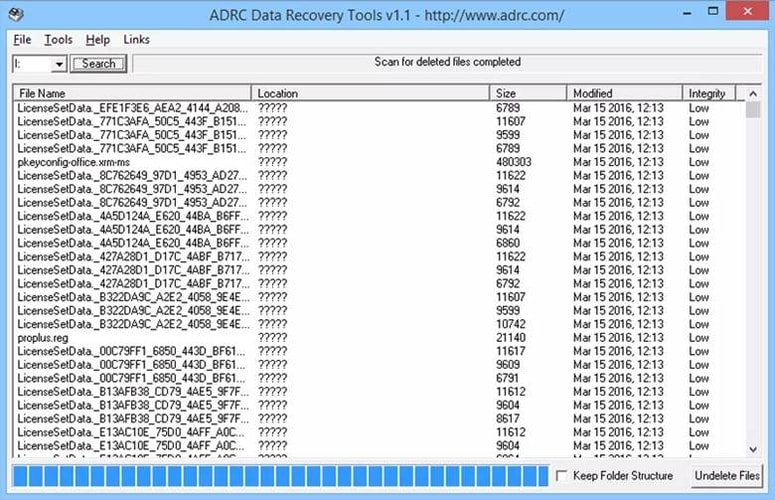
With many attractive features such as sophisticated scanning algorithms and simple GUI, ADRC Recovery Tool comes next on our list of top free data recovery software for Windows PC.

You can use it to the backup disk image, undelete important files, disk cloning, restore the backup image, and many more.

Moreover, it’s a portable program, meaning you can run it from a floppy disk to recover data on your Windows laptop or desktop computer. The only drawback of this file recovery tool to consider is that it’s only compatible with older versions of the operating system (Windows 95, 2000, and XP).

Key Features of ADRC Recovery Tool:

  • It’s completely free software to recover deleted files from Windows.
  • The software has a very easy-to-use interface
  • It can be used for backup, disk cloning, and undelete important files.
  • Using this Windows data recovery tool, you can quickly recover physically damaged files.
  • It lets you create and write raw image files to and from a removable device or a hard drive.

DOWNLOAD


13. SoftPerfect File Recovery

SoftPerfect File Recovery

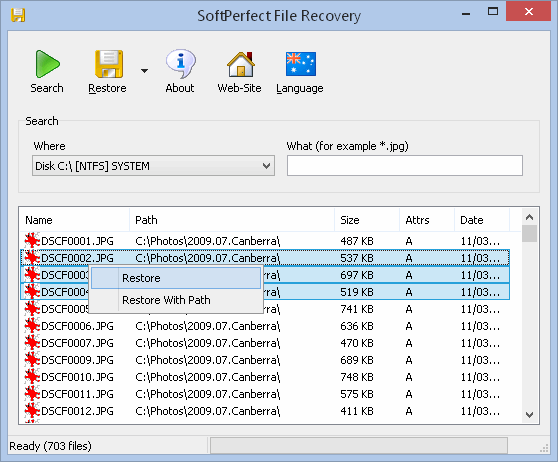
Another famous name in the list of best data recovery software for Windows 10 is SoftPerfect File Recovery. Since it’s a portable file recovery software, you can use it without any installation.

Softperfect can easily sync with all versions of Windows and can recover deleted files from hard drives, floppy disk, flash drives, SD CARDS, etc.

Key Features of SoftPerfect File Recovery:

  • SoftPerfect File Recovery program is lightweight and absolutely free for personal use.
  • It supports most of the popular file formats (NTFS, NTFS5, FAT12, FAT16, and more).
  • The software supports the recovery of compressed and encrypted files.
  • The interface of the software is very easy that can be adapted by anyone.
  • You can use this software for restoring deleted files from internal as well as external drives.

DOWNLOAD


14. MiniTool Data Recovery Software Free
MiniTool Data Recovery Software Free

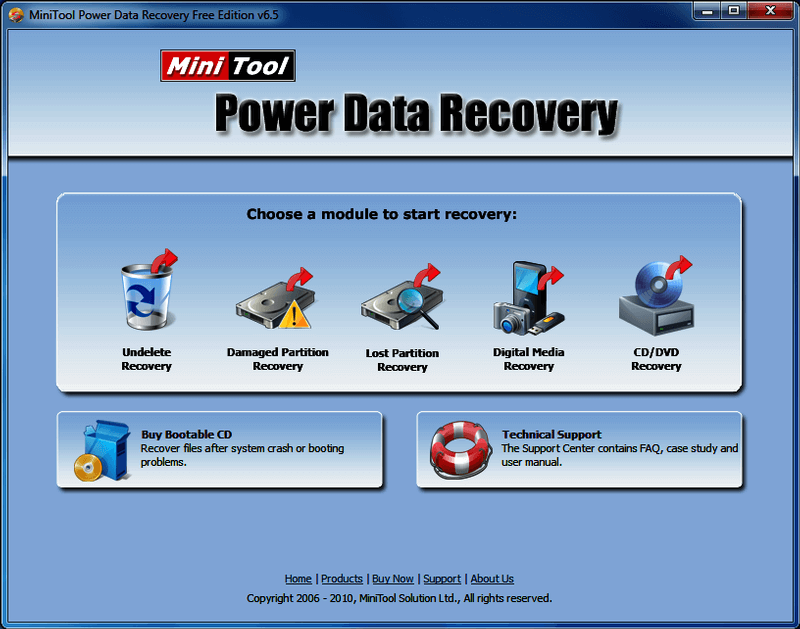
Another impressive data recovery solution to take into account if you wish to recover deleted files is MiniTool Data Recovery Software Free. The software makes it convenient to find and restore deleted files like pictures, work documents, archives, audio, videos, emails, etc. 

However, MiniTool’s free data recovery software has some limitations and only allows you to recover up to 1 GB of data. So, if you want to perform large file recovery you have to shell out some bucks and purchase the full version of the software. 

Key Features of MiniTool Data Recovery Software Free:

  • Using the free version, you can recover up to 1 GB of data.
  • It offers support for up to 70 different kinds of file formats (e.g., picture, audio, video, document formats, etc.).
  • It helps get the lost files/data back even from formatted or lost partitions.
  • The software supports various storage devices like SSDs, hard drives, memory cards, etc.

DOWNLOAD


15. Puran File Recovery

Puran File Recovery

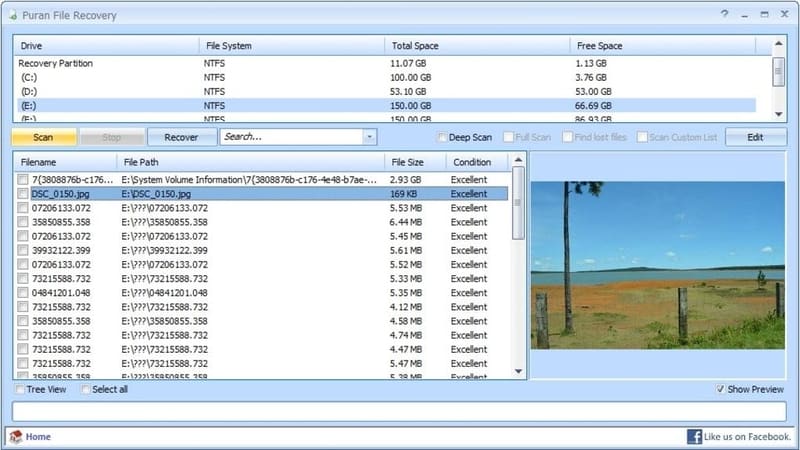
A decent choice for a file undelete program is Puran File Recovery. It’s incredibly easy to use and configure and has a very generous amount of features like a powerful recovery engine and multiple scanning modes. The main feature that makes this free file recovery program worth checking out is the ability to look for deleted and lost files of different formats based on data patterns.

Even though it’s not the most intuitive software out there to recover deleted or lost data, Puran File Recovery earns a spot on this list considering it’s completely free to use without hidden charges/fees.

Key Features of Puran File Recovery:

  • This file undelete software has a very simple interface.
  • It helps recover files from hard drive within a few seconds.
  • It has three scan modes: Quick, Deep, and Full scan.
  • It displays the files in neatly organized tree and list views.
  • Its search box supports wildcard characters to help users quickly find deleted files.

DOWNLOAD


Frequently Asked Questions Related to Best Data Recovery Software for Windows

Below are a few most commonly asked questions regarding the best free data recovery software for Windows 10, 8, 7 PC.

Q.1 What is the Best Software For Data Recovery?

Stellar Data Recovery is one of the most powerful and popular services for data recovery. The software comes with various scan options, which means users can pick the scan type for the data loss that has happened. This saves a lot of time and effort. Additionally, this data recovery software possesses advanced search capabilities, making the overall process of data recovery much easier.

Q.2 What to do if I Don’t have a Lot of Money for Data Recovery Software?

Well, “the cost of not getting the lost data back is a lot higher than the cost of data recovery”. So, it is worth paying for data recovery. But, unfortunately, if you don’t have a lot of money for it, then you can use any of the best free software for data recovery. We recommend using Recuva, a powerful and 100% free recovery software.

Q.3 How Successful is Data Recovery?

The success rate of data recovery mainly depends on the dedicated R&D (Research and Development) team who constantly works on discovering new recovery techniques and tools. Generally, in about 70%-85% of cases, almost 75% of the files can be recovered. And, if there’s an NTFS volume involved, averages might get a bit worse- 40% chance to retrieve at least 90% of the files, and about 75% chance to recover at least 70% of the files.

Q.4 Can Lost Data Be Recovered?

Yes, you can be able to retrieve the lost data from a damaged hard drive by removing the hard drive from your system and connecting it to another PC to check if any files/data aren’t damaged. If in case, the hard drive is completely corrupted, then you can use any of the best data recovery software to recover the lost data.

Q.5 Why is Data Recovery So Expensive?

For some businesses or people, data recovery may seem a bit expensive. Below are a few significant factors that might affect the data recovery cost.

  • Research & development.
  • Quality guarantee.
  • Infrastructure and facilities.
  • Data security and protection.
  • Customer service team.
  • Device replacement.

Recover Lost or Deleted Files in Windows Easily with Best Data Recovery Software (2024)

Through this post, we have shared a well-researched list of the best free data recovery software for Windows 10 and older versions to help you quickly and easily retrieve lost or accidentally deleted files.

Each of the Windows data recovery software tools mentioned above comes with a unique set of features. Hence, we recommend you check your requirements before making your final choice.

We hope you found our article helpful. Before you leave, please tell us which software you choose to undelete files in Windows through the comments section below.


Author

Prachi Dani

Prachi Dani is a technical content writer who specializes in areas of science and technology. She is highly up to date with technological transitions and transformations. Writing is not her passion but the only thing that carries satisfaction in life. If not writing, you may find her engrossed playing action games on her treasured smartphone.

View all posts

Related Posts
Best Widgets for Mac to Use

12 Best Widgets for Mac to Use in 2024

May 2, 2023
0

Do you need the best MacBook widgets to boost your productivity and customize your device? If yes, you may read this article to know the top coolest widgets for Mac.

The year 2014 witnessed a significant change in Mac with the introduction of widgets in OS X Yosemite. However, the user experience of these widgets was far from perfect until macOS Monterey entered the picture.

The macOS Monterey made the widgets a whole lot more useful and convenient for users. With these widgets, you can seamlessly perform tasks like checking the battery percentage, upcoming tasks tracking, etc.

Now, if you are confused about which are the best macOS widgets you should use, this article is here to help.

Through this write-up, we bring to your attention a well-researched list of many cool widgets for Mac that you must try. Let us begin with them without any ado.

Use MacKeeper to Get a Clean and Fast mac in Minutes

List of the Best Widgets for Mac

The following is the comprehensive lineup of the best widgets for macOS Big Sur and  Monterey for a more personalized and seamless experience working with your Mac.

1. Color Widgets

Color Widgets

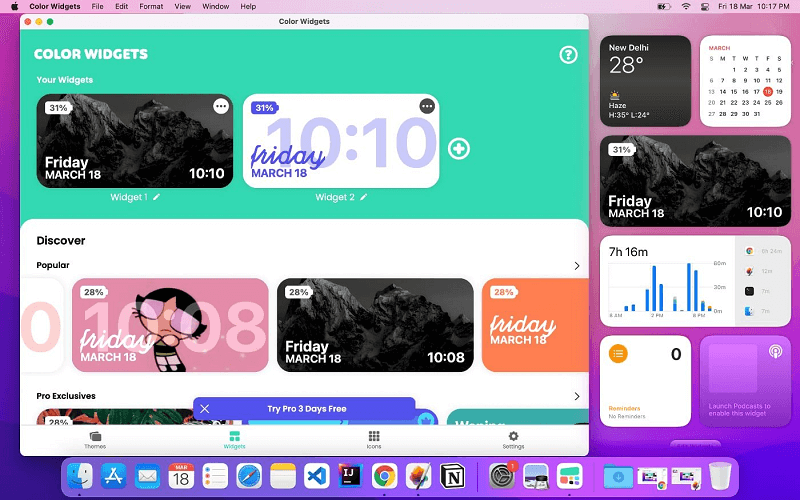
Let us first introduce you to Color Widgets. It is among the best widgets for Mac if you prioritize customization. Here you get a huge selection of completely customizable widgets to customize the notification center of your Mac.

Moreover, it is one of the best macOS widgets to change the color, font, and design according to your preferences. Furthermore, it boasts multiple highly-attractive backgrounds and even lets you use your photo to give you a more personalized feel.

Download Now

Also Read: Best Task Management Apps for Mac


2. Dash Dot Dash

Dash Dot Dash

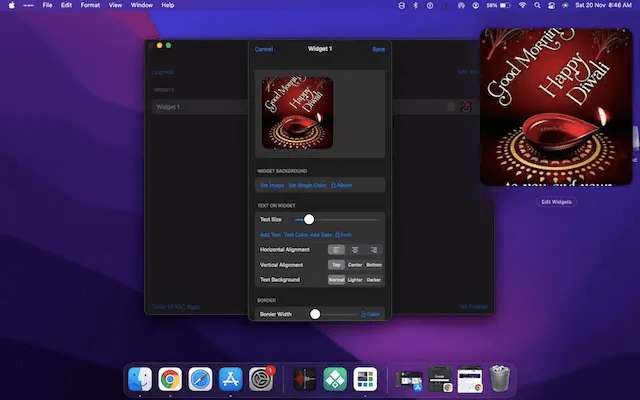
Next, we have Dash Dot Dash on this list of the best MacBook widgets. We like this widget application, particularly for its simplicity and clean widget editor.

You may use the widget editor to perform actions like mixing and matching to create different widgets. Moreover, it allows you to insert images on a widget, add a calendar to the image, or make a sticky note with your shopping list.

Download Now


3. Widgy

Widgy

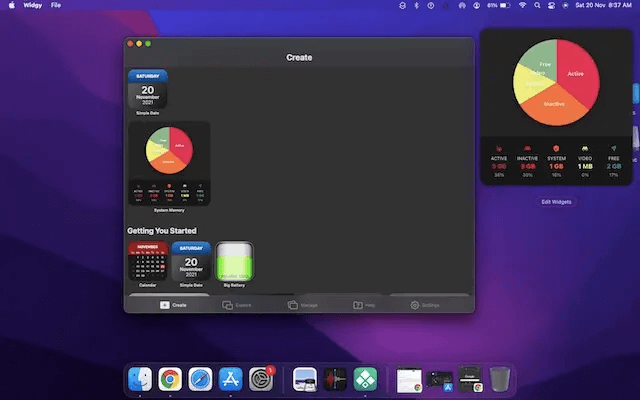
Widgy is our third pick for the top cool widgets for Mac. It is a feature-rich application you can use to customize your Notification Center the way you like.

Widgy lets you choose from a variety of readymade widgets or make your own widget using the app’s easy-to-use editor.

Talking about the editor, it is friendly enough to let even beginners create stunning widgets hassle-freely.

Download Now

Also Read: Best Free Mac Cleaner Apps to Clean and Optimize Your Mac


4. Widgety

Widgety

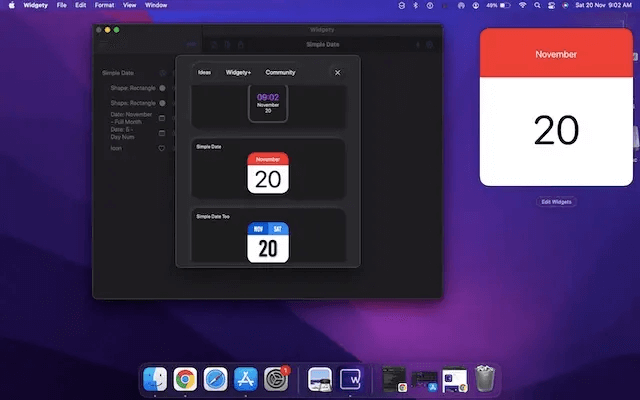
Widgety is one of the best macOS widgets all fitness enthusiasts should use. It comes integrated with the Health and Activity application to keep track of your total steps and overall activity goals.

Moreover, it boasts a smart weather widget to help you check the current temperature and weather conditions easily.

Furthermore, you may even go through the widgets made by other users, adding to the reasons this application is among the best widgets for Mac.

Download Now


5. Apple Weather Widget

Apple Weather Widget

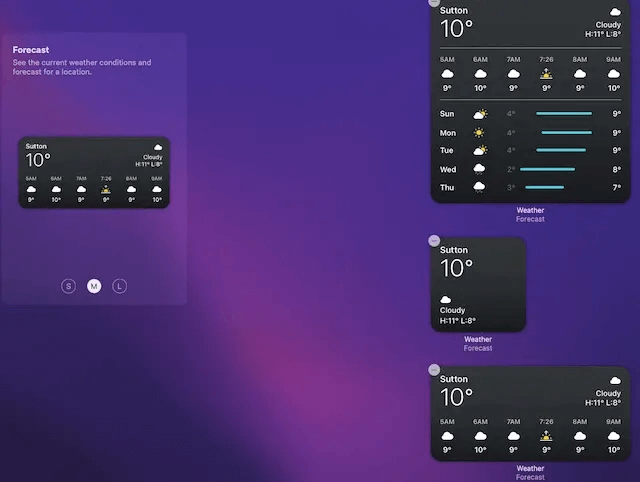
Here is a Mac stock widget (comes pre-installed on your device) that lets you accurately know weather conditions. Available in small, medium, and large sizes, this widget provides accurate information about current weather and forecasts.

You may select a large size widget if you wish to receive detailed weather information, otherwise, you may choose the small size.


6. WaterMinder

WaterMinder

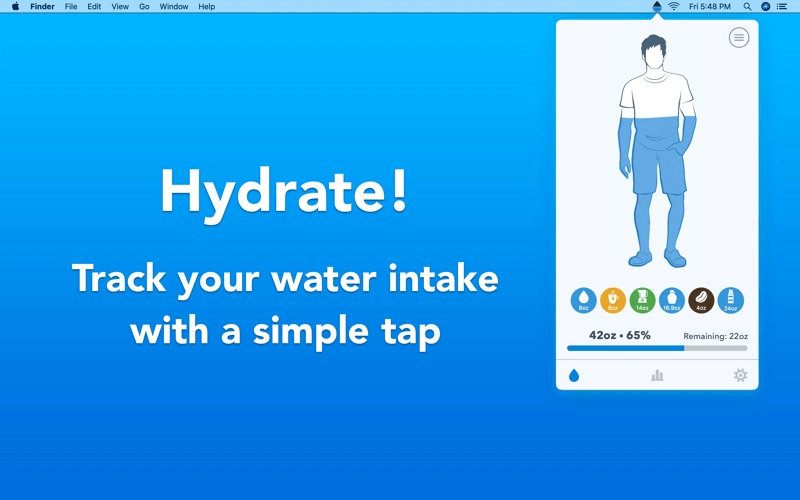
If you wish to improve your fitness and lead a healthier life, WaterMinder is among those cool widgets for Mac that you need. It helps you track your water intake and reminds you about drinking water according to your everyday goals or weight.

With WaterMinder, you can monitor your water intake effectively with readymade cups or make customized cups for a personalized experience. Moreover, it boasts a comprehensive graph to track your progress more conveniently.

Download Now


7. WidgeTunes

WidgeTunes

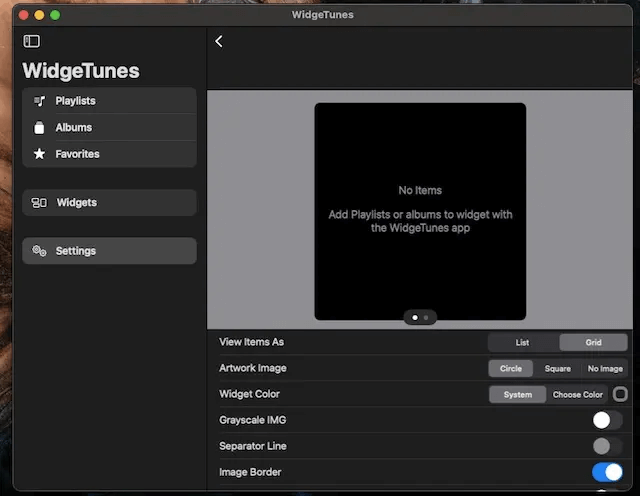
WidgeTunes is among the best widgets for macOS Big Sur for all music lovers. With this widget, you can quickly access all your albums and playlists. Moreover, it allows multiple profile creation so that you can add all the required music widgets.

Furthermore, there is a widget layout editor to customize your widgets according to your preferences and view up to 16 playlists and albums.

It is also notable that WidgeTunes allows you to change the widget’s layout, background color, and size to get a customized experience.

Download Now

Also Read: Best Quiz Maker Software to Make Quizzes


8. Screen Time

Screen Time

The next best Widget for Mac is Screen time. Under the productivity category, this widget can save you from spending unnecessary time on your Mac. It monitors overall screen time which can be subcategorized into multiple time intervals for each application. The interface of the Widget is appealing. The small lines depict the total hours that the users spend. However, medium lines depict line graphs or ads. Large lines break the time into smaller categories. It is pre-installed on your Mac.

Default Installed on Mac 


9. AirBuddy 2

AirBuddy 2

The last name on this list of tools of the best Widget for Mac is AirBuddy 2. With the help of this widget, you can easily control your audio devices like earphones, headphones, and even high-tech tools like AirPods. With the help of this widget, you can see the battery status of your AirPods. If you are always on the move and need your AirPods charged, then this is the best widget for your Mac. With the help of this widget, you will get notifications when the AirPods are less than 25% battery so that you can charge them timely.

Download Now


10. MindNode

MindNode

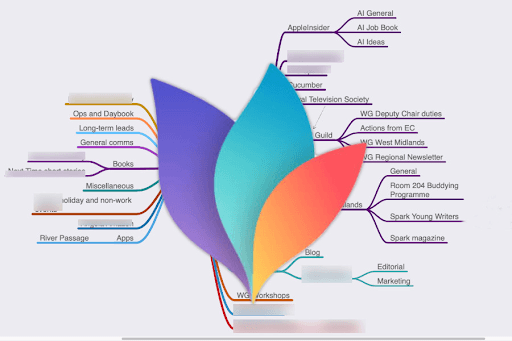
MindNode is another best Widget for Mac that can be used for mind mapping. Its interactive interface makes it easier for users to brainstorm ideas and tasks. Further mapping helps us in organizing life.

Moreover, by dividing each note and task separately you can get an overall view of the project. The clean interface allows users to add creative ideas and expand the canvas. You can also depict different relationships through branches. Also, it has both horizontal and top down layouts that can be used in full-screen mode.

Once the mapping completes the file can be easily exported in pdf, text file, or image format. Also, you can link these files with your Reminders app, Things, or other applications.

Download Now


11. Crypto Pro: Live Coin Tracker

Crypto Pro- Live Coin Tracker

Check out Crypto Pro: Live Coin Tracker if you are thinking about purchasing a smart portfolio tracker. It is what you should do. It provides you with the necessary tools to administer your portfolio. For all publicly traded cryptocurrencies, precious metals, and fiat currencies, Crypto Pro: Live Coin Tracker provides support for all of these assets.

The robust portfolio tracker is compatible with all cryptocurrencies and tokens that are currently in circulation. In addition, it provides you with a convenient widget for the Notification Center, which enables you to monitor the most recent quotations and ensures that you are never missing out on any chance.

Crypto Pro offers a collection of real-time statistics from well-known cryptocurrency exchanges including Coinbase, Binance, Kraken, and others. Moreover, the importation of data automatically via the use of wallet addresses or exchange API keys and details on profits and losses, as well as other data pertaining to the portfolio, is possible with this tool.

Download Now


12. Simple Antnotes

Simple Antnotes

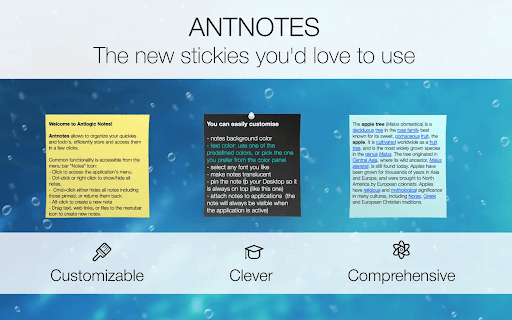
If you want to change the way you take notes and make to-do lists on your Mac, then you can use Simple Antnotes. This is a simple and smart tool and one of the best widgets for Mac that allows you to take notes in a broader spectrum as compared to the traditional or integrated note-taking software on Mac.

Download Now


Concluding the Best Widgets for Mac

Above, we looked at the best macOS widgets you may use to ease your everyday tasks. You may go through all these widgets and then get the one you need.

If you find any of the best MacBook widgets missing from the above list, you may mention it in the comments section below. You may also write us a comment in case of any confusion or questions in relation to this article.

Best Free Video Editor for Mac

10 Best Free Video Editor for Mac in 2024

February 8, 2024
0

If you are searching for the best free video editor for Mac in 2024, then you have come to the right place. Here, we are going to show you a list of the 10 most popular editing tools that you can use on Mac. Continue reading for more information!

There are a lot of people who are looking for free video editing software for Mac since they have a lot of films that they want to edit for better presentation or preservation purposes. Is there any Mac video editing software that’s worth using? This is a common question in online forums. So, to assist you with this, we have brought up a comprehensive list of several excellent video editors for Mac.

In addition, we evaluated these video editing applications for Mac in terms of the supported video formats, as well as the benefits and drawbacks of the top 10 free video editors for Mac.

A List of Top 10 Free Video Editing Software in 2024

Although every single tool on the list of free video editors for Mac that we have provided below is excellent for the process of creating material for social networking platforms, it is important to keep in mind that any free tool will have restrictions, whether those restrictions take the form of limited capabilities, in-app advertisements or watermarks. However, we have done everything in our power to compile a comprehensive list of the tools that are the most useful and the least unpleasant for you.

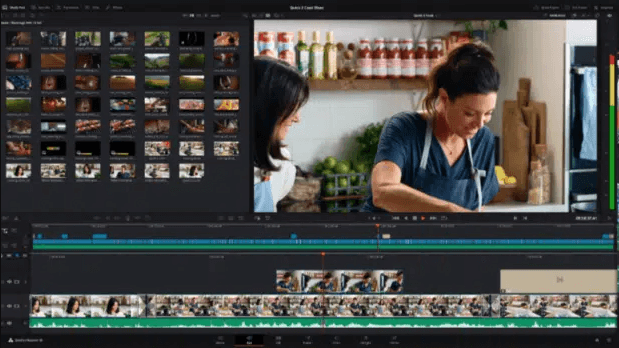
1. DaVinci Resolve

DaVinci Resolve for mac

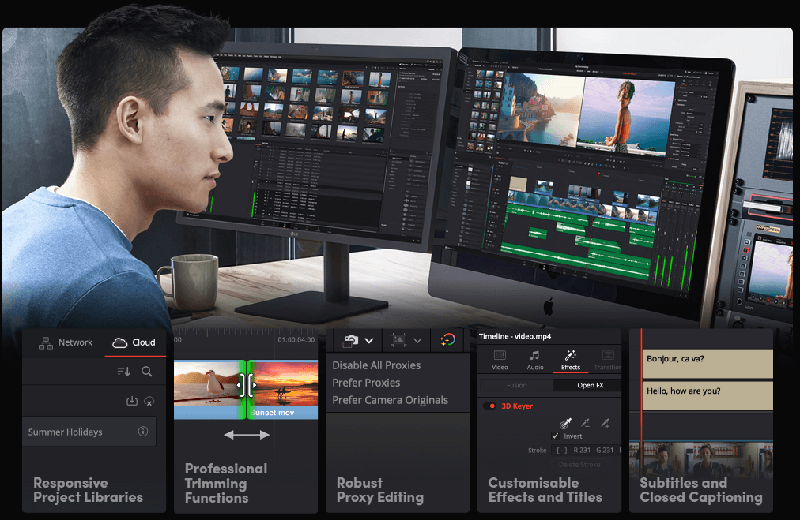
Do you want some “image technology that has won Emmy awards?” Who doesn’t?! If this is the case, the free video editing program that you should use is most likely DaVinci Resolve. The cloud-based workflow systems that DaVinci offers make it an especially valuable platform for participating in remote collaborations.

The user interface design of DaVinci, which is organized into “Pages,” allows users to approach each specific component of the editing process in a concentrated manner. Begin by trimming your image on the ‘Cut’ page, then navigate to the ‘Color’ option to adjust the tones and shadows in your image. On the ‘Media and Delivery’ page, there is support for a broad variety of formats; as a result, you can even publish directly to Twitter if you want to.

Make sure that your hardware is up to the task before you click the “download” button because this is a robust tool that requires an equally powerful computer.

Download Now

Also Read: Best Free Video Downloader for Mac 


2. iMovie

iMovie for mac

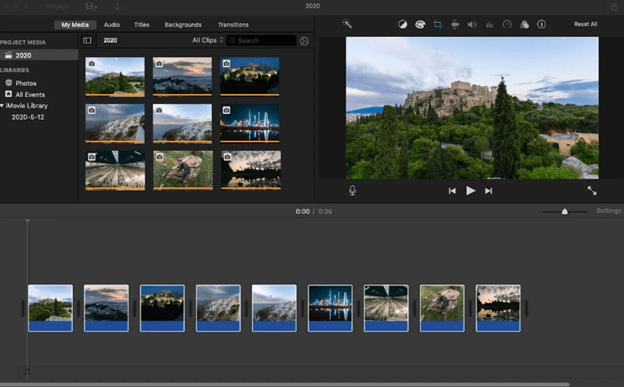
iMovie is a video editing program that is included at no additional cost with the purchase of a new Mac operating system. The most recent iMovie 11 version is an excellent & free video editor for Mac. It comes packed with many useful features, such as movie trailers, one-step effects, and audio editing, amongst others.

You may upload your videos to YouTube, and also export videos/ movies for use on your iPad, iPhone, or other mobile device in just a few simple steps. However, you won’t have to pay for an iMovie if you purchase a new device. You will also find that it is difficult to get proficient with iMovie when you are first beginning to use it. iMovie is often considered to be among the top free video editing programs available for Mac and enjoys a solid reputation in this regard. You might study several iMovie video editing hacks and techniques in order to become more proficient with its use.

Download Now


3. Lightworks

Lightworks for mac

Lightworks is another free video editor for Mac that you can use. It has been operating for more than 30 years, so you can anticipate a high level of brilliance from it. The King’s Speech was edited utilizing the Lightworks, in the event that the Colin Firth element is a deciding factor for you.

The cutting tools and keyboard controls in professional editing software are ideal for managing vast amounts of video, and professional editors find them very useful. The color-correcting options & built-in filters & effects are quite excellent, and you may use all of them even if you are using the free version of the program.

It features a robust timeline, background processing, and automatic autosaving, which together make it an extremely effective tool for finishing your film as quickly as feasible and sharing it with the rest of the world. When you use the free version, the only drawback is that your export choices are more restricted; you can only export up to 720p content, and it must be in a format that is preset for either YouTube, MP4, or Vimeo

Download Now

Also Read: Best Free Video Stabilization Software for Mac


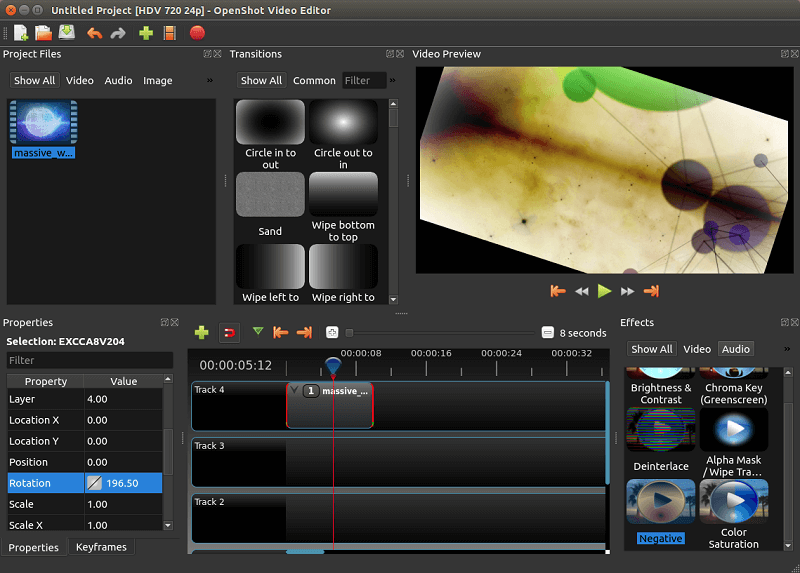
4. OpenShot

OpenShot for mac

OpenShot is one of the best video editors that is available for Mac OS X, Linux, and Windows and is open-source and completely free to use. It is an excellent video editor for novices to use so that they may learn and practice video editing abilities. OpenShot is among the best options available to you if you wish to perform some fundamental video editing without even having to invest an excessive amount of effort.

You are able to produce 3D animation in addition to performing more fundamental video editing tasks. In addition, this best free video editor for Mac strongly supports over seventy different languages. You don’t need to be concerned about a language barrier preventing you from editing movies/ videos. You have the ability to easily cut and slice videos, additionally, it displays waveforms while you are editing. What’s more, it provides various templates so that you can quickly edit the titles.

Download Now


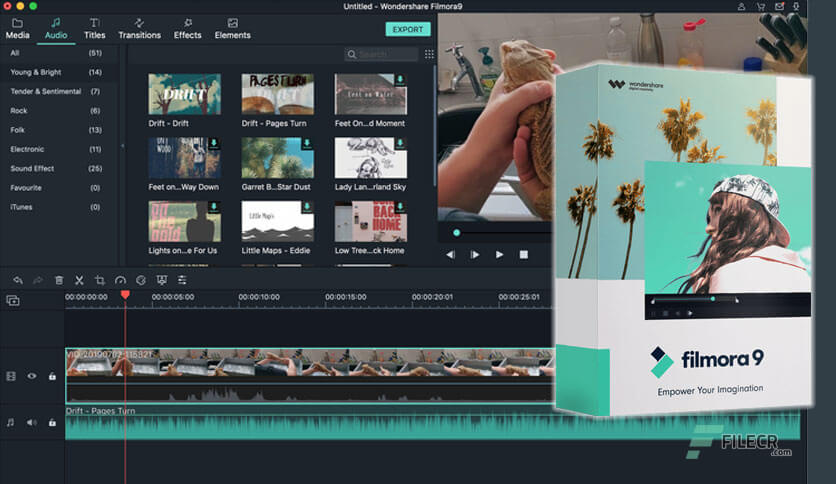
5. Wondershare Filmora

Wondershare Filmora for mac

Next on this list of best Mac video editing software is Wondershare Filmora. It is an effective and user-friendly video editing program that comes packed with a wide variety of additional features. These include compositing, motion graphics, special effects, color correction tools, and many more. It is intended to provide you with increased control over the videos you upload.

Filmora is an excellent option to consider using if you are an experienced videographer who wants to do a color correction or grading to the film you have shot. Both Windows & Mac devices are compatible with Filmora. You have the ability to export your creations to virtually every prevalent video format. It is compatible with animation keyframing as well as motion tracking. It offers a wide variety of user-friendly professional tools in a plethora of categories.

Download Now

Also Read: Best Video Repair Software for Mac


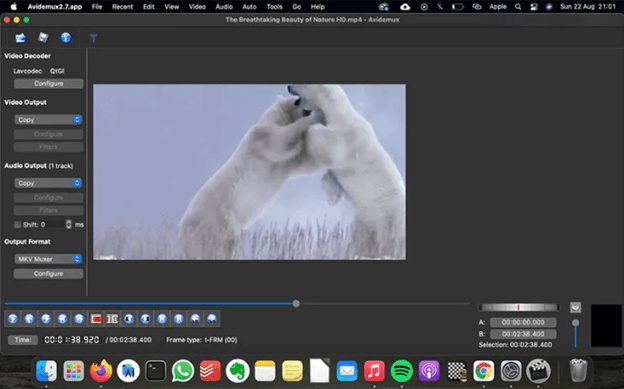
6. Avidemux

Avidemux for mac

Avidemux is yet another fantastic free video editor for Mac that is tailored to perform straightforward operations such as trimming, filtering, and encoding. It is compatible with Mac OS X, Linux, and Microsoft Windows, under the license of GNU GPL, and it supports a wide number of video, audio, and image formats, such as AVI, MP4, MOV, MPEG files, ASF, JPG, AC3, AAC, and so on.

The fact that this free video editing program for Mac is highly compatible with a wide variety of video formats is the software’s crowning achievement. You can also remove advertisements from a recorded TV show or just keep a portion of the footage. In addition to that, it gives you the option to utilize other filters, such as color correction. You can enhance the visual quality of your video by applying one of these filters to it.

Download Now


7. HyperEngine-AV

HyperEngine-AV for mac

HyperEngine-AV is free video editing software for Mac that allows users to record, edit, export videos, and organize the editing process and adjust audio & texts in order to produce slide shows and movies in high-quality. The software also comes with 12 studio-quality amazing effects taken from the Hyperprism suite’s audio processors developed by Arboretum.

In addition to that, it has text options that allow you to show section titles, credits, or karaoke lyrics with completely configurable font, type, size, color, and style as well as alignment & scroll direction. Users of Mac should definitely give HyperEngine-AV a try because it is an extremely brilliant free video editor for Mac.

Download Now

Also Read: Best Video Compressors for Mac


8. HitFilm

HitFilm for mac

HitFilm is known for its lightning-fast processing times. The user-friendly interface allows you to cut, slice, copy, & sync with no lag; according to reports, it is twice as quick as its competitors when it comes to exporting, and 8X times faster at playback.

The in-built tools are really simple, but they are very powerful. You can generate content of professional quality in a matter of minutes by using ready-to-use presets and drag-and-drop transitions. The use of auto audio synchronization makes adjusting the sound a simple process.

If you wish to take your social video editing journey to the next level, adding lighting effects such as glows and light leaks will give your clip a more dramatic sense.

Download Now


9. VideoPad

VideoPad for mac

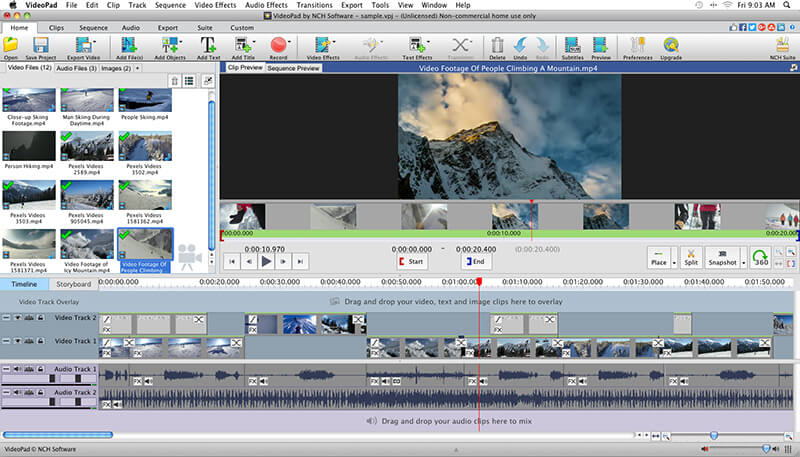
VideoPad is another best free video editor for Mac that you can consider. Although the website has an oddly dated appearance, it is impossible to deny that VideoPad is functioning. The user-friendliness of VideoPad was a primary design goal. In an ideal scenario, you’ll be capable of jumping right in and starting working on your respective video in a matter of minutes.

Create title text animations using templates, record narrations directly in the app, or utilize professional-grade templates to whip up something exceptional in a snap using this software, which contains more than 50 effects and transitions and supports more than 60 kinds of video.

You may export your video in every conceivable resolution, quickly share it online, or instantly post it to YouTube; the app is available for use on desktop computers as well as iOS mobile devices.

Download Now


10. Blender

Blender for mac

Last but not least, Blender is an excellent video editing program that comes with a variety of much-needed features. It is the best 3D graphics tool that has also been recognized to be the greatest video editor for Mac. Modeling, texturing, rigging, UV unwrapping, animation, rendering,  skinning, water and particle simulations, smoke simulations, and other types of simulations are all possible with its utilization.

Blender is a piece of non-linear video editing tool that enables users to composite, also, build a variety of interactive 3D apps, animated films, video games, and additional visual effects. There are many complex features available in Blender, such as potent tools for character animation, modeling tools that are based on a material, modifiers & compositing system that is built on nodes, Python & many more.

Download Now

Also Read: Best 4k Video Downloader Alternative for Windows & MAC


Final Words: Best Video Editor for Mac in 2024

Above you’ll find a compilation of some of our best free video editing applications; none of them include a watermark. These free video editors for Mac will allow you to edit videos without restrictions.

When it comes to producing captivating material for social media, having the appropriate tools and the necessary abilities to edit videos is, of course, only one-half of the equation. Hopefully, you found the information shared in this article helpful. Please feel free to drop your comments in the section below. Additionally, for more technical tips & information, you can subscribe to our Newsletter.
1 Comment
    Mike southburg says: Reply
    September 11th 2021, 9:06 pm

    hi, thank you for this article, I am myself for years now, I prefer using the Minitool both versions, data recovery, and partition wizard, it helps me a lot with my 1Tb external hard drive, to get it back on track hhh.

Leave a Reply Cancel reply

Your email address will not be published. Required fields are marked *

Sidebar Image bit G ad1

Latest Posts

  • Best-Free-Online-Portfolio-Websites-in-2026
    Best Free Online Portfolio Websites in 2026
    by Niharika / March 16, 2026
  • Anytime Astro: Best Website For Online Astrology Consultation
    Anytime Astro: Connect Now For Online Astrology Consultation
    by Somya Shrimal / March 13, 2026
  • Best-Ways-to-Combine-Images-Into-PDF-Files
    Best Ways to Combine Images Into PDF Files
    by Niharika / March 12, 2026
  • Best FREE VPS Hosting Providers
    7 Best FREE VPS Hosting Providers in 2026
    by Devesh / March 12, 2026
  • Best-McAfee-alternative-software-to-use-for-Virus-Protection
    Best McAfee Alternative Software to use for Virus Protection
    by adminuser / February 11, 2026

Categories

  • Cyber Security
  • Driver Updater
  • Entertainment
  • Fitness
  • Games
  • How To
  • laptop
  • OS
  • Reviews
  • Tech News
  • Tips & Tricks
  • Top 10
Sidebar Image bit G ad1
8 Best Winamp Alternative for Mac in 2022 9 Best Free Winamp Alternative for Mac in 2024by Harshita / February 5, 2024
11 Best CPU Temperature Monitor Tools For Windows in 2024by Prachi Dani / February 5, 202411 Best CPU Temperature Monitor Tools for Windows in 2024
TechPout Footer Logo

We at TechPout promise to put forth stories that help people to learn and simplify their digital life. Our purpose is to share the true essence of technology with our tech-loving community.

Useful Links

  • About Us
  • Contact us
  • Privacy Policy

Popular Posts

  • Best PC Optimizer Software
  • Best Mac Cleaner Apps
  • Best Driver Updater
  • Duplicate Photo Finder and Cleaner Software
  • Best Free Movie Download Sites
  • Best IPTV Players

Follow us

Copyright © 2026 www.techpout.com. All rights reserved
DMCA.com Protection Status