Main LogoLight Logo
  • Reviews
  • Top 10
  • How To
  • Tech News
  • OS
    • Windows
    • MAC
    • iOS
    • Android
  • Categories
    • Driver Updater
    • Cyber Security
    • Games
    • Fitness
    • Entertainment
    • Tips & Tricks
Android Top 10
by Prachi Dani

5 Best WhatsApp Status Saver Apps for Android in 2024

February 14, 2024
1

Are you looking for a way to save your friend’s WhatsApp status? Well, you are at the right place, keep reading ahead to find out the best apps which can help you save WhatsApp status. 

Snapchat first introduced the idea of disappearing stories. Since then, many other social networking platforms like WhatsApp, Instagram, and Facebook has adopted the same concept. 

WhatsApp has gained enough popularity over the last few years and is used widely by people of all age groups. Besides being a chatting and messaging platform, it is also used to sharing exciting videos and pictures.

Follow this guide to find out which are the best WhatsApp status saver apps. 

Table of Contents hide
What are the Best WhatsApp Status Saver Apps for Android?
1. Status Saver
2. Status Saver- WhatsApp Status Video Download App
3. Status Downloader for Whatsapp
4. Status Save to Gallery: Status Saver
5. Status Saver – Video Download
Conclusion

What are the Best WhatsApp Status Saver Apps for Android?

While some like to research on their own, some prefer taking expert advice. For those who are not interested in research here is a comprehensive list of some of the best Status Saver apps. 

Take a look and pick the most suitable one. 

1. Status Saver
Status Saver

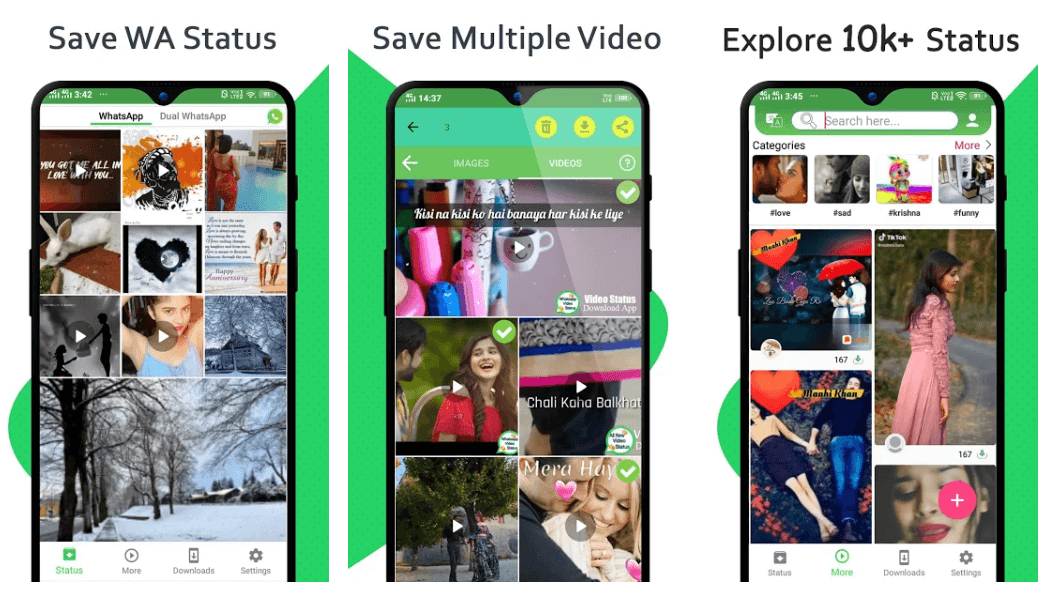
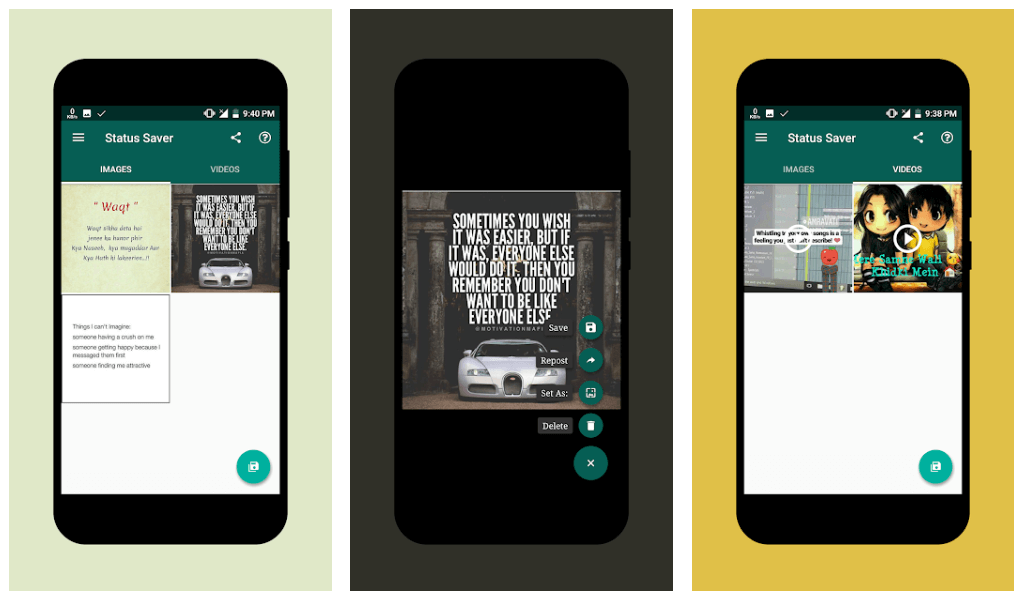
This is one of the simplest and straightforward apps that one could ever find and comes with all the necessary and essential features. 

You can chat with your friends, share videos, save WhatsApp status to your phone gallery, repost a profile status, and many more. 

To access pictures and videos from your friends status, scroll in either left or right direction. The saved video will have the exact length as the one in the app. 

However, there is a small drawback with this application. It does not support status search through contact names. Therefore, you will have to search the videos and images manually, no matter how many contacts you have in your directory.

Keeping aside this small flaw, Status Saver gives a tough fight to its competitors in its category. It’s simple, clean, and user-friendly interface makes it a good contender.

download

2. Status Saver- WhatsApp Status Video Download App
Status Saver- WhatsApp Status Video Download App

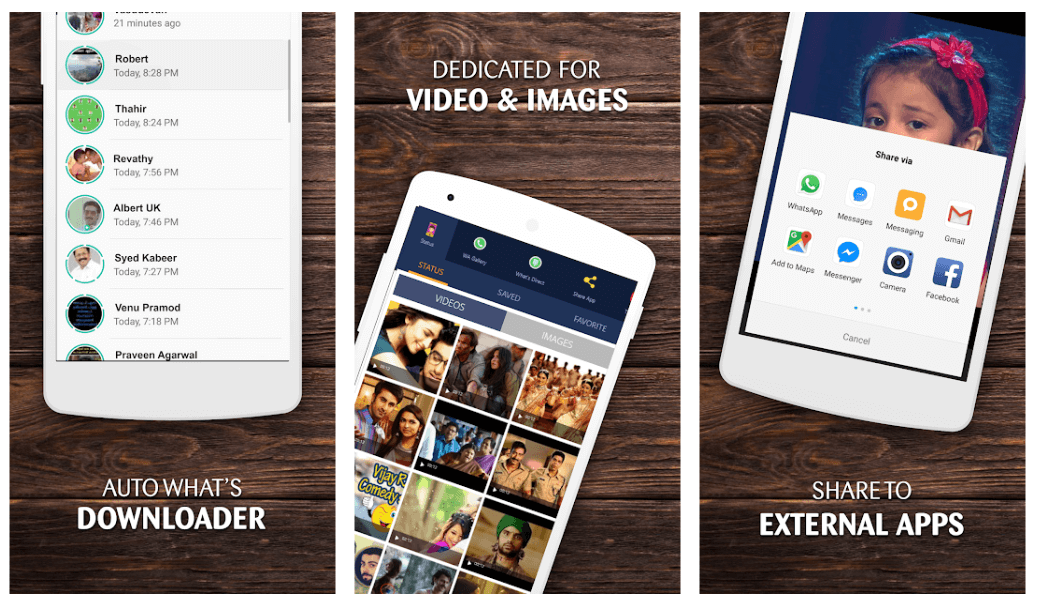
If you want to download a status saver for WhatsApp, this one can be a good pick. Unlike other apps, its interface is not green, so if you’re tired of seeing the green color, this one is a pick for you. 

Just like it any other status saver app, you can copy GIFs and images, and the files are stored in an easy-to-use format. 

It only works on two categories, including videos and images, so if you are thinking of sorting your contacts through names and times, it is not possible. 

You can only do it by scrolling through your contact list.

download

3. Status Downloader for Whatsapp

Status Downloader for Whatsapp

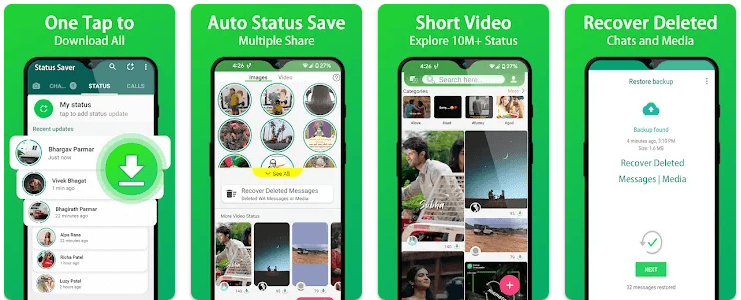
If you are looking for a functional status save app for WhatsApp, this is a perfect choice for you. With this simple to use the application, you can save your friends images, videos, and cherished moments. 

To do so, you need to search for and watch the status from your WhatsApp, then open this application. It will scan and display the status which you can easily save in your phone gallery.

Download it today to save your favorite WhatsApp status.

download

4. Status Save to Gallery: Status Saver
Status Save to Gallery: Status Saver

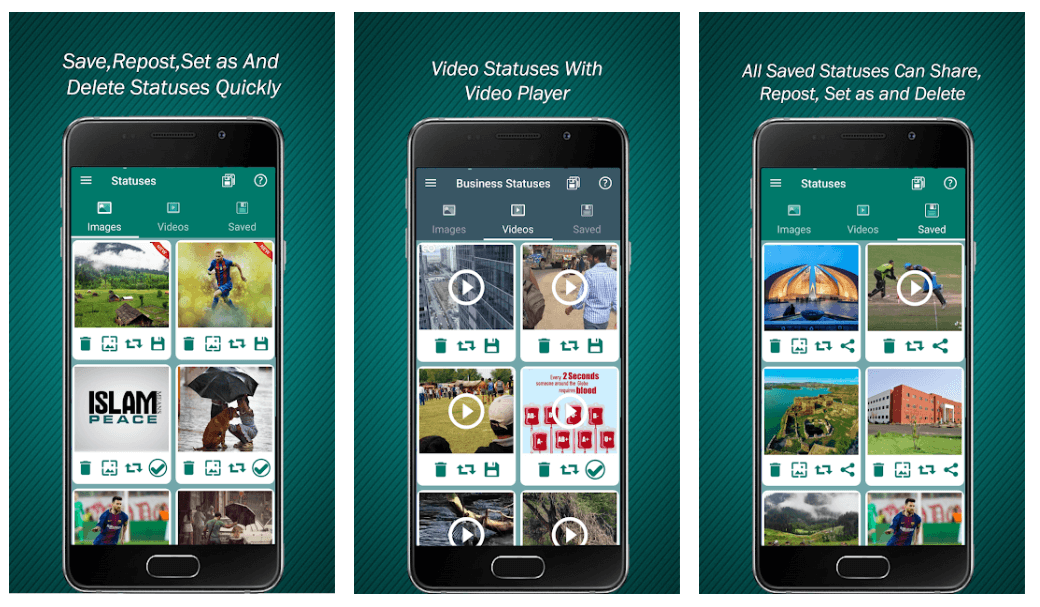
Save your selected WhatsApp status with this stunning application. It gives you an option to repost status on your profile, and you can also put a picture status on your WhatsApp profile and wallpaper. 

Moreover, it also allows you to share your status on other social media platforms like Snapchat, Instagram, Twitter, and many more. With this stunning tool, you can easily manage your saved statuses by deleting or sharing them. 

You can also swap between various statuses and can check your friends status without letting them know.

download

5. Status Saver – Video Download

Status Saver - Video Download

Are you looking for a simple yet power-packed tool? This one might be an appropriate option for you. It works in two divisions, including Videos and Images.

It displays a list of downloaded videos and images that you have checked. Thus these files disappear when the actual profile status is gone from the status. 

The best part of this application is that the contacts are sorted based on their time of download and contact name, which makes your search relatively easy.

download

Conclusion

Use these power-packed tools to save funny images and videos from your friend’s WhatsApp status. However, ensure that you do not breach anyone’s privacy while doing so.

Similarly, if you’re looking for a way to save WhatsApp Status manually, then you can do that by clicking here!

Image Source: Play Store

download status saver for WhatsAppsave WhatsApp Statussave WhatsApp status videos.WhatsApp Status saver appwhich is the best WhatsApp status saver app
Author

Prachi Dani

Prachi Dani is a technical content writer who specializes in areas of science and technology. She is highly up to date with technological transitions and transformations. Writing is not her passion but the only thing that carries satisfaction in life. If not writing, you may find her engrossed playing action games on her treasured smartphone.

View all posts

Related Posts
30 Best Online Games For PC (Free & Paid) In 2024
31 Best Online Games For PC (Free & Paid) In 2024

May 23, 2024
1

Feeling bored enough? Then, this post can help you a lot. The post explains the best online games (free and paid). Pick the ideal one and enjoy!

From a college student to an adult, online games are liked by everyone and offer perfect rescue from a stressful day.

More than the unparalleled graphics and stunning action scenes, what we love the most about these games is the game itself. These games are available in multiple genres and styles which are suitable for all ages. But with hundreds and thousands of choices, it can be a nerve cracking task to decide which game you want to pick for your PC.

Keeping in mind the multiple offerings, here we have compiled a properly researched list of some of the best online games for PC. Most of our picks are free of cost, but we have also included few paid games for those who don’t mind spending a few bugs on gaming.

Well, without any further delay, let’s take a look at the top free and paid online games for PC.

Bit Game Booster - Driver for Perfect Gaming [Recommended]

Best Online Games For PC That You Can Play For Free

1. ValorantValorant

Price: Free

Platform: Microsoft Windows

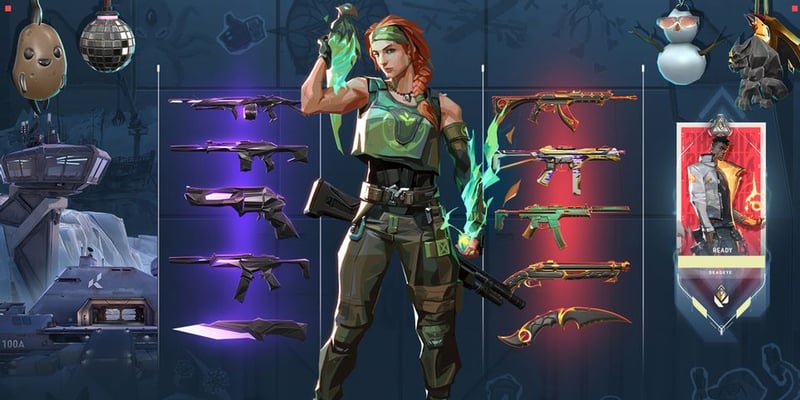
Valorant by Riot Games is a next-gen 5v5 character-based shooting game. The availability of heroes across the distinct game modes including Spike Rush, Deathmatch, and Unranked makes it worth trying.

In the game, there are several agents and weapon skins which incentivize gamers to stick around, & experience intense competition from other players. You also have the option to buy some Valorant Points in order to skip the queue and access shiny skins and agents. The game is one of the best multiplayer video games that you can play.

Download


2. World of Tanks

World of tanks

Price:- Free 

Platforms:- Android, macOS, PS4, PC, Xbox One or Xbox 360

World of Tanks is one of the mighties games that the online gaming industry has ever seen. The game is based on complex game mechanics, battlefield, and exciting tank simulators. 

Read Also: The Best PS4 Exclusive Games

The game features two teams playing against each other. It is all about beating your opponent with an unmatchable strategy and using the right tanks and machines. You get access to around 10 tiers, each containing hundreds of vehicles and containers ranging from hulking heavies to speedy scouts. 

All-in-all World of Tanks has everything that can keep your excitement levels high. PC, Xbox One, Xbox 360, and PS4 are the few platforms where you can play this incredible game. Moreover, World of Tanks is one of the best free online games. 
Download


3. Fortnite

Fortnite

Price:- Free

Platforms:-  Windows 7, 8, 10, and Mac OSX Sierra

Fortnite is one of the best online PC games that you can play. The game offers very interesting gameplay supporting amazing graphics that might interest you. Just like PUBG or Call of Duty you enter a battlefield where you need to survive on an island. Apart from that, you get new things in the game which you won’t find in any other battle royale game.

While paying you can easily harvest resources and build a structure that can help you in surviving the game. The game does not just require killing others but you need to use strategy for building new resources and using them. You have to gather resources while playing the game which makes it unique and interesting.

Overall the game is super exciting and has new addons which make it more interesting to play. You should definitely try this game as it doesn’t disappoint. You can even find many Fortnite alternatives, so if you are bored of looking at the same graphics then you can play other similar games.

Download


4. Neverwinter

Neverwinter

Price:- Free

Platforms:- Xbox One, PC, PS4

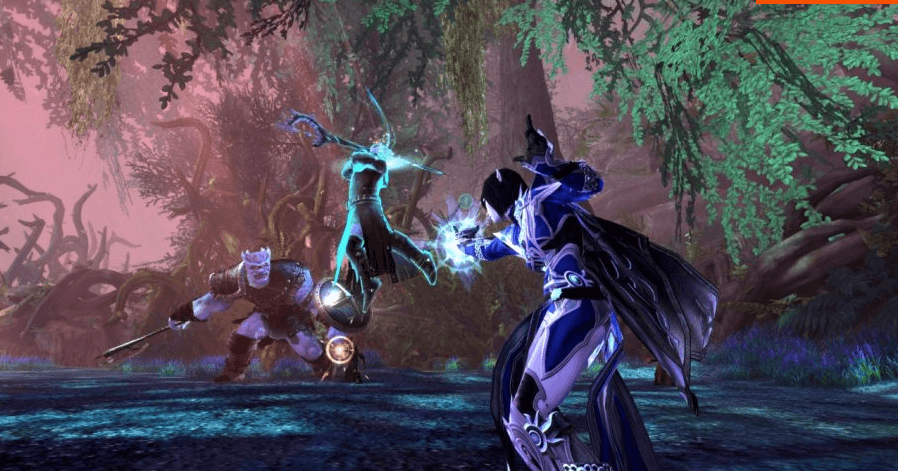
If you are a fan of Dungeons and Dragons, then NeverWinter is the right choice for you. The masses love this free to play online PC game because of two main reasons. 

First: It comes from the highly popular series of online games: The incredible Neverwinter Series. 

Second: It is based on challenging Dungeons and dangerous dragons, a modified and advanced version of its D&D 4th edition. 

Packed with amazing locations, action-focused combat, and a potent battleground, Neverwinter is a perfect pick for D&D lovers. It has an enjoyable MMORPG and can seamlessly run on PS4, PC, and Xbox One platforms. It is one of the best online games for PC that you can play absolutely free.

The most beautiful thing about this game is that you get to access all features without shelling out a single penny. 
Download


5. World of Warships

World of Warships

Price:- Free 

Platforms:- macOS, Windows, PS4

If you liked playing World of Tanks, then choose World of Warships to experience a wet battlefield. The game is based on fighting navies and offers interesting tactics with welcoming and straightforward controls.

In comparison to other games, it is more engaging than the Total Wars, more profound than the Pirate games, and far more approachable than Silent hunter. World of Warships is one of the amazing free online games for computer.
Download


6. Star Trek Online

Star Trek Online

Price:- Free

Platforms:- Windows, MacOS, Xbox One, PlayStation 4

Battle with dangerous aliens, control the starships, train pangalactic professionals and explore the hidden tassels of the galaxy with this best online game for PC. This MMO game gives you a chance to show the world that you are no less than Picard.

Each play is like a full episode of a show and is packed with the best pieces of thrilling experience. If you are a true Trekkie, then Star Trek Online is the game for you.

Download


7. Dragalia Lost

Dragalia Lost

Price:- Free

Platforms:- Android, iOS

Dragalia Lost is based on the tale of a fallen kingdom, which is fighting to save and restore it. The game comes with all the basic free-to-play features, including a stamina meter, random pulls for heroes, etc.

Read More: 25 Best Must Play PSP Games of All Time

It comes with sleek boss battles, delving RPG dungeon, and adequate controls that help you manage potent abilities on your fingertip, and smoothly execute end-minute dodges. It belongs to the Action RPG genre and can be enjoyed on iOS and Android devices.

Download


8. Among Us

Among Us

Price:- Free

Platforms:-  PC, Mobile, Playstation 5/4, Xbox Series X/S, Xbox One, Switch

Among Us is a great game which you can play with your whole group. The game can be played with four to fifteen players. Out of all the players, three will be randomly chosen as imposters in every round. Apart from this, the map will be chosen randomly out of the four maps.

At the beginning of the game, crewmates will be given a task to complete on a particular map.  The task can include fixing wires, maintenance, and downloading data like works. On the other hand, the imposter is given fake tasks to help them blend with their crewmates. Though the imposter cannot perform the task they can help other crewmates in the task. The end goal of the imposter is to kill crewmates. After each player is dead they become a ghost.

All in all, this is a great game that requires team effort and presence of mind. You can’t find the imposter if you fail to catch them lying or not performing. With the increasing popularity of the game, many other developers have also created Among Us alternatives.

Download


9. Rift

Rift

Price:- Free

Platforms:- Windows

This subscription-based fantasy MMO has gained a lot of popularity post its updation. The improved and updated game offers new raids, new world events, new zones, and a furious pace. You don’t have to spend a penny to enjoy this stunning gameplay and explore its beautiful and colorful world. With the massive list of exciting features and unmatchable gameplay, it’s not a bad deal at all.

Download


10. SMITE

SMITE

Price:- Free

Platforms:- Xbox One, Windows, macOS

Similar to Dota 2 and League of Legends, SMITE also features a team of players who are trying to battle and get into their opponent’s base. Each unit consists of 5 players. It uses a third-person perspective to portray the gameplay rather than showing the battleground view. Also, it does not use any fantasy characters but features different players playing the role of mighty Smite Gods.

If you are fond of playing online games on your PC, then SMITE can be a good pick for you.

Download


11. Pinball FX3

Pinball FX3

Price:- Free

Platforms:- Microsoft Windows

Who doesn’t know about Pinball? Everybody loves it and has played it at some or the other time. It is developed by Zen Studios and offers several simulated pinball tables to its players. It uses a primary scoreboard for informal competitions. With its three-dimensional graphics, multiple themes, and a higher level of challenges, it creates a new unforgettable gaming experience.

No matter what you are, this game has enough to offer to all age groups and can run on Switch, PS4, PC, and Xbox One platform. Pinball FX 3 undoubtedly deserves a spot on our list of best online games for pc.

Download


12. Runescape

Runescape

Price:- Free

Platforms:- Windows, iOS, macOS, Android, Java, Linux

Read More: 10 Best Fire Emblem Games From Nintendo

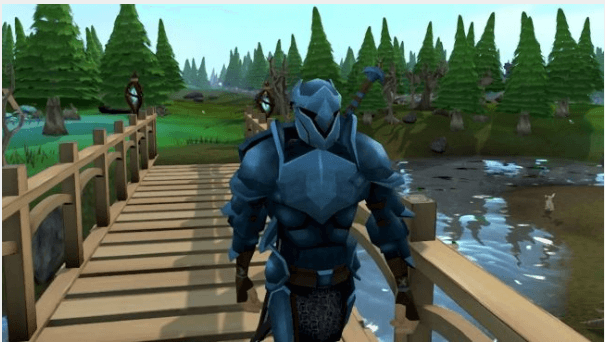
Ever wondered why this oldie is still so popular? It continually improving MMORPG is the reason behind it. It offers a number of challenges to its user, which are enough to keep the excitement levels high. It’s a multiplayer role-playing fantasy game and is developed by Jagex.

Competing, fighting, quests, and mini-games are few of its prominent offerings. It is fully compatible with PC’s and is entirely free of cost.

Download


13. Guild Wars 2

Guild Wars 2

Price:- Free

Platforms:- Microsoft Windows, macOS

If you are looking for the best MMO, then this free game is the best pick for you. As a player, you get a lot to do; you can either help a burning village, take part in zone events where you need to get involved with other players to form a team, and defeat the boss.

With this base game, you have a lot to do.

Download


14. Pokemon Masters

Pokemon Masters

Price:- Free

Platforms:- iOS, Android, Windows

Who doesn’t like Pokemon, from TV cartoons to online PS games, it’s everywhere. The game is based on an island The island of Pasio, where players are seen battling for improving the powers of their pokemon. The game is built specially built for mobile phones but can easily be customized to run on computer systems as well.

Download


15. Clash of Clans

Clash of Clans

Price:- Free

Platforms:- Android, iOS, Windows

Unlock the power to win over nasty clan leaders and goblins. The game allows you to raise an army, guide your tribe, plan your defensive actions, and much more. It offers an ultimate mix of quick and rigorous battle with slow and strategic planning. You can either choose to join an existing clan or form your group to fight against your enemies.

Enjoy a limitless combination of troops, heroes, and spell with this impressive online PC game.

Download


Best Paid Online Games For PC

16. Call of Duty: Black Ops 4

Call of Duty: Black Ops 4

Price:- $49.99

Platforms:- Windows, PS4, Xbox One

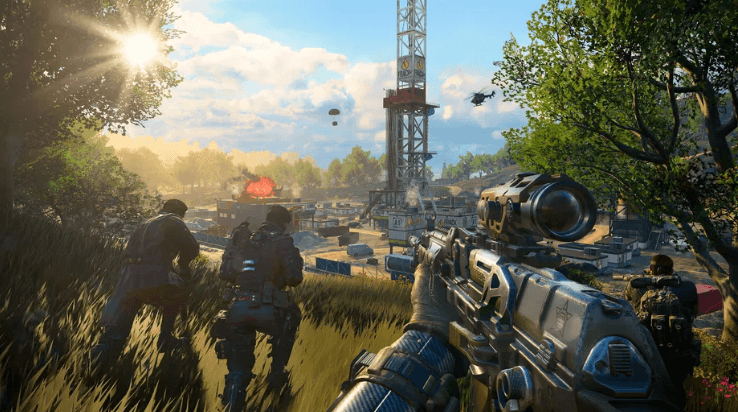
This one is for all you firefighters,with this incredible game, you get to enjoy multiplayer modes like Battle Royale, customize load-outs, win stunning prices, get ranked, and many more.

In totality, Call of Duty offers a great combination of frantic, fast, and satisfying gameplay along with incredible graphics.

Download


17. Tropico 6

Tropico 6

Price:- $39.90

Platforms:- Windows

Read More: Best Offline Racing Games For Android Smartphones

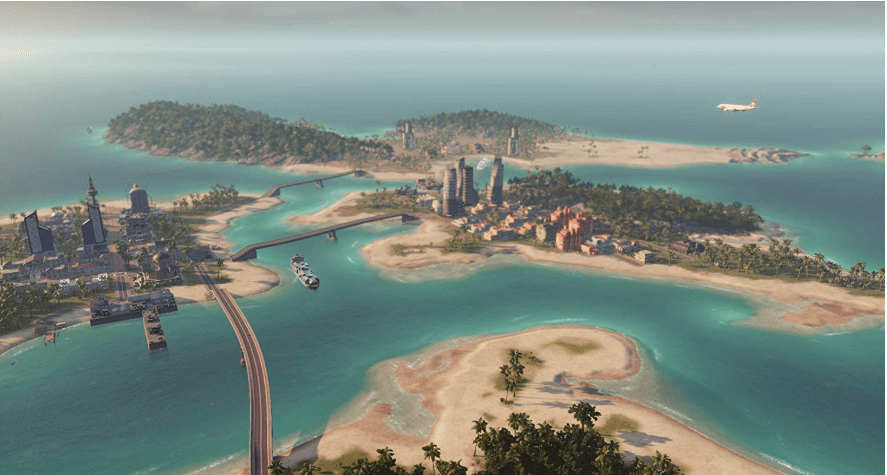
If you are good at making strategies, then Tropico is worth giving a try. The game is built for Android users. It features El Presidente, who is supposed to be modernization to his nation.

The game revolves around the underdeveloped Caribbean island and its glorious future. As a leader, you should play politics, which involves taking strategic decisions, managing public opinion, recount elections, and handle unruly elements.

Download


18. Rocket League

Rocket League

Price:- $19.99

Platforms:- PC, Xbox One, Nintendo Switch, Linux

Are you looking for a racing game best suited for soccer fans? Rocket League is specially made to satisfy your love for both the games.

With this highly addictive game, you can team up with other players from around the world. Its split-screen multiplayer mode helps you play alongside other participants and players. The game features customizable toy cars that are sufficient enough for supporting jaw-dropping and physics-defying moves.

Rocket League is priced at $19.99 and can work on PC, Xbox One, Linux, Nintendo Switch platforms.

Download


19. Overwatch

Overwatch

Price:- $49.99

Platforms:- PS4, PC, xbox One

This is one of the top first-person shooter games that the gaming industry has seen in recent times. With its colorful graphics and flashy gameplay, it quickly became everyone’s favorite.

Each character featured in the game has a detailed backstory attached to it. With this fast-paced game, you get a mixture of both MOBA’s and shooter elements. As a player, you play to kill your enemies, by using grand heroics and abilities. Overwatch comes at an affordable price of $49.99 for PC, Xbox One, and PS4 systems.

Download


20. PUBG

PUBG

Price:- $29.99

Platforms:- PS4, iOS, Android, Windows, Xbox One 

Also known as PlayerUnknown’s Battleground, PUBG turned out to be one of the most popular and significant battle royale games. With its highly addictive features and stunning gameplay elements, it deserves a particular position on our list of best online games for PC.

In this survival gameplay, players are left on an island for looting various things, including food, clothes, weapons, etc. If you wish, you can form a team with other players but ensure they are not planning to kill you and take away your resources. This survival game can be enjoyed on Android, iOS, PC, PS4, and Xbox One for $29.99. Though this game has been banned in India, still, through the use of a VPN, you can enjoy it!
Download


21. Titanfall2

Titanfall2

Price:- Buy from Amazon ($19.93)

Platforms:- PS4, Xbox One, PC

Released in 2016, Titanfall 2 still manages to be one of the best PC games that you can play on your PC and PS4 Machines.

Read More: Best GBA Games (Game Boy Advance) of All Time

As players, you need to control giant robots with impressive abilities. Its single-player mode, along with the multiplayer option, offers highly exciting gameplay. It supports various multiplayer modes, including Capture the Flag, Bounty Hunt, Armed Hardpoint, and many more.

In the multiplayer mode, players should use their skills and gadgets to kill their enemies. This FPS game is worth a try and is priced at $19.93.

Download


22. Minecraft

Minecraft

Price:- $26.95

Platforms:- macOS, PS4, Xbox One, Xbox 360, Android, iOS, Linux, PC, Windows Phone 

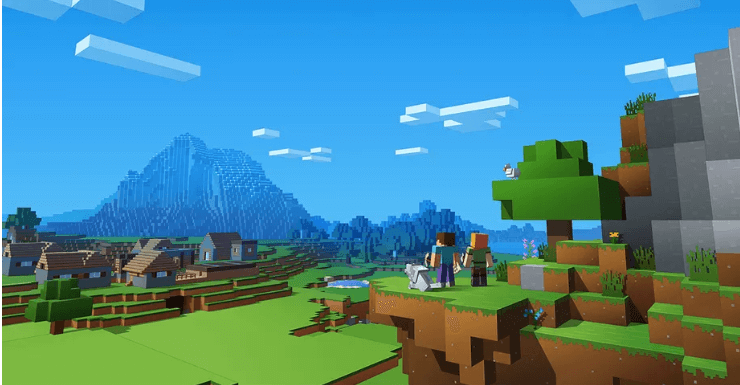
Minecraft is another best survival game that is based on school block graphics. It is known for its robust and addictive gameplay and includes various activities like mining, exploring, building, and crafting. Players are required to make their own houses before the sun goes down.

Minecraft is all about creativity and costs around $26.95. Build your castle, home, and explore vasts maps with this stunning game. Minecraft is one of the most popular games till the present date. Moreover, it is the best online game as well.
Download


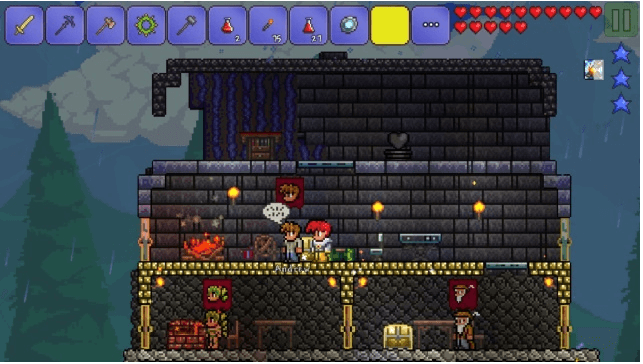
23. Terraria

Terraria

Price:- $9.99

Platforms:- iOS, macOS, Linux, Android, PS4, Xbox One, Windows Phone, PC, Nintendo Switch

Terraria is known to offer a perfect mix of interactive, surprising and fantastic gameplay. It can be considered as a 2D version of Minecraft with unique and unmatchable gameplay features.

The game lets you craft, build, fight, and mine through various levels, and its retro graphics makes it a highly exciting game to play online on your PC.

Choose Terraria to enjoy a stunning combination of various survival elements and RPG. The gamer can run effortlessly on Android, iOS, macOS, Windows Phone, Linux, PC, and many other platforms.

Download it today using the below link at $9.99.

Download


24. Tekken 7

Tekken 7

Price:- $49.99

Platforms:- PS4, Xbox One, PC

If you love online fighting PC games, then Tekken 7 can satisfy your fighting spirit. It is known to popularize the 3D genre of fighting games, which offers exciting gameplay. The player gets a massive list of characters to choose from, which can suit various fighting styles.

If you like challenges and have a competitive spirit, then Tekken 7 is a must-have online pc game for you.

It is priced at $49.99 and be played on PC, Xbox One, and PS4 devices.

Download


25. Rainbow Six Siege

Rainbow Six Siege

Price:- $59.26

Platforms:- PlayStation 4, Xbox One, PC

If you have played Counter-Strike, Rainbow Six Siege will give you a similar feeling. However, this online PC game offers emphasis more of teamwork and strategy building than other shooting games.

As players, you need to work in coordination to fight and win over your enemies. Ever since its launch in 2016, the game has received multiple updates and added more content.

You can opt for the game at $59.26 and enjoy playing it on PS4, Xbox One, and computer systems.

Download


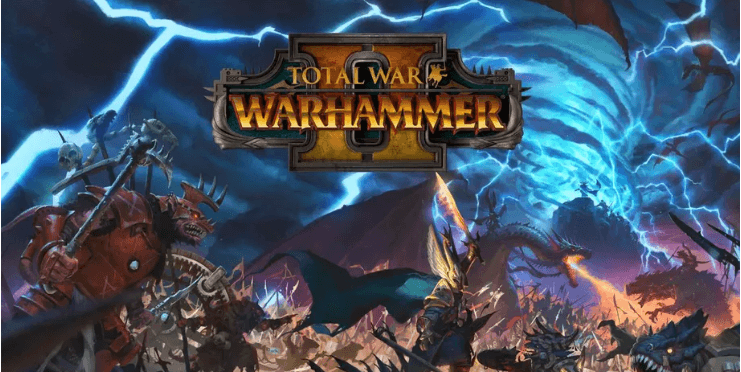
26. Total War: Warhammer II

Total War: Warhammer II

Price:- $59.99

Platforms:- macOS X, Windows, SteamOS + Linux

Read More: Best Games Like PUBG Mobile for Android & iOS

Are you a great fan of Real-time strategy online PC games, then Warhammer II will surely grab your attention. Opt for this stunning game at just $59.99 and enjoy controlling a gang of monsters and battle against thousands of warlocks and troops.

Choose this strategy based campaign to conquer the fantasy world and expand your powers.

Download


27. Shadow of the Tomb Raider

Shadow of the Tomb Raider


Price:- $59.99

Platforms:- Windows, Linux, Mac OS, Xbox One, PS4

This single-player online PC game features Ms. Croft as its primary and only character. The game has everything to take on an adventurous journey but comes with extreme GPU, so ensure your PC is well equipped.

You can enjoy this power-packed game at just $59.99.

Download


28. Forza Horizon 4

Forza Horizon 4

Price:- $59.26

Platforms:- Xbox Series X, Series S, Xbox One, Windows 

Love driving supercars? Choose Forza Horizon 4 to enjoy the most celebrated automotive festival of all time. Challenge your competitors, and enjoy a dynamic and unforgettable driving experience with this incredible game.

It offers you a collection of more than 450 cars, choose one to race on your favorite path. Priced at $59.26 is can be played on Xbox One, PS4, and PC. It is one of the best online games for PC that you can play.
Download


29. Battlefield V

Battlefield V

Price:- $19.99 per month and $99 for a whole year 

Platforms:- Xbox One, PS4, Microsoft Windows

Experience the battlegrounds of WorldWar 2 with BattleField V. Limited health and ammo are the two main elements of the game which tie it together. If you like challenges, opt for its hardcore mode. The game is available at $14.99 per month or $99 for an entire year.

Download


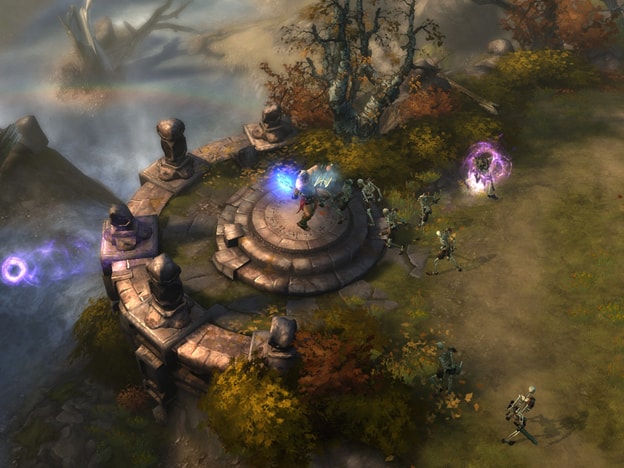
30. Diablo 3

Diablo 3

Price:- Free

Platforms:-  Windows 7, 8, 10, and macOS X 10.11

Diablo 3 has been in the market for more than 8 years now. The game despite being old never loses interest. It offers flashy combat feels which requires the gamer to be 10X more responsive than other games. The game has single-player mode and party mode, you can choose any mode as both are very addictive.

The game is very sorted and you don’t have to find your own teammates for loot. Each player gets their own loot which they will use for the rest of the game. The game keeps on getting an update with every new version which makes it one of the best games to play. You will never lose interest in this game that is confirmed.

Download


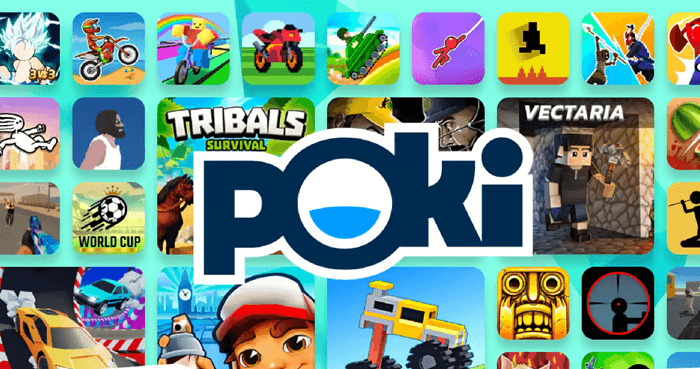
31. Poki

Poki-Games

Price:- Free

Platforms:- Windows, macOS, Android, and more

Poki is not like any other online game listed here. Poki is not a game, per se, but a collection of multiple online games. If you are ever bored or tired, you can easily use this website to play a variety of lightweight games. As these games do not use many resources, it’s very easy to play these games even on a low-end PC.

Download


Final Words On Best Online Games For PC

That’s all folks! These are some of the best online games for PC that you can play right now. However, few of them are absolutely free and some are paid ones. Check which one suits you the most to experience infinitive enjoyment and thrill.

But, we guarantee that each of the games mentioned above has something unique to offer and can keep you entertained for the entire day. And, do share your views on this through the comment box below. Lastly, do not forget to subscribe to our Newsletter to stay informed about every bit of technology. We’ll come back soon, till then stay tuned with us!

Best Ways to Download Embedded Videos For Free In 2022

7 Best Ways to Download Embedded Videos For Free In 2024

March 12, 2024
2

Are you facing challenges while trying to download embedded videos online? The answer is probably yes.

Well, a lot of us encounter such issues because we lack the knowledge and experience of embedded video downloaders.

What is An Embedded Video?

Embedded videos are self-hosted and built on the web page like HTML5. Embedding allows you to host these videos at another location such as blogs, articles, etc. – so users can watch them without having to go to the original web page.

How to Download Embedded Videos?

Downloading embedded videos successfully from video sharing sites like YouTube, Vimeo, Facebook, and Twitter isn’t as easy as you think it would be.

To make things simple for you, we have done all the heavy lifting and explained the 7 incredibly easy ways below so you can download the content of your choice in a hassle-free manner.

Recommended – Download Your Favorite Videos in One-Click

Want to download high-quality videos directly from your web browser or a particular website in just one click? Then, you should definitely give ByClick Downloader a try. The software is seamlessly designed to help users download videos from YouTube, Facebook, Instagram, Vimeo, Dailymotion, and 40+ sites in 720p, 1080p, MP4, and AVI. Below is the download button for the software.

Windows Download Button

7 Easy and Free Methods to Download Embedded Video Online

Here are the best options that will give you a clear insight on how to download embedded videos from websites as well as video hosting platforms:

Method 1: Download Embedded Videos Directly From Sites

There are specific embedded videos which are easily downloadable. For instance, if the video on the website is in an MP4 format, then the video can be installed without much hassle like saving a picture online.

Follow the simple steps below to download a video:

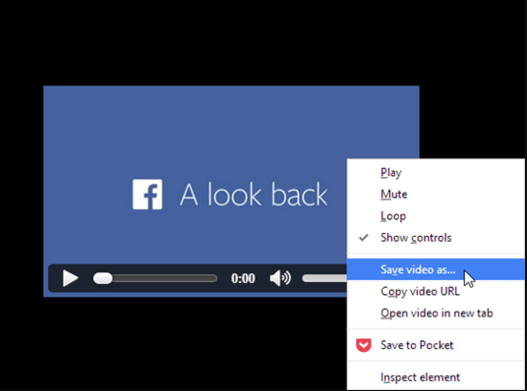
  • Right-click on the video and select the option “Save video as.”

Download Embedded Videos Directly From Sites

  • Now, choose a download location on your device where you wish to save the embedded video.
  • Once done, press ‘Enter’ or click on the ‘Save’ button.

Read Also: How To Download YouTube Videos For Free


Method 2: Download the Video with Free Video Downloaders

You may find several video downloaders in the market that not only allows you to download HD-quality videos from the various video sharing sites but also helps in downloading the ones that are embedded in the website’s page.

Here are some of the most efficient video downloader tools that are worth giving a try.

Download Your Favorite Videos in One-Click by ByClickDownloader

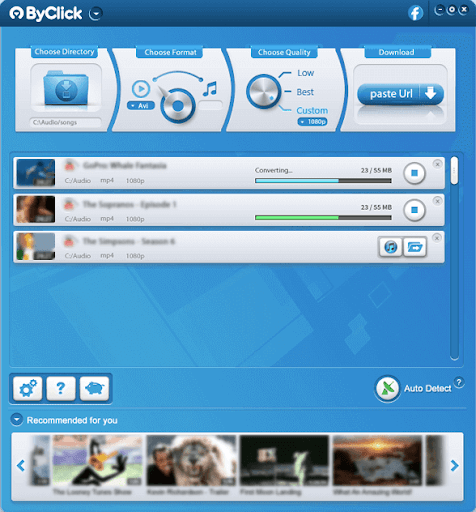
1. ByClick Downloader

ByClick Downloader

Another very handy yet effective tool to download embedded videos is ByClick Downloader. It enables users to download embedded videos from Youtube, Facebook, Twitter, Instagram, Tumblr, Vimeo, Metacafe, Flickr, and other similar websites. Moreover, the tool has the option to download videos in the desired format such as HD, 4K, etc.

Without any further ado here are the steps that can be used to download Embedded video through ByClick Downloader.

Step 1: Click on the Download option to download the ByClick Downloader on your device.

Windows Download Button

Step 2: Apply the on-screen instruction to Install the downloaded setup file.

Step 3: Run the software and paste the link of Embedded video from the desired website.

Step 4: Click on the required option i.e MP# download or Video Download.

Step 5: Choose the format of the video and its quality. Wait till the download for the embedded video completes on your computer.

And it’s done. That is how ByClick Downloader can be used to download the embedded videos from any of the websites. Now you can easily play the downloaded embedded video on your PC.

2. 4K Video Downloader

4K Video Downloader

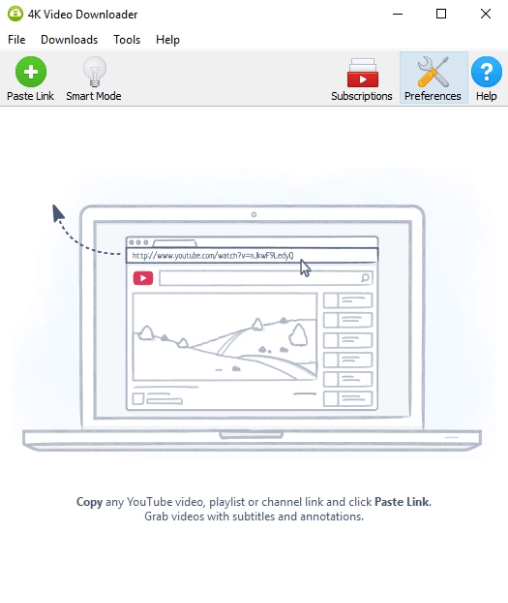
4K Video Downloader is an impeccable application to download video and audio from YouTube, Instagram, TikTok, and similar sites on Linux, Windows PC, and macOS absolutely for free. All that you are required to do is, install the 4K Video Downloader application on your device and then follow the steps below.

Step 1: Open the 4K Video Downloader application.

Step 2: Copy the video URL from the browser that you wish to download on your device.

Step 3: After that, click on the ‘Paste Link’ button in the application, select the video quality, and then press the ‘Download’ button.

Windows Download Button

3. VLC Media Player

VLC Media Player

We often seek solutions and applications outside our PC environment whereas some answers lie within our PC itself. One such example is the capability of the VLC media player to download embedded videos on your Windows devices. Here’s how you can do it

Step 1: Download the VLC media player on your device ( If not downloaded already) and Install it by applying the instructions displayed on your screen.

Windows Download Button

Step 2: Run the player and in the bar present at the top expand the Media section and click on Open Network Stream or use the shortcut keys Ctrl and N together. 

Step 3: In the media window switch to the Network tab and paste the URL of the embedded video that you wish to download.

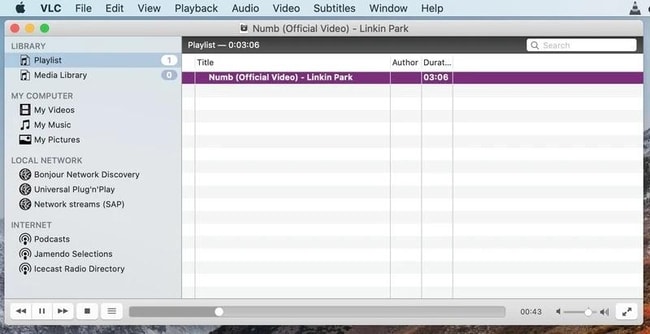
Step 4: Click on the Play button. Simultaneously expand the View section and then click on Playlist.

Step 5: Once done, right-click on the video and choose the Save option. Select the location to save and format of the embedded video.

And it’s done. That is how you can easily download an embedded video from any of the websites through the VLC media player.

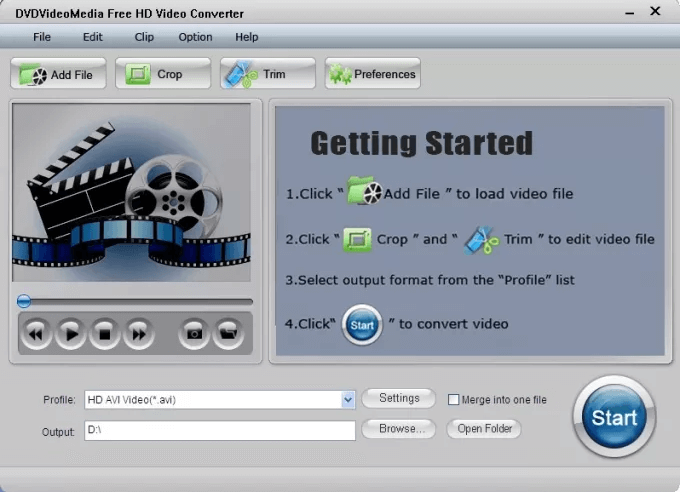
4. Free HD Video Converter Factory

Download the Video with Free Video Downloaders

Follow the simple steps below to download an embedded video:

Step 1: Launch the application and open ‘Downloader’.

Step 2: From the top, select the ‘New Download’ option and now the screen will show a new pop up window saying ‘New Download.’

Step 3: Copy and paste the URL of your embedded video’s website in the ‘Add URL’ section and then hit the ‘Analyze’ option to start the URL analysis process.

Step 4: Once done, you will get the option to choose the video resolution of your choice, and lastly you will be asked to choose a download location for your embedded video file.

Step 5: Now, click ‘Download’ from the bottom of the screen.

Windows Download Button

3. EaseUS MobiMover Free

EaseUS MobiMover Free

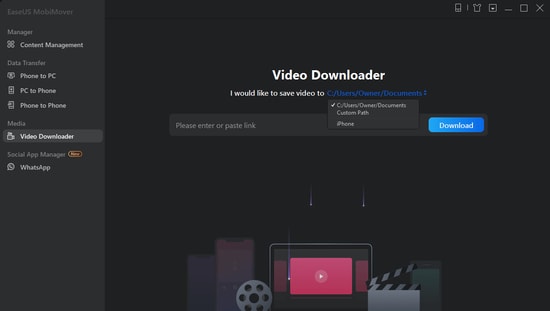
Want to download online videos from YouTube, Facebook, and other 1000+ sites to your computer? If yes, then get an EaseUS MobiMover Free and leave the rest to this impeccable software. Below are the step-by-step instructions to help you save your favorite videos for offline watching.

Step 1: Launch the EaseUS MobiMover application and choose ‘Video Downloader’ option from the left side pane.

Step 2: Copy and paste the URL of the video you want to download in the given bar, and then press the ‘Download’ button.

Step 3: After analyzing the URL, the application will quickly download the video to your computer (PC, Mac, or laptop).

Windows Download Button

4. SaveFrom.App

SaveFrom(dot)App

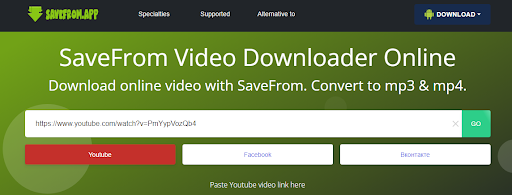
Lastly, you can also use the app or downloader from SaveFrom to download any embedded video with ease. Using the simple interface of the tool, you can easily download videos from various sources including YouTube. The best part about the tool is that it also allows you to select the resolution of the video before downloading it for better results.

Step 1: Download the app from the official website and run it after installing it.

Step 2: Copy and paste the URL of the video you want to download in the search bar, and then wait for some time while it loads.

Step 3: The app will then offer multiple resolutions. Click on any of those and save the video you want.

Windows Download Button

Note: Before start downloading, please make sure you do not have any restrictions in your country on downloading content from third-party sites.


Method 3: Download an Embedded Video Using Chrome/Firefox Bowser

If you are tired of installing software and browser extensions to download videos, then you are on the right page. You can smartly download videos of your choice with the help of your web browsers.

Follow these steps to install embedded videos with Chrome/Firefox:

Step 1: First, you need to run Google Chrome or Firefox (whichever is suitable) and then play your desirable embedded video on the website’s page.

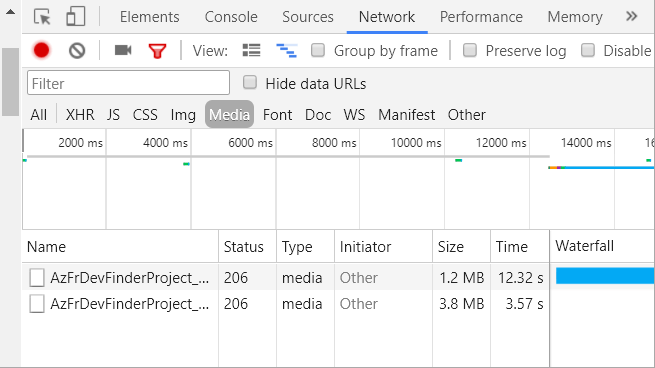
Step 2: Using the F12 shortcut key or by right-clicking on the blank margins of the page, select “Inspect Element” in Firefox or “Inspect” in the Chrome browser.

Step 3: On the inspect page, navigate to the Network > Media tab.

Download an Embedded Video Using Chrome/Firefox Bowser 

Step 4: Press the ‘F5’ shortcut key and play the video again to locate the download link on the page on the lower left side.

Step 5: Now, you will need to right-click on the link and click on ‘Open in a new tab,’ this will allow the video to play in a new tab automatically without any manual interference.

Step 6: Here click on the ‘Download’ option and if you are unable to see the download button, then right-click on the video and select “Save video as” to download the embedded video directly on your local drive.


Method 4: Download Embedded Videos Using Browser Extensions

Browser extensions are undoubtedly one of the most convenient ways for downloading embedded videos from various video hosting platforms like Vimeo, YouTube, Dailymotion, etc.

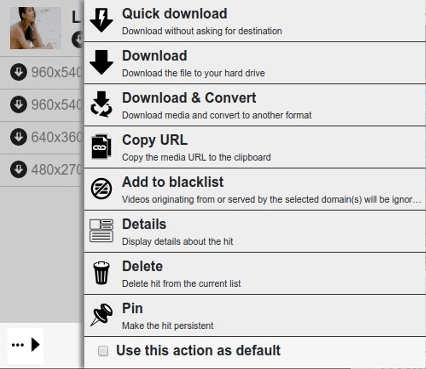
In addition, Video DownloadHelper is one such globally renowned web browser extension (available for both Chrome and Firefox) that offers amazing features for downloading videos, and that too for free.

Follow the steps below to save an embedded video online: 

Step 1: First, add Video DownloadHelper extension to your browser via visiting the below links.

chrome extension
firefox extension

Step 2: After adding the extension, restart your browser and play the embedded video again that you wish to save.

Step 2: From the top of your embedded video’s page, select the ‘Video DownloadHelper’ icon, and then click on the ‘Quick download’ option.

Download Embedded Videos Using Browser Extensions

Apart from downloading HLS streamed and dash videos, you can use this extension to for numerous things like convert downloaded embedded videos to another format, blacklist third-party domains, etc.

Read More: How To Disable Autoplay Videos in Chrome and Firefox


Method 5: Embedded Videos Download Using Online Services

You can also try out various online services that are equally effective in downloading online embedded videos.

To help you assist in how to download embedded videos using a web service, we’ll be using Fetch File for reference. Here are the steps:

Step 1: Visit https://fetchfile.net/.

Download Videos Using Online Services

Step 2: Copy and paste the URL in the given URL section and click on the ‘Download video’ option.

Step 3: Now, select the required video resolution and your desirable embedded video will be saved to your device in just a few seconds.


Method 6: Download Embedded Video Using Command-Line Program

Another way to download embedded videos from YouTube or other websites is Youtube DL. It is the typical command-line program more than a browser extension, wherein you have to write your commands. However, it isn’t easy to use, but it is extremely manageable and robust. Top of all, the program is based on the FOSS (Free and  Open Source Software) platform.

For the tech enthusiasts, who prefer FOSS programs, YouTube DL is worth trying. It is the most secure platform since it gets updated frequently and often releases security patches to empower the platform. The user interface of this FOSS software is quite impressive and lets you add several URLs to your download list. Once files are downloaded then they are transferred to your hard drive. Click here to try Youtube DL for Free.

A Point to Remember: These online services support video downloading from mainstream video hosting platforms like YouTube. It is important to note that you may not be able to download embedded videos from a website.

Read More: 11 Best YouTube to Mp3 Chrome Extensions of All Time


Method 7: Download the Embedded Video with the Help of a Screen Recorder

If you didn’t like any of the above methods to download the embedded video, then you can also take the help of a screen recorder. On the internet, you will find a number of the best free screen recorder software that you can use. Just run the software, play, and video, and start recording the audio and video of any embedded video with ease.


Frequently Asked About (FAQs): Download Embedded Video 2024

If you still have some queries related to the techniques to download the embedded videos online, then here are some of the most commonly asked questions that may be able to help you.

Q1. Is it legal to download embedded videos from the Internet?

The legality of the matter depends upon the privacy policy of any website. The privacy policy defines whether you have permission to download or not. If some website allows sharing and downloading videos then you do not have to worry about anything. So before proceeding with the download, ensure that the privacy policy of the website allows you the same.

Q2. Can I download embedded videos on smartphone?

There are various applications available for Android and iOS platforms that can help you download embedded video in a mobile device. You can download such apps from Google Play or App Store depending on your mobile device and operating system.

Q3. How do I find the URL of an embedded video?

In order to find the URL of a video embedded on a website, all you need to do is right-click on the video and select the “Copy video URL” option.

Q4. Is it possible to download embedded videos?

Yes, it’s possible to download embedded videos on your Windows, Android, or iOS devices. To download embedded videos on your Windows refer to the 7 best methods mentioned in the article above. However, use the relevant application from Play Store or App store to download embedded videos on your mobile devices.

Q5. How do I download an embedded video from a URL?

To download an embedded video through URL use any one of the best video downloaders such as ByClick Downloader, 4K Video Downloader, etc. Else, use a browser extension to download the embedded video through its link.

Q6. How can I download a video from a protected website?

The best way to download a video from a protected website is with the help of third-party video downloader software. On the internet, you will find multiple such alternatives to the video downloader software. However, we have taken afoot and listed some of the best tools of all time to help you download all the views you want.

Q7. Can I Download a Private YouTube video?

Yes, you can download a private YouTube video but only with the help of a video downloader software. You can select a tool from the best free video downloaders provided above for this task.

Q8. How can I download streaming videos from any website for free?

To download streaming videos from any website, you can take the help of a free video download like the Internet Download Manager (IDM). However, before proceeding with the same, you should read the terms and conditions of the streaming website or platform as downloading content may be illegal.

Q9. How do I download a video from a website to my android?

To download a video from a website to your Android, you can take the help of a free video downloader tool. Some of these tools are also available on the Play Store or you can refer to the internet for help.

Q10. Can you download a private video from Vimeo?

Yes, just like with YouTube, you can download a private video from Vimeo using a free video downloader tool.


Final Words on How to Download Embedded Videos Online in 2024

Above are some of the easiest and straightforward ways that would assist you in downloading embedded videos online from any website.

All the above techniques are extremely easy to perform and work differently for a different format of videos.

Use any of the given methods to save embedded videos without any hiccups and enjoy them free of cost.

1 Comment
    Lucy says: Reply
    June 21st 2020, 3:39 am

    Like!! Really appreciate you sharing this blog post.Really thank you! Keep writing.

Leave a Reply Cancel reply

Your email address will not be published. Required fields are marked *

Sidebar Image bit G ad1

Latest Posts

  • Anytime Astro: Best Website For Online Astrology Consultation
    Anytime Astro: Connect Now For Online Astrology Consultation
    by Somya Shrimal / March 13, 2026
  • Best-Ways-to-Combine-Images-Into-PDF-Files
    Best Ways to Combine Images Into PDF Files
    by Niharika / March 12, 2026
  • Best FREE VPS Hosting Providers
    7 Best FREE VPS Hosting Providers in 2026
    by Devesh / March 12, 2026
  • Best-McAfee-alternative-software-to-use-for-Virus-Protection
    Best McAfee Alternative Software to use for Virus Protection
    by adminuser / February 11, 2026
  • What-is-Flip-Flop-in-Circuite-and-it's-Types
    What is Flip Flop in Circuit and its Types
    by Meet / February 6, 2026

Categories

  • Cyber Security
  • Driver Updater
  • Entertainment
  • Fitness
  • Games
  • How To
  • laptop
  • OS
  • Reviews
  • Tech News
  • Tips & Tricks
  • Top 10
Sidebar Image bit G ad1
Best Android Camera Apps 9 Best Android Camera Apps For Quality Pictures in 2024by Prachi Dani / February 14, 2024
How to Fix Arch Bluetooth Mouse Not Working in Windows 10, 11by Niharika / February 14, 2024How to Fix Arch Bluetooth Mouse Not Working in Windows 10, 11
TechPout Footer Logo

We at TechPout promise to put forth stories that help people to learn and simplify their digital life. Our purpose is to share the true essence of technology with our tech-loving community.

Useful Links

  • About Us
  • Contact us
  • Privacy Policy

Popular Posts

  • Best PC Optimizer Software
  • Best Mac Cleaner Apps
  • Best Driver Updater
  • Duplicate Photo Finder and Cleaner Software
  • Best Free Movie Download Sites
  • Best IPTV Players

Follow us

Copyright © 2026 www.techpout.com. All rights reserved
DMCA.com Protection Status