Main LogoLight Logo
  • Reviews
  • Top 10
  • How To
  • Tech News
  • OS
    • Windows
    • MAC
    • iOS
    • Android
  • Categories
    • Driver Updater
    • Cyber Security
    • Games
    • Fitness
    • Entertainment
    • Tips & Tricks
MAC Top 10
by Prachi Dani

12 Best Photo Organizer Software For Mac to Organize Photos 2024

January 12, 2024
1

With the growth of Smartphones, digital photography is no more considered as rocket science. The use of photo manager, organizers, and editing tool is not just limited to professionals

Although technology has made photography quite easy for the mass, it is still a form of true-art. It allows you to capture the cherishable moments and save them for your lifetime. As a result, it is highly crucial to keep them in an organized form.

Are you confused about the best photo organizing software? Don’t have a clue which photo manager to choose to organize your photo collection? 

Refer to our survey and have a look at some of the best photo organizing tools available. 

Table of Contents hide
12 Best Photo Organizers Software For Mac In 2024
1. AfterShot Pro 2
2. Phase OneMediaPro 1
3. Nomac
4. Apowersoft Photo Viewer
5. Unbound
6. Google Picasa
7. XnViewMP
8. Digikam
9. CyberLink PhotoDirector 365
10. PhotoQt
11. Lightroom
12. Mylio Photos

What is the Photo Organizer Software? 

A photo organizer is a tool which principally works on organizing and treating vast quantities of digital images. 


Why Should One Use an Image Organizer Software? 

Taking pictures is a never-ending task, and often we end up clicking hundreds of photos with our smartphones. 

With time we accumulate a massive number of images in our phones, but is every picture worth using? Not really. Instead, it results in unwanted junk accumulation which eats away an enormous portion of hard disk space. 

An image manager is a straightforward method of organizing pictures, identifying and keeping the best shot. This way, it not only helps you choose the best quality photos but also avoid system garbage. 


12 Best Photo Organizers Software For Mac In 2024

1. AfterShot Pro 2
AfterShot Pro 2

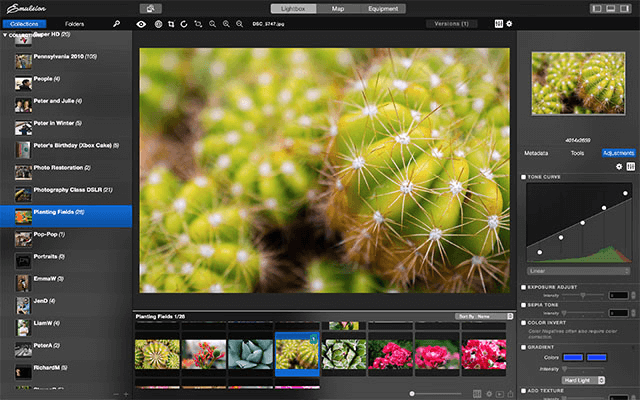
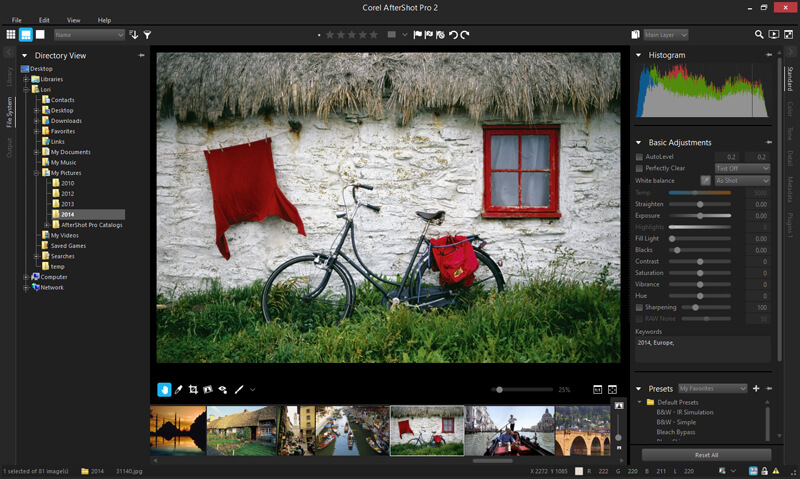
Next in the list of best photo organizers for Mac is AfterShot Pro 2, which organizes and provides a single view of your photo gallery in one place. 

With its powerful batch processing features, it can easily edit and alter images. 

Loaded with sophisticated tools, it can easily search for duplicate files irrespective of their size and location. Compare, filter and delete and save the best shot in a single touch with the photo manager.

Download Now


2. Phase OneMediaPro 1

Phase OneMediaPro 1

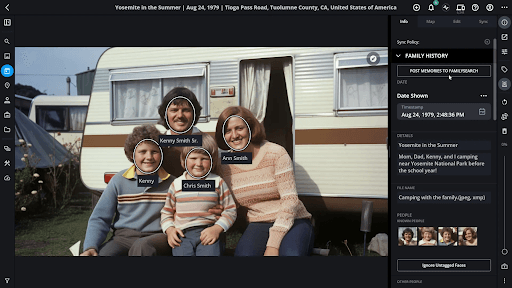
This forms a decent choice for people who like keeping their photo gallery managed and organized.

Its main features are: 

  • It can convert Raw pictures to BMP, PNG and JPEG format. 
  • It can process, rename and edit photographs in batches. 
  • Its auto-sort feature can quickly sort and categorize images with the help of metadata annotations.

Download Now


3. Nomac

Nomac

This user-friendly and lightweight photo manager is Nomac. It comes with a unique feature to scan and detect images from zip files as well. 

You can adjust color, contrast, and hue with it and use its pseudo color feature to make false-color pictures.

 It uses simple search filters to organize your files and runs smoothly on multiple platforms including Mac, Windows, and Linux.

Download Now

Read More: How to Backup iPhone Photos to Google Photos


4. Apowersoft Photo Viewer

Apowersoft Photo Viewer

This light-weight software works on the minimum resource, which supports smooth and fast performance. It allows you to scroll through large images, choose, edit and process them in batches. 

With its quick screenshot feature, you can easily edit and save the best screenshots. Apowersoft undoubtedly earns a good place in the list of best photo organizers with its minimalistic but robust design.

Download Now


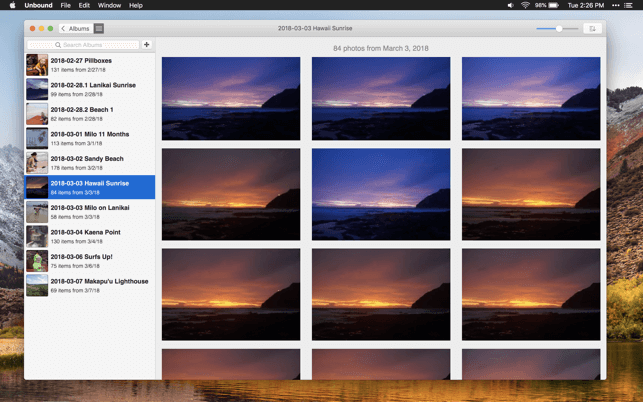
5. Unbound

Unbound

Decently organize your images according to your needs with Unbound. 

It can locate a specific album from multiple options and easily sync your records to your Mac, iPhone, iPad by using Dropbox.

Download Now


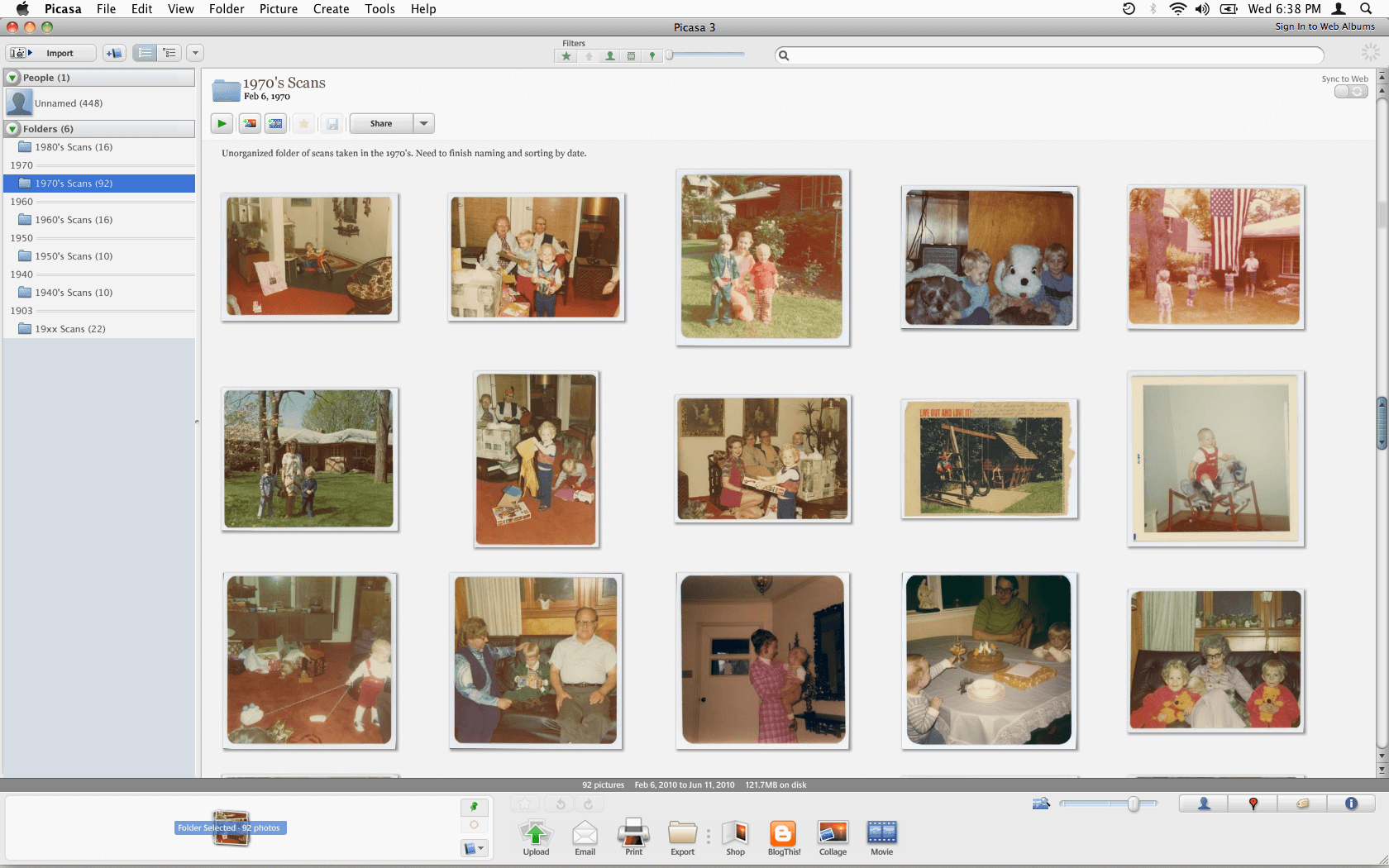
6. Google Picasa 

Google Picasa

This software turns out to be one of the most valuable tools when you are trying to locate the best shot.

This free software can effortlessly arrange your computerized photos and is supported on both Mac and Windows platforms.

Download Now


7. XnViewMP

XnViewMP

Released in 1998, this is one of the oldest image managers. Besides organizing, it can also rotate, crop, resize, apply filters and adjust the color of your photographs. 

It is one of the most trusted photo management tools for Mac and comes with an array of sophisticated features.

Download Now

Read Also: Best Free Mac Cleaner Apps


8. Digikam
Digikam

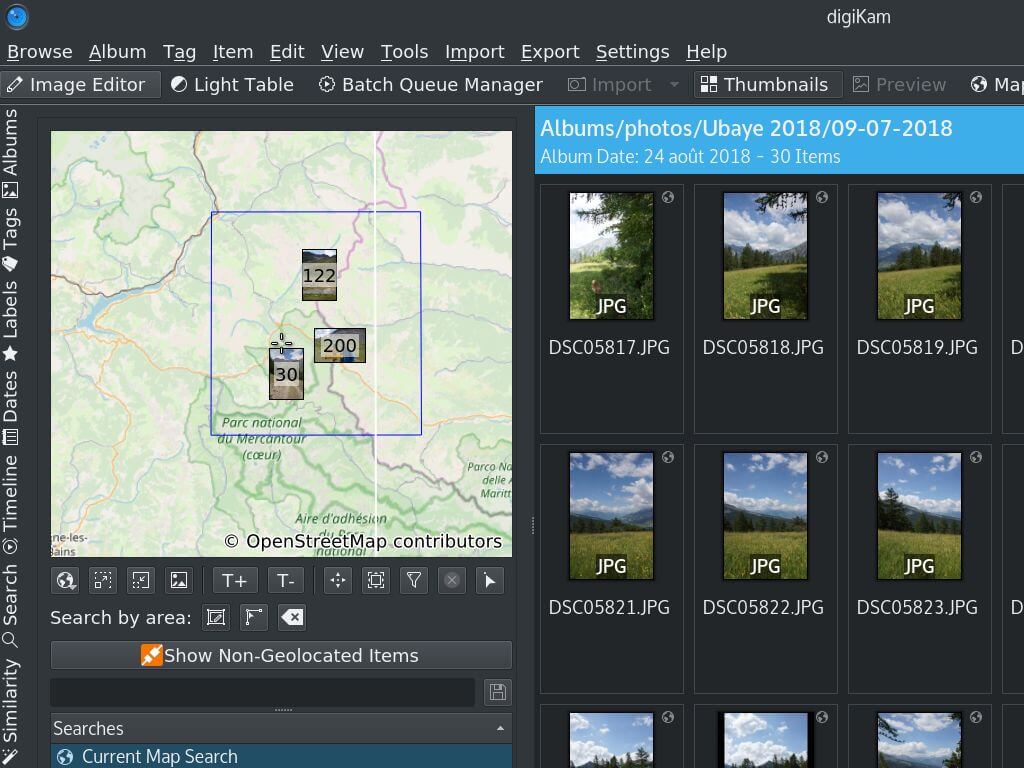
Digikam offers all crucial and useful features that one needs to manage their photo gallery. It is supported on Mac OS and Windows platforms.

Download Now


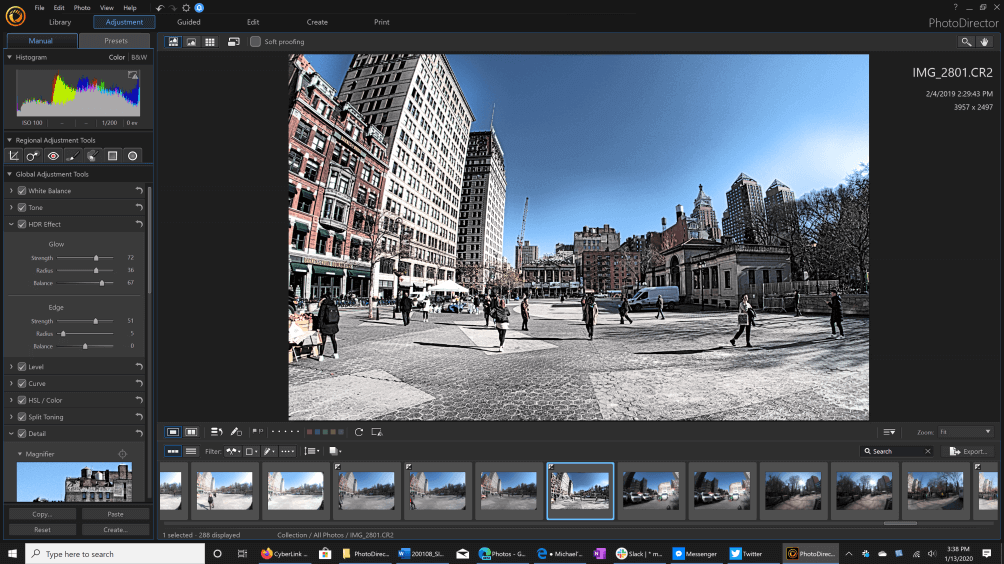
9. CyberLink PhotoDirector 365

CyberLink PhotoDirector 365

The software is a two in one tool for all the users as it offers features of a photo organizer and photo editor. Cyberlink PhotoDirector 365 is a great photo management software. The user can categorize the photos and folder on the basis of keywords, star ratings, color coding, and many others. It automatically categorizes on the basis of date and time, but the user can still change them. 

With the software, you can easily edit photos and can also create slideshows for any social media apps. 

Download Now


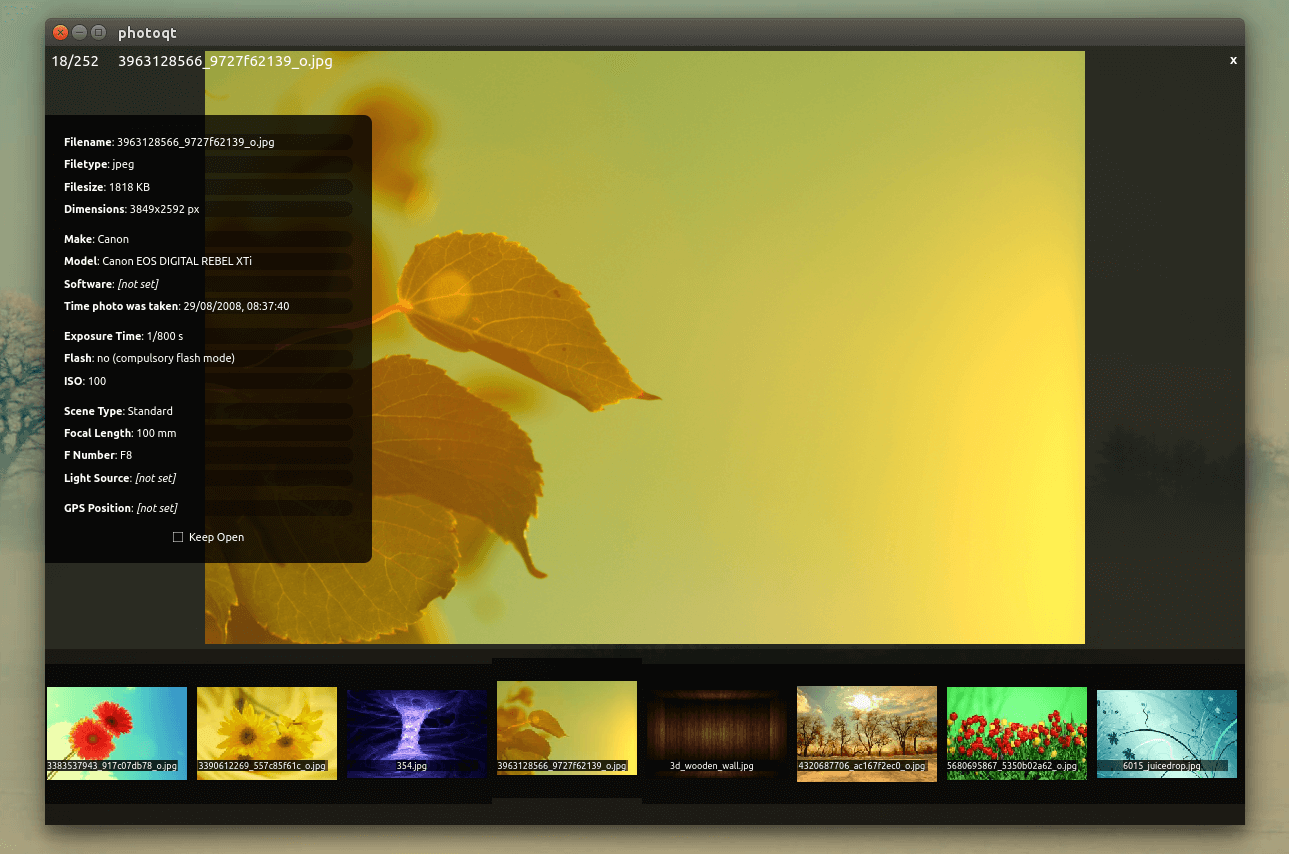
10. PhotoQt

PhotoQt

This photo organizer tool is entirely from other options available in the same category. It can adjust your images automatically, thereby organizing them within seconds. 

This easy-to-use photo manager works on Mac, Windows, and Linux platforms.

Download Now


11. Lightroom

Lightroom

The last name on this list of the best photo organizer software for Mac is Lightroom. Lightroom is much more than just an organizer as it also allows you to edit images and create digital masterpieces with ease. The tool is available for multiple operating systems other than macOS like Windows, Android, iOS, and others.

Download Now


12. Mylio Photos

Mylio Photos

Mylio Photos is another tool that you can try if you are still looking for the best photo organizer software in 2024. This is a cross-platform tool that supports Windows, iPadOS, macOS, Android, and iOS. The interface of the tool is very subtle and minimalistic. Moreover, the tool also allows you to manage the photos present on your device according to the categories of your choice.

Download Now


Conclusion

So, these were some of the best tools that we had to share with you. Each photo-organizing software comes with some other unique features. Above mentioned are a few of the best photo organizer software for Mac, choose one and see which one works best for you. Multiple options are available for you for effective and reliable decision-making. For further information or help, you can contact us using the comments section below. Fill out the form and our experts will get back to you as soon as possible.

10 Best Photo Organizer For MacBest Photo Management SoftwareBest Photo Organizer AppPhoto Management ToolsPhoto Organizer MacPhoto Organizer Software
Author

Prachi Dani

Prachi Dani is a technical content writer who specializes in areas of science and technology. She is highly up to date with technological transitions and transformations. Writing is not her passion but the only thing that carries satisfaction in life. If not writing, you may find her engrossed playing action games on her treasured smartphone.

View all posts

Related Posts
Best Lightweight Browser for Windows 10, 8, 7 PC

17 Best Lightweight Browser for Windows 10, 11 PC in 2024

March 19, 2024
0

Just like other device components your web browser can also put unnecessary load on your system resources making it slow and sluggish. A heavyweight browser can eat your system memory and cause excess battery drainage.

What you need in such situations is a lightweight browser for Windows that can work as efficiently as a mainstream browser without draining system resources.

If you are struggling with your current web browser refer to our list of best lightweight browsers that promises full-fledged navigation experience at a lightning speed. Read the complete article to find the top 17 lightweight browser for PC and enjoy browsing without any compromises with the speed.

What Are the Best Lightweight Browsers for Windows in 2024?

Here, we have shortlisted some of the top-rated, resource-friendly and fast browsers that you can install on your windows device. Go through the list and find out the perfect lightweight browser for Windows 7, 8, 10, and 11.

1. Midori Windows Browser

Midori Windows Browser

Highlight Features:

HTML5 support Start-up Settings Minimalist UI Open-source Incognito Browsing

Enjoy an array of mainstream browser features with this light browser for windows. Midori is an open-source browser and is well known for its class apart functionalities like RSS support, bookmark, and spell checker capabilities.

Another beautiful thing about Midori is that its default search engine duckduckgo does not collect any user information. Minimalist and a straightforward UI also backs its worldwide popularity.

2. UR Browser

UR Browser

Highlight Features:

Safe Browsing HTTPS Redirections Customized Experience Fast Downloading Speed Removes ads & Cookies

Next on our list of best lightweight browsers for Windows is the UR browser. This chromium-based browser is backed with a powerful-suite of multiple features. Privacy-focused search engine, built-in VPN connection along with an integrated virus scanner makes it an all-in-one lightweight browser that can perfectly suit all your requirements.

In addition to this, it also sends alert messages while visiting suspicious sites and blocks all annoying ads from your browser. Enjoy fast browsing seed with this highly customizable and lite browser for Windows.

3. Microsoft Edge

Microsoft Edge - Best Lightweight Browser

Highlight Features:

Browser Extension Support Superior Privacy Built-In Browser for Windows 10 Highly Customizable Edge HTML Engine Layout

Microsoft is not a new name and is known as the trump card of Microsoft against Google Chrome. It is the default browser of Windows 10 and does not hog on your device resources. Although it is a light browser for Windows it does not compromise on loading speed.

Known for its superior privacy features it safeguards your device from suspicious websites and malicious ads. Microsoft Edge also comes with multiple customization options and can easily sync with various browser extensions.

Enjoy seamless working and modern web experience with its Edge HTML Engine Layout.

Read Also: Know About New Microsoft’s Chromium Edge Browser

4. Slim Browser

Slim Browser - Best Lightweight Browser For Windows
Image Source: Slim Browser

Highlight Features:

Ultra-fast Speed Ad blocker Capability Online safety Easy Integration Plug-in Compatibility

Next on our list of lite browsers for PC is Slim Browser. If you are looking for a sophisticated, native, and fast browser then Slim Browser is what you need.

Enjoy 10x download speed and protect your digital life by blocking annoying ads. It also comes backed with a fully customizable toolbar and one-click Facebook integration. Fast downloading of Youtube videos in MP3 and MP4 formats, easy installation of extensions, browser plugin along with easy text translation are few other notable offerings of this lite browser for PC.

5. Opera

Opera - Best Windows Lightweight Browser
Image Source: Opera

Highlight Features:

Free VPN Cross-Device Data Synchronization Private Browsing Customizable features Ad-Blocker

Another light browser for Windows that you can pick is Opera. It promises optimal resource usage and fast downloading speed no matter how many extensions you download.

Its ad-blocker capabilities prevent annoying ads and trackers. To add on to the privacy levels it also comes with auto-upgrade features and a built-in VPN connection that can easily maintain your anonymity and encrypt your online activities.

It is simple to set up and use. Make Opera your browsing companion and enjoy a clean, efficient, and powerful browsing experience.

6. Comodo IceDragon

Comodo IceDragon - Best Lightweight Browser
Image Source: Comodo

Highlight Features

Robust Security Dns Server Integration Lightning Fast Browsing Web Page Scanning Virtual Container

If the above mentioned lightweight browser for Windows has not met your requirements then try our next pick. Comodo IceDragon is popular for its superior and robust security feature which keeps you protected from all possible viruses.

It is integrated with Comodo’s DNS server which ensures error-free conversion of website URLs to IP addresses. Apart from this it also scans your browsers crash and performance reports to scan your web-page for any threats.

It also uses a virtually created container that breaks all the contact of your device with the browser, this means no unwanted or harmful software gets installed on your device.

Read More: Best Lightweight Mobile Browsers For Android

7. SeaMonkey

SeaMonkey - Lightweight Browser For Windows
Image Source: Sea Monkey

Highlight Features:

Voice Interaction Robust Password Manager Easy to use HTML Editor Easy Navigation Open Source

SeaMonkey is another light browser for Windows that promises optimized browser functioning and loading speed. A built-in email client and built-in editor helps you in easy navigation and also assists you in developing a web-page of your own.

It is also powered with a password manager tool along with voice interaction, mouse gestures and restore sessions functionalities. It is an open-source lightweight browser for Windows but can result in stability issues as time.

8. Vivaldi

Vivaldi - Best Lightweight Browser

Highlight Features:

End-to-End Encryption Customizable Keyboard Color Themes Ad-Blocker Stable Performance

Vivaldi is one of the newest entrants in the category of lightest browser for Windows but has enough to give its competitors a big fight. It comes with greater customizable features including tab arrangement, color themes, and notes.

Vivaldi works on the Google Chrome engine and is well known for its reliability and stable performance. It also ensures the utmost privacy and helps you browse privately by blocking unwanted ads and trackers. All the data enchanted on the Vivaldi browser is protected with end-to-end encryption.

9. Lynx

Lynx - Windows Lightweight Browser

Highlight Features:

Text-Based Browser Easy Working Oldest Browser Keyboard shortcuts for easy Navigation

Another smallest browser that you can pick for your Windows device is Lynx. It is one of the oldest Windows browsers and uses various command-line tools. Setting it up is fairly easy and its straightforward design adds on to its simple working.

It is a text-based browser and does not pressurize your system resources. So if you can barter a graphic user interface with a text-based interface then Lynx is a good choice.

10. Torch Browser

Torch Browser

Highlight Features:

Integrated Sharing Apt for hyper-active internet Users Torch Facelift Built-In BitTorrent Embedded Player

Next on our list of lite browsers for Windows PC is Torch. It is perfectly apt for heavily-active users and supports seamless loading at a lightning-fast speed. It is an open-source and media-oriented browser application.

It comes with an in-built BitTorrent feature which helps in easy management of downloads. Along with it you also get access to additional features like Torch Games and Torch Music which adds on to your browsing experience. You can also play online songs before their download is complete with its Torch Player feature.

Manage online media in a hassle-free manner with its integrated sharing and download accelerator feature.

11. Maxthon Cloud Browser

Maxthon Cloud Browser

Highlight Features:

Dark mode In-built Ad blocker Screen capture facility Note-Pad Multi-engine web browser

Maxthon Cloud Browser is an extremely great browser that offers some of the best features than other opponent tool does. It includes a built-in tool for blocking random ads, offers a screen capture facility, note pad, dark mode, reader form, and many other features. Apart from this, Maxthon Cloud Browser utilizes its own cloud services to sync the users’ data among the devices. And, Maxthon Cloud Browser has its own multi-account password administrator, named Magic Fill. If you want to make Maxthon sync your data on all other devices, then you are required to create an account on Maxthon-based cloud services.

12. Lunascape Orion

Lunascape Orion

Highlight Features:

Auto-switch between engines Full-screen mode Fastest browsing speed User friendly Triple engine support Quick access

Have you ever wished to access Internet Explorer, Safari, Firefox in one program? Now, you must be thinking about how it can be possible at all. Isn’t it? Then, you can access Internet Explorer’s Trident, Firefox’s Gecko, and Safari’s Webkit within one program. Yes, you have heard right! That’s exactly what Lunascape does. It has the support of the triple engine i.e., Gecko, Trident, and Webkit. It is designed with the latest technology parameters and algorithms hence comparatively it is faster than others. However, you can set one particular engine to be accessed whenever you open Lunascape Orion. But, switching between the engines is very quick as well.

13. K-Meleon

K-Meleon

Highlight Features:

Feasible for beginners Multiple tabs support Amazing speed Easy to use and navigate  Open-source Extremely lightweight

The Next name on this list of the best lightweight browsers for Windows is K-Meleon. The tool is quite amazing and offers an open-source structure for you. You can edit the coding base of the tool using this open source and use the tool as required. The tool is quite reliable. however, built for 32-bit operating systems only. k-Meleon respects your privacy and does not share any browsing data or surfing data with third-party websites or apps and otherwise. The interface of the browser is customizable as well and allows you to get the best out of the tool with ease.

14. Brave

Brave Browser

Highlight Features:

Easy to use Supports multiple tabs Lightning fast speed Easy to navigate Freeware Ultra lightweight

The last name here on the list of the best lightweight browsers for Windows is Brave. This lightweight browser is available for both 32-bit and 64-bit operating systems. While you use the browser, it will block all the ads to enhance your surfing experience. Moreover, the browser also blocks cross-site trackers for enhanced performance.
This is one of the best tools that prohibits phishing attacks and malicious files from getting into your computer. Moreover, the anonymized network routing by the browser using the Tor mode offers utter privacy to your data and surfing history.

15. Opera One

Opera One - Lightweight Browser

Highlight Features:

Utter Privacy HTTPS Redirections Personalized Experience Fast Downloading and Uploading Speeds Fewer ads

In addition to this, it prohibits all irritating advertisements from Opera One and delivers warning messages if it detects that a user is visiting a website that may be malicious. Enjoy a lightning-fast surfing experience with this Windows browser that is both highly configurable and lightweight. The Opera One makes its way to the next spot in our list of the top lightweight browsers for Windows. This Internet browser, which is based on Chrome, is equipped with a robust collection of a variety of functions. It is an all-in-one lightweight browser that can fully meet all of your needs, complete with a search engine that prioritizes privacy, a built-in virtual private network connection, and an integrated virus scanning.

16. Falkon

Falkon

Highlight Features:

Supports extensions Customizable UI Lightning fast Safe to use for all Fewer ads

Here’s another addition to this list of the best lightweight browsers for Windows. Falkon, just like its name, is a very fast web browser that allows you to surf freely using the internet. The interface of the browser is quite basic yet offers lightning-fast operations. You can download this tool on Windows, Linux, and other operating systems.

17. GNOME

GNOME

Highlight Features:

Super Lightweight Easy to use Fewer popups Works with older OS Open-source

The next best lightweight browser for Windows is the GNOME browser. This is an open-source browser that allows you to surf the internet very easily. The browser can also run high-end websites on your device with ease. Also, the tool allows you to save yourself from annoying ads and retain privacy.


Faqs – Lightweight Browsers

Q1. What is the lightest browser for Windows 10?

In the sea full of options for different browsers available online we have fixed it for our users by listing the best lightweight browser for Windows 10, 11, or older version systems. Go through the list and find the one that matches your definition of lite browser for PC and download it from the official website.

Q2. Which browser uses least memory on your device?

Depending upon the size and other available data Opera uses the least resources of your Windows and still provides the best user-experience and speed.

Q3. Does Chrome use lot of the system’s RAM?

When compared to the above mentioned light-weight browser alternatives, Chrome indeed uses a significantly higher amount of RAM. In addition to this if we download and add multiple extensions to chrome it can get heavier.

Q4. Is Opera Lighweight browser?

Yes, Opera is a well know alternative in the list of lightweight browsers as it only consumes minimal resources of your device.

Q5. Is Brave Lighter Than Chrome?

Yes, Brave is a lighter web browser than Chrome. It puts less strain on your device’s performance than Google Chrome. Brave uses 66% less memory than Google Chrome.


Conclusion

So, this is folks, enjoy effortless and fast browsing experience with our lightweight browser for Windows. All the options mentioned above guarantee fast speed, robots working, less resource usage, and superior privacy.

Pick the best-suited lightweight browser for your windows device to trade-off with a mainstream browser.

Best Photo Storage Apps

10 Best Photo Storage Apps for Android and iPhone in 2024

January 16, 2024
0

You may go through this article to know the best online apps for storage of all your photos on iPhone/Android.

Photos are a memory machine that refreshes beautiful moments you’ve spent with your dear ones. However, we click a lot of pictures to preserve memories. Well, capturing photos is not trouble. The problems begin when you do not have enough room on your phone to keep all the images. However, with the best photo storage apps for iPhone and Android, you can conveniently store all your precious photographs.

There are many commercial and free apps for photo storage to keep your images safe and make them easily shareable. Through this article, we share a carefully curated list of such applications.

We selected the best iPhone and Android photo storage apps after a careful analysis of various parameters such as their features, ease of use, user rating, and availability. Hence, let us do a rundown of these applications in the following section of this write-up without any ado.

List of the Best Photo Storage Apps for iPhone and Android in 2024

You can choose from the following commercial and free storage apps to keep photos safely stored on your phone.

1. Google Photos

Google Photos

Let us first talk about the giant Google. Google Photos is undoubtedly one of the most popular and best online photo storage apps for a variety of reasons. For instance, it lets you backup and sync your photos across multiple devices.

Moreover, it offers 15GB of free storage and the following tempting features to justify its position on our list.

Key features of Google Photos

  • Automatic photo organization
  • Keyword-based photo search option
  • Facial recognition
  • In-built filters and editing tools
  • Easy photo sharing with friends and family
  • “Memories” shows photos taken on the same day in the past
  • Photo printing directly from the app
  • Integration with website building, printing, and other applications

Download Now

Also Read: Best Duplicate Photo Finder & Cleaner Software


2. Dropbox

Dropbox

When it comes to choosing the best way to store photos, we cannot skip Dropbox. It is a renowned online application that safely backups and securely syncs all your photos and other files across multiple devices.

Additionally, it helps enhance your efficiency with a lot of useful tools for remote working, collaboration, and sharing. Furthermore, the following are its other remarkable features.

Key features of Dropbox

  • Keyword-based image search
  • Version history viewing and file recovery
  • Syncs with the phone camera
  • Automatic new image uploads
  • Availability of two-factor authentication
  • Password protection
  • Seamless image sharing with others
  • Digital watermarking is available
  • Smart sync saves local copies of images in a lower resolution
  • Integrates with a lot of other services and applications

Download Now


3. iCloud

iCloud

Let us now introduce you to iCloud. It is an in-built online photo storage application for iPhone. With this app, you can perform cloud storage and sync your photos across various devices.

Moreover, the following features make it an apt choice as one of the best photo storage apps for iPhone.

Key features of iCloud

  • In-built into all Apple devices
  • Automatic image sorting into albums
  • Easy photo search by keywords
  • Stores low-resolution images on your device and high-resolution photos on the cloud
  • Supports album sharing with friends and family
  • Integration and syncing with all Apple apps and across devices
  • Automatically backups and syncs your photos to a new device
  • Additional security with two-factor authentication

Download Now

Also Read: Best Photo Stitching Software for Windows


4. Amazon Photos

Amazon Photos

Are you a casual smartphone shooter looking for the best way to store photos? If yes, we have Amazon Photos for you. It is a full-resolution cloud image storage platform that offers 5 GB of storage for free (unlimited if you are an Amazon Prime member).

The features of this app are quite basic but are just what budding photographers need. Let us look at them.

Key features of Amazon Photos

  • Automatic creation of photo backups
  • Easy image sharing with others
  • Keyword or place-based photo search
  • Facial recognition to find a particular person’s photos
  • Lets you set photos as a screensaver on Echo Show and Fire TV
  • Allows up to six members to upload photos

Download Now


5. Microsoft OneDrive

Microsoft OneDrive

The next name on our list of the best photo storage apps for Android and iPhone is Microsoft OneDrive. Designed to store all kinds of files, you can use this app to store, organize, and share your photos as well.

Moreover, its following features make it an ideal choice for everyone looking for the best free online photo storage apps.

Key features of Microsoft OneDrive

  • Automatic tagging with image recognition
  • Creates albums automatically
  • 5 GB free storage
  • Memories to view past images from the same date
  • Photo search by keyword, date, or place
  • Image organization with tags and albums
  • Automatic photo upload and backup

Download Now

Also Read: Best Free Photo Slideshow Software For Windows


6. Flickr

Flickr

Here is a photographer’s haven called Flickr. Before Instagram took the world by storm, Flickr was the ultimate destination for photographers to showcase their shots.

Below are some Flickr features that many users find fascinating and justify the app’s placement as one of the best apps to store photos.

Key features of Flickr

  • A photographer community and image-sharing groups
  • Availability of a photo license assignment option
  • Image search by tag, license, location, description, date taken, camera model, color, etc
  • Automatic image upload from your phone, PC, and apps like Lightroom and Dropbox
  • Shows stats on how many people are viewing your pictures
  • Lets you order wall art, photo books, and prints directly from Flickr

Download Now


7. SmugMug

SmugMug

Let us now introduce you to SmugMug. It is a combination of a photo storage application and a drag-and-drop website builder. In addition to storing and creating a portfolio of photos, it also allows you to sell the pictures.

Moreover, the following are some other features that brought it to the list of the best photo storage apps for Android and iPhone.

Key features of SmugMug

  • Automatic photo upload
  • Integration with photo editing apps like Lightroom
  • Gallery password protection and privacy controls
  • Direct print selling from your website

Download Now


8. iDrive

iDrive

Next, we have iDrive among the best online apps for photo storage. Though it does not offer any fancy features, it is still a perfect choice for everyone who needs a simple storage solution for images.

The following are some features that brought this application to our attention.

Key features of iDrive

  • Supports online photo sharing
  • You can download photos to all your devices
  • A reasonably priced unlimited backup plan for photos
  • Impressive security features like password protection

Download Now


9. Adobe Creative Cloud

Adobe Creative Cloud

We cannot skip Adobe when the discussion is on anything about photos. In addition to world-class photo editing applications like Photoshop and Lightroom, Adobe offers a cloud storage solution with 10TB of space to store your photos.

Moreover, Adobe Creative Cloud is among the best photo storage apps for iPhone and Android for non-casual photographers due to its following features.

Key features of Adobe Creative Cloud

  • Image editing, storage, and organization from anywhere
  • Tools to create portfolio websites and social graphics
  • Improved search with smart image recognition
  • Community with which you can share images and get Lightroom presets
  • Photo sharing with family and friends

Download Now


10. 500px

500px

Let us conclude the list of the best online photo storage apps for iPhone and Android with 500px. It is a photographic community allowing you to store your favorite photos.

Talking about the features, below is what we found exciting about this application.

Key features of 500px

  • Shows insights about where your photo views are coming from
  • Allows you to make unlimited image uploads
  • Supports portfolio creation
  • Lets you create resources like videos and share them
  • You can hide, add, or rearrange tabs to customize your profile
  • Allows resume sharing with potential clients

Download Now

Also Read: Best Photo To Cartoon Picture Apps For Android & iOS


Summing Up

This article discussed some of the best photo storage apps to store all your fabulous photos without blocking the phone’s memory. You may go through the features of all these apps to pick the perfect one for your requirements.

Please drop us a comment if you find your favorite online photo storage app missing from the above list or have any other suggestions/questions about this article. We will be happy to get in touch with you.

1 Comment
    Eric says: Reply
    November 12th 2021, 5:05 pm

    Thanks a ton for sharing a list of the best photo organizer software for Mac. This list really helped me a lot to manage and organize my photo library on Mac.

Leave a Reply Cancel reply

Your email address will not be published. Required fields are marked *

Sidebar Image bit G ad1

Latest Posts

  • Best-Free-Online-Portfolio-Websites-in-2026
    Best Free Online Portfolio Websites in 2026
    by Niharika / March 16, 2026
  • Anytime Astro: Best Website For Online Astrology Consultation
    Anytime Astro: Connect Now For Online Astrology Consultation
    by Somya Shrimal / March 13, 2026
  • Best-Ways-to-Combine-Images-Into-PDF-Files
    Best Ways to Combine Images Into PDF Files
    by Niharika / March 12, 2026
  • Best FREE VPS Hosting Providers
    7 Best FREE VPS Hosting Providers in 2026
    by Devesh / March 12, 2026
  • Best-McAfee-alternative-software-to-use-for-Virus-Protection
    Best McAfee Alternative Software to use for Virus Protection
    by adminuser / February 11, 2026

Categories

  • Cyber Security
  • Driver Updater
  • Entertainment
  • Fitness
  • Games
  • How To
  • laptop
  • OS
  • Reviews
  • Tech News
  • Tips & Tricks
  • Top 10
Sidebar Image bit G ad1
Top 9 Best WhatsApp Mods You Must Try in 2024 Top 9 Best WhatsApp Mods You Must Try in 2024by Akshara Parnami / January 12, 2024
8 Best Free Keyboard Apps for Android in 2024by Niharika / January 12, 2024Best Free Keyboard Apps for Android
TechPout Footer Logo

We at TechPout promise to put forth stories that help people to learn and simplify their digital life. Our purpose is to share the true essence of technology with our tech-loving community.

Useful Links

  • About Us
  • Contact us
  • Privacy Policy

Popular Posts

  • Best PC Optimizer Software
  • Best Mac Cleaner Apps
  • Best Driver Updater
  • Duplicate Photo Finder and Cleaner Software
  • Best Free Movie Download Sites
  • Best IPTV Players

Follow us

Copyright © 2026 www.techpout.com. All rights reserved
DMCA.com Protection Status