Main LogoLight Logo
  • Reviews
  • Top 10
  • How To
  • Tech News
  • OS
    • Windows
    • MAC
    • iOS
    • Android
  • Categories
    • Driver Updater
    • Cyber Security
    • Games
    • Fitness
    • Entertainment
    • Tips & Tricks
MAC Top 10
by Prachi Dani

12 Best Photo Organizer Software For Mac to Organize Photos 2024

January 12, 2024
1

With the growth of Smartphones, digital photography is no more considered as rocket science. The use of photo manager, organizers, and editing tool is not just limited to professionals

Although technology has made photography quite easy for the mass, it is still a form of true-art. It allows you to capture the cherishable moments and save them for your lifetime. As a result, it is highly crucial to keep them in an organized form.

Are you confused about the best photo organizing software? Don’t have a clue which photo manager to choose to organize your photo collection? 

Refer to our survey and have a look at some of the best photo organizing tools available. 

Table of Contents hide
12 Best Photo Organizers Software For Mac In 2024
1. AfterShot Pro 2
2. Phase OneMediaPro 1
3. Nomac
4. Apowersoft Photo Viewer
5. Unbound
6. Google Picasa
7. XnViewMP
8. Digikam
9. CyberLink PhotoDirector 365
10. PhotoQt
11. Lightroom
12. Mylio Photos

What is the Photo Organizer Software? 

A photo organizer is a tool which principally works on organizing and treating vast quantities of digital images. 


Why Should One Use an Image Organizer Software? 

Taking pictures is a never-ending task, and often we end up clicking hundreds of photos with our smartphones. 

With time we accumulate a massive number of images in our phones, but is every picture worth using? Not really. Instead, it results in unwanted junk accumulation which eats away an enormous portion of hard disk space. 

An image manager is a straightforward method of organizing pictures, identifying and keeping the best shot. This way, it not only helps you choose the best quality photos but also avoid system garbage. 


12 Best Photo Organizers Software For Mac In 2024

1. AfterShot Pro 2
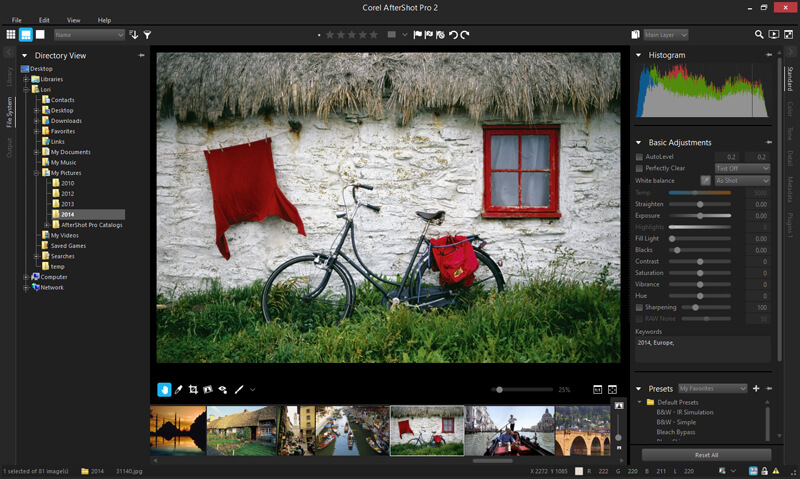
AfterShot Pro 2

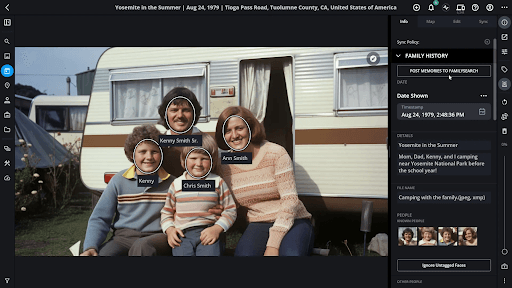
Next in the list of best photo organizers for Mac is AfterShot Pro 2, which organizes and provides a single view of your photo gallery in one place. 

With its powerful batch processing features, it can easily edit and alter images. 

Loaded with sophisticated tools, it can easily search for duplicate files irrespective of their size and location. Compare, filter and delete and save the best shot in a single touch with the photo manager.

Download Now


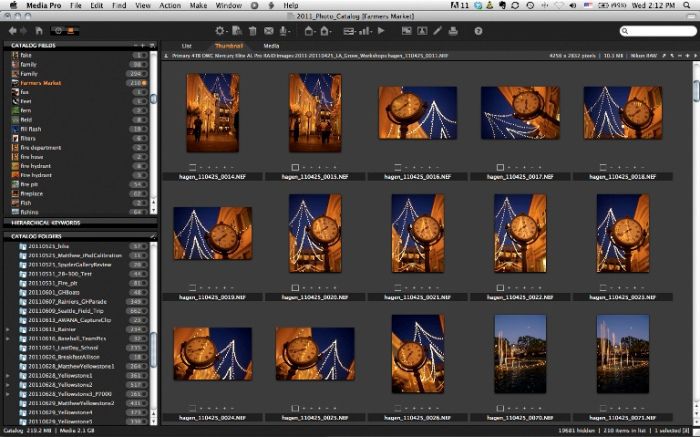
2. Phase OneMediaPro 1

Phase OneMediaPro 1

This forms a decent choice for people who like keeping their photo gallery managed and organized.

Its main features are: 

  • It can convert Raw pictures to BMP, PNG and JPEG format. 
  • It can process, rename and edit photographs in batches. 
  • Its auto-sort feature can quickly sort and categorize images with the help of metadata annotations.

Download Now


3. Nomac

Nomac

This user-friendly and lightweight photo manager is Nomac. It comes with a unique feature to scan and detect images from zip files as well. 

You can adjust color, contrast, and hue with it and use its pseudo color feature to make false-color pictures.

 It uses simple search filters to organize your files and runs smoothly on multiple platforms including Mac, Windows, and Linux.

Download Now

Read More: How to Backup iPhone Photos to Google Photos


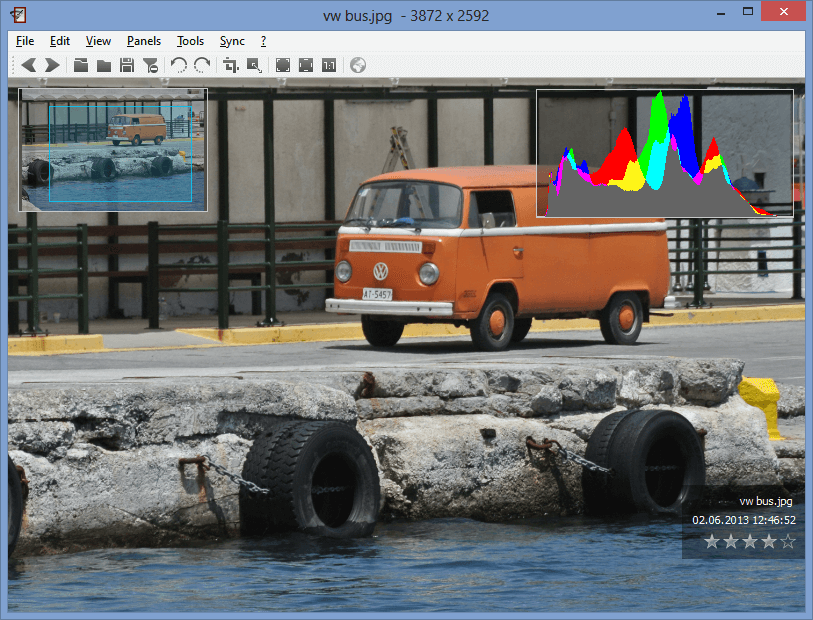
4. Apowersoft Photo Viewer
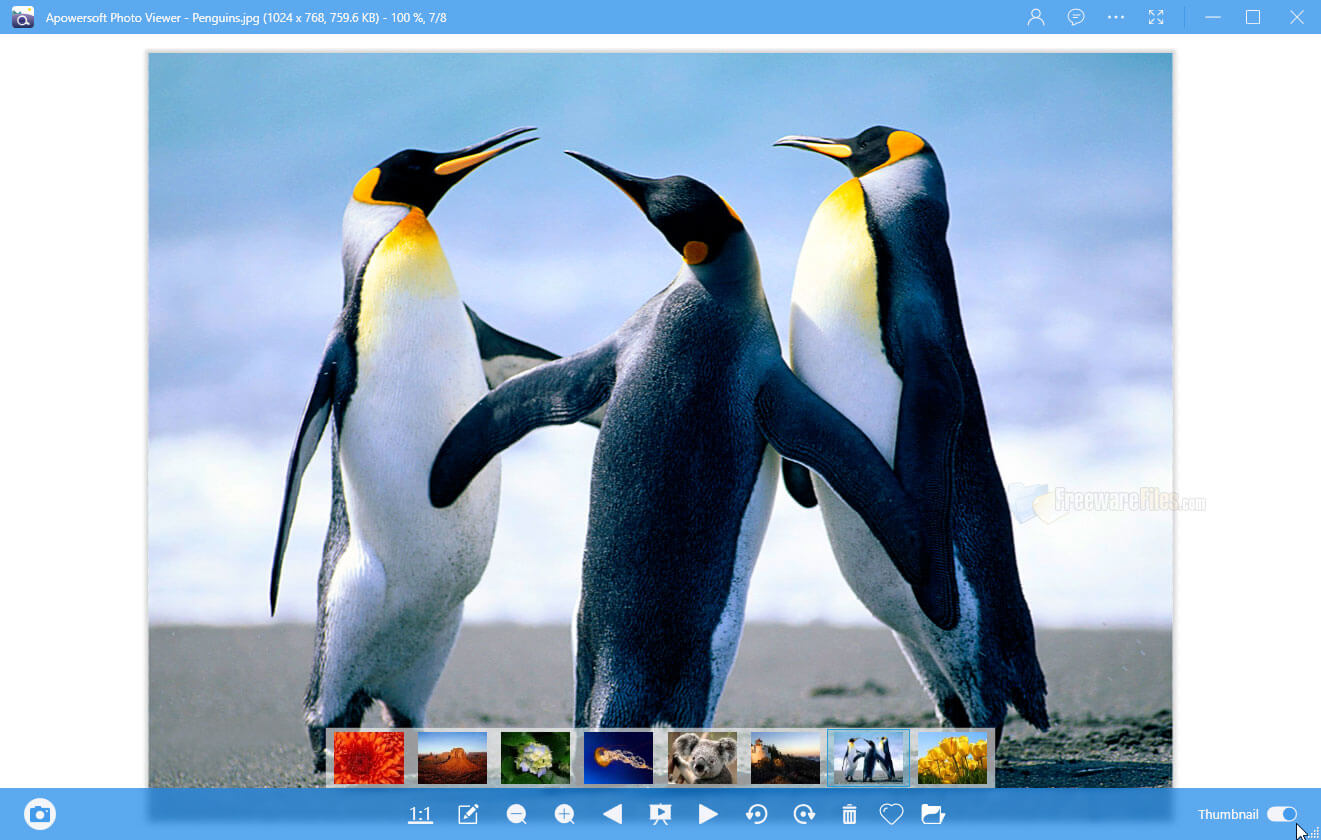
Apowersoft Photo Viewer

This light-weight software works on the minimum resource, which supports smooth and fast performance. It allows you to scroll through large images, choose, edit and process them in batches. 

With its quick screenshot feature, you can easily edit and save the best screenshots. Apowersoft undoubtedly earns a good place in the list of best photo organizers with its minimalistic but robust design.

Download Now


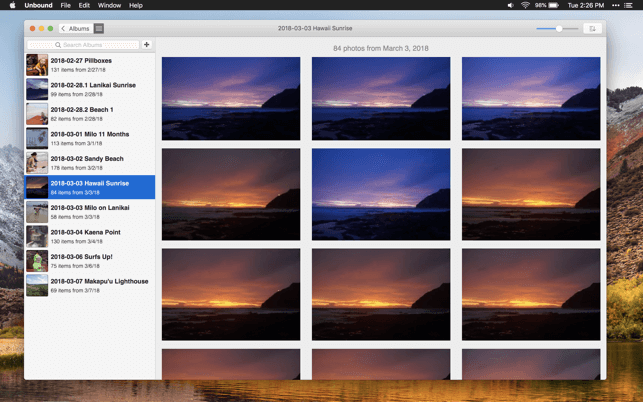
5. Unbound

Unbound

Decently organize your images according to your needs with Unbound. 

It can locate a specific album from multiple options and easily sync your records to your Mac, iPhone, iPad by using Dropbox.

Download Now


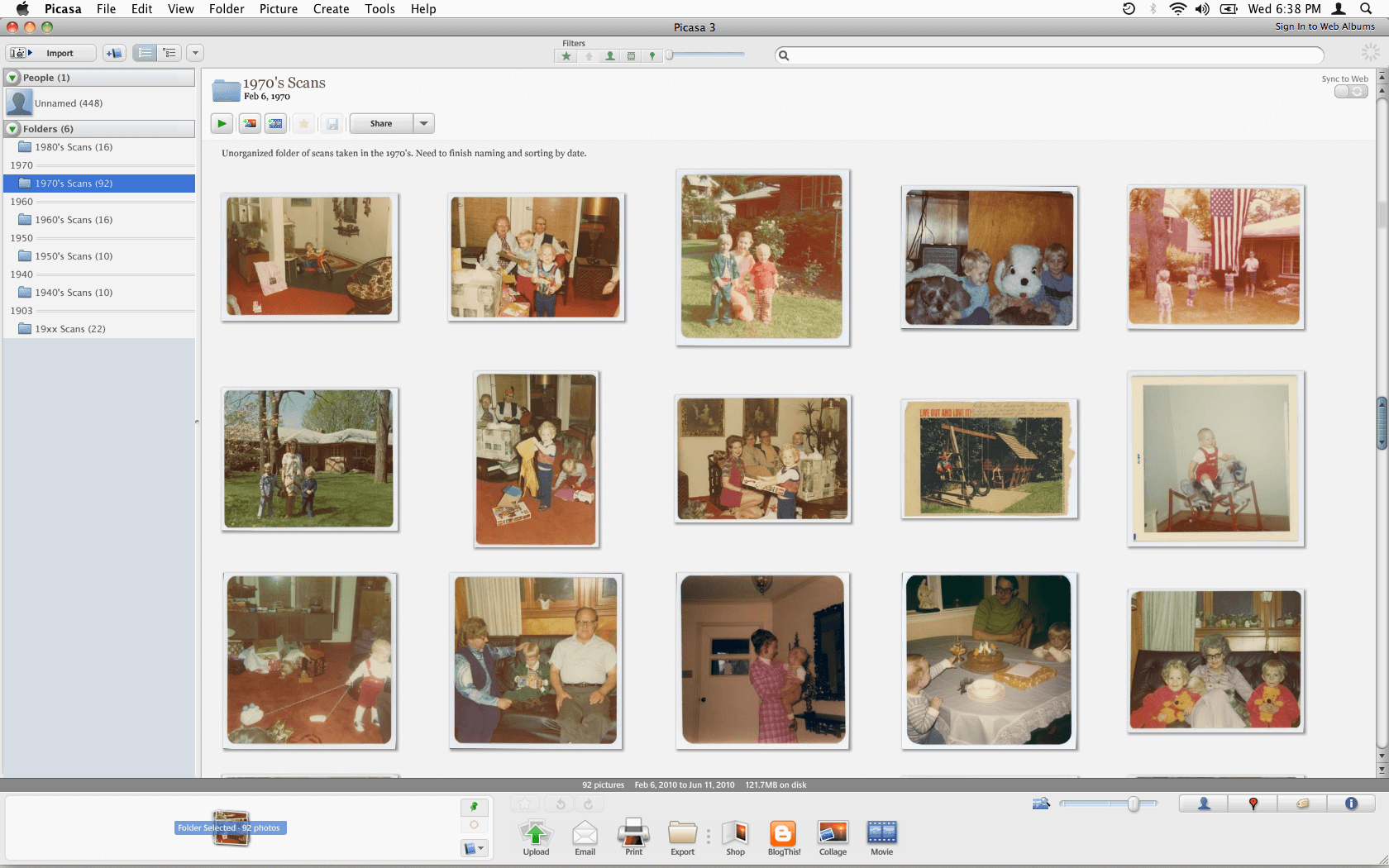
6. Google Picasa 

Google Picasa

This software turns out to be one of the most valuable tools when you are trying to locate the best shot.

This free software can effortlessly arrange your computerized photos and is supported on both Mac and Windows platforms.

Download Now


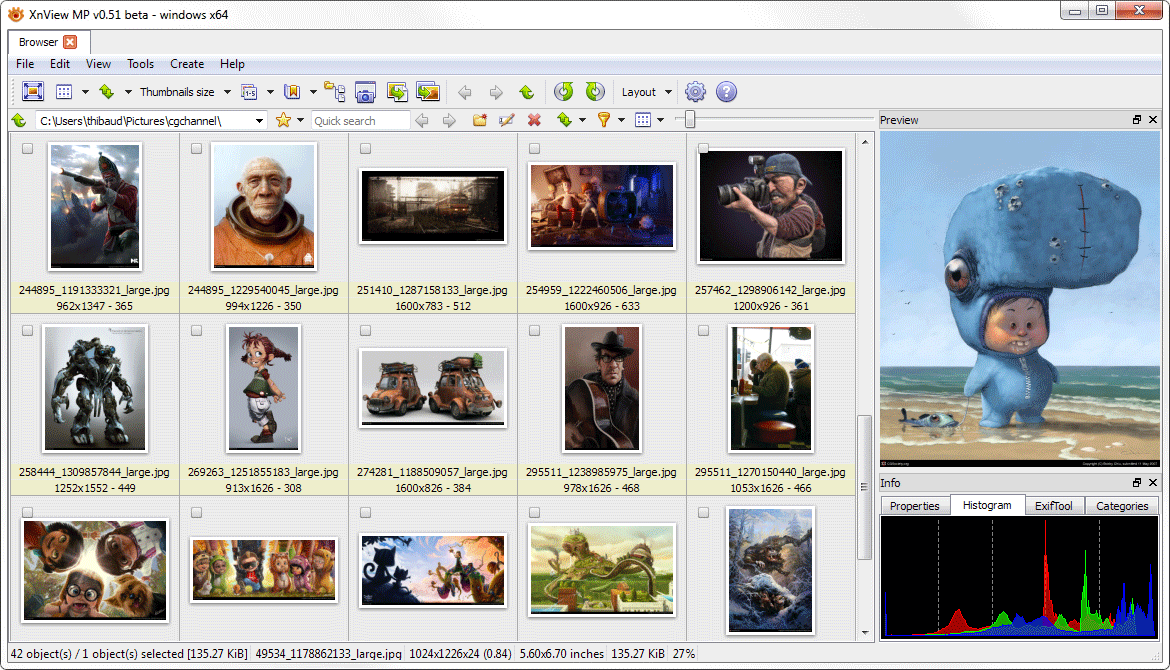
7. XnViewMP

XnViewMP

Released in 1998, this is one of the oldest image managers. Besides organizing, it can also rotate, crop, resize, apply filters and adjust the color of your photographs. 

It is one of the most trusted photo management tools for Mac and comes with an array of sophisticated features.

Download Now

Read Also: Best Free Mac Cleaner Apps


8. Digikam
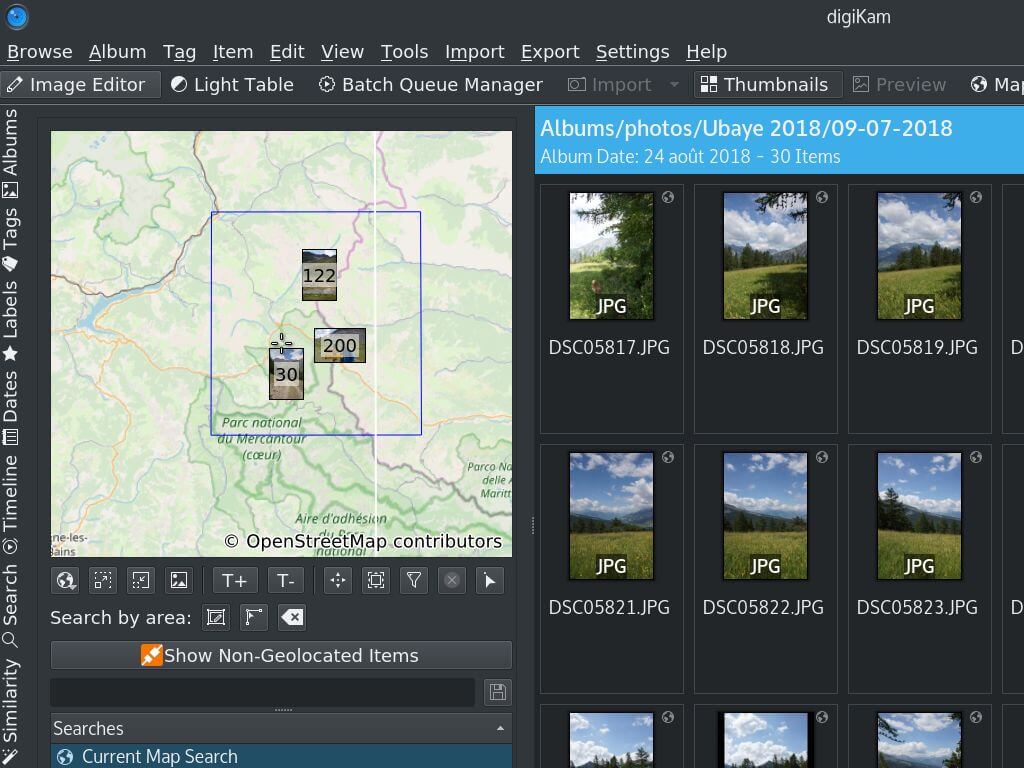
Digikam

Digikam offers all crucial and useful features that one needs to manage their photo gallery. It is supported on Mac OS and Windows platforms.

Download Now


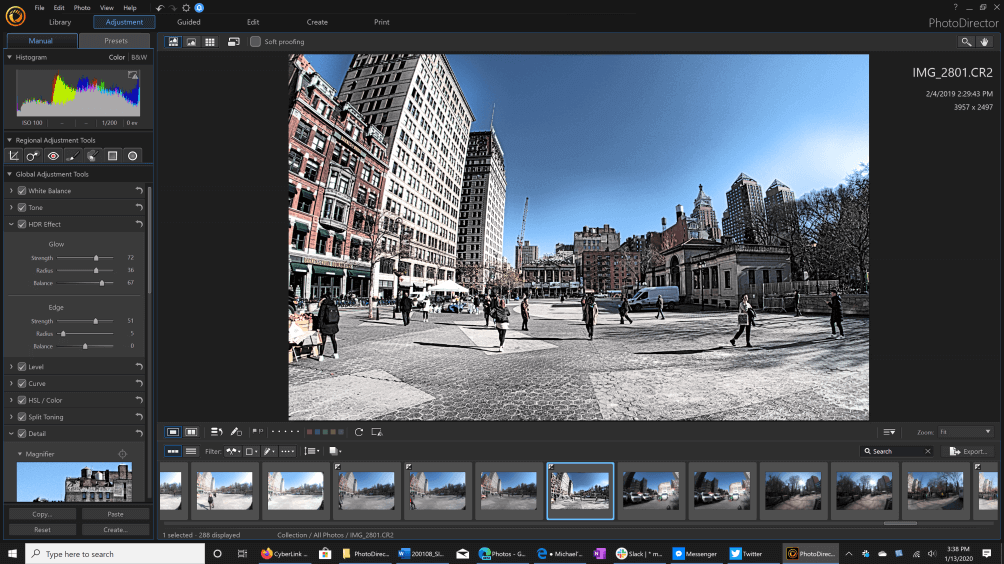
9. CyberLink PhotoDirector 365

CyberLink PhotoDirector 365

The software is a two in one tool for all the users as it offers features of a photo organizer and photo editor. Cyberlink PhotoDirector 365 is a great photo management software. The user can categorize the photos and folder on the basis of keywords, star ratings, color coding, and many others. It automatically categorizes on the basis of date and time, but the user can still change them. 

With the software, you can easily edit photos and can also create slideshows for any social media apps. 

Download Now


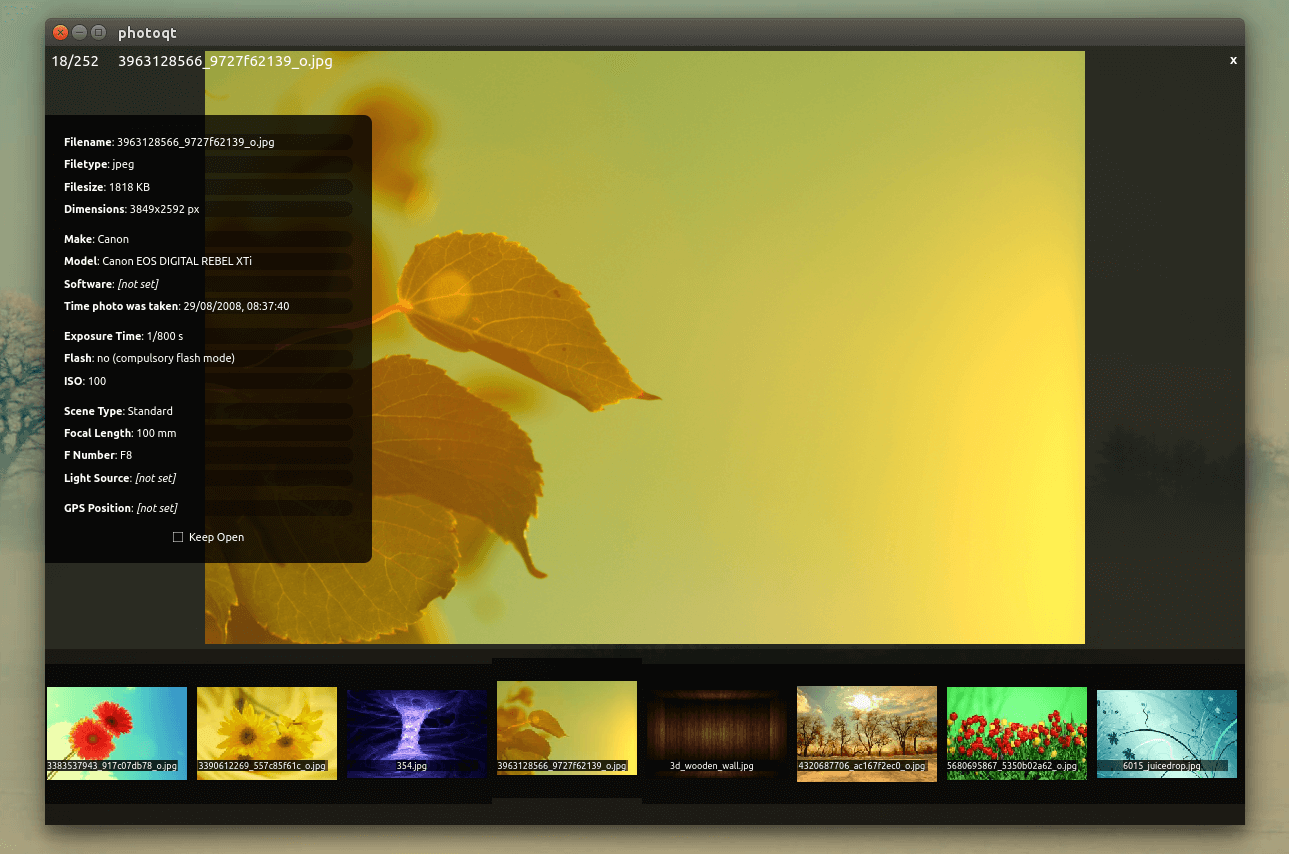
10. PhotoQt

PhotoQt

This photo organizer tool is entirely from other options available in the same category. It can adjust your images automatically, thereby organizing them within seconds. 

This easy-to-use photo manager works on Mac, Windows, and Linux platforms.

Download Now


11. Lightroom

Lightroom

The last name on this list of the best photo organizer software for Mac is Lightroom. Lightroom is much more than just an organizer as it also allows you to edit images and create digital masterpieces with ease. The tool is available for multiple operating systems other than macOS like Windows, Android, iOS, and others.

Download Now


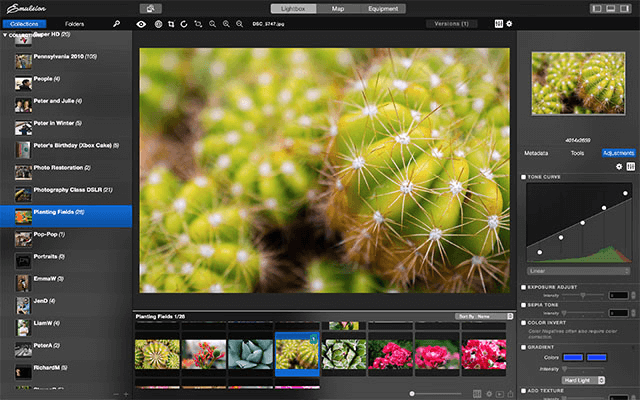
12. Mylio Photos

Mylio Photos

Mylio Photos is another tool that you can try if you are still looking for the best photo organizer software in 2024. This is a cross-platform tool that supports Windows, iPadOS, macOS, Android, and iOS. The interface of the tool is very subtle and minimalistic. Moreover, the tool also allows you to manage the photos present on your device according to the categories of your choice.

Download Now


Conclusion

So, these were some of the best tools that we had to share with you. Each photo-organizing software comes with some other unique features. Above mentioned are a few of the best photo organizer software for Mac, choose one and see which one works best for you. Multiple options are available for you for effective and reliable decision-making. For further information or help, you can contact us using the comments section below. Fill out the form and our experts will get back to you as soon as possible.

10 Best Photo Organizer For MacBest Photo Management SoftwareBest Photo Organizer AppPhoto Management ToolsPhoto Organizer MacPhoto Organizer Software
Author

Prachi Dani

Prachi Dani is a technical content writer who specializes in areas of science and technology. She is highly up to date with technological transitions and transformations. Writing is not her passion but the only thing that carries satisfaction in life. If not writing, you may find her engrossed playing action games on her treasured smartphone.

View all posts

Related Posts
Best OCR Software to Extract Text from Images and PDFs

10 Best OCR Software to Extract Text from Images and PDFs

January 9, 2024
0

Optical Character Recognition or commonly known as OCR technology provides an easy and quick way to digitize handwritten and printed text. So, if you want to electronically convert your PDF images to text, then OCR software should be your go-to-tool.

With these dedicated tools, you can effortlessly manage your paperwork. Moreover, they support several image formats along with file formats such as plain text, word, and excel.

This article talks about 10 handpicked and best OCR Software that can assist you in converting images to text. So, if you have been looking for methods to extract text from images and PDFs, then you are at the correct place.

10 Best OCR Software FREE For Windows, macOS & Linux in 2024

Here is our list of top-notch, reliable, and best OCR software for free to convert images and PDFs to text.

1. Soda PDF Anywhere

Soda PDF Anywhere

Compatibility: Windows & Mac

Next on our list of best OCR software is this highly powerful and professional tool. Soda PDF Anywhere is best known for its simple and user-friendly working. This image to text software can also be used to convert, merge, sign & secure, and edit your PDF documents within seconds.

In addition to this, this cross-platform tool also aids faster working with its batch scanning functionality. Set access permissions and password protect your files with this incredible OCR tool.

Features: 

  • Cross-platform and best OCR Software. Works well on both Mac and Windows.
  • With its OCR feature, you can easily extract and edit text from the scanned documents and PDFs.
  • Page Flipping Technology.
  • Secures documents with its password protection feature.

Pros

  • Easy to use PDF tool.
  • Quickly converts scanned images and documents to editable PDFs.
  • It can split files into individual PDFs and single pages.

Cons

  • It is a paid tool.

Download Now


2. ABBYY FineReader

ABBYY FineReader

Compatibility: Windows and Mac

ABBYY FineReader is backed with a host of useful features that blend perfectly with its intuitive interface. It earns a permanent spot on our list of top OCR software and has been helping small and large enterprises for quite some time. Though beginners and home users might go for a lightweight option.

It comes with all the prerequisites functions that one would require to convert images to text. It offers a simple way of digitizing documents, organizing them, and making them fully readable. It uses advanced AI for better character recognition.

Read Also: How to Change a PDF Document to Word

Features: 

  • Bundle scanning and conversion with minimal efforts..
  • This best OCR software can convert an image to the text within seconds.
  • It can convert documents to PDF and, add annotations and comments, compare documents, and much more.
  • Supports multiple output formats along with multiple languages, to be precise 192 languages.
  • It also works pretty well as mobile apps.
  • Automatically detects the PFD section with extractable text. Extract full or specific text portions using this incredible OCR tool.
  • Image correction functionality, extensive language support, and numerous fonts/ sizes and styles add on to its overall beauty.

Pros

  • Comprehensive software with useful features.
  • Multiple output formats including TXT, EPUB, PDF etc.
  • Uses AI while extracting text from multilingual documents for character recognition.
  • Free 7 day Trial available.

Cons

  • Not an affordable option for beginners.

Download Now


3. Tesseract

Tesseract

Compatibility: Web, Windows, Linux and macOS

Next on our list of best OCR Software for free is this highly advanced and power-packed tool. It uses deep learning techniques to convert images to text and deliver high-end results. It supports multiple image formats such as JPEG, PNG, PDF, TIFF, and BMP files.

What makes this stunning tool even more popular is that it is completely free of cost, which means you can use it to extract text from images and PDFs without worrying about the cost.

Read Also: How to Remove Passwords From PDF Documents

Features: 

  • It can process multiple documents and images at one time.
  • It uses both automatic and manual techniques for data recognition.
  • Edits both searchable PDF and editable text.
  • Supports around 60 languages including Spanish, Japanese, English, German, etc.
  • Batch conversion functionality.

Pros

  • Extremely fast and easy to use.
  • Multiple Language support
  • Intuitive Interface

Cons

  • Does not offer GUI interface.

Download Now


4. Readiris

Readiris

Compatibility: Windows and Mac

If you are hunting for a feature-rich and best OCR tool that can work wonders with minimal efforts, then take a look at Readiris. This professional-grade tool supports conversion into multiple formats including PCX to TIFF, BMP to PNG, and much more.

With this stunning OCR tool, you can also set basic processing parameters including DPI adjustment and smoothening. It determines the text sections in your document and can easily extract the entire file or limited text for you. The extracted text is fully editable and can be saved in various formats including HTM, PDF, DOCX, etc.

Features: 

  • A class apart editing feature along with robust text extraction functionality.
  • With this best OCR software, you can quickly and easily extract the embedded text from your images.
  • Provides a password protection mechanism to secure PDFs.
  • An intuitive tool that helps you edit, split, annotate, sign and aggregate your PDFs.

Pros

  • Multiple text and editing features.
  • Free 10 day trial period.
  • Can process lower resolution images upto 300 dpi.

Cons

  • Can result in errors while processing complex documents.
  • Cloud saving feature is only available with its Pro version.

Download Now


5. Microsoft OneNote

Microsoft OneNote

Compatibility: Windows and Mac

Although Microsoft OneNote is most known as a note-taking application, it is also loved for its OCR goodness. With this best OCR software for free, you can accomplish all the basic text extraction activities at the utmost ease.

Using it is ridiculously easy, and if you are using the desktop version of the application it’s even better. All you need to do it.

  • Add the image using the Insert option.
  • Then right-click on the image and choose the option Copy Text From Picture.
  • This will extract the entire textual content from your image and paste it.

Features: 

  • User-friendly interface.
  • Reliable and best OCR Software for free.
  • Cross-platform image to text tool.

Pros

  • Free of cost
  • Supports multiple image formats including JPG, PNG, TIFF, BMP and much more.
  • Feature rich note taking and OCR application.

Cons

  • It fails to give accurate results for complex images having textual content in the form of tables.

Download Now


6. Google Docs

Google Docs OCR

Compatibility: Windows, Linux, macOS and Web

Surprised? For those who don’t know, Google Docs also comes with an in-built OCR functionality. Although it is not as feature-rich as most of the dedicated tools, it still provides an easy way to convert PDF documents into editable text.

The whole process can be done within a few seconds. Just upload your PDF file, right-click on the uploaded file and choose the “Open With” option. And finally, click on the Google Docs option, and that’s it. The entire PDF text will be converted into editable text and can be accessed from Google Docs.

Read Also: Best Free PDF Editor for Mac

Features: 

  • Simple and straightforward working.
  • Extract text from images easily and quickly with this image to text software.
  • Cross-platform the best OCR software for free.

Pros

  • Top- rated and free OCR software powered with an Intuitive interface.
  • Simple working. It can search , edit and save the extracted text in several formats.

Cons

  • Fails to convert scanned images to PDFs.

Download Now


7. Online OCR

Online OCR

Compatibility: Windows

Yet another popular and best free OCR software is “Online OCR’. It works ridiculously well and can easily convert digital images and photos into text. If you are looking for a feature-rich tool that can extract text from JPG, GIF, TIFF images, and PDFs and convert it into various editable formats then Online OCR is your go-to too.

Features: 

  • Supports multiple output formats including Word, Excel, and Text.
  • It can convert up to 15 images in one hour.
  • It can recognize 32 different languages including Japanese, Korean, Chinese, and many others.

Pros

  • Powerful OCR software with free download.
  • Fast and efficient working.

Cons

  • It can only support input files upto 200 MB size.

Download Now


8. SuperGeek Free Document OCR

SuperGeek Free Document OCR

Compatibility: Windows

Next on our list of best OCR software for free is this incredible tool from SuperGeek. Using this professional tool is extremely easy. It is highly popular for its accurate results and seamless working.

With this top-rated OCR tool you can easily convert your scanned images in BMP, EMF, WMF, TIFF, TIF, JPG, JPEG, PDF formats to fully editable Word and TXT files. This free OCR software also allows you to extract text based on particular search criteria.

Read Also: Best Epub Readers for Windows

Features: 

  • Provides multiple scanning parameters such as File type, Color format, contrast, and brightness.
  • This best OCR software for free also comes with Zoom features to provide better inputs.
  • It also gives you an option to make alterations in the text window, you can copy text to the clipboard, remove line breaks, add words, and much more.
  • High recognition accuracy.

Pros

  • 100 % free OCR software.
  • Supports multiple images and output formats.
  • Easy and efficient working.

Cons

  • Only work on Windows platforms.

Download Now


9. Adobe Acrobat

Adobe Acrobat

Compatibility: Windows, Mac, iOS, and Android

Adobe is popular for its amazing software like Photoshop, Lightroom, InDesign, and many more. The software offers the user immense opportunity and tools to create amazing art. One of the greatest software which the company has made is Adobe Acrobat, the software offers easy to edit, convert, share, and many more tools. 

Features:

Easy to create accessible PDFs 

Meet ISO standards, convert PDF to PDF/X, PDF/A or PDF/E 

Customer support available 24*7  

Pros

  • Create and apply custom action for all your documents.
  • Convert Docx, PPTX, XLXS, jpg, and HTM to PDF with ease.
  • Edit, reorder, delete or adjust the files, the way you want.
  • Free trial available.

Cons

  • Subscription required.

Download Now


10. LightPDF

LightPDF

Compatibility: Windows, Mac, and Linux

Light PDF is the best OCR software as the user can edit and convert various documents with these tools with ease and without even downloading them. The software can be accessed online, and it’s easy to use interface is the USP. 

Features:

No download required to perform an action with this software. 

Easy to convert PDF and Images into different formats including the PPT, TXT, RTF, etc

The software supports many languages 

Pros

  • Free to use software.
  • No installation required for converting files.
  • Every minute a user concerts one file using this software, which means safety guaranteed.
  • Many input and output format supported.

Cons

  • Large files take time to convert.

Download Now


Conclusion

Digitizing handwritten and printed textual content is the need of the hour and can be saved and shared easily. The above mentioned best and free OCR software are specifically designed to cater to this specific need and come with an array of useful features and offerings.

If you want a professional and highly advanced image to text software then we recommend you go with BBYY FineReader, Readiris, and Tesseract. While SuperGeek Free Document OCR, Google Docs, Online OCR are good enough to meet all the basic requirements.

Refer to the above mentioned paid and free OCR software and choose the one that best suits your requirements.

Best Video Editing Software (Free & Paid) For Mac

13 Best Video Editing Software For Mac in 2024

January 1, 2024
0

It can be particularly challenging to find a good video editing software for Mac. Therefore, we have prepared a list of 13 best video editing tools that can assist you efficiently in creating videos for the purpose of sharing them on various video and social media apps.

Video editing can be a tedious task if you lack the right tools and may fail to create the correct impact on the intended audience if not presented well.

Therefore, you need professional video editors that can intuitively enhance your videos. Also, these tools should come with an array of features and offerings to make impressive videos. Let us look at the 13 best video editors available in 2024.

What Are the Best Video Editing Tools For Mac In 2024?

Here are the best video editing solutions for your Mac computer to create beautiful and engaging videos.

1. LightWorks

LightWorks Video Editing Software For Mac

An absolutely free download of this app is possible and there is absolutely no time limit for it. This is one of the best video editing apps for Mac, and for editing a video clip, you can use innumerable sources of audio and video tracks.

Once the video is built, you can play it in the background mode in real time. The entire process sequence is saved on its own and you need not worry about it. LightWorks supports all of the import video formats as well as the export video formats.

You can speed up the process of calculating various chores by using the Graphic Processing Unit (GPU) although LightWorks might require implementation of special drivers and video cards for their proper functioning. This video editor for Mac can edit 4K videos too along with timeline editing.

Read More: Best Free Audio Editing Software For Windows


2. DaVinci Resolve

DaVinci Resolve - Best Video Editing Software

You cannot find a better colour grading app than this one. This video editing software for Mac is replete with professional tools and the colour corrections that this tool provides is extremely intensified with apt stabilization of images.

The free version provides a 60 fps frequency, and the films can be available in standard definition, high definition and ultra high definition mode.

Sound editing had never been so easy, as this video editing app supports fully automated and completely digitized audio workstations. For the sound to operate in a way you want, you don’t have to shut down the software, rather you can keep everything working without any hassles, so in short the sound and the video can operate together.


3. Blender

Blender - Best Mac Video Editing Software

Blender is again an absolutely free video editing software that operates very well with a preset of known functions. These known functions are devised around moving objects like training, modeling, animation, shading of the works, opening the UV radiations and creation of 3 dimensional video games.

The technological interface of this tool is extremely advanced and this professional video editor does not occupy much space; however, the interface might be slightly difficult for the beginners even with this free video editing program for macbook.


4. HitFilm Express

HitFilm Express Video Editing Software For Mac Users in 2020

This is absolutely a free tool for video editing and there are more than 180 special effects to choose from for the video and all this is inclusive of 3D editing. This app can provide masking and lapsing tools and one of the prime features of this video editor for Mac is the creation of composite images. Multi-layer effects can be quite easily integrated.

You can choose from a variety of things including customized playback and pause that makes the playback video run quicker removing the delays that are often encountered while viewing the high resolution videos. There are several new variations like the quality playback, pause of resolution and quality, video resolution, etc.


5. Apple iMovie

Apple iMovie - Best Mac Video Editing Software

An in-built video editing software for Mac, Apple iMovie is extremely user friendly and is the absolute apt app for amateurs. It provides you quality Mac video editing facilities and you have everything to create quality video clips. This video editor is extremely simple and quite innovative.

This app has an intuitive UI and provides you with a great online support system. The Apple iMovie comes with ready to use user guides for use in Mac, iPhone and iPad. It is not good for creating bulk professional videos, and does not support many professional tricks and techniques; however, provides individual support completely.

Read More: Best Video Converter Software For Mac


6. Movavi Video Editor

Movavi Video Editor

Another great software in the list which can easily edit and render videos. Movavi Video Editor is a great video editing software for Mac. Whether you are new to video editing or a professional you can use this software. It offers a very easy interface backed with powerful tools. The best feature about this software is that it takes less time in rendering videos as compared to other software. We have observed that most of the video editing software takes time while rendering.

Using the software you can easily rotate, add audio clips, and can add effects and filters like noise blur, brightness, chromatic balance, invert and contrast. With multilanguage support including English, German, Japanese, Spanish, Korean, Chinese, and many more, you can try this amazing tool.


7. Shotcut

Shotcut - Video Editing Software 2020

If you are looking for collage video making, and trying to edit them with customized filters, then you can use the Shotcut app to create such videos. You can perform the following functions using this best video editing software for Mac such as adjusting the video and audio quality and altering the volume.

You can attain conversion to any of the video format units – WebM, MJPEG, H264 and many more. Quality loss while conversions can also be prevented while using video conversion techniques with this app. You can also adjust the quality of the filters with this app.


8. OpenShot

OpenShot - Mac Video Editing Software

It is a free device to transform Mac video editing. There is an easy drag-and-drop method and OpenShot contains innumerable number of layering and sound mixing techniques. There is a proper balance between the advanced features, which efficiently supports the simple interface.

Video fragments can be incorporated and high quality videos can be created with ease. This video editing software for Mac can be used for professional as well as personal videos and also for training purposes. 

You can mix and match innumerable elements together and there are quite handsome opportunities in creation of quality videos.


9. Avidemux

Avidemux - Best Free Mac Video Editing Software

Our next pick is Avidemux as the best video editing software for Mac 2024. This video editor is designed for video trimming, filtering, and encoding tasks. It supports a large variety of video, image, and audio formats such as AVI, DVD compatible MPEG files, MP4, MOV, ASF, JPG, etc.

You can cut ads from TV recording with this video editing tool. Color correction and filter application are among its other offerings.


10. ZS4 Video Editor

ZS4 Video Editor

When it comes to finding the best video editing software for Mac, then you cannot ignore ZS4 video editor as it can combine a variety of media types into one or more output files.

This software comes with around 150 built-in video effects that can upgrade your videos to the next level without any hassles. With this cross-platform tool you can combine videos, audio as well as photos together.

Read More: How To Disable Autoplay Videos in Chrome and Firefox


11. Filmora

Filmora - Best Video Editing Software For MacOS

Wondershare Filmora is the best online solution for video editing suited for all kinds of video creators. This video editing software for Mac can be used to create personal movies, business presentations, product demos, as well as marketing videos.

You can incorporate overlays, filters, custom titles, transitions as well as adjust audio. You can denoise a video and set keyframes too. Additionally, it supports 4K video editing, multiple footage, and multi-format sources.


12. Adobe Premiere Pro

Adobe Premiere Pro - Best Video Editing Software For Mac

Adobe Premiere Pro is a video editing software for Mac that can support all kinds of cameras, video formats and  platforms.

This tool offers precise color grading, motion graphics, animation, instant audio improvement, apart from integration with hundreds of other technologies. This software also integrates perfectly with the other Adobe products including Adobe’s Creative Cloud.


13. VideoProc

VideoProc

Next in the list of best video editing software for Mac, we have VideoProc. The software works really fast when it comes to editing video and adding effect in video. You can easily create professional videos, teasers, or videos for social media platforms using this software. It has both a paid as well as free version available, you can choose the version depending on your requirement.

The free version offers limited features whereas, on the other hand, the paid version has a big list of features that may attract you to the software. Using the software you can easily stabilize video, remove noise, and lens distortion. Other than this you can also use the basic video editing tools for editing clips. Talking about the format that the software supports, MP4, AVI, FLV, MPG, WMV, and 3GP are supported.


Create Professional-looking Videos With Ease

This is all about the best video editing software for Mac. As you have already seen, the large number of tools mentioned in this article come with various offerings and interesting features to improve and enhance the video quality.

So, you can download a video editing software of your choice and start creating as well as sharing interesting videos on various platforms today.

1 Comment
    Eric says: Reply
    November 12th 2021, 5:05 pm

    Thanks a ton for sharing a list of the best photo organizer software for Mac. This list really helped me a lot to manage and organize my photo library on Mac.

Leave a Reply Cancel reply

Your email address will not be published. Required fields are marked *

Sidebar Image bit G ad1

Latest Posts

  • Anytime Astro: Best Website For Online Astrology Consultation
    Anytime Astro: Best Website For Online Astrology Consultation
    by Somya Shrimal / February 13, 2026
  • Best-McAfee-alternative-software-to-use-for-Virus-Protection
    Best McAfee Alternative Software to use for Virus Protection
    by adminuser / February 11, 2026
  • What-is-Flip-Flop-in-Circuite-and-it's-Types
    What is Flip Flop in Circuit and its Types
    by Meet / February 6, 2026
  • Best-Data-Labeling-Software-to-use-in-2026
    Best Data Labeling Software to Use in 2026
    by Meet / February 2, 2026
  • Best-Google-Slides-tools--to-add-as-extension-in-2026
    Best Google Slides Tools to Add as Extension in 2026
    by Meet / January 30, 2026

Categories

  • Cyber Security
  • Driver Updater
  • Entertainment
  • Fitness
  • Games
  • How To
  • laptop
  • OS
  • Reviews
  • Tech News
  • Tips & Tricks
  • Top 10
Sidebar Image bit G ad1
Top 9 Best WhatsApp Mods You Must Try in 2024 Top 9 Best WhatsApp Mods You Must Try in 2024by Akshara Parnami / January 12, 2024
8 Best Free Keyboard Apps for Android in 2024by Niharika / January 12, 2024Best Free Keyboard Apps for Android
TechPout Footer Logo

We at TechPout promise to put forth stories that help people to learn and simplify their digital life. Our purpose is to share the true essence of technology with our tech-loving community.

Useful Links

  • About Us
  • Contact us
  • Privacy Policy

Popular Posts

  • Best PC Optimizer Software
  • Best Mac Cleaner Apps
  • Best Driver Updater
  • Duplicate Photo Finder and Cleaner Software
  • Best Free Movie Download Sites
  • Best IPTV Players

Follow us

Copyright © 2026 www.techpout.com. All rights reserved
DMCA.com Protection Status