Main LogoLight Logo
  • Reviews
  • Top 10
  • How To
  • Tech News
  • OS
    • Windows
    • MAC
    • iOS
    • Android
  • Categories
    • Driver Updater
    • Cyber Security
    • Games
    • Fitness
    • Entertainment
    • Tips & Tricks
Android Fitness iOS Top 10
by Snigdha

12 Best Calorie Counter Apps to Lose Weight & Boost Immunity

January 2, 2024
1

The right amount of calories can make you fit easily but do you find it cumbersome to count your calories with every meal and snack? Try an incredible calorie counter app to overcome this hurdle on your path to fitness.

In this smartphone dominant world, we have running apps for weight loss, best Zumba apps for dance workout & yoga apps, apps to plan meals and whatnot. Whatever route you take to fitness, it will always prevent you from metamorphosing into a healthier version of yourself if you are not consuming the right amount of calories.

The goal of any fitness regime is to ultimately push us towards a balanced lifestyle that we often forget to prioritize while chasing happiness and success. Therefore, using a smart app for taking care of your daily calorie needs is key to healthy living.

All About Calories:
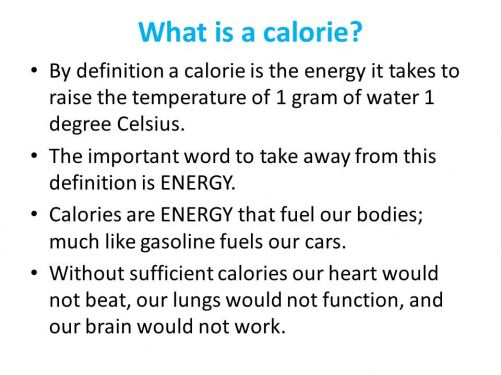
Image Source: Plattershare
  • How much calories are needed by our bodies depends on our age, sex, size, and activity level.
  • As per the United States government, men need an average of 2700 kcal/day while women need 2200 kcal/day.
  • In the US, people consume more than 11% of daily calories from fast food.
  • Empty calories term is used for those food sources which have insignificant nutritional value but high energy value, such as sugars, sodas, fast food, etc.
Table of Contents hide
12 Best Calorie Counter Apps in 2024
1. Fitbit
2. Lose It! – Calorie Counter
3. MyFitnessPal
4. Lifesum
5. Weight Watchers Reimagined
6. Nutritionix Track
7. Fooducate
8. Samsung Health
9. Calory
10.Calorie Counter (Easy Fit)
11. Calorie Counter (MyNetDiary, Food Diary Tracker)
12. HealthifyMe

12 Best Calorie Counter Apps in 2024

Through this blog, let us look at the most striking features of the best calorie counter apps for Android & iPhone in detail.

1. Fitbit
Fitbit - Best Calorie Counter Apps

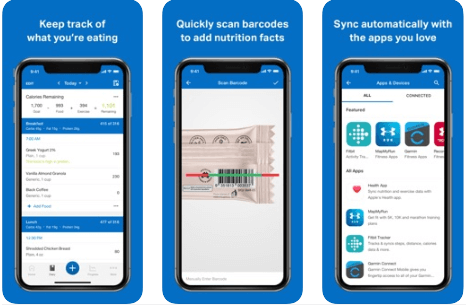
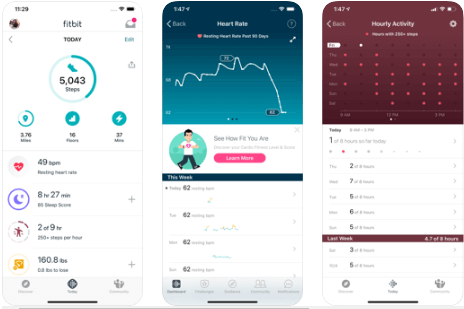
Here is a calorie counter app from Fitbit – the world’s leading brand for fitness tracking products. With this app, you can track your day-long activities and manage all your fitness goals with ease.

Record the number of steps you have walked with MobileTrack. As the Fitbit tracker syncs wirelessly with this tool, it lets you monitor the number of calories burned, your sleep duration, and how much time you have been active throughout the day.

Record workouts, monitor your heart rate with PurePulse, maintain a log of calorie intake, and get an idea of how much calories you are consuming from pre-processed food items with the help of the barcode scanner calorie estimator.

Not only count your calories with this app but also keep a check on your hydration level during workouts. Additional features include sleeping duration monitoring and the MobileRun feature. What makes Fitbit a one-stop solution for fitness enthusiasts is that it can be used to create fitness goals and manage them smoothly.

Android
ios

Read More: 13 Best Meal Planning Apps For Android & iOS


2. Lose It! – Calorie Counter  
Lose It - Best Calorie Counter Apps

Do you want to achieve the right weight and body shape? With Lose It, this is not a very far-fetched goal as it is the best calorie counter app for Android & iPhone users. 

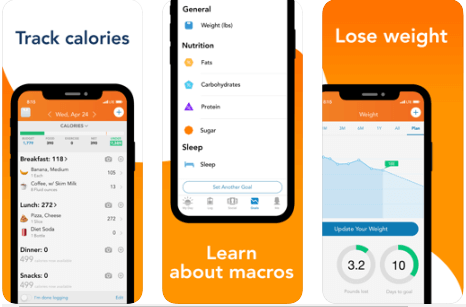
Highly acclaimed by The Wall Street Journal, CNN, Good Morning America and many more, this app lets you track macronutrients, carb, sugar, fat, protein, and the overall calorie intake effortlessly. This app lets you plan your meals, sync your fitness tracker with it and accomplish unlimited possibilities.

Embark on the journey of attaining fitness and staying away from the extra calories with Lose It. This app is highly recommended for those who are on keto, vegan, fasting, or any other kind of diet plan.

This diet tracking app has a Barcode Scanner to estimate the amount of calorie intake. You can also take a snap of your food with the app and let it count the calories you are about to gobble. 

android
ios

3. MyFitnessPal

MyFitnessPal - Best Calorie Counter Apps

An ultimate solution for fitness enthusiasts is here to help you lose weight, get into the right shape and begin a new diet plan. Take a step towards healthier living today by setting the right goal for yourself with this amazing calorie tracker app.

Did you know that you can log menu items from your favorite restaurants now with this app? This app is not limited to just measuring the calories, it can also allow you to log your exercise routines.

MyFitnessPal keeps a track of macro and micronutrient consumption, apart from helping you customize your dairy products intake and also regulating your daily water consumption.

android
ios

4. Lifesum

Lifesum - Best Calorie Counter and Diet Planner  Apps

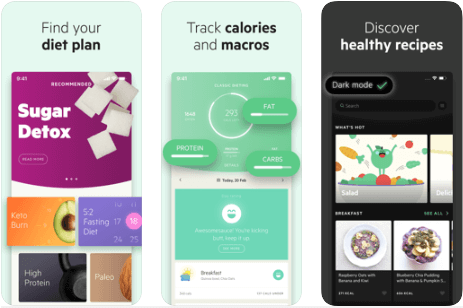
Looking for the best app to count calories? With Lifesum’s top features, you definitely can go on a keto, paleo, fasting or sugar-free diet readily. Count and calculate your calories with ease and get a customized diet plan to lose weight and tone down your body perfectly with this diet planner app. 

Using Lifesum is very beneficial as it integrates with Google Fit and S Health to allow users to export nutrition and exercise data from Lifesum to these platforms. Additionally, you can also sync Lifesum with other fitness apps like Nokia Health, FitBit, Moves, etc.

android
ios

5. Weight Watchers Reimagined

Weight Watchers Reimagined - Best Calorie counter Apps

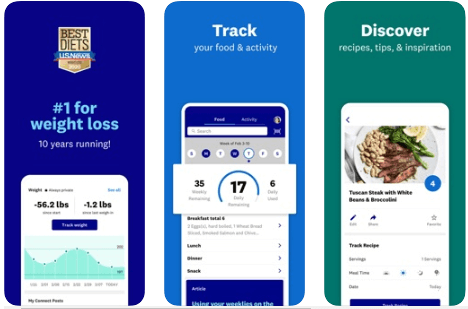
This is certainly the best calorie counter app. Do you know why? Because it has ranked as the no.1 doctor-recommended weight-loss programme in the U.S. 

Like Night Watchers of GOT kept the White Walkers away, similarly Weight Watchers Reimagined will keep the extra calories away. Download the app to access this groundbreaking programme and get a personal evaluation done today. This app will come up with an instant weight loss plan curated just for you.

What’s more interesting is that you will have unlimited access to 24/7 Community & Live coaching. To motivate users further, this app offers rewards points for tracking your food, activity, or weight regularly.

android
ios

6. Nutritionix Track

Nutritionix Track - Best Calorie counter Apps

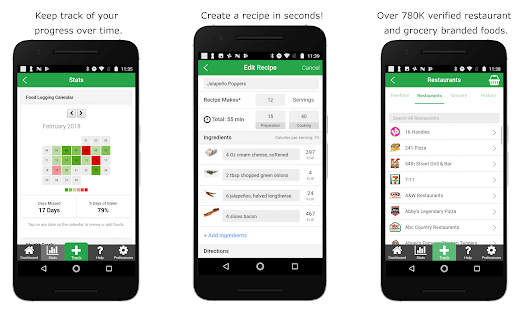
Wouldn’t it be great to have a dietician around to get the most out of your fitness regime? Nutritionix Track makes this possible, as this calorie counter and diet tracking app is designed by a team of registered dieticians.

Unparalleled in its offerings, this app lets you track your food intake, nutrients & calorie intake, exercises & overall activity, as well as water intake. This app facilitates Fitbit sync and downloading data in the form of a spreadsheet with the aid of the Export feature.

The Nutitionix database has 800K+ unique food information. Additionally, you can avail 760+ US restaurant chain menus with this app.

android
ios

Read More: Top 10 Apps To Stay Healthy and Fit


7. Fooducate
Fooducate - Best Calorie counter Apps

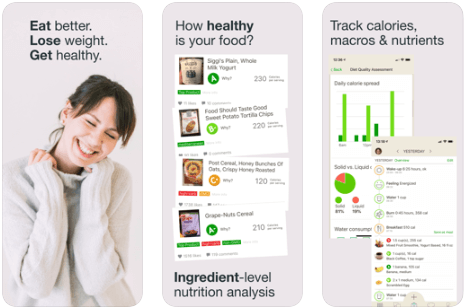
Stop worrying about your daily calorie intake with this calorie tracker app. Monitor your weight, physical activity, and count calories with Fooducate. Besides, you can also integrate this tool with Apple’s Health App.

With a huge food database, this app can quickly provide the nutritional and calorie information of any packaged food item by scanning the barcode. 

It also educates you about the effects of consuming added sugars, trans fats, aspartame (an artificial sweetener), GMO (genetically modified organisms), etc. Thus, it is very suitable for being used by novices.

ios

8. Samsung Health

Samsung Health - Best Calorie counter Apps

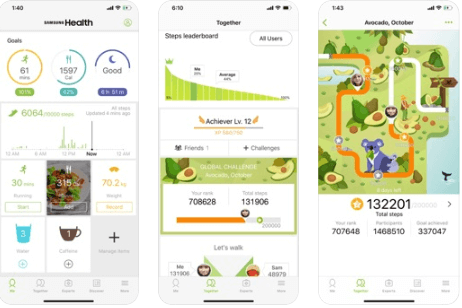
Monitor and control your daily intake of food, water, snacks, caffeine apart from managing your weight with this calorie monitoring app. You can also keep a track of your sleep and stress with this wonderful application from Samsung.

Take note of your daily activities and get in touch with experts effortlessly with this fitness app. Keep yourself fit and healthy without worrying about exposing your private data to prying eyes as Samsung Health monitors your private data securely.

android
ios

9. Calory

Calory - Best Calorie Counter Apps

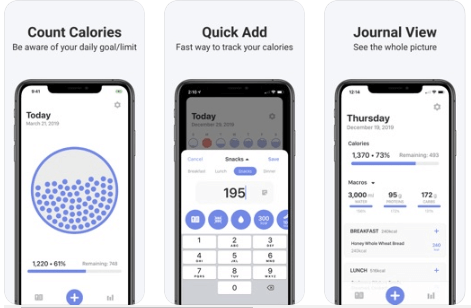
A fun, simple and easy way to count your calories with this calorie counter app for iOS, it suggests a daily calorie intake limit for you based on your weight, height and activity. 

Integrate it with the Apple Watch app and Apple Health easily. Start using the app instantaneously without any registration or sign up needs. Never worry about your private information as Calory stores everything in iCloud.

ios

10.Calorie Counter (Easy Fit)

Calorie Counter (Easy Fit)- Best Calorie Counter Apps

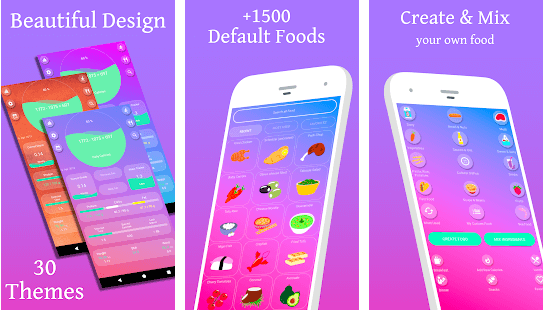
With Easy Fit by your side, you can easily lose your weight and improve your stamina as well as your fitness meters. This free diet tracker app has 2 widgets to incorporate your week’s exercises and your daily calorie intake.

The advantages include a “no list” method. You have got to add the food you want to check. The calorie calculations would be done during the process. You can thus mix and match the foods in a way to create a new meal plan for yourself. 

android

11. Calorie Counter (MyNetDiary, Food Diary Tracker)
Calorie Counter (MyNetDiary, Food Diary Tracker) - Best Calorie Counter Apps

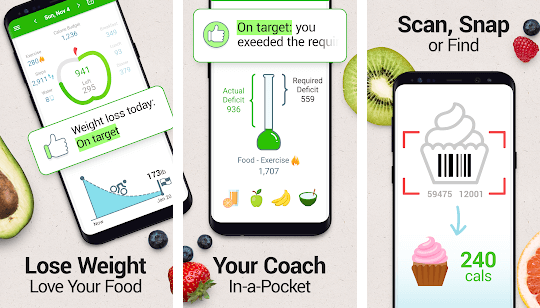
Recognized by the New York Times, as the “simplest, quickest and nicest looking app,” this best calorie counter app for Android can forecast weight, support any form of diet as it has a huge food database, and help you log food easily.

Thus, you can always make the app adapt to the very individualistic and unique needs of your body. This app also includes several blogs from registered dieticians.

android

12. HealthifyMe

HealthifyMe - Best Calorie Counter Apps

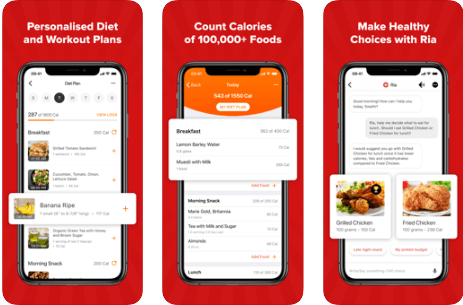
Another top choice among people is this app to count calories. You have to feed the app with your healthy diet sheets and BMI. It would then calculate your apt calorie intakes throughout the day and suggest ways to improve your diet plans and your workout sessions. You can find health advice and recipes on the site as well.

android
ios

Summing Up

Thus, with calorie-tracking apps, you can not only log your food easily but also get a complete insight into the food quality you are consuming and your binge eating habits. These programs don’t just count calories for you but also keep a track of your overall health. Some tools go a step forward to motivate users by offering rewards for doing the right things.

As the famous proverb goes, “A stitch in time saves nine,” so, stop procrastinating, install a diet tracking app on your Android or iOS smartphone today and embrace healthy living.

Image Source: App Store, Play Store

Author

Snigdha

Snigdha is a technical content writer with expertise in the field of science & technology. Though she has a very diverse academic and professional profile yet she finds writing to be a creative form that she was unable to explore so far. When not writing, she can be found indulging in other forms of creativity like painting or travelling.

View all posts

Related Posts
Best Online Learning Platforms | Online Course Platforms

10 Best Online Learning Platforms | Online Course Platforms

January 2, 2024
0

Read on to know the best platforms for online courses and learning to make knowledge gaining and sharing easier.

Forms of learning have changed tremendously over the past few years. Now, you can learn all things ranging from coding to cooking with just a few clicks on your computer from the comfort of your own home. All you have to do is enroll yourself in online learning platforms.

There are a plethora of free online learning platforms available for almost every skill you may want to master. However, selecting the best online learning platforms to suit your requirements may not be an easy task.

To help you pick the right online class platform, we did an in-depth study of all available alternatives. After thorough research, we ranked these platforms for online courses based on their pricing structure, availability of useful add-ons (like mobile applications), and, needless to say, the features they offer.

The next section of this article shares our list of the top online video course platforms you can use to impart/acquire/polish skills, knowledge, or get an education.

Ranked List of the Top Online Learning Platforms in 2024

Below we share the best online learning platforms according to our research and findings.

1. Google Classroom

Google Classroom

An all-in-one online class platform 

The tech giant Google seems to leave no stone unturned to make life and learning easier for almost everyone. The Classroom of Google is one of the best online learning platforms you can find for remote education. No matter whether you are a Pre-K or university level student, this space is pretty useful due to its features, such as virtual grade books, etc. Let’s have a detailed look at what this platform has to offer.

Features of Google Classroom

  • Cloud-based learning platform.
  • Integration with other tools from Google, like Google Docs, Google Drive, etc.
  • Google Meet for classroom-style lectures.
  • Easy assigning, management, submission, and grading of assignments.

Pros

  • Clean interface
  • G-Suite integration
  • Power-packed tools for media sharing

Cons

  • No separate licensing
  • Non-availability of direct support

Also Read: Best Educational Apps For Android Smartphones


2. Thinkific

Thinkific

An easily customizable online course platform 

If you are an educator or someone into an ed-tech business wanting to deliver a better experience to learners, you may trust Thinkific. It is an online platform to create the perfect course that matches your requirements and the needs of your students. We were quite impressed with this platform’s features, like a drag and drop option to organize web content. Below we share all its highlights for you.

Features of Thinkific

  • Easy creation of all forms of learning material, such as quizzes, videos, available for download videos, etc.
  • Course theme selection based on your brand’s style.
  • Option to set course expiry.
  • Complete HTML and CSS access.
  • Support for platforms like Facebook, Google Adverb, and a lot more.

Pros

  • Wide selection of tiers
  • No transaction charges
  • Integrated website builder

Cons

  • No phone application
  • Non-availability of direct support
  • Too basic certificates

3. Adobe Captivate

Adobe Captivate

A feature-rich platform for fast forward learning 

You can think of Adobe if you are looking for one of the best online learning platforms to create top courses within seconds. One thing we liked the most about this platform is its ready-to-use slides. You can add all your content to these pre-designed slides to create stunning mobile-ready courses. Apart from this, below is what you should note about Adobe Captivate.

Features of Adobe Captivate

  • Conversion of PowerPoint content into attractive videos.
  • Easy creation of mobile-friendly courses and virtual reality tours.
  • Screencast creation with on-screen content and video recording simultaneously.
  • All on-screen action recording for simulation module addition.
  • Effortless making of branching for multiple-module courses.
  • Availability of useful tools like quiz slides, text-to-speech, etc.
  • Customizable plugins such as drag and drop, click and reveal, etc.

Pros

  • Free trial for 30 days
  • In-built image editing tools
  • VR project support

Cons

  • Only a few support options are available
  • High-end pricing

4. OpenSesame

OpenSesame

One of the best training platforms to boost workforce efficiency 

Changes in the industry trends and various other factors often necessitate workforce training to keep them challenge-ready. If you are also searching for an online course platform to impart the best possible guidance to your employees, OpenSesame can be a great pick. This software facilitates the creation and management of programs for corporate learning with its following features.

Features of OpenSesame

  • Option to select from over 20,000 courses on various domains, like HR, technology, etc.
  • Integration of previously made courses to your Learning Management System (LMS).
  • Easy integration with LMS.
  • You can select courses with machine learning support.

Pros

  • Intuitive and easy to use
  • Great customer support
  • A lot of content is available

Cons

  • Course searching is a bit tough

Also Read: Must-Have Software For Windows 10


5. Blackboard Learn

Blackboard Learn

One of the most advanced online learning platforms for educators 

For all those wanting to create an interactive learning experience online, Blackboard Learn is among the best platforms available. It provides you with an opportunity to combine classroom and online education in a hybrid environment that fosters interaction between educators and learners. Following are the features that we find the most fascinating about Blackboard Learn.

Features of Blackboard Learn

  • Accessibility tool to make your website ADA compliant.
  • Anti-plagiarism feature to check the originality of student assignments.
  • Visual display options to track the progress of learners.
  • Options like video chatting to boost teacher-student interaction.

Pros

  • Availability of smartphone application
  • Progress tracking
  • One month trial for free

Cons

  • Expensively priced
  • No free tier is available

6. LinkedIn Learning (formerly known as Lynda.com)

LinkedIn Learning (formerly known as Lynda.com)

Best online platform for professional courses 

If you are a professional wanting to expand your skills or an organization looking for a platform to train and educate employees, you can choose LinkedIn Learning. It is among the best online learning platforms with more than 15,000 courses in over 7 languages. Apart from this, below is what else it offers to learners and educators.

Features of LinkedIn Learning

  • Easy learning portal creation.
  • Option to add quizzes in courses.
  • Availability of video, link, and document upload options.
  • Wide selection of course creation templates to choose from.
  • Bit-sized videos to watch on the move.
  • Effortless browsing of popular topics.

Pros

  • Free trial for one month
  • Course completion certificates
  • Availability of a convenient mobile application
  • Self-paced courses
  • Multilingual

Cons

  • No lifetime learning access (you need to pay to continue)
  • Pricing model unsuitable for people taking a single course

7. Coursera

Coursera

One of the best online learning platforms for quality professional development

When the discussion is about professional learning, we cannot skip Coursera. It is among the top online learning platforms to get high-quality professional training from its world-class partner institutions and businesses. Here, you get certifications from renowned universities after successfully completing a paid course of your choice. Moreover, below are its other notable features.

Features of Coursera

  • Availability of more than 4100 courses.
  • You get complete course information before enrollment.
  • Instructors get top-grade educational tools.
  • Coursera offers real courses from esteemed universities.
  • You can also use it as one of the best language learning apps (has a variety of courses to enhance your language skills).

Pros

  • A plethora of learning options
  • Reasonable course pricing
  • Partnership with businesses for job-specific courses

Cons

  • The interface may seem a little outdated

Also Read: Impact of Google Earth on Learning


8. Udacity

Udacity

A renowned name among the best free online learning platforms for skill sharpening 

Udacity is a platform well-known for building and enhancing valuable skills. It partners with global leaders such as Google and Microsoft to help you upgrade your existing technical skills and learn new ones. Moreover, it also offers career advice so that you can shine in your professional world. In addition to this, below we share what else educators and learners can expect from Udacity.

Features of Udacity

  • High-quality content developed in collaboration with Google, Amazon, Nvidia, and other top companies.
  • You get Q & A platform access.
  • Learners get certificates to crow about their newly acquired knowledge.
  • There are more than 200 free courses with real-world projects.

Pros

  • User-friendly interface
  • Discussion forum for students
  • 24*7 mentor support

Cons

  • Not-so-impressive pricing model
  • Limited availability of hand-on-projects
  • No phone app available

9. LearnDash

LearnDash

One of the top online course platforms with WordPress integration 

Next, we have LearnDash on our list of the best course platforms for online learning. It is the name fortune 500 companies and universities trust to create online courses, promote, and sell them. It provides a variety of useful features such as the LearnDash quiz sync. Below is a glimpse of all its noteworthy offerings.

Features of Learndash

  • Availability of eight question types, messages, and other such tools
  • Course arrangement options based on course order.
  • It lets you show text, video, and image hints to learners.
  • You can award the learners for successful quiz completion.
  • Reviewing questions and answers.
  • It allows you to share quiz results with group leaders, users, and admin.

Pros

  • Flexible pricing structure
  • A plethora of management tools
  • Supports all WordPress themes
  • PayPal and Stripe payment gateway compatibility
  • Options to install premium extensions and add-ons

Cons

  • No free trial
  • Unavailability of video conferencing tools
  • Third-party plugin integration necessary to provide better payment options

10. LearnWorlds

LearnWorlds

Among quick and customizable platforms for online courses 

Now, let’s talk about LearnWorlds. It is another great platform for creating online courses and selling them. With this platform, you can customize your course’s look and feel much more easily than you may have thought. Below is a description of its features that make course creation an effortless process.

Features of LearnWorlds

  • Complete package of eCommerce, course creation, and website building tools
  • Easy theme, logo, and style customization according to your brand.
  • It allows you to make use of CSS and JavaScript for course page editing.
  • With LearnWorlds, you can offer free courses to learners.

Pros

  • Multiple language support
  • Customization option for notifications
  • Ready to use catalog of courses
  • Unlimited course creation

Cons

  • No instant support in lower-end packages
  • The website builder has a bit buggy typing feature

Also Read: Best Free PDF Editing Software For Windows


Above were our top picks for the best online learning and course platforms. If you have any questions, you can find their answers in the next section dedicated to the common user queries.

Frequently Asked Questions

Below we try our best to answer all the questions you may have regarding the best platforms for online learning and courses.

Q1. What are online learning platforms?

Simply put, an online learning platform is a system where students can take various courses to enhance their skills in a safe environment. They are also referred to as online course marketplaces because you can use them to search for and enroll yourself in an online course.

Q2. What are the best online learning platforms?

All the platforms shared in this article are best for learning in some way or another. You can choose any of them depending on your specific needs.

Q3. What are online course platforms?

The term online course platform means a Learning Management System (LMS) that you can use to create online courses, host, and sell them to the target audience.

Q4. What are the top online learning platforms for kids?

If you are interested in the top-class online learning platforms for kids, the following can be the best picks.

  • Code with Google
  • iRobot Education
  • Epic
  • Code Monkey
  • ABCmouse

Concluding the Best Online Learning and Course Platforms

In this article, we acquaint you with the most sought-after online learning platforms. You can judge them in the light of your requirements to select the perfect platform.

If you know about any other platform that deserves to be on this list, kindly notify us through the comments section.

To get information about other useful software for your various needs, stay tuned to TechPout.

Best-Free-Email-Automation-Tools-and-Software

Best Free Email Automation Tools and Software

September 20, 2024
0

This article lists and explains the best automation tools for emails to ensure successful email marketing with the minimum possible effort. 

Emails are an effective way to reach potential customers and maintain strong relations with the existing ones. Even in 2024, emails are a significant content marketing channel for both B2B and B2C markets. However, creating personalized emails for hundreds of people, sending emails, and ensuring the emails do not end up in the spam folder is a challenging task if performed manually. Hence, the use of the best email automation software tools is always recommended.

These tools help with effective email marketing by automating the creation of personalized emails, email sending, and ensuring the emails land right in the receiver’s inbox, saving valuable time and effort.

However, before selecting an email marketing service, it is important to check if or not the service offers unlimited email campaigns, its features, the number of subscribers it allows you to email, available automation options, availability of customer support, and the scope for service scalability.

We compiled a list of the best tools to automate emails, keeping the above factors in mind. Let us walk you through it in the following section of this article.

Well-Researched List of the Best Email Automation Software (Free)

Below are our top picks for the tools you can use to automate the emails for an effective marketing campaign.

1. HubSpot

Let us introduce you to HubSpot. It is among the best free email automation tools for segmentation, with everything you may need to make an email marketing campaign successful. HubSpot allows you to design and send emails with drag-and-drop editors and pre-built templates, write subject lines and email copy with AI, and offers the following incredible features.

Key features of HubSpot

  • It is an extremely easy-to-use email automation and marketing tool
  • This software boasts integration with other useful HubSpot tools
  • The paid version of this software offers additional features, such as analytics, landing page builder, and a lot more

HubSpot

Click here for more information 


2. Sender

Next, we would like to name Sender as one of the best software for email automation to run email marketing campaigns for 2,500 subscribers and send up to 15,000 emails/month for free. Moreover, sending campaigns for abandoned carts, shuffling subscribers among various lists, and the following features justify this tool’s position on this list.

Key features of Sender

  • It lets you update custom field values
  • Sender boasts a visual automation builder
  • There are ready-to-use customer journey templates
  • It supports easy audience segmentation according to behavior and demographics to create personalized emails

Sender

Click here for more information 

Also know: Best Free Email Apps for Mac in 2024


3. Moosend

Let us take a look at Moosend. Recognized as a renowned email automation software, Moosend makes email creation easy with an easy-to-use drag-and-drop email builder, boasts more than 110 responsive templates for email newsletters, and offers the following delightful features.

Key features of Moosend

  • You can eliminate cumbersome tasks with marketing automation workflows
  • It supports email list segmentation
  • Moosend boasts online forms for improved lead generation
  • It lets you monitor performance in real time with in-depth reporting and analytics

Moosend

Click here for more information 


4. Brevo (formerly Sendinblue)

Brevo is an all-in-one tool to automate emails and manage your customer relationships through email, chat, SMS, and more. With easy-to-use software, you can send up to 300 emails a day for free. Moreover, a drag-and-drop editor and the availability of ready-made templates make email designing a cakewalk.

Furthermore, it helps you leverage the power of artificial intelligence to create better email content effortlessly. Additionally, below are a few other reasons why we chose Brevo as one of the best email automation tools.

Key features of Brevo

  • It allows you to analyze each email’s performance with detailed statistics
  • Brevo boasts powerful segmentation to make sending targeted messages to various segments easier
  • It offers round-the-clock customer support from real humans in 6 languages

Brevo

Click here for more information 


5. Mailchimp

Here is another software for automating emails, called Mailchimp, to help you convert emails into revenue. It helps you dynamically personalize emails according to your target audience’s browsing and purchase data, create on-brand content faster with generative AI, choose from professionally designed templates, and leverage the benefit of the following features.

Key features of Mailchimp

  • It lets you refine emails with segmentation based on the target customer’s buying behavior, spending amounts, and predicted attributes
  • Mailchimp offers Canva, Instagram, Shopify, Google Analytics, and 300+ other integrations

Mailchimp

Click here for more information 


6. Omnisend

You can choose Omnisend if you are searching for email automation software for an e-commerce business. It offers 500 emails per month for up to 250 subscribers in the free plan, automatic branding for emails and popups, user-friendly drag-and-drop content blocks for easy email creation, and the following incredible features.

Key features of Omnisend

  • There are tools like the Product Picker to help you design impressive newsletters
  • It allows you to add scratch cards, gift boxes, and other cool add-ons effortlessly
  • You can automate workflows or use pre-made workflows for welcome, post-purchase, and cart abandonment workflows
  • It provides you with analytics and reporting to help level up your email marketing

Omnisend

Click here for more information 

Also know: How to Fix Phone Calls are Going Straight to Voicemail


7. MailerLite

Skipping MailerLite is a challenge when it comes to automating emails for selling digital products. With 12000 emails per month for 1000 subscribers and A/B email testing, MailerLite is a renowned tool because of its easy-to-use drag-and-drop editor, simple UI, availability of a rich text editor, and the following features.

Key features of MailerLite

  • You can create attractive newsletter images with the photo editing tool of MailerLite
  • It offers features such as contact tagging and advanced segmentation
  • There is a page builder for unsubscribes
  • MailLite boasts effortless subscriber management
  • It has highly effective subscription forms to help you grow your audience
  • MailerLite comes with Stripe, Zapier, Shopify, WordPress, WooCommerce, and many other integrations

MailerLite

Click here for more information 


Concluding the Best Free Email Automation Tools

This article guided you through the best software to automate your emails for effective and successful marketing campaigns. Hopefully, the above list is exactly what you need. However, if you know any better tools or have any questions, you can write us a comment.

1 Comment
    Shawnda Colindres says: Reply
    March 28th 2020, 10:02 pm

    The 16 Best Calorie Counter Apps To Lose Weight & Boost Immunity article is one of the best I have ever read! I found a way to lose weight with yoga, You are doing a great job Congrats!

Leave a Reply Cancel reply

Your email address will not be published. Required fields are marked *

Sidebar Image bit G ad1

Latest Posts

  • Anytime Astro: Best Website For Online Astrology Consultation
    Anytime Astro: Connect Now For Online Astrology Consultation
    by Somya Shrimal / March 13, 2026
  • Best-Ways-to-Combine-Images-Into-PDF-Files
    Best Ways to Combine Images Into PDF Files
    by Niharika / March 12, 2026
  • Best FREE VPS Hosting Providers
    7 Best FREE VPS Hosting Providers in 2026
    by Devesh / March 12, 2026
  • Best-McAfee-alternative-software-to-use-for-Virus-Protection
    Best McAfee Alternative Software to use for Virus Protection
    by adminuser / February 11, 2026
  • What-is-Flip-Flop-in-Circuite-and-it's-Types
    What is Flip Flop in Circuit and its Types
    by Meet / February 6, 2026

Categories

  • Cyber Security
  • Driver Updater
  • Entertainment
  • Fitness
  • Games
  • How To
  • laptop
  • OS
  • Reviews
  • Tech News
  • Tips & Tricks
  • Top 10
Sidebar Image bit G ad1
Best Data Recovery Software for Mac 9 Best Data Recovery Software for Mac in 2024 (Free and Paid)by Devesh / January 2, 2024
16 Best Mp3 Splitter tools to Split and Join Mp3 Files in 2024by Prachi Dani / January 2, 2024Best Mp3 Splitter tools to Split and Join Mp3 Files
TechPout Footer Logo

We at TechPout promise to put forth stories that help people to learn and simplify their digital life. Our purpose is to share the true essence of technology with our tech-loving community.

Useful Links

  • About Us
  • Contact us
  • Privacy Policy

Popular Posts

  • Best PC Optimizer Software
  • Best Mac Cleaner Apps
  • Best Driver Updater
  • Duplicate Photo Finder and Cleaner Software
  • Best Free Movie Download Sites
  • Best IPTV Players

Follow us

Copyright © 2026 www.techpout.com. All rights reserved
DMCA.com Protection Status