Activation lock in mac appeared to prevent thieves from using stolen apple devices. Activation lock should be removed before selling or passing on the Mac.
It acts as a safeguard that locks your device with your Apple ID. The activation feature works with Find My Network on Apple. If you have not disabled Find my manually, the MacBook Activation Lock is already enabled on your device. This feature in Mac prevents your device from being used by someone as long as the option is enabled. To activate the Activation Lock in MacBook, you should enter the account password of your Apple ID. If you do not remember your Apple ID or password, you have to recover it from the iforgot.apple.com website.
Mac models with Activation Lock
Models with Apple Silicon Mac use Activation Lock. Starting from 2020 to 2021, all models have Activation Lock on MacBook. Upcoming models will also have these features because of the system-on-chip design.
Let us see how to remove the Activation Lock.
Removal of Activation Lock in macOS
If you have reinstalled macOS, enter the password of your Apple ID. In simple steps, removal of Activation Lock of MacBook goes like:
- Go to your device System “Setting”
- Click on your name
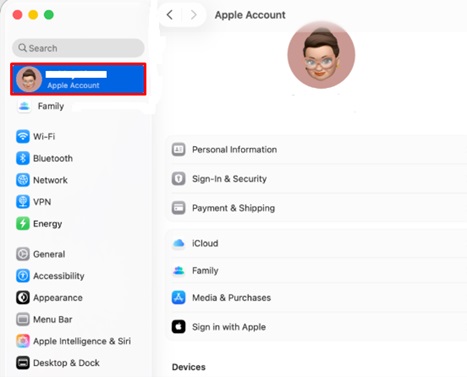
- Then choose “iCloud”
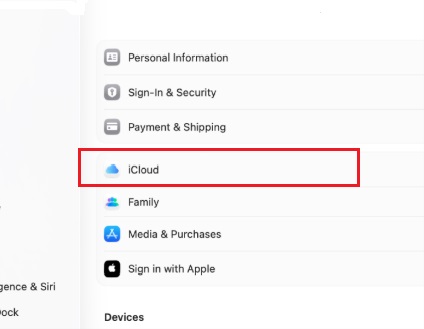
- Hit the “Find My Mac” option
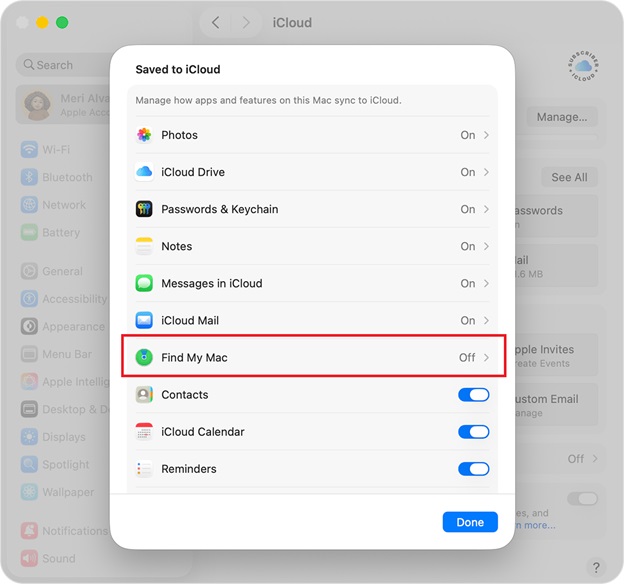
- And tap on “Turn Off”
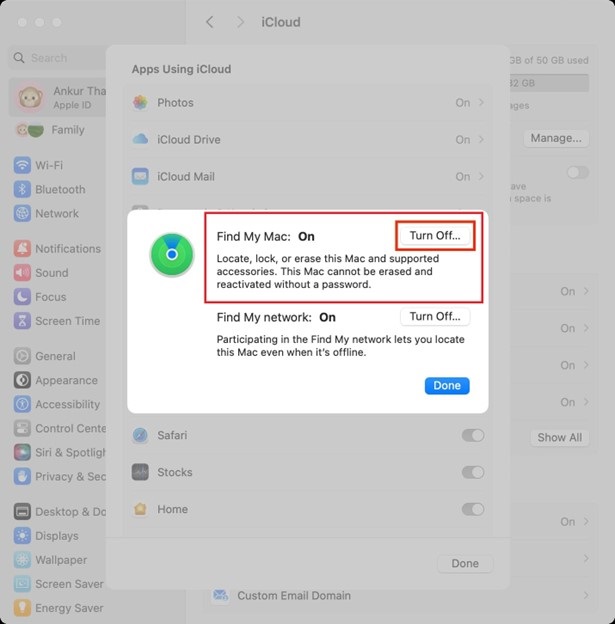
- Enter your Apple ID and password to proceed.
Removal of Activation Lock using iCloud
You can also remove your Activation Lock from MacBook using another device with Find My. It is done on the web at iCloud.com/find or on the iPhone, where your Find My app is linked to the same account. Once you log in, find your Mac in the list of devices shown. After that, choose “All devices” at the top of the screen. After choosing your Mac device, click the “Remove from Account” option to remove the device from your iCloud account.
Also know: Best File Shredder Software For Mac
Ask Apple to Remove Activation Lock on MacBook
If not the above options, go to Apple’s website to make a request saying, “start an activation lock support”. For this, you must have proof of purchase of your device. Apple will ask you for your device’s serial number to proceed further.
If you choose this way, all your data on the device will get erased as part of the process and security.
Avoid Buying a Mac
If you are planning to buy a second-hand Mac, make sure that the seller has disabled MacBook Activation Lock from device. Generally, Mac requires login and setup after factory reset, but make sure that the details of the previous owner are deleted and if not, follow these steps:
- Go to System Settings
- Then click on your name
- Then, tap on iCloud
- Go to Find My Mac
- Click on Turn Off
Avoid Selling your Mac
If you are selling your Mac, removing Activation Lock MacBook is also advised. If you sell your device without removing Activation Lock MacBook, you can always remove it from your account using Find My on another device or the web.
Remove Activation Lock from different device
You can remove Activation Lock from different Apple devices, like an iPhone or an iPad. You can remove a feature from your Apple Watch through the app on your iPhone.
Activation Lock Bypass Code
It is one of the easiest ways to remove Activation Lock through MDM. With bypass code command, the Activation Lock supervised by an Apple device and remove it remotely if Apple ID and password is missing or unavailable.
Also know: Mac CPU Temperature Monitor Apps to Fix Macbook Overheating
How to use the Bypass Code?
- Set up the device in Apple manager
- Set-up MDM
- Find the bypass code
- Enter the bypass code
- Reset your device
How to use the bypass code with SimpleMDM
- Go to the “Devices”.
- Click on the device you want to unlock.
- Choose Action button in Device Detail Page
- Select Disable Activation Lock from the drop-down menu.
- Tap OK to proceed.
Frequently asked questions
What is Activation Lock?
Activation Lock in Apple is connected to the user’s iCloud account. When Find My Mac is enabled on a device, the Activation Lock turned on. This feature locks the device to the user’s Apple ID.
Why is it necessary to remove Activation Lock?
It is important to remove activation lock before buying from another user or selling your device to another user because it contains all of your data and it is connected to your apple ID.