Main LogoLight Logo
  • Reviews
  • Top 10
  • How To
  • Tech News
  • OS
    • Windows
    • MAC
    • iOS
    • Android
  • Categories
    • Driver Updater
    • Cyber Security
    • Games
    • Fitness
    • Entertainment
    • Tips & Tricks
Android iOS Top 10
by Monil

6 Best Selfie Apps for Android and iPhone 2024

February 5, 2024
1

When it comes to clicking a selfie, you want to put your best face forward.

With the rise of image-centric social networks such as Instagram and Snapchat, an intuitive and easy-to-use selfie app is essential to make yourself look better, plus to add some awesome effects to your photos.

Whether you are trying to get more likes on Facebook or simply looking for the best way to record special moments with friends and family, you can use the best selfie camera apps for Android & iOS to capture better-looking selfies.

With the plethora of free selfie apps available online, it gets tough to choose the right one.

If you don’t know which app is best for taking a selfie, then you don’t need to worry anymore as we’ve done all the heavy lifting to help you pick the best selfie app that can help you turn your ordinary pictures into something extraordinary. 

Here’s the list of the best photo editing apps for selfies which can help you make subtle changes to your face like brighten dark circles, remove pimples and blemishes, whiten teeth, skin tone adjustment, and much more.

Table of Contents hide
5 Best Selfie Apps to Make Your Photos Look Better in 2024
1. AirBrush

2. Facetune2
3. YouCam Perfect
4. Retrica
5. Cymera Camera
6. BeautyPlus

5 Best Selfie Apps to Make Your Photos Look Better in 2024

1. AirBrush

AirBrush

In today’s highly competitive marketplace, AirBrush is undoubtedly one of the world’s best photo editing app for selfies that offers amazing tools and filters to make your photos worth sharing.

With this easy to use photo editor, you get the most natural, user-friendly retouch tools, photo effects, and filter options like celestial & element filters, artistic retouching features, blemish and acne remover, gorgeous bright eyes & light effects, etc.

Read Also: 15 Best Duplicate Photo Finder and Cleaner Software for Windows 

AirBrush allows you to take your selfies to the next level by eliminating pesky imperfections like pimples, blemishes, enlarged eyes, and more to get the perfect selfie every time.

With professional filter and photo effect tools, AirBrush is indeed a huge contender for the top spot in this list of best selfie editing apps.

Download App: iOS


2. Facetune2

Facetune2

If you’re looking to create the perfect portrait or capture better-looking selfies, then Facetune2 could be the perfect option for you.

Facetune2 is an award-winning selfie camera app that offers amazing photo editing tools to help you get rid of blemishes, pores, and pimples with the few swipes of a finger.

Facetune2 with its super-advanced technology ranks among the best beauty editing apps available on the market, offering every magical retouching feature and editing tools to give your selfies a more natural touch.

Download App: Android and iOS


3. YouCam Perfect

YouCam Perfect

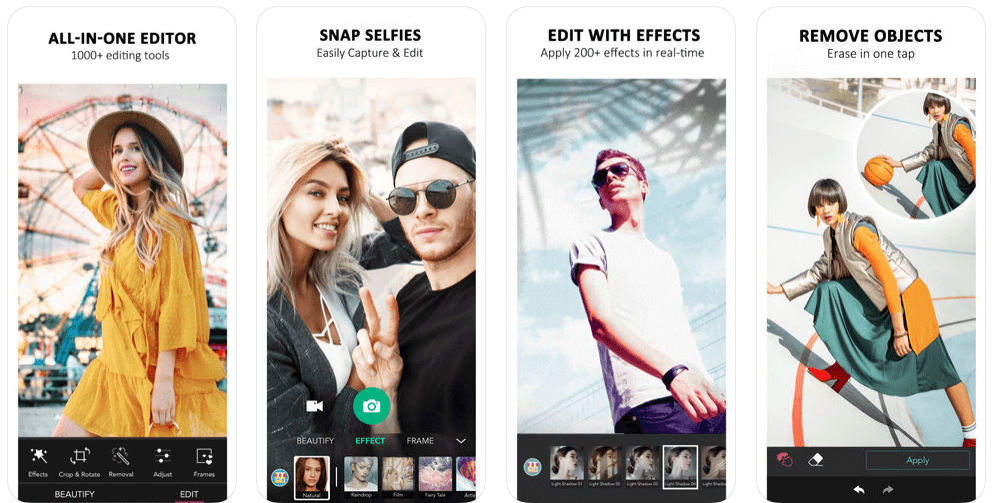
With more than 300 million users, YouCam Perfect is one of the world’s best selfie camera apps which offers an amazing set of photo editing features to turn your basic pictures into masterpieces.

YouCam Perfect brings you the complete photo editing tool kit including 1000+ photo effects, filters, magic brush, stickers, cut-out, watermark, object remover, and more.

So, if you’re looking for a photo editing app with you can beautify your photos, create amazing collages or frames, and capture video selfies in real-time, then YouCam Perfect is a top choice for you.

Download App: Android and iOS


4. Retrica

Retrica

Retrica is one of the most popular selfie editing apps which gives you a variety of beautiful camera filters to make your selfies more special.

Read More: 9 Best Apps To Blur Photo Background on Android & iOS

Retrica also offers a variety of fascinating features like zoom blur effects, time stamping, viewfinder, insight, different colors and lights, and more.

So, if you’re looking to capture better-looking selfies with mesmerizing filters, then Retrica has you covered.

Download App: Android and iOS


5. Cymera Camera

Cymera Camera

With more than 200 million users, Cymera is a perfect beauty camera app that allows you to turn your basic selfies into wonderful moments.

Cymera gives you all the professional photo editing tools you need – selfie filters, blur & mirror photo effects, face stickers, makeup, hairstyles, tattoos, face & muscle effects, etc.

This smart selfie camera comes with a wide range of camera lenses & beauty tools that gives your face a more natural-looking glow. 

Cymera might come last in the list of best selfie apps, but it is definitely worth a try.

Download App: Android and iOS


6. BeautyPlus

BeautyPlus

BeautyPlus is yet another best selfie cameras & photo editors and is used by 800 million users worldwide. The app features a wide range of editing tools and totally free-to-use content for video and photos. It has 50+ powerful editing tools for instant and amazing results. Additionally, it is super intuitive and simple for anyone to get started.

The app provides over 200 stunning effects and themed filters to help you make diversified styles with much ease. You can also add patterns or background colors to level up your pictures. Not only that, but with BeautyPlus you can explore numerous templates and recreate trending edits in just one tap. Furthermore, its smart AR technology will automatically identify faces in a picture and apply the effects accordingly. Thus, it makes your selfies unique and attractive. Creating natural and beautiful picture & video selfies has never been so easy. Try BeautyPlus now and instantly capture great-looking perfect selfies.

Download App: Android and iOS


Final Verdict: Best Selfie Apps

The aforementioned apps are some of the best selfie apps for Android & iOS on the basis of ease and popularity.

You can get all of these selfie camera apps on the Google Play and App Store for free; use them and change the look & feel of your selfies with mesmerizing filter & photo effect tools.

So, what are you waiting for? Pick your favorite & make your selfies worth sharing!

Best selfie appsbest selfie camera appsfree selfie appsphoto editing app for selfiesselfie editing appswhich app is best for taking selfie
Author

Monil

Monil is a professional writer whose forte is absorbing a lot of data and help large technical organizations convey their message clearly across multiple products. An engineer by qualification, his affinity for design enables him to write to inspire, energize, and influence various audiences to uncover their true potential. When not writing, Monil is likely to be found listening to music, traveling, or simply excavating into his favourite cuisines.

View all posts

Related Posts
Best Safari Browser Extensions for Mac in 2023

7 Best Safari Browser Extensions for Mac in 2024

January 17, 2024
0

Here is a list of some of the best and must-have Safari browser extensions for Mac to make your usage easy and feasible. 

Safari, much like Chrome, is more than just a simple web browser; it also offers extra functionality that can be activated in a matter of seconds by installing plugins known as Safari Extensions. Safari browser extensions, which are a kind of add-on, are now available both packaged with relevant Mac programs and via the App Store.

It doesn’t matter whether you’re seeking methods to increase your productivity, find simple ways to save money on your purchases, or find ways to make your time spent surfing the web more enjoyable; Safari extensions for Mac are there to meet your needs.

So. without any further ado, let’s check out some of the best and most trusted Safari plugins or extensions for you in 2024.

Top 7 Best Safari Browser Extensions for Mac of All Time for You in 2024

If you want the ease of working on your Apple device, then take the help of these Safari browser extensions. Try out any of all of these extensions and download the Safari addons as per your requirements.

1. Liner

Liner

Let’s have a look at the one name on this list of Safari browser extensions. Liner is yet another fantastic Safari plugin that may let you capture sections of a web page. This software is perfect for collecting information for your studies or quotations for an article you are writing.

Why is this tool in the list of Safari addons? To emphasize some of the text on the page, you just pick it out first, then click the Liner button. After that, you will have the option to alter the color of the highlighted text, make a remark, or share the text by social media, email, or messaging. Create a free account on Liner, and you’ll always have quick access to the highlights you’ve saved there. Liner is a convenient tool that may be used in place of web clippings to capture specific text with only the press of a button.

Download The Liner Safari Extension

Also Read: Best Free Mac Cleaner Apps to Clean and Optimize Your Mac


2. TickTick

TickTick

The first on this list of the best Safari browser extensions for Mac is TickTick. Do you keep track of your to-dos with the help of TickTick? You can simply store websites that you visit directly to your TickTick Inbox in order to take action on them, making TickTick one of the greatest task management tools currently available.

Why is this tool one of the best Safari extensions for Mac? Here’s the answer. The current URL of the page you’re viewing will appear whenever you click the button for the extension that’s located in your toolbar. You also have the option of manually entering the text that you want to keep.

After that, you need to hit the Enter key to submit it to TickTick. Your TickTick inbox will have copies of everything you’ve saved there, all ready and waiting for you to access them.

Download The TickTick Safari Extension


3. Notion

Notion

Notion is the next name on this list of the best Safari browser extensions for Mac. Is Notion the program for productivity & note-taking that you favor the most? You may capture & save online pages/text directly to any workspace with the online Clipper that is along with Notion. This is an excellent resource for academic research as well as reference sources for your company.

This is indeed one of the best Safari extensions for Mac. You will see your URL appear in the window of the extension by default; but, you may also copy & paste content from the internet into Notion for creating new pages. After that, all you need to do in Notion is choose the workspace & the location.

Download The Notion Safari Extension

Also Read: Best Free Ad Blockers for Mac [Safari Ad blockers]


4. Momentum

Momentum

For the next alternative in this list of the Safari browser extensions for Mac, we have Momentum. Momentum adds some flair to your Safari Start page, despite the fact that you may modify the Safari Start page in a multitude of ways to suit your preferences. In addition to displaying a stunning picture, providing access to your preferred websites, providing a local forecast, creating to-do lists, and checking them off, the app also displays a gorgeous image.

You may also add other components to the homepage of this browser extension for Safari, such as a clock, a welcome, inspirational phrases, and images. When you have finished your work for the day, you can utilize the Balance function to temporarily conceal the productivity elements so that you may have some time to yourself during the downtime that you have scheduled. Check out Momentum for Safari if you’re looking for a fantastic way to kick off your daily web surfing experience.

Download The Momentum Safari Extension


5. Grammarly!

Grammarly

Use Grammarly to check and correct any grammatical and spelling mistakes you may have before sending an email. Even though content marketers, students, and writers use the extension to a significant degree, its popularity among regular users is just as high. In order to leave an everlasting impression on potential employers, professionals who wish to provide a resume that is free of errors are required to utilize Grammarly.

You will need to subscribe to the premium version of Grammarly in order to have access to all of its features. Once you have upgraded to a premium account, you will have access to additional features such as Clarity, Engagement, Delivery, Plagiarism, Goals, and Correctness.

Download The Grammarly Safari Extension

Also Read: Best Uninstaller for Mac to Completely Remove Unwanted Apps


6. Mate Translator

Mate Translator

The next on this list of the best Safari browser extensions is Translator from Mate. After some time using it, we can confidently declare that it is an effective language translator that has all of the characteristics that are necessary. This Safari plugin for Mac is notable for its support for over 100 different languages and its ability to translate websites even when the user is not connected to the internet.

In addition to this, Mate is compatible with iMessage, enabling you to translate texts into the language of your choice. You may begin translating in no time at all thanks to the app’s nifty home screen widget of the best Safari extensions for Mac.

Download The Mate Translator Safari Extension


7. 1Password

1Password

We are ending this list of the top Safari browser extensions for Mac with 1Password. The name of the tool justifies its significance and use. 1Password simplifies the process of managing passwords across several platforms and is widely regarded to be among the finest password managers available.

Using this password manager extension, you will have the ability to generate secure passwords as well as easily enter usernames and credit card details into websites. Most notably, it gives you the ability to establish a number of vaults, which enables you to store all of your passwords separated into a variety of categories.

Using this one of the best Safari plugins, you are also able to utilize categories and favorites, which is another feature that may help simplify the process of managing passwords.

Download The 1Password Safari Extension

Also Read: Best Free Scanning Software For Mac


Summing Up: The Best Safari Browser Extensions for Mac in 2024

So there you have it! These are the best Safari browser extensions for Mac that are presently available for installation on Apple devices such as the MacAir and MacBook. The number of useful add-ons available in Safari’s extension library is growing gradually but consistently thanks to a number of recent additions. In addition, it is only a matter of time before it has the potential to become one of the most comprehensive libraries of web extensions. It certainly puts Chrome in a position of disadvantage by providing extension support on mobile devices before Google does.

Best Mac Disk Space Analyzer

10 Best Mac Disk Space Analyzer [Free and Paid]

June 9, 2022
0

Having a storage crisis on your Mac can be quite a hassle. Even if you’re not having it right now, there’s always a chance you may encounter this evil while watching your favorite movie or working on that important project.

You can free up your disk space or get an external disk when such a problem arises. But, it’s a time-consuming and heavy solution that might not suit everyone. So, we’ve got a hack that can save you a lot of trouble; a Mac disk space analyzer.

What’s A Disk Space Analyzer?

A disk space analyzer is a storage management utility that is developed to scan each disk, folder, and sub-folders, and mobilize a fast cleanup and optimization.  A disk space analyzer helps you to analyze and manage your disk space without the risk of deleting something important.

So, we’re going to present you with the 10 best Mac disk space analyzer software that can help you in having a faster and better PC without much effort.

But, before jumping onto the top Mac disk space analyzer software, let’s understand:

Top 10 Mac Disk Space Analyzer in 2022 (Free & Paid)

Now, let’s start with our top Mac disk space analyzer software:

1. GrandPerspective

GrandPerspective

GrandPerspective is a top-tier disk space analyzer utility that allows its user to scan their system for unwanted and junk files. Later on, these files can be deleted at the user’s discretion. The best thing is that it’s available for free and provides a lot of value despite being “free”.

GrandPerspective helps users to have a sorted view of files by date, type, size, and so on. This storage manager utility can show a comprehensive and detailed list of folders, sub-folders, files, and so on.

Users can also view the top 100 files as per their size or the top 100 oldest files. Having such a view will help users to delete any unwanted files and take a step toward a faster system.

Key Features of GrandPerspective:

  • Deep scans to dig out the oldest and finest files.
  • Customized scan settings.
  • Easy sorting of data through groups or categories.
  • Gives a comprehensive file’s properties.

Pricing: Free

Compatible With: macOS 10.10 or higher

Also Read: Best Mac Cleaner Apps to Clean and Optimize Your Mac


2. DaisyDisk

DaisyDisk

DaisyDisk is a brilliant and intuitive software that proves to be one of the best Mac disk space analyzer software available. Its stylish looks and interface make it a gossip among software testers and critics.

So, DaisyDisk scans your PC and shows all the files and folders in an interactive visual map that gives you the vibe of a computer genius, even if you’re not!

In addition, all the changes are updated in real-time, which helps you check the recovered disk space and how much more you’ll need.

It’s a state-of-the-art storage management tool that every Mac user should possess if they want to keep a check on their disk space usage. With its free version, you can regularly clean your disk space and also keep a tab on your disk usage.

Key Features of DaisyDisk:

  • Fast and effective performance.
  • Cost-effective for the needs of an average user.
  • Visual maps are fun to play with.
  • Scans multiple files and folders, simultaneously.

Pricing: $9.99, free trial available

Compatible With: macOS 10.10 and higher


3. Disk Cartography

Disk Cartography

Running low on your disk space? Disk Cartography, (currently known as CleverFiles Cleaner) got you covered with its cool features and amazing UI.

Disk Cartography is an amazing and light disk space analyzer that helps you to analyze your disk space swiftly. The application scans your system and digs out all the large files and folders that take up a huge space of your disks. Moreover, Disk Cartography also scans USB drives, directories, and external devices too. As the scan completes, Disk Cartography presents a tree view of all the files and folders from the largest to the smallest.

This magnificent Mac disk space analyzer offers 3 display modes; Disk space, percent, and file count. These modes make it easier for the user to sort files as per their respective filter. The scan results of this mac disk space analyzer are color-coded which shows the largest to smallest file in specific colors that helps the user in identifying their files with ease. Visual maps of Disk Cartography help you in seeing your system and disk storage in a fun and interactive way.

So, these were some things that make Disk Cartography an excellent Mac disk space analyzer.

Key Features of Disk Cartography:

  • Real-time scan results.
  • Availability of manual and automatic filters to sort files by file type, size, or name.
  • Includes three different display modes. 

Pricing: Free

Compatible With: macOS 10.8.5 and higher versions, and later versions of 64-bit.


4. Disk Space Analyzer

Disk Space Analyzer

Disk Space Analyzer is another Mac disk management utility that helps the user to manage their disk space and offers them a faster and better PC. This storage manager helps its user organize data and free up disk space on their PC. Disk Space Analyzer is built to find and eliminate unnecessary files that put a toll on your PC’s performance.

If you ever encounter a ‘startup disk is almost full’ message then Disk Space Analyzer can come to your rescue. This software scans the deepest corners of your hard drives and finds junk files that are harmless to delete. We’ll let you in a secret, that it also finds hidden files on your PC. Beware secrets! Disk Space Analyzer is coming.

To recover your precious disk space you just need to select the drive you want to scan and then Disk Space Analyzer will scan the system for the largest files. This software can even scan cloud storage folders. However, not all but some of these features are available for a free trial.

Key Features of Disk Space Analyzer:

  • Effective and efficient scans.
  • Able to find hidden files.
  • Scans external disk and cloud storage.

Pricing: $9.99. Free trial available

Compatible With: macOS 10.10 and higher versions.


5. WhatSize

WhatSize

WhatSize is a revolutionary disk management tool that works for all sorts of users. From regular swing users to techy geeks, it works for all. This mac disk space analyzer helps the users optimize their system by finding the largest files that occupy unnecessary space on your PC. Using this premium tool you can view the pent-up space inside your Mac and free up your disk space.

This disk manager utility also shares some suggestions that can be used to reclaim your disk space and remove redundant files from your PC. WhatSize also offers a chart representation of your disk space, making it easier for the user to digest information quickly.

Key Features of WhatSize:

  • Find and eliminate duplicate and redundant files.
  • Quick scans to save the most precious asset; time.
  • Find hefty space users.

Pricing: $29.99

Compatible With: macOS 10.12 and higher versions.

Also Read: Must-Have Apps and Software for Mac of All Time


6. OmniDiskSweeper

OmniDiskSweeper

OmniDiskSweeper is another free mac disk space analyzer that finds and deletes a big chunk of unnecessary data from your PC. After you download and launch OmniDiskSweeper, Select the driver you want to clean> Click Sweep Selected Drive> After that, click on any folder and select any file that takes up a bigger space than usual.

By doing so, you’ll be able to have a better Mac than before. OmniDiskSweeper offers different download versions depending upon the macOS you’re using.

You can also sweep, shared folders, external drives, and disk drivers on the network.

Key Features of OmniDiskSweeper:

  • Lightweight yet effective performance.
  • Fast operations and quick storage recovery.
  • Display detailed information about the scanned files and folders.

Pricing: Free

Compatible With: macOS 10.5 and above.


7. Disk Drill

Disk Drill

Are you looking for an efficient mac disk space analyzer for your PC? Disk Drill might end your search. Disk Drill is a great storage management tool that allows you to see and clean your hardware storage just after a simple scan. It helps you in locating files that can be deleted or relocated to save space on your selected drives. Users can select different views as per their choice; file size, type, name, date, and so on.

Disk Drill is a comprehensive disk space analyzer that can also work as a data recovery tool for mac users.

Key Features of Disk Drill:

  • Helps in detecting and deleting redundant files.
  • Offers three display modes for better disk management.
  • Also works as a data recovery tool.
  • Doesn’t scan system files.

Pricing: $89.00

Compatible With: macOS 10.12 and higher versions


8. NCDU

NCDU

Unlike other free mac disk space analyzers on this list, NCDU is different. NCDU happens to be a command-line-based disk space analyzer that uses the Ncurses interface. NCDU was designed to scan and find big or small files that unnecessarily clog up your computer’s space and make your system slower. The special thing about this utility is that it works well on remote servers as well as desktops. Being based on DU command, NCDU is quite faster than other disk space analyzers for mac.

After installation completes, launch Terminal> then, type ‘ncdu/’ to start the scan. To look for specific files, use arrow keys.

Key Features of NCDU:

  • Lightweight, simple, yet effective mac disk space analyzer utility.
  • It allows you to export information on an output file.
  • Let’s you use file comparison apps.

Pricing: Free

Compatible With: macOS 10.10 or higher.


9. Disk Inventory X

Disk Inventory X

Disk Inventory X is also a free mac disk space analyzer tool that can represent your disk data in treemaps. While showing data, it also specifies the size and other details about the files. If the users want, they can look for more specifications of a file just by selecting it.

The scan results are presented in an organized manner that makes it easier to analyze the entire disk without much effort. Disk Inventory X’s graphical treemap makes it more convenient to assess the scan results, making it easier to read by an average mac user.

Key Features of Disk Inventory X:

  • Easy to use, yet effective.
  • Treemaps to show comprehensive information.
  • Let’s you zoom into folders to have a detailed look.
  • User-friendly interface.

Pricing: Free

Compatible With: macOS 10.3 and above.


10. CleanMyMac X

CleanMyMac X

CleanMyMac X can be considered a competent rival to all the software listed here. This storage manager utility does all the things that are expected of a regular mac disk space analyzer. In addition to that, it also provides a special feature; a space lens. Space lens allows all the users to have a comparative view of different folders in a drive. Representing each storage area as a bubble. Each bubble’s size depends on the storage it’s using.

CleanMyMac X has an intuitive interface that lets the user move between files and folders, with ease. You’ll also get access to a lot of file cleanup tools that’ll help you to get rid of all the unnecessary files.

Key Features of CleanMyMac X:

  • Protects system files from getting deleted.
  • Easy multi-level navigation with the mouse.
  • Also, have a free version available.

Pricing: $34.95

Compatible With: macOS 10.10 and higher.

Also Read: Best Uninstaller for Mac to Completely Remove Unwanted Apps


Frequently Asked Questions: Best Mac Disk Space Analyzer

Here are some common FAQs regarding disk space analyzer for MAC:

Q1. Does It Help To Have A Disk Space Analyzer?

Sure it does. A Mac disk space analyzer helps you to scan, find, and eliminate unwanted files from your machine. Doing so will result in you having a faster and better device with enhanced speed and performance.

Q2. How To Manually Check Disk Space On Macs?

Here are the steps you can follow to manually check the disk space of your Mac:

Step 1: Click on the Apple menu>About this Mac.

Step 2: Then, click on Storage Tab.

Step 3: You’ll now see a colored bar, hover your mouse above the bar to check which thing is taking up the most space.


Closing Words

So, these were some of the best mac disk space analyzer software available for Mac users around the world. This list is a mixture of free and paid software, so you can choose the one that suits your pocket. Make sure to select the software that matches your macOS and the needs of your system.

For more information, do subscribe to our Newsletter and follow us on our social media handles includes Facebook, Twitter, Instagram, and Pinterest.

1 Comment
    Btnuj says: Reply
    July 13th 2020, 3:14 am

    Like!! Really appreciate you sharing this blog post. Really thank you! Keep writing.

Leave a Reply Cancel reply

Your email address will not be published. Required fields are marked *

Sidebar Image bit G ad1

Latest Posts

  • Anytime Astro: Best Website For Online Astrology Consultation
    Anytime Astro: Best Website For Online Astrology Consultation
    by Somya Shrimal / February 13, 2026
  • Best-McAfee-alternative-software-to-use-for-Virus-Protection
    Best McAfee Alternative Software to use for Virus Protection
    by adminuser / February 11, 2026
  • What-is-Flip-Flop-in-Circuite-and-it's-Types
    What is Flip Flop in Circuit and its Types
    by Meet / February 6, 2026
  • Best-Data-Labeling-Software-to-use-in-2026
    Best Data Labeling Software to Use in 2026
    by Meet / February 2, 2026
  • Best-Google-Slides-tools--to-add-as-extension-in-2026
    Best Google Slides Tools to Add as Extension in 2026
    by Meet / January 30, 2026

Categories

  • Cyber Security
  • Driver Updater
  • Entertainment
  • Fitness
  • Games
  • How To
  • laptop
  • OS
  • Reviews
  • Tech News
  • Tips & Tricks
  • Top 10
Sidebar Image bit G ad1
best free dictation software for Windows and Mac 8 Best Free Dictation Software for Windows and Macby Niharika / February 5, 2024
9 Best Free Video Merger Software in 2024 (Online & Offline)by Harshita / February 5, 2024Best Free Video Merger Software
TechPout Footer Logo

We at TechPout promise to put forth stories that help people to learn and simplify their digital life. Our purpose is to share the true essence of technology with our tech-loving community.

Useful Links

  • About Us
  • Contact us
  • Privacy Policy

Popular Posts

  • Best PC Optimizer Software
  • Best Mac Cleaner Apps
  • Best Driver Updater
  • Duplicate Photo Finder and Cleaner Software
  • Best Free Movie Download Sites
  • Best IPTV Players

Follow us

Copyright © 2026 www.techpout.com. All rights reserved
DMCA.com Protection Status