Main LogoLight Logo
  • Reviews
  • Top 10
  • How To
  • Tech News
  • OS
    • Windows
    • MAC
    • iOS
    • Android
  • Categories
    • Driver Updater
    • Cyber Security
    • Games
    • Fitness
    • Entertainment
    • Tips & Tricks
Android iOS Top 10
by Monil

6 Best Selfie Apps for Android and iPhone 2024

February 5, 2024
1

When it comes to clicking a selfie, you want to put your best face forward.

With the rise of image-centric social networks such as Instagram and Snapchat, an intuitive and easy-to-use selfie app is essential to make yourself look better, plus to add some awesome effects to your photos.

Whether you are trying to get more likes on Facebook or simply looking for the best way to record special moments with friends and family, you can use the best selfie camera apps for Android & iOS to capture better-looking selfies.

With the plethora of free selfie apps available online, it gets tough to choose the right one.

If you don’t know which app is best for taking a selfie, then you don’t need to worry anymore as we’ve done all the heavy lifting to help you pick the best selfie app that can help you turn your ordinary pictures into something extraordinary. 

Here’s the list of the best photo editing apps for selfies which can help you make subtle changes to your face like brighten dark circles, remove pimples and blemishes, whiten teeth, skin tone adjustment, and much more.

Table of Contents hide
5 Best Selfie Apps to Make Your Photos Look Better in 2024
1. AirBrush
2. Facetune2
3. YouCam Perfect
4. Retrica
5. Cymera Camera
6. BeautyPlus

5 Best Selfie Apps to Make Your Photos Look Better in 2024

1. AirBrush

AirBrush

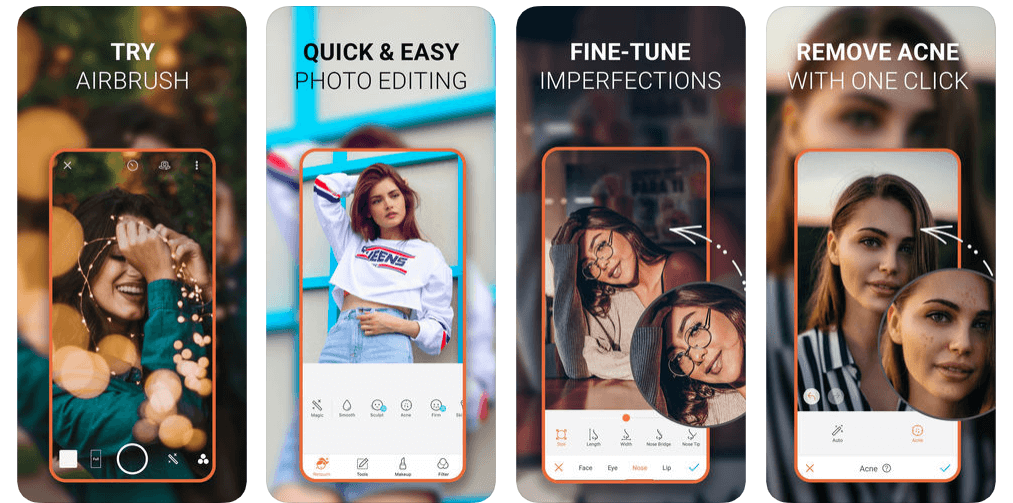
In today’s highly competitive marketplace, AirBrush is undoubtedly one of the world’s best photo editing app for selfies that offers amazing tools and filters to make your photos worth sharing.

With this easy to use photo editor, you get the most natural, user-friendly retouch tools, photo effects, and filter options like celestial & element filters, artistic retouching features, blemish and acne remover, gorgeous bright eyes & light effects, etc.

Read Also: 15 Best Duplicate Photo Finder and Cleaner Software for Windows 

AirBrush allows you to take your selfies to the next level by eliminating pesky imperfections like pimples, blemishes, enlarged eyes, and more to get the perfect selfie every time.

With professional filter and photo effect tools, AirBrush is indeed a huge contender for the top spot in this list of best selfie editing apps.

Download App: iOS


2. Facetune2
Facetune2

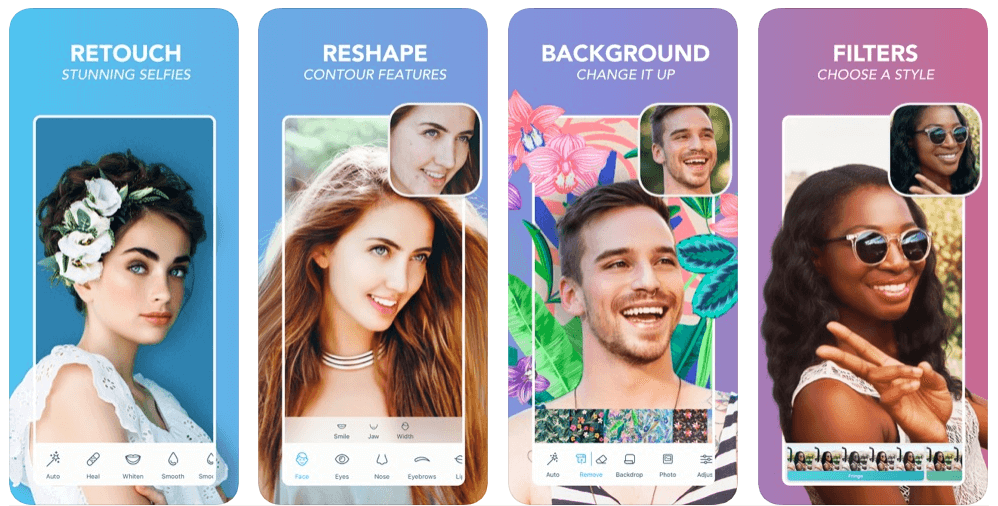
If you’re looking to create the perfect portrait or capture better-looking selfies, then Facetune2 could be the perfect option for you.

Facetune2 is an award-winning selfie camera app that offers amazing photo editing tools to help you get rid of blemishes, pores, and pimples with the few swipes of a finger.

Facetune2 with its super-advanced technology ranks among the best beauty editing apps available on the market, offering every magical retouching feature and editing tools to give your selfies a more natural touch.

Download App: Android and iOS


3. YouCam Perfect

YouCam Perfect

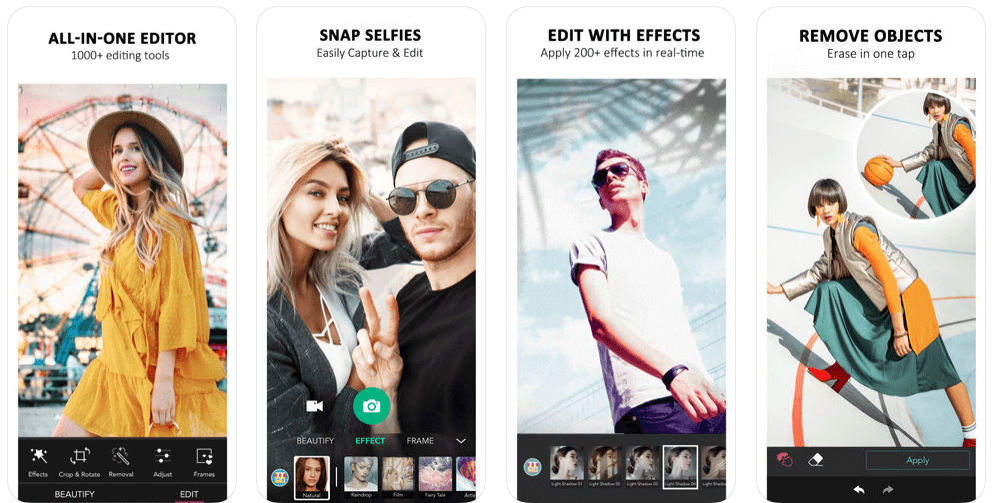
With more than 300 million users, YouCam Perfect is one of the world’s best selfie camera apps which offers an amazing set of photo editing features to turn your basic pictures into masterpieces.

YouCam Perfect brings you the complete photo editing tool kit including 1000+ photo effects, filters, magic brush, stickers, cut-out, watermark, object remover, and more.

So, if you’re looking for a photo editing app with you can beautify your photos, create amazing collages or frames, and capture video selfies in real-time, then YouCam Perfect is a top choice for you.

Download App: Android and iOS


4. Retrica

Retrica

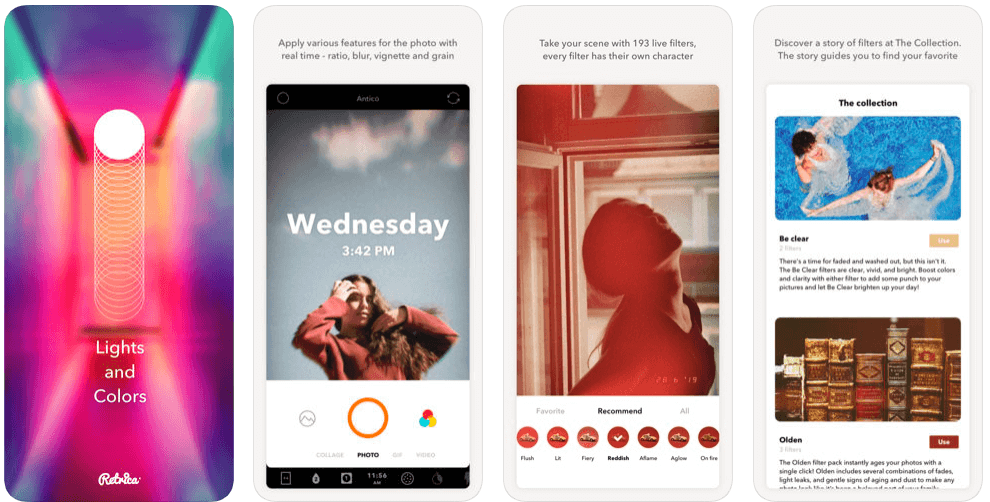
Retrica is one of the most popular selfie editing apps which gives you a variety of beautiful camera filters to make your selfies more special.

Read More: 9 Best Apps To Blur Photo Background on Android & iOS

Retrica also offers a variety of fascinating features like zoom blur effects, time stamping, viewfinder, insight, different colors and lights, and more.

So, if you’re looking to capture better-looking selfies with mesmerizing filters, then Retrica has you covered.

Download App: Android and iOS


5. Cymera Camera

Cymera Camera

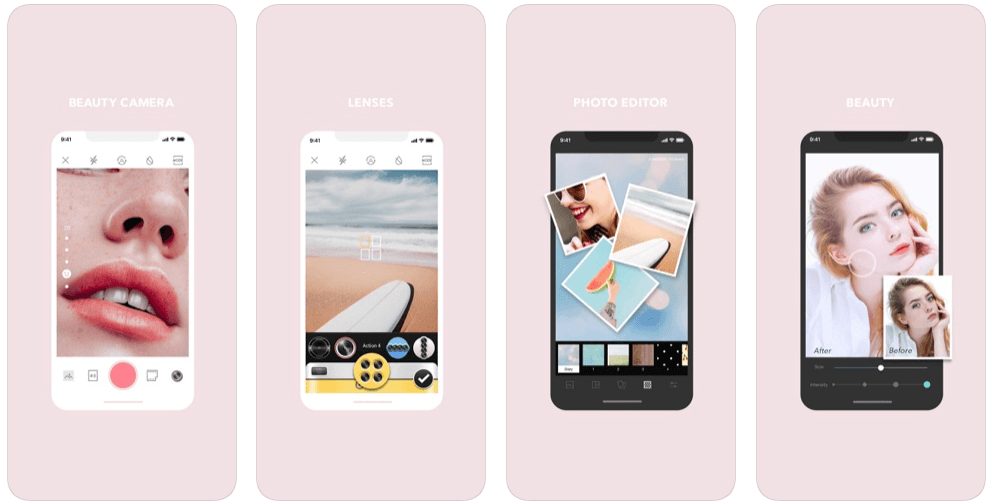
With more than 200 million users, Cymera is a perfect beauty camera app that allows you to turn your basic selfies into wonderful moments.

Cymera gives you all the professional photo editing tools you need – selfie filters, blur & mirror photo effects, face stickers, makeup, hairstyles, tattoos, face & muscle effects, etc.

This smart selfie camera comes with a wide range of camera lenses & beauty tools that gives your face a more natural-looking glow. 

Cymera might come last in the list of best selfie apps, but it is definitely worth a try.

Download App: Android and iOS


6. BeautyPlus

BeautyPlus

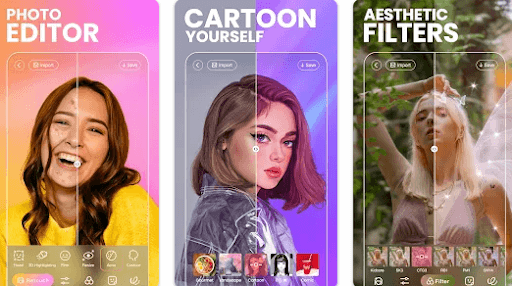
BeautyPlus is yet another best selfie cameras & photo editors and is used by 800 million users worldwide. The app features a wide range of editing tools and totally free-to-use content for video and photos. It has 50+ powerful editing tools for instant and amazing results. Additionally, it is super intuitive and simple for anyone to get started.

The app provides over 200 stunning effects and themed filters to help you make diversified styles with much ease. You can also add patterns or background colors to level up your pictures. Not only that, but with BeautyPlus you can explore numerous templates and recreate trending edits in just one tap. Furthermore, its smart AR technology will automatically identify faces in a picture and apply the effects accordingly. Thus, it makes your selfies unique and attractive. Creating natural and beautiful picture & video selfies has never been so easy. Try BeautyPlus now and instantly capture great-looking perfect selfies.

Download App: Android and iOS


Final Verdict: Best Selfie Apps

The aforementioned apps are some of the best selfie apps for Android & iOS on the basis of ease and popularity.

You can get all of these selfie camera apps on the Google Play and App Store for free; use them and change the look & feel of your selfies with mesmerizing filter & photo effect tools.

So, what are you waiting for? Pick your favorite & make your selfies worth sharing!

Best selfie appsbest selfie camera appsfree selfie appsphoto editing app for selfiesselfie editing appswhich app is best for taking selfie
Author

Monil

Monil is a professional writer whose forte is absorbing a lot of data and help large technical organizations convey their message clearly across multiple products. An engineer by qualification, his affinity for design enables him to write to inspire, energize, and influence various audiences to uncover their true potential. When not writing, Monil is likely to be found listening to music, traveling, or simply excavating into his favourite cuisines.

View all posts

Related Posts
Best Photo Organizing Software For Windows 10, 8, 7

16 Best Photo Organizing Software For Windows 10, 8, 7 In 2024

January 4, 2024
0

Photography is not limited to professional photographers anymore. With the advancement of technology, clicking high-quality pictures is no longer a constraint.

Clicking pictures and capturing moments is a part of our daily lives and with time our smartphones get filled with hundreds and thousands of images. This means arranging and organizing can get difficult and tiresome. If you want to organize your photo gallery in a well-mannered way, you can opt for a Photo Organizing Software. 

With a good photo management tool, you don’t have to bother to sort and manage your images manually. Apart from this, these tools also offer several editing features. 

What to Look For in a Photo Organizing Tool?

Before we move on to check the available options, let’s have a quick look at some of the basic features that your photo management tool must offer. 

  • It should be able to move images to different folders and locations.
  • They should be able to search and find images easily. 
  • It should be able to create different folders and subfolders.
  • It should be able to search, tag and categorize various pictures. 
  • Most importantly, it should be able to process a large number of photographs without making your gadget slow.

What Are the Benefits of Using an Automatic Image Organizer Tool?

  • Automated tools can categorize and move your photographs in different folders.
  • It can tag and rename multiple images for better sorting and identification purposes.
  • It helps you in creating multiple batches for easy naming and transferring of images.
  • With an Image Organizing Tool, you can rate your pictures which makes editing easy.

Now, without any further delay, let’s have a look at some of the best software to organize photos on Windows 10, 8, and 7 in 2024.


What Are the Best Free Photo Organizer Software For Windows In 2024?

Below we have shortlisted some of the most popular and the best photo management software that you can use in 2024 to keep your photos safe and organized.

1. CyberLink PhotoDirector 10

Best Photo Organizing Software - CyberLink PhotoDirector 10

Major Highlights:

  • Convenient and clean UI.
  • Offers simple ways to organize images, you can also use it to create slideshows.
  • It provides easy navigation tools.
  • It offers multiple basic and advanced photo organizing and editing tools.

First on our list of Best Photo Organizing Software is this multi-functional tool. Its advanced features allow you to tag and sort images based on certain keywords, color labels, faces, locations, dates and many more. 

The tool not only offers image organizing features but also comes with several advanced editing tools like cosmetic retouching tools for whitening teeth and removing blemishes. Apart from this, you can also use it to make color adjustments, remove red eyes, get rid of unwanted objects in the background and also adjust the brightness level.

As an additional feature, it also allows its users to capture and edit video clips and make slideshows. You can pick pictures, make a slideshow of them, add music and also share it on Youtube directly using Cyberlink.

The best part is, with Photo Editor you get direct access to Cyberlink’s free online storage. This also allows you to get in touch with a Cyberlink representative over the phone or via email.

Visit Website


2. Adobe Lightroom

Adobe Lightroom

Major Highlights:

  • A single tool that offers unmatched image organization and photo editing features.
  • It supports effortless and easy sorting, import/export of images into various folders and subfolders.
  • It allows for easy cataloging.

Read Also: Best Photo/Image Viewers for Windows 10

Next on our list is this incredible tool with cutting edge image organizing, editing, storing and sharing capabilities. It is one of the best picks for professional and amateur photographers. 

With Adobe Lightroom you get access to magnificent organizing capabilities and phenomenal photo editing tools at a single price. Apart from tagging, organizing and moving images to various folders it also allows you to create virtual folders and catalogs for better image management.

You can sort your images by adding keywords, tags, captions, and titles to your photographs. Apart from this, you can sort them based on the star rating and colors and group them later on.

Easy exporting and bulk renaming are few other features of this incredible Photo Organizing Software.

Visit Website


3. Nikon ViewNX-i

Nikon ViewNX-i - Photo Management tool for Windows

Nikon ViewNZ-i is an advanced version of the conventional ViewNX2 software and comes with top-notch working and usability. Its Photo Tray functionality is one of its highlight features which allows users to store images in temporary folders for easy sorting. This also helps in the easy editing and printing of various images.

With its ViewNX-Movie Editor, you can effortlessly edit movies and it’s Capture NX-D provides detailed adjustment options for still photographs.

Moreover, it also allows you to upload your files directly on Youtube, Facebook, and Nikon Imaging Space.

Visit Website


4. Adobe Bridge

Adobe Bridge - Free Picture Organizer Software

If you are looking for a Free Picture Organizer Software, then Adobe Bridge can be a good pick for you. It is completely free of cost and offers a wide variety of organizing and photo managing functions. 

With this fantastic tool, you can manage images and create a detailed hierarchy of multiple folders within seconds. It also comes with a high-quality import feature that supports the easy transfer of photographs from your smartphone or camera device.

For better sorting, it also allows you to add and rename images with keywords. Apart from all these incredible features, it can support batch processing of multiple pictures.

Visit Website


5. Digicam Photo Manager

Digicam Photo Manager

If you are looking for a high-end and best Photo Organizing Software for your Windows, Mac-OSX or Linux then digiKam Photo Manager can be a good choice to consider. 

It got its inspiration from hundreds of photographers who were looking for an all in one tool for editing, organizing, managing, tagging and sharing multiple images. It helps you to import and manage digital images. 

Its working methodology is based on a simple strategy of Import, improve and impress. Moreover, it is exceptionally easy to use and install.

Visit Website


6. FastStone Image Viewer

FastStone Image Viewer - Free Picture Organizer Software

Next on our list of Free Picture Organizer Software is Faststone Image viewer. This multi-purpose tool is powered with a user-friendly interface and simple working.

It comes with a few advanced editing features which can crop, resize your photographs, do color adjustments and also remove the red-eye defect from them. Apart from this, it supports multiple image formats including JPEG, EPS, TGA, PNG, RAF, ARW, PEF and many more.

Visit Website


7. XnView

XnView - photo collection and Image Organizing Tool

Maintain and enhance your massive photo collection with this incredible Image Organizing Tool. XnView is developed for mostly non-commercial use and comes with highly advanced yet simple to use features. 

Its handy interface allows easy managing of images, batch processing, identification of duplicate images and at the same time provides metadata support. 

Apart from simple organizing features it also allows its users to edit, crop, resize, rotate and adjust the color brightness of multiple photographs.

Visit Website


8. PicaJet Digital Photo Management

PicaJet Digital Photo Management to organize your photo gallery

Looking for a tool that will support easy transferring of pictures from your camera, then PicaJet is the tool you need. With this Photo Management Tool, you can sort and view your images based on various categories including name, rating, date, timeline, keywords, etc. 

Apart from this it also supports color adjustment, image sharpening, cropping, and red-eye correction.

Download this free software today and organize your photo gallery in a hassle-free manner.

Visit Website


9. FreshView Multimedia Organizer

FreshView Multimedia Organizer  - Manage and organize images

Enjoy the ability to manage and organize images, video and audio files at your fingertips with this stunning Image Organizing Tool. It is completely free of cost and does not contain any annoying ads and spyware. 

Read More: Best Duplicate Photo Finder Tools to Delete Duplicate Photos

FreshView supports more than 86 different types of image formats and can display images in various views including thumbnails.

Visit Website


10. Pictomio

Pictomio photo qrganizing software

Next on our list of Free Picture Organizer Software is Pictomio. It allows you to manage your vast photo gallery in a much easier and approachable way. 

In addition, you can use it to categorize and group pictures in various orders. Apart from this, you can also group 2D and 3D effect pictures in a slide with multiple effects. 

Enhance and organize your images in a better way with Pictomio.

Visit Website


11. StudioLine Photo Basic 3

StudioLine Photo Basic 3

Are you looking for an all-in-one tool that can effortlessly manage and organize your hundreds and thousands of images, then Studioline Photo Basic 3 can be your lifesaver. 

You can use it to create slideshows of your 2D and 3d images and upload them on various online platforms. It also allows you to tag multiple images. Crop, rotate, edit, resize and do color adjustments with this power-packed tool.

Visit Website


12. Magix Photo Manager Deluxe

Magix Photo Manager Deluxe

The next best free image management software on our list is called MAGIX Photo Manager. It comes with an array of excellent photo management tools that help you keep your large photo and video collections secure and well organized.

Read Also: Best Free Image Converter Software

An excellent feature of this efficient photo organizer which several users can find valuable is the powerful Selection Wizard. The intelligent feature allows users to keep the best shots and remove the duplicate and similar-looking photos.

Visit Website


13. On1 Photo Raw 2024

On1 Photo Raw 2021

On1 Photo Raw 2024 is another best photo organizing software available for Windows 10, 8 and 7. A fully-featured, professional-grade image organizer program that focuses on giving you complete control over photo organization, editing, and storage.

All in all, On1 Photo Raw is a solid option for both newbie and professional photographers seeking to get an efficient library of beautiful photos & videos.

Visit Website


14. Zoner Photo Studio

Zoner Photo Studio

Want to make every photo more genuine? Then, you need to try Zoner Photo Studio. It is a way to lead your every photo in a better approach and make them sounder enough. Among windows users, this software is the most popular best photo organizing software as compares to others. Those, who are looking for an alternative to Photoshop and Lightroom, can pick the Zoner Photo Studio. 

With this software, you get everything including full layer support, RAW processing, cataloging, video editing, and many more. Plus, with ZPX (Zoner Photo Studio) you can change the entire touch of the photo only in a single go. However, Zoner is the best application but only for those who work on their personal stills. It doesn’t fit the bill of the company. One of the best things about Zoner is; every year it launches new robust features and updates its previous systems. 

Visit Website


15. Google Photos

Google Photos

Read More: Best Photo to Cartoon Picture Apps

Yet another best way to organize photos on the computer system is – Google Photos. It is an absolutely free service that lets you organize your photos, plus, provides unlimited cloud storage for photos. Google Photos comes with an in-built editing tool for pictures. 

So, if you rely on Google Photos then you do not need to install any third-party photo editing software. And, with Google Photos, you can easily share the pictures with others without sharing them separately. Google Photos is the safest place where all the memories reside safely. 

Visit Website


16. Corel AfterShot 3

Corel AfterShot 3

You are able to make use of the pre-prepared keyword sets using this application. You also have the ability to organize images according to ratings, colors, themes, and favorites. Corel is nevertheless versatile enough to allow you to classify photographs and discover them more quickly, despite the fact that it does not include certain essential organizing features like as geolocation or facial recognition.

Corel AfterShot 3 is an excellent solution to consider in this case if you are seeking for an image organizer that is favorable to your wallet. The program is equipped with a good built-in editor, watermarking, and batch photo editing capabilities, in addition to basic organizational functions that allow users to tag and organize photographs.

Visit Website


To Sum Up: Best Photo Management Software For Windows PC (2024)

Organizing pictures can be fun, but doing it manually is something that nobody enjoys. Automated tools like photo organizing software for Windows 10, 8, and 7 is what you need to manage and organize your photo gallery.

Refer to our aforementioned list and pick the best-suited photo management tool to start organizing your photographs and images in a hassle-free manner.

Best Free Drag and Drop Website Builder

Best Free Drag and Drop Website Builder in 2024

February 5, 2024
2

Here is a list of the best drag-and-drop website builder tools for you in 2024. 

Previously, developing and building a website from scratch was quite a tough task. With the level of manual coding involved, developers used to spend weeks and months working on one website. However, with the introduction of advanced tools to code and build a website, the process has become quite automated. Nowadays, the developer does not have to spend so much time coding but uses his knowledge of coding software and tools to get the desired outputs in any website.

One such software is the drag-and-drop website builder. The main purpose of such builders is to reduce the need for manual coding by providing various tools to design and edit the website. This way, you don’t have to worry about working on complex software or codes to create websites.

With the help of this article, we have curated and brought forward a list of the best free drag-and-drop website builder with open-source tools to help reduce the efforts put in on manual coding and website designing. You can use any of these tools as you may and get the desired results with ease.

Top 7 Best Drag-and-Drop Website Builder Tools in 2024

Below are some of the best alternatives for website design and creation that you can use as the best free drag-and-drop website builder. Firstly, go through the descriptions of all of these tools and then use any one or more of the alternatives to create a website with drag-and-drop.

1. Wix-All-Time Favorite Drag-and-Drop Page Builder

Wix-All-Time Favorite Drag-and-Drop Page Builder

The first name on this list of alternatives and indeed the best drag-and-drop website builder of all time is Wix. This is a free tool that has been used by experts to create tons of popular websites. The tool offers an extensive suite of filters, features, and creative options to help you develop a website with ease.

Using this free drag-and-drop website builder, Web developers get unlimited scalability options. Additionally, Wix offers a list of over 800 different templates. You can go through the designs and use any of these as required to get the desired outputs. Wix uses Artificial Design Intelligence to help you create an attractive and well-performing website with ease.

You will know more about the tool when you try it.

Visit Wix

Also Read: Top 10 People Search Engines or Websites to Find People Easily


2. Zyro-Best Drag-Drop Website Builder With AI

Zyro-Best Drag-Drop Website Builder With AI

The next tool on this list is Zyro. This is the best drag-and-drop website builder that allows you to forget about coding and yet create a designer website using some smart options. This is one of the best builders that uses artificial intelligence to deliver the best quality outputs.

Additionally, with Zyro, you can access a collection of professional templates and use them to get the best design for your website. Even if you use the templates from the Zyro library, you get complete control over editing and modifying the outputs as necessary. Thus, Zyro is the best drag-and-drop website builder with open source.

Visit Zyro


3. Squarespace: The Best Drag-Drop Website Builder

Squarespace- The Best Drag-Drop Website Builder

Next comes Squarespace as one of the best development tools and a free best drag-and-drop website builder. Just like any other alternative available on this website, Squarespace also provides tons of templates to you for website and webpage creation. You can select any template you want from a variety of categories distributed according to the types of websites.

This is the best drag-and-drop website builder that allows you to create eCommerce and other websites smartly. Apart from that, Squarespace offers some of the best templates to create blog pages as well. The portfolio and tools of editing present on Squarespace are quite advanced, varied, and customizable.

Visit Squarespace


4. Site123- Create a Website Quickly with This Drag-Drop Website Builder

Site123- Create a Website Quickly with This Drag-Drop Website Builder

Next, Site123 is a completely free tool that allows easy editing and creating of the website and its pages. Yes, you can pick the desired template from a wide variety of templates just like any other tool, but what makes Site123 better is its easy-to-use design.

The tool is quite mobile-friendly and allows you to create websites that run perfectly and quickly even on smartphones. Additionally, Site123 also allows you to host any website freely. You get an SEO-optimized website with Site123. The free drag-and-drop website builder allows you to rank better on different search engines.

Visit Site123

Also Read: Top 11 Technology Websites and Blogs | Best Tech Giants


5. Elementor- Best Drag-and-Drop Page Builder with Full Designs

Elementor- Best Drag-and-Drop Page Builder with Full Designs

Elementor is another smart tool that allows live drag-and-drop editing with multiple options. What makes the tool the best drag-and-drop website builder with open source is its extensive template library. The tool contains full website templates for you. Using these, you can create an entire website within minutes using a couple of clicks.

With the tool, you get a hosting website with multiple personalization options for you. You can even start designing using Elementor on a blank page or website. Elementor is the best free drag-and-drop website builder that comes in the list of a few tools that allow you to create an entire website for any domain and industry.

Visit Elementor


6. CMS Hub- Advanced Yet Easy Drag-and-Drop Page Builder

CMS Hub- Advanced Yet Easy Drag-and-Drop Page Builder

CMS Hub is the best drag-and-drop website builder from HubSpot. With the help of this alternative, you can create as well as manage your existing websites with ease. CMS or Content management software also allows you to host your website created via CMS or any other platform.

A lot of trusted platforms like Clam, WWF, Randstad, Doordash, etc. were created and are managed using CMS Hub. The tool contains a plethora of templates for you to create a website according to your needs. Additionally, you can even create logos and designs with CS Hub quite quickly.

Visit CMS Hub


7. Beaver Builder: Drag-and-Drop Website Builder with Open Source

Beaver Builder- Drag-and-Drop Website Builder with Open Source

The last name on this list of the best drag-and-drop website builder alternatives is Beaver Builder. Although the last on this list, the tool is in no way lesser than any other alternative present on this list. The tool is trusted by some of the major website designers and creators for their outputs.

With Beaver Builder as the best drag-and-drop website builder, you get the option to choose any design for its templates. As the tool is free, you can try out its services and create your own website without any professional coding knowledge. Additionally, with so many options to create the desired website, you get the option to manage as well as add different attributes to the website.

Visit Beaver Builder

Also Read: Best Freelance Platforms


Best Free Drag-and-Drop Website Builder: Conclusion

So, above were some of the best drag-and-drop website builder tools for you in 2024 to try. We hope that after using at least one of the alternatives provided, you were able to create the desired website for your business and miscellaneous requirements. If you have any questions related to the guide, feel free to write to us in the comments. Additionally, subscribe to our blog’s newsletter for more interesting updates.

1 Comment
    Btnuj says: Reply
    July 13th 2020, 3:14 am

    Like!! Really appreciate you sharing this blog post. Really thank you! Keep writing.

Leave a Reply Cancel reply

Your email address will not be published. Required fields are marked *

Sidebar Image bit G ad1

Latest Posts

  • Anytime Astro: Best Website For Online Astrology Consultation
    Anytime Astro: Best Website For Online Astrology Consultation
    by Somya Shrimal / February 13, 2026
  • Best-McAfee-alternative-software-to-use-for-Virus-Protection
    Best McAfee Alternative Software to use for Virus Protection
    by adminuser / February 11, 2026
  • What-is-Flip-Flop-in-Circuite-and-it's-Types
    What is Flip Flop in Circuit and its Types
    by Meet / February 6, 2026
  • Best-Data-Labeling-Software-to-use-in-2026
    Best Data Labeling Software to Use in 2026
    by Meet / February 2, 2026
  • Best-Google-Slides-tools--to-add-as-extension-in-2026
    Best Google Slides Tools to Add as Extension in 2026
    by Meet / January 30, 2026

Categories

  • Cyber Security
  • Driver Updater
  • Entertainment
  • Fitness
  • Games
  • How To
  • laptop
  • OS
  • Reviews
  • Tech News
  • Tips & Tricks
  • Top 10
Sidebar Image bit G ad1
best free dictation software for Windows and Mac 8 Best Free Dictation Software for Windows and Macby Niharika / February 5, 2024
9 Best Free Video Merger Software in 2024 (Online & Offline)by Harshita / February 5, 2024Best Free Video Merger Software
TechPout Footer Logo

We at TechPout promise to put forth stories that help people to learn and simplify their digital life. Our purpose is to share the true essence of technology with our tech-loving community.

Useful Links

  • About Us
  • Contact us
  • Privacy Policy

Popular Posts

  • Best PC Optimizer Software
  • Best Mac Cleaner Apps
  • Best Driver Updater
  • Duplicate Photo Finder and Cleaner Software
  • Best Free Movie Download Sites
  • Best IPTV Players

Follow us

Copyright © 2026 www.techpout.com. All rights reserved
DMCA.com Protection Status