Main LogoLight Logo
  • Reviews
  • Top 10
  • How To
  • Tech News
  • OS
    • Windows
    • MAC
    • iOS
    • Android
  • Categories
    • Driver Updater
    • Cyber Security
    • Games
    • Fitness
    • Entertainment
    • Tips & Tricks
Android iOS Top 10
by Monil

6 Best Selfie Apps for Android and iPhone 2024

February 5, 2024
1

When it comes to clicking a selfie, you want to put your best face forward.

With the rise of image-centric social networks such as Instagram and Snapchat, an intuitive and easy-to-use selfie app is essential to make yourself look better, plus to add some awesome effects to your photos.

Whether you are trying to get more likes on Facebook or simply looking for the best way to record special moments with friends and family, you can use the best selfie camera apps for Android & iOS to capture better-looking selfies.

With the plethora of free selfie apps available online, it gets tough to choose the right one.

If you don’t know which app is best for taking a selfie, then you don’t need to worry anymore as we’ve done all the heavy lifting to help you pick the best selfie app that can help you turn your ordinary pictures into something extraordinary. 

Here’s the list of the best photo editing apps for selfies which can help you make subtle changes to your face like brighten dark circles, remove pimples and blemishes, whiten teeth, skin tone adjustment, and much more.

Table of Contents hide
5 Best Selfie Apps to Make Your Photos Look Better in 2024
1. AirBrush
2. Facetune2
3. YouCam Perfect
4. Retrica
5. Cymera Camera
6. BeautyPlus

5 Best Selfie Apps to Make Your Photos Look Better in 2024

1. AirBrush

AirBrush

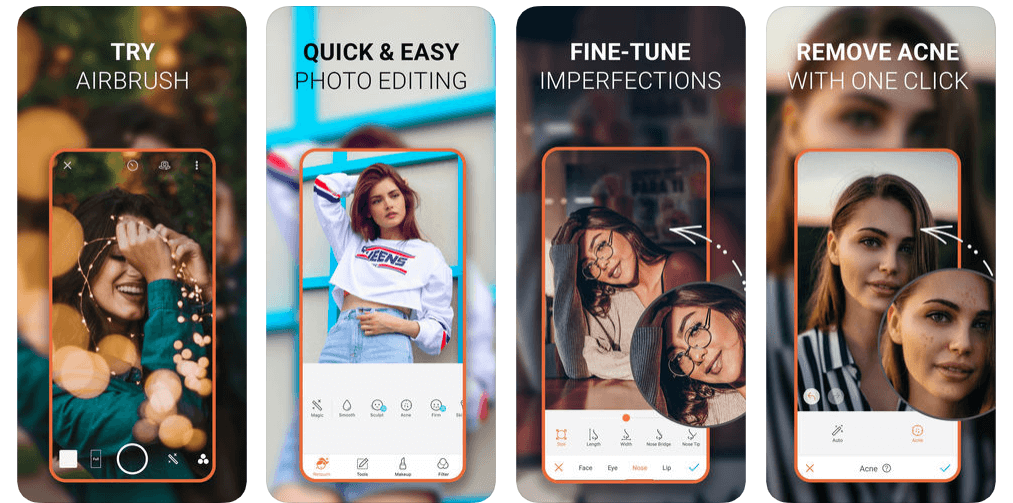
In today’s highly competitive marketplace, AirBrush is undoubtedly one of the world’s best photo editing app for selfies that offers amazing tools and filters to make your photos worth sharing.

With this easy to use photo editor, you get the most natural, user-friendly retouch tools, photo effects, and filter options like celestial & element filters, artistic retouching features, blemish and acne remover, gorgeous bright eyes & light effects, etc.

Read Also: 15 Best Duplicate Photo Finder and Cleaner Software for Windows 

AirBrush allows you to take your selfies to the next level by eliminating pesky imperfections like pimples, blemishes, enlarged eyes, and more to get the perfect selfie every time.

With professional filter and photo effect tools, AirBrush is indeed a huge contender for the top spot in this list of best selfie editing apps.

Download App: iOS


2. Facetune2
Facetune2

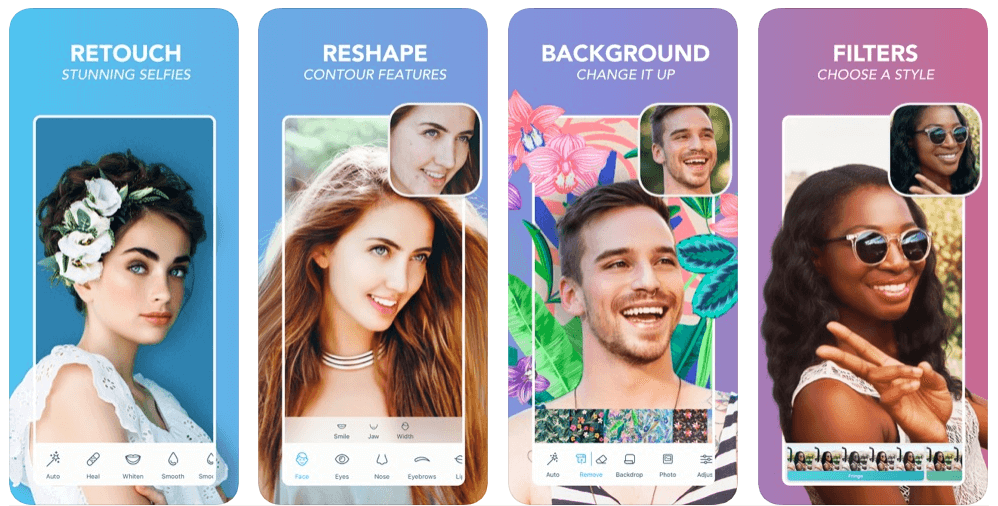
If you’re looking to create the perfect portrait or capture better-looking selfies, then Facetune2 could be the perfect option for you.

Facetune2 is an award-winning selfie camera app that offers amazing photo editing tools to help you get rid of blemishes, pores, and pimples with the few swipes of a finger.

Facetune2 with its super-advanced technology ranks among the best beauty editing apps available on the market, offering every magical retouching feature and editing tools to give your selfies a more natural touch.

Download App: Android and iOS


3. YouCam Perfect

YouCam Perfect

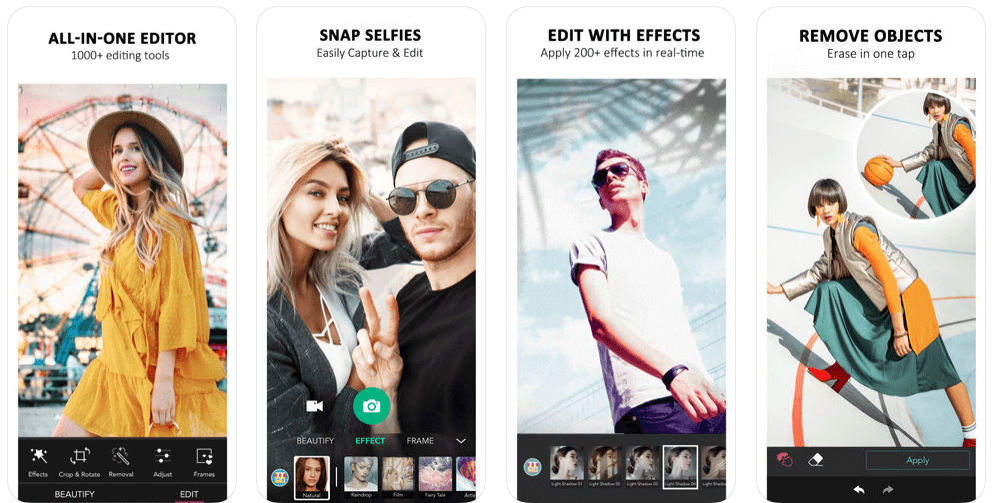
With more than 300 million users, YouCam Perfect is one of the world’s best selfie camera apps which offers an amazing set of photo editing features to turn your basic pictures into masterpieces.

YouCam Perfect brings you the complete photo editing tool kit including 1000+ photo effects, filters, magic brush, stickers, cut-out, watermark, object remover, and more.

So, if you’re looking for a photo editing app with you can beautify your photos, create amazing collages or frames, and capture video selfies in real-time, then YouCam Perfect is a top choice for you.

Download App: Android and iOS


4. Retrica

Retrica

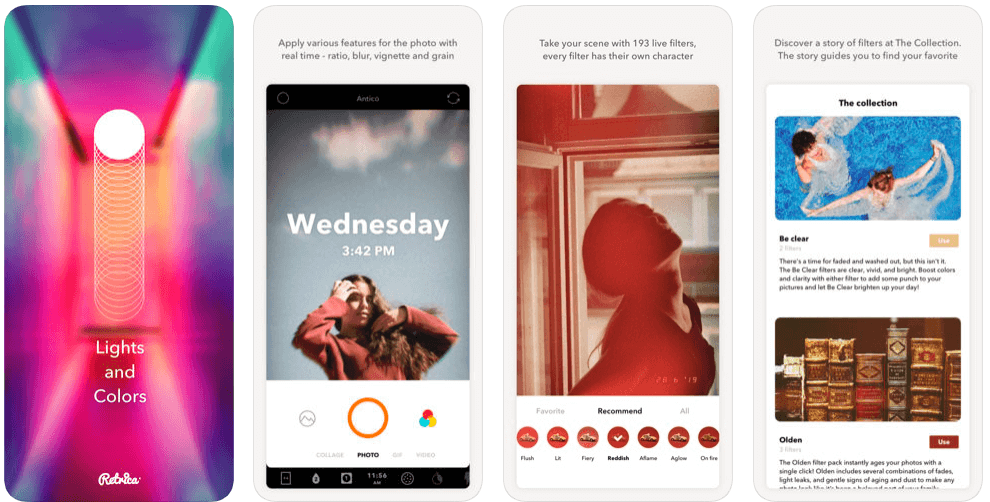
Retrica is one of the most popular selfie editing apps which gives you a variety of beautiful camera filters to make your selfies more special.

Read More: 9 Best Apps To Blur Photo Background on Android & iOS

Retrica also offers a variety of fascinating features like zoom blur effects, time stamping, viewfinder, insight, different colors and lights, and more.

So, if you’re looking to capture better-looking selfies with mesmerizing filters, then Retrica has you covered.

Download App: Android and iOS


5. Cymera Camera

Cymera Camera

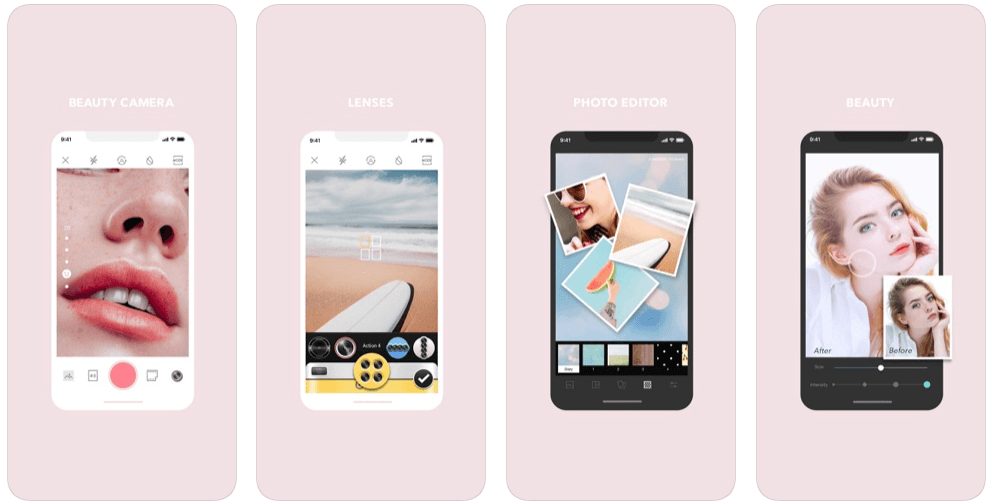
With more than 200 million users, Cymera is a perfect beauty camera app that allows you to turn your basic selfies into wonderful moments.

Cymera gives you all the professional photo editing tools you need – selfie filters, blur & mirror photo effects, face stickers, makeup, hairstyles, tattoos, face & muscle effects, etc.

This smart selfie camera comes with a wide range of camera lenses & beauty tools that gives your face a more natural-looking glow. 

Cymera might come last in the list of best selfie apps, but it is definitely worth a try.

Download App: Android and iOS


6. BeautyPlus

BeautyPlus

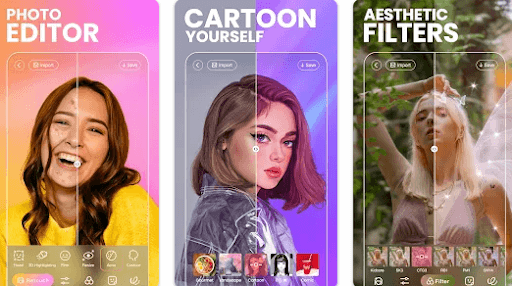
BeautyPlus is yet another best selfie cameras & photo editors and is used by 800 million users worldwide. The app features a wide range of editing tools and totally free-to-use content for video and photos. It has 50+ powerful editing tools for instant and amazing results. Additionally, it is super intuitive and simple for anyone to get started.

The app provides over 200 stunning effects and themed filters to help you make diversified styles with much ease. You can also add patterns or background colors to level up your pictures. Not only that, but with BeautyPlus you can explore numerous templates and recreate trending edits in just one tap. Furthermore, its smart AR technology will automatically identify faces in a picture and apply the effects accordingly. Thus, it makes your selfies unique and attractive. Creating natural and beautiful picture & video selfies has never been so easy. Try BeautyPlus now and instantly capture great-looking perfect selfies.

Download App: Android and iOS


Final Verdict: Best Selfie Apps

The aforementioned apps are some of the best selfie apps for Android & iOS on the basis of ease and popularity.

You can get all of these selfie camera apps on the Google Play and App Store for free; use them and change the look & feel of your selfies with mesmerizing filter & photo effect tools.

So, what are you waiting for? Pick your favorite & make your selfies worth sharing!

Best selfie appsbest selfie camera appsfree selfie appsphoto editing app for selfiesselfie editing appswhich app is best for taking selfie
Author

Monil

Monil is a professional writer whose forte is absorbing a lot of data and help large technical organizations convey their message clearly across multiple products. An engineer by qualification, his affinity for design enables him to write to inspire, energize, and influence various audiences to uncover their true potential. When not writing, Monil is likely to be found listening to music, traveling, or simply excavating into his favourite cuisines.

View all posts

Related Posts
Best-Free-Voice-Changer-Software-for-Mac

12 Best Free Voice Changer Software for Mac in 2024

February 5, 2024
0

Changing voice is a new and ongoing trend on social media. You can also be a part of the trend and change your voice to a funny version. Using the best voice changer software for Mac, you can easily change your voice and use it to make a prank call with friends, make funny videos for social media, or can also make use of it in-game to change identity and troll competitors.

While these applications are made for fun purposes only, people try and misuse the technology. We advise readers to use it for fun only as it can lead to bad representation and people can also take strict action against the person using the app. Keeping the disclaimer in mind let’s have a look at the voice changer for Mac.

12 Best Voice Changer Software for Mac in 2024

Here is the list of free voice changer apps for Mac in 2024 which you can try for amazing voice changing results.

1. MorphVOX JR

MorphVOX JR

MorphVOX Junior is one of the best voice changer software for Mac using which you can convert your voice into a woman, man, or even a kid. The app has inbuilt voice changer tools that make it easy to change voice. You can enjoy this app for free and create amazing voices.

Key features of MorphVOX JR:

  • You can easily adjust and remove other voices from the project
  • Easily create high-quality voice notes
  • You can use this tool to change voice while using other apps like Yahoo Messenger, GoogleTalk, and Skype.
  • Compatible with Mac OS 10.16 and later versions

Moreover, below are the pros of MorphVOX that make it an excellent free Mac voice changer and a few of its unavoidable cons.

Pros

  • Regularly updated features
  • Availability of ultra-quiet background noise cancellation
  • High-end features like voice comparison analysis and voice tuning
  • Customized voice changing and editing
  • Many in-built sounds and voices
  • Challenging UI
  • No magical creature tone is available without buying an add-on
  • Some voices may seem fake

Download Now


2. Voice Changer Plus

Voice Changer Plus

Another great free voice changer for Mac that can help you change your voice with 55 different effects and loads of background music. You can use your pre-recorded voice but cannot change in real-time. Using the software you can easily edit the project and can save it and back it up with iCloud. The application has both a free and premium version.

Key features of Voice Changer Plus:

  • Easily convert your pre-recorded notes with effects
  • Edit the project with ease and keep only the required audio part
  • It offers more than 55 different voice effects to choose from

In addition to the above features, the following are the most notable pros and cons of this software.

Pros

  • Saving and sharing of recordings
  • Many sound editing tools
  • Glitch-free one-tap voice recording

Cons

  • Non-intuitive installation process
  • Limited features in the free version
  • No real-time voice modification when gaming

Download Now

Also Read: Best Free Mp3 Tag Editor for Mac to Edit Songs Metadata


3. Voxal Voice Changer

Voxal Voice Changer

Voxal Voice Changer is one of the best voice changers for Mac as it offers real-time voice changing. You can change your real-time voice into several options including male, female and alien. Let’s check some of its features.

Key features of Voxal Voice Changer:

  • Change and listen to your changed/ edited voices
  • Create your own voice effects as per need
  • It is a lightweight software to use
  • Simple and easy to use interface makes it the best Mac voice changer

In addition to these features, you should also consider the following pros and cons before trying Voxal Voice Changer.

Pros

  • Easy to use
  • One-click sound modification
  • Voice modification during a live conversation
  • Lightweight

Cons

  • Limited content access
  • Occasional application crashes
  • Few effects unavailable in the free version
  • No background noise elimination

Download Now


4. Voicemod

Voicemod

Voicemod is another voice changer for Mac that can easily change voice into many different voices including alien, child, demon, robot, male, female, and many more. The software works as a soundboard software that can create quick voice skins with multi-effects.

Key features of Voicemod:

  • Change voice into multiple voice effects
  • You can easily use this software while playing online games including PUBG, Fortnite, GTA V, Apex Legends, and many more.
  • Change voice while using a chatting app like Skype, Discord, Hangout, and more.
  • Simple and easy to use interface with tutorials to solve doubts.

Let us now look at some notable pros and cons of Voicemod.

Pros

  • Changes local voices to WAV and MP3
  • Cross-platform availability
  • Supports multiple chat programs

Cons

  • No support for Zoom
  • Only a few voice effects are available

Download Now

Also Read: Best Video Converter Software For Mac


5. Audio Voice Changer

Audio Voice Changer

Another best voice changer for Mac that will keep you protected and offers loads of features. The software is easy to use and offers a variety of voice effects to choose from, you can easily edit your recorded voice into many different voices including kid, robot, male, female, and several other effects.

Key features of Audio Voice Changer:

  • Change your voice into several funny voices
  • You can record and add recorded audio for editing
  • You can even change the preset settings of the voice

Above were the features that make Audio Voice Changer one of the best free Mac voice changers. Now, let us discuss its pros and cons.

Pros

  • Many voice-changing options
  • Top-notch customization
  • Good customer support

Cons

  • No advanced voice customization options
  • Some users reported frequent app crashes

Download Now


6. Voice Candy

Voice Candy

Creating funny voices and sharing them with your friends is what Voice Candy is best at. The app can easily change your voice into a chipmunk, Vader, robot, mouse, and many more. Using the app you cannot change your voice in real-time. Other than that the app offers great features that make it one of the best voice changer applications for Mac. Let’s check some of its features.

Key features of Voice Candy:

  • Easy to operate and change voices
  • You can set a reminder to change voice using this voice changer tool
  • Create and share project instantly with the app

Along with the above features, you should also know the following pros and cons of Voice Candy before downloading it.

Pros

  • Availability of an internal microphone
  • Easy to use

Cons

  • No support for local files
  • Only a few voice effects are available

Also Read: Best Free File Rename Software For Mac


7. Voice Generator

Voice Generator

The Voice Generator is a very different and easy to use application for changing voice. You can easily change voice online with the best free voice changer for Mac and every other OS. You can easily upload the audio files and then change the voice into whatever effect you like. Though you can face some issues while changing the voice in real-time. It offers many other features. Let’s take a look at them.

Key features of Voice Generator:

  • The web application is compatible with every OS
  • You can even make voice from texts
  • With more than 34 voice-changing effects, change voice the way you like

After going through the features shared above, you should also go through the pros and cons of Voice Generator.

Pros

  • Ease of use
  • Many voice effects

Cons

  • Users face issues with real-time voice changing
  • Not too advanced features

Download Now


8. Clownfish Voice Changer

Clownfish Voice Changer

In the list of best free voice changers for Mac, Clownfish Voice Changer is a great app. It lets you change the voice as well as the pitch of the voice. This app’s features are unique from other apps as you can apply effects in real-time. Let’s check some of its key features.

Key features of Clownfish Voice Changer:

  • Change voice by adding effects like echo, pitch, chorus, and many more
  • Real-time voice changer can help you change voice while using other apps like Skype, Discord, Hangout, Steam, Viber, and others.
  • It has a very simple and clean interface

Moreover, the following are some noteworthy pros and cons of this one of the best voice changers for Mac.

Pros

  • Supports almost all VoIP applications
  • Easy to use
  • High-end audio player

Cons

  • Limited voice effects (only 15)
  • Difficult to understand voice effects

Download Now

Also Read: Best Antivirus Software For Mac


9. Voice Spice Recorder

Voice Spice Recorder

Voice Spice Recorder is a web application that is compatible with every OS but using it you cannot change the voice in real-time. Other than real-time changer, the app can change pre-recorded voices into various voices and various languages. Let us take a look at the features of the best voice changer software for Mac.

Key features of Voice Spice Recorder:

  • Using this app you can change voice and can also change the text into voice.
  • You can also select the output quality before exporting
  • The free version can convert audio into English and Spanish

In addition to the features of this software, you should also pay attention to its pros and cons shared below.

Pros

  • Voice previewing
  • Easy to use
  • Adds location details to your recordings

Cons

  • No support for VoIP apps
  • Limited voice effects

Download Now


10. Voice Meeter

Voice Meeter

In the end, we have a complete package for editing audio that is Voice Meeter. Using the app you can edit, mix and modulate sound easily. Most importantly the application can easily change the real-time voice which most of the applications fail to. Looking at the offerings the app can be considered as the best voice changer for Mac.

Key features of Voice Meeter:

  • The software can be used for audio mixing and manipulation
  • You can change audio in real-time
  • The software supports multiple inputs and output options

Additionally, the following are the pros and cons of Voice Meeter you should consider before downloading it.

Pros

  • A lot of options for input and output
  • Supports all VoIP applications

Cons

  • Beginners may find it difficult to use

Download Now


11. Garageband

Garageband

Nextly, we have Garageband to conclude our list of the best audio voice changers for Mac. It is a complete music creation studio with a massive library of guitar presets and instruments. Talking about voice changing, it delights the users with a plethora of voice morphing effects and recordings.

With this free software, you can change your voice to that of another gender, a monster, or any way you like. Moreover, the following are its other notable features.

Key features of Garageband:

  • A lot of tools and options to create the music of your choice
  • Open-source application
  • Beginner-friendly
  • Many effects available for vocal transformation

Below are the pros and cons of Garageband you should know before deciding whether or not it is the best Mac voice changer for you.

Pros

  • Streamlined and professional interface
  • Supports third-party plugins
  • Impressive features

Cons

  • Unavailability of mixing console view
  • Hogs resources
  • Difficult to use for beginners

Download Now


12. iMyFone MagicMic

iMyFone MagicMic

The next name on this list of best free Voice Changer software for Mac is MagicMic by iMyFone. It is the most popular and versatile AI voice changer, enabling real-time voice modification with more than 225 AI voice filters. The tool also allows you to utilize famous character voices from different genres and categories like Ghostface, Freddy Krueger, Pennywise, Chucky, and more. Not only that, but you can also modify the voice by adjusting volume, pitch, vocal width, and vocal length.

Key Features of iMyFone MagicMic:

  • It provides you with 600+ soundboard sound effects and 225+ voice filters.
  • The tool lets you create an excellent online experience with a natural voice on Fortnite, Discord, Valorant, Twitch, Zoom, and more.
  • Completely customizable and real-time AI voice changer.

Pros

  • A vast library of AI voices and sound effects.
  • Real-time communication.
  • Availability of voiceover.
  • Sound customization.

Cons

  • Complicated interface.
  • The free version offers basic or limited features.

Download Now


Concluding the List of Best Voice Changer Software for Mac

The features offered by the apps make them the best voice changer applications to use. You can choose one of them depending on your requirements. Every app listed above has unique features from others.

We hope that you find this article useful. For more technology-related articles subscribe to the newsletter.

How to Get Out of Incognito Mode on iPhone

How to Get Out of Incognito Mode on iPhone

October 3, 2023
0

If your iPhone is also stuck in incognito mode and you are forced to wonder “How to Get Out of Incognito Mode on iPhone?” try the solutions provided in this article and get rid of the annoying problem with ease. 

Apple’s Private/Incognito mode in the Safari browser is over a decade old. And in today’s world, almost all web browsers come equipped with the private mode, which is also extremely widespread. In spite of this, it has always been difficult to understand both how it protects users’ privacy and how it operates, and this is especially true for new users and surfers who have just lately become aware of this function.

You have arrived at the correct website if you are someone who is interested in learning more about private mode, how you can use it, and how to turn off incognito mode on an iPhone or any other device.  We are providing a useful tutorial that will answer all of your questions and explain how to activate private surfing on your iPhone device as well as under the iPhone Privacy settings.

How to Get Out of Incognito Mode on iPhone? There are occasions when we would want to maintain the confidentiality of our online surfing. It’s a good idea to use the incognito window whenever possible, whether you’re researching a sensitive subject or doing some online shopping when you don’t want others to see your search history.

After you’ve finished surfing, you should probably exit out of the private mode on your iPhone. Although it is not very challenging to carry out, neither is it particularly simple. Continue reading to find out how to turn off the incognito browsing mode on your iPhone and return back to the standard surfing experience.

What Exactly Does it Mean for Your iPhone to be in Private Mode?

Private surfing, also known as incognito mode, enables users to browse the internet using a new tab of their browser without leaving any history/cookies on their computer. When you check the prices of any items or flights when signed in to your account, it shows the standard prices rather than prices that are somewhat higher than the standard prices. This may be handy.

This feature is also known as incognito mode. Because the other person won’t be able to view your browser history, it’s particularly helpful when you’re using a device that other people have access to. Your ISP, on the other hand, will be able to see your data as well as your surfing history. Utilize a Virtual Private Network, or VPN, in order to conceal your browsing activity from the company that provides your ISP.

How to Get Out of Incognito Mode on iPhone?

You may surf the web anonymously using the incognito mode feature, which prevents websites from keeping your history of visited websites. This might be helpful if you want to conceal the fact that you are surfing the internet; or if you want to avoid seeing advertisements that are based on the websites you have visited in the past. The following is a guide that will show you how to exit incognito mode on Safari and return to normal browsing.

Also Read: How to Fix Safari Crashing, Freezing on Mac

How to Get Out of Incognito Mode on iPhone: The Best Ways

The process to get out of the Incognito Mode on the iPhone is quite simple. All you need to do is follow the solutions and steps provided in the below sections. After doing the same, you won’t be wondering; “how to get out of incognito mode on iPhone?”. If you opt to get out of the incognito mode then there are three ways to do that. You can restrict access to all types of content, some allowed websites, or restrict all adult sites. The procedures to use all of these are provided in the coming sections.

Method 1: Restrict the Operations to Allowed Websites Only

If you want to allow some websites only to work and open unrestrictedly on the iPhone, then you can use this feature. Follow the steps below to learn how to un-restrict some websites of your choice, and know how to get out of incognito mode on iPhone:

  1. Launch the Settings app.
  2. Select the Screen Time option.Settings - Screen Time
  3. Launch the menu for Content and Privacy Restriction.Content and Privacy Restriction
  4. After that, choose the Content Restrictions option.Content Restrictions
  5. After that, choose Web Content from the menu.Web Content
  6. Finally, exit the incognito mode, by choosing the Allowed Websites Only or Limit Adult Websites option from the drop-down menu.Allowed Websites Only or Limit Adult Websites

You have the option to use the Allowed Websites Only setting to limit your children’s access to the Internet and their exploration of a select group of websites. This option works best if you want to apply some parental control over the content reach of your kid. If you are still wondering how to get out of incognito mode on iPhone. Take the help of the next solution.

Also Read: How to Clear Safari’s Cache and Cookies on Mac


Method 2: Allow Unrestricted Access to Websites and Content

Let’s look deeper into How to Get Out of Incognito Mode on iPhone? The option to allow private browsing is turned on by default when you use the browser. However, a significant number of users were unable to activate it, despite their repeated attempts to activate the private button, which were ultimately fruitless. This is due to the fact that the settings do not yet enable the private mode. Take the following actions on your iPhone in order to activate the private browsing mode:

  1. Open the Settings app.
  2. Select the Screen Time option.Settings - Screen Time
  3. Launch the menu for Content and Privacy Restriction.Content and Privacy Restriction
  4. Later, choose the Content Restrictions option.Content Restrictions
  5. After that, choose Web Content from the menu.Web Content
  6. After that, choose Unrestricted Access from the drop-down menu to activate the private browsing mode.choose Unrestricted Access
  7. Now, launch Safari and then choose the Tabs icon from the toolbar.
  8. Select Private, then click Done at the bottom of the screen.

Also Read: How to Download and Install Safari Web Extensions in iOS 15


How to Get Out of Incognito Mode on iPhone?: Conclusion

There is a great deal of controversy regarding the usage of the incognito mode on mobile devices, namely smartphones. Some individuals feel that it is an essential tool for protecting one’s privacy, while others consider that it is not worth the bother. Should you, therefore, disable the anonymous browsing option on your iPhone?

How to Get Out of Incognito Mode on iPhone? But first, should you disable the anonymous browsing option on your iPhone? In the end, the choice is entirely yours to make. If protecting your privacy is not a priority of yours, you should generally avoid utilizing the incognito mode. If, on the other hand, you want to restrict your device from saving a record of your browsing history, then you should use the anonymous browsing mode.

Incognito mode is a function that enables you to surf the internet on your device without storing any information in its memory. Your cookie and browsing histories, along with any other data you may have entered, will not be preserved. However, even while you are using the anonymous browsing mode, certain websites may still be able to monitor your activity.

That’s all from our end. We hope that we were able to help you with your query; How to Get Out of Incognito Mode on iPhone?

If you have any questions, do let us know and communicate using the comments section below.

1 Comment
    Btnuj says: Reply
    July 13th 2020, 3:14 am

    Like!! Really appreciate you sharing this blog post. Really thank you! Keep writing.

Leave a Reply to Btnuj Cancel reply

Your email address will not be published. Required fields are marked *

Sidebar Image bit G ad1

Latest Posts

  • Best-Free-Online-Portfolio-Websites-in-2026
    Best Free Online Portfolio Websites in 2026
    by adminuser / March 16, 2026
  • Anytime Astro: Best Website For Online Astrology Consultation
    Anytime Astro: Connect Now For Online Astrology Consultation
    by Somya Shrimal / March 13, 2026
  • Best-Ways-to-Combine-Images-Into-PDF-Files
    Best Ways to Combine Images Into PDF Files
    by Niharika / March 12, 2026
  • Best FREE VPS Hosting Providers
    7 Best FREE VPS Hosting Providers in 2026
    by Devesh / March 12, 2026
  • Best-McAfee-alternative-software-to-use-for-Virus-Protection
    Best McAfee Alternative Software to use for Virus Protection
    by adminuser / February 11, 2026

Categories

  • Cyber Security
  • Driver Updater
  • Entertainment
  • Fitness
  • Games
  • How To
  • laptop
  • OS
  • Reviews
  • Tech News
  • Tips & Tricks
  • Top 10
Sidebar Image bit G ad1
best free dictation software for Windows and Mac 8 Best Free Dictation Software for Windows and Macby Niharika / February 5, 2024
9 Best Free Video Merger Software in 2024 (Online & Offline)by Harshita / February 5, 2024Best Free Video Merger Software
TechPout Footer Logo

We at TechPout promise to put forth stories that help people to learn and simplify their digital life. Our purpose is to share the true essence of technology with our tech-loving community.

Useful Links

  • About Us
  • Contact us
  • Privacy Policy

Popular Posts

  • Best PC Optimizer Software
  • Best Mac Cleaner Apps
  • Best Driver Updater
  • Duplicate Photo Finder and Cleaner Software
  • Best Free Movie Download Sites
  • Best IPTV Players

Follow us

Copyright © 2026 www.techpout.com. All rights reserved
DMCA.com Protection Status