Main LogoLight Logo
  • Reviews
  • Top 10
  • How To
  • Tech News
  • OS
    • Windows
    • MAC
    • iOS
    • Android
  • Categories
    • Driver Updater
    • Cyber Security
    • Games
    • Fitness
    • Entertainment
    • Tips & Tricks
MAC Top 10
by Snigdha

9 Best Free VPN For Mac in 2024 (Protect Your Mac With Fast VPN)

February 5, 2024
1

Read the complete guide to find out the best free VPN for Mac in 2024 and browse without any risk of getting tracked by hackers or losing your crucial data.

Hackers are increasingly targeting Macs. One of the core attractions of Apple products is the Security of data offered by the developers. But lately, hackers have begun to target Mac users more frequently as the business has grown in popularity. Unfortunately, there are very few VPN Safari extensions available, especially free ones. Therefore, choosing the best VPN for Mac can be a tough choice. If you are also having trouble finding the best VPN for MacBook your search ends here. 

Entire data on your Mac, Mac Mini, or other Apple devices, is protected while using a VPN program, including all of your Safari activity. But before selecting the best free VPN for Mac make sure you have read the data retention policy of the VPN. To make it simpler for you we have summarized and compiled the best free VPN for MacBook that can be used in 2024. 

Table of Contents hide
List of Best Free VPN for Mac
1. PrivadoVPN – Best VPN for Mac
2. Nord VPN – Overall Good Mac VPN
3. Express VPN – Best Free VPN for Mac
4. Surf Shark – VPN for Mac
5. ProtonVPN – Top Mac VPN
6. Private Internet Access – Vpn for Mac
7. Windscribe – Best Free VPN for Mac
8. CyberGhost VPN– Best Free VPN for Macbook
9. Atlas VPN

List of Best Free VPN for Mac

Given below is a well-analyzed list of VPN for Mac. Read the features of each and then make the best choice that is suitable for your device. 

1. PrivadoVPN – Best VPN for Mac
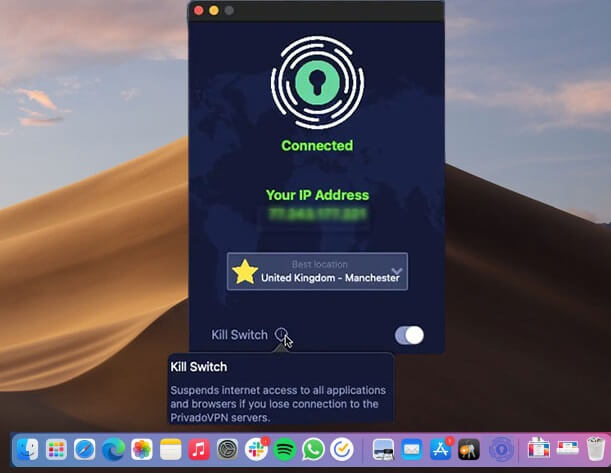
PrivadoVPN for mac

The first one on our list of best free VPN for Mac is PrivadoVPN. This popular free VPN also offers a paid version. Based in Switzerland the Virtual Private Network guarantees the utmost security and privacy. 

With the help of this VPN for Mac, you can browse websites that are not available in your geographical location. Moreover, all your data is safe without any exceptions. Just one click and connect to the server of any other country. Let’s know more about this Best VPN for Mac free below.

Key Features of PrivadoVPN

  • With over 330 servers and 40+ server locations, the VPN offers unlimited device support. 
  • Good internet speed when compared to other VPNs
  • Strict no data log policy to keep your data safe
  • Kill the switch feature to turn off the internet as soon as VPN is interrupted. 
  • User-friendly interface

Pros

  • No logs policy
  • Offers strong data security
  • Unblock Netflix & other video streaming platforms
  • Allows Torrenting
  • Simple and easy interface
  • Complete money-back guarantee
  • Cross-platform i.e compatible with Mac, Windows, iOS, and Android

Cons

  • Free version offers limited features

Mac Download Button

Also Read: Best VPNs For Torrenting And uTorrents


2. Nord VPN – Overall Good Mac VPN

NordVPN for mac

Another one here in our list of best free VPN for Mac is NordVPN. The cross-platform VPN service has proven expertise in obtaining online privacy despite being very simple to use. Access Netflix anywhere using NordVPN and obtain its membership via cash and also through cryptocurrencies. 

With a military-grade encryption facility, this Mac free VPN can offer end-to-end security. No personal information is tracked, recorded, or stored by the Nord VPN.

All forms of information are transmitted using the 256-bit encryption provided by the Advanced Encryption Standard (AES). Your data remains protected by the automatic kill switch even if internet connectivity is suddenly lost. Let’s know more about this free VPN Mac OS

Key Features of NordVPN

  • One of the fastest VPNs for MacBook and Windows devices
  • No data tracking
  • Select from 5400+ servers located in over 60 countries. 
  • Split tunneling and Kill Switch feature
  • Dedicated IP with the ability to mask it. 
  • 24*7 customer support is available

Pros

  • Incredible download & upload speed
  • AES 256 encryption 
  • Simultaneous connection for up to 6 devices
  • Huge Server network
  • Around-the-clock assistance from the customer support team
  • Additional features such as Password Manager, NordLocker, etc with the Premium version.

Cons

  • Paid tool 

Mac Download Button


3. Express VPN – Best Free VPN for Mac
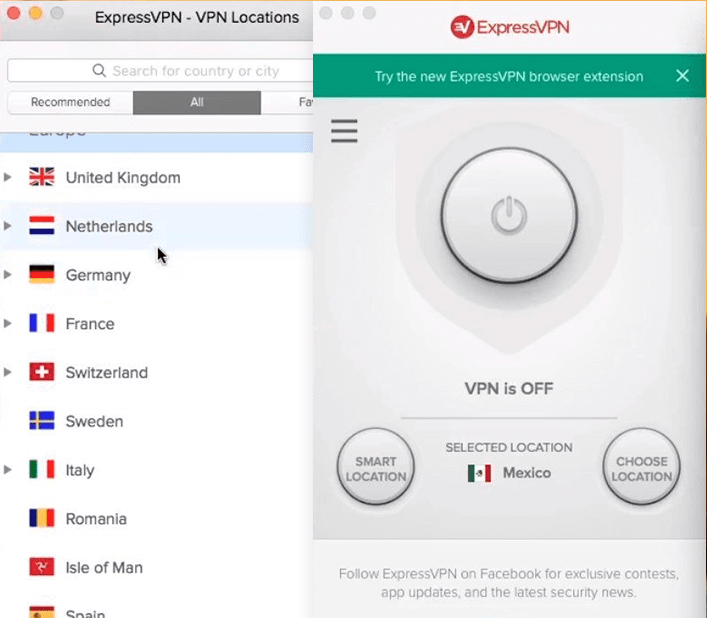
Express VPN for mac

Yet another best free VPN for Mac is ExpressVPN. Despite not being a completely free VPN for Mac, it is a fantastic option because of its user-friendly features and bilingual design. This program is compatible with desktop and mobile versions.

This is the best mac free VPN for getting over geographic restrictions and accessing any content with the best possible data encryption and total data security.

The ability to choose which apps need to access the VPN and which apps can be excluded from the list of choices because they don’t require VPN protection is provided by the split tunneling function.

This best free VPN for Macbook offers superior capabilities for all types of enterprises to safeguard their privacy and delivers a government-grade encryption facility. With a 30-day money-back guarantee and 24-hour technical support, this VPN for Mac is unquestionably the best.

Therefore, if you are looking for the best VPN for MacBook, ExpressVPN can be a great choice. Due to its extended features don’t mind spending an extra amount to switch to the Pro version. Let’s know more about this Best VPN for Mac free below. 

Key Features of Express VPN

  • High-level encryption of data with no logs policy
  • Easy-to-use interface with major platform support. 
  • 24/7 customer support and 30-day money back guarantee
  • Kill Switch, Split Tunneling, and DNS leak protection

Pros

  • Server network in more than 90 countries
  • User privacy maintained through the No logs policy
  • Highly secure Encryption 
  • Ensures anonymity of users
  • 24*7 support
  • Powerful and highly secure VPN

Cons

  • Paid subscription required for additional features 
  • Can’t work with Linux

Mac Download Button

Also Read: Best Free VPN for Spotify


4. Surf Shark – VPN for Mac
Surf Shark vpn for mac

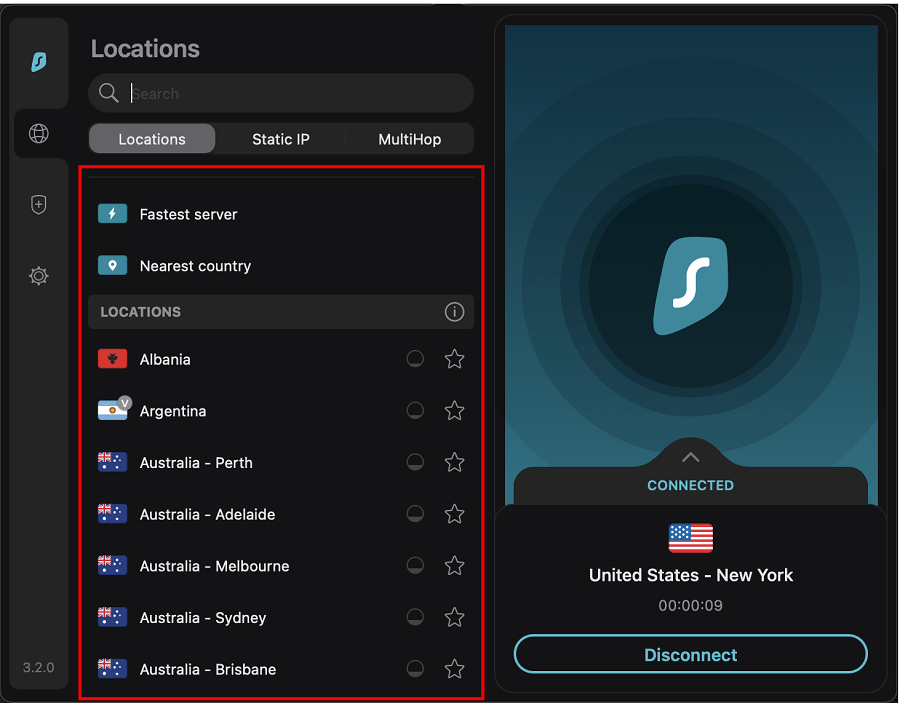
This is yet another top-notch free VPN for Mac that offers limitless access. While using Surf Shark, even from your internet network provider, your identity is hidden when using the camouflage mode. All you need to do is download it to get started and access different browsing platforms.

In addition to this, the best free VPN for Mac can whitelist the trusted applications or web pages that will automatically be bypassed by the VPN. Your actions are not tracked by it. For complete security, each server has private DNS and IPV4 stack that prevents data leakage. Despite not being a free VPN for MacBook, Surf Shark VPN is very reasonably priced and has a lot to offer. Let’s know more about this free VPN Mac OS.

Key Features of Surf Shark: 

  • Offers high privacy and security to user data
  • Cross-platform support (Windows, Linux, Android, macOS, and iOS)
  • The speed of the VPN is extensively fast when compared to other VPN service providers. 
  • Smooth video streaming of even the blocked content in your geographical location
  • Nifty extraordinary features such as No border mode, CleanWeb, etc. 

Pros

  • Highly safe and secure to use
  • Simple interface
  • Support assistance around the clock
  • Unlimited server support
  • Almost all streaming platforms support

Cons

  • Only Paid version can unlock additional features
  • Free trial available only for Mac & Mobile applications

Mac Download Button


5. ProtonVPN – Top Mac VPN

ProtonVPN for mac

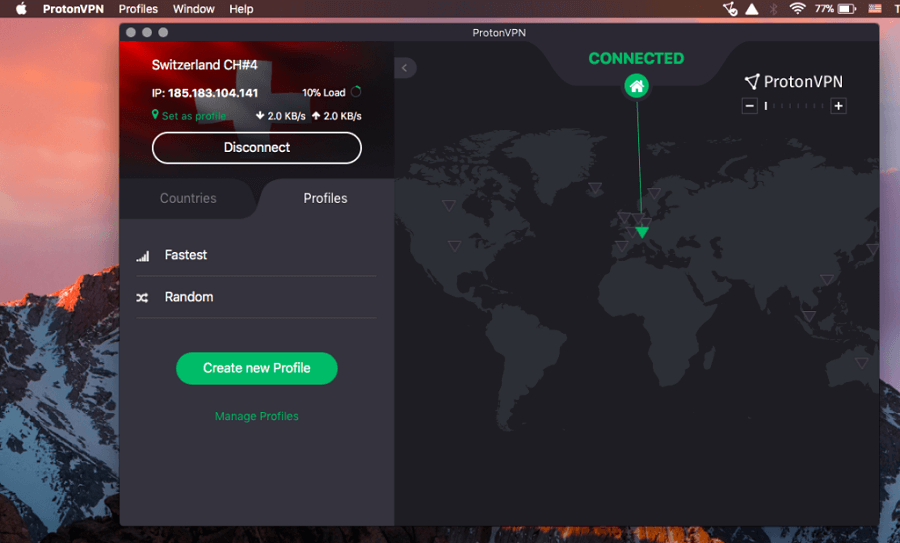
The next one here in our list of best free VPN for Mac is ProtonVPN. It is one of the strongest VPN for Mac. Proton VPN adheres to a no-logging policy. This VPN service provider doesn’t engage in any data retention practices keeping all your data safe from threats and leaks. ProtonMail features powered by a straightforward Interface and DNS leak prevention are some of its key features. Let’s know more about this Best VPN for Mac free below. 

Key Features of ProtonVPN: 

  • Three state kill switch to prevent data leak and Split tunneling
  • Custom profiles to select country, server, and protocol. 
  •  Supports P2P torrenting and downloading by using P2P capable servers
  • Port Forwarding firewall to block ports that are not in use. 
  • Tor over VPN 

Pros

  • Economical pricing with customizable plan options
  • Regular security audits
  • Multihop & Tor connection 
  • Can unblock Amazon Prime, Disney +, iPlayer, Netflix, and other similar browsing platforms. 

Cons

  • Performance issues
  • Restrictions on additional features and servers

Mac Download Button

Also Read: Best Free ChatGPT VPN


6. Private Internet Access – Vpn for Mac
Private Internet Access for mac

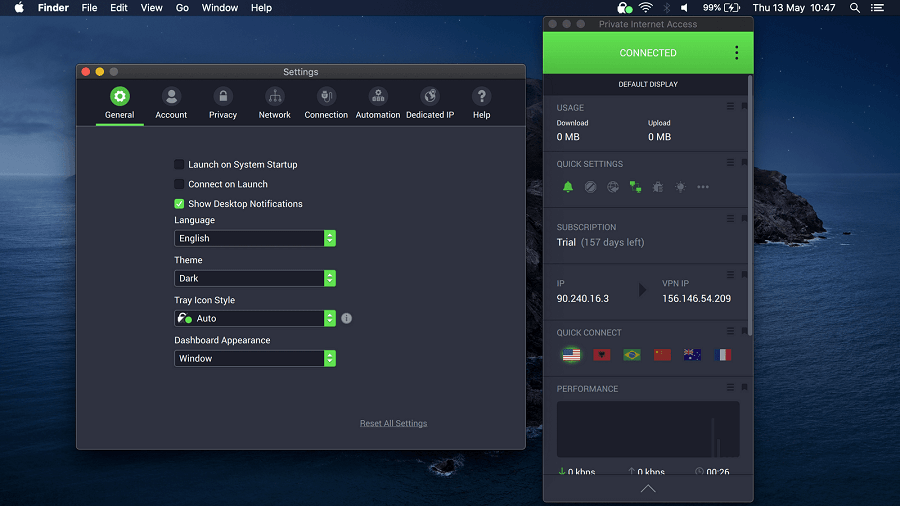
Private Internet Access is yet another best free VPN for Mac 2024. It is one of the most trusted VPN with a strict no logs policy. In addition to this, it offers a variety of customizations for your privacy. The best free VPN for Macbook has unlimited device protection without any cost

PIA has a dedicated application for each browser, platform, and OS. To unlock the additional features of the VPN service switch to the Paid plan with a 30-day refund policy if the users are not satisfied. Let’s know more about this free VPN Mac OS. 

Key Features of Private Internet Access

  • It has a strict policy of No logs for your browsing history. 
  • In-built ad blocking to avoid malicious attacks
  • 100% open source VPN that makes it transparent and secure
  • Additional features such as torrenting support, split tunneling, kill switch, and more. 
  • Easy and quick configuration 

Pros

  • Cross Platform support: Windows, macOS, Android, and iOS
  • Lightning fast speed
  • 24*7 customer support
  • 100% open source and transparent
  • 30 day money back guarantee
  • Unlimited device support

Cons

  • Lack of International servers
  • Free version contains ads

Mac Download Button


7. Windscribe – Best Free VPN for Mac

Windscribe for mac

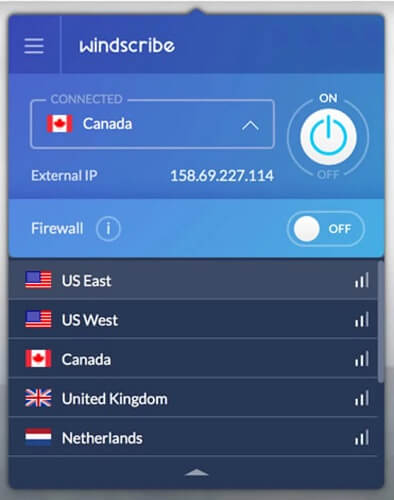
Windscribe, one of the top free VPN for Mac, offers 10 GB of data for use. For individuals who tweet about their app, an additional 5 GB is made available.

For increased security, they also have a firewall and an ad blocker for mac. This free VPN for Mac ensures users can experience great privacy by deleting all of their data within three minutes of logging out.

Your GPS location can be fooled using the Location Warp function. The Time Warp feature does the same thing, adjusting your timezone to that of the country you are connected to. Let’s know more about this Best VPN for Mac free below

Key Features of Windscribe: 

  • Large network spread across servers in 63+ countries. 
  • AES-256 encryption
  • Free version available for users tight on their budget
  • Static IP
  • Port forwarding to access internal resources safely
  • Split tunneling 

Pros

  • Easy to use
  • In-built ad blocker
  • Cross-platform support
  • Highly reliable VPN for MacBook

Cons

  • Consistency issue 
  • No technical support

Mac Download Button


8. CyberGhost VPN– Best Free VPN for Macbook

CyberGhost VPN

The last name on this list of the Best VPN for Mac free is CyberGhost VPN. If you want to use a professional VPN tool with utmost security and privacy, you can take the help of the CyberGhost VPN.

The tool offers unlimited bandwidth to you. Moreover, with the 256-bit AES Encryption feature of the tool, you get strong and unbreachable security. Let’s know more about the best free VPN for Macbook free below.

Key Features of CyberGhost VPN:

  • Strict anti-logging policies
  • Allows streaming and torrenting
  • Integrated Kill Switch
  • Customer Support 24/7
  • Over 100 countries and over 9000 servers

Pros

  • Cross-platform tool
  • Money-Back Guarantee
  • Automatic Wi-Fi Protection
  • Personalization features
  • Multiple plans

Cons

  • Confusing privacy norms
  • Better alternatives available
  • Limited and very short trial period

Mac Download Button


9. Atlas VPN

Atlas VPN

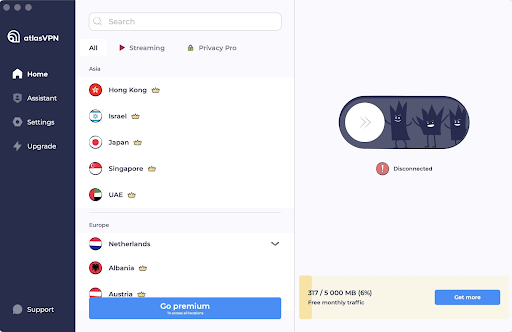
Atlas VPN is an excellent user-friendly VPN service for macOS. Atlas VPN allows you to use as many devices as you want with a free version. It provides over 1000 ultra-fast premium, secure, and video-optimized servers worldwide. Atlas VPN polishes its tunnels in order to provide an uninterrupted and stable experience. Moreover, it comes with a built-in Data Breach Monitor feature that notifies you whether your personal information was leaked in data breaches. In sum, it is the best free VPN for Mac that you can use to control your digital life and keep all your devices safe.

Key Features Of Atlas VPN:

  • Allows you to quickly change your locations.
  • More than 1000 super-fast and secure servers.
  • The Data Breach Monitor feature informs you whether your personal data or details were leaked.
  • Its shield feature prevents you from entering any potentially malicious sites.

Pros

  • Attractive and user-friendly interface.
  • Unlimited simultaneous connections.
  • Network kill switch.
  • Free subscription.

Cons

  • No support for browser extensions.
  • Lack of customization options.
  • 3 free server locations.

Mac Download Button


Closing Lines:

Here we end our descriptive guide on the best free VPN for Mac. Hopefully, you will now have a fair idea to select a suitable VPN for your Mac. If you have any further questions or suggestions don’t hesitate to connect with us in the comments below. 

If you found our list helpful, don’t forget to subscribe to our blog for more informative tech write-ups. Also, to never miss any updates follow us on Facebook, Instagram, Pinterest, and Twitter.


Author

Snigdha

Snigdha is a technical content writer with expertise in the field of science & technology. Though she has a very diverse academic and professional profile yet she finds writing to be a creative form that she was unable to explore so far. When not writing, she can be found indulging in other forms of creativity like painting or travelling.

View all posts

Related Posts
Different-Types-of-Software-Used-in-the-Healthcare-Industry

Different Types of Software Used in the Healthcare Industry

December 10, 2024
0

Let’s have a look at different types of software used in the healthcare industry and understand which one of these can be beneficial for your healthcare business.

We have been seeing a growing number of healthcare institutions making investments in and building a variety of software platforms for healthcare in order to take their companies to the next level. The question now is, what type of healthcare system are they constructing? In addition, if you are considering engaging in a comparable activity, what kind of solutions would be most suitable for you?

Despite the fact that healthcare software development may not be the topic of conversation in the IT community, this multi-billion dollar industry has been expanding for quite some time and does not look to be slowing down any time soon. And with developments in fields like telemedicine and artificial intelligence, its influence on the future of healthcare is likely to be considerably more substantial than it may have been otherwise.

You can’t choose the perfect software for healthcare whilst having little knowledge about the different types of healthcare software that are available on the market. This is in addition to the fact that you don’t want to provide a poor patient experience, have a low retention rate, and manage a chaotic workplace where there are so many options available.

So, to help you rest your search, we are providing some of the most common healthcare software solutions used in the healthcare industry. Despite the fact that this list does not cover all of them, it does give a comprehensive overview of ten major kinds of medical software and will help you choose which ones are suitable for your specific company needs.

This blog will provide you with all of the answers you are looking for, as well as a comprehensive explanation of the many aspects of different types of software used in the healthcare industry, including their features and the advantages they provide.

Top Healthcare Software Used in the Medicine World

In the coming sections of this guide, we will throw some light on different types of software used in the healthcare industry. All of these healthcare software solutions are listed here after extensive study and research. These are the most common ones that can be found in any healthcare institution.

Type 1: Applications for Mobile Health Devices

By simplifying administrative activities such as paying medical bills, booking appointments, and conducting virtual consultations with nurses or physicians, these user-friendly healthcare software solutions provide patients the ability to take control of their own healthcare. Patients get unhindered access to a variety of telehealth services when they use mobile health applications that operate very well.

Many professionals in the healthcare industry first saw mobile health applications as disruptive; nevertheless, they have now evolved into an essential component of contemporary healthcare services.

Also know: Best Medication Reminder Apps for Android & iPhone


Type 2: Remote Patient Monitoring (RPM)

RPMs are one of the most prominent and actively used healthcare software solutions. Through the provision of the capability to gather patient data outside of conventional healthcare facilities such as hospitals and clinics, RPM has brought about a revolution in the healthcare business.

This cutting-edge technology not only improves the breadth of patient health information that is accessible, but it also makes it possible to use acquired data to make diagnoses remotely.

As a result of the disruptions that occurred in conventional health management procedures, RPM technology enjoyed tremendous growth during the pandemic, similar to the rise that telemedicine services experienced. Within the different types of software used in the healthcare industry, RPMs are quite advanced in their usage.


Type 3: Software for Personal Health Records

Personal Health Record software serves a different function than other healthcare software solutions, the majority of which are intended to maintain a healthy lifestyle. Instead, the software is used to monitor ailments. These kinds of software provide the function of medical diaries, and they may either be stored on the device that the patient uses, or they can be connected with the Healthcare software that the doctor or hospital uses.


Type 4: Applications for the Administration of Medical Equipment

This category of healthcare software solutions aims to achieve efficiency by eliminating the need for hospitals and medical practices to manually perform tasks such as stocktaking and equipment maintenance. By providing features such as automated maintenance scheduling and inventory alerts, medical equipment management software for Healthcare helps ensure that clinics can operate efficiently.

Also know: Windows 11 PC Health Check App 


Type 5: Software Used for Medical Billing

The accounting departments of hospitals may use different billing healthcare software solutions to simplify the process of keeping track of payments, patient invoices, and any other financial processes. Integration with larger systems, such as electronic health records (EHR) or software for hospital administration, is common.


Type 6: Software for Healthcare Appointments

What are other healthcare software solutions that any organization may need? Clinics, hospitals, and other medical offices may better manage their appointment systems online with the assistance of healthcare software solutions for booking. In most cases, the program includes a patient panel that enables users to make appointments via the use of a connected mobile application or website. In many cases, it also includes an email notification system & automated reminders for patients and physicians on forthcoming visits.


Type 7: Electronic Prescribing Software

It is becoming more important for medical professionals to have access to healthcare software solutions for prescriptions as the number of nations across the globe that are transitioning to electronic healthcare software continues to rise. It is possible for medical practitioners to monitor, renew, and cancel prescriptions for their patients with the use of this program. It also incorporates national drug reference databases into its system.


Type 8: Software for Medical Diagnostics

There are certain knowledge gaps that prohibit physicians from delivering an accurate diagnosis, and medical diagnostic healthcare software solutions give them the ability to communicate anonymised patient data with one another so that they can fill such gaps. The majority of the time, this kind of software makes use of artificial intelligence (AI) in order to examine all of the patient data that is accessible and to create plausible diagnoses.


Type 9: Software for Medical Research

When it comes to healthcare research, the two key functions that healthcare software solutions serve are teaching and the dissemination of research to the medical community. Healthcare software of this kind is often used for the purpose of training medical workers and providing assistance for diagnosis in situations when there are no comparable clinical instances among patients that can be referenced internally.

Also know: Best Hospital Management Software


Type 10: Electronic Health Records (EHR)

Hospitals and clinics employ electronic health record software, which is not only one of the most common types of healthcare software solutions but also the single most used form of software. In many respects, it is comparable to a CRM system, with the exception that it is tailored to the medical business. The electronic health record software gathers information on individuals, such as the medications they take, the recommendations made by their physicians, and the treatments that they have already had.


Different Types of Software Used in the Healthcare Industry: Final Words

When it comes to improving the methods by which medical organizations administer and provide treatment, healthcare software solutions are really necessary. Through the use of the power and potential of data analysis, machine learning algorithms, & digital insights, the application of information technology in the field of medicine paves the way for a multitude of new chances to enhance health management and clinical welfare.

The current moment is the ideal time to make use of medical information technology by using various types of healthcare software. This is because of all of the benefits and chances that are now available. If you have any questions related to this domain, you can ask them in the comments section below. If you liked our guide on healthcare software solutions, don’t forget to subscribe to our newsletter for daily updates.

Best Expense Tracking Software

10 Best Expense Tracking Software | Expense Management Tools in 2024

February 9, 2024
0

This article introduces you to the best expense management software for easy expense monitoring, reporting, approval, and reimbursement.

Many organizations offer their employees reimbursement of expenses like utility bills, traveling expenditures incurred in connection with their job, etc. However, it often takes longer to process these repayments as accurately tracking the expenses is a wearying task. But now you do not have to worry, as the best expense tracking software are here to record and maintain better accounts of all business-related expenses.

So, without further ado, let us jump right into the well-researched list of the currently available best expense management solutions.

List of the Best Expense Tracking Software in 2024

Below we have listed the best expense management and tracking tools you can use.

1. Expensify

Expensify

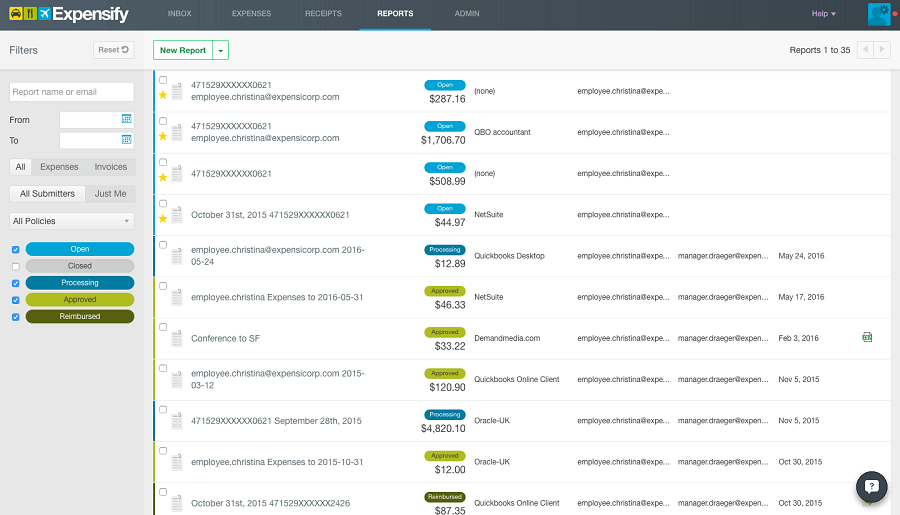
Next, we have Expensify on this listicle of the best expense management system. It is an automated application that manages your spending in real-time.

What we liked the most about Expensify is that it analyzes the policies of your company to help you concentrate only on relevant expenses. Additionally, the following are other useful Expensify features.

Key features of Expensify

  • Smart integrations and reporting
  • Automated reimbursement system
  • Cloud-based application

Download Now

Also Read: Best Cash Advance Apps Like Dave to Borrow Money


2. QuickBooks

QuickBooks

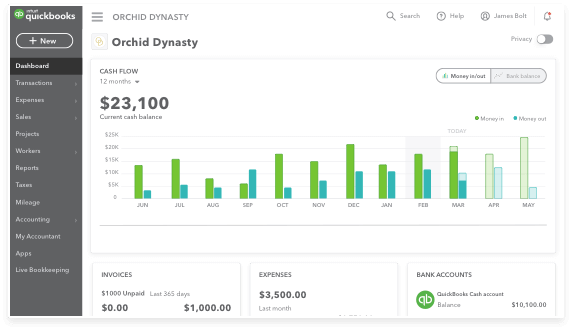
Let us first introduce you to QuickBooks. With this application, you can effortlessly track your finances irrespective of whether you work from home, the office, or anywhere else.

The best thing about QuickBooks is that it boasts a real-time dashboard, so you stay updated with all your transactions as and when they occur. Moreover, it automatically downloads the bank account information, saving you from the hassle of entering data into spreadsheets.

Furthermore, the following features add to the reasons we consider QuickBooks one of the best expense tracking software.

Key features of QuickBooks

  • Invoice tracking to ensure timely payment by clients
  • Availability of tax standard-compliant tracking of sales tax
  • Lets you record all receipts on the mobile device
  • Cost-effective expense management software for small businesses

Download Now


3. Rydoo

Rydoo

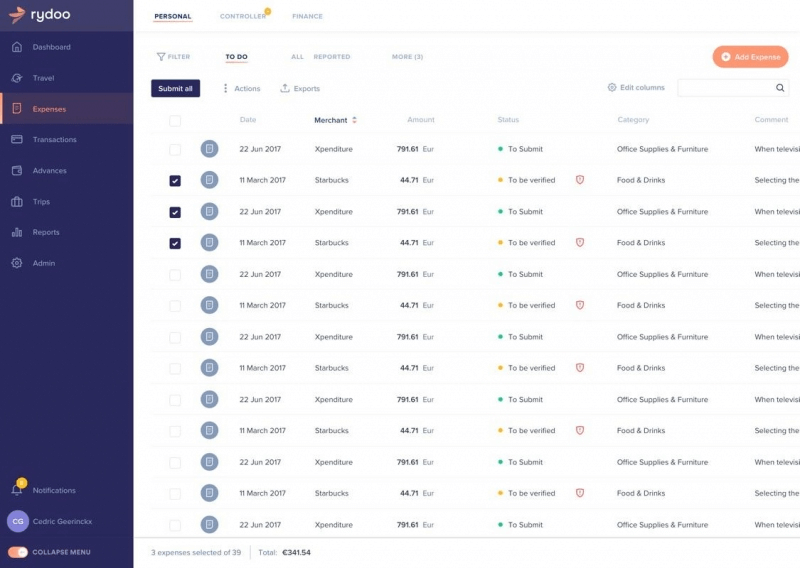
Here comes yet another great expense management system you may try. Rydoo is one of the simplest applications to track expenses.

It lets you upload receipts through the application or email, automatically extracts crucial data, and then orders the extracted data according to projects and categories.

Moreover, the following are some other notable things about Rydoo.

Key features of Rydoo

  • Allows you to log mileage and cash advances
  • You may set up offices, groups, and branches to organize the way you use Rydoo
  • Supports report generation in the form of XLS, XML, CSV, and PDF files

Download Now


4. Abacus

Abacus

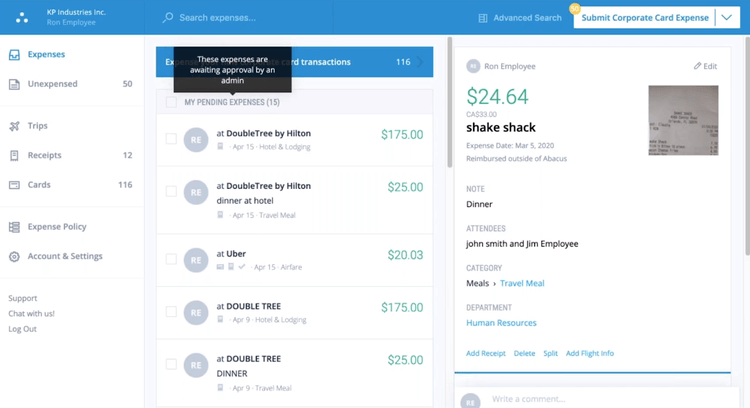
The next name on our list of the best expense management tools is Abacus. It is a program popular for its contemporary design and ease of use.

Besides being user-friendly, Abacus is also a great addition to this due to its wide spectrum of features. A few of the remarkable features of this software include a supporting application that allows employees to submit expenses when they occur and the ones shared below.

Key features of Abacus

  • In-built text feature to speed up the process of reporting and reimbursement
  • Option to connect personal or corporate cards to make expense tracking simple
  • Learns from your behavior and automatically suggests merchants and categories
  • Automatically forwards certain expenses to the concerned manager according to specific criteria
  • In-app chat option so that you can communicate with your team

Download Now


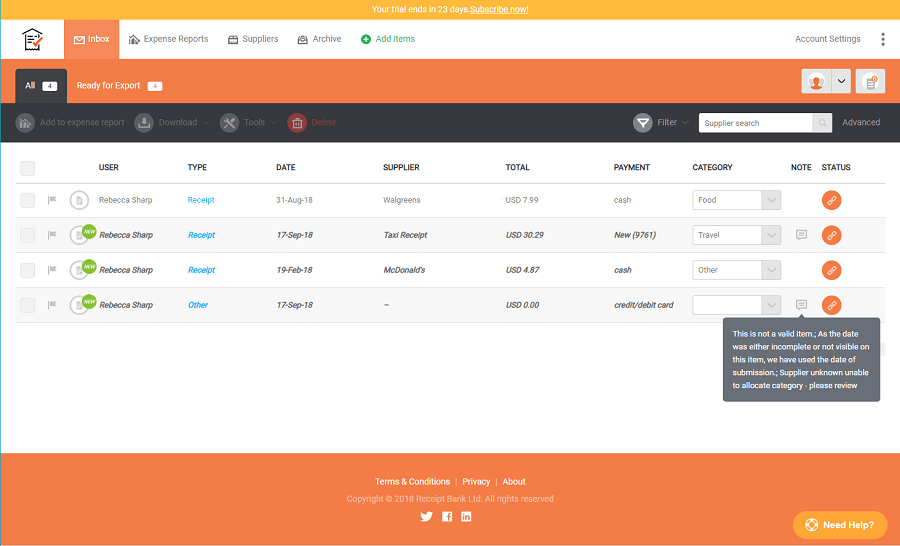
5. ReceiptBank

ReceiptBank

You may choose ReceiptBank if you are looking for the best expense tracking software that excellently integrates with third-party accounting applications. It minimizes the data entry requirements to simplify the process of expense tracking.

Additionally, features such as automatic Optical Character Recognition (OCR) justify ReceiptBank’s position on this listicle sharing the best expense management software for small businesses. Furthermore, the following features also make it a desirable choice.

Key features of ReceiptBank

  • Highly secure with 256-bit SSL security
  • Allows data export through PDF or CSV files
  • ReceiptBank’s high-end plans include features like item import from Dropbox and PayPal

Download Now

Also Read: Accounting Software for Mac for Small Business and Enterprises


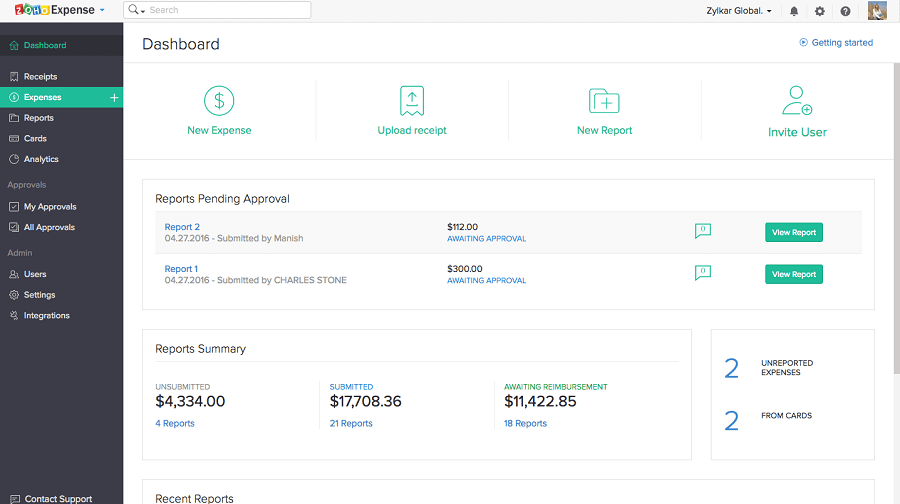
6. Zoho Expense

Zoho Expense

Talking about Zoho Expense, it is yet another budget-friendly yet feature-rich expense management system. The customization options are what attracted us the most to this software.

Along with high customizability, the following features are also a highlight of Zoho Expense.

Key features of Zoho Expense

  • Automatically turns receipts into expense entries
  • Groups expenses into a single report
  • Card transactions import option
  • Supports expense forwarding from the inbox
  • Stores receipts in the cloud
  • Organizations may set spending limits and monitor employee expenditure

Download Now


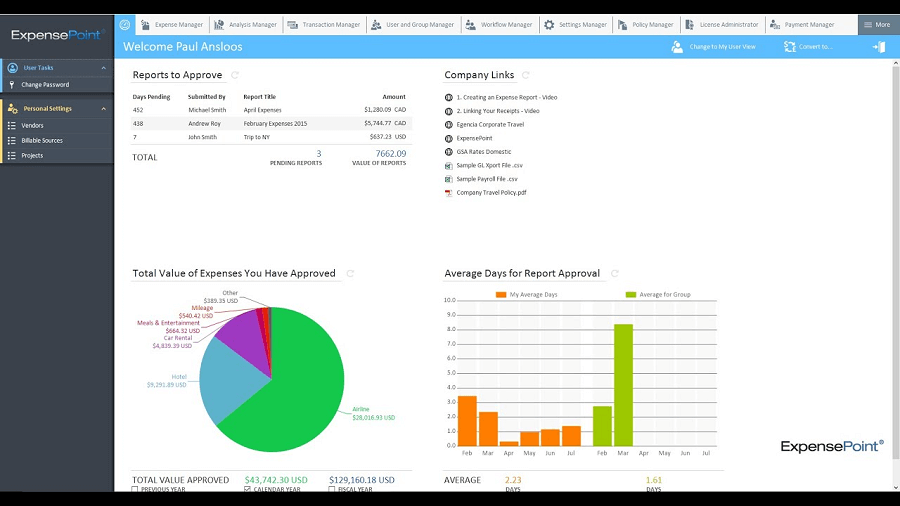
7. ExpensePoint

ExpensePoint

Next, we would like to include ExpensePoint on our list of the best expense management solutions. Its affordable pricing makes it a great choice for small businesses.

Besides being affordably priced, ExpensePoint boasts the following useful features that make it one of the best expense tracking software.

Key features of ExpensePoint

  • Credit card integration
  • Multiple device access
  • Easy employee reimbursement through Automated Clearing House (ACH)
  • Receipt uploading via methods like email
  • Useful back-end administrator tools
  • Receipt imaging system
  • Multi-currency system
  • One-stop destination for expense submission, approval, and reporting

Download Now


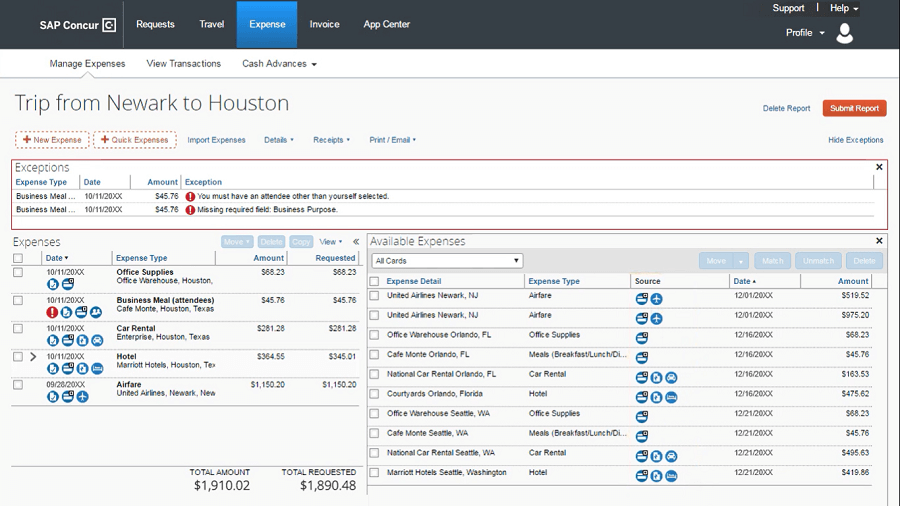
8. Concur Expense

Concur Expense

Here we have Concur Expense in the eighth position on this list of the best expense management software. It is a popular application for its ability to capture high-quality receipt pictures to submit them for expense claims.

Moreover, the addition of unlimited business cards and the following features make Concur Expense the best expense management tool.

Key features of Concur Expense

  • Enterprise Resource Planning (ERP) to give you a detailed picture of your forecasts and budgets
  • Analysis of data and ensuring its compliance with tax rules and regulations
  • Cloud-based environment allowing you to see all your expenses in a single location
  • Supports integration with other SAP applications

Download Now


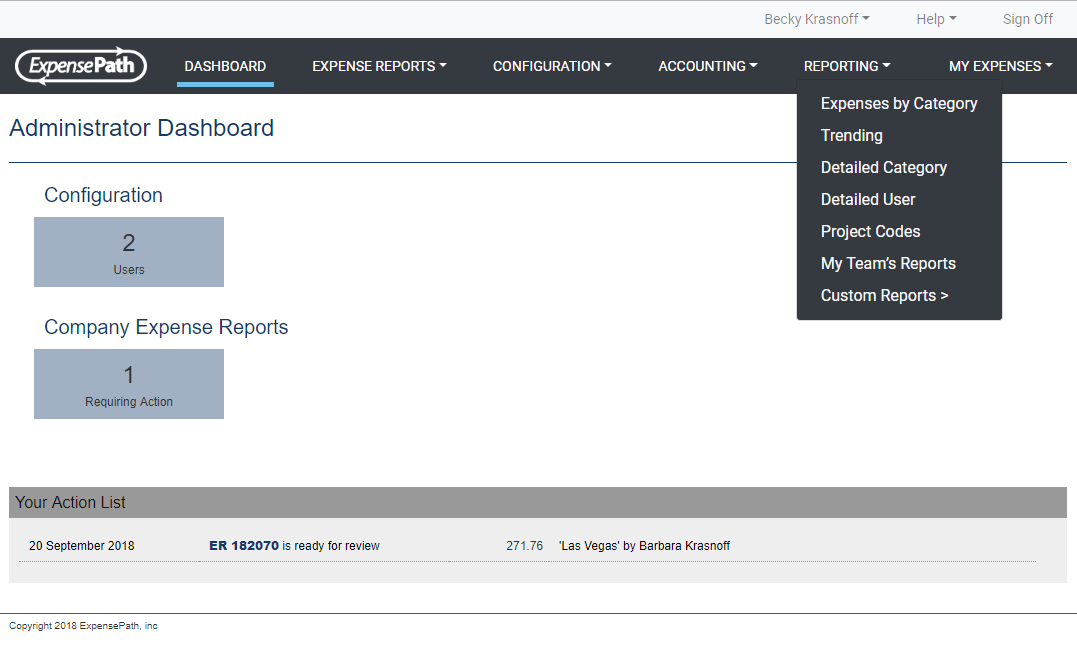
9. ExpensePath

ExpensePath

In the ninth position, we would like to place ExpensePath. It is a beginner-friendly expense management system having an intuitive interface.

In addition to it, ExpensePath boasts the required customization, admin manual, and the following features to justify its place on the list of the best expense tracking software.

Key features of ExpensePath

  • Policy violation flagging
  • Company card reconciliation and management
  • Speed analysis reporting and audit documentation
  • Accounting system integration
  • Mobile device support for the creation, submission, and reviewing of expense reports
  • Travel booking integration

Download Now


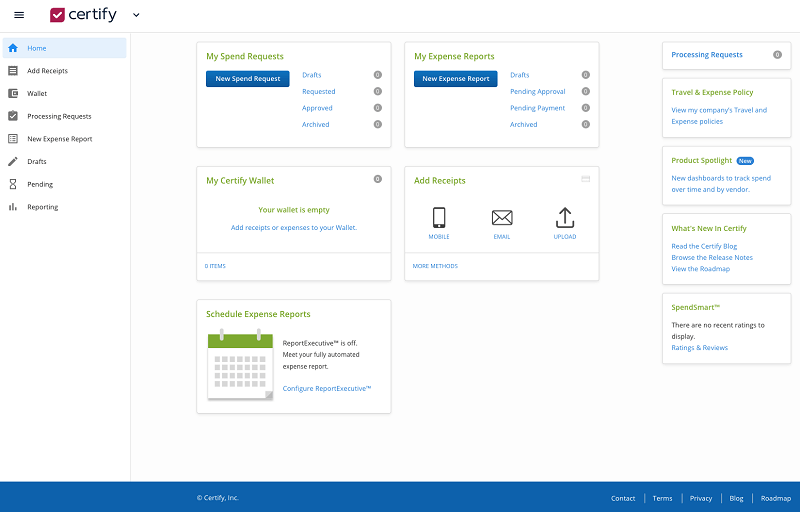
10. Certify

Certify

Finally, we have Certify to conclude our best expense management software. This easy-to-set-up software is loaded with excellent features.  Talking about the features, it boasts video tutorials to help you use the software. Moreover, below is what else you may like about Certify.

Key features of Certify

  • Quickbooks, Microsoft Dynamics, Uber, and other app integration
  • Allows you to book travel
  • You may upload  your receipts or click a picture
  • Automatic extraction of information like location, category, and date from the receipts
  • Audit support for your team’s accounting

Download Now

Also Read: Best Payroll Management Software


Summing Up

Above, we shared a list of the best expense-tracking software for small businesses and employees who don’t have much time to track their expenses and wait for reimbursement. You may go through the unique features of all these programs to select the best one for your needs.

In case of any doubts or confusion regarding this write-up, you may contact us via the comments section.

1 Comment
    Fiona_d says: Reply
    May 18th 2020, 4:05 pm

    It would be super nice to find a free service, but it’s quite hard to do that without getting scammed. Out of all the VPNs mentioned above, I have only tried out Surfshark. Pretty decent service. The subscription is about to end, but I’m quite sure I’m going to renew it.

Leave a Reply Cancel reply

Your email address will not be published. Required fields are marked *

Sidebar Image bit G ad1

Latest Posts

  • How-to-get-help-with-file-explorer-in-windows
    How to Get Help With File Explorer in Windows 11/10
    by Niharika / March 20, 2026
  • Easy Online Video Editors to Try in 2024
    10 Easy Online Video Editors to Try in 2026
    by Remy Thomas / March 20, 2026
  • how-to-export-bookmarks-from-edge
    How to Export Bookmarks From Edge
    by Niharika / March 18, 2026
  • Best-Free-Online-Portfolio-Websites-in-2026
    Best Free Online Portfolio Websites in 2026
    by Niharika / March 16, 2026
  • Anytime Astro: Best Website For Online Astrology Consultation
    Anytime Astro: Connect Now For Online Astrology Consultation
    by Somya Shrimal / March 13, 2026

Categories

  • Cyber Security
  • Driver Updater
  • Entertainment
  • Fitness
  • Games
  • How To
  • laptop
  • OS
  • Reviews
  • Tech News
  • Tips & Tricks
  • Top 10
Sidebar Image bit G ad1
Best Free Property Management Software Best Free Property Management Software to Use in 2024by Harshita / February 5, 2024
Best Free VPN for Omegle in 2024 [100% Working]by Akshara Parnami / February 5, 2024Best-Free-VPN-for-Omegle
TechPout Footer Logo

We at TechPout promise to put forth stories that help people to learn and simplify their digital life. Our purpose is to share the true essence of technology with our tech-loving community.

Useful Links

  • About Us
  • Contact us
  • Privacy Policy

Popular Posts

  • Best PC Optimizer Software
  • Best Mac Cleaner Apps
  • Best Driver Updater
  • Duplicate Photo Finder and Cleaner Software
  • Best Free Movie Download Sites
  • Best IPTV Players

Follow us

Copyright © 2026 www.techpout.com. All rights reserved
DMCA.com Protection Status