Main LogoLight Logo
  • Reviews
  • Top 10
  • How To
  • Tech News
  • OS
    • Windows
    • MAC
    • iOS
    • Android
  • Categories
    • Driver Updater
    • Cyber Security
    • Games
    • Fitness
    • Entertainment
    • Tips & Tricks
Android Top 10
by Prachi Dani

9 Best Free Collage Maker Apps For Android Smartphones [2024]

January 8, 2024
1

Posting a single picture on your Social media profile can get a bit boring at times. Making a photo collage can, however, be a more creative and better way of sharing your good times with your friends and relatives. 

For better results, you can take the help of a collage maker app to compile various pictures into one stunning piece. 

Luckily, there are many Collage making apps available on the app store, which are exceptionally easy to use. These apps work seamlessly well on both Android and iPhones. 

Here, we have listed some of the best collage maker apps for Android, which can help you bring together a collage in a matter of seconds. 

So, without any delay, let’s have a look at some of the most popular apps. 

Table of Contents hide
Collage Maker Apps For Android In 2024
1. Moldiv
2. Collage Maker
3. Pic Collage
4. Pic Stitch
5. Fotor
6. Photo Collage Maker
7. Canva
8. Layout from Instagram
9. Pixlr

Collage Maker Apps For Android In 2024

1. Moldiv 

Moldiv - Best Free Collage Maker App

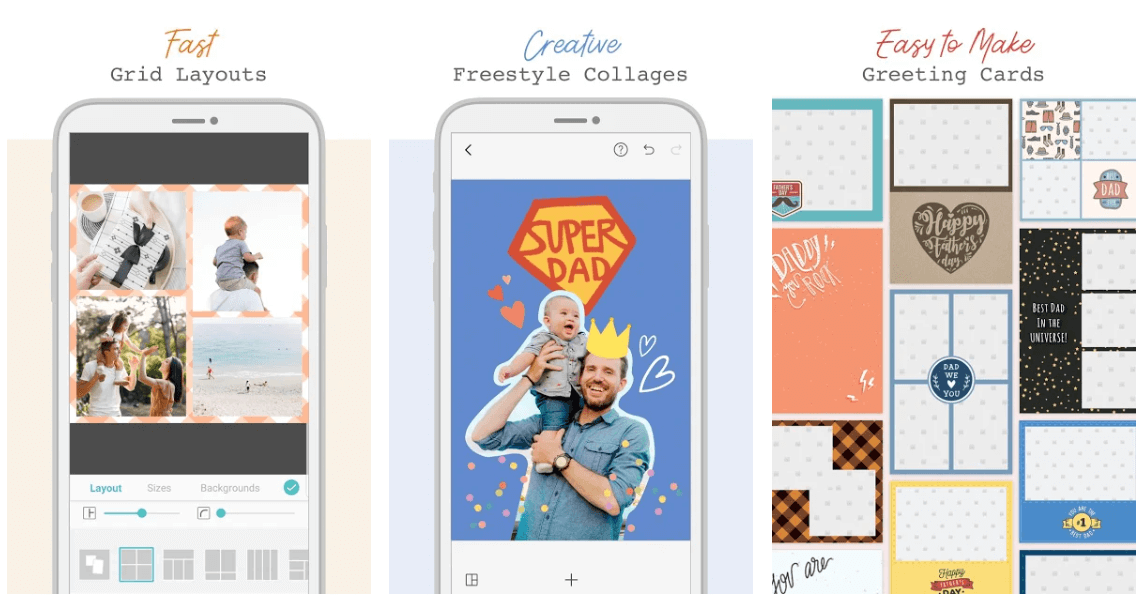
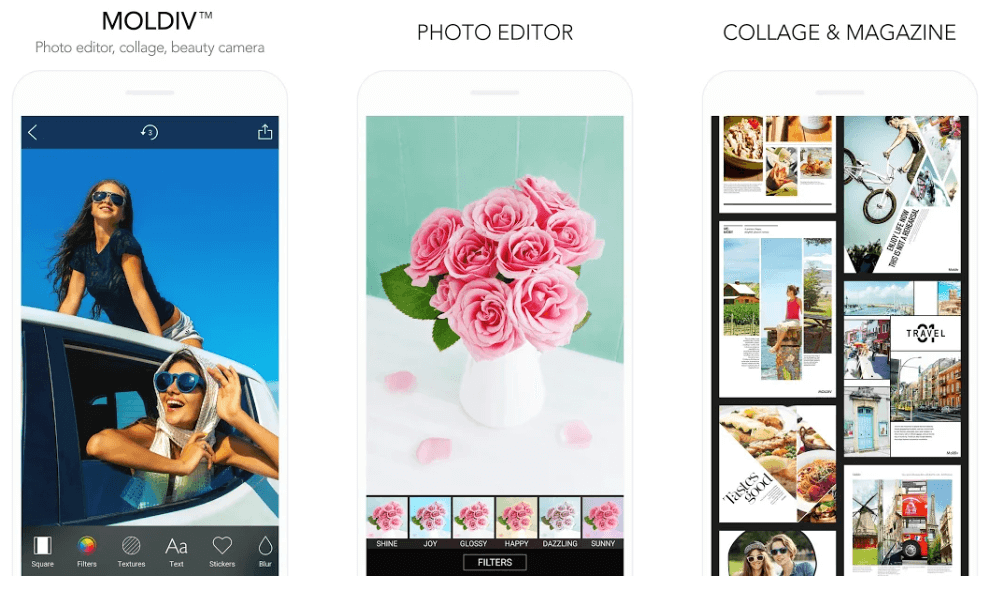
Moldiv is a feature-rich Collage making an app that can take care of all your photo editing requirements. It’s an all-in-one application and comes with several useful templates, editing tools, and filters. 

Additionally, it’s also has a built-in camera which adds on to its overall working. For people who love clicking selfies, they can make good use of its beauty function. 

This Collage Maker App has an extensive list of different layouts that works in a reasonably straightforward manner. You can use it to switch together up to nine pictures at a time. 

download from play store

Must Read: 9 Best Apps To Blur Photo Background on Android & iOS


2. Collage Maker

Collage Maker - Best Collage Maker App For Android

Collage maker is one of the cleanest interfaces that you will find on the play store. InShot Inc develops this free photo collage app. 

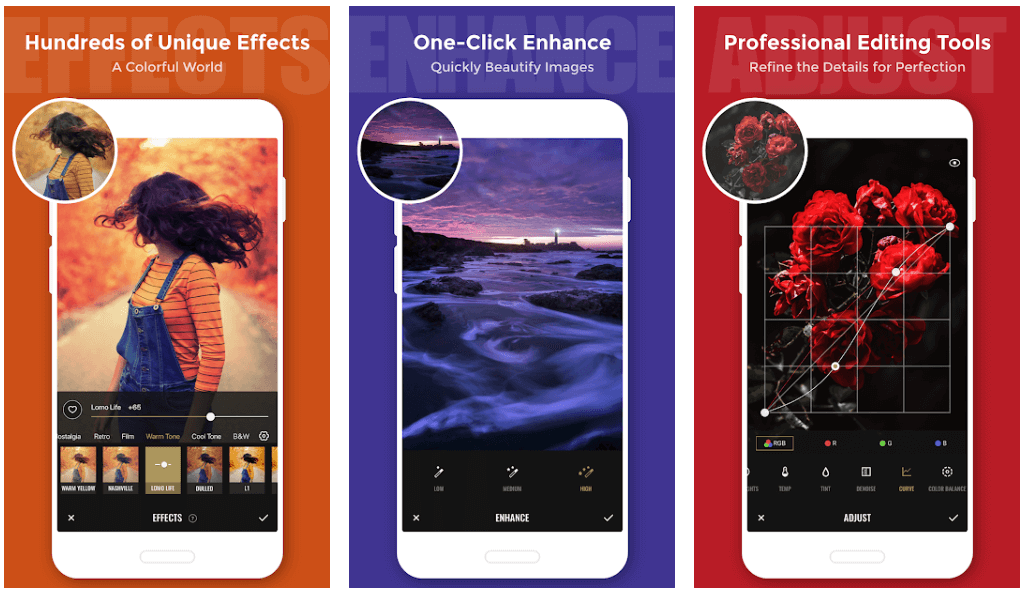
It lets you alter and edit the pictures to make a collage, and you can club around 18 photos at a time using this incredible tool. It comes with several customization functionalities like you can choose and change the grid dimensions as per your requirement. 

It also comes with a Freestyle feature and inbuilt-editor with which you can re-polish your images and make them perfect for social media worthy. 

download from play store

3. Pic Collage

Pic Collage - Free Collage Maker App

Use this convenient and straightforward app to make a stunning collage. Use it to add different texts, stickers, images, and frames to your Collage.

If you like posting your stories on Social media platforms, then its stories feature can be of great use to you. You may also try its Freestyle mode to customize your work by adding a personal touch to it.

Another best part about this stunning app is, it does not require any login and comes with a minimal interface. 

download from play store

4. Pic Stitch

Pic Stitch - Android Collage Maker App

Another highly popular and recommended app for collage making is Pic Stitch. It comes with multiple unique features that are hard to find in other apps. 

The most beautiful thing about Pic Stitch is that you can use it to resize individual pictures so that they can easily fit in your Collage. It also allows you to alter the aspect ratio. 

With over 300 different layout options, it is a sound collage making an app for your android device.

download from play store

5. Fotor

Fotor - Best Free Collage Maker App

If you are looking for a photo collage app with a clean and simple interface, then Fotor can be the right choice for you. Its free version comes with all necessary and essential functionalities. Moreover, if you wish to enjoy advanced features, you can opt for its premium version. 

This stunning application comes with an array of customization features to best suit your requirements. Use it to alter the shape, color, size, prints, and shadow of your pictures. 

download from play store

6. Photo Collage Maker

Photo Collage Maker

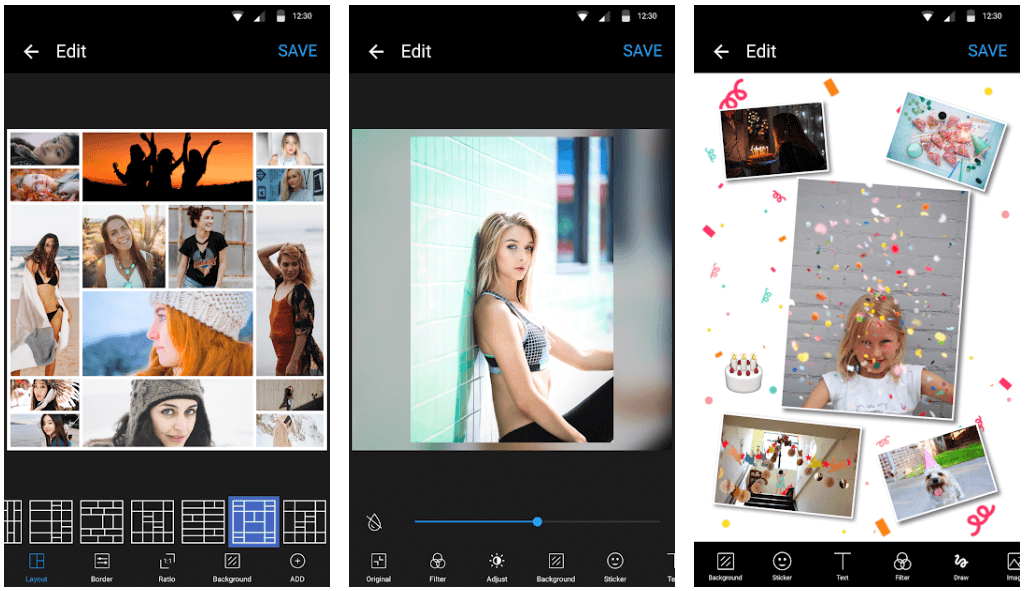
Use this stunning piece of software to change the aspect ratio of your pictures. With Photo Collage Maker, you also get the power to edit your images, add filters and background to them.

You can also change the brightness, saturation, and contrast of your Collage using this incredible app. 

download from play store

Must Read: 10 Best Photo to Cartoon Picture Apps For Android & iOS


7. Canva
Canva

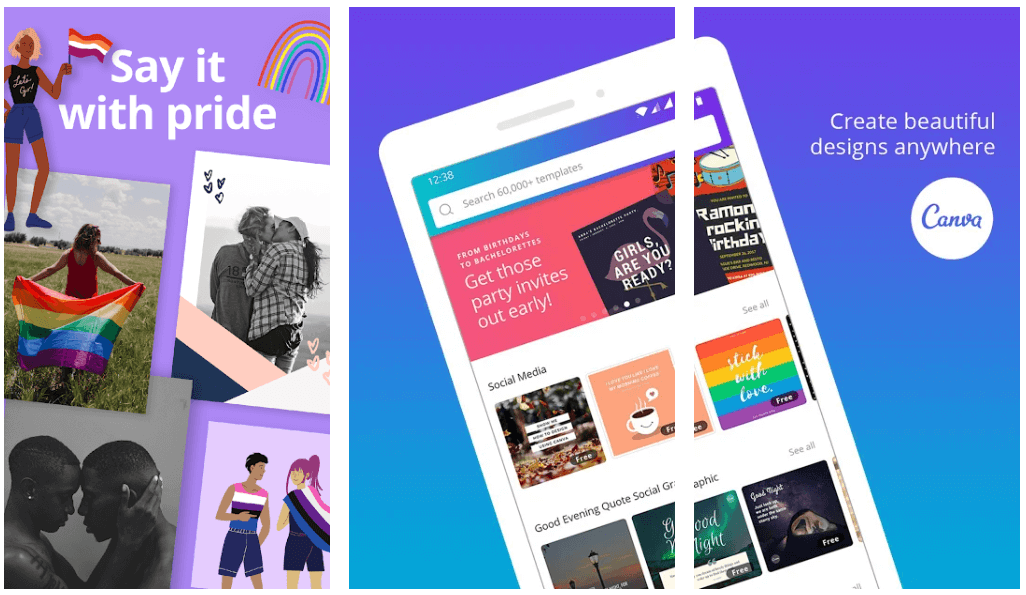
Another most popular name in the category of Collage Making Apps is Canva. This browser-based application comes in both a free and paid version and runs seamlessly well on the Android and iOS platforms.

You can trim, resize and crop your images for them to fit appropriately in your Collage. If you wish you can even add bleed space and crop marks to your creation. 

download from play store

8. Layout from Instagram

Layout from Instagram

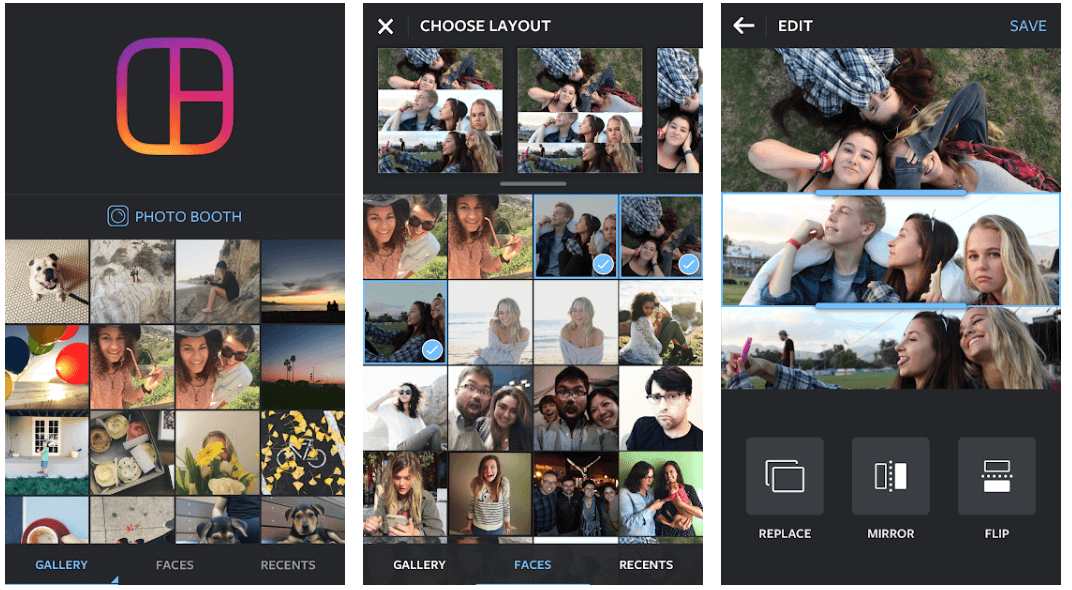
Created by the developers of Instagram, Layout from Instagram surely deserves a spot on the list of best collage maker apps. You can select various pictures, drag and drop them, tweak and edit them to fit into your creation. 

Overall it is a stunning app and does what it promises. 

download from play store

9. Pixlr

Pixlr

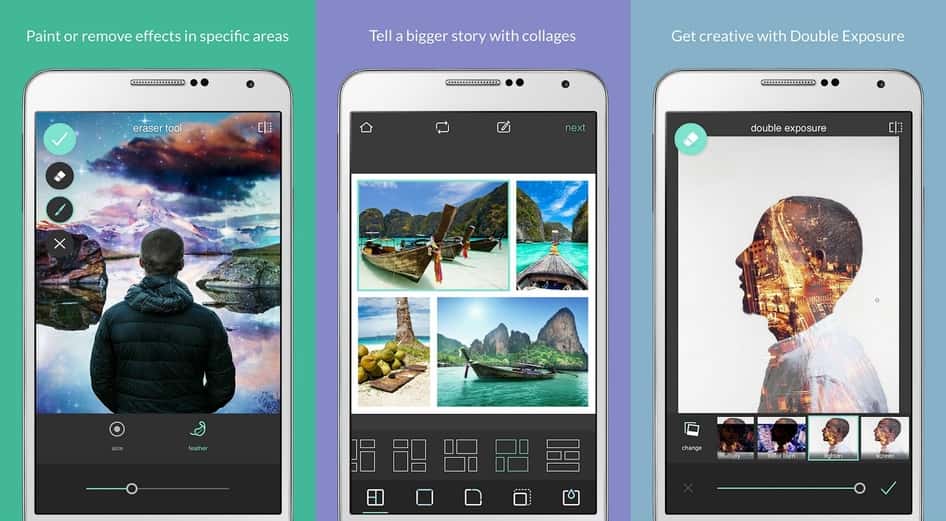
Pixlr offers the user to adjust the collage the way they want. The user while using this app can change every aspect of the collage according to their choice. The freedom offered to the user makes the app the best collage maker in the league. Irrespective of all the features the app is available for free on Google play store. The app has autoFix features which adjust the images to the best automatically including the brightness, contrast and saturation.

download from the play store


Final Words 

Now that you are aware of the top collage maker apps for Android make sure that you choose one to give a boost to your creative instinct. 

Pick the one which best suits your needs and start stitching your favorite pictures. 

Author

Prachi Dani

Prachi Dani is a technical content writer who specializes in areas of science and technology. She is highly up to date with technological transitions and transformations. Writing is not her passion but the only thing that carries satisfaction in life. If not writing, you may find her engrossed playing action games on her treasured smartphone.

View all posts

Related Posts
Best Calendar Apps for Mac

14 Best Calendar Apps for Mac in 2024 [Free & Paid]

May 2, 2024
0

This article shares the 14 best paid and free calendar apps for Mac to help you with planning and organizing your days.

It is cumbersome to sail through the day without proper planning and organization. You need to plan and schedule your day well in advance to check off that to-do list and ensure you don’t end up struggling and juggling various tasks throughout the day. The best calendar app for Mac can be of great help in making the day’s plans.

Now, you might be wondering why you need the best calendar for Mac from a third party when the device already has a default calendar. Well, Mac’s in-built calendar is bare bones with no advanced features to aid better planning and scheduling.

Hence, this article brings to light a well-researched list of the best paid and free calendar apps for Mac.

However, you should know what to look for in a calendar program before going through this list. Knowing it helps you choose the perfect fit for your requirements. Hence, let us first take a look at these essential features.

Use MacKeeper to Get a Clean and Fast mac in Minutes

Essential Features of the Best Calendar Apps for Mac

The best calendar for Mac should possess all or most of the following features.

User-friendly native macOS interface

The interface of the top calendar application for Mac should follow Apple’s design and integrate well with the operating system. It should offer features like menu bar icons, notifications, native keyboard shortcuts, and Today widgets. All in all, it should be an application that is both user-friendly and feature-rich.

Quick appointment addition

Adding and remembering events/appointments is one of the prime reasons a person needs a calendar application. These apps are of no use if one cannot quickly add appointments. Hence, the best calendar app should let the users perform appointment addition with just a few clicks. Moreover, these programs get brownie points if they support natural language processing.

Quick appointment viewing

In addition to adding appointments in a snap of the fingers, the best Mac calendar app for Mac should let users quickly view appointments. You should be able to see your appointments hassle-freely in the way you want to view them, i.e., monthly, weekly, or daily appointments.

Syncing to mobile and other devices

The calendar app should have syncing capabilities. It is always good to sync your calendar through iCloud, Exchange, Google Calendar, or all of them to ensure the all-time availability of the calendar.
Now let us proceed towards the applications offering all or a majority of the above and many other features without further dilly-dallying.


Researched List of the Best Calendar App for macOS

The following are the best calendar apps for macOS you may use this year.

1. Fantastical

Fantastical

Let us first introduce you to a fantastic and the best calendar app for Mac called Fantastical. We got intrigued by this calendar’s design at first glance.

Apart from being well-designed, it boasts many other features, such as quick event creation using the “+” menu, creation of a template from the added event, one-click event composition, and third-party calendar support.

Moreover, you are going to like Fantastical for its smooth animations, and quick and highly-responsive experience.

Download Now

Also Read: Best Screenshot Tools for Mac


2. BusyCal

BusyCal

When you look at BusyCal, it reminds you of the in-built Apple Calendar. However, these two are entirely different in terms of their features. BusyCal is way more customizable than Apple or perhaps any other calendar on this list.
It is the best calendar app for macOS as it allows you to view only the needed information, get an interesting color scheme for the calendar, change fonts, and add another timezone.

In addition to high-end customization options, BusyCal comes with an availability panel. You may use this panel to locate your schedule’s next open spot. Moreover, you may categorize events annually, monthly, weekly, or daily.

Furthermore, it allows data syncing through Yahoo, iCloud, Fruux, Google, Office 365, Fastmail, iCloud, Exchange, and CalDAV.

Download Now


3. Microsoft Outlook

Microsoft Outlook

Now, let us talk about Microsoft Outlook, a bit more professional-looking free calendar app for Mac. It is already a renowned application for its email functionality.

Talking about the calendar, Microsoft Outlook leaves no stone unturned to delight users with its features. For example, this calendar supports event creation according to location, meeting notes, Skype calls, and other such factors.
Moreover, Microsoft Outlook allows you to import and add popular TV channel schedules. Furthermore, another likable feature of this calendar is that it is closely integrated with Microsoft’s To-Do service and Sticky Notes.
Download Now

Also Read: Best Uninstaller for Mac


4. WeekCal

WeekCal

Next, we have WeekCal on this list of the best free calendar apps for Mac. It claims to help you organize your life without effort. And perhaps its features truly aid a well-organized life.

WeekCal’s most fascinating features include schedule visualization via colors and emojis and a clear and comprehensive year/month/week/day-based overview. Moreover, it syncs perfectly with other apps, such as iCloud, Yahoo Calendar, Google Calendar, Exchange, Microsoft Outlook, iCal, ICS subscription calendars, and CalDAV.

Furthermore, WeekCal helps you schedule appointments effortlessly by dragging, copying, and pasting. You can even create event templates and recurring events.  It also allows you to assign emojis/colors to events according to rules. And you may share your events through messaging applications.

Download Now


5. Calendar 366 II

Calendar 366 II

If you do not like Windows view, you may go for Calendar 366 II, an entirely menu-bar-based application for Mac. The best thing about this calendar is that it keeps your attention intact as you do not have to switch to another window.

As far as features are concerned, Calendar 366 II comes loaded with Spotlight search support to find needed calendar entries easily. Moreover, there is Touch Bar support, easy appointment addition and viewing, natural text inputs, and seamless data syncing across various devices.

Furthermore, you can even use Calendar 366 II as a clock on your Mac, this is another interesting feature that makes it one of the best calendar apps for Mac.

Download Now


6. Any.Do

Any Do

Primarily a task management application, Any.Do doubles up as the best calendar app for macOS. The most attractive feature of this app is that it lets you add relevant information like notes, location, URL, etc., to the event details.

Moreover, another great feature of Any.Do is its excellent third-party application integration. It supports over 1500 applications that include but are not limited to Trello, OneNote, Evernote, and Slack.

And as far as customization is concerned, you can customize the application with exciting themes and background wallpapers.

Download Now

Also Read: Best Productivity Apps for Mac


7. Google Calendar

Google Calendar

Here comes a perfect solution for all those needing the best Google calendar app for Mac. Technically, not a downloadable application, Google Calendar is a web-based app. It can serve as an alternative to Apple Calendar if you are an ardent user of Google products as the app syncs all your activities seamlessly.

Apart from excellent syncing capabilities, Google Calendar arranges all your information effectively. You only need to keep the Google Calendar window open in your browser to use it.

Download Now


8. Calendars

Calendars

Here come Calendars on this list of the best free calendar apps for Mac. It is the perfect app for anyone who is happy with Apple Calendar but wants an add-on to place in the menu bar.

This app sits in the menu bar to help you view the calendars present in the Calendar. It lets you view your agenda and schedule effortlessly. Moreover, you may get a Calendars subscription if you want a few more features, such as the addition of backgrounds.

Download Now


9. Informant

Informant

Next, we would like to introduce you to Informant. It is not only the best calendar app for macOS but also a task manager and note taker.

Moreover, it boasts an option to choose between various viewing modes and offers easy customization of how individual events look. Furthermore, it has a menubar that allows you to add events to the calendar.

Download Now


10. Mini Calendar

Mini Calendar

Nextly, let us bring this list of the best free calendar apps for Mac to an end with Mini Calendar. It offers three-way access to the calendar, you may view it through the desktop, via the menu bar, or using the Dock.

Moreover, Mini Calendar is quite lightweight and customizable. You can customize its shortcut keys and color. Furthermore, it lets you view sunset and sunrise times as well.

Download Now

Also Read: Best Free Auto Clicker For Mac


11. Morgen

Morgen

Nextly, allow us to present to you the last product in this list of the best free calendar apps for Mac named Morgen. With the help of this tool, you can easily manage your time and schedule as per your requirements.
The cross-platform solution is available for Windows, Mac, Linux, Android, and iOS. Hence, you can schedule using any device and make the changes in all.

Download Now


12. Apple Calendar

Apple Calendar

The Apple Calendar app, which comes pre-installed on Mac, is easy to use, well-designed, and automatically synchronizes with your iOS devices, including iPhone or iPad.
Simply clicking the “+” button makes it easy to add new appointments. Natural language processing allows users to type in something like “go for a walk at noon” and have the expectation that their computer will understand what you mean by it. In addition, you can create an appointment by clicking and dragging anywhere on the calendar itself. The day, the week, the month, and the year are the four primary perspectives.

You are free to create as many individual calendars on your local device as you like, and iCloud will keep them all in sync. You can also import calendars from external accounts such as Exchange, Google, Yahoo, or AOL. This not only makes it simpler to use shared calendars, including shared iCloud Calendars, but it’s also helpful if you’re trying to maintain a healthy balance between your personal and professional calendars.

The Reminders app, which is now a separate download, has taken over the function of the to-do list that was formerly included in Apple’s Calendar. This software will not satisfy your needs if you wish to view tasks in addition to your scheduled appointments. However, there are a plethora of more connectors. For example, addresses will appear on Apple Maps, and you will have the option to receive updates regarding journey times. You have the ability to schedule and invite others to participate in FaceTime calls. There is even a calendar that pulls in prospective data rom iMessages, or other apps of Apple apps called the Siri Suggestions calendar.

The best free calendar app mac Apple Calendar may be straightforward, but it provides all of the features that the vast majority of users want. If you only use Apple products, you should try it out before downloading anything else because getting a considerably better experience requires you to pay quite big amount of money. If you only use Apple products, you should try it out before installing anything else.


13. Timepage by Moleskine Studio

Timepage by Moleskine Studio

This list of the top free calendar applications for Mac includes Timepage by Moleskine Studio as one of the entries. In order to assist you in seeing the Timepage by Moleskine Studio that is associated with the Calendar, this application is included in the menu bar.

As a result, you will have an easier time seeing your agenda and calendar. In addition, if you want a few more capabilities, such as the ability to add backdrops, you may purchase a membership to Timepage by Moleskine Studio.

All those individuals who are content with Apple Calendar but are looking for an add-on that can be placed in the menu bar will find this program to be ideal.

Download Now


14. Calendars 5 by Readdle

Calendars 5 by Readdle

If you are comfortable spending a few bucks on the best calendar apps for Mac, then you should try Calendars 5 by Readdle. This is an advanced tool that allows you to manage your events and plans according to your preferences.

The smart user interface of the software makes it easy to use, even for a beginner. You can use this software throughout all the APple devices for sync.

Download Now


Concluding the Best Calendar Apps for Mac

Now, we have reached the end of the best calendar for Mac. You may choose any calendar from the above list depending on your preferences and requirements. Also, let us know in the comments section whether you liked our article or not.

If you wish to read more helpful and interesting tech articles, keep yourself connected with TechPout.

Best-digital-wallets-used-in-India

Best Digital Wallets Used in India

September 17, 2025
0

A few years ago, buying groceries or paying at a restaurant meant carrying cash or cards. Individuals had to wait in lines, count change, or swipe their cards. But things have changed quickly with the rise of digital wallets in India.

Today, you can pay with just your phone. A simple tap or scan is enough. Whether you are shopping at a small kirana store, booking movie tickets, paying bills, or sending money to a friend, everything can be done in seconds using a digital wallet in India.

India has seen a big change in the way individuals make payments. From big cities to small towns, more and more individuals are using their phones instead of cash. This shift has made life easier, faster, and safer.

There are many mobile wallets in India today, each with its own features. But with so many choices, how do you know which one is right for you?

In this blog, we will look at the most popular and trusted digital wallets in India, explain how they work, and help you find the best wallet app in India for your needs. Let’s get started.

What is a Digital Wallet?

A digital wallet, also known as an e-wallet, is a software application that helps you store your money and payment details safely on your phone, tablet, or computer. It lets you pay for things online, send money to others, pay bills, and much more without needing cash.

In India, most digital wallets are connected to your bank account, debit or credit card, or UPI. This makes it easy to make payments quickly and securely.

These wallets use strong security tools like encryption, PINs, and two-step verification to keep your money safe from fraud or misuse. Instead of carrying cash or cards everywhere, now you can just use your phone. A quick fingerprint, face scan, or tap is all you need to make a payment.

Now that you know what a digital wallet is and how it works, you might be wondering—why should you use one? Let’s look at some of the biggest reasons why digital wallets have become so popular in India.

Why You Should Use a Digital Wallet

More and more people in India are using payment wallets every day. Here are a few strong reasons why millions of individuals now prefer payment wallets in India:

  • Convenience – You can pay anytime, anywhere, whether you are buying something online, paying at a shop, or even having tea at a roadside stall. No need to carry cash or cards.
  • Safe and Secure – Digital wallets use things like fingerprints, PINs, and special codes to keep your money safe. Even if your phone is lost, no one can easily access your wallet.
  • Quick Payments – No more waiting in line or counting change. Payments are done in just a few seconds with mobile wallets.
  • Cashback and Offers – Many mobile wallets in India give rewards like cashback, discounts, or points every time you pay. So you actually save money while spending.
  • Track Your Spending – You can see all your past payments right in the app. This helps you know where your money is going and makes it easier to manage your budget.

To help you choose the right one, here’s a look at some of the best digital wallets in India and the features they offer.

Best Digital Wallets in India

There are many mobile wallets in India, but a few stand out for their features, reach, and reliability. Here are the top choices:

1. Paytm

Paytm is one of the most popular and widely used digital wallets in India, with over 350 million users. It started as a mobile recharge platform but has grown into a complete payment solution. Today, Paytm lets users pay bills, recharge Fastag, book flight and train tickets, shop online, and even invest in insurance and mutual funds. You can easily add money to your Paytm wallet using debit or credit cards, UPI, or net banking. It is accepted by millions of stores, both online and offline, which makes it a very convenient option for everyday payments.

Paytm

When it comes to security, Paytm uses SSL encryption, two-factor authentication, and a strong fraud detection system to keep user information safe. Some of the biggest advantages of using Paytm include wide acceptance, regular cashback offers, and smooth integration with your bank account. However, users should be aware that refunds can sometimes take up to 7 days, and large transactions may require extra documentation.

Download Now!

Also know: Best Cryptocurrency Wallets


2. PhonePe

PhonePe was launched in 2016 and has quickly become one of the most popular mobile wallets in India, with over 250 million users. It began as a UPI-based app and has expanded to offer many useful services. Users can recharge mobile phones, pay utility bills, book travel through partners like MakeMyTrip, buy insurance, invest in gold, and even split bills with friends, making it a flexible and user-friendly wallet app.

PhonePe

PhonePe uses strong security features like device-level protection, two-factor authentication, and data encryption to keep your transactions safe. Some of its key advantages include support for both UPI and wallet payments, a handy bill-splitting feature, and discounts on OTT subscriptions. While it offers many features, some users feel that its customer support can be slow to respond. Still, it remains one of the top choices for individuals looking for reliable payment wallets in India.

Download Now!


3. Google Pay

Google Pay, also known as GPay, is one of the most secure and fast-growing payment wallets in India. Unlike many other wallet apps, Google Pay does not require you to load money into a separate wallet. Instead, it connects directly to your bank account through UPI, making money transfers quick and hassle-free. With over 70 million users, it is widely used for daily payments, especially peer-to-peer transactions.

Google Pay.

Some of the key features include sending and receiving money between bank accounts, paying mobile and utility bills, and earning rewards like scratch cards after transactions. Google Pay also supports higher transaction limits, which is helpful for users who make frequent or larger payments. Since it is backed by Google, the app offers strong security and a smooth user experience. However, it does not have a dedicated wallet balance and offers fewer merchant rewards compared to other mobile wallets in India like Paytm or PhonePe.

Download Now!


4. Amazon Pay

Amazon Pay is a built-in digital wallet mainly used by individuals who shop on Amazon. It allows users to do mobile recharges, pay bills, and make payments while shopping on Amazon. You can also use it at some partner stores outside Amazon. Many users enjoy the cashback offers and special deals that come with using Amazon Pay for everyday purchases.

Amazon Pay

With over 50 million users in India, Amazon Pay has become a trusted name among digital wallets in India. It uses strong security features like multi-factor authentication and encryption to keep your data safe. Some of its biggest benefits include instant refunds on Amazon orders, smooth integration with your Amazon account, and cashback on Amazon-exclusive deals. However, it may not be accepted by all merchants, and it has fewer features compared to other popular mobile wallets.

Download Now!

Also know: Best Personal Finance/Budgeting Software


5. MobiKwik

MobiKwik is one of the oldest and most trusted e wallet examples in India. With over 108 million users, it offers a variety of services such as mobile recharges, utility bill payments, booking train or bus tickets, and even investing in mutual funds. One of its special features is “SuperCash,” which gives users extra savings or cashback on different types of transactions.

MobiKwik

The app is known for its simple and easy-to-use design. Users also like that it supports insurance services and investments directly from the wallet. While it offers good rewards and features, MobiKwik has slightly lower acceptance in smaller towns and may occasionally face minor app glitches. Still, it remains a strong choice among mobile wallets in India for people looking for more than just basic payments.

Download Now!

With so many options available, it is important to pick a wallet that matches your lifestyle and payment habits.


Choosing the Best Wallet App in India

When choosing the best wallet app in India, think about your specific needs. Are you a frequent shopper on Amazon? Then Amazon Pay makes sense. Do you need to split expenses with friends often? Try PhonePe. Want the broadest merchant support and cashback offers? Paytm is your go-to.

Whichever one you choose, you will be joining the millions who are making their daily transactions faster, safer, and more rewarding.

Conclusion

The future of payments in India is digital, and mobile wallets in India are leading this transformation. From large metro cities to remote villages, digital wallets in India have empowered individuals to handle money with just a few taps.

Whether you want to send money, pay bills, or get rewards on your purchases, there’s a payment wallet in India that fits your needs. These apps are great e wallet examples that show how simple and secure digital payments can be.

1 Comment
    Menoyo says: Reply
    June 1st 2020, 3:19 pm

    Amazing article, I like it.

Leave a Reply Cancel reply

Your email address will not be published. Required fields are marked *

Sidebar Image bit G ad1

Latest Posts

  • Best VirusTotal Alternatives for windows in 2026 
    by Dikshika Singh / April 30, 2026
  • Best Ways to Fix Facebook Session Expired Loop Error  (1)
    Best Ways to Fix Facebook Session Expired Loop Error 
    by Gunjita Sompura / April 28, 2026
  • React vs Vue
    React vs Vue Detailed Comparison in 2026
    by Gunjita Sompura / April 23, 2026
  • Top Image Resizing software for Windows PC 
    by Dikshika Singh / April 21, 2026
  • How-To-Download-and-Install-Windows-Fax-And-Scan-In-Windows-11
    How To Download and Install Windows Fax and Scan in Windows 11
    by Dikshika Singh / April 15, 2026

Categories

  • Cyber Security
  • Driver Updater
  • Entertainment
  • Fitness
  • Games
  • How To
  • laptop
  • OS
  • Reviews
  • Tech News
  • Tips & Tricks
  • Top 10
Sidebar Image bit G ad1
Best Free VPN for Firestick 10 Best Free VPN for Firestick in 2024 (Totally Free VPN)by Devesh / January 8, 2024
9 Best Ludo Game Apps For Android and iPhone In 2024by Jyotsana / January 8, 2024Best Ludo Game Apps for Android and iPhone in 2024
TechPout Footer Logo

We at TechPout promise to put forth stories that help people to learn and simplify their digital life. Our purpose is to share the true essence of technology with our tech-loving community.

Useful Links

  • About Us
  • Contact us
  • Privacy Policy

Popular Posts

  • Best PC Optimizer Software
  • Best Mac Cleaner Apps
  • Best Driver Updater
  • Duplicate Photo Finder and Cleaner Software
  • Best Free Movie Download Sites
  • Best IPTV Players

Follow us

Copyright © 2026 www.techpout.com. All rights reserved
DMCA.com Protection Status