
It is very important for a creator to keep track of their niche and what kind of content their audience is expecting from their page. There are many ways to provide a variety of content to your audience on TikTok; one of them includes reposting on TikTok. You can repost others’ and your content as well.
You can repost the content you want to share with your audience irrespective of the creator. That video could be of yours or any other creator but related to your niche. Some sort of attractive content shared from your profile will help you to enhance the viewers a lot.
But people also have these queries like ‘How to repost on a TikTok profile?’ Or ‘How do I undo a repost on TikTok profile?’ No need to worry more because we have covered all the solutions to these queries.
With this guide, you will learn the main reasons why you should repost content that can increase user engagement. Along with that, the easiest way to repost any video on your TikTok profile and undo the same.
What Is the Need to Repost on Tik Tok?
Now, you must be wondering what the even need to repost on TikTok is and what benefits you can get by simply reposting others’ content.
But, by simply reposting, your TikTok can get these following benefits at once:
- You can gradually increase the materialistic value of your videos and your content as well. And attain longer engagement with the effective reposting and subjects to remain evergreen on your page.
- Reposting can also save you from going back to various resources and saving your resources to enhance video marketing.
- You can easily share your most viral and most viewed content straight to the client in a few seconds.
- It can also help you to share all the other kinds of content that are your niche, but you like to share it with your audience. You can easily repost and share others’ content with your audience.
- If you repost your content on your page, then you can also do some experiments on all the popular hashtags.
Now we need to understand how you can easily repost any kind of video or content on your TikTok profile.
Also know: How to Duet on TikTok
How do I Repost on TikTok?
Now let’s get back to the main question we are looking for a solution for which is, ‘How do I repost on TikTok?’ You just need to follow these few steps to repost any content on your TikTok.
Step 1: Look for the video or content that you want to share on your TikTok. Make sure to select the type of content that will attract your audience and enhance your reach for your page.
Step 2: Now if you have found the videos you want to repost, you need to click on the ‘Share’ button present on the bottom-right corner of your screen.
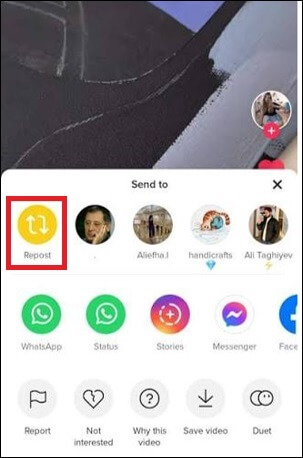
Step 3: There you will see a yellow button to ‘Repost’ the video you have selected. Click on that button to repost the content on your page.
Step 4: If the video is reposted, a notification will pop up stating ‘You Reposted’; else, you need to follow all these steps once again.
Now that you have reposted this video and this will appear on your TikTok profile, you can simply add hashtags and comments for it.
As we have learned how to repost content on your TikTok, but another query that you need to find an answer for is ‘How do I undo a repost on TikTok?’
How Do I Undo a Repost on TikTok?
Now you need to find a solution to the question, ‘How do I undo a repost on TikTok?’
Because now you have reposted a video, but you are not getting all those you were expecting, so now you need to remove it. And to undo a repost from your account, you need to follow the given steps properly:
Step 1: Go to the video on your TikTok profile that you do not want to repost anymore.
Step 2: Then click on the ‘Share’ button present on the bottom-right corner of your screen.
Step 3: There you will find the same yellow button you use to repost the video; now you need to click on that once again.
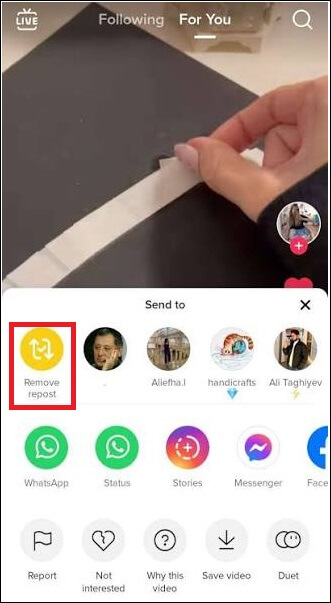
Step 4: After you select the ‘Remove Repost’ button, you will find that the video is no longer available on your TikTok profile.
Also know: Best TikTok Alternative Apps
Frequently Asked Questions (FAQs)
Q1. Where can I find the videos or content that I reposted on my TikTok?
Ans. You can find all the videos or content that I reposted on my TikTok profile in the ‘Reposted Tab’ represented by two arrows.
Q2. Who can see the videos or content that I reposted on my TikTok profile?
Ans. If you have a private account, then all your followers can see those videos you reposted, and if you have a public account, then anyone visiting your TikTok profile can see all the videos you reposted.
Q3. How long can you keep the videos you reposted on our page on your TikTok?
Ans. You can keep all the videos you repost as long as you want, or we can say it will remain on your page until you manually remove them.
And that is how you can easily repost the videos and other content you see on TikTok on your profile. Make sure that you are reposting all the videos and content that your audience will like and want to see. And also, before you undo any repost you have made, you need to make sure that it has reached the correct audience as well.