
Imagine using the system peacefully, and suddenly something happens to your software or hardware, and you have no idea how to fix it or how to contact Microsoft to fix the same. Don’t worry, we all have been in this kind of situation at least once.
We all know the first place to find the solution to every query in your system is Microsoft. But still the question that arises here is, ‘How to get help from Microsoft Support?’ A lot of us are still confused about the different ways you can get help from Microsoft for your personal and business accounts.
But there is no need to worry more, because with this post, you will get clear answers for questions like how to contact Microsoft, how to fix this or that issue with Microsoft, and many more.
Different Ways to Contact Microsoft
To find the answers for the query ‘How to contact Microsoft,’ you need to understand what the different ways are to contact Microsoft in your system. Because every query needs to be resolved in a different way related to the context it is in.
Here we have put all those different ways in which you can easily get help from Microsoft on your system in just a few steps.
1. Community Support
One of the easiest and most used ways to get help from Microsoft is to use the community support after you sign up for Microsoft Learn. With the Azure tag, you need to post your query with Microsoft Q&A and then find solutions from various contacts and users as well. But to capitalize and get help from Microsoft, there is a specific time for different regions, like it does not provide you with 24/7 assistance.
Get Help from Microsoft for Personal Account Users
- Run Troubleshooters: To get help from Microsoft or to contact Microsoft, you can easily run some available troubleshooters for many common scenarios.
There are many times when there is no need to contact Microsoft; on some common ground, you can easily run these troubleshooters and get rid of some glitches on your own.
- Contact Support: If these troubleshooters fail to resolve your issue, then you must try to contact Microsoft with the Contact Support button.
Here’s how you can use the contact support directly:
Step 1: Go to the contact support button and click on the product or service, with which you need help.
Step 2: You can easily select one of these preferred methods to get help from Microsoft:
- Chat with a support agent in your current web browser.
- Get chat support with the agent on a phone call.
- You can also submit a request to repair any hardware issues.
Get Help from Microsoft for Work and School Account Users
- Search for the Issue: To get rid of the problem, you need to first find out the category of the problem. Then out of all the available options, you need to figure out what type of problem you are facing in your Microsoft. To get all the related solutions, articles, and other resources to get rid of the issues.
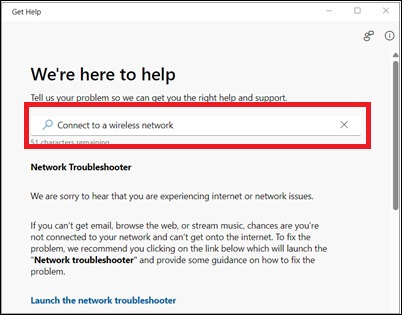
- Run Troubleshooters: To get help from Microsoft or to contact Microsoft, you can easily run some available troubleshooters for many common scenarios.
There are many times when there is no need to contact Microsoft; on some common ground, you can easily run these troubleshooters and get rid of some glitches on your own.
Also know: How to Restore Microsoft Store and Default Apps in Windows 11
2. Business & Enterprise Support
Standard support includes Microsoft 365 for cloud services and all the billing and subscription management support for your businesses. And the unified enterprise variable supports all the Microsoft products, including Microsoft 365, Teams, Outlook, OneDrive, and many more. This offers you on-demand assessments and setups and configurations as per your needs.
This also provides you with a successful management service and all of that expert-led support. Microsoft Enterprise support has specified incident response time and better escalation management.
And here’s how you can contact Microsoft to get business & enterprise support on your current browser:
Step 1: Open the admin center on your browser.
Step 2: If you are not an admin, then a notification will pop up on your screen stating that you do not have permission to access the page or perform any kind of action.
Step 3: Now on the lower right side of the page, you will find the ‘Help & Support’ option.
Step 4: There you can type all the queries you have in the text box. And from the drop-down menu, you can select the problem you are facing. Or any query or question closest or related to yours.
Step 5: If you are unable to encounter anything related to your query, then you can also reach the ‘Contact Support’ option.
Step 6: Now enter the detailed description for your issue and make sure to enter the correct contact details. And then for your entered contact details, select the ‘Contact me’ option.
3. Cloud Support Plans
You need the cloud support plans to explore when you want to activate the technical benefits and access the ID and contract ID as well. The technical cloud support plans also help you in determining the technical benefit support for the products and their various versions. These cloud support plans are designed for the partner cloud support benefits only.
And here’s how you can view or activate the technical support benefits for your Microsoft:
Step 1: Open and sign in to the Partner Center and select the ‘Benefits’ option for your Microsoft account.
To open this Partner Center, you need to have a Microsoft AI Cloud Partner Program.
Step 2: Now go to the ‘Technical Support & Consultation’ option, and there you will find the Benefits pane.
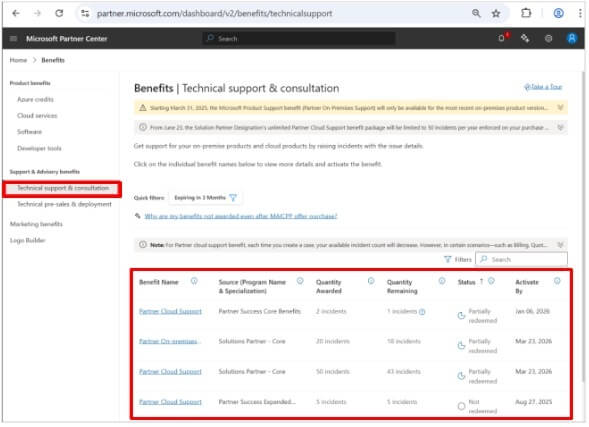
That will contain the active membership offer available with the name of your current organization.
Step 3: And then to activate all the benefits required, click on the benefit name link and then click on the ‘Activate’ option. Then wait a minute or two to find the Access ID or the Contract ID on your screen.
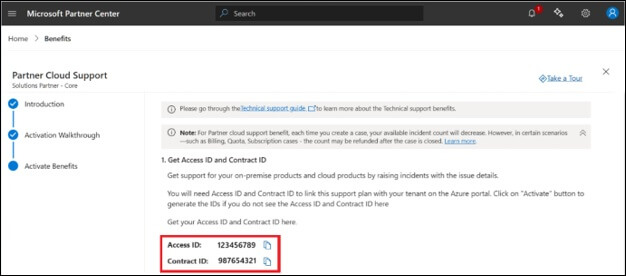
Step 4: If the Access ID or the Contract ID is on your screen, then the activation has been successfully done for this user.
Also know: How to Log In to Microsoft Forms
Frequently Asked Questions (FAQs)
Q1. Can I contact a person for live chat support?
Ans. Yes, you can contact live chat support or chat with the support agent from the Microsoft contact page. If you feel more comfortable describing your problems with direct chat support, then you can simply get it from Microsoft 365.
Q2. How can I fix all the sign-in issues?
Ans. You can simply fix all the sign-in issues with the automated Microsoft Sign-in Helper tool with your basic login credentials, like phone number or email address.
Q3. Is it possible to reset the account password using Microsoft support?
Ans. No, you cannot reset the account password using Microsoft support. Because of many privacy and security reasons Microsoft support agents cannot manually reset account details with provided links.
So, these were all the ways that you can find solutions to the queries for your personal and work accounts. It is very easy to get help from Microsoft for your problems; all you need is to just find out the type of query you are facing in your system. And then search for it on the right corner of Microsoft and its various products.