Main LogoLight Logo
  • Reviews
  • Top 10
  • How To
  • Tech News
  • OS
    • Windows
    • MAC
    • iOS
    • Android
  • Categories
    • Driver Updater
    • Cyber Security
    • Games
    • Fitness
    • Entertainment
    • Tips & Tricks
Android Fitness iOS Top 10
by Diksha Lalwani

7 Best Weight Loss Apps For Android & iOS In 2024

January 2, 2024
1

In this day and age, there are two things people worry about and want the most: money gain and weight loss. Well in the case of money, we can’t help you as such. But with weight loss, yes. There are many apps that boast about their prowess in helping people maintain their health and lose weight.

So if you have any questions like, “Which is the best food log app?” “Is My Diet Coach that good?” “Are there any good weight loss apps for Android?”. All of them will be answered in this article, right here and now.

Table of Contents hide
Top-Rated 7 Best Weight Loss Apps For Android & iOS
1. MyFitnessPal
2. WW (Weight Watchers Reimagined)
3. Lose It! – For Diet & Weight Loss
4. HealthifyMe – Weight Loss Plan
5. Noom: Health & Weight
6. Cronometer – Nutrition Tracker
7. Fooducate

Top-Rated 7 Best Weight Loss Apps For Android & iOS

In search of free weight loss apps? Then, this post can help you. The post highlights the 7 most noteworthy weight loss apps that can help you in achieving your weight loss goals. So, just have a look at the list and out of all choose the best one that fits the bill!

1. MyFitnessPal
 
MyFitnessPal

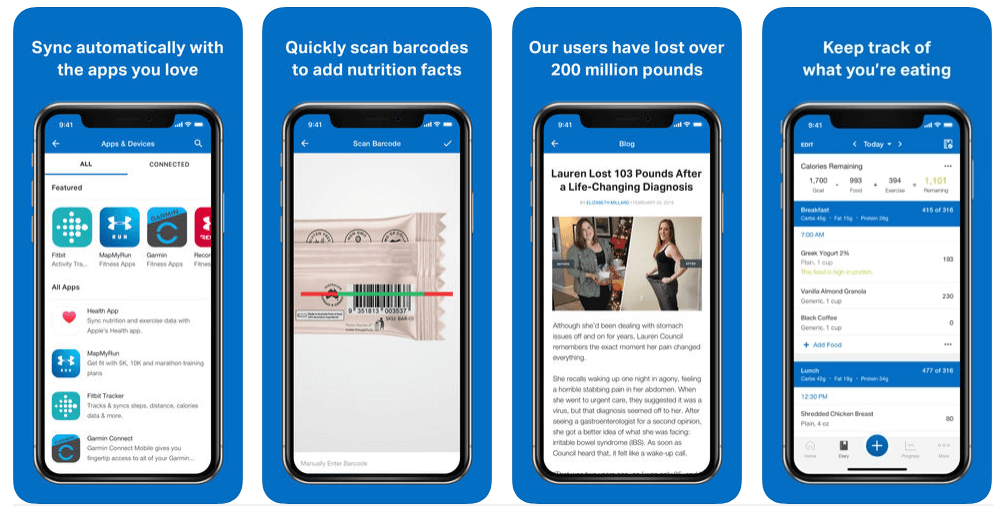
This is one of the greatest weight loss apps for both Android and iOS. The 2,017,194 monthly app downloads and 5-star reviews speak for its supremacy.

It is also a food log as well as a calorie counting tool. It calculates the daily calorie needs of an individual and lets them log in to their food trajectory throughout the day. This is including the restaurant foods. 

This way, the weight loss app MyFitnessPal generates reports that provide an overview of the individual’s total fat, protein, and carb consumption. It can sync with other fitness tracking apps too.

So if you are looking for a great route to weight loss, MyFitnessPal should be your top choice.

Download App: Android & iOS

Read Also: Best Running Apps For Weight Loss


2. WW (Weight Watchers Reimagined)
WW (Weight Watchers Reimagined)

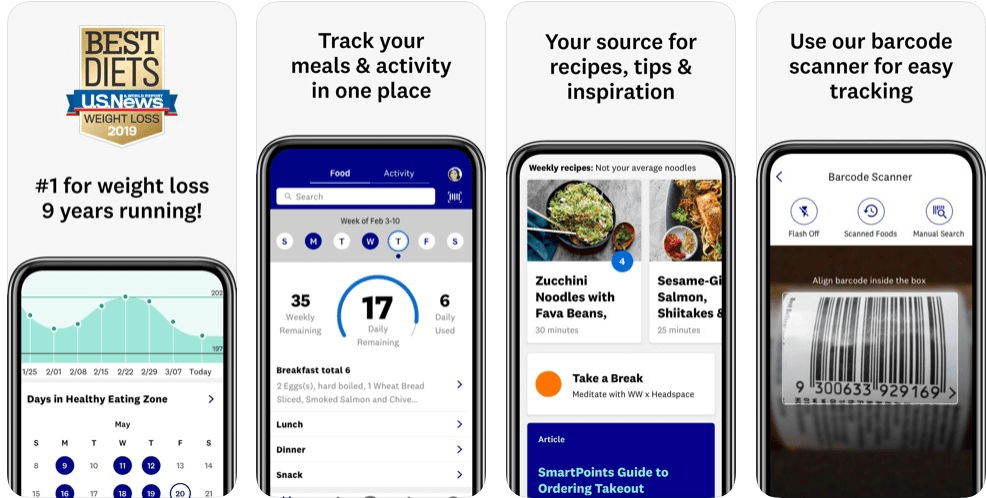
This is number one in the Best Weight Loss Program category on iTunes. Formerly known as Weight Watchers, WW aims to make it easier for its customers to lower their calorie intake by assigning or charting “points”. These points are allotted to foods based on their calories, sugar content, and saturated fat. That means, the higher the composition of these components, the higher the points will be.

While using this app, a person would always stay motivated because WW has a “Journey” tab, which gives details about the person’s progress. 

Also for the ones who love to eat out, WW has a comprehensive list of restaurant dishes with their total points, that way you can add them to your food log easily.

Download App: Android & iOS


3. Lose It! – For Diet & Weight Loss

Lose It! - For Diet & Weight Loss

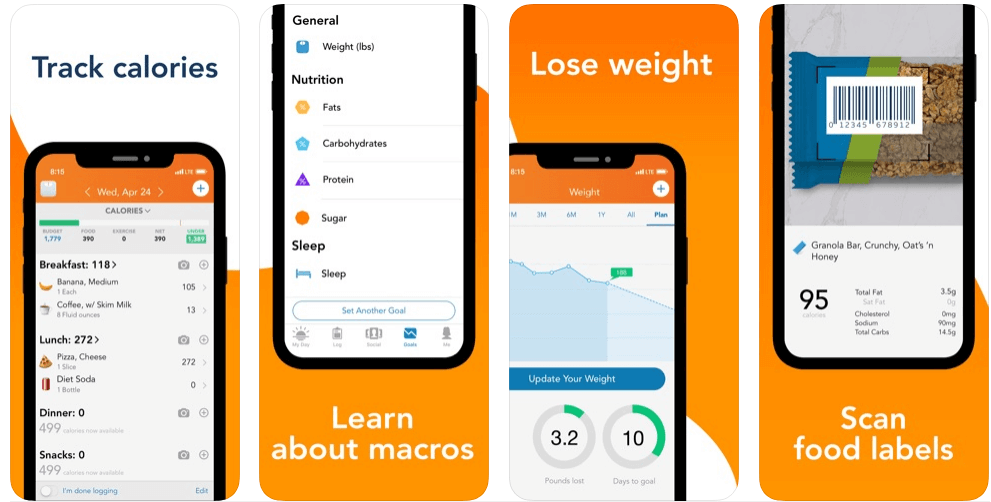
Undoubtedly one of the best weight loss apps in the current market, Lose It! is an app that is majorly focused on weight tracking and calorie counting. It generates a personalized plan for its users based on their daily calorie needs and weight goals.

And as soon as the plan is established, the users can easily log their food intakes in the portal to get a comprehensive database of over 7 million foods, restaurant items, and brands.

Read More: Best Free Zumba Apps to Get a Toned Body

One of the major highlights of Lose It! is the community component. In this, any user can take part in challenges against other users, ask or share information, and a lot more.

But what actually makes Lose It! stand out amongst all its competitors is its “Snap It” feature, using which anyone can easily track their food intake by simply taking pictures of their meals

Although, the only con that it possesses is that it’s not one of those food log apps that also keep track of your consumed vitamins and minerals.

Download App: Android & iOS


4. HealthifyMe – Weight Loss Plan

HealthifyMe - Weight Loss Plan

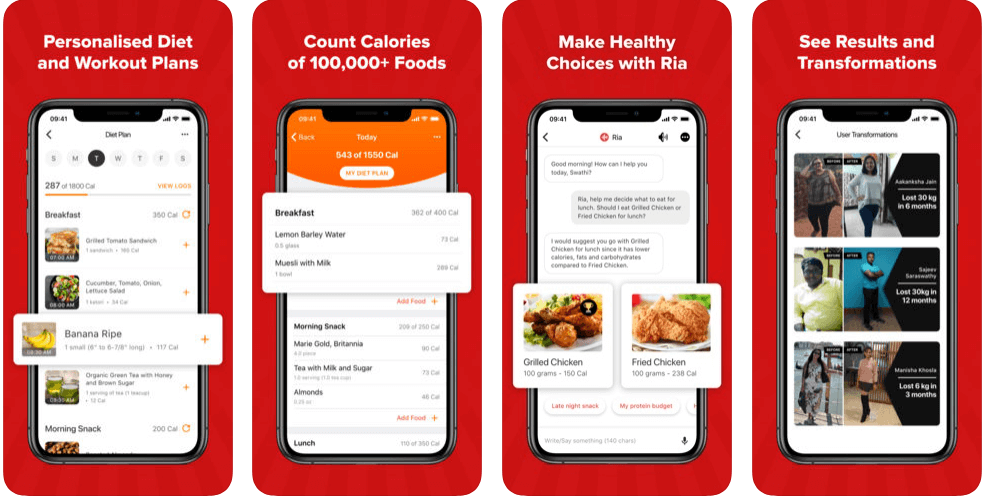
HealthifyMe is a pretty minimalistic app that lets the user document their weight, as well as helps them understand the food they are consuming and what they need to do to reach their goals. It fulfills all these tasks by creating and showing different insights into the food that is consumed.

That means, with this food log app, a person can easily track or check the level of different components like fiber, protein, etc. in their regular diet.

The interface of the app also supports competitive profile levels and leaderboards. And even offers the choice of on-demand health instructors. 

And did I mention that the app is free of cost?

Download App: Android & iOS


5. Noom: Health & Weight

Noom: Health & Weight

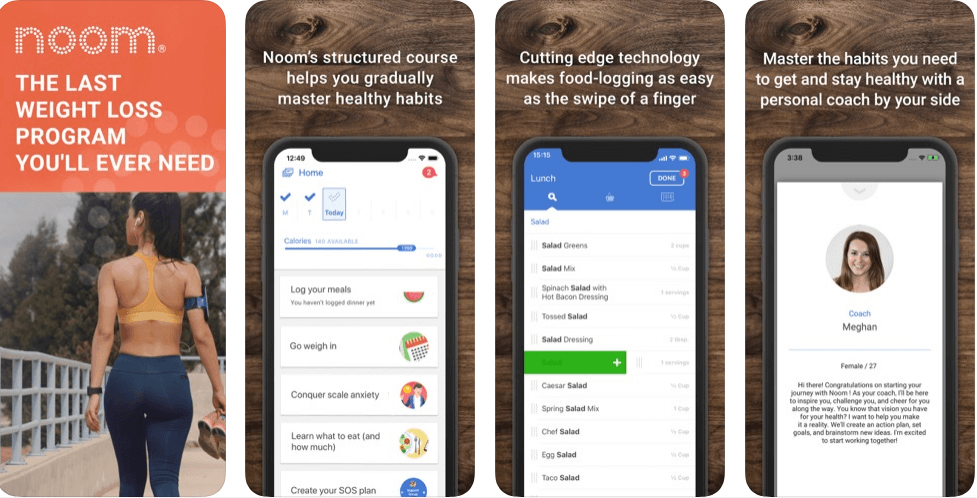
A perfect weight loss app for women, Noom uses a psychological approach to combat unhealthy habits. It gets deep into the psyche to identify a person’s beliefs about exercise and nutrition. 

After knowing such opinions, it then forms a customized approach, with the inclusion of a personal coach and a tracker. It aims to focus on the person’s relationship with food, rather than the one with numbers.

Read More: Best Free Yoga Apps For Android & iOS

With the user’s psychology in its portal, Noom easily creates a plan such that the person can get leaned towards healthier lifestyle habits.

Noom promotes a free as well as a premium version of its application. In the free version, you can set up a plan around your caloric intake, and then further monitor your activities. While in the premium version, you get the additional support of health coaches, support groups, and courses in healthy habits.

Download App: Android & iOS


6. Cronometer – Nutrition Tracker

Cronometer - Nutrition Tracker

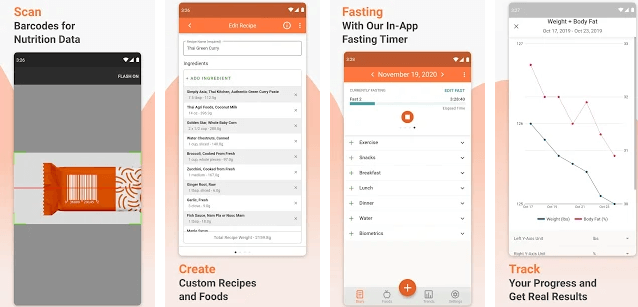
Want to balance your diet for free? Then, here is Cronometer, one of the best weight loss apps in 2024. And, the best thing is that Android and iPhone, both users can access it. With the 4.5 stars ratings, the chronometer is the most accessed weight loss app. Till the present date, Cronometer is the more accurate and comprehensive nutrition tracker application than others. With the help of Cronometer, more than three million individuals have fulfilled their weight loss goals. Chronometer comes with a handful and unique features including an in-built fitness tracker, logs complete meals & exercises, barcode scanner, healthy recipes, diet chart, and many more. 

Read More: Best Workout Apps For Android To Get A Fit Body

Are you want to fulfill your weight loss goals? Or, Are you want to have a slim-toned body? Whether your goal is fitness or having a toned body, Chronometer is the one who helps you in doing so. So, what are you waiting for, try this app now on your Android and iPhone device. You can download this application directly from the link given below. Eat healthier and live smarter with Chronometer. 

Download App: Android & iOS


7. Fooducate 

Fooducate

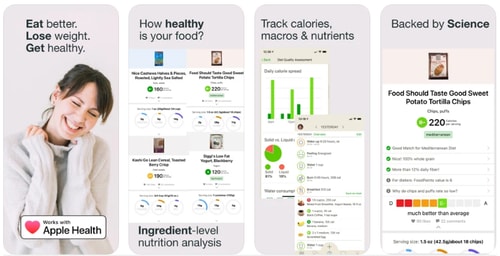
It is next to impossible to lose weight without knowing what actually healthy means. No matter if you are sweating for hours in the gym until you aren’t eating healthy food. If you are not sure about it then you can use the Fooducate application that offers almost 50K+ healthy recipes. 

Apart from this, it guides you on what to look for to maintain the nutrition level. Since 2010, the application has helped millions of users around the globe in losing weight and staying healthy. It has an in-built tracker that logs your calories, macros, and nutrients intake. Moreover, it scans for any food/drinks barcode and tells you whether you should eat or not. 

Download App: Android & iOS 


What are the Best Weight Loss Apps for Android and iOS?

If you haven’t met your weight loss goals yet, then no worries. Through this write-up, we’ve brought up the list of best weight loss apps for both Android and iOS devices. Out of all, choose the one that best suits your needs regarding weight loss. In addition to this, we would like to recommend to you the two leading weight loss apps that will surely help you no matter what.

So, My Diet Coach and Healthify me are the top-rated weight loss apps that you can easily get from the Google Play Store or App Store. Moreover, these apps include the virtual sessions of the world’s top fitness professionals. They’ll help you in tracking your meals as well as your workouts. So now, you don’t have to stress about losing weight.

That’s all up till now, hopefully, you find this write-up helpful. If you have liked our write-up, then share it around your circle, so one and all can know how to lose weight quickly and easily. And, do not forget to share your weight loss journey or goals with us in the comment box below. Lastly, subscribe to our Newsletter to stay updated. Till the next venture, have fun losing weight!


best weight loss appsBest Weight Loss Apps For Best Resultsfood log appmy diet coachweight loss apps for androidweight loss myfitnesspal
Author

Diksha Lalwani

Diksha Lalwani is an aspiring content marketer and a self-declared bibliophile. An English honors graduate, she likes to keep up with the recent happenings around the world and form an opinion. Her interest in anything and everything tech made her follow the path into becoming a technical writer.

View all posts

Related Posts
Best Facebook Story Viewer

7 Best Facebook Story Viewer in 2024

June 3, 2024
0

In this article, we discuss the best anonymous story viewers to view Facebook stories secretly.

Stories are among the most loved features of all social media platforms, including Facebook. Users can use this feature to share everyday moments via videos and photos with their friends. Visible for 24 hours from the time of posting, a story is an excellent way to have a sneak peek into anyone’s life. However, if you view any story on Facebook, your name appears in the list of viewers. If you do not want this to happen, you can use an anonymous Facebook story viewer to view the Facebook stories anonymously.

Though stalking-like behavior is not something we recommend, we understand keeping a secret check is sometimes essential to protect our loved ones. Hence, this article lists and explains carefully selected anonymous viewers for Facebook stories. Let us save your precious time and get started right away.

Best Anonymous Facebook Story Viewers in 2024

You can view Facebook stories anonymously using any of the following story viewer tools.

1. Eyezy

eyeZy

Let us introduce you to Eyezy. It is among the best Facebook story anonymous viewers because of its user-friendly interface that allows you to see what your loved one is up to without being detected. In addition to Facebook story viewing, Eyezy is popular among millions of users due to its social spotlight (an option to view deleted and active conversations), built-in GPS, and the following features.

Key features of Eyezy

  • It boasts a keylogger that lets you know everything your target types, search for, or whenever they type anything controversial
  • You get notified whenever the target sends or receives any Facebook message
  • In addition to Facebook, Eyezy supports Hangouts, WhatsApp, Snapchat, and other applications
  • You can analyze the target’s WiFi network with Eyezy

Download Now

Also Read: Best Instagram Story Viewer


2. mSpy

mSpy

Next, we have mSpy as one of the best Facebook anonymous viewers for stories and posts. In addition to monitoring posts and stories, you can also monitor the target’s calls, emails, location, browsing history, and text messages using this application. Furthermore, the below features contribute to justifying mSpy’s position on this list.

Key features of mSpy

  • The stealth mode keeps your activities hidden from the target
  • mSpy offers round-the-clock customer support
  • Along with Facebook, mSpy supports Snapchat, Instagram, and other social media applications
  • It protects your data by encrypting it
  • mSpy allows you to view the real-time location of the target device
  • You can set danger zones to get alerted whenever the target enters or exits these zones

Download Now

Also Read: How to Recover Deleted Facebook Account


3. OverWatch

OverWatch

OverWatch is yet another excellent tool you can use to view Facebook stories anonymously. Along with story viewing, this application offers GPS location tracking, app usage monitoring, browser history tracking, keylogging, and the following incredible features.

Key features of OverWatch

  • This application allows you to view the target’s camera usage, SMS, and call history
  • There is a stealth mode to keep the tracker hidden from the target
  • In addition to Facebook, OverWatch lets you monitor the target’s WhatsApp and Snapchat

Download Now


4. uMobix

uMobix

There is no way to exclude uMobix from our list of the best anonymous Facebook story viewers. This cell phone tracker for modern parents allows you to view everything that happens on your dear one’s smartphone in real-time, including watching the stories they put up on their Facebook accounts. Moreover, GPS location tracking, keylogger availability, a stealth mode to hide the target’s presence from the target, and the following features make uMobix one of our favorites.

Key features of uMobix

  • It supports 30+ social media applications
  • You can search the target’s messages using keywords
  • uMobix captures documents, messages, received/sent videos, photos, and audio recordings

Download Now

Also Read: Sorry, This Content Isn’t Available Right Now: Facebook Error [Fixed]


5. Moniterro

Moniterro

Moniterro is the next application we would like to name as one of Facebook’s best anonymous stories viewers. Additionally, this application lets you view the target’s Facebook chats and group conversations, Messenger contact list, and all photos and videos shared by the target. Furthermore, it offers the following remarkable features.

Key features of Moniterro

  • It notifies you whenever the target’s conversations contain certain words or sentences
  • You can track your target’s real-time location and get alerted whenever they change their whereabouts
  • The invisible mode hides the application from the main screen and keeps you undetected
  • You can use Moniterro to read the target’s SMS messages and record calls
  • Moniterro boasts a keylogger to record everything the target types on their phone
  • In addition to Facebook, this application supports Snapchat, iMessage, Telegram, Skype, WhatsApp, KIK, Hangouts, and Line
  • There is a screen recorder and an option to control the target’s browsing activities

Download Now


6. Spynger

Spynger

The next name on our list of the top apps to view someone’s Facebook stories without letting them know is Spynger. This application is among the favorites of millions of users because of its accurate location tracking, keystroke monitoring, an option to monitor social media chats and phone texts (including deleted ones), and the following features.

Key features of Spynger

  • You can see the target’s browsing history and what they search for
  • It lets you view pictures the target has sent or received
  • Spynger boasts a hidden screen recorder
  • Besides Facebook, Spynger supports WhatsApp, Kik, Telegram, Snapchat, and many other social media and dating apps

Download Now

Also Read: Best Private Instagram Viewer Apps, Tools & Sites


7. Story Space

Story Space

Next, we would like to mention Story Space as one of the top anonymous Facebook viewers. It lets you search stories by tags, GEO, author, and friends. Moreover, it allows you to download Facebook stories and offers the following attractive features.

Key features of Story Space

  • Besides Facebook, Story Space supports Instagram
  • It boasts dark and light modes for a comfortable story-viewing experience
  • You can add it to Chrome as an extension

Download Now

Also Read: How to Fix Facebook Dating Not Showing Up for Android & iPhone


Best Facebook Story Viewers: The Conclusion

You can choose from any application from the above list to view Facebook stories anonymously. However, use these apps only for legitimate purposes and not to invade someone’s privacy. We hope you found this article useful. If you did find it helpful, share it with your friends and subscribe to our blog to get notified when we post another interesting write-up.

Best Free Video Editor for Mac

10 Best Free Video Editor for Mac in 2024

February 8, 2024
0

If you are searching for the best free video editor for Mac in 2024, then you have come to the right place. Here, we are going to show you a list of the 10 most popular editing tools that you can use on Mac. Continue reading for more information!

There are a lot of people who are looking for free video editing software for Mac since they have a lot of films that they want to edit for better presentation or preservation purposes. Is there any Mac video editing software that’s worth using? This is a common question in online forums. So, to assist you with this, we have brought up a comprehensive list of several excellent video editors for Mac.

In addition, we evaluated these video editing applications for Mac in terms of the supported video formats, as well as the benefits and drawbacks of the top 10 free video editors for Mac.

A List of Top 10 Free Video Editing Software in 2024

Although every single tool on the list of free video editors for Mac that we have provided below is excellent for the process of creating material for social networking platforms, it is important to keep in mind that any free tool will have restrictions, whether those restrictions take the form of limited capabilities, in-app advertisements or watermarks. However, we have done everything in our power to compile a comprehensive list of the tools that are the most useful and the least unpleasant for you.

1. DaVinci Resolve

DaVinci Resolve for mac

Do you want some “image technology that has won Emmy awards?” Who doesn’t?! If this is the case, the free video editing program that you should use is most likely DaVinci Resolve. The cloud-based workflow systems that DaVinci offers make it an especially valuable platform for participating in remote collaborations.

The user interface design of DaVinci, which is organized into “Pages,” allows users to approach each specific component of the editing process in a concentrated manner. Begin by trimming your image on the ‘Cut’ page, then navigate to the ‘Color’ option to adjust the tones and shadows in your image. On the ‘Media and Delivery’ page, there is support for a broad variety of formats; as a result, you can even publish directly to Twitter if you want to.

Make sure that your hardware is up to the task before you click the “download” button because this is a robust tool that requires an equally powerful computer.

Download Now

Also Read: Best Free Video Downloader for Mac 


2. iMovie

iMovie for mac

iMovie is a video editing program that is included at no additional cost with the purchase of a new Mac operating system. The most recent iMovie 11 version is an excellent & free video editor for Mac. It comes packed with many useful features, such as movie trailers, one-step effects, and audio editing, amongst others.

You may upload your videos to YouTube, and also export videos/ movies for use on your iPad, iPhone, or other mobile device in just a few simple steps. However, you won’t have to pay for an iMovie if you purchase a new device. You will also find that it is difficult to get proficient with iMovie when you are first beginning to use it. iMovie is often considered to be among the top free video editing programs available for Mac and enjoys a solid reputation in this regard. You might study several iMovie video editing hacks and techniques in order to become more proficient with its use.

Download Now


3. Lightworks

Lightworks for mac

Lightworks is another free video editor for Mac that you can use. It has been operating for more than 30 years, so you can anticipate a high level of brilliance from it. The King’s Speech was edited utilizing the Lightworks, in the event that the Colin Firth element is a deciding factor for you.

The cutting tools and keyboard controls in professional editing software are ideal for managing vast amounts of video, and professional editors find them very useful. The color-correcting options & built-in filters & effects are quite excellent, and you may use all of them even if you are using the free version of the program.

It features a robust timeline, background processing, and automatic autosaving, which together make it an extremely effective tool for finishing your film as quickly as feasible and sharing it with the rest of the world. When you use the free version, the only drawback is that your export choices are more restricted; you can only export up to 720p content, and it must be in a format that is preset for either YouTube, MP4, or Vimeo

Download Now

Also Read: Best Free Video Stabilization Software for Mac


4. OpenShot

OpenShot for mac

OpenShot is one of the best video editors that is available for Mac OS X, Linux, and Windows and is open-source and completely free to use. It is an excellent video editor for novices to use so that they may learn and practice video editing abilities. OpenShot is among the best options available to you if you wish to perform some fundamental video editing without even having to invest an excessive amount of effort.

You are able to produce 3D animation in addition to performing more fundamental video editing tasks. In addition, this best free video editor for Mac strongly supports over seventy different languages. You don’t need to be concerned about a language barrier preventing you from editing movies/ videos. You have the ability to easily cut and slice videos, additionally, it displays waveforms while you are editing. What’s more, it provides various templates so that you can quickly edit the titles.

Download Now


5. Wondershare Filmora

Wondershare Filmora for mac

Next on this list of best Mac video editing software is Wondershare Filmora. It is an effective and user-friendly video editing program that comes packed with a wide variety of additional features. These include compositing, motion graphics, special effects, color correction tools, and many more. It is intended to provide you with increased control over the videos you upload.

Filmora is an excellent option to consider using if you are an experienced videographer who wants to do a color correction or grading to the film you have shot. Both Windows & Mac devices are compatible with Filmora. You have the ability to export your creations to virtually every prevalent video format. It is compatible with animation keyframing as well as motion tracking. It offers a wide variety of user-friendly professional tools in a plethora of categories.

Download Now

Also Read: Best Video Repair Software for Mac


6. Avidemux

Avidemux for mac

Avidemux is yet another fantastic free video editor for Mac that is tailored to perform straightforward operations such as trimming, filtering, and encoding. It is compatible with Mac OS X, Linux, and Microsoft Windows, under the license of GNU GPL, and it supports a wide number of video, audio, and image formats, such as AVI, MP4, MOV, MPEG files, ASF, JPG, AC3, AAC, and so on.

The fact that this free video editing program for Mac is highly compatible with a wide variety of video formats is the software’s crowning achievement. You can also remove advertisements from a recorded TV show or just keep a portion of the footage. In addition to that, it gives you the option to utilize other filters, such as color correction. You can enhance the visual quality of your video by applying one of these filters to it.

Download Now


7. HyperEngine-AV

HyperEngine-AV for mac

HyperEngine-AV is free video editing software for Mac that allows users to record, edit, export videos, and organize the editing process and adjust audio & texts in order to produce slide shows and movies in high-quality. The software also comes with 12 studio-quality amazing effects taken from the Hyperprism suite’s audio processors developed by Arboretum.

In addition to that, it has text options that allow you to show section titles, credits, or karaoke lyrics with completely configurable font, type, size, color, and style as well as alignment & scroll direction. Users of Mac should definitely give HyperEngine-AV a try because it is an extremely brilliant free video editor for Mac.

Download Now

Also Read: Best Video Compressors for Mac


8. HitFilm

HitFilm for mac

HitFilm is known for its lightning-fast processing times. The user-friendly interface allows you to cut, slice, copy, & sync with no lag; according to reports, it is twice as quick as its competitors when it comes to exporting, and 8X times faster at playback.

The in-built tools are really simple, but they are very powerful. You can generate content of professional quality in a matter of minutes by using ready-to-use presets and drag-and-drop transitions. The use of auto audio synchronization makes adjusting the sound a simple process.

If you wish to take your social video editing journey to the next level, adding lighting effects such as glows and light leaks will give your clip a more dramatic sense.

Download Now


9. VideoPad

VideoPad for mac

VideoPad is another best free video editor for Mac that you can consider. Although the website has an oddly dated appearance, it is impossible to deny that VideoPad is functioning. The user-friendliness of VideoPad was a primary design goal. In an ideal scenario, you’ll be capable of jumping right in and starting working on your respective video in a matter of minutes.

Create title text animations using templates, record narrations directly in the app, or utilize professional-grade templates to whip up something exceptional in a snap using this software, which contains more than 50 effects and transitions and supports more than 60 kinds of video.

You may export your video in every conceivable resolution, quickly share it online, or instantly post it to YouTube; the app is available for use on desktop computers as well as iOS mobile devices.

Download Now


10. Blender

Blender for mac

Last but not least, Blender is an excellent video editing program that comes with a variety of much-needed features. It is the best 3D graphics tool that has also been recognized to be the greatest video editor for Mac. Modeling, texturing, rigging, UV unwrapping, animation, rendering,  skinning, water and particle simulations, smoke simulations, and other types of simulations are all possible with its utilization.

Blender is a piece of non-linear video editing tool that enables users to composite, also, build a variety of interactive 3D apps, animated films, video games, and additional visual effects. There are many complex features available in Blender, such as potent tools for character animation, modeling tools that are based on a material, modifiers & compositing system that is built on nodes, Python & many more.

Download Now

Also Read: Best 4k Video Downloader Alternative for Windows & MAC


Final Words: Best Video Editor for Mac in 2024

Above you’ll find a compilation of some of our best free video editing applications; none of them include a watermark. These free video editors for Mac will allow you to edit videos without restrictions.

When it comes to producing captivating material for social media, having the appropriate tools and the necessary abilities to edit videos is, of course, only one-half of the equation. Hopefully, you found the information shared in this article helpful. Please feel free to drop your comments in the section below. Additionally, for more technical tips & information, you can subscribe to our Newsletter.

1 Comment
    Komal Patel says: Reply
    February 19th 2020, 11:14 am

    Hey Diksha! this is really great post for readers because if someone wants to get ideas for weight loss, they were not satisfied with answers but in your post, you have to define a very clear and genuine way. so thanks for this knowledgeable post with us…

Leave a Reply Cancel reply

Your email address will not be published. Required fields are marked *

Sidebar Image bit G ad1

Latest Posts

  • Best-Free-Online-Portfolio-Websites-in-2026
    Best Free Online Portfolio Websites in 2026
    by adminuser / March 16, 2026
  • Anytime Astro: Best Website For Online Astrology Consultation
    Anytime Astro: Connect Now For Online Astrology Consultation
    by Somya Shrimal / March 13, 2026
  • Best-Ways-to-Combine-Images-Into-PDF-Files
    Best Ways to Combine Images Into PDF Files
    by Niharika / March 12, 2026
  • Best FREE VPS Hosting Providers
    7 Best FREE VPS Hosting Providers in 2026
    by Devesh / March 12, 2026
  • Best-McAfee-alternative-software-to-use-for-Virus-Protection
    Best McAfee Alternative Software to use for Virus Protection
    by adminuser / February 11, 2026

Categories

  • Cyber Security
  • Driver Updater
  • Entertainment
  • Fitness
  • Games
  • How To
  • laptop
  • OS
  • Reviews
  • Tech News
  • Tips & Tricks
  • Top 10
Sidebar Image bit G ad1
Best Mp3 Splitter tools to Split and Join Mp3 Files 16 Best Mp3 Splitter tools to Split and Join Mp3 Files in 2024by Prachi Dani / January 2, 2024
USB Serial Controller D Driver Download and Updateby Niharika / January 2, 2024USB Serial Controller D Driver Download and Update
TechPout Footer Logo

We at TechPout promise to put forth stories that help people to learn and simplify their digital life. Our purpose is to share the true essence of technology with our tech-loving community.

Useful Links

  • About Us
  • Contact us
  • Privacy Policy

Popular Posts

  • Best PC Optimizer Software
  • Best Mac Cleaner Apps
  • Best Driver Updater
  • Duplicate Photo Finder and Cleaner Software
  • Best Free Movie Download Sites
  • Best IPTV Players

Follow us

Copyright © 2026 www.techpout.com. All rights reserved
DMCA.com Protection Status