Main LogoLight Logo
  • Reviews
  • Top 10
  • How To
  • Tech News
  • OS
    • Windows
    • MAC
    • iOS
    • Android
  • Categories
    • Driver Updater
    • Cyber Security
    • Games
    • Fitness
    • Entertainment
    • Tips & Tricks
Android Fitness iOS Top 10
by Diksha Lalwani

7 Best Weight Loss Apps For Android & iOS In 2024

January 2, 2024
1

In this day and age, there are two things people worry about and want the most: money gain and weight loss. Well in the case of money, we can’t help you as such. But with weight loss, yes. There are many apps that boast about their prowess in helping people maintain their health and lose weight.

So if you have any questions like, “Which is the best food log app?” “Is My Diet Coach that good?” “Are there any good weight loss apps for Android?”. All of them will be answered in this article, right here and now.

Table of Contents hide
Top-Rated 7 Best Weight Loss Apps For Android & iOS
1. MyFitnessPal
2. WW (Weight Watchers Reimagined)
3. Lose It! – For Diet & Weight Loss
4. HealthifyMe – Weight Loss Plan
5. Noom: Health & Weight
6. Cronometer – Nutrition Tracker
7. Fooducate

Top-Rated 7 Best Weight Loss Apps For Android & iOS

In search of free weight loss apps? Then, this post can help you. The post highlights the 7 most noteworthy weight loss apps that can help you in achieving your weight loss goals. So, just have a look at the list and out of all choose the best one that fits the bill!

1. MyFitnessPal
 
MyFitnessPal

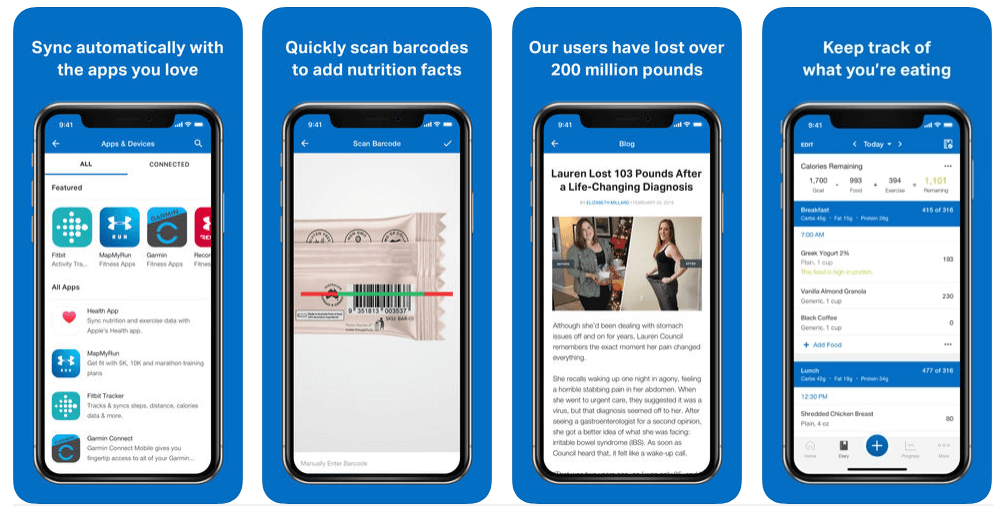
This is one of the greatest weight loss apps for both Android and iOS. The 2,017,194 monthly app downloads and 5-star reviews speak for its supremacy.

It is also a food log as well as a calorie counting tool. It calculates the daily calorie needs of an individual and lets them log in to their food trajectory throughout the day. This is including the restaurant foods. 

This way, the weight loss app MyFitnessPal generates reports that provide an overview of the individual’s total fat, protein, and carb consumption. It can sync with other fitness tracking apps too.

So if you are looking for a great route to weight loss, MyFitnessPal should be your top choice.

Download App: Android & iOS

Read Also: Best Running Apps For Weight Loss


2. WW (Weight Watchers Reimagined)
WW (Weight Watchers Reimagined)

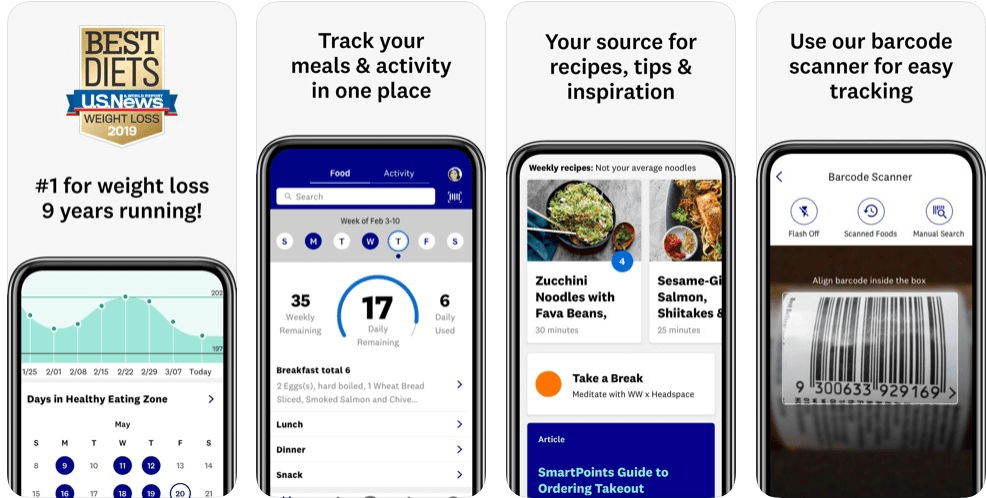
This is number one in the Best Weight Loss Program category on iTunes. Formerly known as Weight Watchers, WW aims to make it easier for its customers to lower their calorie intake by assigning or charting “points”. These points are allotted to foods based on their calories, sugar content, and saturated fat. That means, the higher the composition of these components, the higher the points will be.

While using this app, a person would always stay motivated because WW has a “Journey” tab, which gives details about the person’s progress. 

Also for the ones who love to eat out, WW has a comprehensive list of restaurant dishes with their total points, that way you can add them to your food log easily.

Download App: Android & iOS


3. Lose It! – For Diet & Weight Loss

Lose It! - For Diet & Weight Loss

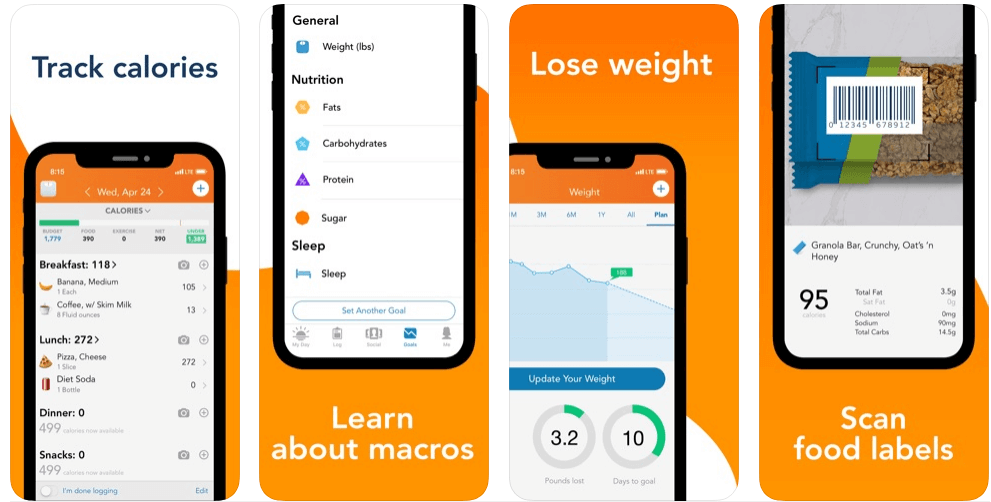
Undoubtedly one of the best weight loss apps in the current market, Lose It! is an app that is majorly focused on weight tracking and calorie counting. It generates a personalized plan for its users based on their daily calorie needs and weight goals.

And as soon as the plan is established, the users can easily log their food intakes in the portal to get a comprehensive database of over 7 million foods, restaurant items, and brands.

Read More: Best Free Zumba Apps to Get a Toned Body

One of the major highlights of Lose It! is the community component. In this, any user can take part in challenges against other users, ask or share information, and a lot more.

But what actually makes Lose It! stand out amongst all its competitors is its “Snap It” feature, using which anyone can easily track their food intake by simply taking pictures of their meals

Although, the only con that it possesses is that it’s not one of those food log apps that also keep track of your consumed vitamins and minerals.

Download App: Android & iOS


4. HealthifyMe – Weight Loss Plan

HealthifyMe - Weight Loss Plan

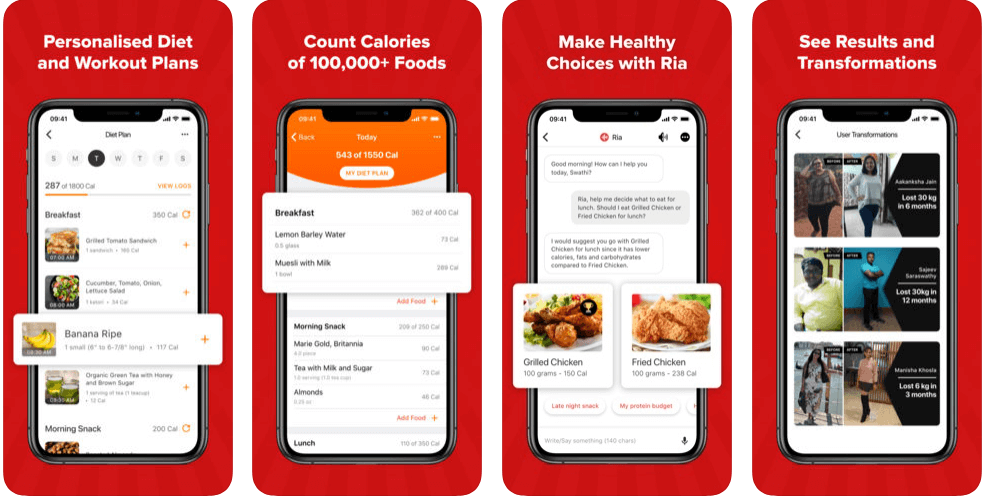
HealthifyMe is a pretty minimalistic app that lets the user document their weight, as well as helps them understand the food they are consuming and what they need to do to reach their goals. It fulfills all these tasks by creating and showing different insights into the food that is consumed.

That means, with this food log app, a person can easily track or check the level of different components like fiber, protein, etc. in their regular diet.

The interface of the app also supports competitive profile levels and leaderboards. And even offers the choice of on-demand health instructors. 

And did I mention that the app is free of cost?

Download App: Android & iOS


5. Noom: Health & Weight

Noom: Health & Weight

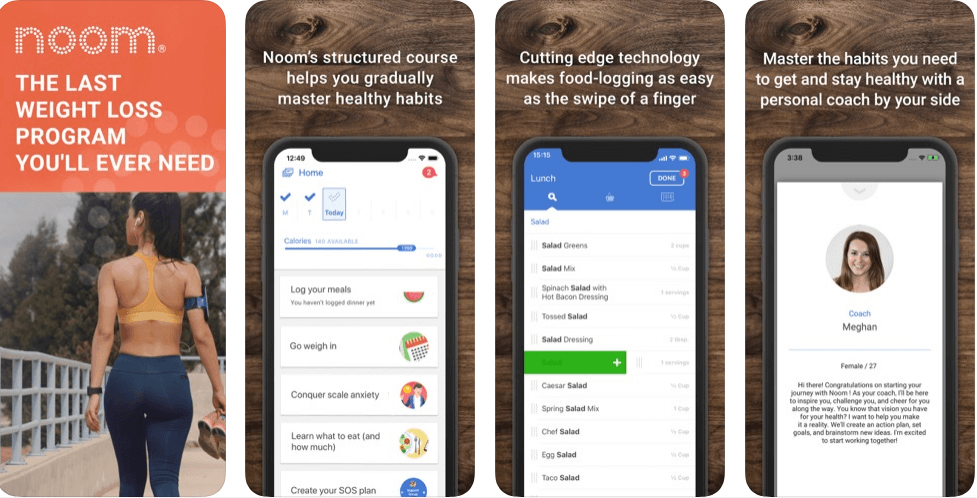
A perfect weight loss app for women, Noom uses a psychological approach to combat unhealthy habits. It gets deep into the psyche to identify a person’s beliefs about exercise and nutrition. 

After knowing such opinions, it then forms a customized approach, with the inclusion of a personal coach and a tracker. It aims to focus on the person’s relationship with food, rather than the one with numbers.

Read More: Best Free Yoga Apps For Android & iOS

With the user’s psychology in its portal, Noom easily creates a plan such that the person can get leaned towards healthier lifestyle habits.

Noom promotes a free as well as a premium version of its application. In the free version, you can set up a plan around your caloric intake, and then further monitor your activities. While in the premium version, you get the additional support of health coaches, support groups, and courses in healthy habits.

Download App: Android & iOS


6. Cronometer – Nutrition Tracker

Cronometer - Nutrition Tracker

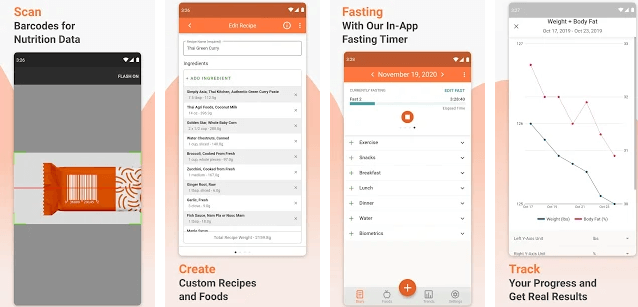
Want to balance your diet for free? Then, here is Cronometer, one of the best weight loss apps in 2024. And, the best thing is that Android and iPhone, both users can access it. With the 4.5 stars ratings, the chronometer is the most accessed weight loss app. Till the present date, Cronometer is the more accurate and comprehensive nutrition tracker application than others. With the help of Cronometer, more than three million individuals have fulfilled their weight loss goals. Chronometer comes with a handful and unique features including an in-built fitness tracker, logs complete meals & exercises, barcode scanner, healthy recipes, diet chart, and many more. 

Read More: Best Workout Apps For Android To Get A Fit Body

Are you want to fulfill your weight loss goals? Or, Are you want to have a slim-toned body? Whether your goal is fitness or having a toned body, Chronometer is the one who helps you in doing so. So, what are you waiting for, try this app now on your Android and iPhone device. You can download this application directly from the link given below. Eat healthier and live smarter with Chronometer. 

Download App: Android & iOS


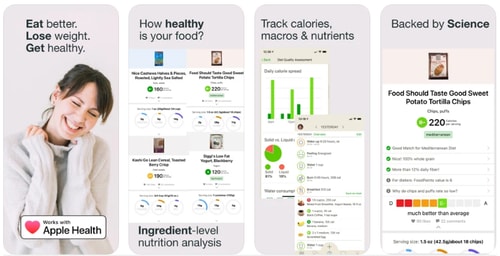
7. Fooducate 

Fooducate

It is next to impossible to lose weight without knowing what actually healthy means. No matter if you are sweating for hours in the gym until you aren’t eating healthy food. If you are not sure about it then you can use the Fooducate application that offers almost 50K+ healthy recipes. 

Apart from this, it guides you on what to look for to maintain the nutrition level. Since 2010, the application has helped millions of users around the globe in losing weight and staying healthy. It has an in-built tracker that logs your calories, macros, and nutrients intake. Moreover, it scans for any food/drinks barcode and tells you whether you should eat or not. 

Download App: Android & iOS 


What are the Best Weight Loss Apps for Android and iOS?

If you haven’t met your weight loss goals yet, then no worries. Through this write-up, we’ve brought up the list of best weight loss apps for both Android and iOS devices. Out of all, choose the one that best suits your needs regarding weight loss. In addition to this, we would like to recommend to you the two leading weight loss apps that will surely help you no matter what.

So, My Diet Coach and Healthify me are the top-rated weight loss apps that you can easily get from the Google Play Store or App Store. Moreover, these apps include the virtual sessions of the world’s top fitness professionals. They’ll help you in tracking your meals as well as your workouts. So now, you don’t have to stress about losing weight.

That’s all up till now, hopefully, you find this write-up helpful. If you have liked our write-up, then share it around your circle, so one and all can know how to lose weight quickly and easily. And, do not forget to share your weight loss journey or goals with us in the comment box below. Lastly, subscribe to our Newsletter to stay updated. Till the next venture, have fun losing weight!

best weight loss appsBest Weight Loss Apps For Best Resultsfood log appmy diet coachweight loss apps for androidweight loss myfitnesspal
Author

Diksha Lalwani

Diksha Lalwani is an aspiring content marketer and a self-declared bibliophile. An English honors graduate, she likes to keep up with the recent happenings around the world and form an opinion. Her interest in anything and everything tech made her follow the path into becoming a technical writer.

View all posts

Related Posts
Microsoft Authenticator App Not Working on Android & iPhone

Microsoft Authenticator App Not Working on Android & iPhone

May 19, 2024
0

Is the Microsoft Authenticator app not working on iPhone & Android? Don’t worry, get the Microsoft Authenticator application working again with the help of this troubleshooting guide.

The Microsoft Authenticator app is a well-known application that can be used to generate two-factor authentication codes on your mobile device. It may only sometimes operate effectively, even though it provides a secure login experience for Microsoft accounts as well as those belonging to other parties. When the app stops displaying sign-in requests or codes on your Android or iPhone, it may sometimes let you down. This may be a very frustrating experience.

When it comes to the Microsoft Authenticator, problems often occur due to faulty setup or an inaccurate phone clock. Possibly, there could be other reasons as well. But, whatever the reason is, the good news is that you can efficiently resolve the Microsoft Authenticator app not working on iPhone & Android. Below, we have compiled a list of various simple but effective solutions to fix the problem.

How to Fix Microsoft Authenticator App Not Working on iPhone & Android

Listed below are some tried and tested solutions that you can use in order to resolve the Microsoft Authenticator app not functioning properly on your mobile devices. Now, without further ado, let’s get started!

Fix 1: Close & Reopen the Application

On your mobile device, Microsoft Authenticator could behave strangely if one of its application processes has problems while it is operating. So, to fix the Microsoft Authenticator app not working, you will need to completely exit the application and then open it again

On the iPhone, slide up from the bottom of the screen to activate the app switcher. This will allow you to move between apps. Swipe upwards to exit the application when you have located the Microsoft Authenticator app.

Microsoft Authenticator app

On your Android device, locate and long-press the Microsoft Authenticator app icon, then select the ‘i’ icon from the menu that appears to force close the app. After that, you’ll see the Force stop option in the lower right corner, simply tap on it.Microsoft Authenticator app icon force stop

Try reopening the application on your mobile device to see whether it continues to function normally. If the Microsoft Authenticator app not working problem persists, proceed with the other solutions below.


Fix 2: Set Date and Time to Automatic

In order to create codes, Microsoft Authenticator makes use of the current time located on your device as well as a secret key that is kept locally. Microsoft Authenticator will not function properly if the clock on your phone is not in sync with time. Following the instructions below will allow you to activate the automatic date and time option on your phone, which will help you solve this issue.

On iPhone

Step 1: Open the Settings app on your iPhone and go to the General section of the configuration menu.open the setting and click on general

Step 2: Choose the Date and Time option.Date and Time iphone

Step 3: Toggle the switch that is located next to the Set Automatically option.Set Automatically option time zone in iphone

On Android

Step 1: Launch the Settings app on your device and go to the General Management section.Settings app on your device and go to the General Management

Step 2: Select the Date and time, then turn on the toggle that is located next to the “Automatic date and time” option.Automatic date and time” option


Fix 3: Enabling Notification Permission

You will need to provide permission for the Microsoft Authenticator app to show alerts on your iPhone or Android device, just similar to any other application. If you have already denied this permission, Microsoft Authenticator will not display any login approval requests on your mobile device under any circumstances. Here is how to fix the Microsoft Authenticator app not working on iPhone & Android.

On iPhone

Step 1: As a first step, launch the Settings application on your iPhone.

Step 2: Scroll down till you find the Authenticator option and tap on it.Authenticator option

Step 3: Now, tap the Notifications option and then turn on the toggle available beside the Allow Notifications option.Allow Notifications

On Android

Step 1: Long press on the icon of the Microsoft Authenticator app and then choose the ‘i’ info icon from the menu that appears.

Step 2: Next, tap on Notifications and then activate the toggle that is located next to Allow notifications in the menu that appears.Allow notifications in the menu that appears


Fix 4: Clearing App Cache (For Android)

It is also possible for the Microsoft Authenticator on your Android device to work improperly if the cache files are either outdated or faulty. You might try clearing the cache of the currently installed application to see if it improves the situation. Removing the Microsoft Authenticator app cache doesn’t delete any of your accounts. Give it a go by following the steps below:

Step 1: Long press on the icon of the Microsoft Authenticator app, and then choose the information icon from the menu that appears.

Step 2: Navigate to the Storage menu and choose the option to Clear cache.

Navigate to the Storage menu and choose the option to Clear cache


Fix 5: Update the Application

There is a possibility that the Microsoft Authenticator is not working correctly because you are using an invalid outdated version of the application. As a final option, you might try upgrading the application if nothing else fixes the problem.

You should check to see whether a more recent version is available by going to the Google Play Store or the App Store. Tap the Update button to apply the update, and then check to see whether it resolves the issue you’re experiencing.


How to Fix Microsoft Authenticator App Not Working on Mobile Devices: Fixed

Problems with Microsoft Authenticator may prevent you from accessing your accounts. The implementation of the solutions described above ought to assist in resolving any underlying problems. However, if none of the above fixes worked, you may want to think about utilizing an alternate two-factor authentication software for your iPhone or Android device.

That was all about how to solve the Microsoft Authenticator app not working on Android & iPhone. Hopefully, you found the troubleshooting guide informative and helpful. If you have any questions or further tips & tricks regarding the same, then do tell us in the comments section below.

Lastly, you can also subscribe to our Newsletter for more how-to guides, technical tips, and other related stuff.

Best Free Music Player for macOS in 2024

16 Best Free Music Player for macOS in 2024

May 1, 2024
0

To help you with the search for the best music player for Mac we have created this article. You can find the best audio player for Mac to use in 2024. To know more about the players, keep reading.

Music players are very crucial for every device as they help you to lighten the mood and enjoy your favorite music whenever you want. But now most tools ask the user to make payment to listen without ads. Other than this you can also witness that the software requires you to take a premium plan for downloading your favorite music.

Apple products are assumed to have fewer options when it comes to third-party applications, but it is not always true. This article is going to help many Mac users to find the best mp3 player for Mac. The misconception of less third-party software will be broken after reading this article. So without any further delay let’s take a look at the list of music player apps for Mac.

Best Music Player Software for Mac to Choose in 2024

Here are some of the best free music players for Mac that you can choose and enjoy your favorite music for free.

1. Spotify

Spotify

Spotify is one of the best song and podcast streaming platforms for Windows, Android, macOS, iOS, and various other operating systems. Although Spotify is considered to be an online streaming platform, only a few users know that you can also use it as the best free music player for macOS. The tool allows you to surf offline/save/download songs in your device’s storage and plan them as required.

Download Now


2. Elmedia

Elmedia

Elmedia tops the list of best music players for Mac. This software offers the best music experience and offers an innovative interface. Majorly when looking for a music player, you need to check for the sound output as it is the only thing that affects the user experience. The software supports almost every format so that you never miss music from any artist.

The list of features is very long, some of its best features are it offers a 10 band equalizer to enhance the sound output through this best music player for mac free. Other than this it also offers playlist streams, wireless connection, and DTS decoders like amazing features. If you want to use this software with full capabilities then you need to subscribe to the premium plan.

Download Now


3. IINA

IINA

The next free mp3 player for Mac on the list is IINA. The software has a very unique and amazing design which makes it the best on the list. The sound quality and the format support are normal as other competitors. You can enjoy every format with amazing sound quality but the only difference that this software has against others is that it offers a pleasant UI.

The software has basic capabilities which cannot be upgraded to advanced, so if you are looking for software with advanced features then this is not the right macOS music player for you. The software is ideal for Mac as it offers an interface design that is suitable and best for macOS.

Download Now

Also Read: Best Audio Recording Software For Mac


4. Colibri

Colibri

Colibri is a music player for Mac that offers great features and the best part is that it does not take up much space on the disk. This lightweight music player for Mac does not even take much battery so you can enjoy your favorite music wherever you are. This is a very convenient software that you can use but the downside is it requires you to subscribe to the plan.

The interface of this free music player for Mac is easy, you can easily adapt to the interface with no issues. Whether you are traveling or staying back in the office, you can use this software to refresh your mood without worrying about the battery.

Download Now


5. VOX

VOX

VOX is one of the best audio players for Mac, it offers some unique features which make it the best. The feature list includes inbuilt radio, cloud storage, and many others. Saving what you like is very important and you need, the cloud backup will the songs and your preference saved. Your choices will be saved for a lifetime, all you need to do is log in and get your preferences back.

Whatever your preferences are you can definitely get them on this best free mp3 player for Mac. You need to pay a subscription fee on a monthly basis to avail of the features. It also has a free version which you can try if you want.

Download Now

Also Read: Best Free Music Making Apps to Make Your Own Music


6. Audirvana

Audirvana

Just like any other Mac’s best audio player, Audirvana also offers the best features to the user which they look for in every music player for Mac. The interface of this software is basic and brief, you can find every music according to your preference in the suggestion. Other than this you can search for favorites easily and filter them as per requirements.

The software has standard features with advanced Hi-Fi system support. The software needs a subscription to use which is why it can not be considered a free music player for Mac.

Download Now


7. VLC Media Player

VLC Media Player

VLC Media Player is a very popular software, you must have seen this software mostly in Windows. But this is one of the best music players for Mac. The best part about this software is that it is free to use and everyone can use this software. Other than this it can be used as a video player software too. Primarily the software works as a video player but the multiple file format support of this software makes it compatible with a Windows and Mac music player.

Using this software you can easily manage playlists and steam seamlessly. If you want to have the macOS best music player which requires no payment then definitely you can try this software. Though this software offers very minimal and basic features, you won’t find advanced features.

Download Now

Also Read: Best Free Video Player Apps For MacOS


8. Pine Player

Pine Player

Pine music player for Mac is on the list because of its multiple file support. This is one of the best music players for Mac as it supports all formats including MP3, FLAC, APE, AAC, M4A, WAV, WMA, DSD, SACD, ISO, and many others. Other than this the software offers the best sound quality which every user wants.

You can enjoy music in the background with its gapless playback function which allows users to have seamless transitions. You can enjoy all these features of this macOS music player for free.

Download Now


9. Clementine

Clementine

Next up in the list of best music players for Mac is Clementine. This software offers many helpful features which may interest you as a music lover. The software offers a huge collection of music, you can find every song or audio from every artist. Other than this you can create playlists according to mood and preferences.

The software supports all major formats, you can export files in formats including M3U, XSPF, PLS, and ASX. you can even upload files to Google Drive, OneDrive, or Dropbox-like cloud services. Overall this software has many features to offer which is why it is on the list and considered as the best free music player for Mac.

Download Now

Also Read: Best Fastest Web Browser for Mac


10. Swinsian

Swinsian

Another traditional best music player for Mac that you can try. Swisian has a similar interface to iTunes which most Mac users would like. It offers many features which you would know after upgrading the software. You can customize the interface as per your needs and you will definitely love the feature to customize. You can add grid, columns, playlist, and minimized player.

All major formats are supported in the software including FLAC, MP3, AAC, ALAC, Ogg, WMA, WAV, Opus, and many others. You can try the best music player for Mac by clicking the link below.

Download Now


11. 5KPlayer

5KPlayer

The next in the list of best music players for Mac we have 5KPlayer. This software offers many features including streaming music online, download songs, and many more. You can easily download songs from various platforms including YouTube, Facebook, Vimeo, and other websites. You can even listen to the radio as the software offers satellite radio channels and has a separate section for that.

The software supports switching your playback from Mac to iPhone easily. The offering and features make it one of the best audio players for Mac. you can try this software to experience the best sound quality.

Download Now

Also Read: Best Video Editing Software For Mac


12. Cog

Cog

The next best free music player for macOS on our list is Cog. The open-source player supports multiple file formats that include WAV, Opus, DTS, ALAC, Vorbis, Musepack, RealAudio, etc. Also, it has a dual-pane interface that allows you to integrate a file drawers with your playlist. Simply drag and drop your music into the software to begin.

The list will be displayed in the left panel and you can configure columns as required. Use hotkeys, skip buttons, or other commands to control playback options. Moreover, you can use the Last.fm application to manage media keys on the software.

It also supports MIDI and Soundfont plugins. Also, if you are a musician you can also use this free audio player for Mac to synthesize music through effects, velocity-sensitive volume edits, loops, and others.

Download Now


13. JustPlay

JustPlay

JustPlay is another excellent audio player for Mac. This best free music player for macOS has a wide range of useful features. In addition to playing MP3, it also excels as a WAV and FLAC player for Mac. With the 10-band audio equalization that comes as an in built feature, you can adjust the playback according to your preferences. Moreover, JustPlay includes a separate volume control that works independently of your Mac’s system sound preferences.

Through the audio player, you can enjoy to high-quality music anywhere with its simple connection to a variety of external audio devices, whether you’re using a straightforward set of headphones or an elaborate home theater setup. Apart from this, with an uncluttered UI that integrates well with macOS, this compact and potent player is simple to use.

Download Now


14. Fidelia

Fidelia

The next name on this list of the best Mac mp3 player tools in 2024 is Fidelia. This is an amazing tool that allows you to play audio on your Mac and take control of all the attributes of the audio tracks as well. Apart from Mac, the tool is also available for some other operating systems, including Android. The tool may not be free to use but is worth every penny.

The software supports various different formats for audio listening and playing. When it comes to interface, the software is amongst the top alternatives for any music player for Mac free. From equalizer to playback control, the software offers tons of different features to you.

Download Now


15. Amarra Luxe

Amarra Luxe

Last but not least, Amarra Luxe is a music player that can playback audio at a high resolution. It is compatible with a wide variety of file formats, including MQA, AIFF, AAC, ALAC, FLAC, MP3, and WAV. In addition to that, it provides DSD to PCM conversion. It comes equipped with an MQA decoder that lets you listen to the original master recordings without compromising the quality of the MQA file while doing so.

Music can also be streamed through Amarra Luxe by browsing the catalogs of third-party services such as Qobuz, nugs.net, and TIDAL. Upsampling, multichannel sound, equalization presets, and artwork support are a few of the additional capabilities that are particularly remarkable. This music player for macOS is available in both free and paid versions.

Download Now


16. Hi-Res Audio Player for Mac

Hi-Res Audio Player for Mac

Here’s another tool named Hi-Res Audio Player for Mac that you can use. This is the best free music player for Mac that allows you to play high-resolution audio files with ease. The user-friendly interface of the tool makes it feasible for all to use and run the tool as and when needed.

Download Now


Final Words: 16 Best Free  Music Players for macOS in 2024

The article has the best music player for Mac that you can use. Check the software that fulfills your requirements and download it using the link mentioned below the description. Some of the software is free to use, while some charge some amount for the subscription. We hope that we have helped you to choose the best mp3 player for Mac. Tell us which software you choose and why.

1 Comment
    Komal Patel says: Reply
    February 19th 2020, 11:14 am

    Hey Diksha! this is really great post for readers because if someone wants to get ideas for weight loss, they were not satisfied with answers but in your post, you have to define a very clear and genuine way. so thanks for this knowledgeable post with us…

Leave a Reply Cancel reply

Your email address will not be published. Required fields are marked *

Sidebar Image bit G ad1

Latest Posts

  • How to Fix Monitor Ghosting – 2021 Step by Step Guide
    What Is Monitor Ghosting and How Do I Fix It?
    by Niharika / April 9, 2026
  • 14 Best Free Tools & Utility Apps For Android in 2024
    15 Best Utility Apps For Your Android Smartphones in 2026
    by Snigdha / April 8, 2026
  • windows 11 installation assistant download
    Windows 11 Installation Assistant Download 
    by Niharika / April 7, 2026
  • Best-vistaprint-alternatives
    Best Vistaprint Alternatives to Use in 2026 
    by Gunjita Sompura / April 1, 2026
  • Best-Data-Labeling-Software-to-use-in-2026
    Best Data Labeling Software to Use in 2026
    by Niharika / March 27, 2026

Categories

  • Cyber Security
  • Driver Updater
  • Entertainment
  • Fitness
  • Games
  • How To
  • laptop
  • OS
  • Reviews
  • Tech News
  • Tips & Tricks
  • Top 10
Sidebar Image bit G ad1
Best Mp3 Splitter tools to Split and Join Mp3 Files 16 Best Mp3 Splitter tools to Split and Join Mp3 Files in 2024by Prachi Dani / January 2, 2024
USB Serial Controller D Driver Download and Updateby Niharika / January 2, 2024USB Serial Controller D Driver Download and Update
TechPout Footer Logo

We at TechPout promise to put forth stories that help people to learn and simplify their digital life. Our purpose is to share the true essence of technology with our tech-loving community.

Useful Links

  • About Us
  • Contact us
  • Privacy Policy

Popular Posts

  • Best PC Optimizer Software
  • Best Mac Cleaner Apps
  • Best Driver Updater
  • Duplicate Photo Finder and Cleaner Software
  • Best Free Movie Download Sites
  • Best IPTV Players

Follow us

Copyright © 2026 www.techpout.com. All rights reserved
DMCA.com Protection Status