Main LogoLight Logo
  • Reviews
  • Top 10
  • How To
  • Tech News
  • OS
    • Windows
    • MAC
    • iOS
    • Android
  • Categories
    • Driver Updater
    • Cyber Security
    • Games
    • Fitness
    • Entertainment
    • Tips & Tricks
Top 10 Windows
by Prachi Dani

16 Best Free Webcam Software for Windows 10, 11 (2024)

December 27, 2023
1

Video communication services are an integral part of today’s technological world. But do you think that just having a high-end camera with an in-built webcam will be enough for you? Not really. A good camera along with the best webcam software is what will take your experience to the next level.

There is no denying that a lot can be done with a camera, but when clubbed with the right software, it can do wonders. It can be used for clicking wide-angle selfies, recording videos, video calling with your loved ones, and many other thrilling things.

From necessary activities to fancy tasks, the webcam software can be used for “n” number of things. Keeping in mind these varied user requirements, we have compiled a well-researched list of some of the best webcam recording software for you.

Each of our picks stands out on some of the other parameters, which includes a slick user interface, impressive frames, graphic effects, editing tools, and many more.

Let’s now take a quick look at the top webcam software for Windows 7/8/10.

Table of Contents show
What Are The Best Webcam Software for Windows 7, 8, 10, 11 in 2024?
1. ManyCam
2. Yawcam
3. MyCam
4. Cyberlink YouCam
5. Splitcam
6. IP Camera Viewer
7. Photo Broth Pro
8. Webcam Toy
9. Logitech Webcam
10. FakeWebcam
11. Debut Video Capture and Screen Recorder Software
12. GoPlay
13. Movavi Screen Recorder
14. Webcamoid: Ultimate Webcam Suite
15. NVIDIA Broadcast
16. Bandicam Webcam Software
Closing Words: Best Free Webcam Software 2024

What Are The Best Webcam Software for Windows 7, 8, 10, 11 in 2024?

Check out our well-researched list below to know about the top webcam recording software available in the marketplace currently.

1. ManyCam
Many_Cam

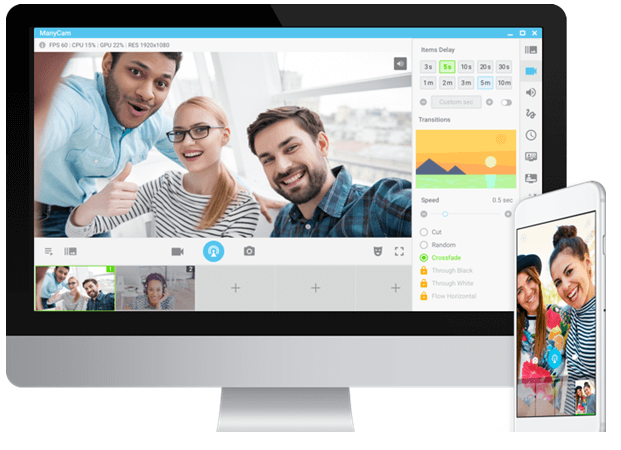
With its extensive list of features and offerings, ManyCam surely deserves a place on the list of Best webcam software. It is an incredible tool with simple and convenient working. ManyCam can be easily integrated with your Game Capture features, Skype account, Facebook, Tumblr, Youtube and can also work as a screencast for your PC screen.

You can use it to alter the background of your video stream and for adding multiple effects like stickers, backgrounds, 3D effects, and face masks. In addition to this, it also supports various video sources, picture in picture, playlist, IP Camera, Mobile app, Multiple channel broadcasting, and many more.

Out of the many features, as mentioned above, it Mobile app feature captures everyone’s attention. This feature erases the need of a dedicated webcam, which means your mobile phone camera is sufficient for you. All you need to do, connect your phone with your computer system. With the help of ManyCam’s mobile app feature, you can use your smartphone as a webcam.

Download

2. Yawcam

Yaw_cam

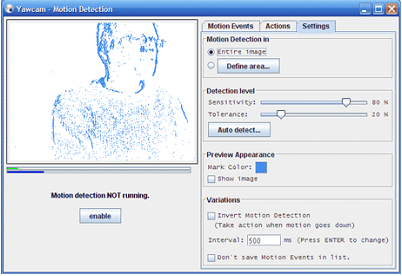
Next on our list of best free webcam software windows 7 is Yawcam. It is a free app, but that does not mean it is less than any high-end paid tool. Its voluminous list of features and benefits makes it a perfect pick. Video streaming, password protection, image snapshot, time-lapse movies, multi-language support, built-in web server, and motion detection are a few of the offerings of Yawcam. But the two most notable features are real-time video streaming and an inbuilt-web-server. You can also set a password for your videos and pictures with Yawcam.

Download

3. MyCam

my_cam

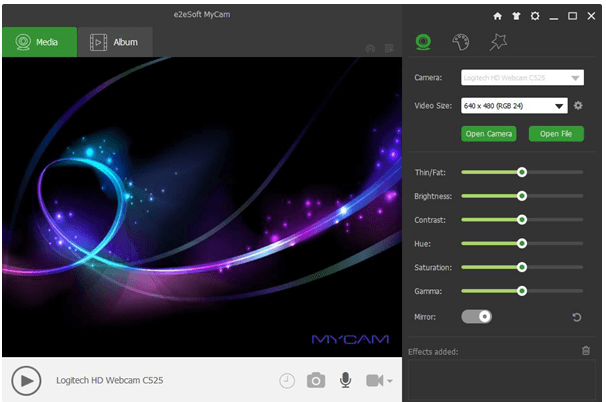
Another most popular and top webcam software for windows 10 is MyCam. It comes with a clean and convenient UI and is known to offer an array of advanced utilities. The “Album” feature is its most distinctive offering and allows you to share recorded files with your smartphone.

Major Benefits

  • It can be used to scan barcodes and QR codes.
  • It supports video broadcasting.
  • You can add videos and sound effects to your recording with My cam.
  • It comes with multiple filters and stunning effects that can be used while clicking pictures and making videos.
  • Enjoy videos without lag and high-quality images with its GPU image processing mechanism.
Download

4. Cyberlink YouCam

Cyberlink_youcam

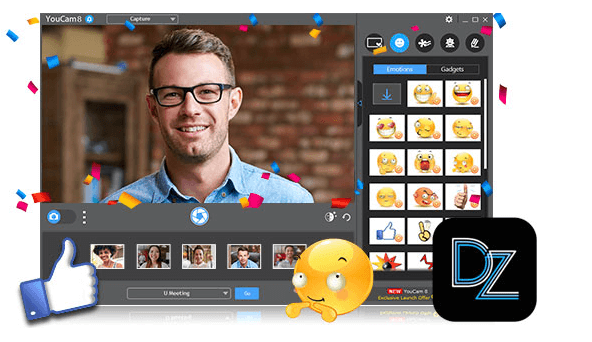
If you like the overall functionality of MyCam, you will surely be amazed by YouCam7. You can not only use it to record videos and capture images but also add various effects, frames, and color presets to them.

This best webcam recording software comes in both a free and premium version. Its free version lasts for 30 days and offers benefits like:

  • Face beautifying tools and effects.
  • Panorama and HDR photo modes.
  • Smart video enhancement tools.
  • Real-time skin smoothing effects for videos.

For users who want to enjoy advanced features like surveillance, services can opt for its premium version, which costs Standard ($34.95) and deluxe ($44.95).

Download

5. Splitcam

Split_cam

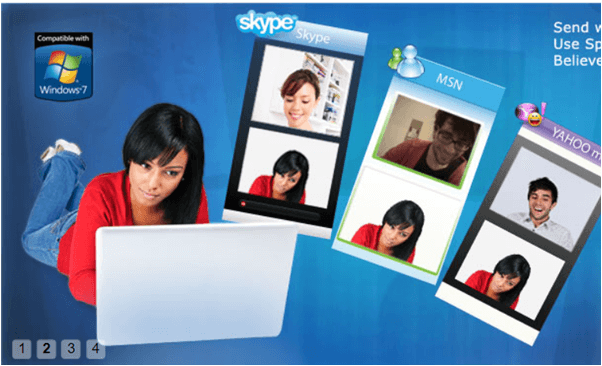
Its ability to support multiple clients makes it different from all the webcam software mentioned above. With Splitcam, you can stream numerous things with your friends on Skype and other platforms. This makes it work more engaging and is not available on any other similar software.

Read Also: How to Fix Video Driver Problems in Windows

  • 3D Masks to give 3D effects.
  • It can easily sync with various streaming platforms like Ustream, TinyChat, etc.
  • It can effortlessly split your videos to several programs.
  • It can be used as an IP camera.
  • It offers multiple webcam effects.
  • It can stream your video files, webcam, and various slideshows.
Download

6. IP Camera Viewer

IP_Camera_Viewer

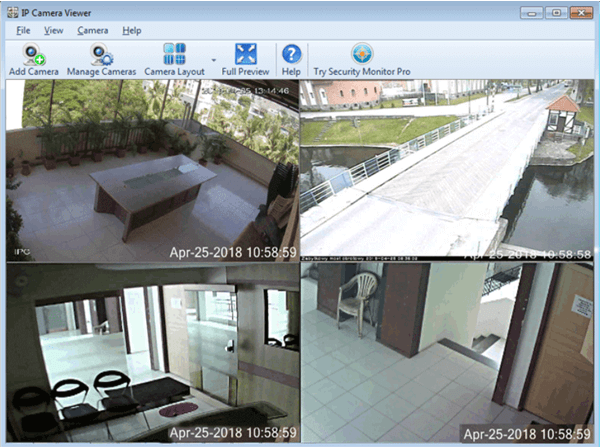
If you think that webcam can only be used for video chatting and live streaming, then you are highly mistaken. Use this best webcam software as an IP camera Viewer to monitor and shield your workplace and house. IP Camera Viewer can support up to 1800 IP camera modules. It also gives its users multiple customization options like coverage area, frame rate, orientation, and many more.

You can use it to record videos in various resolutions and varied sharpness, contrast, and saturation. It works incredibly well on different Windows versions, including 10/8/7/XP/Vista/2012 and 2008.

Download

7. Photo Broth Pro

Photo_Broth_Pro

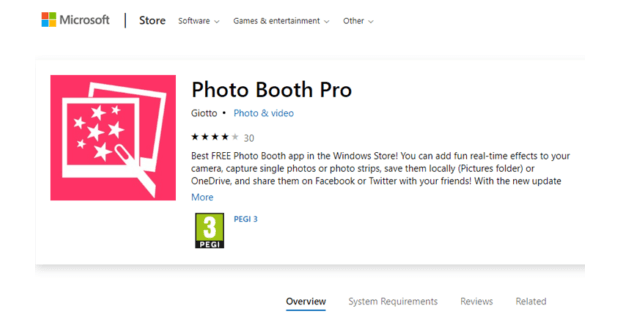
Photo Broth Pro is a highly popular and widely used webcam. This excellent webcam software comes at no price and is perfect for supporting clear and crisp video communications. It takes care of slow loading speed and avoids your camera from lagging.

Its user interface is user-friendly and has many hotkeys attached to its name.

Read Also: How to Update Video Card Drivers in Windows 10

  • You can add filters, effects, and stickers to it.
  • It also offers various beautification tools that can make your videos and photos look good.
  • It can record high-quality pictures with real effects.
Download

8. Webcam Toy

Webcam_Toy

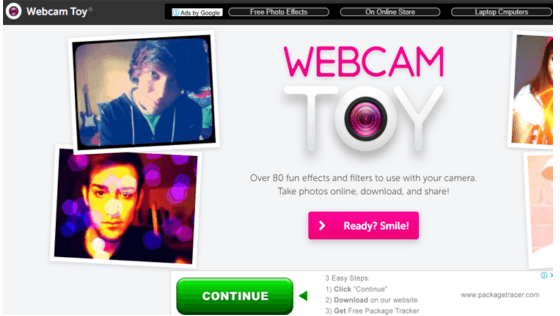
Add a fun quotient to your video calls with Webcam Toy. This browser-based tool comes with a large basket of effects and filters to choose from. It is entirely free of cost and is exceptionally easy to use. Download it today to click pictures, download them, and upload them on your Social media accounts.

Download

9. Logitech Webcam

Logitech_webcam

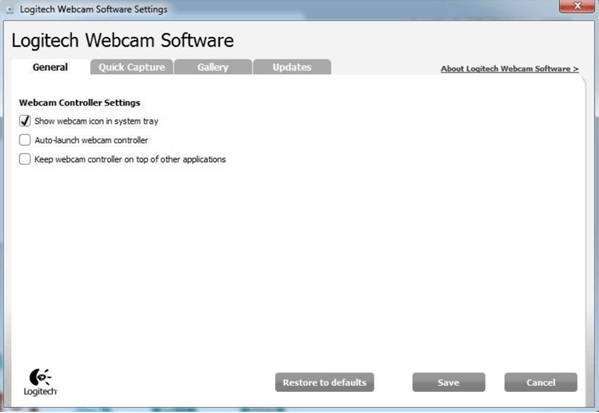
Who doesn’t know about Logitech Webcam? Previously known as Quickcam Express, the Logitech webcam has been in the market for quite some time now and is readily available on the Windows app store. Use it to record videos and take images; additionally, it can also be used to detect motions and for adjusting your camera’s sensitivity. It’s a good pick for users looking for a sound surveillance system.

Download

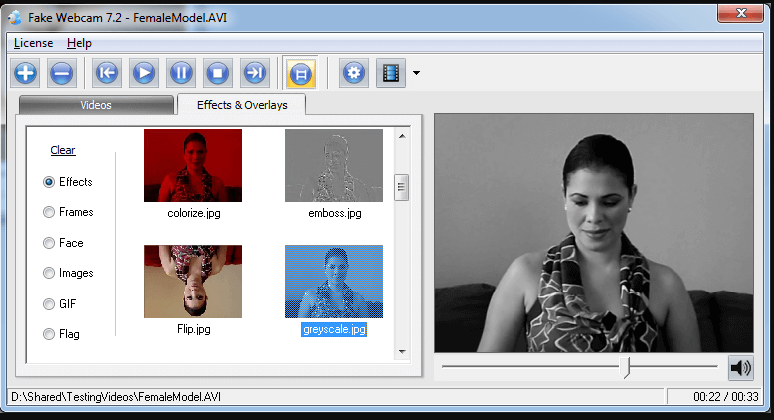
10. FakeWebcam

Fake_web_cam

The next tool on our list of best webcam recording software is FakeWebcam. This virtual webcam works just like a real one and is highly easy to use. Use it to add various overlays and effects with the filters it offers.

Download

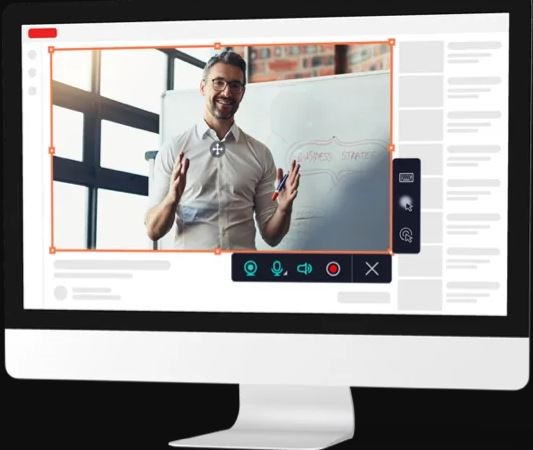
11. Debut Video Capture and Screen Recorder Software
Debut Video Capture and Screen Recorder Software

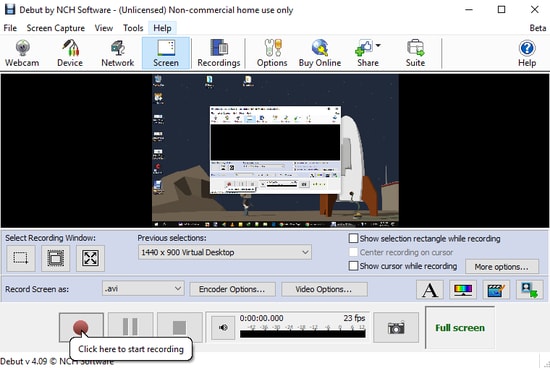
Debut Video Capture Software is another feature-rich webcam solution for Windows 10, 8, and 7. It allows you to record videos from a network IP camera, webcam, and other external sources. It comes with a screen recorder tool that lets you record your computer screen, gameplay, movies, or any other streaming videos.

You also have the option to use its video overlay feature which helps you to record your webcam and device’s screen simultaneously. This software is available for download for non-commercial use.

Download


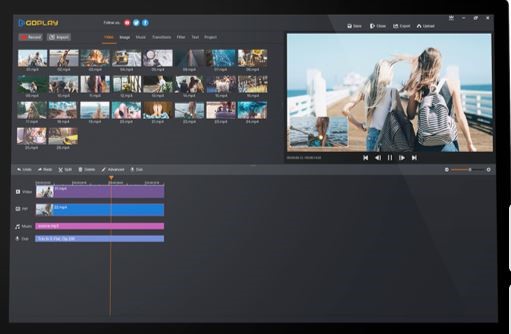
12. GoPlay

goplay

GoPlay is the best webcam software that you can use to record videos with your voice. Plus, with the help of GoPlay, you can also add captions to your videos. And, without any annoyance, you can remove the background noise from the video. Moreover, the tool offers numerous varieties of video effects. You can also share the videos directly to other social media platforms such as Instagram, Facebook, and YouTube. Effectively, it supports HD resolution along with editing the speed of video and audio. Basically, it is a perfect application for recording fast-speed games up to 60fps and GoPlay is an ideal option for streaming too. GoPlay is highly compatible with Windows, Android, and iOS. 

Download


13. Movavi Screen Recorder

Movavi Screen Recorder

Next on this rundown is, Movavi Screen Recorder, one of the leading webcam and screen recording software. This application is used for screen recording, capturing, streaming, video calls, and many more. With this application, you can be able to capture a full HD video at 60 fps (frames per sound). Additionally, this application provides ready-to-use templates. Sounds impressive no! With this amazing tool, you can be able to share the results directly on Google Driver, Movavi Cloud, or YouTube. And, to capture the screen audio with Movavi you do not need extra hardware. Movavi Screen Recorder is highly compatible with Windows and Mac. With this software, you can also record webinars and streaming videos with ease.

Download


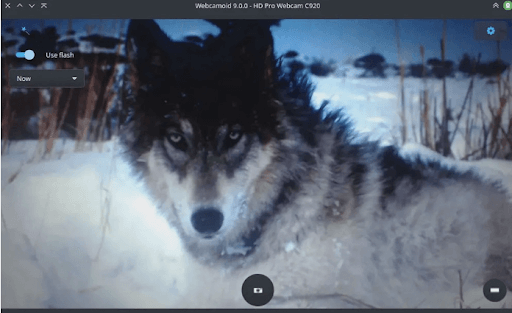
14. Webcamoid: Ultimate Webcam Suite

Webcamoid- Ultimate Webcam Suite

The next best free Webcam software is Webcamoid. It is used for live streaming, capturing screenshots, and recording screens. Moreover, it has advanced adjustment possibilities for pictures and videos. You can edit the contrast, saturation, or brightness of the image using the simple slider or simply entering the number.

Also, it allows automatic adjustment for temperature, backlight compensation, white balance, and gain. The not-so-ordinary flash function automatically brightens the screen before capturing pictures. The software also supports VLC playback support.

As the software is available for free it is a tremendous option for Webcam software for Windows, Mac, and Linux users. However, the only drawback is it lacks the default options.

Download


15. NVIDIA Broadcast

NVIDIA Broadcast

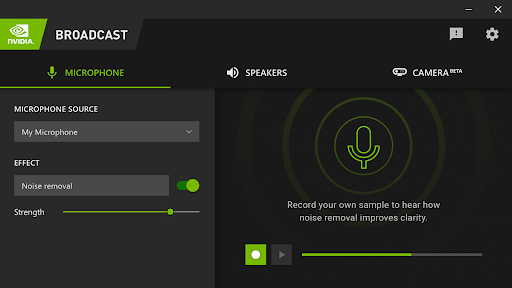
The next name in this list of the best free Webcam software for Windows is NVIDIA Broadcast. This is amazing software that is used by millions of gamers and professionals worldwide. The smart and futuristic features of the tool allow you to get amazing streaming and broadcasting results. Your streamers will get amazing quality with clearer sound with this tool.

The best part about this tool is the AI-enhanced voice and video features. The presence of these features means that the tool ascertains the background audio and video and optimizes the same for the best experience of viewers or streamers.

The tool is available for Windows devices only but makes up for the same with its advanced features.

Download


16. Bandicam Webcam Software

Bandicam Webcam Software

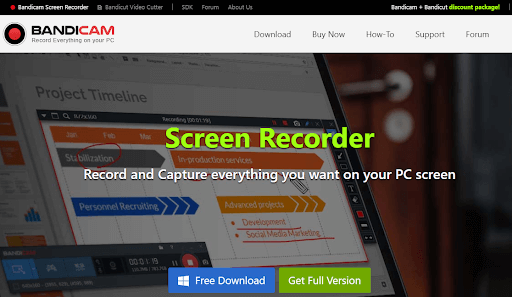
Bandicam is another free webcam software for Windows PCs. Using this lightweight tool, you can directly record games from PlayStation or Xbox with a high compression ratio. In addition to this, it is one of the most popular screen recorder software as well.

The software comes with lots of advanced and excellent features. It supports real-time drawing functionality, allowing you to outline and draw something on your screenshot or video. Not only that, but with the help of this software you can even schedule recording on a daily/weekly basis as per your preference. Bandicam also lets you record your voice and the system audio simultaneously. Moreover, adding animation and mouse effects while recording is another useful feature offered by Bandicam.

Download


Closing Words: Best Free Webcam Software 2024

In this blog, we have discussed some of the best webcam software for Windows 10,11 that you can install right now. We have shortlisted this software based on their ease of usage, versatility, offerings, and UI. Refer to our list and choose the one which suits your requirements.

Author

Prachi Dani

Prachi Dani is a technical content writer who specializes in areas of science and technology. She is highly up to date with technological transitions and transformations. Writing is not her passion but the only thing that carries satisfaction in life. If not writing, you may find her engrossed playing action games on her treasured smartphone.

View all posts

Related Posts
Top 10 Secure Bring Your Own Device (BYOD)

Top 10 Secure Bring Your Own Device (BYOD) in 2024

January 17, 2024
0

Here is a list of the top 10 Bring Your Own Device (BYOD)  that can help your employees connect over a common platform with ease. 

BYOD, which stands for “bring your own device,” is a policy that incentivizes workers to use their own personal devices for work-related activities inside a business.

Accessing emails, gaining access to corporate applications and data, & connecting to a business network are some of the items that fall under this category of activities. While smartphones are the most frequent mobile devices that workers bring to work, they also bring their own tablets, laptops, and USB drives. Smartphones are the most common mobile device that people bring to work.

This increase in the usage of personal devices motivates businesses to have these rules in place. This pattern not only eliminates the need for workers to carry more than one smartphone but also ensures that employees follow solid security procedures while connecting to a workplace network. This is the purpose of any BYOD policy.

However, to execute this task, you need to take the help of a Bring Your Own Device (BYOD) tool. A BYOD tool simply does what it suggests, integrating employees and workers over a common professional platform. There are multiple solutions that an organization can use, however, all of these tools may not be worth it. So, how can you select?

List of the Best BYOD and Security Solutions in 2024

In the coming sections of this guide, you will learn about some of the best Bring Your Own Device (BYOD) solutions in 2024. From the huge pile of alternatives, we have curated this list of the top tools that can help you get what you seek. SO, have a look at the tools, go through their descriptions, and then decide accordingly ~ which is the best and the most secure BYOD for your organization? 

1. Venn

Venn

The list of the best Bring Your Own Device (BYOD) solutions starts with the best one indeed. Venn is an amazing tool that helps you control any setup or desktop remotely. The tool is not like any random or ordinary workspace. Using Venn, you can connect with any PC or Mac device without using VDI. When the organization uses and manages Venn, it can ensure that the entire data across all the networks and routes is coded and encrypted.

Venn offers a set of extensive features that are not common in regular Bring Your Own Device security tools. To make the best out of the tool, the user does not need to establish a virtual machine. This tool complies with all the requirements of FINRA, NYS DFS, NAIC, SEC, and other regulations.

Moreover, as Venn is suited for businesses and corporations, it does not undertake a public gateway to establish connectivity. Rather, you can set up and use a private company-routed gateway to establish a secure BYOD for your employees.

Learn More About Venn Here

Also Read: Maximum Online Business Functionality: Keep Your Customers and Employees


2. Miradore

Miradore

Miradore assists businesses in adopting a Bring Your Own Device (BYOD) Mobile Device Management (MDM) solution, which enables workers to utilize their own personal devices to access corporate data and information while they are on the go.

Companies may guarantee that their staff have access to the appropriate applications, enterprise data, and Wi-Fi by using Miradore MDM. With Miradore’s Bring Your Own Device (BYOD) solution, workers are able to self-service their workflows and only contact IT in the event of any irregularities, which results in a reduction in the amount of manual labor of IT.

The most prevalent Bring Your Own Device (BYOD) gadget is a smartphone, however, there has been a significant rise in the usage of tablets and laptops for work. Because workers are allowed to use their own personal devices while on the job, the company’s equipment costs are reduced. Furthermore, the BYOD policy may be implemented in a short amount of time while using an MDM solution.

Learn More About Miradore Here


3. Citrix

Citrix

When it comes to dealing with user’s devices, Citrix has a specific approach in place. This Bring Your Own Device (BYOD) tool for the protection that the MDM system provides to devices that are enlisted by the enterprise is the security that is provided by the software applications that are made accessible to devices that are enlisted by the user.

Citrix is the primary competitor of VMware in the virtualization business, and its expertise includes application delivery for XenMobile. Citrix is also a competitor of VMware in the market for virtualization. This suite comes with wonderful capabilities for managing mobile content and mobile applications.

Because users are able to access their accounts from any device, they are able to begin working on a project on their desktop computer and then continue working on that project from their mobile device when they leave the workplace.

For this, an application for logging onto a network is the only thing that is put into the device. Following the completion of the owner’s logout from that site, the device will no longer contain any corporate property. This is an excellent solution to the difficult problem of erasing data from misplaced mobile devices.

Learn More About Citrix Here

Also Read: What Are the Best Practices for Implementing Business Process Management


4. VMware Workspace ONE

VMware Workspace ONE

With the VMware Workspace ONE Bring Your Own Device (BYOD) solution, workers are able to utilize their own personal devices to achieve their work goals. Users are able to access essential business applications via a unified catalog that is accessible across all devices, and they are also able to access any application whenever it is most convenient for them.

VMware also includes a built-in privacy tool that teaches workers how to separate their personal data from their business data and how to make the most of Bring Your Own Device (BYOD) programs. Employees are able to self-service onboard their devices and interact with the IT help desk in the event that they have any support difficulties from this feature.

Mobile sign-on allows users to utilize the permitted business applications without having to go through the process of authenticating themselves. Controlling the job profile and enforcing company-specific privacy regulations are both made possible by this mechanism. Through the use of the secure BYOD solution, you are able to encrypt and remotely delete corporate data while keeping the personal applications and folders on the device untouched.

Learn More About VMware Workspace ONE Here


5. BlackBerry UEM

BlackBerry UEM

When it comes to protecting communications between enterprise endpoints, BlackBerry UEM offers protection regardless of where those endpoints are located. Hence, it is one of the most reliable Bring Your Own Device (BYOD) tools. Additionally, the package offers a containerized distribution method for corporate applications that need to be installed on user’s devices.

As a result, the question of whether or not consumers would allow you to delete their phones in the event of a loss is not a concern with the BlackBerry system. You will, however, have the ability to access devices remotely, and among the activities that you will be able to conduct on all controlled devices is the ability to lock them in the event that they are stolen.

You are able to set up your own devices in bulk, or you may facilitate the availability of secure applications for user’s devices. The BlackBerry system does not offer a device locating tool or the capacity to delete data from a user’s phone in the event that it is lost.

This strategy protects the data of the firm on all mobile devices at the same time. For company-owned digital devices, the package also contains capabilities for tracking, locking, and erasing data.

Learn More About BlackBerry UEM Here


6. SureMDM 42Gears

SureMDM 42Gears

SureMDM assists businesses in implementing a Bring Your Own Device (BYOD) strategy, which allows workers to use their own personal devices while they are on the job. BYOD and security programs often consist of employee-owned mobile devices, such as smartphones and tablets, which are for use in business operations and have a work container that is distinct from the user’s personal profile.

Bring Your Own Device (BYOD) solutions have the ability to handle all security issues, provide flexibility, and increase data protection. You may achieve the potential advantages of Bring Your Own Device (BYOD) by implementing technologies that support BYOD.

Through an amazing feature, workers are able to work without interruption inside the work container, without having their personal material or applications on the device interfered with. Employees are able to utilize any corporate application that has been authorized on their mobile devices when organizations use Bring Your Own Device (BYOD) solutions. SureMDM’s Bring Your Own Device (BYOD) program allows workers to have more freedom while still ensuring the protection of company data.

Learn More About SureMDM 42Gears Here

Also Read: Best Free Inventory Management Software for Small Business


7. ManageEngine Mobile Device Manager Plus

ManageEngine Mobile Device Manager Plus

In order to manage user-owned mobile devices as well as fleet devices, ManageEngine Mobile Device Manager Plus gives you access to all the capabilities that you want. This also includes content management, as it guarantees that iOS & Android smartphone owners who access your data are unable to store copies of it or send it to others who are not allowed to receive it via their devices.

It is now possible to design policies for several groups of devices, which makes it simple to provide distinct configuration choices for Bring Your Own Device (BYOD) devices and company-owned digital devices.

This suite is the entire enterprise mobility management (EMM) solution since it contains app management, content management, & email management in addition to MDM. Among the management choices are services for Bring Your Own Device (BYOD), which begins with any enrollment app that can integrate a device into the network. You are able to set device configurations in bulk and/or on an individual basis if you have company-owned digital devices.

Learn More About ManageEngine Mobile Device Manager Plus Here


8. Codeproof

Codeproof

This framework allows you to maintain distinct profiles for work and personal lives. To ensure the safety of the company’s information, the work container may have its own unique password policy.

Codeproof MDM helps to guarantee that businesses have a workforce that is content by allowing employees the flexibility to utilize their most recent devices and encourage them to make use of such devices in order to communicate with their teams, talk, and learn, as well as to achieve superior levels of productivity in an easy and comfortable manner.

This software is aware that flexibility comes with dangers, and that there is a must to have proper security measures in place in order to protect the data and information of the company. Codeproof software gives you the ability to take advantage of workplace mobility by managing staff devices via a containerization framework.

Bring your own device (BYOD) enables workers to choose the device that best suits their needs, while simultaneously removing the need for businesses to purchase the most recent equipment.

Learn More About Codeproof Here


9. N-able N-sight

N-able N-sight

System administrators are able to quickly enroll devices with the help of N-able N-sight. Because this is a remote system, it is not necessary for those particular devices to be located at the same location.

The first level is designed for company-owned digital devices, which can be completely tracked, controlled, & locked/wiped remotely. The second level is designed for user devices; still allowing the owner to use them for normal recreational purposes.

It is thus possible for a single central IT department to provide a configuration that has been authorized by the company to groups of mobile devices that have been supplied to various locations.

It is now possible to include user’s devices into the corporate system by populating them with a gateway to the services offered by the organization. In the event that the phone is misplaced or stolen, it is simple to prevent access to this feature. Therefore, there are two different levels of treatment that are available for mobile devices that are used for company activities.

Learn More About N-able N-sight Here


10. Scalefusion

Scalefusion

Because it is aware of the requirements of a contemporary workforce, Scalefusion incorporates a Bring Your Own Device (BYOD) policy into its MDM solution. On the one hand, Scalefusion enables businesses to implement policies on employee-owned devices without jeopardizing the confidentiality of employee data, and on the other hand, it protects the confidentiality of corporate data.

When it is necessary to dismantle the work container, Scalefusion’s MDM capabilities enable a “remote wipe,” which allows for the separation of personal and business data via the use of containerization. The fact that Scalefusion MDM protects the confidentiality of personal data and encrypts business data makes it one of the most effective MDM solutions for managing a Bring Your Own Device (BYOD) program.

Scalefusion MDM allows you to deploy Bring Your Own Device (BYOD) rules to devices running Android, Windows, iOS, and macOS in a seamless manner. The encryption of applications and information on the work profile of the device is one of the ways that comprehensive policy applications contribute to the protection of corporate data.

Learn More About Scalefusion Here

Also Read: The Beginner’s Guide for Starting a Small Business Online


Best BYOD and Security Tools: Summing Up

Working on personal devices has become more simple as a result of the BYOD pattern. Bring Your Own Device (BYOD) rules eliminate security concerns that enterprises have had in the past. At this point in time, businesses consider BYOD and security to be a win-win situation and are aware that it is here to stay due to the potential advantages and flexibility it offers.

BYOD cyber security is a relatively new idea that, in the beginning, did not achieve broad acceptance due to concerns over the security of company data. At the moment, it is a very popular trend. Many businesses are already aware of the multiple advantages that are connected with a BYOD in Cyber Security program that is part of an MDM.

If you have queries related to the Bring Your Own Device (BYOD) tools and solutions listed earlier, feel free to connect with us using comments. Also, do let us know which one of the tools you liked the best. Subscribe to our newsletter and follow us on Instagram, Facebook, Tumblr, and other social media platforms for daily updates.

5 Best WhatsApp Sticker Apps For Android and iPhone In 2024

5 Best WhatsApp Sticker Apps For Android and iPhone In 2024

January 10, 2024
0

WhatsApp keeps on updating the chatting method for its users. Earlier where people had to type everything to express their feelings. Now the time has changed and the user can easily communicate and express their feelings by using the stickers. Stickers express one’s exact emotion by just a click. Android users can download the best Whatsapp sticker apps from the Play Store and iOS users can download the sticker apps from the App Store.

Using the best sticker apps for WhatsApp makes the experience memorable. As the apps give you freedom to download the stickers of your choice and also some of the apps give the option for customizing the stickers by your choice.

There are tons of apps available and it’s tough to choose out of them. But, don’t worry we have filtered some of the best sticker apps for your mobile. Whether you have Android or an iPhone we have covered it all.

Best WhatsApp Sticker Apps For Android and iPhone 2024

Here is the list of best sticker apps for WhatsApp available on Android and iOS devices. This list is filtered on the basis of the user ratings.

1. Wemoji: WhatsApp Sticker Maker

Wemoji - WhatsApp Sticker Maker

Wemoji is unique and delivers the best which is why the app stands second on the list. While other apps provide a bunch of stickers pre-loaded, this app gives a free hand to the user to customise the sticker according to their choice. The user can crop the image the way he/she wants and can create a sticker out of that image.

The images which were used earlier can be reused for another sticker. The freedom which the apps provide the user is its USP. The users have loved the freehand option, which is why the app has been rated 4.6 out of 5.

Download App: Android


2. Stickify: Stickers for WhatsApp

Stickify - Stickers for WhatsApp

Stickify is listed at the top, the best WhatsApp sticker app for Android according to the users and their ratings. The app has a rating of 4.6 which makes it best in the class. The app is free to use and doesn’t ask for any payment after installation. Other than the preset of stickers the app gives full freedom to the user to customise and add stickers to WhatsApp.

Read Also: How To Send Message To An Unsaved Number

By using the app, users can create stickers for WhatsApp from any picture, whether it’s a downloaded image or clicked from the device. Despite these features, the user can also decorate stickers. The app is available for only Android users.

Download App: Android


3. Sticker.ly: Sticker Maker And WhatsApp Status Video

Sticker.ly - Sticker Maker And WhatsApp Status Video

Sticker.ly is one the best WhatsApp sticker apps available for Android and iPhone users. This has some major features which attracts the user to use the app. The app offers 20,000,000+ funny stickers for the user to choose from. The users can have their own Sticker pack, which makes it a lot easier to search for a sticker. The sticker pack can also be shared to others to make their life easier, which is why this app is in the list of best sticker apps for WhatsApp.

Read More: How To Send Selfie Stickers On Instagram

Sticker.ly offers both options including the pre-loaded sticker and customising sticker option. The app has been rated 4.6 on the Play Store and 4.7 on the App Store.

Finding the original Sticker.ly can be tough for iPhone users as there are many other apps from the same name. Sticker.ly has a logo which has a blue background and a white smiley face in it.

Download App: Android and iPhone


4. Sticker Maker For WhatsApp

Sticker Maker For WhatsApp

In the list of best WhatsApp sticker apps, the Sticker Maker for WhatsApp stands on fourth. The app is available for Android users on the Play store. With the variety of options available in the app, creating stickers is an easy task to perform in the app. The user can just crop the image, add the variant which he/she would like and just create a sticker.

The app offers different variants to add on the sticker like masks, shapes and emojis. Other than that the user can have a variety of text options and magnifying glass options which helps to create details on the sticker. The app has a rating of 4.4 out of 5.

Download App: Android


5. Sticker Maker Studio

Sticker Maker Studio

Read More: Free Instagram Followers Apps for Android & iOS

Sticker Maker Studio is available in iOS devices. The iPhone user has less number of WhatsApp sticker apps as compared to the Android users but this app won’t let you feel it. The Sticker Maker Studio gives free hand to the user to customise the stickers, other than this the user can also merge an emoji with the sticker to make it more creative. The app has a 4.8 rating on the App store.

Download App: iPhone


Conclusion Words

Now that you have a list of best WhatsApp sticker apps. The list has both sticker apps for Android and sticker apps for iPhone as well. Now choose the best according to the requirement and enjoy the sticker language.

1 Comment
    Exccmubpmw says: Reply
    June 23rd 2020, 1:13 pm

    Like!! Really appreciate you sharing this blog post. Really thank you! Keep writing.

Leave a Reply Cancel reply

Your email address will not be published. Required fields are marked *

Sidebar Image bit G ad1

Latest Posts

  • Best-Free-Online-Portfolio-Websites-in-2026
    Best Free Online Portfolio Websites in 2026
    by Niharika / March 16, 2026
  • Anytime Astro: Best Website For Online Astrology Consultation
    Anytime Astro: Connect Now For Online Astrology Consultation
    by Somya Shrimal / March 13, 2026
  • Best-Ways-to-Combine-Images-Into-PDF-Files
    Best Ways to Combine Images Into PDF Files
    by Niharika / March 12, 2026
  • Best FREE VPS Hosting Providers
    7 Best FREE VPS Hosting Providers in 2026
    by Devesh / March 12, 2026
  • Best-McAfee-alternative-software-to-use-for-Virus-Protection
    Best McAfee Alternative Software to use for Virus Protection
    by adminuser / February 11, 2026

Categories

  • Cyber Security
  • Driver Updater
  • Entertainment
  • Fitness
  • Games
  • How To
  • laptop
  • OS
  • Reviews
  • Tech News
  • Tips & Tricks
  • Top 10
Sidebar Image bit G ad1
Best Program Launcher for Windows 10 12 Best Program Launcher For Windows 10 in 2024by Snigdha / December 27, 2023
Best Free Image Recognition Software in 2024 [Open Source]by Devesh / December 27, 2023Best Free Image Recognition Software
TechPout Footer Logo

We at TechPout promise to put forth stories that help people to learn and simplify their digital life. Our purpose is to share the true essence of technology with our tech-loving community.

Useful Links

  • About Us
  • Contact us
  • Privacy Policy

Popular Posts

  • Best PC Optimizer Software
  • Best Mac Cleaner Apps
  • Best Driver Updater
  • Duplicate Photo Finder and Cleaner Software
  • Best Free Movie Download Sites
  • Best IPTV Players

Follow us

Copyright © 2026 www.techpout.com. All rights reserved
DMCA.com Protection Status