
Isn’t it amazing how our smartphones have made our lives easier, no matter what the work is?
Whether you want to order your favorite food at your doorstep, book movie tickets online, or shop for your favorite pair of jeans. Now, with smartphones, you can do everything that you couldn’t imagine before. Distance and area calculation are some of the complicated tasks that need a lot of hard work, but with a smartphone, you can do it with ease, and that too with precision.
Yes! You heard it right. Now there are various best distance measurement apps available online, which can help you measure the distance between two places on your smartphone.
Now you don’t need a measurement tape to measure the distance between two points. With so many distance and area measurement apps available for Android and iPhone on the market, you can easily calculate the distance between two points.
But it is really difficult to find the best distance measurement app that works best for you. So, to help you out, we have compiled a list of the 5 best distance and area measurement apps that can help you measure the distance between two places.
Top 5 Area and Distance Measuring Apps
So, free measurement apps have made it easier than ever to measure distances and areas. These distance measurement apps are really helpful for different jobs, whether you are planning a renovation, measuring a garden, or checking the size of your room. Here are some of the best distance and area measurement apps to get you started.
1. AR Ruler App
Let’s start our list of the best area and distance measuring apps with the AR Ruler app.
The AR Ruler app is a high-end digital tool for precisely measuring area and calculating volume. This distance measurement app uses cutting-edge augmented reality to turn your smartphone into the best distance measuring app, enabling you to perform any volume measurement task. The AR ruler app has a built-in tape measure feature that provides a reliable way to take accurate measurements for flooring or room area.
With this distance and area measurement app, you can calculate volume, measure area, and find the perimeter in just a few seconds.
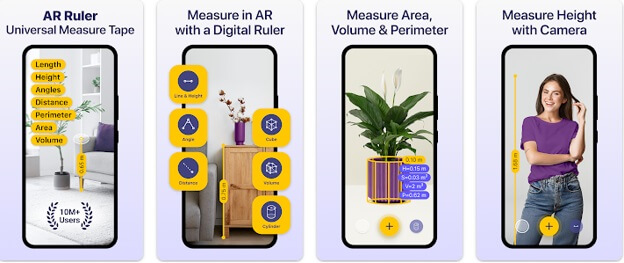
Key Features of AR Ruler App:
- This distance application estimates the distance from the device camera to a point on a 3D surface.
- It includes an Angle Tool that can measure angles directly on real surfaces.
- You can find the length, perimeter, and area of rectangles using the Rectangle Tool.
- With the Circle Tool in the AR Ruler App, you can measure the radius, perimeter, and area of circular objects.
- Poly & Poly Smooth help in calculating the area and volume of irregular shapes.
- The AR Ruler distance app helps you measure straight and curved walls.
Also know: Best Video Editing Apps For Android
2. Angle Meter app
Presenting the Angle Meter app, which may not have the most visually appealing user interface but excels at producing excellent outcomes. It uses the arctangent of the angle of gravity between two axes and gives accurate results according to the quality of the sensors.
This mobile application provides a wide range of tools, such as a camera-based laser level tool, a protractor, and an on-screen ruler.
Though it looks simple, Angle Meter turns out to be a gem, especially for its distinct feature of accurately measuring the angle of inclination of objects, which most distance and area measurement apps lack.
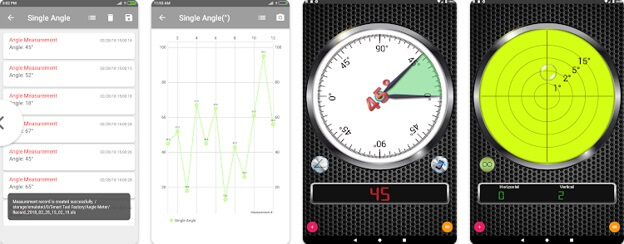
Key Features of Angle Meter app:
- It can measure slope or angle on surfaces that are not parallel to the ground by using the relative angle mode.
- It employs an angle complement between 0 and 180 or 0 and 360 degrees.
- This distance measuring app has an option to save recordings to the database, view them as lists or charts, and get a copy of the measurement history (as xls files or charts).
- In the image measurement screen, there is an option to measure the angle of an object in a picture in the Angle Meter distance app.
- It has an image gallery to view images in preview or full detail.
3. Moasure App
Let me introduce you to the next distance measuring app in our list – the Moasure app.
The Moasure app connects via Bluetooth and provides a slick and user-friendly interface for measuring, viewing, and editing your measurement data in one place, without the need for Wi-Fi, GPS, or cellular signal. With the features of a protractor, goniometer, ruler, and 300 m/1000 ft tape measure, the Moasure distance app is unique in its convenience and adaptability.
Additionally, it has an incredibly well-designed and intuitive user interface that makes navigating around it easy. Users also receive helpful video tutorials within the app that walk them through the app’s features and functionality.
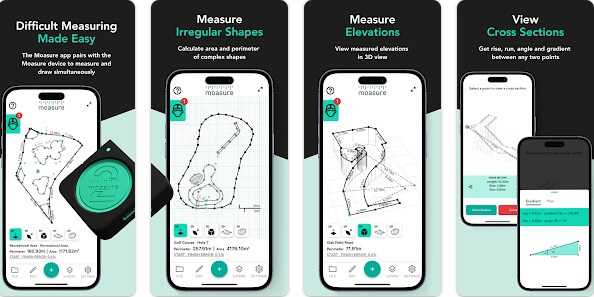
Key Features of Moasure app:
- This distance measurement app includes an intuitive UI without the interruption of advertisements.
- You can watch educational video tutorials to learn how to make the most of the app.
- With a wide range of measurement tools, such as protractors, tape measures, and rulers, this distance measuring app can be used for a variety of purposes.
- You can save each measurement and organize files into folders within the app for easy access.
- With the Moasure app, you can instantly view your measurements in both 2D and 3D on the screen in a variety of ways.
4. Geo Measure Area Calculator
Geo Measure is a simple and useful tool to measure land. It is perfect for anyone who wants to buy land and has to figure out how much space it covers.
Make Geo Measure your trusted partner on your home-buying journey. Taking accurate measurements means you know how big your potential new land is. This distance and area measurement app has a GPS Speedometer App, which is helpful in calculating GPS area and distances, ensuring you get accurate measurements every time.
Geo Measure makes it easy to measure property. It’s simple and ideal for first-time landowners and real estate enthusiasts, and a must-have for anyone buying property.
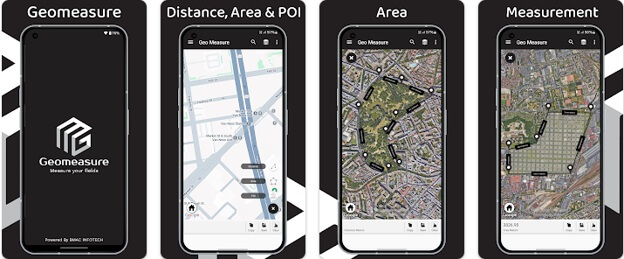
Key Features of Geo Measure app:
- It includes add, delete, and drag-and-drop markers to place markers at the perfect place.
- Geo Measure also includes an instant measurement/instant calculation feature.
- This distance measuring app allows you to save any calculated area so you don’t have to repeat the process.
- This distance app also allows you to load and delete previously measured or calculated areas.
- It also allows you to export and share KML files.
5. RoomScan
Introducing RoomScan Pro, a revolutionary distance and area measurement tool designed specifically for architects and interior designers.
This user-friendly distance app is perfect when you’re working in dimly lit spaces, as it effortlessly provides accurate basic floor plans. All you have to do is point your device at the floor, and RoomScan Pro does the rest. It automatically scans the ground, capturing every detail of the floors and walls to generate a comprehensive floor plan in just moments.
If your job requires floor plans on a daily basis and you are not using RoomScan Brick Mode, you are wasting time.
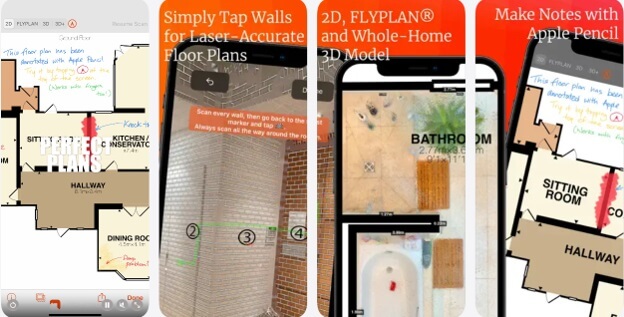
Key Features of RoomScan:
- With RoomScan Pro, you can make measurements by placing the device against the wall you want to measure.
- It involves creating a 3D model that allows you to change the height and add windows and doors.
- It automatically calculates ceiling height, wall areas, and heat loss parameters, making it ideal for contractors.
- It stores every project in the application and exports it as a PDF, DXF, or image.
- The interface of RoomScan Pro is simple and easy to use.
Also know: Best Utility Apps For Your Android Smartphones
Frequently Asked Questions
Q1. What are distance and area measurement apps, and how do they work?
Distance and area measurement apps help you measure length, distance, height, and angles using your smartphone. They use augmented reality (AR) technology, which combines digital information with the real world. The apps work by using your phone’s camera and sensors to show measurements on the screen as you point your camera at an object or space.
Q2. Which is the best distance measuring app for everyday use?
The best distance measuring app depends on your needs and the type of device you have. Some popular options include the AR Ruler and Angle Meter app. These distance measurement apps are easy to use and let you get quick measurements, making them useful for everyday tasks like measuring a room or furniture.
Q3. Are distance and area measurement apps accurate enough for real projects?
The accuracy of these distance measurement apps can vary based on your device, lighting conditions, and how you use them. They work well for estimates and quick checks, but they may not replace precise tools for professional projects. It’s good to know what level of accuracy you need for your specific situation.
The right distance and area measurement app can make your outdoor activities easier and more efficient. Whether you’re planning a hike, working on landscaping, or exploring new places, these 5 apps mentioned in this article provide reliable tools for accurate measurements. They have easy-to-use features, so you’ll be ready for your next adventure.