

Juggling back-to-back meetings, traveling, and changing priorities can be tough when you have so much on your plate. That’s why the best AI calendar apps help you automate daily scheduling, reduce back-and-forth coordination, and protect focus time.
AI calendar and time management applications use AI to fix meeting times, schedule tasks, and make automatic calendar adjustments when your plans change, much like a 24*7 AI assistant that works across various time zones and speaks many languages.
The best AI scheduling assistants use large language models (LLMs) and machine learning to learn your habits and find the slots that suit you best. With top paid and free AI schedulers, you can manage a large team with complex availability, automate time blocking for priorities and habits, manage recurring meetings, sync the team’s schedules, and handle client-facing bookings across time zones.
This article lists and explains the best AI calendar assistants, curated carefully after analyzing how well these tools can sync multiple calendars, consider buffer times, respect everyone’s working hours, manage meetings across various time zones, identify mutually open slots, coordinate across different participants, generate booking links, automate meeting invites, intelligently block time for tasks, avoid schedule overloading, protect focus periods, and how easy they are to set up and use. Let’s get started.
What Are the Best AI Calendar Apps to Use as an Assistant
Reclaim, FlowSavvy, Akiflow, Calendly, and Motion top the list of the best AI calendar and scheduling assistants. Reclaim is best for managing recurring events and protecting focus time. FlowSavvy is best for scheduling for individuals automatically. Akiflow is best for a single task inbox and helpful integrations. Calendly is best for complete meeting management. Motion is best as a comprehensive project management app that automatically manages deadlines, calendar commitments, and priorities. Below are all these apps in detail.
1. Reclaim
Reclaim is one of the best AI calendar apps and schedulers for protecting your focus time, building habits, and coordinating meetings easily. With Reclaim, you can manage recurring events and protect your focus time by telling the app how many hours of focus time you need each week; it schedules your meetings and habits without disrupting your focus time. Moreover, below are its other notable features.
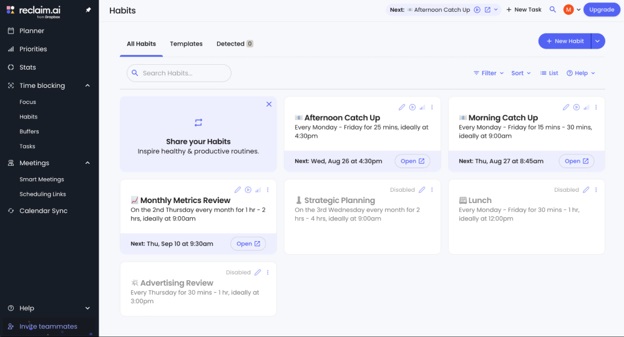
Key features
- Suggests tasks you can choose to work on next.
- Provides detailed insights into your productivity patterns.
- Mirrors your personal calendar events to your work calendar and the other way around to ensure there are no double bookings.
- Priority-aware booking links so you can meet clients and teammates without compromising your priorities.
Also know: How to Turn on FaceTime Photos on Both Devices
2. FlowSavvy
FlowSavvy is the next name on the list of the best free AI schedulers, automatically scheduling tasks from your to-do list into your calendar. When your plans or priorities change, FlowSavvy instantly updates your schedule to match your new plans and priorities. Additionally, the automatic scheduling feature and the following features make FlowSavvy an AI scheduling assistant worth trying.
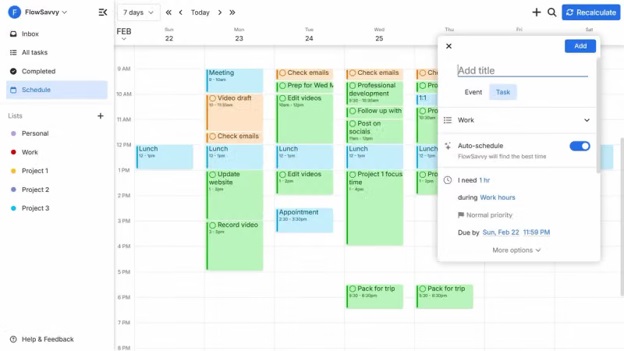
Key features
- Easy rescheduling of missed tasks.
- Integrates with Google Calendar, Outlook Calendar, iCloud Calendar, Todoist, Google Tasks, Microsoft To Do, and Apple Reminders.
- Supports Claude, ChatGPT, Zapier, MCP, and API for AI and automation.
- Organize your tasks into lists so that you can access them quickly from the sidebar.
3. Akiflow
Akiflow is the best AI calendar assistant app for automatically labeling tasks and managing them across different platforms. With Akiflow’s built-in AI chat, you can manage your events and tasks via natural language. Additionally, Akiflow doubles as a planner and productivity app; it brings your tasks from all other applications, such as Asana, Todoist, Google Calendar, Outlook Calendar, Outlook email, Gmail, Microsoft Teams, Slack, Trello, ClickUp, Zoom, and Linear, to a single view so that you need not switch between apps. Akiflow also offers other unique features.
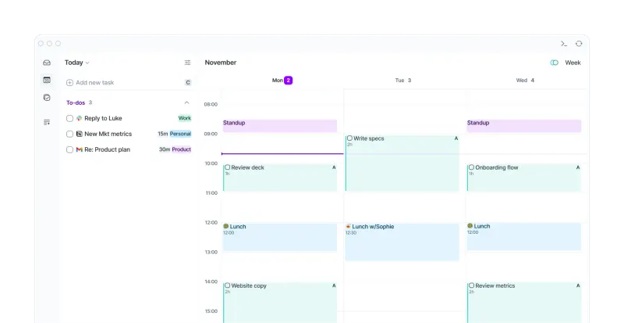
Key features
- Easily convert Slack messages, notes, or emails into actionable tasks and schedule them directly on your calendar.
- Ensures critical tasks are visible and completed on time by setting deadlines, priorities, and reminders.
- A command bar and keyboard shortcuts let you capture tasks quickly, plan your day, and set items according to your schedule without breaking your workflow.
4. Calendly
Calendly is another scheduling AI assistant for end-to-end meeting automation. It embeds AI into your meeting workflow for seamless meeting coordination. With this easy-to-use AI schedule assistant app, you can schedule various meetings and create custom meetings according to the information available when requesting a meeting. Here are other noteworthy Calendly features.
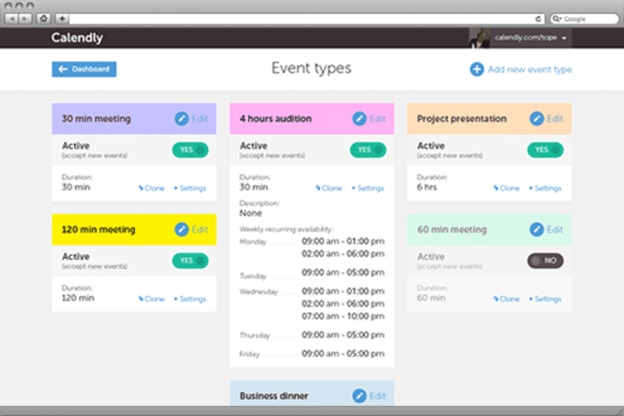
Key features
- Automatic distribution of meeting requests across team members to balance the workload.
- Inbound lead qualification via a form, sending it to the appropriate person’s booking page based on responses or CRM ownership.
- Groups up to 40 people for meeting polls to vote on a preferred time and then books the winner automatically.
- PayPal and Stripe integration for collecting payments at booking time, helpful for consultants and coaches who run paid sessions.
- Automatic SMS and email reminders before meetings on a set schedule.
5. Motion
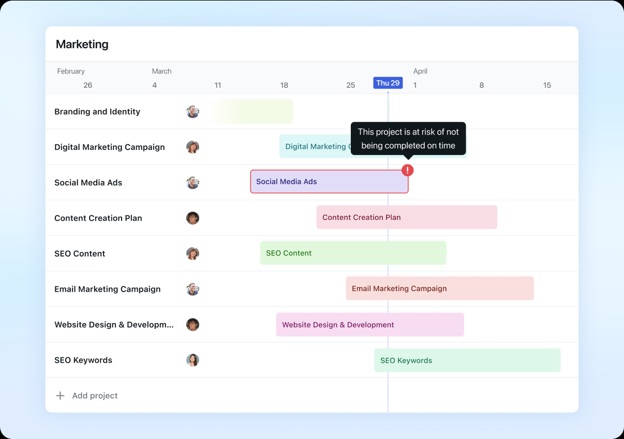
Motion, on the list of the best AI time management apps, is a complete project management software. It includes a powerful AI productivity package with an AI calendar, AI Notetaker, AI Docs, team collaboration, and AI Project Management. The AI calendar schedules and adjusts tasks based on your plans. Below is what makes Motion a unique app.
Key features
- Automatic task rescheduling if there is a plan change.
- Advanced project management features such as Kanban boards and Gantt charts.
- Task assignee coordination, team workload tracking, and project completion date prediction.
- Automatically builds each team member’s schedule and streamlines team management when you assign work.
- Set work-life boundaries with designated work hours, no-meeting time, and focus time.
Also know: How to Fix Windows 10, 11 System Restore is Taking a Long Time
Frequently Asked Questions
Q1. Is there an AI scheduling assistant?
Yes, AI scheduling assistants help you manage calendars, block task time, and coordinate meetings.
Q2. Which AI calendar is best?
The best AI calendar depends on your needs, whether you want to automate time blocking, book external meetings, or schedule full days. The top options include Reclaim, FlowSavvy, Akiflow, Calendly, and Motion. You can learn about them in the article above.
Q3. Is there a free AI calendar app?
Yes, Reclaim and FlowSavvy are some of the best free AI schedulers and calendar apps that you can use.
Hope this helps you choose the right AI calendar app. To select the best app for your requirements, check if the app can help you build a better schedule, if the app can also help you with project management (if managing projects is one of your top priorities), and if you can schedule via chat or voice notes (if this is what you prefer). If you have any doubts or questions, leave us a comment.