

A study reveals that more than one in four (27%) breaches happen because of an unpatched vulnerability. In fact, over 60% of small businesses get hacked every year because of unpatched vulnerabilities. These alarming statistics make patch management a necessity, not an option. Moreover, corporate compliance and governance requirements also necessitate up-to-date IT infrastructure patching. Patch management, i.e., the process of identifying, acquiring, testing, and deploying software updates, also called patches, to address security vulnerabilities, fix bugs, and improve functionality, needs the best patch management tools for proper execution.
The best patch management software improves an organization’s security, fixes bugs, adds new functionality, identifies software that does not fix bugs so you can update it, minimizes system crashes caused by software defects, and installs patches regardless of the device’s location.
This article lists and explains the best patch management solutions, carefully curated after considering features such as integration with other tools, an intuitive dashboard, ease of setup and use, thorough scanning, system auditing, and comprehensive reporting. Let’s get started.
What Are the Best Patch Management Tools
GFI LanGuard, NinjaOne, SolarWinds, ManageEngine Patch Manager Plus, and Robin by Atera consistently top the list of the best patch management tools. While all are strong options, each stands out in different ways to fit a variety of IT needs:
– GFI LanGuard is ideally suited for small to large businesses, offering broad integration with over 4,000 security applications and strong network vulnerability scanning. It provides a perpetual license option for those seeking long-term cost efficiency and reliable reporting tools.
– NinjaOne is designed for small to medium-sized businesses and freelancers. Its cloud-native interface emphasizes automation, straightforward onboarding, and excellent customer support. Its flexible subscription-based pricing model scales easily as teams grow.
– SolarWinds Patch Manager appeals to both small and large organizations, particularly those already invested in Microsoft solutions. With its robust dashboard, deep integration with SCCM and WSUS, and advanced reporting, it is a strong choice for enterprises needing to manage complex IT environments. The pricing aligns well for businesses looking for more advanced monitoring and automation features.
– ManageEngine Patch Manager Plus is an all-in-one solution that supports both cloud and on-premises deployment, making it a fitting choice for organizations with hybrid environments. It offers dynamic patching for over 650 third-party applications and is scalable for growing businesses with tiered pricing.
– Robin by Atera targets small to medium-sized MSPs, IT consultants, and internal IT departments. As a fully cloud-based platform, it provides integrated RMM, PSA, and automated patching, along with remote access and a comprehensive script library. The simple monthly pricing per technician helps MSPs budget and scale more effectively.
Below are these patch management solutions in detail.
1. GFI LanGuard
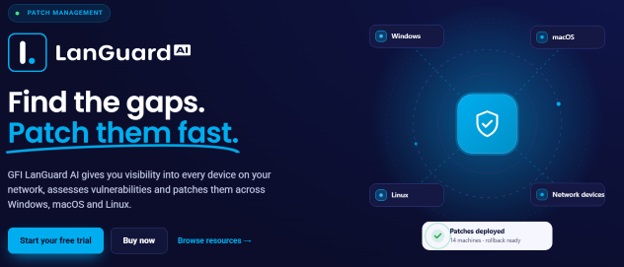
GFI LanGuard is one of the best patch management tools for network monitoring and network security scanning, offering patch management, application security, and vulnerability management. Here are its notable features.
Key features
- Third-party patch management for apps such as Adobe Reader, Mozilla Firefox, and Apple QuickTime.
- Automatic patching facility for browsers like Google Chrome, Apple Safari, Mozilla Firefox, etc.
- Capability to identify 60,000+ vulnerabilities.
- Network audit capabilities for a detailed network view.
- Additional features such as exporting reports in different formats, security audits, and support for virtual environments.
- Automatic downloading of missing patches.
- Rolls back patch updates if issues occur.
Also know: Best Network Management Software
2. NinjaOne
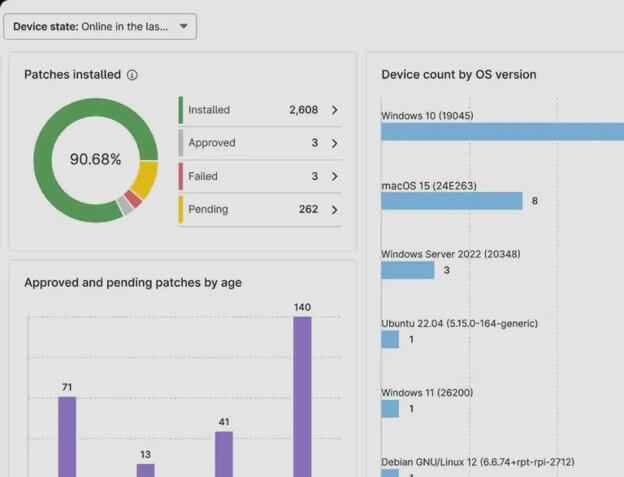
NinjaOne, formerly known as NinjaRMM, is the best patch management software, with automated endpoint management, seamless integration with a wide variety of security and IT technologies, free onboarding, training, and customer support, plus the following noteworthy features.
Key features
- Automated third-party app and OS patching with deep control over security updates, features, and drivers.
- Productivity and health monitoring for all your laptops, workstations, and servers.
- Complete software and hardware inventories.
- Remote device management with powerful remote tools that don’t disturb end users.
- Robust IT automation for standardized device deployment, configuration, and management.
- Direct device control via remote access.
3. SolarWinds
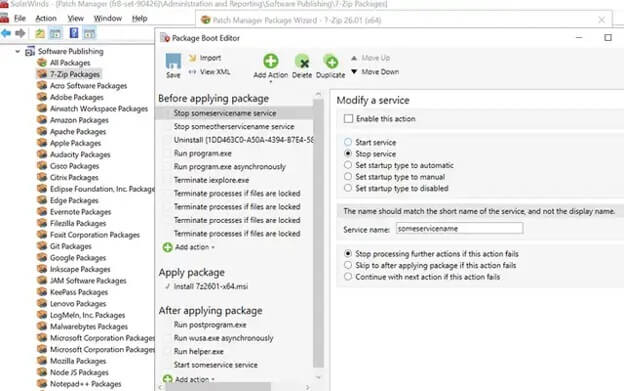
SolarWinds Patch Manager is another patch management solution that automates patching for Microsoft servers, workstations, and third-party apps. In addition to automatic patching and reporting, this software minimizes security risks, limits service interruptions, and offers the features below.
Key features
- A Microsoft SCCM extension that fills in loopholes in SCCM’s patching capabilities.
- Detailed standardized and custom reports.
- Patching compliance and vulnerability reports on all managed computers.
- Microsoft WSUS and pre-built, pre-tested packages for reliable patch distribution.
- Configurable alarms and patch report scheduling.
- Improved software security with Wake-on-LAN that reactivates sleeping devices and turns them off afterward.
- Real-time security monitoring with detailed compliance reporting.
4. ManageEngine Patch Manager Plus
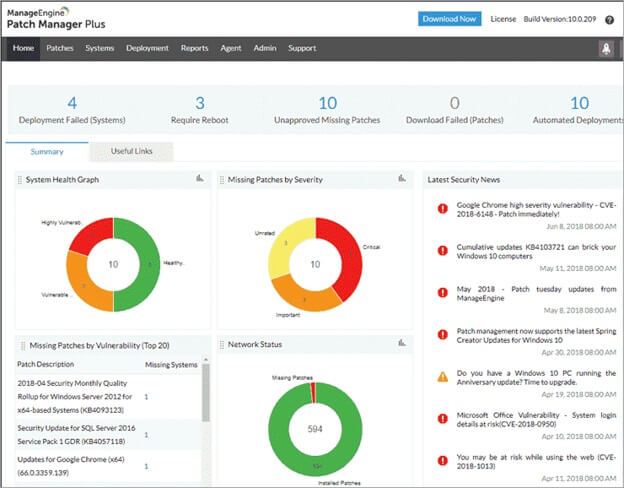
ManageEngine Patch Manager Plus is one of the best and most comprehensive patch management tools for automatically deploying patches to OS endpoints. Moreover, this software supports 650+ third-party updates across 350 apps, supports both on-premises and cloud deployment, and offers the following notable features.
Key features
- Patch deployment and management for 250+ third-party apps such as Adobe and Java.
- Flexible patch deployment policies.
- Options to test, approve, and decline patches, and third-party app patching.
- Advanced audits and analytics with patch tracking via insightful patch management reports.
- Vulnerability scanning and patch deployment from pre-tested repositories.
- Automated patch testing, driver updates, and scheduled remote shutdowns.
5. Robin by Atera
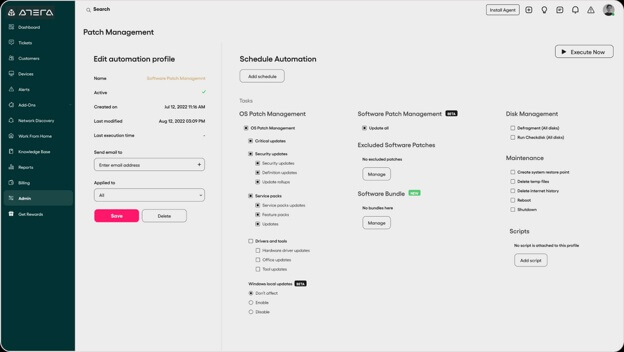
Robin by Atera is one of the best cloud-based patch management software solutions. It is a complete RMM and IT management solution with automated patch management and reporting, smooth patching across all devices with Chocolatey for Windows and Homebrew for Mac integrations, remote access, PSA, a script library, helpdesk, ticketing, reporting, billing, and the following features.
Key features
- Weekly/monthly scheduling of recurring patching profiles.
- Installation of critical security updates, drivers, service packs, upgrades, and tools.
- Patch deployment and success rate statistics reports.
- Create testing groups for seamless deployment, along with patch exclusion capabilities.
- Software deployment automation and patching.
- AI-powered script generation for smooth patching.
Also read: How to Open Print Management in Windows
Frequently Asked Questions
Q1. What is patch management?
Patch management means pinpointing, acquiring, testing, and putting into place software updates, called patches, to fix security vulnerabilities and bugs for improved performance.
Q2. What is the purpose of a patch?
A patch fixes bugs and security vulnerabilities and improves the performance and functionality of computer software and systems.
Q3. What are the top 5 patch management tools?
GFI LanGuard, NinjaOne, SolarWinds, ManageEngine Patch Manager Plus, and Robin by Atera are the top five patch management tools; you can learn about them in the article above.
Hopefully, this helps you choose the right patch management tool to improve your software and system security and functionality. As next steps, consider trialing one or more of the tools listed above to see which best meets your organization’s needs. Review vendor documentation to ensure compatibility and integration with your current systems, and assess your existing infrastructure to identify specific requirements or constraints. Taking these actions will empower you to make an informed decision and support a smooth transition. If you have any persistent questions or confusion, leave us a comment.