Main LogoLight Logo
  • Reviews
  • Top 10
  • How To
  • Tech News
  • OS
    • Windows
    • MAC
    • iOS
    • Android
  • Categories
    • Driver Updater
    • Cyber Security
    • Games
    • Fitness
    • Entertainment
    • Tips & Tricks
Android How To
by Diksha Lalwani

How To Create An App For Android

August 4, 2019
1

With the fast-paced journey of the technology around us, day-by-day we are becoming more and more dependent and skewed towards digital resources of living, aka gadgets and applications. 

The creative soul inside all of us comes alive once in a while for different purposes. Building an app from scratch is one of those purposes. We are surrounded by apps completely (that’s literally so true), and it isn’t a guess that we would like to have one of our own apps at some point.

And hence, we’ll tell you how to create an app using app builders.

Why You Might Want to Create a Mobile App?

There can be a multitude of reasons for your decision to jump into the app development world. You might have the greatest idea the world has seen in a long time. Or an idea that could help a lot of people. Maybe you just want to have fun and not looking forward to an extensively made application. But for many, it’s a way to boost up their business and build a more profound consumer-based network. 

Why an Android App is Necessary for Your Business?

  • You can build better customer relationships easily
  • Your online app business can stay open 24/7
  • You can reach to your customers all day, every day without fault
  • You can create better business plans by tracking your customers’ choices and needs
Table of Contents hide
Some Basic Steps to Create an App (For Mid-Range to Advanced Developer):
How to Create an App Without Coding?
1. Appy Pie
2. Mobile Roadie
3. Andromo App Maker
4. App Makr
5. MIT App Inventor
Best App Builders With and Without Coding Requirements
1. GoodBarber
2. Buzztouch
3. Xamarin

Some Basic Steps to Create an App (For Mid-Range to Advanced Developer):

Step 1. Having a great idea for the app.

Step 2. Having a wireframe/ blueprint of all the features in the app.

Step 3. Picking IDE and learning the basics of Java (you have to!)

Step 4. Building the layout and acquiring the images.

Step 5. Finally, writing the code and implementing advanced functionalities.

Step 6. Adding some final finishes and touch-ups.

Step 7. Admiring, publishing, and using your app.

How to Create an App Without Coding?

Not all of our work at Silicon Valley and have great computer skills (and by great, I mean, extraordinary). To be truthful here, heavy coding looks like alien jargon to me. Now don’t come at me, I know it’s the same for many of you. But that doesn’t mean we can’t dream, right? 

Keeping us mere mortals in mind, the gods of the tech sector have blessed us with various applications and software that deliver our app dreams to us, without asking for any coding or technical knowledge in return. Some of those incredible creations are:

1. Appy Pie

This is undoubtedly one of the best free app builders out there, regardless you are a coder or not. Even though it has different price points for different tiers of functions, its free version makes up for most of the basic needs of amateur app developers.

This DIY and super easy to use tool helps in making app creation, a fast and unique experience. It comes with an array of unique features and competitive analytical abilities. 

It has dragged and dropping a building ecosystem that makes it a favorite of app developers, old and new, all over the world. 

2. Mobile Roadie

Mobile Roadie is the big star amongst all the app makers. Its list of clients includes Universal, Disney, and TED.org. Because of such a clientele, it charges quite a bit for its services. 

But in its defense, it provides its users with a collection of design choices, amazing templates, and their customization space. It even has community features like chats and fans walls.

However, small businesses and amateur developers hesitate to invest in it just because of its heavy pricing.

3. Andromo App Maker

With a user base of more than 1 million, there are no doubts regarding Andromo App Maker’s supremacy and excellence.

It allows access to its users to build their first apps completely free of cost; they just need to sign up with Andromo. They can inculcate all their desired activities like music, videos, surveys, maps, and a lot more features. And with one-click, the app is created and ready to be uploaded.

To all those who always think and ask, “How to create an app and make money?” Andromo app is your solution, people (It claims earnings of around $10,000 for top apps). It has features like polls and ads that you can affix to your app. This way, you build a paying app with ease and simplicity.

4. App Makr

This one is a really basic and humbly interfaced application for people who are miles away from coding knowledge – regarded as one of the best app builders for 2018 and 2019.

One can simply go to the website, enter the preferred app name, and begin to follow the steps by using its easy modules. The designs can be changed or tweaked as per the user’s wishes. 

App Makr is surely a great app developing a tool for doubtful beginners.

5. MIT App Inventor

Children love it, school kids love it, college students love it, and we love it too. MIT App Inventor has a very basic and user-friendly interface that aids you in developing a high impact and complex app. 

It is a block-based tool and doesn’t require coding basics for a fully-functional and intuitive app creation. 

One of the very best features of MIT App Inventor is that you can see the working of your developed app in real-time by connecting your mobile phone to it.

Best App Builders With and Without Coding Requirements

1. GoodBarber

GoodBarber is the next best friend to those newbies who don’t know the ABCs of coding but want a marketable app. It consists of around 50 professional themes, incredible content creation tools, and customization tools.

The interface is similar to a website creating a platform, and the app is highly impactful for organizations like NGOs, restaurants, local businesses, etc.

2. Buzztouch 

It is another great comprehensive online tool that allows the user to operate with pre-written plugins and even customize them to form new features without any restrictions. 

On its website, one can go through a complete guide about its working and learn a great deal from it.

Buzztouch is a sure shot solution for many Android app developers.

3. Xamarin

Xamarin is a cross-platform tool that is used to build apps using Visual Studio. It lets the user create programs using a single code base (with C#) and ensures a fast and flawless experience. It has comprehensive hardware support and has code reusability attached to it too. 

It obviously comes with a bit of a learning curve but is perfect for novices in the coding world.

Now you can put questions like “How to create an app for free?”, and “How to create an app and make money?” to rest. These app builders are a great addition and decision to make in your budding app developer life.


app buildersbest free app builderhow to create an app and make moneyHow to create an app for AndroidHow to create an app for freehow to create an app without coding
Author

Diksha Lalwani

Diksha Lalwani is an aspiring content marketer and a self-declared bibliophile. An English honors graduate, she likes to keep up with the recent happenings around the world and form an opinion. Her interest in anything and everything tech made her follow the path into becoming a technical writer.

View all posts

Related Posts
How to Fix XDefiant Stuck On Initializing (Solved)

How to Fix XDefiant Stuck On Initializing (Solved)

September 9, 2023
0

Undoubtedly, XDefiant, developed and published by Ubisoft, is one of the best free-to-play first-person shooting video games currently available. Irrespective of being the popular game, numerous Windows PC users reported that it stocks on the loading screen. Experiencing this inconvenience is quite annoying, but the good news is it can be solved. Are you also running into, the ‘XDefiant stuck on initializing’ issue? If yes, then you have come to the right place. In this blog post, we will explain a few workable solutions to fix the issue, without any hassles. Continue reading!

What Causes XDefiant Stuck on Initializing?

It’s common knowledge that the open beta release of the game drew in millions of players from all around the world. This inflow has caused the game’s servers to become congested and overloaded, which has an effect on how the game communicates with computers and other gaming devices. Other than issues that are related to the server, the following are some other probable causes of getting stuck on the initializing step in XDefiant:

  • Problems with low-end computer networks.
  • Outdated graphics drivers.
  • Game files that are corrupted.
  • Missing admin privileges.

Solutions to Fix XDefiant Stuck On Initializing on Windows PC

Listed below are a few tried and tested workarounds that you can consider in order to fix XDefiant stuck on initializing. You don’t need to use them all, just work your way through each and find the best fit for you. Now, without further ado, let’s get started!

Solution 1: Initial Workarounds

  • Checking system requirements: Verify that your computer fulfills both the required and the recommended system requirements in order to play XDefiant without any glitches.
  • Launch the game as an administrator: To ensure that the game starts up without any problems, give XDefiant permission to run with administrative rights.
  • Check the status of the server: You should check the status of the XDefiant server to ensure that it is not experiencing any congestion, overload, downtime, outages, or scheduled maintenance.
  • Verifying the integrity of game files: It is necessary to check and fix the integrity of the XDefiant game files in order to get rid of any temporary defects or glitches that may cause problems when the game is launched.
  • Verify that you have an active internet connection: Make sure that your internet connection is stable and active.

If in case, the above-shared basic solutions didn’t help you fix the XDefiant stuck on loading screen problem, then proceed with the other solutions mentioned below.

Also Read: How to Fix Windows 10 Computer Stuck on Restarting


Solution 2: Update Your Graphics Drivers

If you’re using an older version of the drivers for your graphics card, you can run into problems when you try to launch XDefiant. Make sure that you have the most recent version of your graphics driver installed in order to have easy access to the game and to play it efficiently. You can update your graphics drivers either manually or automatically.

To update drivers manually, you need to visit the official website of your graphics card manufacturer and then find, download, and install the compatible driver file according to your Windows OS version. In order to make use of this method, one must have proper technical knowledge and a lot of time. And, if you don’t have the patience, time, or required computer skills to manually install the pending graphics drivers, then you can do it automatically with Bit Driver Updater.

Bit Driver Updater is a globally recognized driver updating software that automatically scans your device for outdated or problematic drivers and then finds new ones for it. Moreover, the software only installs WHQL-tested and certified drivers. In addition to this, the driver updater utility also enhances the overall performance of your system by automatically fixing other Windows-related issues.

Bit Driver Updater is available in both a free version and a pro version. However, it is worth noting that the pro version gives you the ability to update all outdated drivers in one go. Additionally, with the pro version, you will get 24/7 technical support and a full money-back guarantee. Comparatively, the free version lets you update one driver at a time, plus, it is partly manual.

Now, follow the steps below to update the outdated drivers with Bit Driver Updater:

Step 1: From the button below, download and install Bit Driver Updater for Free.

Windows-Download-Button

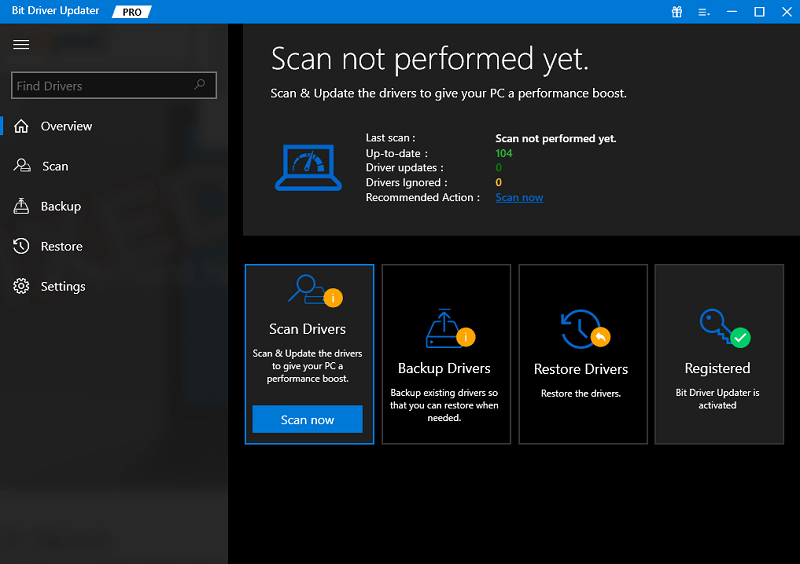
Step 2: Next, launch Bit Driver Updater on your PC, and click the Scan option from the left menu pane.Scan outdated driver of your windows pc

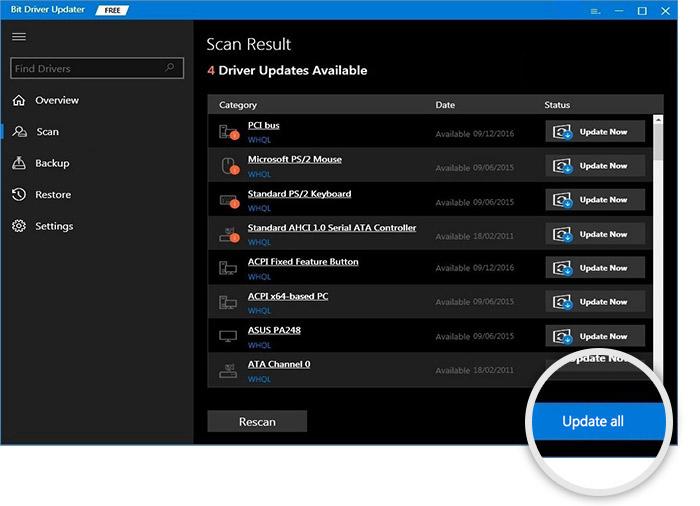
Step 3: Wait for the scanning to be completed. Then, locate and click on the Update Now button available next to the driver you wish to update.

Step 4: And, if you are using the pro version, then you can install all PC drivers in one click. To do so, simply click on the Update All button.Update all outdated driver of your windows pc

Once everything is done, restart your device to apply new drivers. That’s all! See how simple & quick it is to install the latest driver updates on a Windows PC via Bit Driver Updater. After installing the latest drivers, check to see if the XDefiant Stuck on initializing is fixed. If not, move on to another solution.

Also Read: Thread Stuck in Device Driver Windows 10,11


Solution 3: Make Use of VPN

According to some users, using a virtual private network (VPN) to log in from a different region can fix the XDefiant stuck on initializing problem. This enables Ubisoft to connect to the game’s servers, which in turn makes it possible for you to play the game.

The delay that occurs between a server’s reaction and a gamer’s activity is caused by a server that is congested with an excessive amount of traffic. This slowness prevents players from successfully connecting to the servers, which results in an error message being displayed. A virtual private network (VPN) can assist in alleviating this issue by establishing an encrypted connection between your computer and the internet. Your Internet service provider cannot slow down your connection because they do not know what you are doing with it.

Follow these steps on your computer to use and connect to a VPN:

Step 1: Get a setup file of the virtual private network application.

Step 2: Install the Virtual Private Network (VPN) service by following the on-screen instructions provided by the VPN for Windows 10.

Step 3: Connect to a server that offers a VPN service, and check to see if the problem still exists after doing so.

If still, the XDefiant stuck on loading screen, then try the last resort mentioned below.


Solution 4: Try Another Connection

For optimal performance, XDefiant calls for an internet connection that is both more reliable and more rapid. You can acquire faster Internet by switching to a different connection, such as a wired connection, which will help you overcome the problem of being stuck on the initializing screen. After you have ensured that your PC and router are both equipped with an Ethernet port, restart the game to determine whether or not the problem has been resolved. Make sure your Wi-Fi connection is turned off.

Also Read: How to Fix Printer Stuck on Spooling Issue on Windows 10, 11


XDefiant Stuck on Initializing: Fixed

That was all about how to fix XDefiant stuck on initializing Windows 10, 11 PC. We hope you found the troubleshooting tutorial helpful. Please leave a comment below with any other suggestions, as well as any extra questions or feedback you may have.

Do subscribe to our Newsletter and follow us on Social Media – Facebook, Instagram, Twitter, or Pinterest so you never miss any tech updates.

How to Find and Delete Duplicate HEIC and HEIF Images from PC

How to Find and Delete Duplicate HEIC and HEIF Images from PC

February 16, 2024
0

In this article, we share and explain the quickest and easiest method to find and delete duplicate HEIF and HEIC images from your computer.

Introduced by Apple, HEIC or HEIF images are becoming increasingly popular across the globe because of advanced algorithms to store high-quality images. However, it is no secret that the accumulation of HEIC/HEIF image duplicates (like all other file or photo duplicates) can hamper your computer’s performance.

If you are wondering why duplicate HEIC and HEIF photos are created on a PC, let us answer this question. Some reasons for image duplication include picture import from multiple sources, file conversion, syncing with Google Photos or other cloud services, editing and exporting in different formats, creating image backups with different backup solutions, software glitches/errors, incomplete photo deletion, and automatic image saving in more than one format.

These pictures hog the storage space that could otherwise be used to store other crucial files. Moreover, they unnecessarily consume PC resources that could be allocated to other significant tasks. Hence, finding and deleting the duplicate HEIC and HEIF images is a good decision.

However, locating these pictures in a storage full of various kinds of images is like finding a needle in a haystack, i.e., an uphill task. Hence, it is important to know the best deduplication method. Well, you do not need to go too far to learn it, as we discuss the quickest and easiest way to remove duplicate HEIF and HEIC photos in the subsequent section of this write-up.

The Best Way to Find and Delete Duplicate HEIC and HEIF Images

There are multiple ways to locate and delete duplicates. For example, you can manually search all folders to spot the HEIC and HEIF photos, compare them, and then take your call to remove them.

However, as you can already feel manual deduplication is a daunting task, we recommend deleting duplicates using a dedicated tool like Quick Photo Finder.

Quick Photo Finder is a unique program to detect and delete duplicate photos in no time. Best known because of its simplicity and smooth working functionality, Within a few steps, you can find and delete duplicate HEIC/HEIF images and all other photo dupes from your computer via Quick Photo Finder. Here is how to put this software into action.

Also Read: How to Manage Duplicate Photos on Windows 10

  • To begin with, download and install Quick Photo Finder
  • Secondly, open the application.
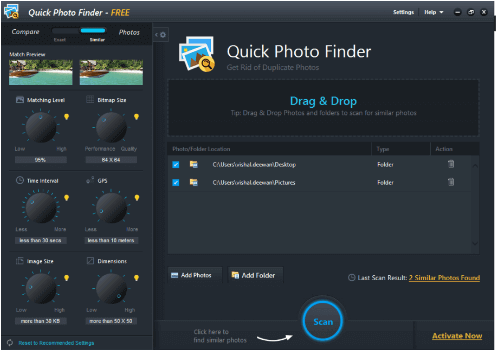
  • Now, add the images or folder containing pictures to the scanning pane.Quick Photo Finder
  • You can now click on the button to start the scan.
  • Review the on-screen scan results.
  • Lastly, choose the option to delete all selected duplicates automatically with just a click of a button.

Above, we shared the easy steps you can take to get rid of duplicate images on your computer. However, in addition to ease of use, there are many other reasons for recommending Quick Photo Finder. Below are a few of them.


Remarkable Features of Quick Photo Finder

Below are some notable features of Quick Photo Finder software to find and delete duplicate photos.

Quick detection of duplicate photos

Quick Photo Finder applies the most standardized parameters and algorithms to detect duplicate HEIC and HEIF images (and all other identical/similar photos). Moreover, you can remove all photos with a single click.

Filtered photo library

Maintaining your complete picture library is among the best features of Quick Photo Finder. It eradicates unwanted image copies from your computer to make your picture library clutter-free.

Group-based results

Quick Photo Finder groups scan results in neat categories to help you make quick and easy decisions. Group-based scan results help you effortlessly decide which group of images you wish to delete.

Improved storage space

As you already know, duplicate photos eat your storage space. Quick Photo Finder removes all duplicate images and also frees up the storage space.

So, these were the benefits of Quick Photo Finder because of which it is the most recommended way to find and delete duplicate HEIC and HEIF images.

Also Read: How to Use Microsoft’s Photos to Remove Duplicate Photos


Duplicate HEIC and HEIF Images Found and Deleted

This article acquainted you with the best possible approach to finding and deleting duplicate HEIC and HEIF photos. You can get rid of all photo duplicates effortlessly via Quick Photo Finder. However, if you have any confusion, questions, or suggestions, please write us a comment. We will be more than happy to assist you. Also, please remember to subscribe to our newsletter and follow us on social media to stay updated.

1 Comment
    John Merashi says: Reply
    May 12th 2020, 8:37 pm

    Wow, Great. Such a nice article. It clears my concepts about app development. Really great. Thanks for sharing.

Leave a Reply to John Merashi Cancel reply

Your email address will not be published. Required fields are marked *

Sidebar Image bit G ad1

Latest Posts

  • How-to-get-help-with-file-explorer-in-windows
    How to Get Help With File Explorer in Windows 11/10
    by Niharika / March 20, 2026
  • Easy Online Video Editors to Try in 2024
    10 Easy Online Video Editors to Try in 2026
    by Remy Thomas / March 20, 2026
  • how-to-export-bookmarks-from-edge
    How to Export Bookmarks From Edge
    by Niharika / March 18, 2026
  • Best-Free-Online-Portfolio-Websites-in-2026
    Best Free Online Portfolio Websites in 2026
    by Niharika / March 16, 2026
  • Anytime Astro: Best Website For Online Astrology Consultation
    Anytime Astro: Connect Now For Online Astrology Consultation
    by Somya Shrimal / March 13, 2026

Categories

  • Cyber Security
  • Driver Updater
  • Entertainment
  • Fitness
  • Games
  • How To
  • laptop
  • OS
  • Reviews
  • Tech News
  • Tips & Tricks
  • Top 10
Sidebar Image bit G ad1
5 Best Duplicate Photo Finder Tools 5 Best Duplicate Photo Finder Tools to Delete Duplicate Photosby Prachi Dani / August 3, 2019
How To View Private Instagram Profiles?by Prachi Dani / August 4, 2019How To View Private Instagram Profiles
TechPout Footer Logo

We at TechPout promise to put forth stories that help people to learn and simplify their digital life. Our purpose is to share the true essence of technology with our tech-loving community.

Useful Links

  • About Us
  • Contact us
  • Privacy Policy

Popular Posts

  • Best PC Optimizer Software
  • Best Mac Cleaner Apps
  • Best Driver Updater
  • Duplicate Photo Finder and Cleaner Software
  • Best Free Movie Download Sites
  • Best IPTV Players

Follow us

Copyright © 2026 www.techpout.com. All rights reserved
DMCA.com Protection Status