Main LogoLight Logo
  • Reviews
  • Top 10
  • How To
  • Tech News
  • OS
    • Windows
    • MAC
    • iOS
    • Android
  • Categories
    • Driver Updater
    • Cyber Security
    • Games
    • Fitness
    • Entertainment
    • Tips & Tricks
Top 10
by Monil

12 Best Free Music Making Apps to Make Your Own Music in 2024

May 23, 2024
1

Want to create your own music or beats? Then, you’ve arrived at the right destination. Here, at Tech Pout, we’ve brought up the list of best free music making apps. So, stay tuned with us till the end!

Whether you’re a young student and started making music as a leisure activity or planning to become the next Dan Reynolds, it’s always best, to begin with, free online music maker software.

So, if you’re looking to create your own music or band, look no further than your smartphone. Now, you can easily create your own music beats and make your own band just like K-Pop or BTS. Sounds interesting no! Then, jump to our next section to know more in-depth. 

However, if you don’t know how to make your own music online, then you don’t need to worry about it anymore as we’ve done all the heavy lifting to help you pick the best music making apps. So, just have a look at the list below!

Table of Contents hide
List of Best Music Maker Apps for Creating Your Own Band and Music
1. GarageBand
2. BandLab – Music Making Studio
3. Suggester
4. Music Maker JAM
5. n-Track Studio 9
6. Groovebox
7. Audacity
8. Tracktion T7
9. Music Memos
10. Cubasis 2
11. FL Studio Mobile
12. KORG iELECTRIBE
Frequently Asked Questions

List of Best Music Maker Apps for Creating Your Own Band and Music

The following is a well-researched list of the top applications you may use to make your own music.

1. GarageBand

GarageBand - Best Free Music Making App

Price:- Free

Compatibility:- iOS 14.0 or up

The most obvious choice for the top spot, this free online music maker has been a favorite for many years.

Whether you’re a complete beginner or ready to take your music-making to the next level, GarageBand has got you covered.

Apple’s long-standing music-making app offers a wide range of Touch Instruments & Multi-Touch gestures to help you play guitars, keyboards, create beats with DJ-style effects, and much more.

Moreover, we think it is among the best free apps to make your own music for access to the various audio recordings, Apple Loops, and musical instruments with professional mixing effects & sound packs — so you can create your own music anywhere, anytime.

Download


2. BandLab – Music Making Studio

BandLab – Music Making Studio

Price:- Free

Compatibility:- Android 5.0 or up, and iOS 11.0 or up

Read More: Best Free Music Download Sites

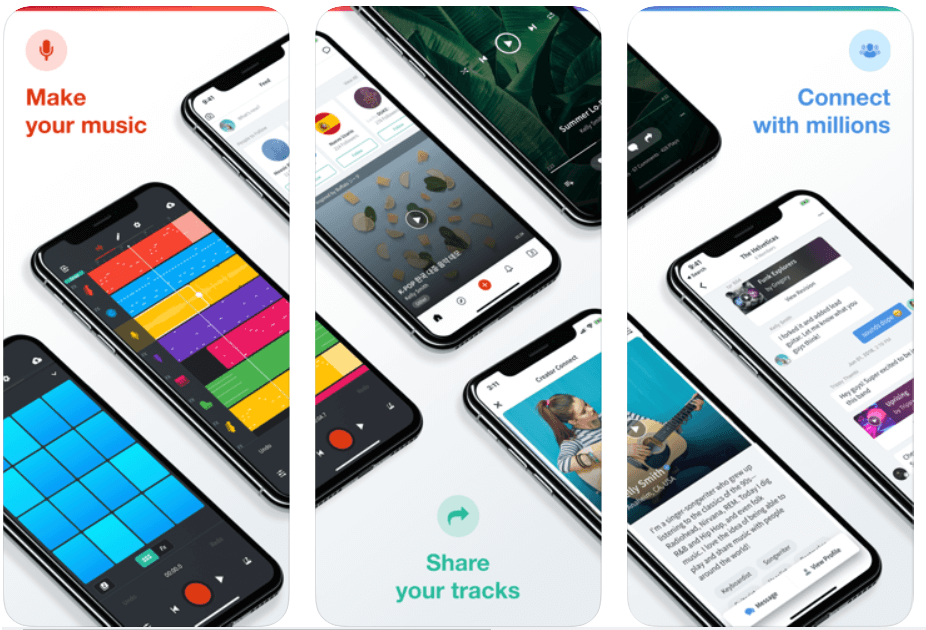
With more than 9 million users, BandLab is the world’s most popular free online music studio to create your own songs and mashups.

With BandLab’s multi-track editor, you can record, produce, edit and remix any fine-tune to perfection while on the go.

BandLab also lets you connect with fellow DJs and artists — so you can start a band with established musicians, rappers, guitarists, and more.

Download


3. Suggester

Suggester

Price: $13.99 (Free version also available)

Compatibility: iOS 13.0 or later and Android 6.0 and up

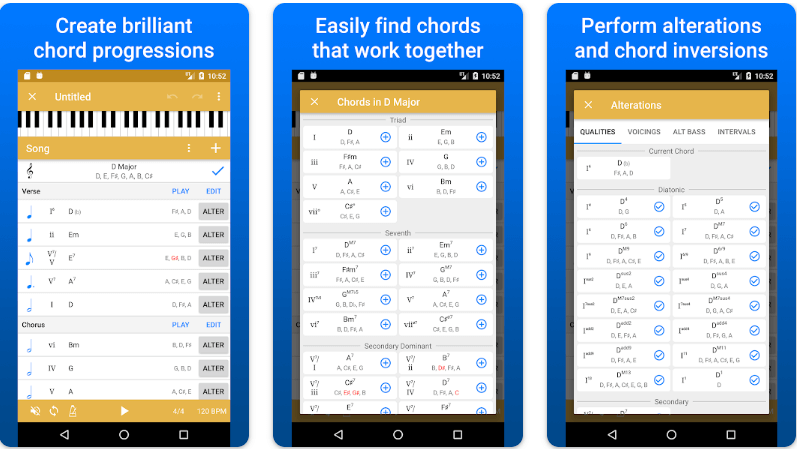
Let us introduce you to Suggester. It is among the best free music making apps for music theory enthusiasts to create new chord progressions. We like the application because of its wide range of chord suggestions within a designated key, easy MIDI export to DAW, the perfect use of Roman numeral notations, effortless chord playing, and quick drag-and-drop chord reordering. You should definitely try this app to unleash your inner musician.

Download for iOS

Download for Android


4. Music Maker JAM 

Music Maker JAM 

Price:- Free, In-app purchases

Compatibility:- iOS 9.3 or above, and all Android versions

Even if you are not a fan of music-making apps, then Music Maker JAM will definitely make you one.

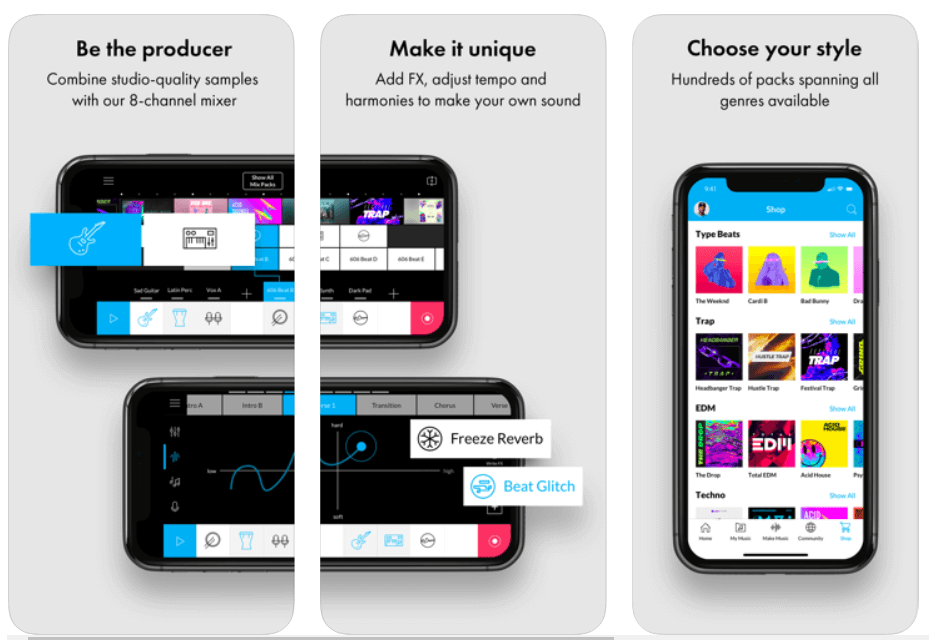
It is one of the best free apps to make music due to its tons of studio-quality loops allowing you to create & share amazing music with the world.

Being a part of this music creation community, you can get access to more than ten free packs with over 2000 loops that can help you produce your own album right on your smartphone.

So, what are you waiting for? Download Music Maker JAM and be a music creator today!

Download


5. n-Track Studio 9 

n-Track Studio 9 - Best Free Music Making App

Price:- Free

Compatibility:- Android, iOS, Windows

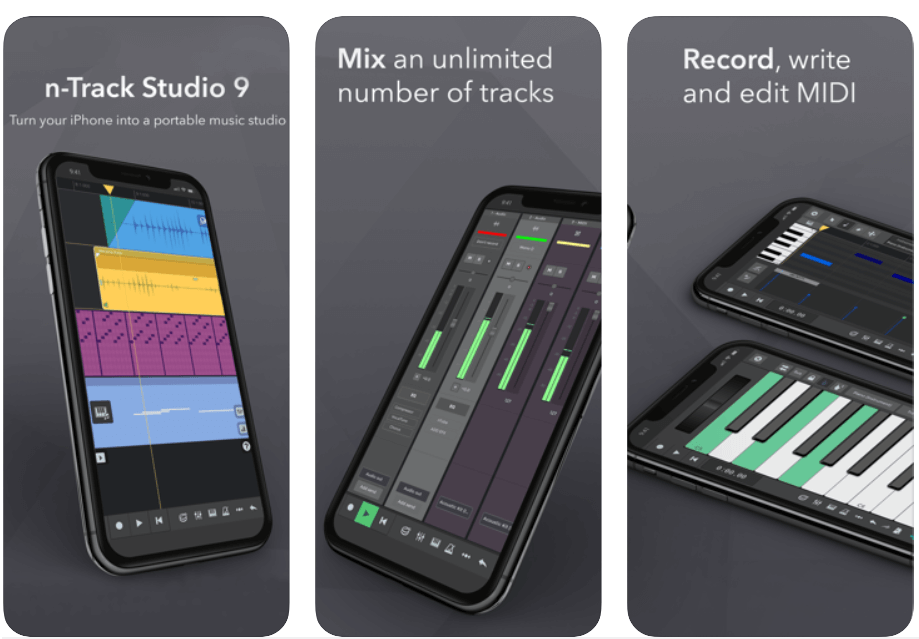
n-Track 9 is an online music studio that lets you record & share an unlimited number of tunes and MIDI tracks (max 11 tracks without in-app purchases) with the Songtree community.

It offers a wide range of creative tools including Piano Roll, Guitar Amp, Screen Drumkit, VocalTune, Surround mixing, Beat doctor, 2d & 3d Sonograms, and much more!

So, if you’re looking to make a name for yourself in the music production industry, then this free online music maker could be the perfect option for you.

Download


6. Groovebox

Groovebox - Music Making App

Price:- Free

Compatibility:- iOS 13.0 or above

Read More: Best Lyrics Apps to Learn The Lyrics of Your Favorite Song

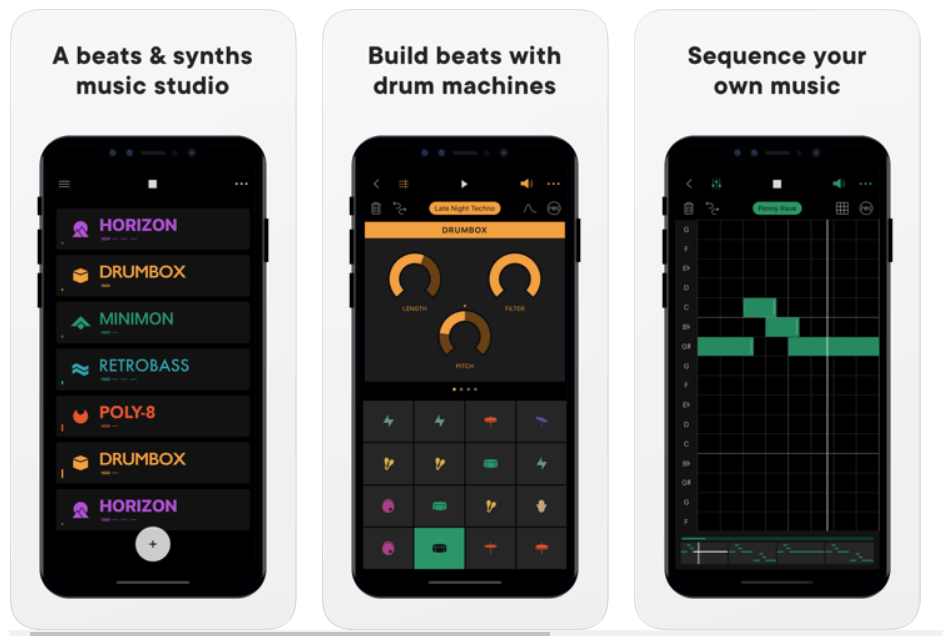
Groovebox is a beautifully designed and one of the top free music-making apps with an inspiring synth, presets, and world-class touchable instruments.

With this free music maker application software, you can instantly create, remix and record your own tunes and melodies.

So, what are you waiting for? Download Groovebox today and tune your iPhone or iPad into an online music studio. 

Download


7. Audacity

Audacity - Best Music Making App

Price:- Free

Compatibility:- iOS 11.4 or up

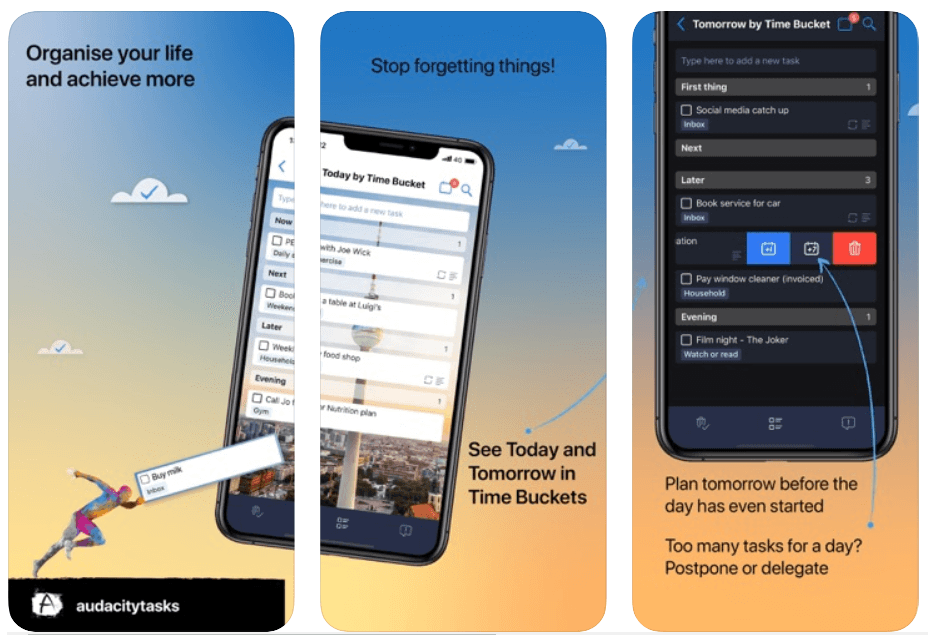
Audacity is a free, open-source music making software that offers an amazing set of editing features and real-time effects to help you make your own music.

The music production software is available for free download on Windows, Mac OS X, and Linux operating systems.

Audacity is one of the most used multi-track audio editors with you can instantly record live audio through a microphone or mixer. Moreover, it is one of the best free music-making apps for the iPhone.

Download


8. Tracktion T7

Tracktion T7

Price:- Free

Compatibility:- macOS 10.11 or above (64-bit) and Windows 8 & 10 (64-bit)

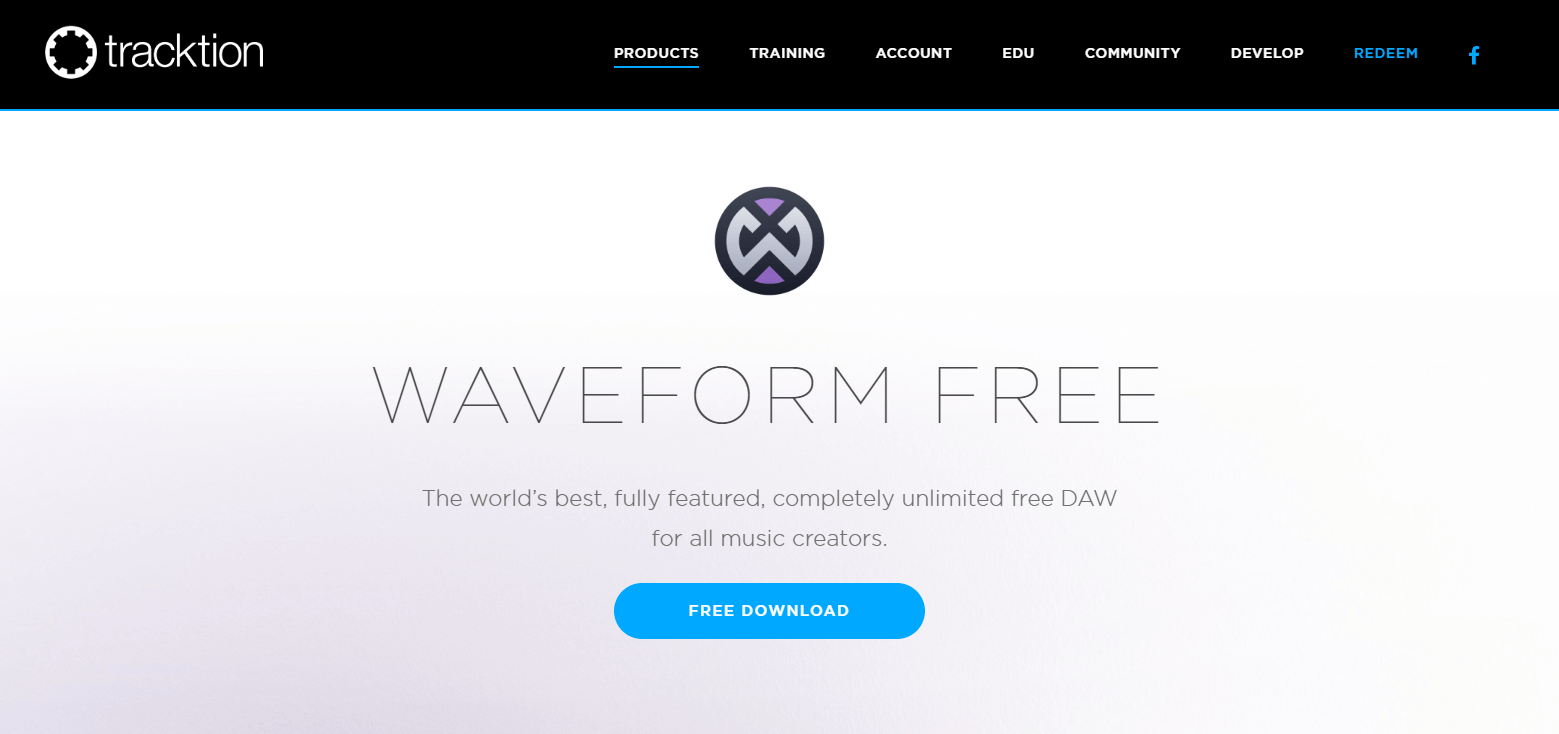
Tracktion T7 is a free digital audio workstation (DAW) for recording, producing and sharing your own music.

Tracktion T7 offers unlimited free audio and MIDI tracks with a wide range of powerful editing and recording features like clip layer effect, automation pattern, LFO modifier, freeze point technology, and more – so you can easily record, edit, and produce your own beats with ease.   

This free DAW is available for download on Windows, Mac, and Linux operating systems.

Download


9. Music Memos

Music Memos

Price:- Free

Compatibility:- iOS 11.0 or above

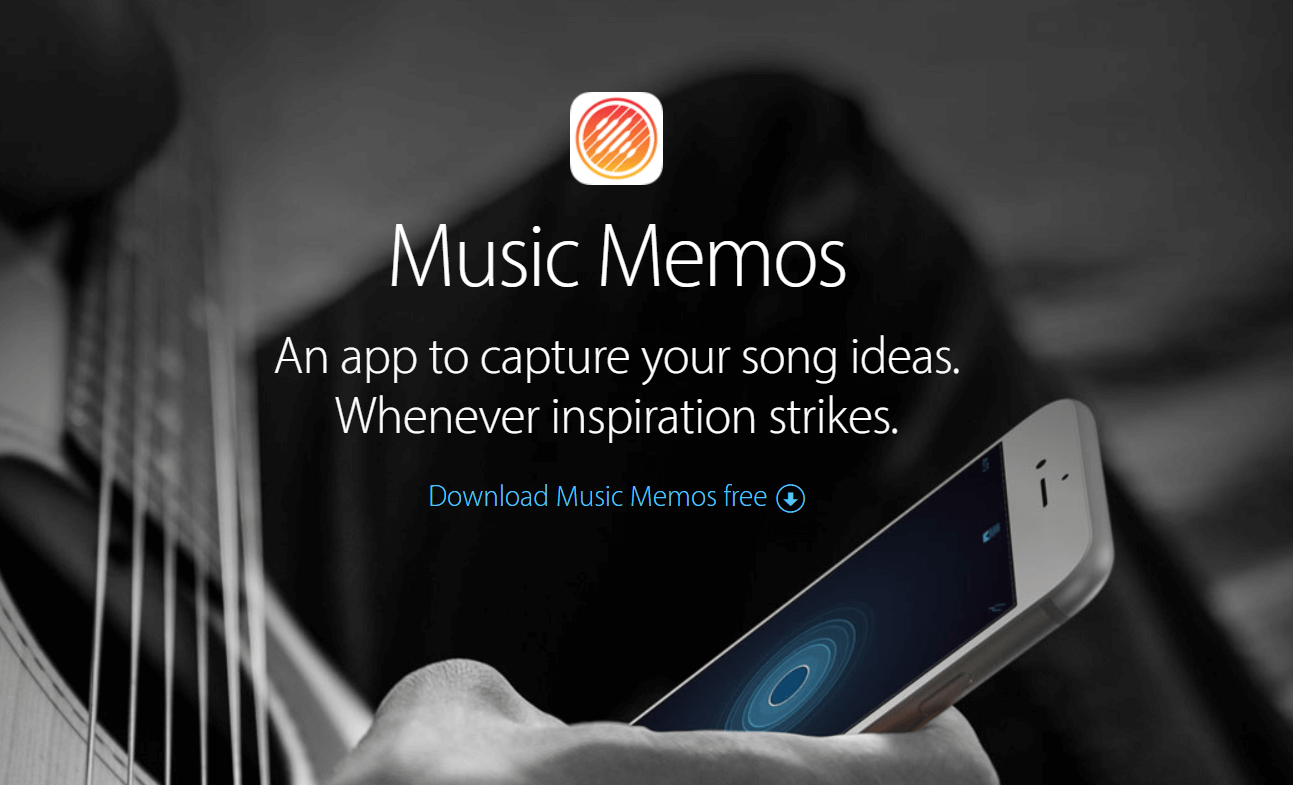
Music Memos, developed by Apple Inc. is one of the best free music-making apps for music writers to capture & organize your new song ideas.

Music Memos helps you record piano, acoustic guitar, voice, or any other musical instrument in high-quality on your iPhone & iPad.

It also allows you to take your song ideas into GarageBand on your iPhone device – so you can use an additional instrument to make yourself sound like a Pro!

Download


10. Cubasis 2

Cubasis 2

Price:- $49.99, 

Compatibility:- iOS 13.0 or up and Android 8.0 or up

Read More: Best Free Movie Download Sites

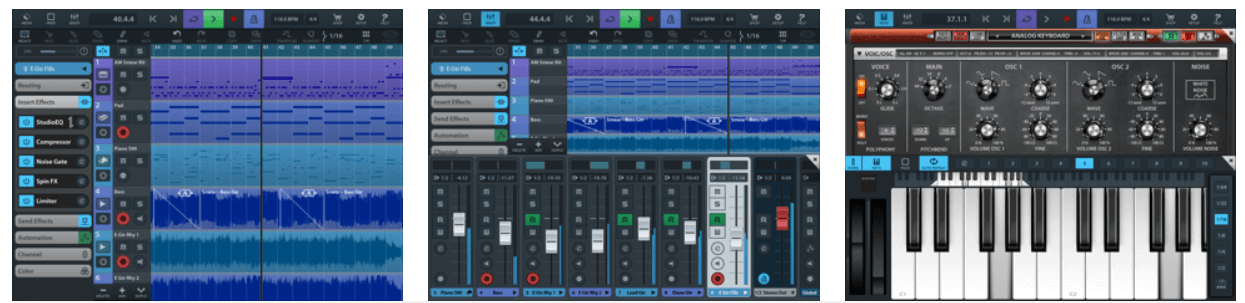
Cubasis, developed by Steinberg, is an iOS-based online music studio that lets you record, edit, mix, and produce an extensive collection of songs with ease.

It features amazing touch-optimized tools like real-time pitch-shifting and time-stretching, spin FX, mini sampler, virtual analog synthesizer, and much more, making it one of the best apps to make a song for free! Cubasis is one of the most worthy music-making apps for both iOS and Android devices. 

Cubasis with its wide range of built-in instrument sounds and performance features ranks among the best music-making apps in the world right now.

Download


11. FL Studio Mobile

FL Studio Mobile

Price:- $13.99

Compatibility:- iOS 8.0 or later and Android 4.1 or plus

The beautifully designed user interface has made FL Studio Mobile the world’s most popular free music maker software in the world.

FL Studio Mobile offers a vast number of built-in features like advanced sound creation, touch controllers, high-quality synthesizers, mix effects, and more – so you can take your music to the next level.

It might come last in the list of best music-making apps, but it is definitely worth a try.

Download


12. KORG iELECTRIBE

KORG iELECTRIBE

Price:- $13.99

Compatibility:- iPadOS 8.0 or later

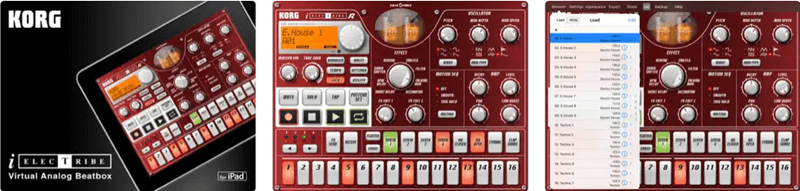
KORG iELECTRIBE is an advanced and not-so-traditional free music-making app. This app is available for iPadOS only. Using this app, you can use its 8 parted synthesizer notes to create the required music tone. The tool is very easy to use as well as advanced at the same time. The app also allows you to use a variety of patterns for audio generation.

Download


Above, we shared our top picks for the best free apps to make your own music. If you have any persisting doubts, you may go through the below section to clear them. 

Frequently Asked Questions

Below we try to answer all the common questions about the best free music-making apps to clear the doubts you may have. 

Q1. What app can I use to make my own music?

In this article, we shared many free music-maker applications. You may use any of them to make a song or music. However, below are some of our favorites to help you select one easily. 

  • GarageBand
  • BandLab
  • n-Track Studio 

Q2. How to make your own song for free? 

It is not a tough task to make your own song. You can use the applications shared in this article to compose your song easily. 

Q3. How to make your own music app? 

You may use applications like GarageBand and Groovebox to make your music app on the go. They are extremely easy to use and help you create music perfectly. 

Also Read: Best Music Player Apps for iphone


Create Your Own Music Using Best Free Music-Making Apps 

The apps listed above are some of the best music-making apps on the basis of ease and popularity.

You can get all of these online music studios for free; use them and make your own music anywhere, anytime. Through this post, we’ve tried to make your selection of music-making apps quite easier.

So, what are you waiting for? Pick your favorite & create your own album right on your phone. Plus, if you think that the list should include some other music-making software then do tell us in the comment box below. We’ll make changes to it. Subscribe to our Newsletter for getting the latest Tech updates instantly!

Author

Monil

Monil is a professional writer whose forte is absorbing a lot of data and help large technical organizations convey their message clearly across multiple products. An engineer by qualification, his affinity for design enables him to write to inspire, energize, and influence various audiences to uncover their true potential. When not writing, Monil is likely to be found listening to music, traveling, or simply excavating into his favourite cuisines.

View all posts

Related Posts
Download Best Free Antivirus Protection for Windows in 2024

Download Best Free Antivirus Protection for Windows in 2024

January 12, 2024
0

Cybercriminals spare no one and cyber threats loom on everyone’s head nowadays. Wondering which could be the best free antivirus for protecting you from cyber exploitation in the upcoming times?

At the dawn of this new decade, the cyber world has evolved with machine learning, artificial intelligence, and blockchain technology. In a similar way, the cybercriminals are upgrading their exploitation skills and techniques with the help of these emerging technologies.

Therefore, enhanced cybersecurity offered by an all-in-all best free antivirus is the only way to ensure safety and security from these advanced cyber threats. Don’t worry, we are here to offer you the best solutions for traversing safely through the cyber world, fraught with dangerous traps. 

This article aims at providing you a thorough understanding of an efficient antivirus software, how it functions, and how it can offer protection against ransomware and other malicious programs.

At TechPout, we have tested some of the best free antiviruses of 2024 using a sample of 500 malware on a new Windows machine to determine which tools were able to detect and fix the maximum number of infections and issues. 

Thereby, the tools which had resolved the highest number of issues were considered the most effective antiviruses for Windows computers. Here are the results:

Antivirus No. of infections detected  
McAfee 207
Kaspersky Total Security 426
Norton Security 429
Avast Free Antivirus 411
F-Secure Anti-Virus 411
BullGuard Antivirus 357
Panda Dome Antivirus 308
Defencebyte Antivirus 162

Unravel more about these Windows antivirus applications to find out your best fit.

Best Free Antivirus in 2024 for Windows Computers:

Let us look at some of the top-class antivirus solutions for Windows systems available in 2024. 

As mentioned earlier, out of 500 samples, the products that were capable of fixing the highest number of infections and issues on a new Windows machine have been deemed as the most effective antivirus protection provider among 10 prominent antivirus tools.

Thereby, the product offerings have been elaborately explained in a decreasing order of performance. Let us, therefore, look at the first product – McAfee which resolved the highest number of issues out of 500 test samples. 

1. McAfee

 OS: Windows, Mac, Android, iOS

McAfee - Best Free Antivirus For Windows 2021

McAfee is in the market for a long time and it has been providing internet security worldwide. This program is more than just an antivirus for the system. The most minimal plan supports a single device. 

You also get an encrypted storage facility (128-bit encryption) with this tool. Let us find out the different features that this best antivirus for windows 10 offers.

Notable Offerings:

  • Optimizes the performance of your personal computer.
  • Avail comprehensive internet security and surf the web with the web safety tools.
  • Includes a spam blocker.
  •  Analyze your own data in real-time.
Windows Download Button

Pros

  • Effective at blocking zero-day attacks.
  • Manage your passwords with the password manager feature

Cons

  • The interface is not very user friendly.

Read More: List of Best Bluetooth Software for Windows 10 


2. Kaspersky Total Security

OS: Windows & Mac

Kaspersky Total Security - Best Free Antivirus Protection

This is another excellent antivirus protection from Kaspersky Labs that protects your essential files and backs up your data securely. The basic plan covers two user accounts at a time. 

Being an award-winning antivirus tool, it offers top-notch privacy protection features to keep your system safe from all sorts of malware attacks. 

Notable Offerings:

  • Efficiently blocks viruses, cryptolockers, and other online threats.
  • Payments are protected with bank-grade encryption.
  • Smart self-protection routine, anti-ransomware feature and webcam security.
  • Encrypts data with VPN services.
  • Advanced parental controls.
Windows Download Button

Pros

  • Performs fast scans
  • Scans can be configured

Cons

  • Lacks additional features

Read More: 11 Best Password Managers Software For Windows 10


3. Norton Security

OS: Windows & Mac

Norton Security - Best Free Antivirus For Windows Computer

Norton has been in business for quite a long time and offers multi-layered protection to your Windows PC. This is another best free antivirus application to shield your Windows PC from all kinds of cyber threats. 

This tool offers antivirus, malware, anti-spyware, and ransomware protection along with plenty of other features. With top-quality virus definition, the Norton Security app is extremely easy-to-use.

It allows experts to configure custom scans with the help of multiple control features. You can also backup your PC with the help of the Cloud Backup feature. 

Notable Offerings:

  • Impressive browsing protection.
  • An intelligent firewall further enhances internet protection.
  • Comes with a Startup Manager and bundled backup tool.
  • Covers a minimum of 1 device which increases as the plan upgrades.
Windows Download Button

Pros

  • Doesn’t slow down a PC
  • Offers a password manager feature, parental control, and a VPN to benefit users.
  • It also comes with a safecam feature to prevent spying through your webcam.

Cons

  • Expensive subscription plans
  • Free trial period is missing
  • Anti-ransomware has scope for improvement

4. Avast Free Antivirus

OS: Windows, Mac, Android, iOS

Avast Free Antivirus For Windows

With a heuristics engine, Avast Free Antivirus is a free antivirus software having multiple awards in its kitty. This product has received the Gold Award for precise malware detection and protection capability.

Avoid data breaches with the best free antivirus with numerous utilities and enjoy excellent built-in features. It’s easy to install and can be used effortlessly.

The new passive mode runs multiple security products simultaneously and also features Game Mode as well as Do Not Disturb Mode. It also comes with a ransomware shield, and real site DNS hijack prevention.

Notable Offerings:

  • Enabled with machine-learning virus protection.
  • Real-time analysis of unknown files.
  • You can avail protection against phishing and web browsing with this tool.
  • The Smart Scan feature detects malware and network threats effortlessly.
Windows Download Button

Pros

  • Highly configurable
  • Help to manage passwords and also optimizes PC performance.
  • Covers up to 10 devices

Cons

  • Tries to uninstall unwanted software
  • Contains ads
  • To avail enhanced features you need to purchase them


5. F-Secure Anti-Virus

 OS: Windows, Mac, Android, iOS

F-Secure - Best Free Antivirus Software

Ostensibly one of the best free antivirus software for all the complicated cyber threats, this antivirus protects you from viruses, infected email attachments and different sorts of malware.

Notable Offerings:

    • This antivirus technology offers complete protection against all potential forms of malware and cyber threats.
    • Constant customer support available.
Windows Download Button

Pros

  • Offers decent banking protection
  • Simple and clean interface

Cons

  • Is not a complete cybersecurity solution
  • Doesn’t block malicious URLs

6. BullGuard Antivirus

 OS: Windows

BullGuard Antivirus - Best Antivirus Software

BullGuard is a popular household name and is one of the best free antivirus hosting a number of services making it one of the best cybersecurity platforms. Simplified services, easy-to-use features, and a lot more is what this antivirus product offers. The basic plan supports a single device.

 Notable Offerings:

  • Advanced machine learning and deep learning methods identify malicious codes.
  • Vulnerability scanner alerts you against unauthentic apps and unsafe Wi-Fi networks.
  •  Next-gen antimalware feature gives triple-layer protection.
Windows Download Button

Pros

  • It speeds up your game by blocking pop-ups
  • You can customize the scans

Cons

  • Advanced features like cloud backup and parental control are available at the highest tier plans
  • Has a cluttered interface

7. Panda Dome Antivirus

 OS: Windows, Mac, Android

Panda Dome Antivirus - Best Free Antivirus Programs

Panda Dome is the best free antivirus you can download for your system. Appealing UI, easy to install and use, this tool imparts a 100% virus detection ratio. It’s absolutely light on your system as everything is done from the cloud.

 Notable Offerings:

  • USB protection helps scan the USB drive as soon as inserted into the port.
  • The panda rescue kit offers a free PC recovery system.
  • Experience no interference from the antivirus while watching games or videos.
Windows Download Button

Pros

  • This tool offers a completely customizable personal firewall.

Cons

  • Round the clock technical support is not available in the basic plans

8. Defencebyte Antivirus

  OS: Windows

Defencebyte Antivirus - Best Free Antivirus Software

Product of an Australian based company, this effective antivirus for windows 10 offers you a range of services and facilities along with round the clock customer support to help you get rid of problems arising from the use of this antivirus.

Notable Offerings:

  • Scans and identifies rootkits and other harmful apps.
  • Deletes useless files and fixes different PC issues.
  • Identity theft protection is facilitated along with the removal of all chat records and browsing history.
Windows Download Button

Pros

  • The tool is absolutely easy to install and comes with a clean UI

Cons

  • Pay exorbitant charge for availing the tool’s services

9. Avira

OS: Windows, Mac, Android, and iOS

Avira

Avira is one of the best Kaspersky Antivirus alternatives that can offer you the best tools for protecting your PC. The antivirus offers the best free version which has tools to identify threats and remove them to some extent. Apart from this, the premium version is what gives you full protection tools.

The recent update has given a new look to the interface which is catchy yet easy to adapt. The free version of Avira apart from offering security tools offers VPN upto 1 GB for free. Other than this the software has various other add ons like Internet Security Plan or the Prime Plan, Pro version, and Plus Prime version. You can choose the version depending on your usage and requirements.

Notable Offerings:

  • The software offers great anti-phishing and web protection tools
  • You can easily configure the software as you like
  • The PC is protected from every threat
  • For gamers, it has a gaming mode that lets you play games without any interruptions

Windows Download Button

Pros

  • You get 30 days money-back guarantee
  • There are many plans to choose from
  • You get loads of offers and discounts on every plan
  • The free version offers VPN

Cons

  • The scan and protection as compared to competitors are weak

10. AVG

OS: Windows, Mac, Android, and iOS

AVG Antivirus

AVG Antivirus is great security software that offers the best tools for protecting the system. Though the software cannot be considered as the best lightweight antivirus, it can definitely help you in boosting performance and security. The antivirus software has two paid plans from which you can choose.

The plan includes AVG Internet Security that is compatible with every device. The price range of the software starts from $39.48 to $47.88. The difference in the price is because of the number of devices that can use the software. On the other hand, the software has an AVG premium ultimate package. In this plan, you will get VPN and AVG PC TuneUp as an addition. The plan costs $79.99 for 10 devices.

Notable Offerings:

  • The software offers loads of tools for protection including AI Detection, Turbo scan, etc
  • It helps in boosting the performance of the system
  • You can clean the system registry, pre-installed bloatware, and junk files
  • It automatically checks and updates more than 50 renowned applications

Windows Download Button

Pros

  • It is a very easy to use software
  • You can easily clean up your PC using various tools
  • The software offers separate VPN, privacy, system optimization, and other protection tools

Cons

  • It offers no parental controls
  • For VPN you need to take the premium plan

11. Bitdefender Antivirus

OS: Windows, Mac, Android, and iOS

Bitdefender Antivirus is yet another best free antivirus for Windows. This tool is an inclusive solution that provides all-around protection from different kinds of viruses and threats. The tool comes in multiple versions of variants that make protection better and customizable for you.

Notable Offerings:

  • Offers performance enhancement features and functionalities.
  • Maintains your privacy at all costs.
  • Helps in reducing battery and power usage.
  • Strong anti-spamming features

Pros

  • Feasible operations
  • Smart UI

Cons

  • Lacks some advanced features

How Does Antivirus Work and Improve the Performance of the PC?

What Do You Understand by the Term Antivirus? 

The easiest way to define an antivirus (also abbreviated to AV program) is to describe it as a computer program capable of detecting and removing malware if a system has been infected by a malware already. 

Other than this, a good antivirus program also prevents malware attacks on a system with the help of advanced functionalities and features.

The free antivirus applications are responsible for keeping an eye on the web pages, apps, and files travelling over the network to your devices and monitoring the behavior of programs to flag suspicious ones.

Now, let me ask you another question.

What Do You Understand by the Term Malware?

Malware is an umbrella term for malicious software variants that can deliver its payload in various ways to infect and damage a system, steal its data, gain control over a system, and ultimately disrupt the services of the infected systems.

How Does an Antivirus Work?

The best antivirus software solution operates in the background to scan computers, servers, and mobile devices to detect threats in real-time, protect against the potential attacks as well as remove the existing infections. It performs the following functions:

  • Scans directories, files, folders, and in fact, the whole system.
  • Scans USBs such as pen drives, external hard drives, etc.
  • Performs real-time scans, launches a new scan as well as schedules a scan.
  • Detects and removes malicious codes from your system.
Virus Identification Method

Why is an Antivirus Important for Your Windows?

Did you know that there is about 60000 new malware created every day? 

Where would your PC or your enterprise be without the support of an effective antivirus program?

Let’s take a look at the largest data breaches of recent times and the monetary losses caused due to several cybercrimes.

Stats of Antivirus Data
Image Source: Safety Detectives
Stats of Antivirus Data - 1
Image Source: Safety Detectives

Malware nowadays reprogram quickly to avoid detection. With constant cyber attacks and ambushes, it becomes crucial to have a free antivirus protection that can defend you against the following:

  • Spyware 
  • Ransomware
  • Viruses
  • Worms
  • Trojans
  • Adware
  • Spam
  • Rootkits
  • Botnets
  • Keyloggers

Thus, the best free antivirus is going to maintain the overall health of your system and ensure the safety of your devices.

Traits of a commendable antivirus solution:

  • Protects your system against zero-day attacks.
  • Protects your system from web and email threats.
  • Protects your system against prevalent malware.
  • Should automatically update virus definition to keep the application up-to-date.
  • Should be capable of performing heuristic analyses to detect new threats before a virus definition exists.

Frequently Asked Questions (FAQs)

Q1. When was antivirus introduced?

The first computer virus of the world known as the “Creeper” virus was deleted in 1949 by a program known as “The Reaper” which was created by Ray Tomlinson. 

However, in 1987, the first antivirus product for Atari ST computers was developed by Andreas Lüning and Kai Figge who established the German company G Data Software. 

In the same year, the company released Ultimate Virus Killer (UVK) 2000. This was, thus, deemed as the first industry-standard virus killer for Atari ST and Atari Falcon.

Also, in 1987, the McAfee company was founded by John McAfee. He created and released the first version of VirusScan.

Meanwhile, the first version of the NOD antivirus was also released in the same year.

Q2. Can antivirus stop hackers?

Hackers largely rely on malware and phishing scams to take control over a device and damage it. Therefore, an ideal antivirus protection capable of blocking zero-day malware attacks can protect your system against hacking effectively.

Antivirus providers also utilize behavior-based detection techniques to impart multi-layered protection and safeguard users against hackers.

Q3. Can an antivirus detect trojans?

The clear-cut answer is, ‘Yes.’ An updated and powerful antivirus software can track the trojans and remove them from the computer.

A trojan horse sneaks into a system masquerading as a legitimate software that you download on your system without any realization.

Thus, the right antivirus program can detect, block as well as remove trojan infections smoothly.

Q4. Can antivirus detect keylogger?

Installing a modern antivirus software is your best solution to protect against keyloggers and other rootkit malware.

Keylogging is an activity-monitoring spyware that logs keystrokes without your awareness to access personal information such as login details, credit card information, passwords, etc.

The best antivirus software in the market uses a combination of signature-detection methods and behavioral techniques to catch keyloggers.

Q5. Can antivirus detect spyware?

Yes, the best antivirus software is capable of detecting and removing malware that spies on your devices and system to rob sensitive information.

Q6. Can antivirus stop ransomware?

Yes, is the direct answer to this question.  A highly evolved antivirus application is capable of preventing multiple kinds of ransomware. 

However, if ransomware has already infected a system and encrypted important files, then even for the best antivirus program it’s a bit challenging to stop it. 

Antiviruses can detect known forms of ransomware based on its behavior but 2nd generation ransomware is a bit difficult to track down.

Q7. How can I protect Windows 10?

You can protect your Windows system with the best in class antivirus tool or with the usage of the Windows Security default app.

Q8. Can antivirus cause lag?

This is an old tale as advanced antivirus software is quite efficient and fast. However, it is true that all applications use CPU, so while scanning it is quite obvious that a detailed analysis of the system’s condition utilizes processing power but in an optimal way.


Final Verdict

Ultimately it can be said that without a decent antivirus software, your system is like an open vault that can be damaged and looted within minutes. 

Although Windows 10 systems have an in-built antivirus protection in the form of Windows Defender, yet it is not adequate in imparting ransomware protection and safety from advanced malware. It is also not effective against infiltrations via the phishing routes.

So, hopefully, you have now identified the best free antivirus for your Windows system that can provide the strongest defence against the emerging cyber threats. In addition to this, awareness regarding cyber scams and implementing the best practices of cybersecurity is indispensable to keep your system malware-free.

13 Best Free Animation Software Programs For Windows 10/8/7 PC

14 Best Free Animation Software Programs For Windows 10/8/7 PC

January 4, 2024
0

Whether you are a beginner or a pro animator you will need animation software to prepare stunning visual arts. But before you think of burning a hole in your pocket with a paid tool, refer to our blog to find out about the best free animation software that can effortlessly assist you in your job.

The tools mentioned here include some of the most competent and efficient options in both 2D and 3D categories. If you are an animator and add flying colors to your rough ideas our free animation software will surely help you create advanced animations like motion graphics, 2D vectoring, topography, stop-motion animation, and much more. 

What Is The Use Of Animation Software?

Animation tools offer an easy and convenient way to convert visual files into moving graphics. They help in creating 2D or 3D images of computer-generated and hand-drawn images and sketches. 

List Of Best Free Animation Software (2D & 3D) in 2024

2D Animation Software Programs For Windows PC

S.No. Software 2D/3D Support Prominent Feature Download
1. Pencil 2D Animation 2D Beginners love its minimalist design Get It Here
2. Synfig Studio 2D Cross-platform tool for beginners and Pro animators Get It Here
3. Creatoon 2D Get real-time animation results Get It Here
4. Open Toonz 2D Best for creating cartoon animation designs Get It Here
5. Stykz 2D Stick Figure animation tool Get It Here
6. Animation Paper 2D It supports real-time changes Get It Here
7. Powtoon 2D Super responsive and easy to use Get It Here

If you think animation is an expensive thing, our list here will clear out all your confusions. Let’s have a look at some of the best programs which come without a price tag.

1. Pencil2D Animation

Pencil2D Animation

The best things in the market come with a hefty price tag, well this does not hold for Pencil 2D. This versatile tool is packed with stunning features and is best suited for bitmap and vector animation. Use your creative ideas to develop a colorful 2D graphic design with minimal fuss.

Even though it is a free animation software, it comes with various illustration tools and several support slabs. Apart from this, you can also use it to add color, import images, and determine the sound and frame rate of your design.

Read Also: Best Whiteboard Animation Software

Key Feature: 

  • Open-source free animation program.
  • A lightweight tool with a minimalist design.
  • Cross-platform tool. Fully compatible with Windows, Linux, FreeBSD, and macOS.

2. Synfig Studio

Synfig Studio

Polish your skills and learn how to create vector and bitmap animation with this incredible tool. Its advanced features like onion skinning, shape tools, keyframes, and class-apart drawing tools help you upscale your learning curve. 

It also lets you add and synchronize a background score and narration voice to a video. Besides Windows, the application is also compatible with macOS X and Linux.

Key Features:

  • Free animation program suitable for both beginners and pro animators.
  • It comes loaded with around 50 Multi-layer suitable for making both advanced and basic designs.
  • Feature-rich 2D animation app.

3. CreaToon

CreaToon

Packed with an array of incredible features Creatoon is one of the best and free animation software that you can pick. With it, you can use your handmade designs and incorporate them into your final animation piece. 

Apart from this you also get access to few advanced features like automatic inbetweening, editing, and previewing in real-time, manipulate the movements of your brush, and enjoy combining working with bitmap and vector graphics.

Read More: Best Animation Apps For Android & iOS

Key Features: 

  • Compatible with multiple image formats.
  • A straightforward layout with minimalist design.
  • Supports real-time animation results.

4. OpenToonz

OpenToonz

Open Toonz is one power-packed tool that has everything that one can ever wish for. Enjoy indexed color palettes along with motion tracking, motion tweening, and frame-by-frame animation. 

In addition to this, you also get a massive array of composite scenes and animated effects including wraps, masks, lighting, keys blur, and much more. Add rain and dust to your animation piece with its particle system along with bone character animation functionality.

Key Features:

  • Suitable for both commercial and non-commercial assignments and projects.
  • Open Source, free 2D animation program.
  • Impressive tool for creating marketing videos.

5. Stykz

Stykz

Stykz is best suited for beginners who want to learn animation and turn their creative ideas into reality. It works seamlessly well and helps you create an animation frame by frame. You can use its frame-based feature to change the frames of your animation model. Try out its different frames until you get what you are looking for. 

Key Features:

  • Simple design with Straightforward working.
  • Free from watermarks.
  • Multi-platform free animation software
  • Pivot compatible

6. Animation Paper

Animation Paper

If you are looking for quick and spellbinding solutions then Animation paper is the perfect pick for you. It is a cross-platform program and can save your work in different formats including GIF, AVI, TGA, and much more. 

Format frames, customizable toolbar, high-quality lines, zooming in and out, sketching space are its notable features.

Read More: Best GIF Maker & Editor for Windows 10/8/7

Key Features:

  • Powerful and uncomplicated 2D animation software for free.
  • It is super responsive and easy to use.
  • It supports real-time changes and suggestions.

7. Powtoon

Powtoon

Next on our list of best animation software is Powtoon. Using this amazing platform you can easily create animations for online advertisements, presentations, informative videos, tutorials, and manuals. It is a very easy 3D animation software using which you can create, save, and share projects with your friends. Millions of Powtoons have been created and every minute the number is increasing. 

Key Features:

  • Easy and user-friendly interface 
  • Loads of presets and tools to create animation
  • 24*7 customer support
  • Upload custom fonts 

3D Animation Software Programs For Windows PC in 2024

S.No. Software 2D/3D Support Prominent Feature Download
1. Anim8or 3D Best suited for high-level professional work Get It Here
2. K-3D 3D Enjoy hassle-free polygonal modeling Get It Here
3. Clara.io 3D A great mix of polygonal modeling & stick-figure animation Get It Here
4. Blender 3D Loaded with comprehensive animation features. Get It Here
5. Seamless3D 3D Get infinite Undo/Redo functionality Get It Here
6. BRYCE 3D 3D Create amazing fractal landscapes Get It Here

1. Anim8or

Anim8or

Create stunning and impressive pieces of work with this advanced 3D modeling tool. But if you are a beginner you might take some time to get used to the program. Use it to create various 3D designs including platonic solids, spheres, cylindrical designs, and much more.

Key Features:

  • Best 3D modeler program.
  • It supports TrueType fonts and is best suited to high-level professional work.
  • It supports the hassle-free creation of stunning animation scenes that can be exported as images and video files.

2. K-3D

K-3D

Next on our list of top animation software for free is K-3d. It is best suited for true creative souls and helps to master your skills in structure modeling, shadows, and texturing with K-3D. 

With its parametric and procedural workflow, you can easily make the necessary changes and adjustments in your 3D model and preview them in real-time. Create unique combinations with this highly flexible tool. In addition to all these features, K-3D also gives you the power to enjoy a node-based visualization pipeline which means you can connect anything to anything.

Read More: Best Free Video Editing Software With No Watermark

Key Features:

  • Best for polygonal modeling.
  • Uses various tutorials for better learning.
  • It is powered with an Undo/Redo functionality.

3. Clara.io

Clara.io

If you are still looking for feature-rich animation software for free, then Clara.io can be a good pick. Access a full range of incredible features including multi-user editing, collaboration, review tools, easy embedding and sharing, sub-object editing, blazing speed, and flexible lighting setups. 

Drag/drop, undo/redo and responsive workflows are some of the prominent features of its modern interface.

Key Features:

  • Modern interface with powerful modeling tools.
  • Free multi-platform animation software.
  • It provides a great mix of polygonal modeling and stick-figure animation.

4. Blender 

Blender

Blender is a cross-platform and open-source free animation program that comes with class apart feature and animation capabilities. Since it is best suited for pro animators beginners might find it a bit difficult to understand its functioning. 

Pick Blender today for smooth workflow and top-notch performance.

Key Features:

  • Best 3D free animation software for professionals, studio artists, video game developers, and expert animators.
  • Loaded with a comprehensive array of 3D modeling tools.
  • Advanced sculpting tools and Python scripting.

5. Seamless3D

Seamless3D

Pick Seamless3D to develop and create stunning animation work. You can make 3D characters, specialized images, and animated videos with it. Polygon subdivision, intuitive animation bar, scripting, and morphing are some of its other offerings.

Key Features:

  • Easy to use 3D modeling program.
  • Enjoy unmatched flexibility with unlimited Undo/ Redo options.
  • Powered with a Tree-view interface.
  • Enjoy effortless and partitioned texture mapping for your Youtube videos.

6. BRYCE 3D

BRYCE 3D

Bryce 3D is the next animation software on our list which has been in the market for a long time now, launched in 1994 for Mac PCs. Using the software you can create amazing fractal landscapes as it has been designed for creating them. The software is very easy to use if still, the user faces any difficulty. There are loads of tutorial videos that will help with the app and processing. Since the launch, the developers are upgrading the software for customer satisfaction. So let’s check some of its features. 

Read More: Best Duplicate Photo Finder & Cleaner Software

Key Features:

  • Instancing Lab for creating individual or a set easily
  • Improved Light labs with newly added features
  • Particle Emitter

7. Autodesk Maya

Autodesk Maya

This fully-featured application is capable of 3D animation, motion graphics, and hyper-realistic animation. It has been used throughout history to assist in the production of some of the most well-known films ever made, ranging from the most recent Marvel films to the Star Wars prequels that were released in the early 2000s. Students are eligible for free access to this program, and casual users may also test out a free trial version of it. However, the software is not free for everyone. In addition, it is important to note that Autodesk Maya is not a choice that is suitable for beginners; rather, it is possible to propose it only to animation students or professionals.

Key Features:

  • Liquid simulation
  • Hyper-realistic animations
  • Huge range of procedural effects

Turn Your Rough Ideas Into a Stunning Animation Design

Enjoy creating impressive 2D and 3D animated designs with our free and best animation software. Refer to our list and pick a tool that fully suits your requirements and skillsets. 

Let your creative mind wander in an unimaginable world and leave the rest to animation programs.

1 Comment
    16 Best Free Audio Editing Software For Windows in 2021 says: Reply
    January 2nd 2021, 2:51 pm

    […] Read More: 10 Best Free Music Making Apps to Make Your Own Music […]

Leave a Reply Cancel reply

Your email address will not be published. Required fields are marked *

Sidebar Image bit G ad1

Latest Posts

  • Anytime Astro: Best Website For Online Astrology Consultation
    Anytime Astro: Best Website For Online Astrology Consultation
    by Somya Shrimal / February 13, 2026
  • Best-McAfee-alternative-software-to-use-for-Virus-Protection
    Best McAfee Alternative Software to use for Virus Protection
    by adminuser / February 11, 2026
  • What-is-Flip-Flop-in-Circuite-and-it's-Types
    What is Flip Flop in Circuit and its Types
    by Meet / February 6, 2026
  • Best-Data-Labeling-Software-to-use-in-2026
    Best Data Labeling Software to Use in 2026
    by Meet / February 2, 2026
  • Best-Google-Slides-tools--to-add-as-extension-in-2026
    Best Google Slides Tools to Add as Extension in 2026
    by Meet / January 30, 2026

Categories

  • Cyber Security
  • Driver Updater
  • Entertainment
  • Fitness
  • Games
  • How To
  • laptop
  • OS
  • Reviews
  • Tech News
  • Tips & Tricks
  • Top 10
Sidebar Image bit G ad1
30 Best Online Games For PC (Free & Paid) In 2024 31 Best Online Games For PC (Free & Paid) In 2024by Prachi Dani / May 23, 2024
6 Best Free Twitch Emote Maker in 2024by Harshita / May 23, 2024Best Free Twitch Emote Maker
TechPout Footer Logo

We at TechPout promise to put forth stories that help people to learn and simplify their digital life. Our purpose is to share the true essence of technology with our tech-loving community.

Useful Links

  • About Us
  • Contact us
  • Privacy Policy

Popular Posts

  • Best PC Optimizer Software
  • Best Mac Cleaner Apps
  • Best Driver Updater
  • Duplicate Photo Finder and Cleaner Software
  • Best Free Movie Download Sites
  • Best IPTV Players

Follow us

Copyright © 2026 www.techpout.com. All rights reserved
DMCA.com Protection Status