Main LogoLight Logo
  • Reviews
  • Top 10
  • How To
  • Tech News
  • OS
    • Windows
    • MAC
    • iOS
    • Android
  • Categories
    • Driver Updater
    • Cyber Security
    • Games
    • Fitness
    • Entertainment
    • Tips & Tricks
Top 10 Windows
by Monil

12 Best Free Photo Slideshow Software For Windows in 2024

December 18, 2023
1

Do you feel bored looking at the same pictures over and over? Want to create an impressive cinematic photo slideshow with amazing background music and transition effects?

Well, in order to turn your coolest photos into an amazing slideshow, all you need is a photo slideshow software for Windows.

Slideshow software is an easy to use tool that can help you create amazing video slideshows using your favorite photographs, theme, and soundtrack.

Needless to say, there are hundreds of photo slideshow makers available in the market, but choosing the perfect one is an extremely difficult task. So if you don’t know how to shortlist the best one for your Windows PC, no need to worry, we’ve got your covered.

To make your task a little bit easier, we have narrowed down the list of best free photo slideshow software to top nine. Here they are!

Table of Contents hide
Best Photo Slideshow Software For Windows 2024:
1. Wondershare Filmora
2. Slideshow Maker
3. PhotoStage Slideshow Software
4. Movavi Slideshow Maker
5. CyberLink MediaShow
6. MAGIX Photostory Easy
7. Freemake Video Converter
8. Renderforest
9. Kizoa
10. Free Bolide Slideshow Creator
11. Microsoft Powerpoint
12. ThunderSoft Free Slideshow Maker
Bring Your Photos into Life with Slideshow Software

Best Photo Slideshow Software For Windows 2024:

Whether you want to create a professional presentation for business, a photo collection of family events, or just a simple slideshow with music and cool artistic effects, you can count on these best professional slideshow software any day of the month.

Now, let’s jump right into the list:
1. Wondershare Filmora

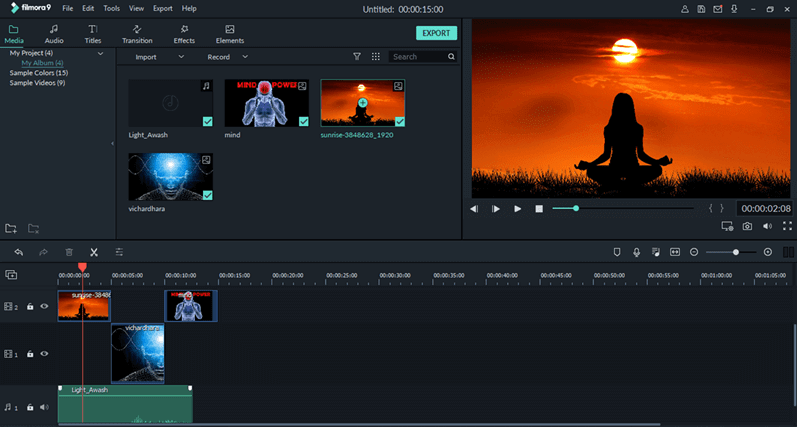
Wondershare Filmora9 - Photo Slideshow Software For Windows

Filmora9 developed by Wondershare holds first place in our list of best slideshow software for Windows. Now, you may be wondering how video editing software has managed to make its way into this list. Well, most people are not aware that Filmora9 holds strong capabilities to create slideshows using your photos.

Notable Offerings: 

  • Improves the quality of your sound with using keyframing
  • It support full 4K resolution
  • It has endless effects like green screen, slow motion, aesthetic, etc.

System Requirements:

Supported OS: Windows 10, 8.1, & 7 | Processor: Intel i5 or higher with 2Ghz+ CPU | RAM: 4 GB of RAM (8 GB recommended for videos with 4K resolutions) | GPU: NVIDIA GeForce GTX 700 series or Intel HD 5000 or Radeon R5 M230 graphic card | Hard Disk: 10GB of free space

Pros

  • Multiple features
  • Easy to use UI
  • Built-in libraries
  • Multiple filters and options’
  • Supports different formats

Cons

  • Complicated for some
  • Lack of advanced features in free version

2. Slideshow Maker
Slideshow Maker - Best Free Photo Slideshow Software

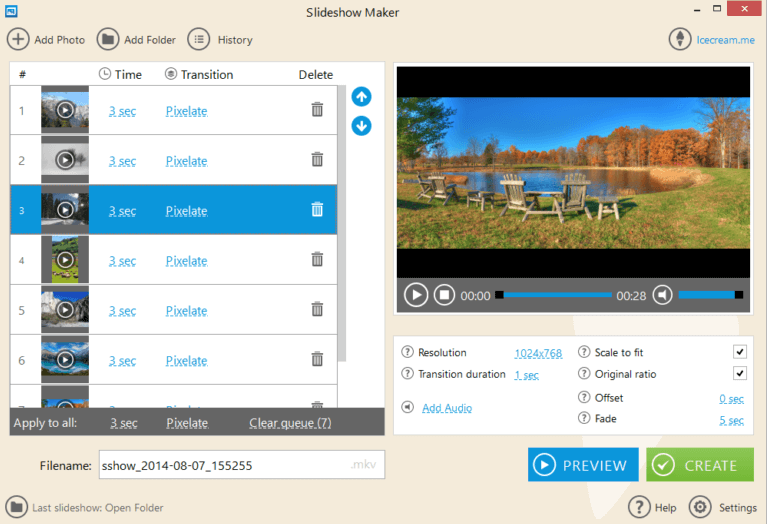
Slideshow Maker from Icecream Apps is a prominent slideshow software available for Windows. The beautiful design and easy to use, intuitive interface make this photo slideshow maker a great option for anyone looking to create video slideshows using photos.

Notable Offerings

  • Create professional looking presentations for your business
  • Wide array of  transition effects to choose from including mosaic, pixelate, & flip over
  • Displays preview of slideshow before creating
  • Make high-quality slideshows with 4K resolution (3840×2160 pixels)
  • Slideshow burner option to let you burn slideshow to DVD

System Requirements: 

Supported OS: Windows 10, 8.1, 8, 7, Vista, & XP | CPU: Intel 1.66 GHz or AMD processors | RAM: 4 GB RAM for faster performance (512MB minimum) | Hard Disk: 5GB free hard disk space

Pros

  • Attractive design
  • Freeware available
  • Preview available
  • Snappy tool
  • Lightweight

Cons

  • Lack of advanced features
  • Complex for some users

Read More: 13 Best Free Slideshow Maker Apps For Android & iOS


3. PhotoStage Slideshow Software
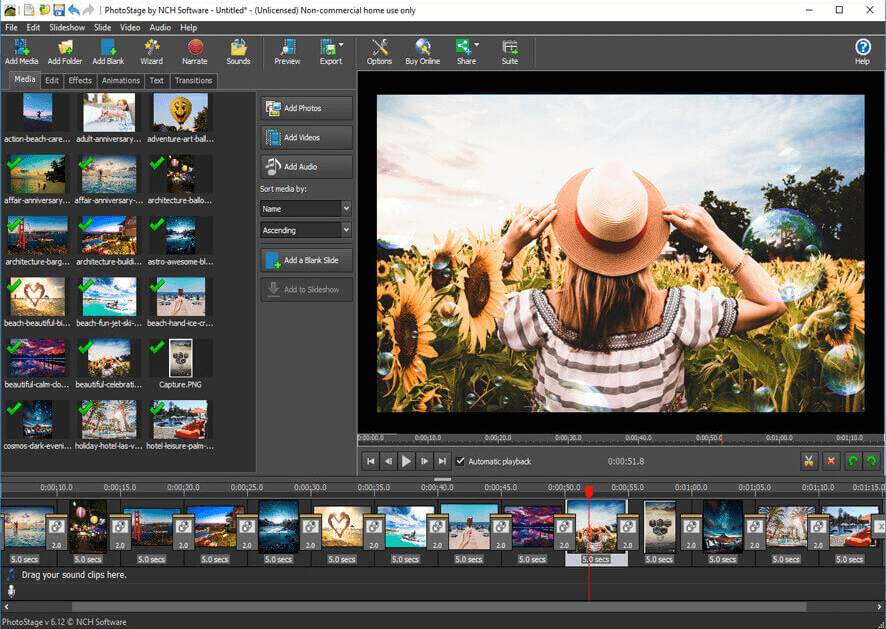
PhotoStage Slideshow Software

Creating photo slideshows and multimedia presentations has never been this easier; thanks to the awesome PhotoStage Slideshow Software. The program comes with a plethora of photo editing tools and stunning after effects that help you bring your pictures into life. Also, the interface of this program is so intuitive and easy to use that even a beginner will have no trouble using it.

It is undoubtedly one of the best free photo slideshow software for Windows available in the current marketplace.

Notable Offerings: 

  • Comprises various effects like zoom, fade, Ken Burns, etc.
  • Create multimedia presentations with captions, background music and narration
  • Upload slideshows online, burn to DVD or save to other portable devices
  • Supports popular video formats such as .MP4, .3GP, .GIF, and more

System Requirements:

Supported OS: Windows 10, 8.1, 8, 7, Vista, & XP (only 64 bit version) | RAM: 512MB | Hard Disk: 100MB (minimum) | Processor: Intel Celeron 2.10 GHz

Pros

  • Quick execution
  • Easy to use
  • Multiple output options
  • Plethora of features

Cons

  • Outdated UI
  • Lacks some basics filters

4. Movavi Slideshow Maker
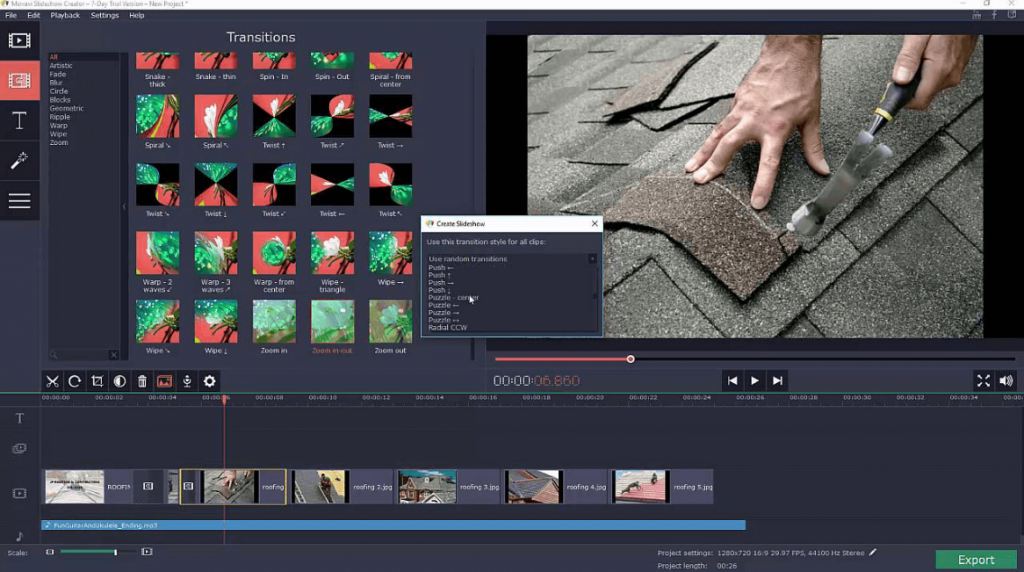
Movavi Slideshow Maker Software For Windows

One of the most remarkable tools for creating personalized slideshows with amazing music and effects is Movavi Slideshow Maker. It is a powerful yet easy to use program that lets you make your video and photo slideshows even more enticing with a wide array of customization and editing tools such as themed soundtracks, background noise removal, narration, visual effects, and more.

Notable Offerings: 

  • Amazing ‘Montage Wizard’ option to help you automatically create slideshows
  • It has built-in effects, music tracks, title styles, transitions, and more
  • Share your creative slideshows with your loved ones on YouTube
  • The program supports all popular video, audio, and image formats

System Requirements:

Supported OS: Windows 10, 8, and 7 | CPU Processor: Intel dual-core processor 1.5 GHz | GPU: Intel HD 2000, NVIDIA GeForce 8, Radeon R600 (Graphic cards should have up-to-date drivers for better gaming performance.) | Display Resolution: 1280 × 768 pixels | RAM: 2GB | Hard Disk: 750MB of free hard drive space.

Pros

  • Supports different formats
  • Multiple attractive transitions
  • Snappy performance
  • Plethora of features

Cons

  • Complicated at times
  • Complex UI

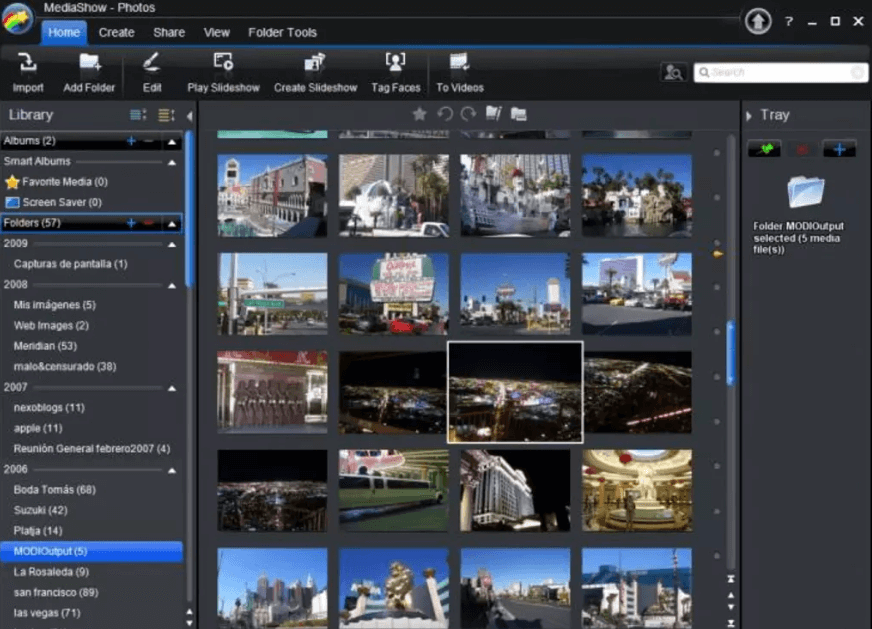
5. CyberLink MediaShow

CyberLink MediaShow - Photo Slideshow Software For Windows 2020

Anyone who wants to manage a huge collection of photos and videos virtually and enrich them with stylistic elements to look more appealing and lively should download this excellent photo slideshow tool of CyberLink.

Being one of the best slideshow software, MediaShow offers numerous photo management tools to help you create professional-looking slideshows within a few minutes.

Notable Offerings: 

  • Simple, fast, and easy to manage slideshow maker
  • Allows users to organize all photos date wise in a calendar
  • Quickly find your photo from large collection of albums using its smart instant view
  • Includes effective FaceMe option to help you tag your friends
  • Redefine your 2D or 3D photos and videos with numerous transitions and effects

System Requirements:

Supported OS: Windows 10, 8.1, 8, 7, Vista, and XP | Display Resolution: 1024 x 600 pixels | RAM: Minimum 1GB of RAM (2GB required for HD videos) | CPU: Intel Pentium 3.0 GHz | Hard Disk: 1GB to 60GB of free hard drive space | GPU: Intel 945GM Express or NVIDIA Geforce 6600 or ATI X1600 or higher

Pros

  • Creates 3D images
  • Multiple input and output formats
  • Easy to use
  • Multiple advanced features

Cons

  • Can not process RAW images

6. MAGIX Photostory Easy
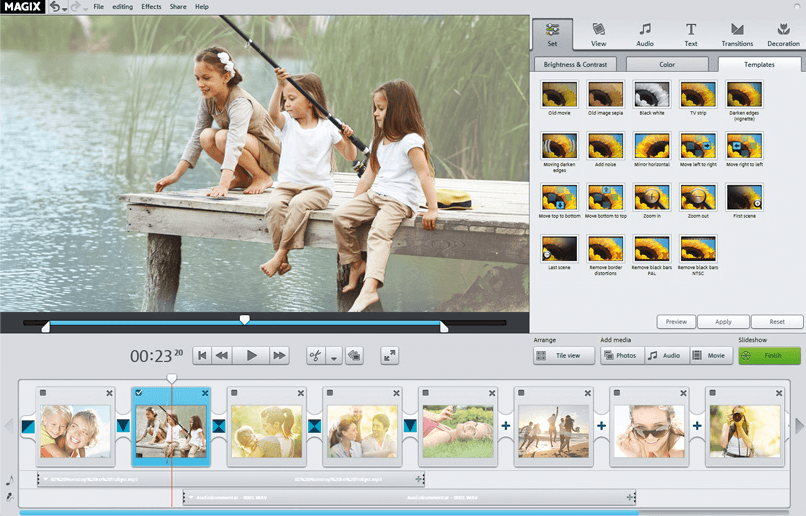
MAGIX Photostory Easy - Best Professional Slideshow Software

You can’t talk about the best free photo slideshow software for Windows without including MAGIX Photostory Easy. The program is easy to use and configure and offers lots of beautiful templates to create anniversary, vacation, birthday, and graduation slideshows with amazing background music and effects.

Notable Offerings: 

  • It comes with an unique import wizard option that lets you select your best shots directly from your smartphone
  • It has a lot of attractive animations, decorative items, and cool effects
  • It automatically removes red eyes and optimizes your photos in just a few clicks
  • It lets you upload your slideshows online (Facebook, YouTube, and Flicker) for free

System Requirements: 

Supported OS: Windows 10, 8, and 7 | RAM: 2GB | CPU Processor: 2 GHz | GPU: Onboard graphics card with up-to-date drivers and a display resolution of 1024 x 768 pixels | Hard Disk: 1GB of free hard drive space.

Pros

  • Multiple unique filters.
  • HD results
  • Playback options

Cons

  • Selects limited pictures
  • Lack of advanced features

7. Freemake Video Converter
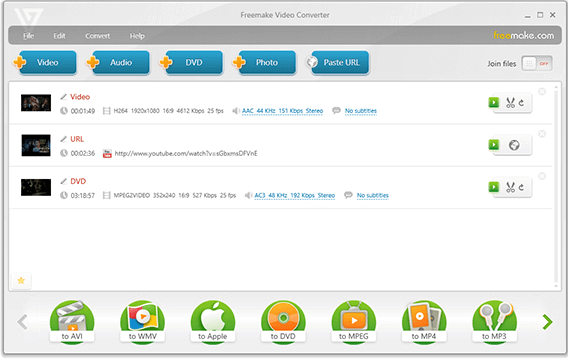
Freemake Video Converter Software For Windows

Freemake Video Converter developed by Ellora Assets has been in the business for more than a decade and still ranks among the best professional slideshow software of all time.

Though it might come next in the list of photo slideshow tools, it’s still a great option to convert video clips and make photo slideshows for free.

Notable Offerings: 

  • Fast and easy to use interface
  • It lets you burn slideshows and movies or video clip to DVD or Blu-ray
  • Supports HD, full HD, and 4K
  • It supports all popular audio, video, and image formats

System Requirements: 

Supported OS: Windows 10, 8.1, 8, 7, and Vista | CPU Processor: Intel 1 GHz or any other compatible processor | Microsoft NET Framework: 4.5 | RAM: 256MB or above | Hard Disk: 50MB of free hard drive space

Pros

  • Completely free to use
  • Supports different formats
  • Direct sharing features

Cons

  • No templates
  • No option to add text to slides

Read More: 14 Best Video Converter Software For Windows


8. Renderforest
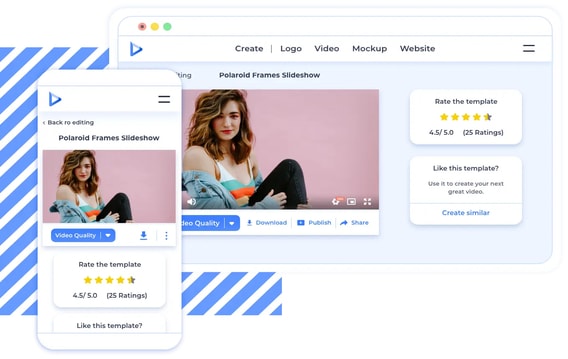
Renderforest

Renderforest requires no space on the device to create slideshow. The software is available online and the user can make slideshows from any browser. It offers great features which can be used to create YouTube intro, explainer animation and many more. The features which only the best slideshow softwares offer.

Notable Offerings:

  1. Users have the freedom to choose templates of their own choice and can also customize the design.
  2. User friendly interface makes it easy for the user to create slideshows.
  3. Whether it’s animation, tutorial videos or slideshows, the app can create all with just a click.
  4. You can choose commercial videos/ music or can also import your own video/ music for editing in the software.

System Requirements:

As the software is available online and the user can create amazing projects from the browser. There are no specific system requirements to use the software. All you need is just a device with internet connection and a browser.

Pros

  • Multiple features
  • Easy to use
  • Straight UI

Cons

    • Variation in the paid version
    • Complicated for some users

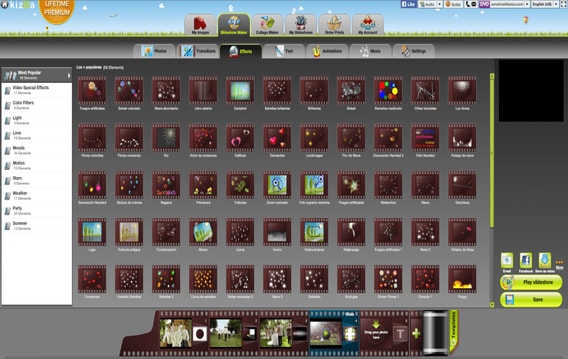
9. Kizoa

Kizoa

Kizoa Our app, Your Story, is a great app to create slideshows or videos for any project irrespective of school project or work. The app can easily make slideshows just the way you want it. The app also offers a feature which makes photo editing easy, so that the user does not have to rely on any other software to edit photos. It’s all in one offering makes it the best free slideshow software.

Notable Offerings: 

  1. By using the app users can add transition, text, effect, music and animation to the slideshow.
  2. By default the app automatically selects the transition to ease the work of the user.
  3. The project created in Kizoa can directly be exported to YouTube.
  4. The app can create a photo slideshow into a video without any hussle.

System Requirements:

Supported OS: Windows 10,8.1,8,7 & XP | RAM: 512 MB | Hard Disk: 100 MB free (Minimum)

Pros

  • Online tool
  • Free to use
  • Provides creating tips
  • Multiple templates

Cons

  • Requires account creation

10. Free Bolide Slideshow Creator
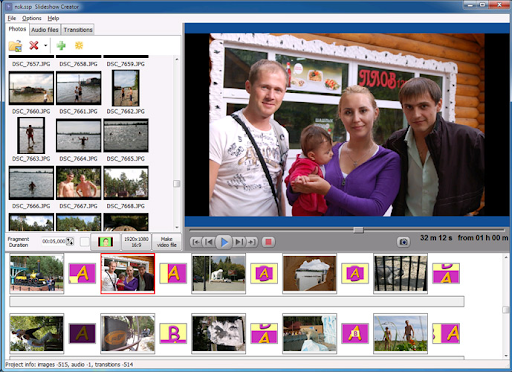
Free Bolide Slideshow Creator

Free Bolide Slideshow Creator is the another name on this list of the best free photo slideshow software for Windows. One of the best features of this software is that it does not contain any ads and hence offers a smooth performance. The tool supports a lot of different image formats. Apart from this, below are some exceptional features of Free Bolide Slideshow Creator.

Notable Offerings:

  1. The interface of the app is multilingual and supports all major languages.
  2. No output created using Free Bolide Slideshow Creator contains any watermark.
  3. The tool is quite reliable and allows you to create slideshows securely and quickly.
  4. With the help of the tool, you can directly share your outputs on different platforms like Facebook.

System Requirements:

Supported OS: Windows 11,10,8.1,8,7 & XP | RAM: 512 MB | Hard Disk: 100 MB free (Minimum)

Pros

  • Offline standalone tool
  • Completely Free for all
  • Multiple filters and options
  • Customization options

Cons

  • Lacks advanced features

11. Microsoft Powerpoint
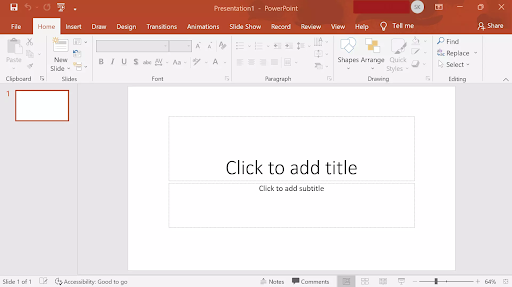
Microsoft Powerpoint


Microsoft Powerpoint is the next name on this list of the best free photo slideshow software for Windows. The tool is quite amazing and very well-known for developing presentations. With the help of this tool, you can easily create and present slideshows as well.

Notable Offerings:

  • The tool allows you to create presentations or PPTs.
  • Microsoft PowerPoint offers multiple features for amazing outputs.
  • You can use this software on any Windows device quite easily.
  • The tool allows you to add transitions and make the document more presentable.

System Requirements:

Supported OS: Windows 11,10,8.1,8,7,XP, or Lower | RAM: 512 MB | Hard Disk: 100 MB free (Minimum)

Pros

  • Works offline
  • Multiple futures
  • Smart UI

Cons

  • Better alternatives available

12. ThunderSoft Free Slideshow Maker
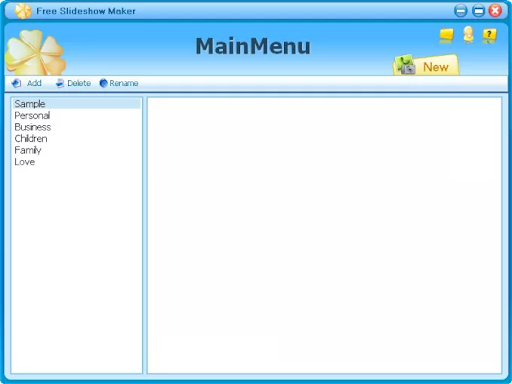
ThunderSoft Free Slideshow Maker

ThunderSoft Free Slideshow Maker is the another name that takes on this list of the best free photo slideshow software for Windows. This easy-to-use tool may boast an older interface but does not mean that it is short in performance. The tool allows you to use multiple filters and animations to make the slideshow attractive.

Notable Offerings:

  • Allows transition of images and slides as required.
  • Creates thumbnail for easy stimulation and smoother experience.
  • Takes that help of HTML5 for better results.

System Requirements:

Supported OS: Windows 11,10,8.1,8,7,XP,Vista | RAM: 256 MB | Hard Disk: 200 MB free (Minimum)

Pros

  • Fully offline
  • No ads
  • Smart filters

Cons

  • Better paid alternatives available

Bring Your Photos into Life with Slideshow Software

The simplest solution to create professional-looking slideshows with your favorite photos, music, and artistic effects is to use the best photo slideshow software.

So, now that you know how to make a slideshow of photos, download any of these aforementioned photo slideshow tools today and make your beautiful memories last forever.

Author

Monil

Monil is a professional writer whose forte is absorbing a lot of data and help large technical organizations convey their message clearly across multiple products. An engineer by qualification, his affinity for design enables him to write to inspire, energize, and influence various audiences to uncover their true potential. When not writing, Monil is likely to be found listening to music, traveling, or simply excavating into his favourite cuisines.

View all posts

Related Posts
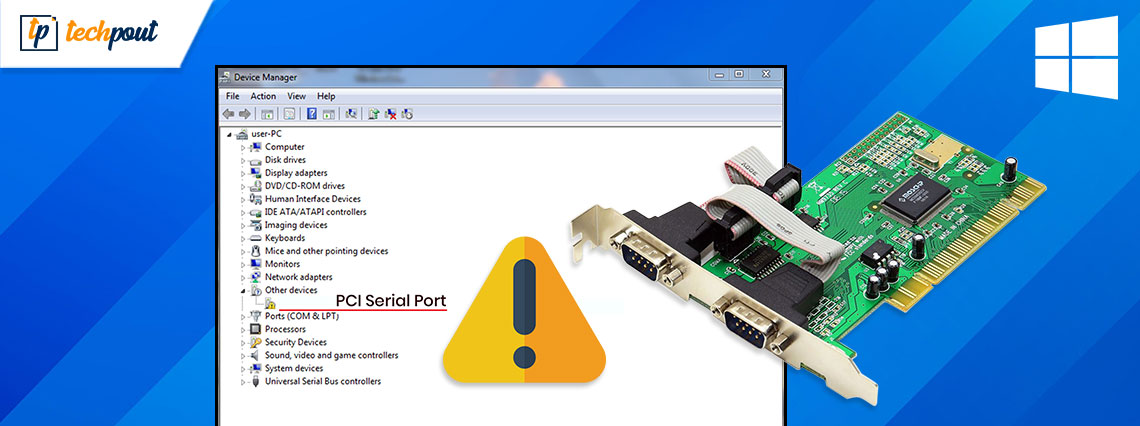
Fix PCI Serial Port Driver Issues on Windows 10/8/7 (Solved)

Fix PCI Serial Port Driver Issues on Windows 10/8/7 (Solved)

January 7, 2022
0

Read on to fix PCI Serial Port driver issues on Windows 10, 8, 7. The post has the two best approaches to get rid of this inconvenience. 

Are you a Windows PC user? Has your PCI Serial Port driver suddenly stopped functioning? Then, it’s probably happening because your PCI serial port driver has become obsolete. Quite lately, many Windows PC users have reported the same issue. So, if you are also concerned about this then you are not alone. 

Fortunately, the issue can be fixed easily & quickly just by updating the corresponding drivers. To help you, we have prepared this guide. Here we are going to show you the two easy ways to update PCI Serial port drivers. 

All-In-One Solution to Fix PCI Serial Port Driver Issues on Windows 10, 8, 7

Use Bit Driver Updater to resolve PCI Serial Port driver issues, easily & quickly. Bit Driver Updater is an effective and complete solution to fix all faulty driver-related issues. It automatically recognizes your system and then provides you with a detailed list of drivers that need to be updated. Moreover, it requires only one click to update all outdated device drivers. From the below-provided download link, you can try it for Free.

Windows-Download-Button

Quick Methods to Fix PCI Serial Port Driver Issues on Windows 10, 8, 7 

Check out the methods explained below to easily update and fix PCI serial port driver issues on your Windows PC. Without further ado, let’s get started: 

Method 1: Update PCI Serial Port Driver in Device Manager

Windows has a default utility program called Device Manager that shows the graphical representation of the hardware and its drivers. So, you can use Device Manager to check and update the outdated device drivers on Windows PC. Below is how to fix PCI Serial Port driver issues on Windows using Device Manager: 

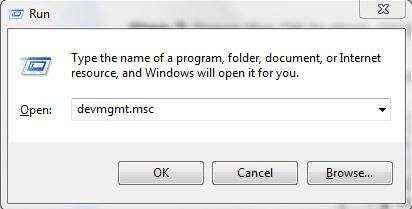
Step 1: Launch the Run Dialog box by pressing the Windows logo and R keyboard buttons at a time. 

Step 2: Copy and paste devmgmt.msc in the box and press the Enter key from your keyboard. 

Type devmgmt.msc in Run Dialog Box

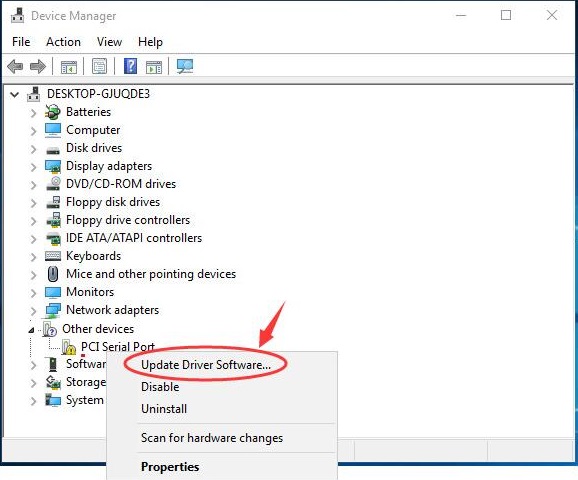
Step 3: This will invoke the Device Manager window on your computer screen. Here you need to navigate to the Other devices section and double click on it. 

Step 4: Then, locate PCI Serial Port and right-click on the same. 

Step 5: Next, choose the Update Driver Software. 

Update Driver Software - PCI driver

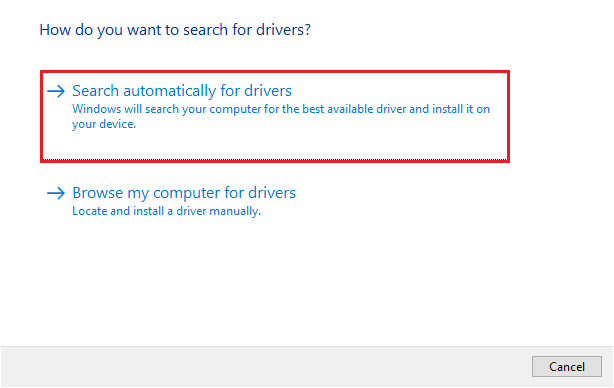
Step 6: Select Search Automatically for Updated Drivers Software. 

Search Automatically for Updated Driver Software

Now, Device Manager starts searching for the latest version of PCI Serial Port drivers; if Windows finds any available driver updates, it will install the update automatically. 

Important Note: Sometimes, Microsoft lags detecting the latest driver updates for your device. In that case, try another method mentioned below. 

Also Read: USB 3.0 Driver Download and Update for Windows 10, 8, 7 {Quick Tips}


Method 2: Use Bit Driver Updater to Automatically Update PCI Serial Port Driver (Recommended)

Bit Driver Updater is a software tool that automatically recognizes your device and finds the most suitable driver updates for you. The software is also a perfect fit for resolving numerous Windows-related issues like Blue Screen of Death errors and more. 

Unlike others, this driver updater software only provides WHQL tested and certified drivers. This is a more precise method to fix PCI Serial Port driver issues on Windows PC. You can even perform bulk driver downloads at once with this super-amazing driver updater utility tool. Using this complete automatic solution, you can also avoid the risk of installing the wrong or faulty drivers. In addition to this, you do not need to know the exact PC information. 

To update PCI Serial Port drivers with Bit Driver Updater, follow the steps below: 


Step 1: From the download button below, get the installer of Bit Driver Updater. 

Windows-Download-Button

Step 2: After that, finish the installation instructions to complete the process. 

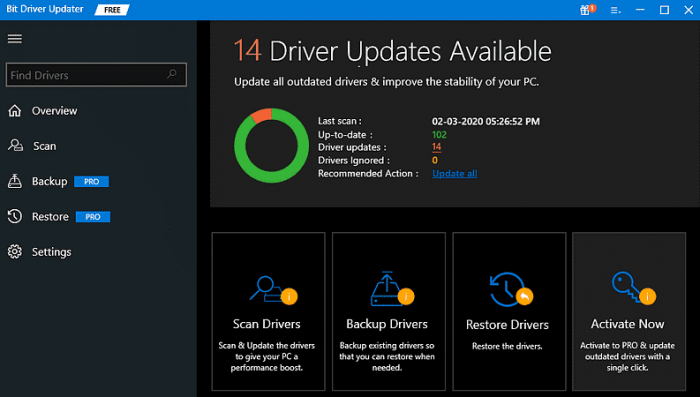
Step 3: Once installation is done, invoke the Bit Driver Updater on your computer and click on Scan. 

Bit Driver Updater will scan your PC

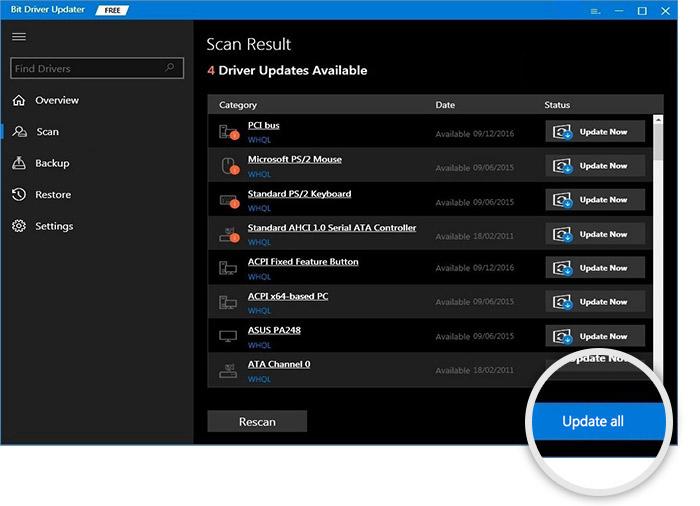
Step 4: Next, check the scan results and click on the Update All button.
Update All Driver with Bit Driver Updater

See how easy and convenient it is to update or fix all driver-related issues with Bit Driver Updater. In order to unlock its complete functionalities, you need to upgrade to its pro version. Also, it offers round-the-clock technical assistance and a complete money-back guarantee. 

Also Read: Microsoft USB Driver Updates Completely Free For Windows 10, 8, 7


Bonus-Tip: How to Uninstall and Reinstall PCI Serial Port Driver

If updating the PCI drivers doesn’t work for you, then try to reinstall the drivers. For this, follow the steps shared below: 

Step 1: Launch Device Manager. 

Step 2: Locate and double-click on the Other Devices category. 

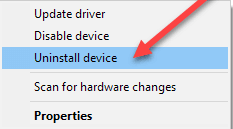
Step 3: Right-click on PCI Serial Port and choose Uninstall Device. 

Click On The Uninstall Device Option

Step 4: Click yes, if a box prompts asking for your confirmation. 

Step 5: Wait for the process to complete. 

Once done, then visit the PC manufacturer and install the PCI serial port drivers again. Now, your PCI serial port drivers should be working fine as expected. 

Also Read: How to Fix Ethernet Port Not Working on Windows 10 – Quick Tips


PCI Serial Port Driver Issues on Windows 10, 8, 7: FIXED

So, by updating the PCI serial port drivers, one can easily fix the issues related to the same. Hopefully, this troubleshooting guide helps you in the best way possible. 

Please let us know in the comments below if you have any doubts or further suggestions. Additionally, subscribe to our Newsletter and follow us on Facebook, Twitter, Instagram, and Pinterest for more tech-related articles or pieces of information. 

Best Free TradingView Alternative

7 Best Free TradingView Alternative in 2024

March 17, 2024
0

This article is going to be your favorite read for the day if you are looking for the best free apps like TradingView (perhaps even better programs) for all your market intelligence software needs.

If you are a professional trader, you may be familiar with TradingView. Founded in 2011, it is among the most popular technical analysis charting platforms. However, it has lost its charm because of feature limitations in the free version, the hefty pricing of the paid program, and the availability of the best TradingView alternatives with better features at no cost.

Like many other users, are you also looking for the best apps to use in place of TradingView? If yes, look no further than this article. We dived deep into the world of charting apps and compared them depending on various factors (such as ease of use, features, etc.) to list the truly best applications in this write-up. Let us get started with it in the following section without wasting priceless time.

List of the Best TradingView Alternatives (Free) in 2024

The following are our top choices for the best alternative websites like TradingView you can use for free.

1. Investing.com

Investing(dot)com


Let us introduce you to Investing.com. It is among the best sites similar to TradingView for all your trading requirements. Investing.com contains comprehensive information on a variety of financial products to help you trade effectively. Moreover, the following features justify its position on this list.

Key features of Investing.com

  • It is available in over 44 languages, such as English, German, French, Italian, etc.
  • Investing.com helps you make informed decisions with instant news updates for stocks and currency pairs
  • It is a social networking platform for traders, allowing them to engage in discussions and exchanges
  • There are many technical tools and investment resources

Download Now

Also Read: Best LetMeWatchThis Alternatives


2. GoCharting

GoCharting

Next, we have GoCharting as one of the best free alternatives to TradingView. It is a popular app among the trading community because it supports 2000+ cryptocurrencies, connects to 14000+ pairs and over 90 exchanges, and boasts the following delightful features.

Key features of GoCharting

  • It supports cloud-based tracking and preservation of technical charts
  • There is a plethora of tools for detailed technical analysis, such as auto-pattern detection
  • You can effortlessly create and manage your cryptocurrency portfolio
  • GoCharting facilitates options trading with the availability of 40+ ready-to-deploy strategies

Download Now


3. MultiCoinCharts

MultiCoinCharts

Here comes MultiCoinCharts. It is yet another free TradingView alternative for cryptocurrency traders. User-friendly interface, real-time monitoring, and the following features make this charting platform attractive.

Key features of MultiCoinCharts

  • You can easily monitor almost all cryptocurrencies (such as Ethereum, Bitcoin, Dogecoin, etc.) with real-time charts and price data
  • It supports all popular exchanges, such as Coinbase, Binance, FTX, Kucoin, etc., to name a few
  • MultiCoinCharts boasts one of the most advanced cryptocurrency scanners to take your trading to the next level

Download Now

Also Read: Best Jenkins Alternative to Use


4. ChartMill.com

ChartMill(dot)com

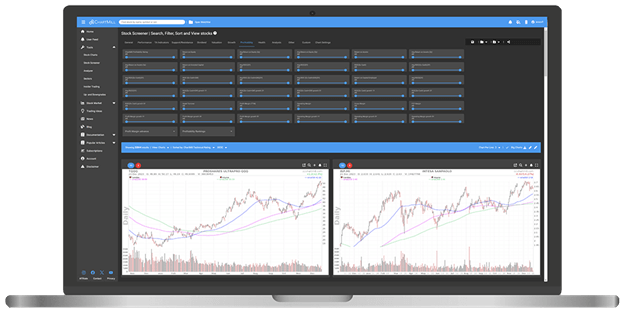
We cannot skip ChartMill.com when discussing the best websites like TradingView. It is a renowned name among traders and investors because of its comprehensive screening, an excellent fundamental analysis tool to get in-depth information about financial metrics, long-term averages, crucial earnings data, and the following helpful features.

Key features of ChartMill.com

  • There is a stock screening tool to help you identify potential trades and streamline the research process
  • ChartMill.com boasts a vast documentation and video library to enhance your trading and investment knowledge
  • You can practice effective risk management with a Position Sizing tool

Download Now


5. Dealerify.io

Dealerify(dot)com

Let us take a look at Dealerify.io. It is a trading, Copy Trading, and Auto Trading tool that is also one of the best apps like TradingView. Tailored specifically for cryptocurrency trading, this tool caters to the requirements of people and traders at different levels. It offers in-depth technical analysis tools (such as 30+ indicators, complete chart timeframes, and diverse pattern candles), direction connection to Dealerify exchanges for seamless trading, and the following features.

Key features of Dealerify.io

  • It offers a wide range of chart timeframes, such as hour-based, minute-based, and second-based charts
  • Dealerify.io boasts an attractive and user-friendly interface
  • This platform provides detailed and accurate information on charts to help you make correct decisions

Download Now

Also Read: Best Unroll.me Alternatives You Can Use


6. FinViz

FinViz

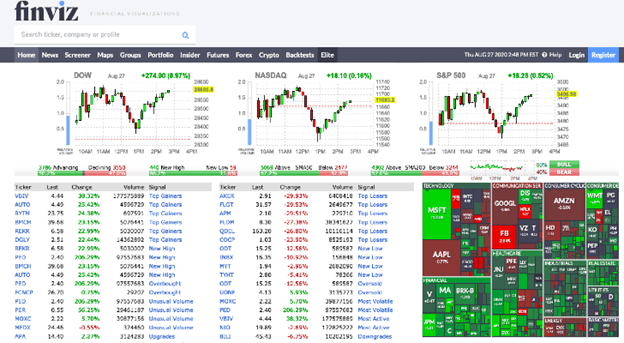
You can choose FinViz if you are looking for an alternative of TradingView with features such as screening, chart pattern recognition, and heatmaps. Popular because of its free stock screening services (that allow you to scan over 8,500+ stocks and ETFs), FinViz offers interactive charts, real-time data, and the following helpful features.

Key features of FinViz

  • There are many charts including advanced charts with more than 17 chart indicators
  • You can create over 50 unique portfolios
  • It provides valuable insights into market data, insider trading, and futures and forex markets

Download Now


7. TrendSpider

TrendSpider

TrendSpider is another popular chart analysis software and one of the best free alternatives to TradingView. It boasts professional-grade tools for everyone to help them make accurate decisions. Moreover, data sourcing from over 150 exchanges and 6500 trading pairs and the following features contribute to justifying this software’s popularity.

Key features of TrendSpider

  • This application uses AI algorithms to create chart patterns, candlestick patterns, Fibonacci retracements, and plot trendlines automatically
  • The multi-timeframe analysis helps you see resistance levels from various time frames on a single chart
  • There is a power-packed backtester to test trading strategies on over 7000, 5000, or 3000 historical candles
  • It supports Japanese candlesticks, line charts, raindrop charts, etc.

Download Now

Also Read: Best Free Grammarly Alternatives


Concluding the Best TradingView Alternatives

So that was everything about the best free alternatives to TradingView. You can compare the features of each of these applications to choose the app that fits your needs perfectly. However, if you have any queries/doubts/valuable suggestions regarding this write-up, please drop us a comment. Moreover, join us on our social media and subscribe to our mailing list to get notified whenever we come up with a new post.

1 Comment
    Smiddy says: Reply
    September 11th 2023, 7:28 am

    I conceive you have noted some very interesting details , appreciate it for the post.

Leave a Reply to Smiddy Cancel reply

Your email address will not be published. Required fields are marked *

Sidebar Image bit G ad1

Latest Posts

  • Anytime Astro: Best Website For Online Astrology Consultation
    Anytime Astro: Connect Now For Online Astrology Consultation
    by Somya Shrimal / March 13, 2026
  • Best-Ways-to-Combine-Images-Into-PDF-Files
    Best Ways to Combine Images Into PDF Files
    by Niharika / March 12, 2026
  • Best FREE VPS Hosting Providers
    7 Best FREE VPS Hosting Providers in 2026
    by Devesh / March 12, 2026
  • Best-McAfee-alternative-software-to-use-for-Virus-Protection
    Best McAfee Alternative Software to use for Virus Protection
    by adminuser / February 11, 2026
  • What-is-Flip-Flop-in-Circuite-and-it's-Types
    What is Flip Flop in Circuit and its Types
    by Meet / February 6, 2026

Categories

  • Cyber Security
  • Driver Updater
  • Entertainment
  • Fitness
  • Games
  • How To
  • laptop
  • OS
  • Reviews
  • Tech News
  • Tips & Tricks
  • Top 10
Sidebar Image bit G ad1
Best Free Text Comparison Tools 9 Best Free Text Comparison Tools in 2024 (Online & Offline)by Niharika / December 18, 2023
11 Best Free PDF Drive Alternative to Use in 2024by Devesh / December 18, 2023Best Free PDF Drive Alternative
TechPout Footer Logo

We at TechPout promise to put forth stories that help people to learn and simplify their digital life. Our purpose is to share the true essence of technology with our tech-loving community.

Useful Links

  • About Us
  • Contact us
  • Privacy Policy

Popular Posts

  • Best PC Optimizer Software
  • Best Mac Cleaner Apps
  • Best Driver Updater
  • Duplicate Photo Finder and Cleaner Software
  • Best Free Movie Download Sites
  • Best IPTV Players

Follow us

Copyright © 2026 www.techpout.com. All rights reserved
DMCA.com Protection Status