Main LogoLight Logo
  • Reviews
  • Top 10
  • How To
  • Tech News
  • OS
    • Windows
    • MAC
    • iOS
    • Android
  • Categories
    • Driver Updater
    • Cyber Security
    • Games
    • Fitness
    • Entertainment
    • Tips & Tricks
MAC Top 10
by Jyotsana

15 Best Free Mp3 Tag Editor for Mac to Edit Songs Metadata in 2024

December 26, 2023
1

As much as it is important to play your favorite playlist and be lost in the magic of Now, some music lovers take pleasure in knowing the whereabouts along with the entire history and data related to the songs. In this article, you will come across the best free MP3 tag editors for Mac that automatically or manually help you fill in the metadata of your audio files.

MP3 metadata is the data or information related to the songs and albums that you download and listen to. This information includes, album name, artist name, title of the song, genre and even lyrics alongside the many other bits of information.

If you have a bundled collection of songs in your Mac to edit and organize the metadata for, let us tell you, there are several MP3 tag editors for Mac that not only help in editing the information of audio files but offer numerous other features that boost the management of such files.

Table of Contents hide
What Are The Best Free MP3 Tag Editors For Mac in 2024?
1. iMusic
2. Kid3
3. Metadatics
4. MusicBrainz Picard
5. MetaBliss
6. iD3 Tag Editor
7. TuneUp
8. Music Tag Editor
9. Meta
10. Tag Editor
11. Wondershare UniConverter
12. Music Tag Editor Pro
13. MP3TAG
14. Amvidia
15. Mp3TagsForTracks

What Are The Best Free MP3 Tag Editors For Mac in 2024?

The following MP3 tag editors, with their coolheaded interface, feature supercool features like online synchronization, multiple audio format support, downloading and many more. Let’s take a stroll through the list and find the best one to fulfil your demands.

1. iMusic
iMusic

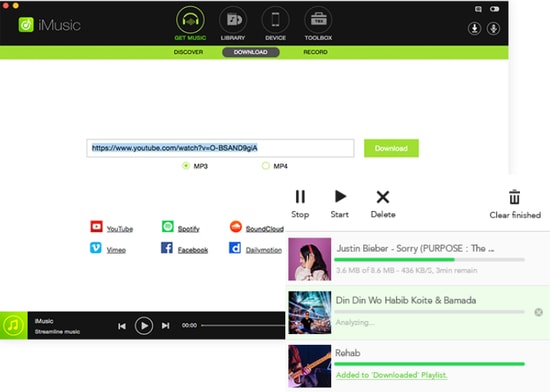
iMusic is one of the best MP3 tag editors for Mac. This amazing tool has everything you are looking for. It can be used for multiple reasons and it offers features transfer, sharing and the management of music libraries that make this software count.

Noteworthy features: 

  • iMusic allows you to transfer music between iOS devices, Mac, PC and iTunes.
  • You can download music from Archive, YouTube, and numerous other sites.
  • It features batch download from Youtube in multiple formats such as MP3, MP4, WebM etc.
  • It allows you to stream and download qualitative audio in multiple audio formats.

Download


2. Kid3

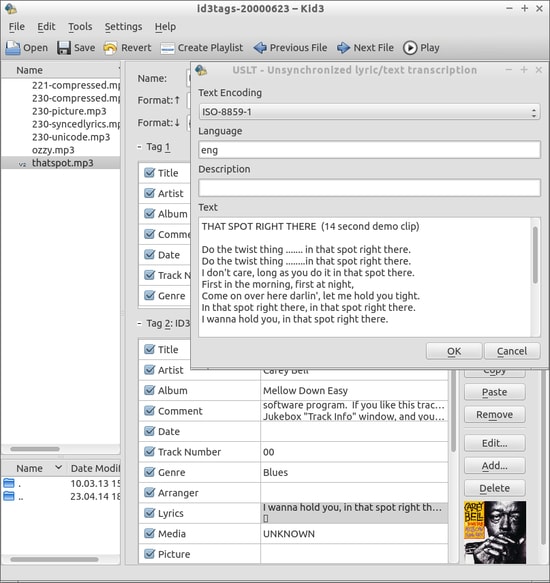
Kid3

Kid3 is another best free MP3 tag editor to be available for your Mac. It allows you to edit the information for both audio and video on Mac alongside many other features such as conversion of tags, exporting tags in multiple formats etc.

Noteworthy features: 

  • Kids3 allows you to edit the file names for multiple files together.
  • It allows you to convert the tags between ID3v1.1, ID3v2.3 and ID3v2.4.
  • You can create playlists with this software.
  • It imports tags from other online directories.

Download


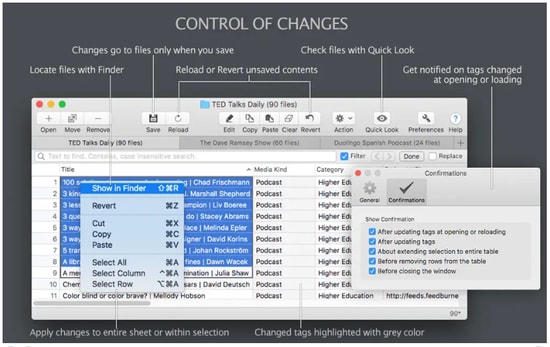
3. Metadatics

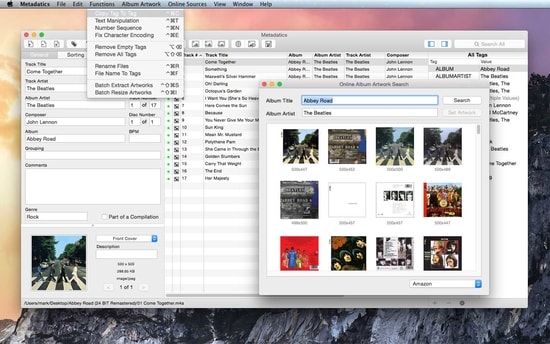
Metadatics

Metadatics is yet another amazing MP3 tag editor that allows you to edit the information of music on the Mac system. The best part about this software is that it lets you edit the truckload of audio files as quickly and easily as possible.

Read Also: Best MP3 Duplicate Songs Finder And Remover

Noteworthy features: 

  • This tool features smooth functionality which allows you to edit/replace the characters and copy tags.
  • It is easy to use and allows you to search the data online.
  • It supports ID3v1, ID3v2, MP4, Vorbis, APE, and ASF tags from multiple audio formats.
  • You can rename, and generate files in this tool.

Download


4. MusicBrainz Picard

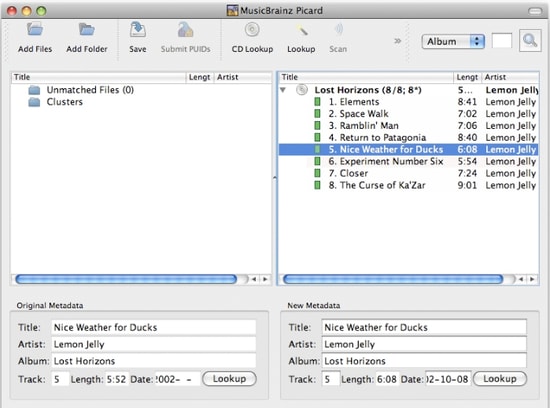
MusicBrainz Picard

MusicBrainz Picard, introduced by MusicBrainz, counts as one of the best free MP3 Tag Editors for Mac that helps you edit metadata and supports files of several formats alongside the AcoustID feature.

Noteworthy features: 

  • MusicBrainz Picard supports multiple formats such as WMA, WAV, MP3, FLAC, OGG M4A and more.
  • It features AcoustID audio fingerprints for audio files to be recognized by actual music.
  • It features lookup from CDs allowing to look over the music in one go.
  • This tool is open source.

Download


5. MetaBliss

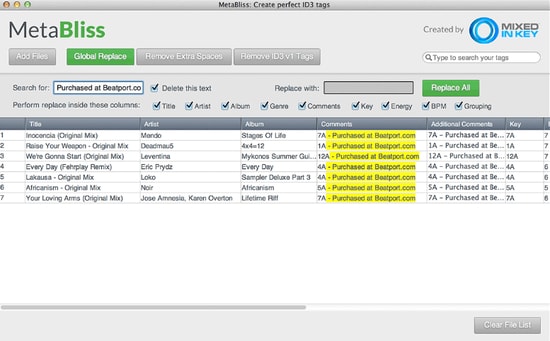
Metabliss

You may want to use MetaBliss, one of the coolest MP3 tag editors with friendly features that is available for MAC OS X for free. If you are looking for a steadfast editing tool then this one is worth the try.

Noteworthy features: 

  • Metabliss allows you to edit the song name, artist and many other tags easily.
  • Ity enables easy searching for multiple files.
  • In this tool, you can rename the filename, and remove the files easily.

Download


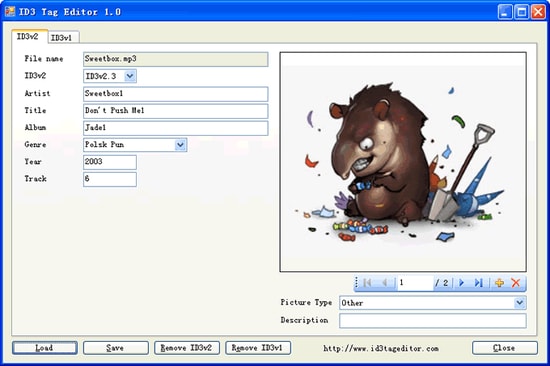
6. iD3 Tag Editor

iD3 Tag Editor

iD3 editor is one of the best MP3 tag editors for Mac operating system and Windows. It is free to use and is known to be a light software but sometimes, its interface becomes too challenging to comprehend.

Noteworthy features: 

  • iD3 tag editor is supported by iTunes, Winamp, Windows Media Player and many other software.
  • In this tool, you can easily copy and paste the data.
  • It allows you to write comments to your audio files.
  • You can easily remove the ID3 tags from the audio files.

Download


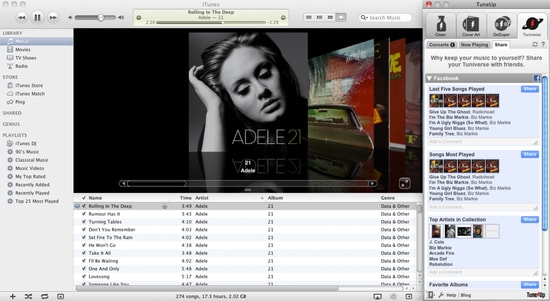
7. TuneUp

TuneUp

Image Source: Bitsdujour

TuneUp, another best MP3 tag editor, helps you in organizing the music collection with ease. It features striking functions along with a friendly and attractive interface. Your search for a software that keeps it organized and clean may end on this tool.

Read Also: List of Best Mac Cleaner Apps

Noteworthy features:

  • It features waveform recognition technology which lets it detect the acoustic fingerprints of a file and provide you the information.
  • The files are organized automatically and it removes the duplicate ones.
  • It allows you to share the MP3 you stream on social media platforms.

Download


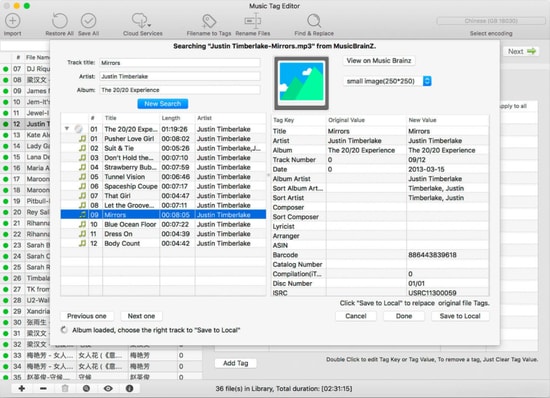
8. Music Tag Editor

Music Tag Editor

Image Source: InsMac.org

Music Tag Editor is one of the best free MP3 tag editors for Mac that offer the fastest features and help you in changing and editing the metadata of audio files.

Noteworthy features: 

  • In the Music Tag Editor tool, you can edit the cover photo of soundtracks as well as the tags.
  • This software allows you to make changes and edits in multiple files using this MP3 tag editor.
  • It supports iTunes tags.

Download


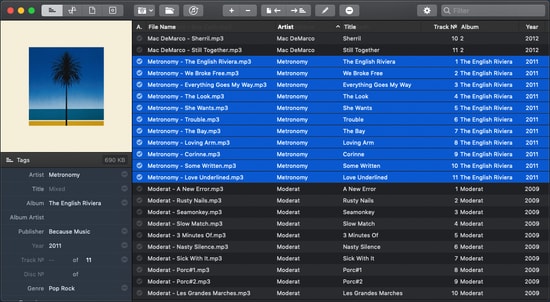
9. Meta

Meta

Ease your way out to edit the metadata of audio files  with this one of the best MP3 tag editors, Meta. However, you can only edit the multiple audio files together.

Noteworthy features: 

  • You can change and edit the metadata of audio files fastly.
  • You can change the cover photo of audio files.
  • It features a user-friendly interface and thus, makes the experience lightweight.

Download


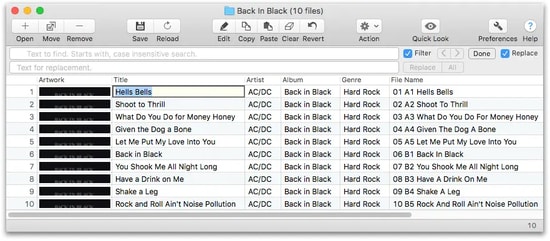
10. Tag Editor

Tag Editor

If you are still looking for the best MP3 tag editor for mac, perhaps you should take a look at Tag Editor. Yes it does what is synonymous with its name and works with ease.

Noteworthy features: 

  • It allows you to edit the files in a batch and organizes your collection.
  • You can edit several file names together.
  • It allows you to cut, copy and paste the tags.
  • It allows you to download the tags from online platforms.
Download


11. Wondershare UniConverter

Wondershare UniConverter

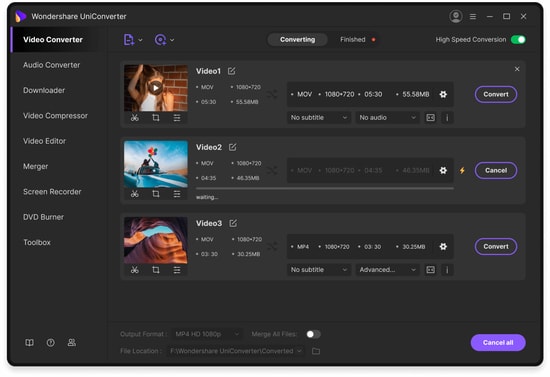
Wondershare Uniconvertor is one of the most popular and best free MP3 tag editors to count in this list. This software was originally known as Wondershare Video Converter Ultimate and is often used as a video editing tool. However, when it comes to editing or changing metadata of audio files, this software will not disappoint you.

Noteworthy features:

  • Wondershare Uniconvertor features a decent user interface.
  • It offers you to edit the meta tags of files both automatically and manually.
  • It offers a free version.

Download


12. Music Tag Editor Pro

If you cannot get enough of editing the meta tags of your audio files and need one best free MP3 tag editor for Mac which offers incredible features at zero dime then check this software, Music Tag Editor Pro. It easily helps you check off your music to-dos with its super-friendly user interface.

Noteworthy features: 

  • Music Tag Editor Pro automatically fills the metadata by synchronizing the information from an online platform.
  • This software supports almost every major audio file format.
  • Since it features batch processing, you can change the metadata of multiple audio files together.

Download


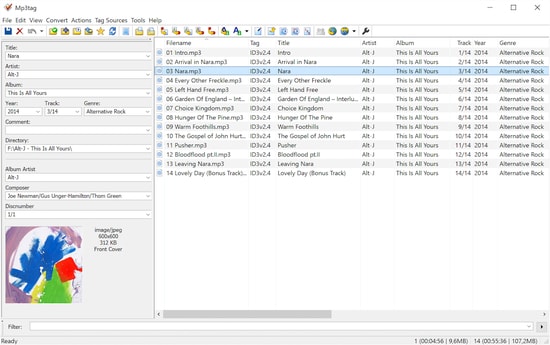
13. MP3TAG

MP3TAG

Keep calm as we still have one of the most powerful and useful software to share with you and that is MP3tag. This amazing MP3 tag editor features an attractive list of all the prominent offers that you could ask for. These features include batch tag editing, Importing tags from online databases, User-friendly interface and many more.

Noteworthy features: 

  • MP3tag tool features easy-to-use interface and ease your way out to edit the metadata of audio files.
  • It supports batch-tag editing of ID3v1, ID3v2.3, ID3v2.4, iTunes MP4, WMA, etc. Thus, it allows you to add tags for multiple files at once with support for multiple audio formats.
  • This tool can collect tags from online databases alongside the cover art.
  • It allows you to rename, import and export tag information and also lets you create playlists.

Download


14. Amvidia

Amvidia

Amvidia offers the user to edit more than 60 types of tags for the videos. Using the software the user can download the information from online websites like ACoustid, MusicBrainz, and many more.  The software has two versions available including the paid and free versions.

Noteworthy features:

  • One-stop solution for a music tag editing
  • The software download the Metadata automatically from different websites in just a few clicks
  • Compatible with most Mac OS
  • The user can also edit the tags and remove the extra space present in the information
  • Using the Amvidia user can also rename multiple files together with ease

Download


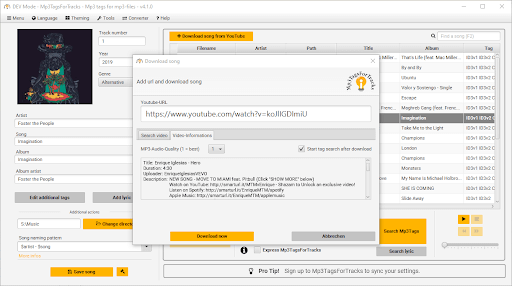
15. Mp3TagsForTracks

Mp3TagsForTracks

Let us introduce you to Mp3TagsForTracks. It is among the best software to edit MP3 tags on Mac because of its intuitive GUI with an in-built audio player, easy album cover search, lyric addition to a song, and the following incredible features.

Noteworthy features:

  • Lets you download YouTube music videos
  • Express makes available all the additional MP3 file information with a single click
  • Normalizes the audio file’s volume when saving it
  • Automatically adds and saves the audio file genre

Download


Conclusion

So, that was about the 15 best free MP3 tag editors for Mac that possess amazing features to help you get the metadata under check in no time. With every software featuring friendly specifications and simple interface, you have a thick list to choose from. Which one are you getting hands on? Share with us in the comment section if you have anything to add or maybe, ask?


Author

Jyotsana

Jyotsana is a technical writer with a non-technical background. An eye of detail and a knack for writing helps her to write technology related content.
Apart from writing, she is a coffee connoisseur and an aesthete who rejoices in poetry and music during leisure.

View all posts

Related Posts
Best Remaker AI Alternative

7 Best Remaker AI Alternative in 2024

April 21, 2024
0

Here’s a smart and extensive list of some tools that you can use as the best Remaker AI alternative for Windows 10, 11, or any other operating system with ease and swap the face of any image, and do a lot more with ease. 

The AI platform known as the Remaker AI has gained a lot of popularity in the previous years. With the advancements and new updates in the world of artificial development, the platform has managed to keep up with the ever-changing pace and offer reliable services to its users. However, these users still end up looking for a free Remaker AI replacement. What’s the reason?

The main reason behind this is the limited availability of the advanced features of the tool and the lack of free access. Remaker A only allows you to face swap on a fixed number of images and then you need to subscribe to its services. Hence, using a free program like Remaker AI is better than spending money on this platform.

So, to offer you the same, we have come up with this list of tools that can be considered the best Remaker AI alternative for any OS. you can use this alternative(s) as required and face-swap images, videos, and more. So, let’s get cracking.

Top 7 Best Free Remaker AI Alternative Tools and Websites in 2024

In the coming sections of this article, you will find the best Remaker AI alternative in 2024. These alternatives to Remaker AI are completely free to use for all. Hence, go through the list, and use any or all alternatives as required.

1. Face Swapper

Face Swapper

Remaker AI provides a free trial that includes thirty free credits; however, in order to access other capabilities, a VIP membership is necessary. You may get ten free credits every day if you sign up for the free plan of this best Remaker AI alternative. The Starter Plan, which costs $29 a year and offers 199 credits per month, is the pricing structure for extended features.

When everything is taken into consideration, this replacement for Remaker AI may not be as thorough as Remaker, but it still offers a helping hand. In addition, if you pay $49 each year, you will get access to the Premium Plan and receive 499 credits every month.

Get it Now

Also Read: Best Free QR Code Generator


2. Miocreate.AI

Miocreate.AI

As opposed to Remaker AI, which provides you with 30 free credits to begin with, Miocreate offers a Pro plan that costs $4.95 per month. This best Remaker AI alternative for Windows 10 has a collaborative online whiteboard that allows users to swap your face. Its ability to facilitate real-time collaboration on projects is one of its most notable features.

Miocreate, as an Remaker AI replacement, is accessible over the web and offers a broad variety of capabilities, such as the ability to personalize colors, fonts, and pictures. Additionally, it is able to generate page layouts, as well as add text and pictures.

Get it Now


3. Magic Hour

Magic Hour

After a free trial period of 500 frames, the Creator plan of this best Remaker AI alternative costs $10 per month, while the Pro plan costs $49 per month. The trial period is followed by the cost of the subscription. On the other hand, Remaker AI offers a free trial that includes thirty credits; but, in order to access all of the other features, you will need to become a VIP member.

Moreover, the high output quality of MagicHour is comparable to that of Remaker AI, which is well-known for its outstanding artificial intelligence picture-generating and face-swapping capabilities. This is one of the best free alternatives to Remaker AI that comes with a method for transferring styles from one movie to another, an animation function that allows for transitions from text to images to videos, and a Face Swap option that is of a high quality.

Get it Now

Also Read: Best Free AI Photo Enhancer Apps


4. Deepswap.ai

Deepswap.ai

A free trial version of Deepswap’s text-to-image creation software is availablef for you. A monthly fee of $9.99 for twenty credits and a one-year subscription fee of $49.9 are required to access extra services of this best Remaker AI alternative. Additionally, it offers a free trial that includes thirty credits but does not provide access to the VIP features.

In comparison to Remaker AI, it provides its users with real-time editing capabilities as well as high-quality algorithms that produce realistic outcomes. Deepswap.ai is a platform that is designed as a free alternative to Remaker AI and is driven by artificial intelligence. Face switching, picture production, and editing capabilities are some of the many tools that are included in this package.

Get it Now


5. Vidnoz

Vidnoz

This is the next best Remaker AI alternative that provides consumers with a free plan in addition to subscription options that begin at $22.49 per month, while Remaker AI gives a free trial that includes 30 credits. For further information, in order to access specific features of Remaker, a VIP membership is required.

Vidnoz is an excellent option for content production as the Remaker AI alternative is free. Despite the fact that both platforms provide tools that are comparable to one another, Vidnoz is more focused on video creation and editing. On the other hand, the primary advantages of Remaker AI are its one-of-a-kind artificial intelligence art generator and its ability to switch faces.

Get it Now

Also Read: Best Free Discord AI Image Generator 


6. FakeFace

FakeFace

Artificial intelligence (AI) voice clones, AI talking photographs, AI text-to-speech, AI text-to-video, and a great deal more are all things that can be created using FakeFace AI, the best Remaker AI alternative. With the exception of the AI Face Swapper, the following is a list of all the features that are available:

With the assistance of generative artificial intelligence, FakeFace is yet another Remaker AI alternative for free that enables users to switch faces. Not only does FakeFace allow you to swap faces, but it also enables you to produce professional avatar movies that can be used to generate a wide variety of material, including news, explainers, instructions, and more.

Get it Now


7. Pincel

Pincel

Summing up this list fo the best alternatives to Remaker AI, we have Pincel as the last tool. When it comes to the development of output, Pincel performs a really good job with the capabilities that we tested, which include AI video Face Swap and animations that convert words to images and then make them into videos. However, the free plan includes a watermark that may be removed by buying a subscription or frame pack. This watermark is not included in the free plan of this best Remaker AI alternative.

Pincel is a video production platform that offers a comprehensive set of features and is designed to cater to both users and video artists. The software provides a multitude of functions, such as artificial intelligence video Face Swap and so much more. Everything is accessible with this best free Remaker AI alternative.

Get it Now

Also Read: Best Free AI Image Generator to Use


In a Nutshell: Best Free Alternative to Remaker AI

It is my hope that the list of tools offered for the best Remaker AI alternative for Windows 10 and other operating systems described above was of some use to you. You are able to browse and even download the target’s stories and other profile material on your device without revealing your identity thanks to the platforms themselves.

However, if you believe that we have overlooked the best Remaker AI alternative that can be a viable replacement, please let us know. You may subscribe to this site in order to get other useful tech lists & how-to tutorials. Additionally, you may follow us on Facebook, Pinterest, Instagram, X, Tumblr, YouTube, and more.

Best Free Property Management Software

Best Free Property Management Software to Use in 2024

February 5, 2024
0

Which is the best free property management software in 2024? What prominent features should you look for? Get the answer to these questions in this detailed guide. Here we are going to show you the 5 popular property management applications that you can use.

Property management has become one of the biggest tasks that also takes energy, time, and even money, right? We have all seen the property dealer, broker, or real estate agent that goes around from 1 appointment to another.

Sprinting from one location to another is quite a hefty task. And, here comes property management software as a savior in order to make the entire process of managing property work much easier. However, choosing the most dedicated property manager is not an easy job. But, nothing to worry about, we can help you out! Here, we have brought a list of the 5 best property management software that you can consider. Keep reading for more information!

A List of 5 Best Free Property Management Software in 2024

Listed below is the best property management software that you can use to manage all your property-related work, without much hassles. Check them out below:

1. TurboTenant

TurboTenant

TurboTenant is one of the best property management systems that one can use. Property owners can easily post their rental properties on several listing websites like Rent.com, Facebook Marketplace, and more. A powerful and simple online application process allows renters to apply from their comfort zone. In addition to this, TurboTenant also lets tenants submit maintenance requests and pay online. In sum, it is an all-in-one solution that lets you manage your rental property from start to finish online so you can hassle-free manage everything in a single place.

Key Features of TurboTenant

  • Its intuitive design makes it really easy to collect rent payments, search for new tenants, send reminders & notices, and a lot more.
  • It is a completely free-to-use property management system.
  • Provides tenant screening and credit reports.

Download Now

Also Read: Best Bulk Rename Utility for Windows


2. DoorLoop

DoorLoop

DoorLoop is yet another popular property management software designed to provide every possible tool one needs to manage their property. Developed with world-class support, ease of use, and speed in mind, DoorLoop is a complete property suite. It offers numerous marketing tools like IDX-based site builders, automated listings, and more. Moreover, it comes with a Tenant Portal that lets tenants pay their rent directly from their mobile phones.

Key Features of DoorLoop: 

  • It has multiple payment modes, a chart of all accounts, automated rent payments, and everything else that one needs.
  • Different types of marketing tools.
  • The support team responds within a few minutes and a dedicated account manager is also available to assist you to get the most from the property management software.
  • The software can handle everything you need to organize your portfolio.

Download Now


3. WildApricot

WildApricot

Personify’s Wild Apricot is one of the best HOA management tools designed for associations. If you handle HOA communities, co-ops, or condos, then Wild Apricot could be a perfect fit for you. This powerful cloud software simplifies every task and helps you manage your properties or even organizations in one place.

Key Features of Wild Apricot: 

  • Records every member’s information.
  • Tools for event creation and management.
  • Options for committee management and even website management.
  • Its basic plan starts at $40 per month which includes up to 100 contacts and goes up to $600 monthly which includes 50,000 contacts.

Download Now

Also Read: Best Graph Databases


4. Condo Control

Condo Control

Another best property management software that you can use is Condo Control. The software is designed for managing condo and co-op communities. If in case, you are searching for property management software that perfectly fits HOA communities but also has a few or more other features related to property management, then this is an ideal choice. It offers multiple pricing tiers, like MRI commercial, however, they don’t list their pricing publicly, so for more information, you will need to contact the Sales Team of Condo Control.

Key Features of Condo Control: 

  • Provides security features like visitor parking management and more.
  • Tools for managing the community such as voting, event management, and bulletin boards.
  • Different payment methods are available.
  • Less paperwork, and a more synchronized property management system.

Download Now


5. TenantCloud

TenantCloud

Last but not least, TenantCloud is a rental property management tool that provides a limited free plan. It helps you collect payment online, advertise your vacant properties, and screen potential tenants. TenantCloud offers mobile applications for both iOS and Android devices. It is a cloud-based SaaS, that automates daily property management tasks while saving time and money by eliminating unnecessary add-ons. Additionally, it also provides 24/7 support to the users so you can contact the support team at any time from anywhere.

Key Features of TenantCloud:

  • Easily and quickly collect rent online via numerous payment modes such as ACH payments, and credit & debit cards.
  • Good work order management system.
  • Let you list the vacant rentals on dozens of listing websites.
  • See a report right from the application.
  • Easy accounting management.

Download Now

Also Read: Best CPU Temperature Monitor Tools For Windows


Best Free Property Management Software: Final Words

Using any of the above-shared tools, you can easily manage all your property-related stuff or work, without any hassles. No matter which software you choose, just be sure it is the one whose prime goal is to optimize and streamline your business processes.

That’s all! Was this comprehensive guide helpful? Want to add some words? Then, please share your feedback in the comments section below. For more tech-related tips, articles and information, do subscribe to our Newsletter and follow us on Facebook, Twitter, Instagram, and Pinterest.

1 Comment
    Glenn says: Reply
    December 7th 2020, 1:49 am

    These are really amazing tag editors!

Leave a Reply Cancel reply

Your email address will not be published. Required fields are marked *

Sidebar Image bit G ad1

Latest Posts

  • Best-Free-Online-Portfolio-Websites-in-2026
    Best Free Online Portfolio Websites in 2026
    by Niharika / March 16, 2026
  • Anytime Astro: Best Website For Online Astrology Consultation
    Anytime Astro: Connect Now For Online Astrology Consultation
    by Somya Shrimal / March 13, 2026
  • Best-Ways-to-Combine-Images-Into-PDF-Files
    Best Ways to Combine Images Into PDF Files
    by Niharika / March 12, 2026
  • Best FREE VPS Hosting Providers
    7 Best FREE VPS Hosting Providers in 2026
    by Devesh / March 12, 2026
  • Best-McAfee-alternative-software-to-use-for-Virus-Protection
    Best McAfee Alternative Software to use for Virus Protection
    by adminuser / February 11, 2026

Categories

  • Cyber Security
  • Driver Updater
  • Entertainment
  • Fitness
  • Games
  • How To
  • laptop
  • OS
  • Reviews
  • Tech News
  • Tips & Tricks
  • Top 10
Sidebar Image bit G ad1
Best Debugging Tools for Windows 10, 8, 7 in 2024 10 Best Debugging Tools for Windows 10, 8, 7 in 2024by Harshita / December 26, 2023
9 Best LiveLeak Alternatives to Watch Videos In 2024by Harshita / December 26, 2023Best LiveLeak Alternatives
TechPout Footer Logo

We at TechPout promise to put forth stories that help people to learn and simplify their digital life. Our purpose is to share the true essence of technology with our tech-loving community.

Useful Links

  • About Us
  • Contact us
  • Privacy Policy

Popular Posts

  • Best PC Optimizer Software
  • Best Mac Cleaner Apps
  • Best Driver Updater
  • Duplicate Photo Finder and Cleaner Software
  • Best Free Movie Download Sites
  • Best IPTV Players

Follow us

Copyright © 2026 www.techpout.com. All rights reserved
DMCA.com Protection Status