Main LogoLight Logo
  • Reviews
  • Top 10
  • How To
  • Tech News
  • OS
    • Windows
    • MAC
    • iOS
    • Android
  • Categories
    • Driver Updater
    • Cyber Security
    • Games
    • Fitness
    • Entertainment
    • Tips & Tricks
MAC Top 10
by Jyotsana

15 Best Free Mp3 Tag Editor for Mac to Edit Songs Metadata in 2024

December 26, 2023
1

As much as it is important to play your favorite playlist and be lost in the magic of Now, some music lovers take pleasure in knowing the whereabouts along with the entire history and data related to the songs. In this article, you will come across the best free MP3 tag editors for Mac that automatically or manually help you fill in the metadata of your audio files.

MP3 metadata is the data or information related to the songs and albums that you download and listen to. This information includes, album name, artist name, title of the song, genre and even lyrics alongside the many other bits of information.

If you have a bundled collection of songs in your Mac to edit and organize the metadata for, let us tell you, there are several MP3 tag editors for Mac that not only help in editing the information of audio files but offer numerous other features that boost the management of such files.

Table of Contents hide
What Are The Best Free MP3 Tag Editors For Mac in 2024?
1. iMusic
2. Kid3
3. Metadatics
4. MusicBrainz Picard
5. MetaBliss
6. iD3 Tag Editor
7. TuneUp
8. Music Tag Editor
9. Meta
10. Tag Editor
11. Wondershare UniConverter
12. Music Tag Editor Pro
13. MP3TAG
14. Amvidia
15. Mp3TagsForTracks

What Are The Best Free MP3 Tag Editors For Mac in 2024?

The following MP3 tag editors, with their coolheaded interface, feature supercool features like online synchronization, multiple audio format support, downloading and many more. Let’s take a stroll through the list and find the best one to fulfil your demands.

1. iMusic
iMusic

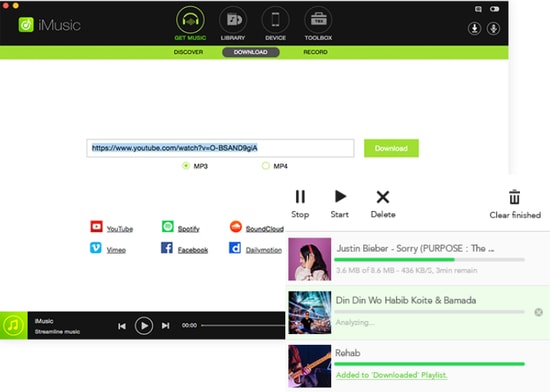
iMusic is one of the best MP3 tag editors for Mac. This amazing tool has everything you are looking for. It can be used for multiple reasons and it offers features transfer, sharing and the management of music libraries that make this software count.

Noteworthy features: 

  • iMusic allows you to transfer music between iOS devices, Mac, PC and iTunes.
  • You can download music from Archive, YouTube, and numerous other sites.
  • It features batch download from Youtube in multiple formats such as MP3, MP4, WebM etc.
  • It allows you to stream and download qualitative audio in multiple audio formats.

Download


2. Kid3

Kid3

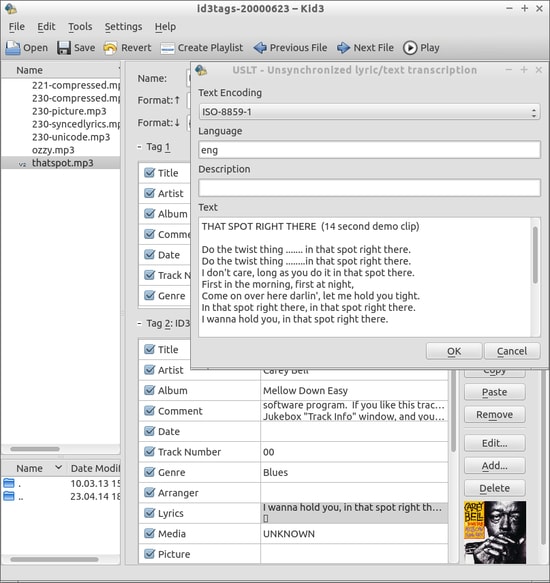
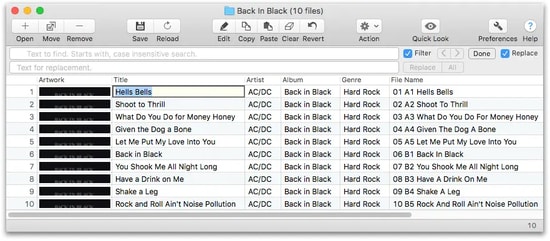
Kid3 is another best free MP3 tag editor to be available for your Mac. It allows you to edit the information for both audio and video on Mac alongside many other features such as conversion of tags, exporting tags in multiple formats etc.

Noteworthy features: 

  • Kids3 allows you to edit the file names for multiple files together.
  • It allows you to convert the tags between ID3v1.1, ID3v2.3 and ID3v2.4.
  • You can create playlists with this software.
  • It imports tags from other online directories.

Download


3. Metadatics

Metadatics

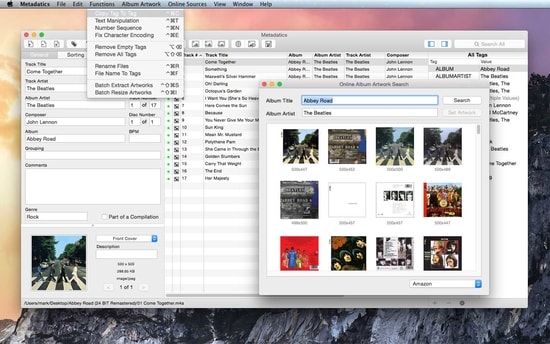
Metadatics is yet another amazing MP3 tag editor that allows you to edit the information of music on the Mac system. The best part about this software is that it lets you edit the truckload of audio files as quickly and easily as possible.

Read Also: Best MP3 Duplicate Songs Finder And Remover

Noteworthy features: 

  • This tool features smooth functionality which allows you to edit/replace the characters and copy tags.
  • It is easy to use and allows you to search the data online.
  • It supports ID3v1, ID3v2, MP4, Vorbis, APE, and ASF tags from multiple audio formats.
  • You can rename, and generate files in this tool.

Download


4. MusicBrainz Picard

MusicBrainz Picard

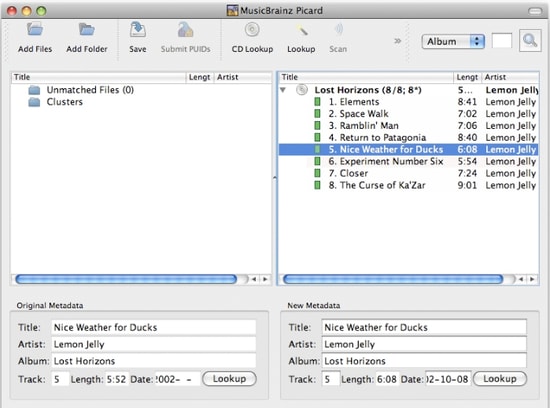
MusicBrainz Picard, introduced by MusicBrainz, counts as one of the best free MP3 Tag Editors for Mac that helps you edit metadata and supports files of several formats alongside the AcoustID feature.

Noteworthy features: 

  • MusicBrainz Picard supports multiple formats such as WMA, WAV, MP3, FLAC, OGG M4A and more.
  • It features AcoustID audio fingerprints for audio files to be recognized by actual music.
  • It features lookup from CDs allowing to look over the music in one go.
  • This tool is open source.

Download


5. MetaBliss

Metabliss

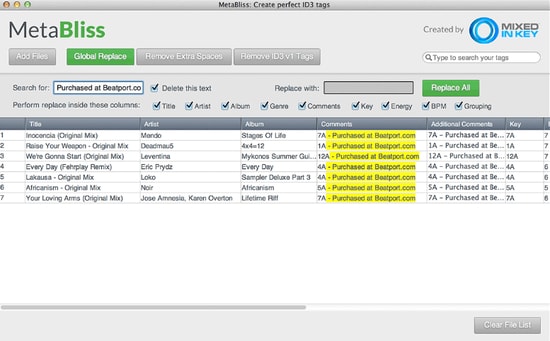
You may want to use MetaBliss, one of the coolest MP3 tag editors with friendly features that is available for MAC OS X for free. If you are looking for a steadfast editing tool then this one is worth the try.

Noteworthy features: 

  • Metabliss allows you to edit the song name, artist and many other tags easily.
  • Ity enables easy searching for multiple files.
  • In this tool, you can rename the filename, and remove the files easily.

Download


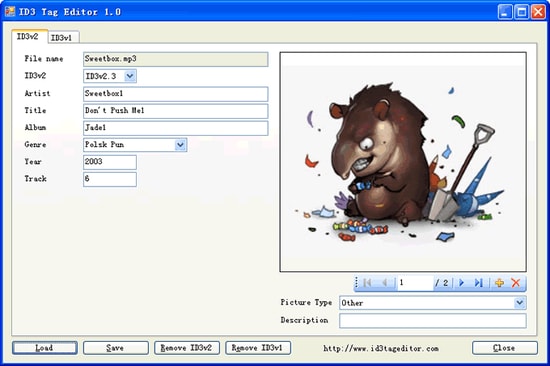
6. iD3 Tag Editor

iD3 Tag Editor

iD3 editor is one of the best MP3 tag editors for Mac operating system and Windows. It is free to use and is known to be a light software but sometimes, its interface becomes too challenging to comprehend.

Noteworthy features: 

  • iD3 tag editor is supported by iTunes, Winamp, Windows Media Player and many other software.
  • In this tool, you can easily copy and paste the data.
  • It allows you to write comments to your audio files.
  • You can easily remove the ID3 tags from the audio files.

Download


7. TuneUp

TuneUp

Image Source: Bitsdujour

TuneUp, another best MP3 tag editor, helps you in organizing the music collection with ease. It features striking functions along with a friendly and attractive interface. Your search for a software that keeps it organized and clean may end on this tool.

Read Also: List of Best Mac Cleaner Apps

Noteworthy features:

  • It features waveform recognition technology which lets it detect the acoustic fingerprints of a file and provide you the information.
  • The files are organized automatically and it removes the duplicate ones.
  • It allows you to share the MP3 you stream on social media platforms.

Download


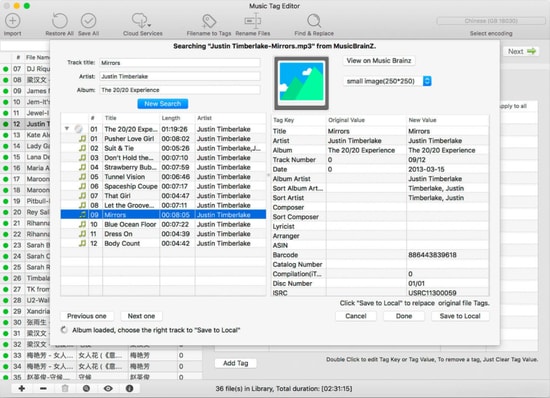
8. Music Tag Editor

Music Tag Editor

Image Source: InsMac.org

Music Tag Editor is one of the best free MP3 tag editors for Mac that offer the fastest features and help you in changing and editing the metadata of audio files.

Noteworthy features: 

  • In the Music Tag Editor tool, you can edit the cover photo of soundtracks as well as the tags.
  • This software allows you to make changes and edits in multiple files using this MP3 tag editor.
  • It supports iTunes tags.

Download


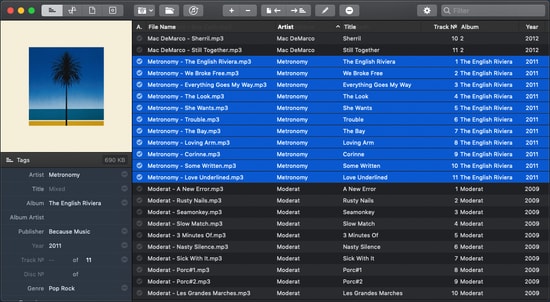
9. Meta

Meta

Ease your way out to edit the metadata of audio files  with this one of the best MP3 tag editors, Meta. However, you can only edit the multiple audio files together.

Noteworthy features: 

  • You can change and edit the metadata of audio files fastly.
  • You can change the cover photo of audio files.
  • It features a user-friendly interface and thus, makes the experience lightweight.

Download


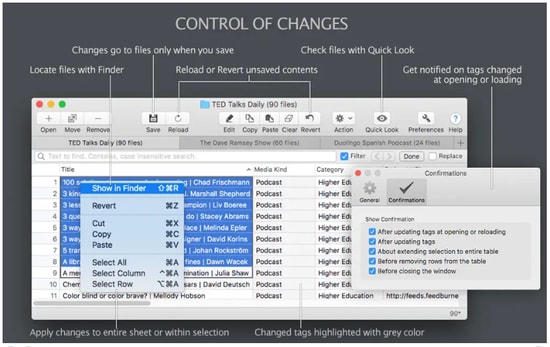
10. Tag Editor

Tag Editor

If you are still looking for the best MP3 tag editor for mac, perhaps you should take a look at Tag Editor. Yes it does what is synonymous with its name and works with ease.

Noteworthy features: 

  • It allows you to edit the files in a batch and organizes your collection.
  • You can edit several file names together.
  • It allows you to cut, copy and paste the tags.
  • It allows you to download the tags from online platforms.
Download


11. Wondershare UniConverter

Wondershare UniConverter

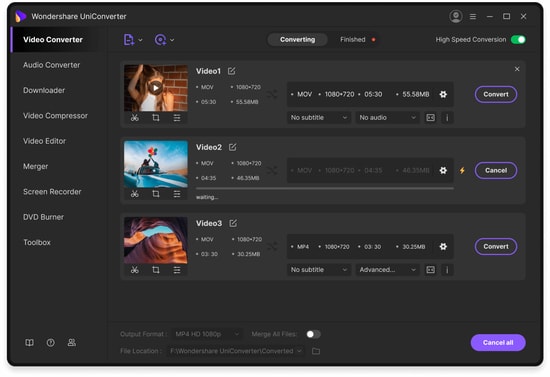
Wondershare Uniconvertor is one of the most popular and best free MP3 tag editors to count in this list. This software was originally known as Wondershare Video Converter Ultimate and is often used as a video editing tool. However, when it comes to editing or changing metadata of audio files, this software will not disappoint you.

Noteworthy features:

  • Wondershare Uniconvertor features a decent user interface.
  • It offers you to edit the meta tags of files both automatically and manually.
  • It offers a free version.

Download


12. Music Tag Editor Pro

If you cannot get enough of editing the meta tags of your audio files and need one best free MP3 tag editor for Mac which offers incredible features at zero dime then check this software, Music Tag Editor Pro. It easily helps you check off your music to-dos with its super-friendly user interface.

Noteworthy features: 

  • Music Tag Editor Pro automatically fills the metadata by synchronizing the information from an online platform.
  • This software supports almost every major audio file format.
  • Since it features batch processing, you can change the metadata of multiple audio files together.

Download


13. MP3TAG

MP3TAG

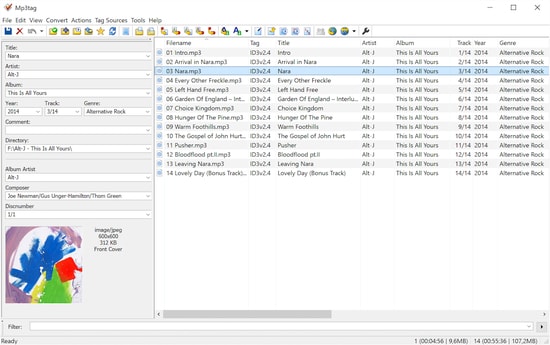
Keep calm as we still have one of the most powerful and useful software to share with you and that is MP3tag. This amazing MP3 tag editor features an attractive list of all the prominent offers that you could ask for. These features include batch tag editing, Importing tags from online databases, User-friendly interface and many more.

Noteworthy features: 

  • MP3tag tool features easy-to-use interface and ease your way out to edit the metadata of audio files.
  • It supports batch-tag editing of ID3v1, ID3v2.3, ID3v2.4, iTunes MP4, WMA, etc. Thus, it allows you to add tags for multiple files at once with support for multiple audio formats.
  • This tool can collect tags from online databases alongside the cover art.
  • It allows you to rename, import and export tag information and also lets you create playlists.

Download


14. Amvidia

Amvidia

Amvidia offers the user to edit more than 60 types of tags for the videos. Using the software the user can download the information from online websites like ACoustid, MusicBrainz, and many more.  The software has two versions available including the paid and free versions.

Noteworthy features:

  • One-stop solution for a music tag editing
  • The software download the Metadata automatically from different websites in just a few clicks
  • Compatible with most Mac OS
  • The user can also edit the tags and remove the extra space present in the information
  • Using the Amvidia user can also rename multiple files together with ease

Download


15. Mp3TagsForTracks

Mp3TagsForTracks

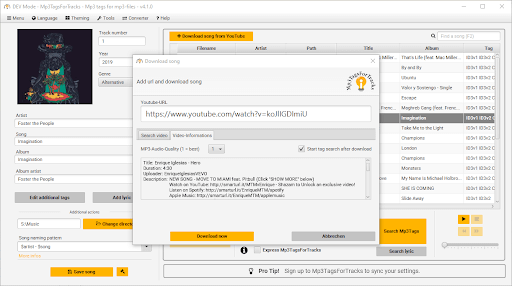
Let us introduce you to Mp3TagsForTracks. It is among the best software to edit MP3 tags on Mac because of its intuitive GUI with an in-built audio player, easy album cover search, lyric addition to a song, and the following incredible features.

Noteworthy features:

  • Lets you download YouTube music videos
  • Express makes available all the additional MP3 file information with a single click
  • Normalizes the audio file’s volume when saving it
  • Automatically adds and saves the audio file genre

Download


Conclusion

So, that was about the 15 best free MP3 tag editors for Mac that possess amazing features to help you get the metadata under check in no time. With every software featuring friendly specifications and simple interface, you have a thick list to choose from. Which one are you getting hands on? Share with us in the comment section if you have anything to add or maybe, ask?


Author

Jyotsana

Jyotsana is a technical writer with a non-technical background. An eye of detail and a knack for writing helps her to write technology related content.
Apart from writing, she is a coffee connoisseur and an aesthete who rejoices in poetry and music during leisure.

View all posts

Related Posts
9 Ways to Improve eCommerce Shopping Cart Conversion Rates

9 Ways to Improve eCommerce Shopping Cart Conversion Rates

November 10, 2020
0

With the market going digital, eCommerce has become one of the major platforms to increase market share. However, it is not possible unless the traffic on the website seals the deal. Converting digital traffic to buyers requires modern techniques. With more conversion rates, the sales volume increases, and the eCommerce platform garners confidence in consumers’ minds.

Improving the Conversion Rate

One has to follow specific rules and regulations, tips and tricks, business models, and ethics to succeed in the e-commerce business and increase the consumer base. It is not always a cakewalk as it sounds but often requires professional help so that your small business can sustain the online market pressure and have positive growth. So it’s always better to hire an agency like 2x.marketing, etc for taking care of your eCommerce store.


The Typical Flow

One can observe that the eCommerce conversion rate increase depends on various unique features and tools. They can be unique products, strong customization filters, attractive displays with details, prompt delivery period. Consumers spend more time on an eCommerce platform with these features and often fill their shopping carts and seal the deal. 

1. Using Various Tools

Many digital tools available these days. They can monitor the customer behavior pattern, gauge their social activities. These tools allow optimizing the online platform and giving more customized prompts. Ideas of client preferences get mapped, observing their other online social activities. 


2. Offering Prompt and Free Delivery

Customers are more eager to get fast delivery as butterflies fly inside their stomach as they purchase something online. They are also too price-conscious while shopping online as they can compare across various platforms. Free delivery is one of the best options to convert visitors to customers.

Let’s take an example of buying printer ink from Amazon vs YoYoInk. Both sites sell printer ink but most of the customers end up buying from YoYoInk because of the free delivery option. However, platforms should introduce it judiciously by adding the delivery cost to the product. Marketing is a psychological game, and one who can break this barrier can win the race and increase the market share across and segments. 


3. Offering Flash Sales or Time-Bound Coupons

One of the essential provisions of increasing the conversion rate is to offer flash sales or time-bound discount coupons. Customers like to eat free pies without thinking about how it is possible to offer. Luring the customer and converting them to buyers. These coupons or flash sales increase the conversion rate for a limited period and help clear stocks or increase market penetration and share. 

Read More: Best Deal Apps For Best Discounts


4. Having a Smooth Checkout Process

Many customers add products to their cart but turn a blind eye during the checkout process. If the store checkout process takes more time, the payment gateway is limited or slow; the consumers may feel uncomfortable and retract from completing the transactions. Therefore a smooth checkout process, ordering as a guest, and an easy payment gateway can increase the conversion rate. Making a crisp and single page checkout process helps to hold on to the prospect.


5. Staying Competitive in Pricing

Customers and visitors of any of the eCommerce platforms are not fools. They compare similar products across various eCommerce platforms for the price, delivery, offers, etc. Consumers only seal the deal with the platform offering the lowest price and without any hidden conditions. It isn’t easy to have brand-loyal customers unless they are quite competitively priced or at par with other platforms.


6. Adding High-Quality Still Images and Video

Like physical stores where light and proper display play an important part in drawing attraction and confirm the deal, it is a bit difficult on eCommerce platforms unless the contents and images are of high quality. Many times supportive HD videos help to gain the confidence of the visitor and increase the conversion rate. Providing many details with pictures and videos and fine prints increases the client’s imaginary capacity. Just don’t limit yourself with these things. Give importance to product packaging too. Like using direct thermal labels to print the product description. This gives a good high-quality look and adds value to your product branding.


7. Using Instant Chat Software

eCommerce conversion rate depends on how well the platform can convince the customer with the product details. Often customers have extra queries. Customers can face delivery, shipment, or refund issues. Live chat software can quickly solve these problems. Therefore, incorporating live chat software can increase the conversion rate or guide the existing traffic towards successful checkout. 


8. Tracking User History

Most of the eCommerce platforms have registered customers. People abandon products in shopping carts for various reasons. It is best to track the visitor’s cart and loom for cart abandonment. Sending emails reminding the customers about the abandonment or giving some discount or coupon code often brings back the customer to complete the checkout. Using specific software to track cart abandonments and sending special offers substantially increase the conversion rate. 

Read More: Best Money Making Apps for Android & iOS


9. Maintaining High Site Security Levels

Customers use debit, credit, or other online payment methods while doing online transactions. They are quite skeptical about site security and hacking. Increasing the platform security levels and letting the customers know about them can increase the conversion rate. 


In Conclusion

One can easily increase the conversion rate following the above methods in their eCommerce platform. Ultimately, the sales revenue that matters and inducting the above techniques can increase traffic and shoot up the conversion rate.

14 Best Free Android Cleaner Apps to Optimize Your Android Phone

Best Free Android Cleaner Apps to Optimize & Speed Up Your Android Phone

December 5, 2023
0

Is your android running slow? If yes, then this article is for you. We have mentioned in this article, a list of best Android cleaner apps to help you choose the best app to clean and optimize your Android phone. Cleaning an Android phone makes it run faster, removes junk data and also improves battery life.

Why Do You Need Android Memory Cleaner Apps?

Manual selection of the junk and cache files, unused files, music, video and photo files can be an extremely time consuming process. Thus, use of Android cache cleaner apps is the best way to swiftly clean your phone.


Other Benefits of Using an Android Cache Cleaner App?

There are several other benefits of using a phone cleaner app, apart from removing junk files from your device. Here they are:

  • It boosts your Android phone’s battery life
  • It generates a lot of free space for your device
  • It acts as a RAM booster and increases your phone’s performance and speed
  • It helps to organize and declutter your smartphone

Best Free Android Cleaner App to Clean Your Android Phone in 2024

We have penned down a list of 9 apps in the category of best phone cleaner for Android that can help get the device back to its original speed.

1. 1Tap cleaner:Best Android Cleanup App, Powerful RAM Booster

1Tap cleaner - Best Cleaner For Android

1Tap Cleaner is possibly the best cleanup app for Android that cleans your smart phone with just a single touch thus enhancing the performance of your Android phone immensely. What does it clean? It cleans your cache, history and your call/text log, default cleaner, SD Cleaner and much more efficiently.

The in-built apps can also be cleaned using the 1Tap cleaner by the process of default cleaning of these apps. All you have to do is set an interval at which you can clean your app and then forget all about cleaning.

Read Also: Best Junk File Cleaner For Windows 10/8/7

After this, the Android phone cleaner can keep on cleaning your Android phone all by itself without disturbing you with messages for permission to carry on cleaning. It is absolutely free and it is quite user friendly even though it has limited functionalities.


2. CCleaner: Cache Cleaner, RAM Cleaner, Booster

CCleaner - Top Android Cleaner

CCleaner is one of the best cleaner apps used for cleaning almost everything including computers, laptops and smartphones. It releases a lot of space by cleaning temp files, cache, junk files, downloaded folders, call and SMS logs, etc.

It incorporates a number of powerful features like application manager, RAM booster, app hibernation, storage meters and more. It also has a separate option for indicating battery and temperature of the phone.


3. Phone Master – Junk Cleaner Master, Battery Cooler

Phone Master - Best Android Cleaner

If you want your Android device to function in a way you like, then you must try Phone Master. With this app installed on your device, you can easily save power with CPU tuners and can also improve your phone’s performance immensely.

Phone Master often requires asking you basic permissions in order to run on the phone. This app can however, turn a little perilous if you do not have much idea about the various tolerance zones of Android. It is a great app for those users who are well versed with the Android device though.


4. Avast Cleanup – Avast Software  – Phone Cleaner, Booster, Storage & Memory Cleaner

Avast Cleanup and Boost, Phone Cleaner, Optimizer

This is one of the best Android cleanup apps for Android as it cleans your phone in no time and makes it run faster.

All you need is just a single click to clean extra junk and trash from your Android smartphone.

One of the biggest advantages with Avast Cleanup and boost app is that you can organize your phone’s picture library in no time. Furthermore, you can also analyze your images and apps.

You can improve your battery life by removing the junk of those programs in the phone that eats away your battery more. With Avast Cleanup you can actually make the high energy demanding apps dormant thus saving more of your battery.


5. Norton Clean, Junk Removal

Norton Clean, Junk Removal

Norton is undoubtedly one of the best cleaners for Android. With the help of this app, you can successfully remove the junk and trash from your Android.

Apart from cleaning, Norton would always inform you whenever you are trying to establish a connection with an unsafe public Wi-Fi. You can always try to block all those calls that you do not want to take with the help of Norton.

Read More: Best Battery Saver Apps For Android Smartphones

With Norton Clean, junk removal you can uninstall any unnecessary apps and also find out more about those apps that can harm your Android phone in any which ways or have higher probabilities of stealing information from your Android phone.


6. AVG Cleaner – Clean Out Junk & Free Up Storage

AVG Cleaner For Android

AVG Cleaner is one of the best cleaning apps for Android that can not only clean up the junk but can also increase the speed of your Android phone largely. AVG Cleaner could be your single stop solution for cleaning junk and for boosting your phone, in order to achieve an optimum performance. Delete unnecessary apps that serve you no purpose.

Chop off the unnecessary picture files and video files from your phone using AVG Cleaner. AVG Cleaner can increase the cell life of your phone remarkably. You can make those apps dormant in your phone that you are not using at that point of time with the help of AVG cleaner.


7. Speed Booster – Super Clean, Master of Cleaner

Speed Booster - Best Android Cleaner App

With Speed Booster you can clean junk files and remove messages from your phone. It is extremely lightweight and user friendly. You can remove any number of files and also boost your phone’s battery life and also cools down your phone. Speed Booster is one of the best phone cleaner apps that can optimize your smartphone in no time.


8. 360 Cleaner – Speed Booster & Cleaner Free

360 Cleaner - Best Android Cleaner Apps

360 Cleaner is one of the best Android cleaner apps and helps to increase your phone’s storage space. It also helps you to clean the cache and also boosts your memory. It serves as the app manager, processor cooler and also saves power immensely. It helps your phone work as an optimizer and also frees up memory and cools your phone.


9. Super Clean-Master of Cleaner

Super Clean-Master of Cleaner

Super Clean-Master of Cleaner is yet another best Android cleaner apps and can help you improve the performance of the Android device in a single tap. The tool allows you to take control of the overall storage and manage what’s saved on your device. The app offers feasible widgets to help you manage the device’s performance on the go.


Frequently Asked Questions:

Q1. Which is the best Android cleaner app without ads?

Among a myriad of best Android phone cleaner apps, you can use 1Tap cleaner app for an ad-free cleaning experience.

Q2. How to speed up an Android phone?

Android smartphones tend to become slow over a period of time after constant usage due to accumulation of numerous types of junk files.

Therefore, if you want to speed up your Android phone, then you can easily use Android cache cleaners apps to delete redundant temp files and free up memory as phone storage to speed up your Android smartphone.

You can refer to our article above for learning about some of the best applications in this category.

Q3. How to clean Android phone cache?

Android phone’s can be cleaned using competent cleaning apps that can delete cache files, junks, and unused apps. You can refer to our article above to decide which app best suits your requirements.

Q4. How to make an Android phone faster through an optimizer app?

Optimizer apps cleans RAM, and uninstalls unused applications, deletes apps which hog the memory and battery, as well as remove unwanted files, videos, etc from the smartphone, thereby making the Android phone fast and stable.


Best Android Cleaner 2024

So, after reading about all these above-mentioned best Android cleaner apps, I am sure by now you know which one to use to clean RAM and improve your phone’s performance.

Go to the Play Store and download the app of your choice. After downloading and using these renowned Android optimizers, your phone’s performance would improve manifold.

We would love to hear from you. You can forward your queries and suggestions to us by putting them in the comment’s box below. Subscribe to our newsletter or follow us on social media to get the latest updates from the world of Information & Technology.

1 Comment
    Glenn says: Reply
    December 7th 2020, 1:49 am

    These are really amazing tag editors!

Leave a Reply Cancel reply

Your email address will not be published. Required fields are marked *

Sidebar Image bit G ad1

Latest Posts

  • Best VirusTotal Alternatives for windows in 2026 
    by Dikshika Singh / April 30, 2026
  • Best Ways to Fix Facebook Session Expired Loop Error  (1)
    Best Ways to Fix Facebook Session Expired Loop Error 
    by Gunjita Sompura / April 28, 2026
  • React vs Vue
    React vs Vue Detailed Comparison in 2026
    by Gunjita Sompura / April 23, 2026
  • Top Image Resizing software for Windows PC 
    by Dikshika Singh / April 21, 2026
  • How-To-Download-and-Install-Windows-Fax-And-Scan-In-Windows-11
    How To Download and Install Windows Fax and Scan in Windows 11
    by Dikshika Singh / April 15, 2026

Categories

  • Cyber Security
  • Driver Updater
  • Entertainment
  • Fitness
  • Games
  • How To
  • laptop
  • OS
  • Reviews
  • Tech News
  • Tips & Tricks
  • Top 10
Sidebar Image bit G ad1
Best Debugging Tools for Windows 10, 8, 7 in 2024 10 Best Debugging Tools for Windows 10, 8, 7 in 2024by Harshita / December 26, 2023
9 Best LiveLeak Alternatives to Watch Videos In 2024by Harshita / December 26, 2023Best LiveLeak Alternatives
TechPout Footer Logo

We at TechPout promise to put forth stories that help people to learn and simplify their digital life. Our purpose is to share the true essence of technology with our tech-loving community.

Useful Links

  • About Us
  • Contact us
  • Privacy Policy

Popular Posts

  • Best PC Optimizer Software
  • Best Mac Cleaner Apps
  • Best Driver Updater
  • Duplicate Photo Finder and Cleaner Software
  • Best Free Movie Download Sites
  • Best IPTV Players

Follow us

Copyright © 2026 www.techpout.com. All rights reserved
DMCA.com Protection Status