Main LogoLight Logo
  • Reviews
  • Top 10
  • How To
  • Tech News
  • OS
    • Windows
    • MAC
    • iOS
    • Android
  • Categories
    • Driver Updater
    • Cyber Security
    • Games
    • Fitness
    • Entertainment
    • Tips & Tricks
How To
by Jyotsana

How To Send Message To Someone On WhatsApp Who Is Not In Your Contact List

October 16, 2020
1

Despite the upgrades and exciting features over the years that WhatsApp has into, you still need to save the contact in your phone to commence the conversation. But that doesn’t echo a straightforward NO to messaging an unsaved contact on WhatsApp. If you are wondering how to send a message to the number not in your contact list, this article is here for you.

Table of Contents hide
Send Message to an Unsaved Contact on Your WhatsApp
How to Send Message to an Unsaved Number If You are an iPhone User
How to Send Message to an Unsaved Number If You are an Android User

Send Message to an Unsaved Contact on Your WhatsApp

If the unsaved number you are meaning to send a message to is registered on WhatsApp, you will have to start by creating a WhatsApp link to be able to send a message to the number that is not in your contacts list. When you click on the link, a chat with that person will automatically open up.

Here’s what you have to do to create the link:

  • First, open your preferred browser Chrome, Firefox or Safari. 
  • Stop yourself at the web address bar to type: https://wa.me/<phonenumber>
  • Replace the last part (“phonenumber”) with the unsaved number you want to send a message to.
  • As you add that number, make sure to add region code and do not put + , () or 00. It should look like this: https://wa.me/910987654321 
  • As you type the URL in the browser, you will now see the big green message icon on the new web page. Tap on it to open chat with that number which you just typed in your WhatsApp.

Read Also: How to Show or Hide WhatsApp Status from Specific Contacts


How to Send Message to an Unsaved Number If You are an iPhone User

Are you looking for a way to send messages in a number that is not added in your WhatsApp contacts on iPhone? Great. You can try this method to message the unsaved number on WhatsApp. It involves Siri (iOS 12 and above) for the steps to get started.

Here’s how to do that:

  • Open Shortcuts in the Settings.
  • Now, enable Allow Untrusted Shortcuts.
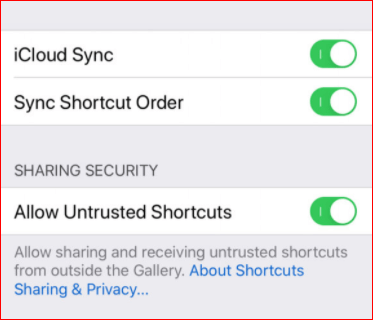
Enable Allow Untrusted Shortcuts

  • Now that you are allowed to run Siri Shortcuts from everyone and anyone, you can open this link and click on the Get Shortcut button to download it. You will be redirected to the Shortcuts app. 
  • Now, Tap Add Untrusted Shortcut.
  • Find the WhatsApp to non-contact shortcut in the My Shortcuts tab. Then, tap Add to Home Screen to create a quick launch shortcut on the home screen.
  • Now, you will need to enter the recipient’s number. Mention the country code along with the number. Then, you’ll be redirected to WhatsApp with a new message window open.

Read More: Find Someone On Snapchat Without Username & Phone Number


How to Send Message to an Unsaved Number If You are an Android User

If you are an Android user then you can try the method below to send a message to an unknown number on WhatsApp.

  • Open your phone’s keypad.
  • Type the number.
  • Once you have typed the number, select it on the keypad.
  • Now, there will be a few options to take action on that number like Call, Cut, Copy etc.
  • Check to see if there’s a drop-down button further for more options to send messages on third-party text messaging tools. If it is there, you might be able to get WhatsApp in the list which you can select to send a message to that unsaved number.

Note: This trick does not work on all iPhone & Android phones. You must have Android 9 and above OS to get access to this trick which is only available on the selects or you can apply the method of creating the link to start messaging.


Conclusion

You just learned the best methods and tricks on how to send WhatsApp messages without adding contact. Whether you are an iPhone user or the Android one, give these tricks a try. It does require extra actions as compared to sending messages to the saved numbers but if you are up for that, then you can perform the steps. If you found this section helpful, don’t forget to let us know in the comments.  

Author

Jyotsana

Jyotsana is a technical writer with a non-technical background. An eye of detail and a knack for writing helps her to write technology related content.
Apart from writing, she is a coffee connoisseur and an aesthete who rejoices in poetry and music during leisure.

View all posts

Related Posts
7 Best Ways to Unblock Websites & Access Restricted Contents

7 Best Ways to Unblock Websites & Access Restricted Contents

February 19, 2021
0

Here, at Tech Pout, we’ve rounded up the list of best yet safe methods that educate you on how to unblock websites and access the restricted content. Read the entire details below!

Though we are currently nourishing in the 21st century, the blocked or restricted website instances are more than beyond any zone. Don’t you feel the same? In some territories, governments have blocked some kind of websites due to inappropriate content. However, it is quite a common thing. But, undoubtedly, it is the worst thing too, that hinders your work by any means.

Whether you are a college/school-going student or an employee working in a big organization this issue makes you feel restless and hinders your work too. So, if you are one of them who are frustrated by the blocked websites in your offices/schools/universities, then now you don’t need to worry. Because we’ve brought the most effective ways to access blocked sites with ease at tips. Before, turning ahead, let’s know about it in-depth!

Why Do Websites Get Blocked?

IP (Internet Protocol) address is something that verifies your device over the internet and reveals your real-physical location as well. Even the all-powerful blockers of the websites are capable to keep you away because of your IP address. And then that indicates to the network executives or the content providers whether your device should be permitted to access the specific sites or not. But, luckily we have a VPN, a Virtual Private Network through which we can hide our IP address. It is one of the most ideal options, and we’ve also included it in the list. 

Many of us, think that “Is it safe to Unblock Websites and Access Restricted Content”. Well, it totally depends on where you belong to. Through a VPN, you can do so as most of the countries allowed VPN, even in China, in some range. But, if you breach the copyright media rules then it is illegal and you’ll be punishable for this as well according to the cyber laws and amendments. In that case, doesn’t matter you are accessing a VPN or not.


Safe & Legal Ways to Access Blocked Websites

We don’t know your reason behind accessing the blocked websites, but still, here we’ve come up with the best ways to unblock blocked websites and access the restricted content. So, without any further ado, let’s get started with the list!

#1. Use VPN to Unblock Websites 

One of the easiest and stable ways to access blocked sites is – using a VPN. A Virtual Private Network, that hides your IP address. Accessing a VPN, the traffic from your side transfers via a VPN server that is not blocked or restricted by the government or ISP. By this medium, it allows you access even the blocked websites. Experts recommend using a VPN to unblock websites is one of the safest and easiest ways. If you are interested in this method, then we would like to suggest you the most robust VPN services including ExpressVPN, NordVPN, and many more. Here are the steps on how to do it!

Step 1:- Download and install the most suitable VPN service as per your choice. 

Step 2:- Then, connect your system to the Internet.

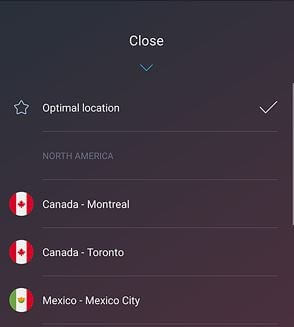
Step 3:- Turn on the VPN, choose the location of the server that you want to browse from. And, for the fastest speed and hide your IP address select the Optimal location option. 

Hide Your IP Address Select The Optimal Location Option

Woohoo! now you are browsing with the secure hidden location. That’s how using a VPN you can access blocked sites with much ease and security. 

Read More: How To Increase Upload Speed On Internet


#2. Unblock Websites through Tor

Another handiest option to staring the restricted content is using Tor. The Onion Router aka Tor helps you in accessing the restricted content online. It ways your online traffic through many layers of encryption, that’s what it actually supposed to do. That is how it lets you access the restricted content anonymously. Moreover, Tor provides strong online privacy and security. Steps to unblock websites on Google Chrome or any other browser using Tor. 

Step 1:- Visit the Tor website.

Step 2:- Now, you need to select your platform i.e., Windows, Mac, Android, or iOS. 

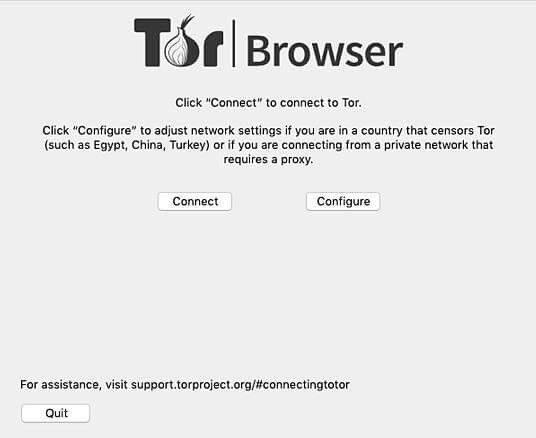
Step 3:- Setup Tor and configure it (optional).

Unblock Websites Through Tor

Step 4:- After this now you can connect.

Hooray! now you access any sites anonymously that you wish for. This is it! what you need to follow to unblock blocked websites online using Tor. 

Read More: How To Setup & Use a VPN in Windows


#3. Hook-up with the URL shortener

Just in case, if you are not able to use VPN and Tor to unblock websites. And, are in a hurry to access blocked content immediately. Then, here is one quick method that can help you a lot and which is using a URL shortener. However, it is not accurate as the VPN and Tor, but yeah it can help you a bit in all possible ways. Here are the steps that you need to travel with!

Step 1:- Switch to one of the best URL shorteners such as is.gd, Bitly, TinyURL, and many more. 

Step 2:- Then, you need to input the website which you want to access or unblock into the URL zone and click on the Shorten tab.

Step 3:- After this, copy the new shorten URL and paste it into your browser. If your luck is with you, then you can successfully access the restricted content.

So, this is the quickest yet simple way to unblock blocked websites online in just a matter of moments. 


#4. Chop and Change Protocols 

The next best way to unblock websites is – switching the protocols. If your school or work area accessing the primary blocking approaches, then you can use the chop and change protocol way to get access over it. Sometimes, you can be able to unblock the blocked websites just by switching from HTTP to HTTPS. Maybe, this little change can make a big impact. 

Note: Though, HTTP is the less secure protocol. And, we advise you not to enter any personal information into the websites that are using the HTTP protocol, just because of the security shortcomings.

Read More: Best Free TV Streaming Sites To Watch Online TV Shows


#5. Use Web Proxy to Unblock Websites 

If you are using a school or workplace’s computer and won’t be able to use a VPN or Tor, and need to unblock the blocked website instantly. Then, in that case, you feel helpless. Isn’t it so? If, yes, now you don’t need to feel the same as earlier anymore. Here comes Web Proxy, another smartest hack that lets you access restricted content. 

Basically, Web Proxy is for quick access to the restricted content from the blocked websites on the local or public systems. To do so, you’ll require to access the Web Proxy first, after that the desired landing place. And, before visiting the website that you want to, you’ll need to connect to the Web Proxy first always. Totally agree on this that it is a little frustrating and daunting. 


#6. Use Proxy Extension to Unblock Websites

Like Web Proxy, one more convenient way to get access to the blocked websites is through Proxy Extensions. It is the extensions that allow you to peep into the restricted content. It’ll get you around the content in no time, however, there are numerous Proxy Extensions available for Chrome. Out of them, we have shared HIMA VPN Proxy Extension, you can easily get it from the Chrome Web Store. Here is how it works! 

Step 1: Download the HIMA VPN Proxy Extension for free from the Chrome Web Store.

Download HIMA VPN Proxy Extension

Step 2: Confirm your action by clicking on the Add Extension. And, choose the hat-icon on the top-most right edge.

Confirm Action By Clicking On Add Extension

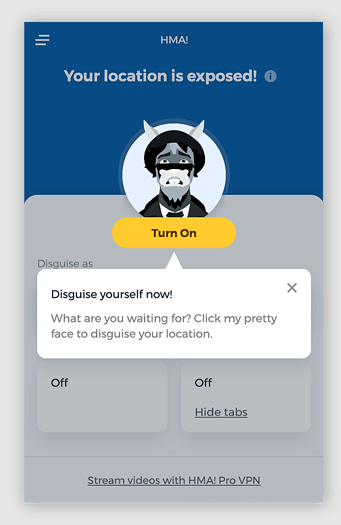
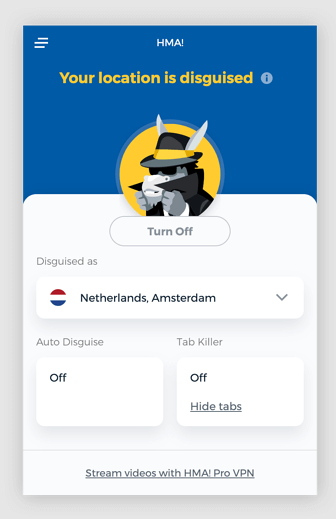
Step 3: Now, choose Turn on to initiate the extension. Disguise as will allow you to choose your preferred virtual network.

Choose Turn On To Initiate Extension

That’s all! Now, you are ready to access the restricted content as per your preference.


#7. Try Google Cache

Another quick method that lets you unblock sites on Google Chrome for PC is – using Google Cache. It is something when your Google or any other browser makes a copy of browsed files and saves it. So, when you visit that cached website again then it loads faster. Thus, just in case, if the live version of the website is blocked so you can use the cached version. Here is how to do it!

Step 1:- Visit Google.com, and search for the website that you want to visit.

Step 2:- After this, Google will display the site with the arrow, click on that downside arrow to expand it.

Step 3:- Now, choose cached and enjoy the restricted content. 

Read More: How To Extract Audio From YouTube Videos


Unblock Blocked Websites and Access Restricted Content

So, this is all we want to tell you how to unblock websites and access the restricted content. Through this write-up, we’ve brought up a list of some effective ways that help you to get access to blocked websites. This list included some quick yet not so reliable methods as well. 

If you want to know our view on this, then we would like to recommend you to use the VPN for unblocking blocked websites. Using a VPN is the best way to unblock websites quite safely and legally. Hence, it is time to say goodbye to you. Hopefully, now you are familiar with the methods to unblock blocked websites. 

Lastly, do subscribe to our Newsletter for more interesting write-ups. Kindly share your feedback on this with us in the comment box below. We’ll be glad to hear your suggestions. We’ll come back soon, till then, stay tuned with us!

Computer Programming Is it Possible to Learn This Profession on Your Own

Computer Programming: Is it Possible to Learn This Profession on Your Own?

July 7, 2022
0

Is learning code on your own possible? This is a question you may be asking if you have considered other options and they don’t work for you. Learning programming requires discipline and commitment. It is basically learning how to give your computer “instructions” that it can execute. If you learn best independently, learning computer programming on your own could be a suitable option for you.

Understand the basic concepts

You need to start off with basic coding exercises to understand more about the concepts involved in programming and how things work. Understanding the basic concepts is more important in the beginning than understanding all the different languages. You can find many courses and tutorials online that will help you to get started with basic computer programming.

Also Read: Best Programming Languages To Learn


Start writing your own code

At some point, you have to go beyond tutorials and guided projects and start writing your own code. When you start out, your scope may be limited, but the more code you write, the better you will get at it. Start writing your own code to make things, even if they aren’t perfect or have been done before. Make sure you keep working on your code until it works. You won’t improve unless you’re dedicated to writing your code over and over.


Teaching students programming

It takes time to learn computer programming, and if you’re a student trying to do it on your own, you may need help, especially if you intend to have a computer science career and get a computer programming job. You can use an online service and get a professional writer to write a college essay for you. If you buy a college essay from EduBirdie, you will receive a high-quality and plagiarism-free essay. It will be delivered within the required deadline and can devote more time to your computer programming.


What if you get stuck?

While learning on your own, you may often reach points where you feel stuck. You may try a more difficult exercise building on an earlier concept and find you’ve lost your way somewhere. What you will discover is that almost every problem you encounter has already been a problem for someone else. Google searches can get you quite far on your journey to learning code. If you can find a senior programmer to mentor you and help answer your questions, this will be a big plus for you.


Reverse engineer a website

If you want to solidify the knowledge you have already picked up, a good exercise to try is reverse engineering a website. Online Course Report has a list of tutorials where you can clone some well-known sites.

As it isn’t a paid job, you can take your time and learn as you go. Choose a fairly simple website and open it up in your browser. Look out for techniques such as CSS3 effects, animations, responsive web design etc. and find out more about them before using them. Studying good code is a great way to improve your own skills. If you get stuck, you can right-click on the webpage and “inspect element” to give you a clue on how to continue.


Get your code out there

By putting your code on GitHub, you can get feedback on it and even get suggestions for improvements. This is extremely beneficial if you are learning to code entirely on your own. There comes a time when you have to expose your code to other coders, even if you feel it’s amateurish and messy.

Having others review your code can be intimidating, but it is one of the best ways to learn. Other programmers can see if you have any obvious errors in logic and if you managed to translate what you were trying to do into code in the best possible way. If not, they can show you a better way to write it.


Will I ever be good enough to be a software developer?

There are many programmers with successful careers who are self-taught. It can be a tedious, lengthy process to teach yourself code. You will need many hours of practice if you want to become a professional coder.

Also Read: Software Development Languages For Programming


Conclusion

You may decide to get a Computer Science degree, take online courses, attend a coding bootcamp or teach yourself to code. No matter which route you take to learn to code, you will need persistence as it becomes harder the further you go. Overcoming all the obstacles along the way will give you what it takes to succeed in your career.

1 Comment
    Michale says: Reply
    October 18th 2020, 2:10 am

    Thanks for your marvelous posting! I actually enjoyed reading it, you’re a great author.

Leave a Reply Cancel reply

Your email address will not be published. Required fields are marked *

Sidebar Image bit G ad1

Latest Posts

  • How-to-get-help-with-file-explorer-in-windows
    How to Get Help With File Explorer in Windows 11/10
    by Niharika / March 20, 2026
  • Easy Online Video Editors to Try in 2024
    10 Easy Online Video Editors to Try in 2026
    by Remy Thomas / March 20, 2026
  • how-to-export-bookmarks-from-edge
    How to Export Bookmarks From Edge
    by Niharika / March 18, 2026
  • Best-Free-Online-Portfolio-Websites-in-2026
    Best Free Online Portfolio Websites in 2026
    by Niharika / March 16, 2026
  • Anytime Astro: Best Website For Online Astrology Consultation
    Anytime Astro: Connect Now For Online Astrology Consultation
    by Somya Shrimal / March 13, 2026

Categories

  • Cyber Security
  • Driver Updater
  • Entertainment
  • Fitness
  • Games
  • How To
  • laptop
  • OS
  • Reviews
  • Tech News
  • Tips & Tricks
  • Top 10
Sidebar Image bit G ad1
How To Change IP Address in Windows 10 How To Change IP Address in Windows 10? Try Easy Methods!by Jyotsana / October 12, 2020
How to Sync Contacts from Gmail to iPhone and iPad? Try 3 Ways!by Jyotsana / October 18, 2020How To Sync Gmail Contacts to iPhone or iPad
TechPout Footer Logo

We at TechPout promise to put forth stories that help people to learn and simplify their digital life. Our purpose is to share the true essence of technology with our tech-loving community.

Useful Links

  • About Us
  • Contact us
  • Privacy Policy

Popular Posts

  • Best PC Optimizer Software
  • Best Mac Cleaner Apps
  • Best Driver Updater
  • Duplicate Photo Finder and Cleaner Software
  • Best Free Movie Download Sites
  • Best IPTV Players

Follow us

Copyright © 2026 www.techpout.com. All rights reserved
DMCA.com Protection Status