

Looking for the best Instagram followers app 2024? Read the full guide to find the applications for Instagram real-time followers and ace up your Instagram game.
Building your connections and getting followers on a Social network giant like Instagram is quite a difficult task. Fortunately, several apps can help you in getting likes and followers on Instagram in seconds.
The default Instagram app does not provide any methods to boost followers; however, few dedicated and free Instagram Followers apps come to your aid in such scenarios.
Get Free Followers on Instagram and manage them effortlessly with the help of these best social media apps. The market is filled with numerous applications, but only a few can meet users’ expectations and are completely safe to use.
Read further to check the list of best and free Instagram followers apps that you may consider in 2024 to increase your account followers.
Top Free Instagram Followers Apps for Android & iOS in 2025
Want to become popular on Instagram? The first and obvious thing you need to do is to boost your followers count on Instagram. The following list contains a bunch of the best Instagram follower apps that can help you rapidly gain free followers for your Instagram account.
1. Social Scan

If you are looking for an indispensable app that can efficiently manage and monitor your Insta account, then Social Scan can be a good pick. The app is one of the best alternatives when searching for top follower apps for Instagram. It is loaded with multiple features and comes with a minimalistic and pleasant UI.
Use it to know the active users, who are following your account along with your unfollowers. This one of the best social media apps also gives you a single-screen view of the number of likes, comments, posts, followers, and much more.
It is a handy and lightweight application that does not consume too much memory space. Social Scan is fully compatible with iOS platforms and is completely free of cost.
You can also take the help of the app if your Instagram Music Not Working.
However, if you wish to enjoy some added features you can opt for its premium version. Which support multiple functionalities and allow you to find out:
- Your most active posts.
- Popular hashtags.
- Active users and
- Details about your followers who do not follow you back and whom from your follower list you don’t know.
Pros
- The application supports multiple accounts
- It keeps a track of history and searches for future use
- Show exact data about the account and posts
- It suggests the popular and most used hashtags
Cons
- The application requires a subscription for using it, the plan can vary depending on the time duration
2. Snoopreport (web): See what your friends, exes, and favorite celebrities
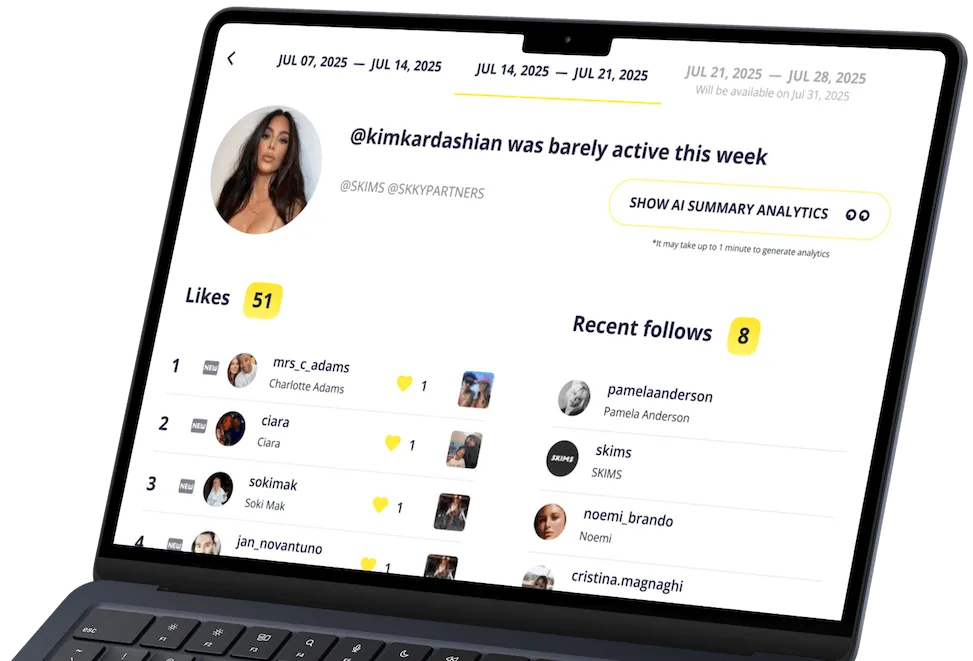
Want to spy on someone’s Instagram activity completely legally and anonymously? Snoopreport Instagram activity tracker shows the likes, new followings, and hashtags of any public profile, including friends, exes, and celebrities, so you can instantly see their interests. Its AI turns that activity into an easy-to-understand summary of interests and psychological profile, plus smart conversation starters and ideas for places they’d probably enjoy. All insights come from public data only – no passwords or access required.
Here’s how it helps you get followers:
- Borrow content ideas from the posts and topics that your target audience already likes.
- Mirror the hashtags and creators your audience engages with to expand your reach.
- Spot trends early by tracking competitors and niche tastemakers.
- Pick collaborations and shout-outs that your audience is primed to follow.
It’s best for creators, brands, and curious users who want authentic growth and practical insights, not fake-follower apps.
Pros
- Works with any public Instagram profile (friends, exes, influencers, competitors)
- Clear AI summaries of interests, personality, conversation starters, and likely hangout spots
- Ethical, research-first approach to growth (no bots or gimmicks)
- No target-account login needed.
Cons
- Report generation takes about a week from the time you begin tracking an Instagram profiler
- Retrospective reports on user likes and follows available an additional fee
Track Anyone’s Instagram Activity: See Likes & Follows – Snoopreport
See Anyone’s Instagram Activity without app installation. See What Someone Likes and Follows on Instagram with Snoopreport Instagram Activity Tracker
3. InsTrack
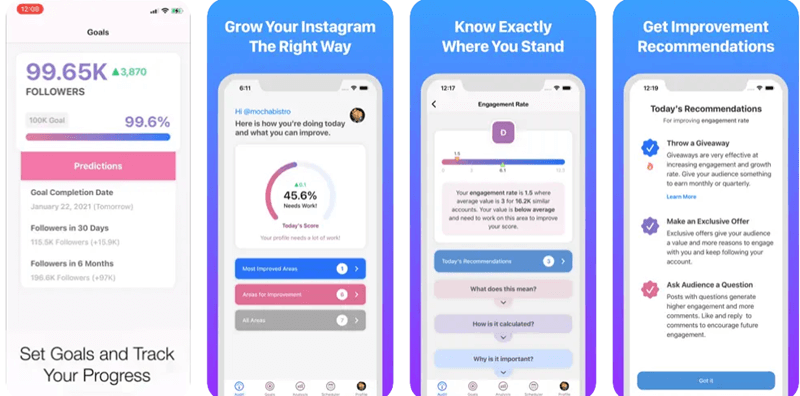
Get free Instagram followers Instantly with this smart and simple to use too. It provides detailed statistics of your Instagram account including followers/ unfollowers data, the total number of likes, comments, and subscribers.
Apart from the main feature to get Instagram followers it also allows you to toggle between multiple accounts.
Pros
- You can track Facebook as well as Instagram highlights using this application
- You can use multiple accounts with this application
- The app track the performance of hashtags
- It offers personalized recommendations of improvements
Cons
- To use this application you need to have a professional account
- It is not free to use software
4. Crowdfire
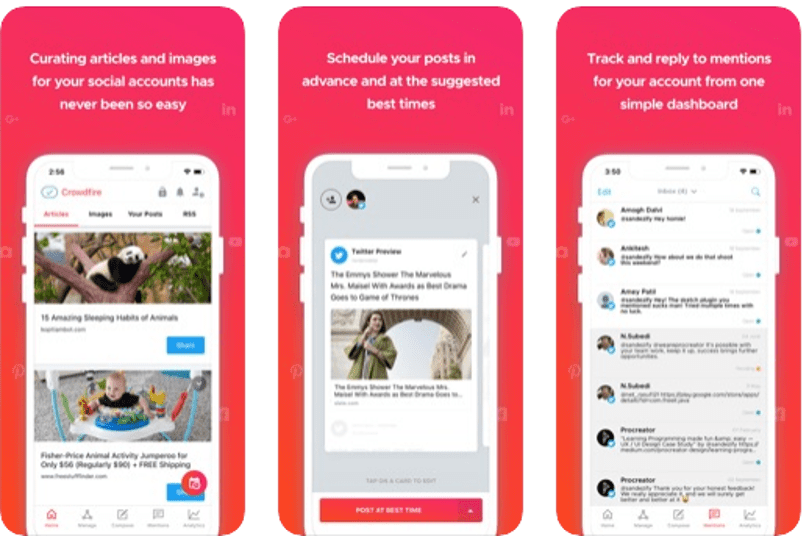
Next on our list of best and free followers app for Android is Crowdfire. Use this freeware application to get Instagram followers for free and enhance user engagements and know about trending posts and hashtags.
Use it to discover details about your new followers, unfollowers, who unfollowed you recently, inactive users and many more.
Loaded with many features Crowdfire compliments your Instagram account perfectly.
Pros
- It suggests audience-specific images and information that you can share to interest users
- You can schedule all your posts in advance so that you never miss the peak time
- Using this app you can share and publish on Pinterest
- To help you in creating content you can add websites and blogs to favorites using the RSS feature
Cons
- The app charges monthly/ yearly fees for usage
- The rating on the Play Store is not so impressive
5. Followers and Unfollowers
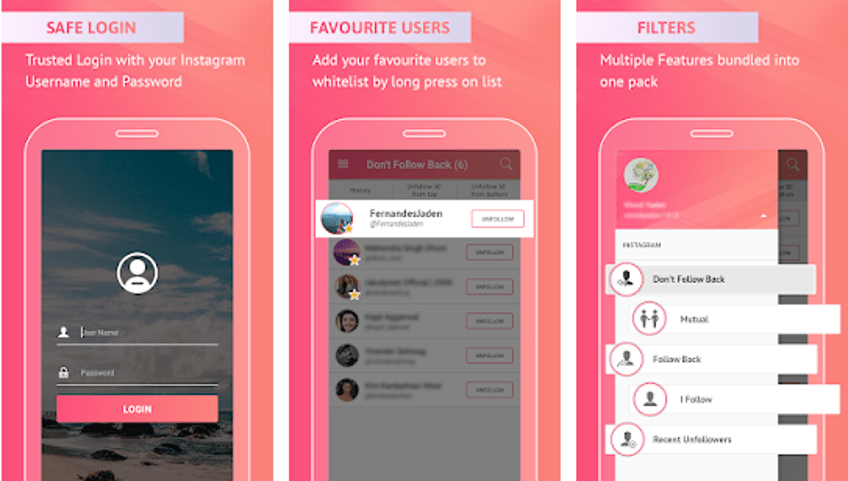
Pick this best app to buy Instagram followers for adding flying colors to your account. Use it to follow new people and to unfollow whom you are currently following. The app enjoys a rich download number along with a 4.6/5 user rating.
This is one of the most stunning and best social media apps, you can get useful insights about your Insta account along with the followers/ unfollowers data. Use this free tool to grow your account followers.
Don’t follow me back, mutual followers, follow back, I follow, Recent Unfollowers and mass unfollow are some of its key features.
It is compatible with Android 4.0 devices. Get this reliable and safe app today with the link below.
Pros
- The app has an easy interface that lets you track every activity on your page
- You can track you follower and unfollowers
- The app has a starred list that lets you add them to your favorite list
- You can unfollow 50 people in one go
Cons
- The app has separate charges for every item
6. Followers+ Followers Analytics for Instagram
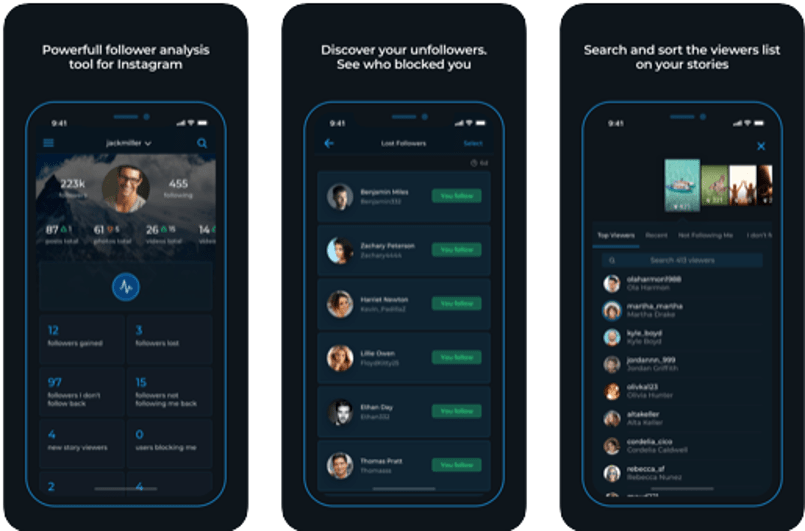
Next on our list of best Instagram followers app is “Followers+ Followers Analytics for Instagram”. It comes with high-end analytics tools and works seamlessly well on both Android and iOS platforms.
Read More: Best Instagram Photos & Videos Downloader Apps
Use it to manage multiple Instagram accounts and monitor the total number of followers, check details of the comments and likes. Apart from this, it also gives you valuable details about the number of posts, videos, comments, photos on your account.
This app can also be a replacement if the Instagram Not Working error occurs.
To add on to this it also gives you detailed data about your followers gained/lost, views on a new story, users blocking you, new profile stalkers and followers who do not follow you back along with your followers whom you don’t follow.
Pros
- Offers all the data related to your account
- It supports multiple accounts
- Track who follows you among your friends
- You can schedule and optimize your posts
Cons
- Limited features in the free version
7. Insights+ IG Follower Reports
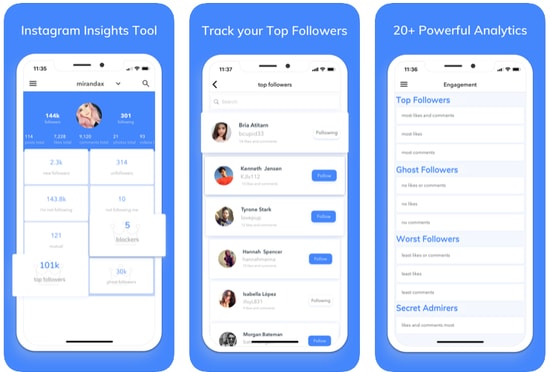
Next on our list is this smart tool to get free Instagram followers instantly. It is an all in one tool for iOS users which provides useful statistics about your account.
This one of the best social media apps is a useful tool if you need detailed information like the number of followers, who unfollowed you, whom you are not following back, likes and comments on your posts, and who removed their comments and unliked your posts.
Pros
- It offers a very simple user interface
- The free version offers all the numbers on the home screen
- You can unfollow people easily from the app itself
- The app lets you track ghost accounts who visited your page
Cons
- You need to have a pro version to use all the features
8. Followers Track for Instagram
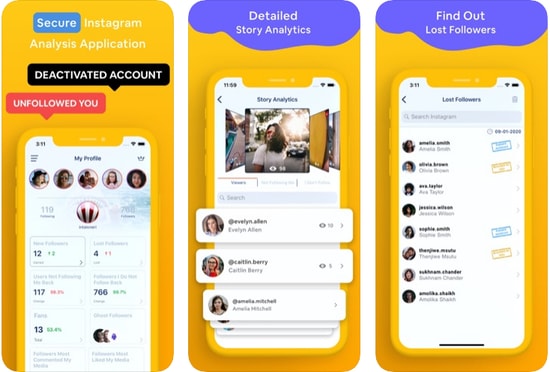
Next on our list of best Instagram followers apps is this incredible app. It allows you to check details related to your account. Who followed who, who unfollowed you, your followers whom you are not following and much more.
It is a free app that comes with a user-friendly interface and simple working. But this tool can not be used to limit your Instagram usage. However, if you wish to enjoy additional features like data about deleted comments, blocked Instagram followers, you will have to take its upgrade pack.
Pros
- You can watch and repost stories from the app itself
- The app lets you compare like on each post
- It shows the most liked and least liked post
- The app offers analytics of stories as well as posts
- Supports multiple languages
Cons
- It is paid application
- You need to have an iOS 12 or later version to use it
9. Followers Insight for Instagram
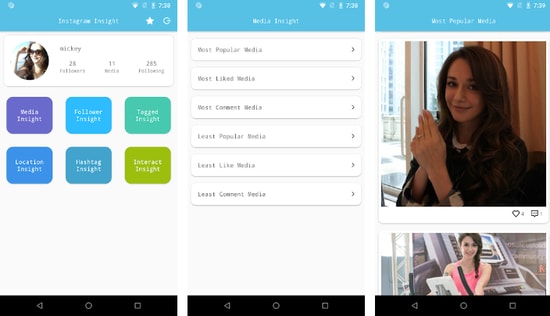
With a rich customer base and a great user rating of 4.5/5, this tool deserves a place on our list. The app comes for free with all basic functionalities.
However, its premium version offers a set of advanced features like:
- People who blocked you.
- Followers gained and lost on your account.
- Get details of inactive users, potential spammers, and spies.
- Find out who are your loyal followers.
Read More: Best Free Ways To Generate Instagram Likes
Pros
- The app shows your media popularity rank
- You can track your followers, unfollowers, and friends
- It offers information on your hashtags used in the post
- You can even track the popularity of posts in which you are tagged
Cons
- It shows false information about followers and unfollowers
10. Followmeter on Instagram
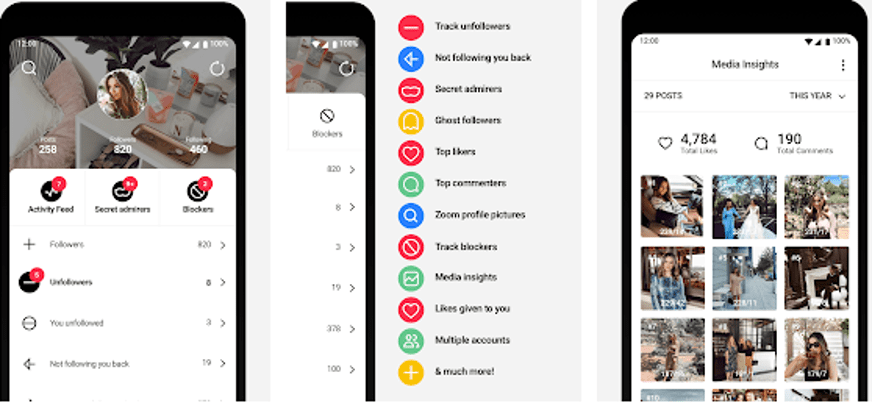
Next on our list is this stunning app powered with an incredible and simple interface. Use it to manage your account effortlessly and get useful insight like:
- Total likes
- Number of comments
- Average of your total likes and comments.
- A total number of followers gained and lost.
This one of the best social media apps is free to use but if you opt for its premium version you get to access its “Discover Section” too.
Pros
- You can track who blocked your account
- It has a separate activity meter to monitor your account engagement
- You can track unfollowers and accounts not following you back
- It lets to track the people who viewed your story most of the time
- The tool can not be used as an Instagram password finder tools
Cons
- The ratings are not so impressive
- The app charges for every item differently
11. Unfollowers & Followers for Instagram
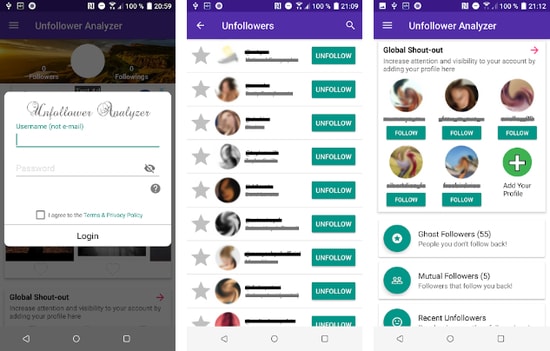
Use this intelligent tracker tool for monitoring your Insta account. It also assists in enhancing follower engagement and provides useful details of who followed you recently and who unfollowed you. Apart from this, you can also use it to check your new followers, non-followers and delete followers.
Download this Instagram followers app on your Android device using the below link
Pros
- It has a very interactive interface
- This app offers descriptive details about your account
- You can follow new account from the app only
- It offers features to promote your account
Cons
- The user ratings are 3.5 only, as compared to competitors it is very less
12. Viewer and Analyzer on Instagram
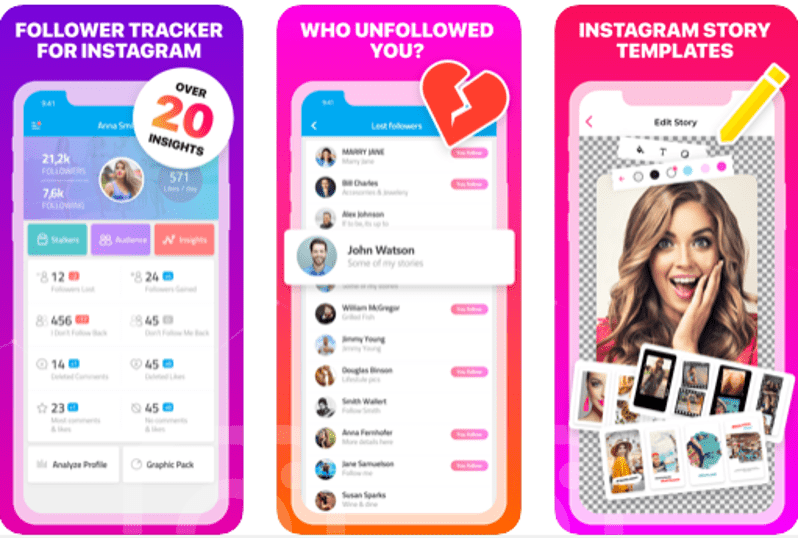
Keep your Instagram account in control and improve your social network with Viewer and Analyzer. It is a simple tool which provides relevant stats like:
- Your fans
- Your recent followers and unfollowers.
- People whom you recently unfollowed.
- Inactive users, ghost followers, secret admirers, nearest followers and many more.
Pros
- You can easily track people who followed you and who unfollowed you
- The app lets you monitor the performance of your account and posts
- It shows the time when you should post to get more reach
- You can even track the engagement you got
- The app is compatible with multiple languages
Cons
- It is a heavy app that can affect the performance of your device
- You need to have a plan for using this app
13. Follower Analyzer
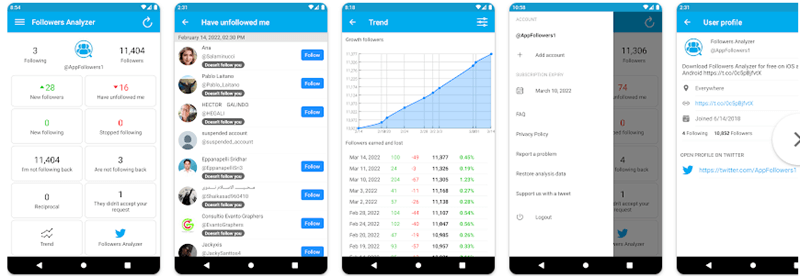
Next on our list of best Instagram followers apps is Follower Analyzer. Use this stunning app to access in-depth data of your Instagram account. Its basic version covers all basic functionalities including followers, unfollowers, block and unblock followers, track new and lost followers.
Read Also: 15 Best Instagram Tools For Marketer
Apart from this, you can also use it to check who blocked you recently and whom you have blocked. With it, you also get access to crucial statistics like a total number of posts, likes, comments, photos, videos and many more on your Insta account.
Pros
- It has a very simple and descriptive interface
- The app shows the best performing posts
- It is a lightweight application that does not affect the processing of your device
- Using the software you can even analyze your friend’s account
Cons
- You need to grant permission in order to use it
- The app has ads that can be annoying
- This tool can not be used as one of the Instagram password finder tools
14. Organic Followers For Instagram
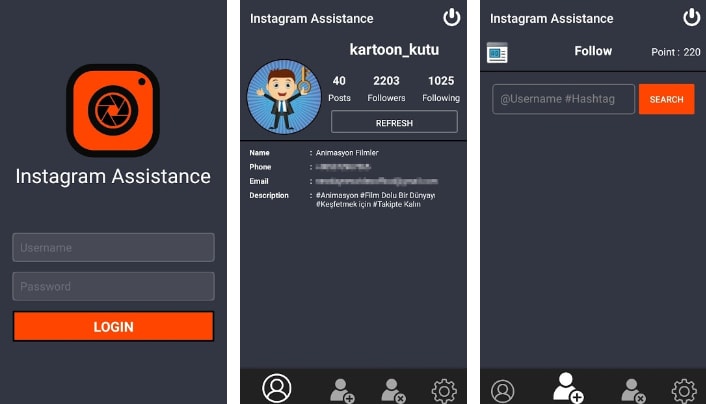
The next free Instagram follower app on our list is called Organic Followers. Developed by DikaSoft, this app allows you to define and find your ideal audience based on your Instagram (or other best social media apps) niche or field. You can rapidly grow the reach of your followers and likers using a variety of popular hashtags or keywords related to your niche. This app can also be used as one of the Best Instagram Alternatives.
A remarkable feature of this application that most of the users find helpful is that it lets you find only the followers that will follow you back.
Pros
- The app automatically follows people from your niche, to help your account grow
- It even manages the unfollow list
- You will find a real audience with this app as its searches for the audience which has interest in your account
- The user ratings are positive as in Play Store it has been rated 4.3 stars
Cons
- You need to pay some amount for using the item
15. Real Followers & Likes for Instagram 2024 New
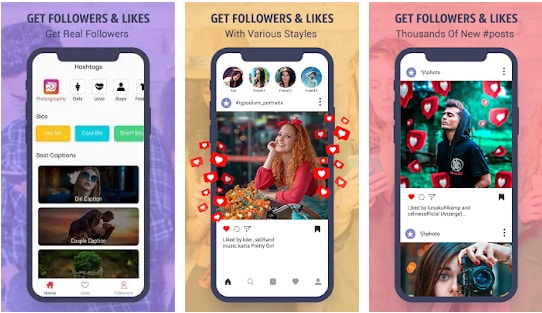
The next application on our list is Real Followers and Likes for Instagram 2024 New. This app helps in offering all the required details that you want to grow your account. The best part about this application is that it has been recently updated, so you can experience a better interface and workflow. It offers various sections or categories to choose from and add to your account.
Pros
- It offers various categories for hashtags and captions that you can choose and add to your posts
- You can filter search as per requirement
- It is free to use application that offers all the required tools
- The app has been rated 4 stars by more than 8K users
Cons
- Some users have face lag and issue while using the application
16. Followers Gallery
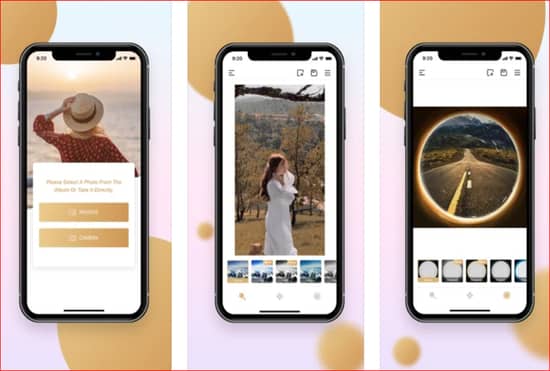
While it is easy to count the fake followers and likes on your Instagram profile, Followers Gallery makes sure you don’t need to do that. It is among the best Instagram followers apps for the right reasons. First of all, like any decent Instagram follower app, this one is capable of earning you real and active followers along with likes. Besides, you get the coins by following or liking the users and their posts. Available for both platforms, iOS and Android, this Instagram follower does the deed for free and is a must-try.
Pros
- The app auto like the post that falls under your niche
- It helps you in getting followers
- It has 4.2 stars rating in App Store
Cons
- It takes more than 100 MB of space
- This tool can never be used as one of the Instagram password-finder tools
- You need to purchase coins to use this app
17. Fast Followers & Likes
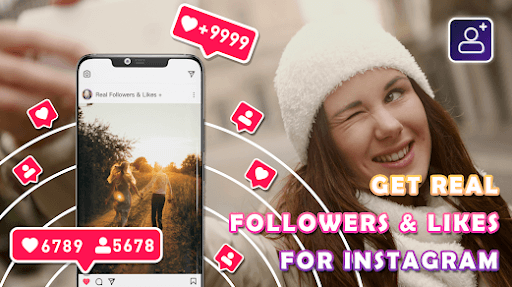
Want to become popular on Instagram? Then, Fast Followers & Likes with artificial intelligence is the best choice. This Instagram follower application claims to provide the easiest way to handle an Instagram profile or increase real followers. The application contains a wide variety of unique quotes that will make your pictures more engaging.
You can use this app for free. The intuitive and functional interface makes it extremely easy to use. Statistics will increase faster due to profile views. The more conversions to the Instagram pages, the more famous it becomes.
Pros
- Easy to use interface.
- Real-time profile monitoring.
- Contains attractive quotes.
- Different editing options are available.
Cons
- Not available for iOS devices.
18. Ins Followers
Do you wish to get Instagram followers for free? If yes, Ins Followers is among the best Instagram followers apps you can use. With this application, you get an organic and fast increase in your followers. Moreover, this app helps you get free likes to add to your Instagram popularity. The only thing you need to do is earn coins and use these coins to get likes and followers for free. Moreover, the following are the pros and cons of this app you should know.
Pros
- Friendly interface
- Real and active followers
Cons
- Earning coins is tough
19. Unfollowers & Ghost Followers
Here’s yet another app for you in this list of the best free Instagram followers. The Unfollowers & Ghost Followers is one of the best ways to know who is following and unfollowing you or even ghosting you.
Pros
- Smart UI
- Easy to use for beginners
Cons
- Skeptical performance
Frequently Asked Questions (FAQs)
Here are the top Faqs which asked by the Instagram User.
Q.1 Where to buy Instagram followers?
There are infinite alternatives available to buy Instagram followers. To ease your search, we have mentioned the top follower app for Instagram users. Read through the list, find the Poros and Cons of each app and pick the appropriate application to boost Instagram followers for your account.
Q.2 How much does it cost to buy Instagram followers?
Although there are several options both free and paid to buy Instagram followers. Refer to the complete guide above to have an idea of a set of the best app to get Instagram followers for free. The applications will help you gain followers on Instagram.
Q.3 Does buying Instagram followers work?
It is suggested that organic growth on Instagram works well with the algorithm of Instagram. However, there exists Instagram followers increase apps that help you get more likes on Instagram and enhance your engagement rate. Refer to the article to claim knowledge about the best app for Instagram followers and the specific Instagram follower increase websites.
Q.4 Is it safe to buy Instagram followers online?
Not all the free followers Instagram apps are safe to use. Some of the applications might seek your personal information in return for more followers on Instagram. But not anymore as the article provides a comprehensive list of the best app to get followers on Instagram. Thoroughly go through all of them and download the one that matches your requirements.
Q.5 How can I get 10K followers on Instagram?
There are a lot of scams that claim that you can get 10K followers on Instagram in a snap. However, you should not believe these scams and try generic ways like providing quality content, uploading content regularly, and using the top free Instagram followers apps provided above to get the best and long-lasting results.
Q.6 Are Instagram follower apps safe to use?
Yes, all the Instagram follower apps are safe to use, provided that you take the help of a reliable app from a reliable source, like the ones provided above for your ease.
Q.7 How do I get more real followers?
To get more real followers on Instagram, you should try uploading quality and demanded content on the platform. Additionally, you should also keep the viewers engaged with different kinds of content like reels, images, IGTVs, and more at regular intervals. Keep the viewers hooked. Additionally, you may also seek the help of the best apps to get real Instagram followers provided above for ease.
Q.8 Can I get 1,000 followers on Instagram?
Yes, you can get 1,000 followers on Instagram quite easily with the help of a reliable best Instagram followers app. The main purpose of such tools is to provide the required followers to you. Use any of the alternatives as suited to get the desired followers.
Q.9 How to get 10,000 followers on the Instagram app?
The best way to gain or get 10,000 followers on the Instagram app is by using the best Instagram followers app. Such apps are quite reliable and allow you to get the required followers to the users with ease.
Final Words: Best Apps to Get Real Instagram Followers (2024)
So, folks, these are some of the best free Instagram followers apps that you can pick in 2024. Choose one to boost your social network and increase your followers instantly.
Each of the aforementioned applications offers a simple yet effective way to provide instant followers, likes, and comments on Instagram. Just pick one, connect it with your Instagram account and you are good to go.




1 Comment
Is very nice?