Main LogoLight Logo
  • Reviews
  • Top 10
  • How To
  • Tech News
  • OS
    • Windows
    • MAC
    • iOS
    • Android
  • Categories
    • Driver Updater
    • Cyber Security
    • Games
    • Fitness
    • Entertainment
    • Tips & Tricks
MAC Top 10
by Jyotsana

15 Best Free Mp3 Tag Editor for Mac to Edit Songs Metadata in 2024

December 26, 2023
1

As much as it is important to play your favorite playlist and be lost in the magic of Now, some music lovers take pleasure in knowing the whereabouts along with the entire history and data related to the songs. In this article, you will come across the best free MP3 tag editors for Mac that automatically or manually help you fill in the metadata of your audio files.

MP3 metadata is the data or information related to the songs and albums that you download and listen to. This information includes, album name, artist name, title of the song, genre and even lyrics alongside the many other bits of information.

If you have a bundled collection of songs in your Mac to edit and organize the metadata for, let us tell you, there are several MP3 tag editors for Mac that not only help in editing the information of audio files but offer numerous other features that boost the management of such files.

Table of Contents hide
What Are The Best Free MP3 Tag Editors For Mac in 2024?
1. iMusic
2. Kid3
3. Metadatics
4. MusicBrainz Picard
5. MetaBliss
6. iD3 Tag Editor
7. TuneUp
8. Music Tag Editor
9. Meta
10. Tag Editor
11. Wondershare UniConverter
12. Music Tag Editor Pro
13. MP3TAG
14. Amvidia
15. Mp3TagsForTracks

What Are The Best Free MP3 Tag Editors For Mac in 2024?

The following MP3 tag editors, with their coolheaded interface, feature supercool features like online synchronization, multiple audio format support, downloading and many more. Let’s take a stroll through the list and find the best one to fulfil your demands.

1. iMusic
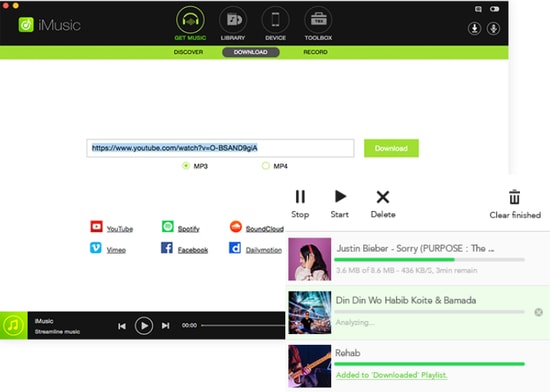
iMusic

iMusic is one of the best MP3 tag editors for Mac. This amazing tool has everything you are looking for. It can be used for multiple reasons and it offers features transfer, sharing and the management of music libraries that make this software count.

Noteworthy features: 

  • iMusic allows you to transfer music between iOS devices, Mac, PC and iTunes.
  • You can download music from Archive, YouTube, and numerous other sites.
  • It features batch download from Youtube in multiple formats such as MP3, MP4, WebM etc.
  • It allows you to stream and download qualitative audio in multiple audio formats.

Download


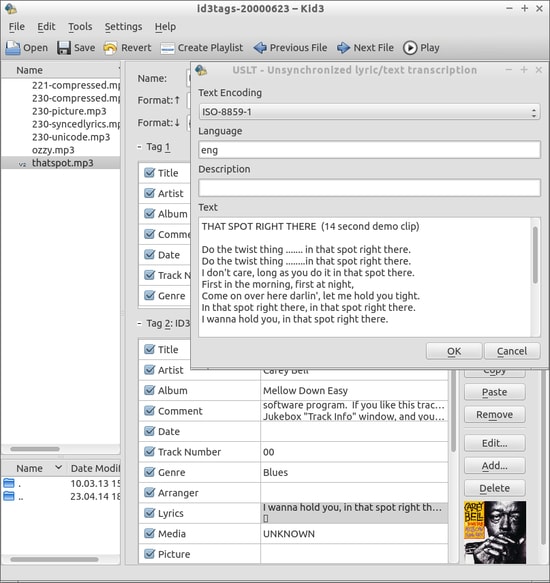
2. Kid3

Kid3

Kid3 is another best free MP3 tag editor to be available for your Mac. It allows you to edit the information for both audio and video on Mac alongside many other features such as conversion of tags, exporting tags in multiple formats etc.

Noteworthy features: 

  • Kids3 allows you to edit the file names for multiple files together.
  • It allows you to convert the tags between ID3v1.1, ID3v2.3 and ID3v2.4.
  • You can create playlists with this software.
  • It imports tags from other online directories.

Download


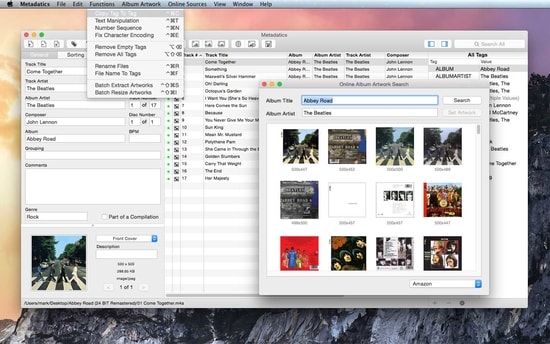
3. Metadatics

Metadatics

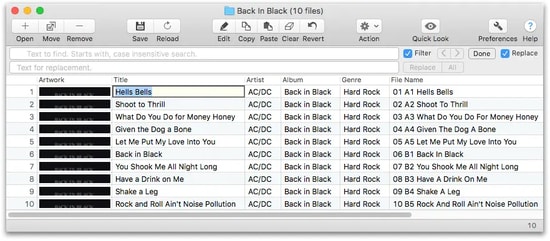
Metadatics is yet another amazing MP3 tag editor that allows you to edit the information of music on the Mac system. The best part about this software is that it lets you edit the truckload of audio files as quickly and easily as possible.

Read Also: Best MP3 Duplicate Songs Finder And Remover

Noteworthy features: 

  • This tool features smooth functionality which allows you to edit/replace the characters and copy tags.
  • It is easy to use and allows you to search the data online.
  • It supports ID3v1, ID3v2, MP4, Vorbis, APE, and ASF tags from multiple audio formats.
  • You can rename, and generate files in this tool.

Download


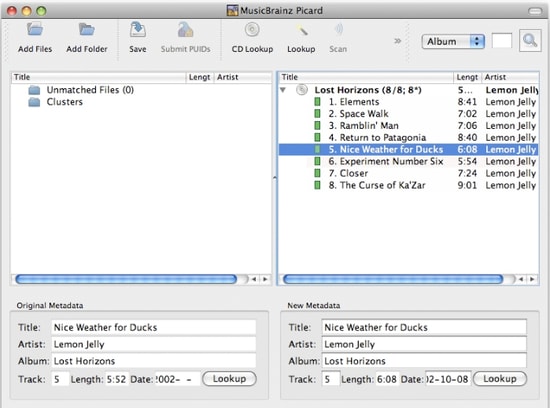
4. MusicBrainz Picard

MusicBrainz Picard

MusicBrainz Picard, introduced by MusicBrainz, counts as one of the best free MP3 Tag Editors for Mac that helps you edit metadata and supports files of several formats alongside the AcoustID feature.

Noteworthy features: 

  • MusicBrainz Picard supports multiple formats such as WMA, WAV, MP3, FLAC, OGG M4A and more.
  • It features AcoustID audio fingerprints for audio files to be recognized by actual music.
  • It features lookup from CDs allowing to look over the music in one go.
  • This tool is open source.

Download


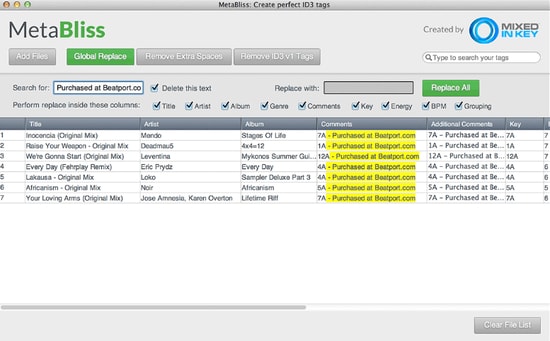
5. MetaBliss

Metabliss

You may want to use MetaBliss, one of the coolest MP3 tag editors with friendly features that is available for MAC OS X for free. If you are looking for a steadfast editing tool then this one is worth the try.

Noteworthy features: 

  • Metabliss allows you to edit the song name, artist and many other tags easily.
  • Ity enables easy searching for multiple files.
  • In this tool, you can rename the filename, and remove the files easily.

Download


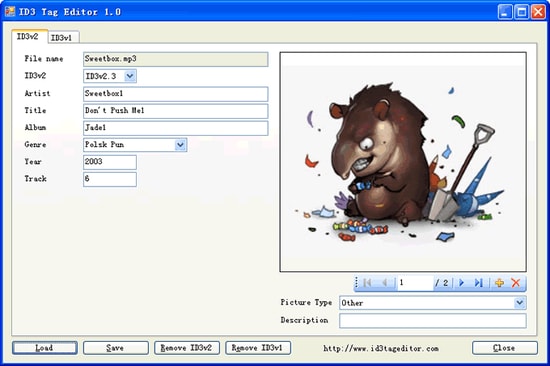
6. iD3 Tag Editor

iD3 Tag Editor

iD3 editor is one of the best MP3 tag editors for Mac operating system and Windows. It is free to use and is known to be a light software but sometimes, its interface becomes too challenging to comprehend.

Noteworthy features: 

  • iD3 tag editor is supported by iTunes, Winamp, Windows Media Player and many other software.
  • In this tool, you can easily copy and paste the data.
  • It allows you to write comments to your audio files.
  • You can easily remove the ID3 tags from the audio files.

Download


7. TuneUp

TuneUp

Image Source: Bitsdujour

TuneUp, another best MP3 tag editor, helps you in organizing the music collection with ease. It features striking functions along with a friendly and attractive interface. Your search for a software that keeps it organized and clean may end on this tool.

Read Also: List of Best Mac Cleaner Apps

Noteworthy features:

  • It features waveform recognition technology which lets it detect the acoustic fingerprints of a file and provide you the information.
  • The files are organized automatically and it removes the duplicate ones.
  • It allows you to share the MP3 you stream on social media platforms.

Download


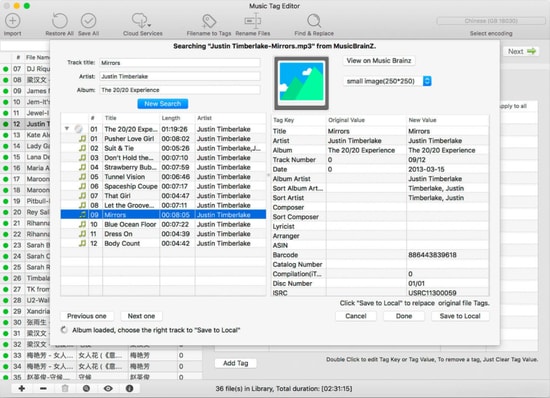
8. Music Tag Editor

Music Tag Editor

Image Source: InsMac.org

Music Tag Editor is one of the best free MP3 tag editors for Mac that offer the fastest features and help you in changing and editing the metadata of audio files.

Noteworthy features: 

  • In the Music Tag Editor tool, you can edit the cover photo of soundtracks as well as the tags.
  • This software allows you to make changes and edits in multiple files using this MP3 tag editor.
  • It supports iTunes tags.

Download


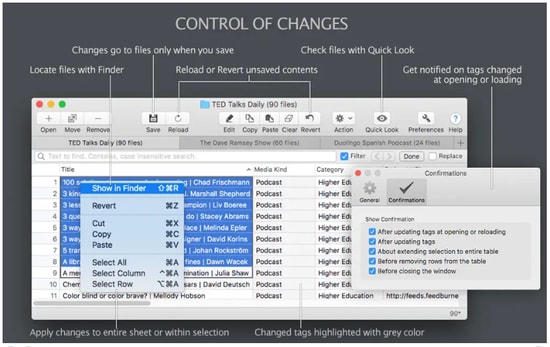
9. Meta

Meta

Ease your way out to edit the metadata of audio files  with this one of the best MP3 tag editors, Meta. However, you can only edit the multiple audio files together.

Noteworthy features: 

  • You can change and edit the metadata of audio files fastly.
  • You can change the cover photo of audio files.
  • It features a user-friendly interface and thus, makes the experience lightweight.

Download


10. Tag Editor

Tag Editor

If you are still looking for the best MP3 tag editor for mac, perhaps you should take a look at Tag Editor. Yes it does what is synonymous with its name and works with ease.

Noteworthy features: 

  • It allows you to edit the files in a batch and organizes your collection.
  • You can edit several file names together.
  • It allows you to cut, copy and paste the tags.
  • It allows you to download the tags from online platforms.
Download


11. Wondershare UniConverter

Wondershare UniConverter

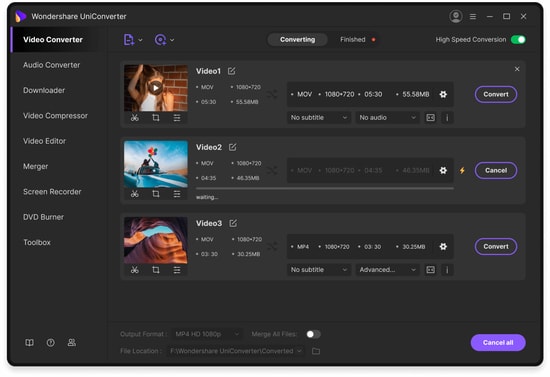
Wondershare Uniconvertor is one of the most popular and best free MP3 tag editors to count in this list. This software was originally known as Wondershare Video Converter Ultimate and is often used as a video editing tool. However, when it comes to editing or changing metadata of audio files, this software will not disappoint you.

Noteworthy features:

  • Wondershare Uniconvertor features a decent user interface.
  • It offers you to edit the meta tags of files both automatically and manually.
  • It offers a free version.

Download


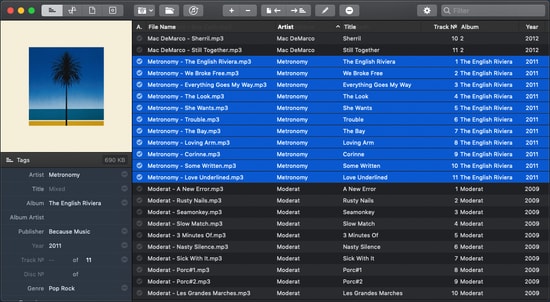
12. Music Tag Editor Pro

If you cannot get enough of editing the meta tags of your audio files and need one best free MP3 tag editor for Mac which offers incredible features at zero dime then check this software, Music Tag Editor Pro. It easily helps you check off your music to-dos with its super-friendly user interface.

Noteworthy features: 

  • Music Tag Editor Pro automatically fills the metadata by synchronizing the information from an online platform.
  • This software supports almost every major audio file format.
  • Since it features batch processing, you can change the metadata of multiple audio files together.

Download


13. MP3TAG

MP3TAG

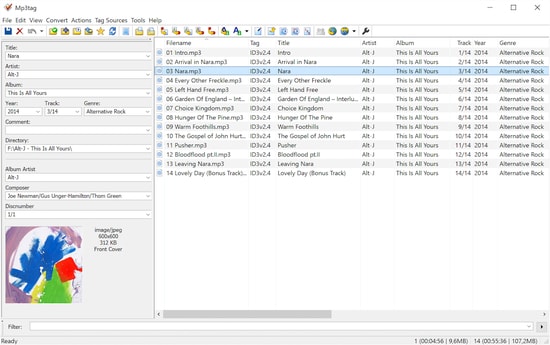
Keep calm as we still have one of the most powerful and useful software to share with you and that is MP3tag. This amazing MP3 tag editor features an attractive list of all the prominent offers that you could ask for. These features include batch tag editing, Importing tags from online databases, User-friendly interface and many more.

Noteworthy features: 

  • MP3tag tool features easy-to-use interface and ease your way out to edit the metadata of audio files.
  • It supports batch-tag editing of ID3v1, ID3v2.3, ID3v2.4, iTunes MP4, WMA, etc. Thus, it allows you to add tags for multiple files at once with support for multiple audio formats.
  • This tool can collect tags from online databases alongside the cover art.
  • It allows you to rename, import and export tag information and also lets you create playlists.

Download


14. Amvidia

Amvidia

Amvidia offers the user to edit more than 60 types of tags for the videos. Using the software the user can download the information from online websites like ACoustid, MusicBrainz, and many more.  The software has two versions available including the paid and free versions.

Noteworthy features:

  • One-stop solution for a music tag editing
  • The software download the Metadata automatically from different websites in just a few clicks
  • Compatible with most Mac OS
  • The user can also edit the tags and remove the extra space present in the information
  • Using the Amvidia user can also rename multiple files together with ease

Download


15. Mp3TagsForTracks

Mp3TagsForTracks

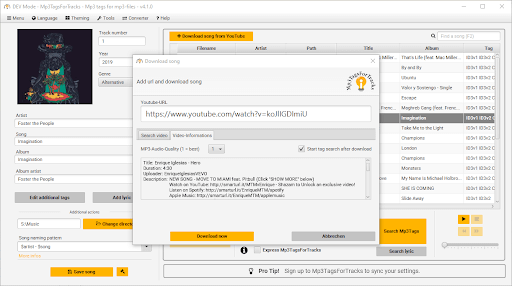
Let us introduce you to Mp3TagsForTracks. It is among the best software to edit MP3 tags on Mac because of its intuitive GUI with an in-built audio player, easy album cover search, lyric addition to a song, and the following incredible features.

Noteworthy features:

  • Lets you download YouTube music videos
  • Express makes available all the additional MP3 file information with a single click
  • Normalizes the audio file’s volume when saving it
  • Automatically adds and saves the audio file genre

Download


Conclusion

So, that was about the 15 best free MP3 tag editors for Mac that possess amazing features to help you get the metadata under check in no time. With every software featuring friendly specifications and simple interface, you have a thick list to choose from. Which one are you getting hands on? Share with us in the comment section if you have anything to add or maybe, ask?


Author

Jyotsana

Jyotsana is a technical writer with a non-technical background. An eye of detail and a knack for writing helps her to write technology related content.
Apart from writing, she is a coffee connoisseur and an aesthete who rejoices in poetry and music during leisure.

View all posts

Related Posts
Best Live Cricket Streaming Apps for Android

11 Best Live Cricket Streaming Apps for Android in 2024

June 7, 2024
0

Are you a die-hard cricket fan? If yes, then here are some best live cricket streaming apps for you that will help you watch your match across the world.

Cricket is one of the most popular and loved sports around the world, and people love to watch cricket and don’t want to drop a single catch in a live match, especially when our favorite cricket team or players are playing on the pitch. However, it is not possible at all to sit in front of the TV to get all the live updates.

It is extremely hard for a cricket aficionado to watch the progress of their ideal team due to the difference in the time zone. Therefore, to help you out, we have brought up a list of 8 top-notch apps for live cricket streaming. All these apps keep you updated about Commentary, Expert analysis, Highlights, Predictions, and Ball by Ball. In short, cricket live streaming apps will cover everything related to the match.

A List of Best Live Cricket Streaming Apps for Android in 2024

Check out our detailed list of the best cricket live streaming apps in 2024 to watch cricket matches live online like ICC T20 World Cup, ICC ODI World Cup, IPL (Indian Premier League and other cricket events.

1. JioCinema

JioCinema

The first name on this list of the best live cricket streaming apps is JioCinema. Jio recently purchased the streaming rights for the IPL matches and is offering free match streaming services to all. With the help of the app, you can watch live matches of IPL in the highest quality or any other desired one with ease. While watching the matches, you get the option to enjoy commentary in different languages including English, Hindi, Bhojpuri, Marathi, Gujarati, Kannada, Malayalam, Punjabi, and others.

As the app is completely free, you don’t need to purchase any paid subscription to the same. Apart from cricket, the app also offers live-streaming features for various other sports like Tennis, Badminton, Football, and others. You can also use the JioCinema app to watch Indian and international shows, movies, etc.

Pros

  • Smart interface
  • Beginner-friendly
  • Multilingual for your ease
  • High-quality video including 4k resolution.
  • Dolby Atmos sound system
  • Smart camera angles for amazing streaming experiences
  • Detailed pre and post-match reviews.

Cons

  • The player lacks some advanced features
  • Limited gesture-compatible features

Download Now


2. ESPN

ESPN

ESPN is one of the best sources to get live cricket news & updates. It is the best sports brand providing thousands of live events, also here you’ll get highlights, scores, and analysis. Moreover, the app allows you to access several channels like SEC Network, ESPN3, ESPN2, ESPNews, ESPN Deportes, ESPNU, ESPN, and Longhorn Network.

Plus, you’ll get premium sports articles, exclusive originals, fantasy tools, and many more. All you need to do is, just download the ESPN app on your Android device, pick your favorite team and get the latest updates about them. Apart from cricket, ESPN is also popular for streaming the Fifa World Cup. The app provides up-to-the-minute sports news coverage, commentary, highlights, and scores for Cricket, Rugby, Football, Kabaddi, F1, and more.

Pros

  • Fast access to all sports updates.
  • Real-time notifications for desired teams.
  • Covers all the information about your team.
  • Easy-to-use and lightweight tool.

Cons

  • The free version comes with limited features.
  • The video frequently freezes during live matches.
  • Sometimes notifications take a long time to open or load.

Download Now

Also Read: Best Cartoon Streaming Sites


3. Willow TV

Willow TV

Watch all the top-tier cricket matches across the globe in HD quality on the Willow app. It is the only app that is dedicated to cricket in the US. The Willow TV can bring all the cricket actions to your fingertips. It is suitable for both Android and iPhone devices. Cricket admirers can enjoy live matches, incorporating interactive or frequently up-to-date scorecards and ball-by-ball commentary.

What’s more, you can even set reminders for your favorite matches and also share them with your friends on social media. But, in order to get the best experience, you need to acquire Willow TV’s monthly subscription.

Pros

  • Highlights and replays of matches are available.
  • You can even hide results and scores.
  • Sharing feature is available.
  • Live stream a cricket match on Chromecast.

Cons

  • Does not offer a free trial.
  • The free version shows a lot of ads.
  • Only users with paid versions can enjoy live cricket streaming.

Download Now


4. SLING TV

SLING TV

SLING TV is one of the best international streaming services that offer high-quality content and reliability. The app can be run on any device including Xbox, Smart TVs, Roku, smartphones, and desktops. And with more than 200 channels, it has everything you need, from live match updates to daily entertainment, kid shows, and more. With the SLING TV, you can get your DIY fix with HGTC and satisfy your cravings for new recipes on Food Network.

Pros

  • Convenient and reliable source to get cricket matches and other sports updates.
  • Multilingual support.
  • Compatible with all streaming devices.
  • Pricing is quite cheaper than top competitors.

Cons

  • Channel packages are confusing.
  • Gives partial access to local channels.

Download Now


5. SuperSport

SuperSport

Here is the next best live cricket streaming app to get regular updates, highlights, schedules, live scores, and ball-by-ball commentary. SuperSport is designed to give you what you want from cricket or other sports and when you want it. In addition to cricket, SuperSport focuses on all popular sports like Football, Golf, Tennis, Motorsport, and Rugby. The app helps you track the progress of your team during a live match. Also, there’s a special option called Reminder that gives you every single update.

Pros

  • A customization option is available.
  • Provides real-time updates.
  • Covers all international sports events.

Cons

  • Sometimes, video buffers.
  • The user interface is not friendly.

Download Now

Also Read: Best Putlocker Alternatives


6. SonyLIV

SonyLIV

SonyLIV is another best live sports application but it is a geo-restricted streaming platform, so in order to use the app in other countries like the US, you need to use any reliable and best VPN service. The app might be your one-stop solution because it provides everything including Sports, Web Series, Movies, TV Shows, News Updates, and Live Cricket Streaming. If you want to enjoy endless entertainment, then SonlyLIV is all you need. The app is available for both Android and iOS devices.

Pros

  • A wide variety of genres are available including sports, music, movies, and more.
  • Simple interface and can be used without requiring any expert knowledge.
  • Streams Mixed Martial Arts Events.

Cons

  • No subtitles/captions are available.
  • No option to choose the appropriate video quality.

Download Now


7. Live Cricket TV HD – FREE

Live Cricket TV HD

Developed by Sports Stream, Live Cricket TV HD is a completely free streaming service that is ready to entertain you no matter where you belong to. In order to get started, you only need a smartphone and an active internet connection. The application covers all the major cricket leagues like PSL, IPL, BBL, and ICC World Cup. It gives you a TV like cricket live video experience, simply download the app, launch it on your preferred device, and there you are good to go.

Pros

  • HD quality live streaming for free.
  • No video buffering problems.
  • Quick and easy access to cricket and other sports as well.

Cons

  • The app doesn’t work as expected on mobile data. That means you will need to make a switch to Wi-Fi to run the application smoothly and effectively.
  • There is no option to connect the app to the TV in order to enjoy live cricket on the big screens.

Download Now

Also Read: Best Free Sports Streaming Sites


8. Cricket Australia Live

Cricket Australia Live

This is an official cricket live streaming app of Cricket Australia with over 1 million downloads. It can be run on both Android and iOS devices. With Cricket Australia Live, you can watch all domestic and international matches in Australia. However, if you want to use the app in other nations, then you need to use the best VPNs apps for Android. Apart from that, it also has a live radio feature, incorporating live cricket matches, live updates, highlights, analytics, and commentary.

Pros

  • Gives you highlights, ball-by-ball commentary, and live score updates.
  • Live radio feature.
  • Provides exclusive cricket news from across the globe.
  • Ad-free application.

Cons

  • Can’t connect the app with your TV.
  • Users often face login issues.
  • No dark theme is available.

9. OSN Play

OSN Play

Last but not least, OSN Play is also the best live cricket streaming app that you can consider to enjoy the matches of your team. By installing this application, you can watch your favorite team’s match live from anywhere at any time.

This streaming service offers live streaming of all international and domestic cricket leagues like ICC World Cup, IPL, LPL, PSL, and more. Furthermore, you can also watch movies, web series, and other shows.

Pros

  • Provides a 7-day free trial.
  • Straightforward and lightweight tool.
  • Easy to understand interface.
  • Ad-free experience for subscribers.

Cons

  • Doesn’t support 4k streaming quality.
  • Poor customer service.

Download Now

Also Read: Best Free Anime Streaming Apps


10. Yupp TV

YuppTV

Yupp TV is an ideal application for cricket fans who want to see live scores and updates of cricket matches. The application is one of the largest online TV platforms with over 200+ Live TV Channels, the latest Bollywood and Regional movies, and seven days of catch-up TV. The app contains a variety of genres like Comedy, Family, Music, Drama, Spirituality, and more. Additionally, you’ll get a 7-day free trial to enjoy live cricket before acquiring the subscription plan.

Pros

  • Lightweight and easy-to-use app.
  • Real-time push notifications for different matches.
  • Various TV channels are also available.
  • Multilingual support.

Cons

  • Sometimes you might face a lot of hanging and buffering issues.
  • Runs slightly slower than other streaming applications.

Download Now


11. FanCode

FanCode

FanCode is another one of the best Live streaming apps for Android that you can use to get the latest cricket live scores, IPL updates, cricket highlight videos, match highlights, playing XI predictions, and more. The app provides you with accurate and real-time delivery of live cricket scores of any live cricket match such as the ICC T20 World Cup, India tour of South Africa, etc. In addition to this, users will get updates from Football world. Here you can also watch exclusive interviews with your favorite players, coaches, and managers.

Pros

  • A completely ad-free experience.
  • It gives you access to all kinds of sports news.
  • Real-time notifications.
  • Live streaming in good quality.

Cons

  • To enjoy live streaming, you have to pay for its paid versions.

Download Now


Live Cricket Streaming Apps for Android in 2024: Final Words

Nowadays, Cricket fever is at its peak and numerous cricket leagues are coming in a few months. Wherever you belong in the world, the above-shared best live cricket streaming apps will help you enjoy your favorite matches and keep you updated with the scores or run chase. In addition, these apps provide you with all the latest updates and news related to upcoming cricket events.

We hope you find the article informative and helpful. Do tell us in the comments below if you have any queries or better suggestions. Are you interested in reading more useful guides? If yes, then do subscribe to our Newsletter. Plus, follow us on Facebook, Twitter, Instagram, and Pinterest.

Best Email Extractor Online Tools 2022

7 Best Free Email Extractor Tools in 2024 (Email Scrapper Tools)

January 10, 2024
0

Are you searching for answers to the questions like what is an email extractor, how it works, and which is the best email extractor to be used? Don’t worry we have got it all covered for you. The article below explains the usage and the list of best paid and free email extractors.

Understand Email extractor as a tool that provides an extension or application for your device to automatically extract the email addresses from different websites or other social media platforms. The email address extractor works for both the sources i.e online and offline. Moreover, you can extract the email addresses from different websites, folders, accounts, etc.

The list that follows mentions the best email extractor online tools. Go through the list and pick the best email grabber to grab all the relevant email addresses and improve your lead generation.

Difference Between Top Email Extractors Online

Name of Email Extractor Platform Availability Key Features Browser/ Software Availability Link
Growmeorganic Windows, Mac, and Android Extract email addresses from B2B platforms for networking Available Online, Software Visit Now
Hunter.io Windows & Mac Finds essential emails in bulk Chrome, Windows Visit Now
AtomPark Windows Target list of contact details Windows Visit Now
Advance Web Email Extractor Windows Save the emails extracted in the format of text and CSV files. Chrome, Google Chrome Extension, and Windows Visit Now
Bolster Windows and macOS Monitor metrics & get reports from time to time Web application, software Visit Now

List of Email Extractor Online Tools in 2024

The list below has our top picks of email extractors. Read the exceptional features of each and download the one that matches your requirements.

1. GrowMeOrganic

Growmeorganic

GrowMeOrganic is an all-in-one sales prospecting and cold outreach platform. Unlike other tools, GrowMeOrganic offers unlimited credits on all its features. With GrowMeOrganic, you can find emails of your potential customers from platforms like Linkedin, Google My Business and a pre-built database of 575M+ verified professionals and over 30M+ Companies

GrowMeOrganic offers a variety of features that can be extremely helpful for your email marketing services or campaigns. Also, it can also be used to extract emails from LinkedIn.The ideal application is best used for email automation, business growth, and marketing.

GrowMeOrganic’s user-friendly interface makes it simple for beginners to use. It is already receiving praise for its outstanding performance and is now the most economical all-in-one B2B sales prospect marketing tool in the market.

GrowMeOrganic is a great option to extract the desired email addresses. Take advantage of the software to extract email data from the website you’re browsing right now. Additionally, this program allows you to validate the list of email addresses that you’re extracting from the respective platforms.

Features:

  • This email scraper allows you to gather email addresses in bulk.
  • Find the emails hidden behind any of the websites.
  • In order for users to receive higher ratings, it supplies all of the verified email addresses.
  • It is simple to synchronize with your existing CRM.
  • Target specific email addresses using keywords
  • It provides a dashboard where you may view notifications.
  • can be used to find professional personnel’s email addresses.

Benefits:

  • Exports unlimited LinkedIn contacts.
  • Supports unlimited LinkedIn visits and requests.
  • Scrape unlimited websites & local businesses.
  • Can convert unlimited company names to domains.
  • Explore unlimited emails from name and company.
  • Ability to add unlimited contacts to CRM
  • Runs unlimited campaigns.
  • Connect with unlimited email senders.
  • XLS and CSV export in one-click
  • CRM + Lead Scoring
  • Automatically generates Email Sequence.
  • Full API integration and Webhooks.
  • Automatic Email Warmup.
  • Supports unlimited active chatbot.
  • More than 15M company search.
  • 575M+ people search.

Platforms Supported: Windows and Mac

Available as:

  • Chrome Extension
  • Online

Price:

  • Starter pack $39 per month
  • Growth pack $79 per month (unlimited credits)
  • Pro pack $159 per month (unlimited credits)

Visit Now


2. Hunter.io

Hunter.io

The email scraper application Hunter.io is an amazing alternative to extract the desired email addresses. Use the software to extract email data from the website that you are currently browsing. Moreover, you can verify the list of email addresses using this application. Additionally features such as email verification and finding emails are also offered by the tool.

Features

  • Using this email scrapper you can extract bulk or email addresses
  • Find the addresses behind any of the websites
  • To synchronize email data Zapier integration is provided by the Hunter.io
  • It offers all the verified email addresses to achieve improved scores
  • It can easily synchronize with your current CRM
  • Use keywords to target specific set of email addresses
  • It offers a dashboard to take a look at notifications
  • Can be used to find out email addresses of professional personnel.

Platforms Supported: Windows and Mac

Available as:

  • Chrome Extension
  • Online

Price: 

  • Free
  • Starter pack i.e $49 per month
  • Growth Pack i.e for $99 per month
  • Pro Pack i.e for $199 per month
  • Enterprise version i.e for $399 per month

Visit Now

Also Read: Best Email Clients For Windows


2. Bolster

bolster

Bolster offers the ability to its users to scrape different websites and automate the process for businesses. Use the RPA tools to automate tasks that are repetitive in nature.  You can easily streamline the data across specific channels or messengers of your preference.

Features

  • Get real time notifications of your social media platforms, websites, and other platforms for monitoring them.
  • Extracts emails from various websites and structures them in the format that makes analyzing these data an easier job
  • Get reports at timely intervals and monitor your metrics

Price

  • Free trial with limited features
  • Paid plans start from $25 per month

Visit Now


3. Email Extractor

Email Extractor

An email extractor chrome extension is capable of extracting emails from different websites. Automatically extract emails and store the data on your local system drive or online. Identify emails and list them from different Ajax pages such as Google search.

Features:

  • Automatic download for email addresses
  • Removes the duplicate data present on the page automatically
  • Ad-free experience
  • Filters out all the repetitive email addresses

Availability 

Available as a Browser Extension

Price

Free trial but limited features

Visit Now


4. Gmail Extractor

Gmail Extractor

A small but effective tool Gmail Extractor allows the extraction of emails from your Gmail account. Extract the name and email address details using this email scraper software.

Features

  • Collect email addresses from the respective Gmail account easily
  • Has a count option to display the message of each label

Availability

  • Chrome
  • Windows

Price

  • Available for Free trial for 15 days
  • Four paid plans (Lite: $9.99, Pro: For one year $25, Advanced: For one year $49)

Visit Now

Also Read: Best Email Marketing Software To Grow Your Business


5. Atompark

Atompark

The email extractor from websites Atompark enables its users to extract the desired email data from multiple sources. The tool is user friendly and can extract the desired data email addresses from social media accounts, email accounts, etc.

Features

  • Capable of providing a list of contact numbers
  • Can extract phone and fax numbers from the text file or webpage
  • Extract email addresses from MSN or Yahoo Messenger
  • 24*7 customer support
  • Fully compatible with automatic products
  • Helps in lead generation

Price: Available for Free trial but has only limited features.

Platform Supported: Windows

Visit Now


6. Advance Web Email Extractor Professional

Advance Web Email Extractor Professional

The email address extractor Advance web email extractor professional can extract relevant email data available from a list of URLs or websites. The engine of the tool to extract emails is fast and completely reliable. This makes it one of the best tools with the fastest results of extractions in just a few seconds.

Features:

  • Use the software to extract email address details from different URLs and websites.
  • Filter the email addresses extracted.
  • Save the emails as text files or .CSV
  • Quick results for URL scans

Price:

  • Free trial is available
  • Paid plans start from $49.95 for 2 years

Visit Now


7. Web Email Extractor Pro

Web Email Extractor

The software Web Email Extractor Pro can use multiple search engines like Yahoo, Google Askcom, Bing, etc to find the email addresses. Also, it can extract the required email data from the specified URLs. Dig out all the email addresses that are required and list them as per your requirements.

Features

  • Extract the email address from the available list of URLs
  • Email extraction with specific criteria and categorization to get the best possible results.

Price

  • Free trial available
  • 2 years paid plans start from $49.95

Platforms Supported: Windows & Mac

Visit Now


8. Email Grabber

Email Grabber

Extract email addresses via different websites automatically by using the email grabber. It can use multiple connections simultaneously in order to scan URLs faster.

Features

  • Customize the search of email addresses using level and URL filters
  • Restricts the email search by limiting the number of levels
  • Use the keywords to begin the Search wizard and get the all the relevant email data
  • Also, it allows users to combine different email addresses from multiple sources and remove duplicates.

Price 

  • Free trial available for 15 days
  • Pro version priced at $16.95

Availability 

  • Windows
  • macOS

Visit Now

Also Read: How To Schedule Emails in Gmail For Free


Closing Lines on Best Email Extractor Online Tools

Hopefully, the above guide will help you pick the best email extractor online. Read the features of each extractor and download the one that matches your needs. These email scrappers can help you generate more leads. If you need just basic features use the free email extractor chrome extensions.

Have any questions or suggestions for us? Feel free to drop them in the comment box below. Also, if you found the blog helpful sign up for our newsletter to receive daily updates directly in your mailbox.

1 Comment
    Glenn says: Reply
    December 7th 2020, 1:49 am

    These are really amazing tag editors!

Leave a Reply Cancel reply

Your email address will not be published. Required fields are marked *

Sidebar Image bit G ad1

Latest Posts

  • Best-Free-Online-Portfolio-Websites-in-2026
    Best Free Online Portfolio Websites in 2026
    by Niharika / March 16, 2026
  • Anytime Astro: Best Website For Online Astrology Consultation
    Anytime Astro: Connect Now For Online Astrology Consultation
    by Somya Shrimal / March 13, 2026
  • Best-Ways-to-Combine-Images-Into-PDF-Files
    Best Ways to Combine Images Into PDF Files
    by Niharika / March 12, 2026
  • Best FREE VPS Hosting Providers
    7 Best FREE VPS Hosting Providers in 2026
    by Devesh / March 12, 2026
  • Best-McAfee-alternative-software-to-use-for-Virus-Protection
    Best McAfee Alternative Software to use for Virus Protection
    by adminuser / February 11, 2026

Categories

  • Cyber Security
  • Driver Updater
  • Entertainment
  • Fitness
  • Games
  • How To
  • laptop
  • OS
  • Reviews
  • Tech News
  • Tips & Tricks
  • Top 10
Sidebar Image bit G ad1
Best Debugging Tools for Windows 10, 8, 7 in 2024 10 Best Debugging Tools for Windows 10, 8, 7 in 2024by Harshita / December 26, 2023
9 Best LiveLeak Alternatives to Watch Videos In 2024by Harshita / December 26, 2023Best LiveLeak Alternatives
TechPout Footer Logo

We at TechPout promise to put forth stories that help people to learn and simplify their digital life. Our purpose is to share the true essence of technology with our tech-loving community.

Useful Links

  • About Us
  • Contact us
  • Privacy Policy

Popular Posts

  • Best PC Optimizer Software
  • Best Mac Cleaner Apps
  • Best Driver Updater
  • Duplicate Photo Finder and Cleaner Software
  • Best Free Movie Download Sites
  • Best IPTV Players

Follow us

Copyright © 2026 www.techpout.com. All rights reserved
DMCA.com Protection Status