If you have ever opened an app or website like Spotify and saw a message “No healthy upstream,” you probably wondered what it means and, more importantly, how to fix it.
In this complete guide, we will break down what does no healthy upstream means, explain why it happens, and walk you through clear, step-by-step methods to solve it. Whether you are facing no healthy upstream Spotify issues or getting the same error across other platforms, you will find the help you need here.
What Does No Healthy Upstream Mean?
The error message “no healthy upstream” typically appears when a system or application, like Spotify, is unable to connect to any functioning server to process your request. In technical terms, “upstream” refers to backend services responsible for handling user requests. When these servers are marked as unhealthy or unavailable due to overload, downtime, or network issues, the system cannot route your requests successfully, resulting in this error.
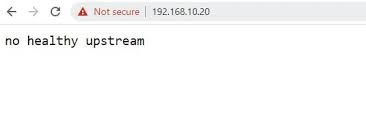
In simpler words, think of it like calling a company and finding out all their phone lines are down. Your message cannot go through because no one is available to take the call. With Spotify, no healthy upstream errors usually mean the app tried reaching its servers to stream music or load data, but none were working or accessible at that time. While frustrating, this error is temporary and may resolve itself within a few minutes. Let us explore some common causes behind this issue to better understand the no healthy upstream meaning.
Also know: Best Online WEBP to PDF Converter Tools
No Healthy Upstream Meaning: Why Does It Happen?
Understanding the no healthy upstream meaning helps you figure out where the issue might lie. Here are the most common causes:
- The backend servers are actually down or undergoing maintenance. This is common with large platforms like Spotify during updates or outages.
- If too many users try to access the service at the same time, the servers can become overwhelmed and stop accepting new requests.
- Your internet connection might be slow, unstable, or misconfigured, causing problems in reaching the server.
- Your device may be trying to connect to an outdated or incorrect address because of DNS (Domain Name System) issues.
- Temporary bugs in the app or web browser can prevent successful server communication.
In case the issue does not solve itself, we have coupled some of the best practices to employ during a no healthy upstream error.
Also know: Best Disk Management Software For Windows
How to Fix a “No Healthy Upstream” Error
Now you know what does no healthy upstream means, here are effective ways to solve it.
1. Try Again After Some Time
In most cases, the no healthy upstream error happens because the server is down or not working properly. This is usually a problem on the service provider’s end, not yours. An administrator or IT professional needs to fix the issue from their side. So, there’s not much you can do except wait.
If you see this error on just one app or website, it is likely that their server is having trouble. But if you are seeing it across multiple services, your internet connection or network setup might be causing the issue.
2. Restart the App
Sometimes, the Spotify no healthy upstream error or similar issues in other apps are caused by a small glitch in the app or browser you are using. A simple restart can fix it. Just close the app or browser completely, then reopen it and try again. This refreshes the connection and may help the app reach a healthy server.
3. Restart Your PC
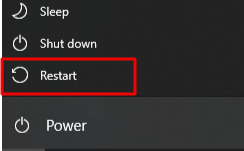
If you are still seeing the no healthy upstream error even after restarting the app, your computer might be experiencing a minor glitch. A simple restart can clear temporary bugs and free up system memory, which may help fix connection issues.
To restart:
- On Windows, click the Start menu, select the power icon, and then choose Restart.
- On Mac, click the Apple icon in the top-left corner and select Restart.
Once your device restarts, try opening the app or website again.
4. Reset Your Network Settings to Start Fresh
Still dealing with the no healthy upstream error and wondering what does no healthy upstream means in your situation? It could be due to incorrect or faulty network settings. Resetting your network configuration might fix deeper connection issues by restoring your settings to default. Keep in mind, you will need to reconnect to your Wi-Fi afterward, so make sure you know your network name and password.
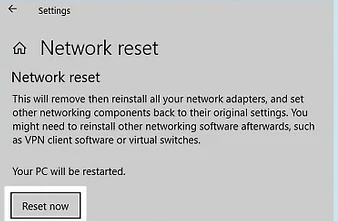
On Windows, click the Start menu, type Network reset, then select it and click “Reset now.” Follow the prompts and restart your computer.
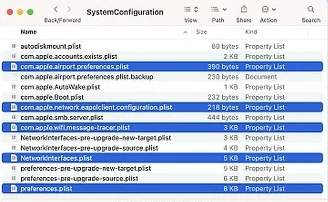
On Mac, open Finder, click Go → Go to Folder, and enter /Library/Preferences/SystemConfiguration. Delete the following files: CaptiveNetworkSupport, com.apple.network.eapolclient.configuration, com.apple.airport.preferences.plist, preferences.plist, and NetworkInterfaces.plist. Then restart your Mac. Resetting these settings may help eliminate the root cause of the Spotify no healthy upstream error or similar server-related issues.
5. Clear Your Browser Cache to Remove Corrupt Data
Over time, your browser stores temporary files called “cache” to help websites load faster. However, this cache can sometimes become corrupt and interfere with how sites or services function, leading to connection issues. Clearing your cache can help fix these problems.
In Chrome, press Ctrl + H, click Delete browsing data, choose “All time” under time range, and click Delete data.
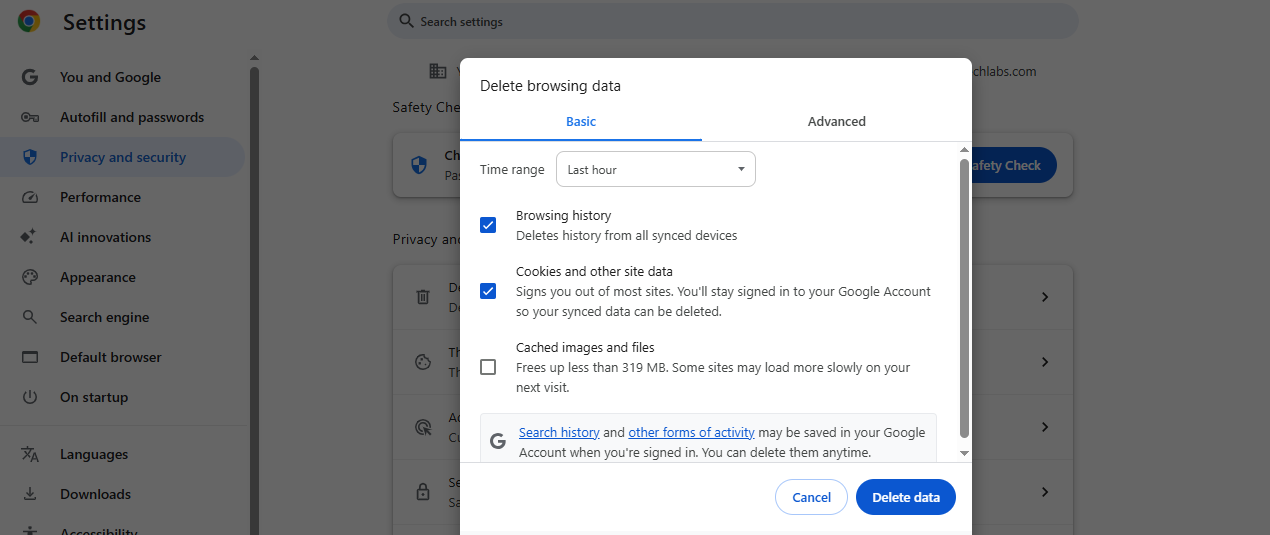
In Microsoft Edge, press Ctrl + H, click the trashcan icon, select “All time,” and hit clear now.
For Safari, press Option + Command + E to clear the cache instantly.
In Firefox, press Ctrl + Shift + H, right-click the time frames on the left panel, and select Delete. Once cleared, reload the site or app to see if the error is resolved.
6. Flush Your DNS
If you are still wondering what does no healthy upstream means, one possible cause is a corrupt or outdated DNS cache. Your DNS cache helps your device find websites and servers quickly, but if it is outdated or damaged, it can prevent your device from connecting properly, leading to errors like no healthy upstream. To fix this, you can flush your DNS settings.
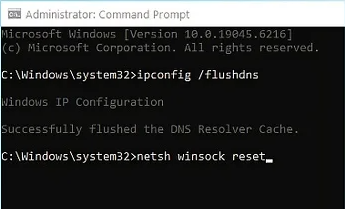
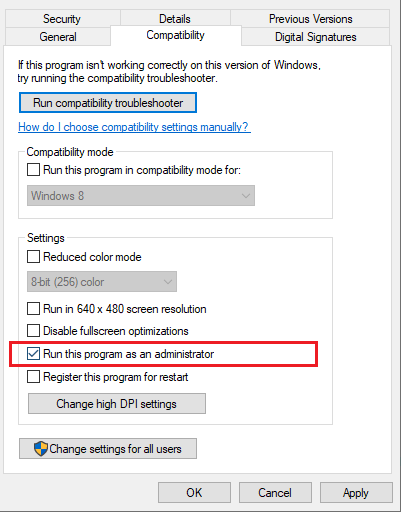
On Windows, open the Start menu, type CMD, right-click Command Prompt, and select Run as Administrator. Then type ipconfig /flushdns and press Enter, followed by netsh winsock reset and Enter. Finally, restart your computer.
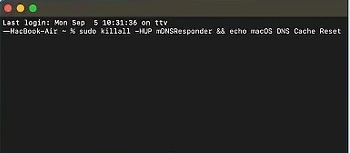
On a Mac, open Terminal via Spotlight, then type sudo killall -HUP mDNSResponder && echo macOS DNS Cache Reset and hit Enter. Enter your admin password and restart your computer. This process clears your DNS cache and can help restore proper connection to servers.
7. Restart Your Router to Fix Internet Issues
A weak or unstable internet connection can also trigger the no healthy upstream error. Restarting your router or modem often helps fix this. Simply unplug the power cable from your router or modem, wait for about 30 seconds, then plug it back in. Give it about a minute to fully restart. Once your internet connection is restored, try using the app or website again. This may resolve the issue, especially if you are experiencing the Spotify no healthy upstream error or similar problems.
8. Update Your Browser to Ensure Proper Functioning
If you are wondering what does no healthy upstream means, one common cause can be an outdated web browser. Using an old browser may lead to connection problems like the one you are experiencing right now. Therefore, to fix this, make sure your browser is up-to-date.
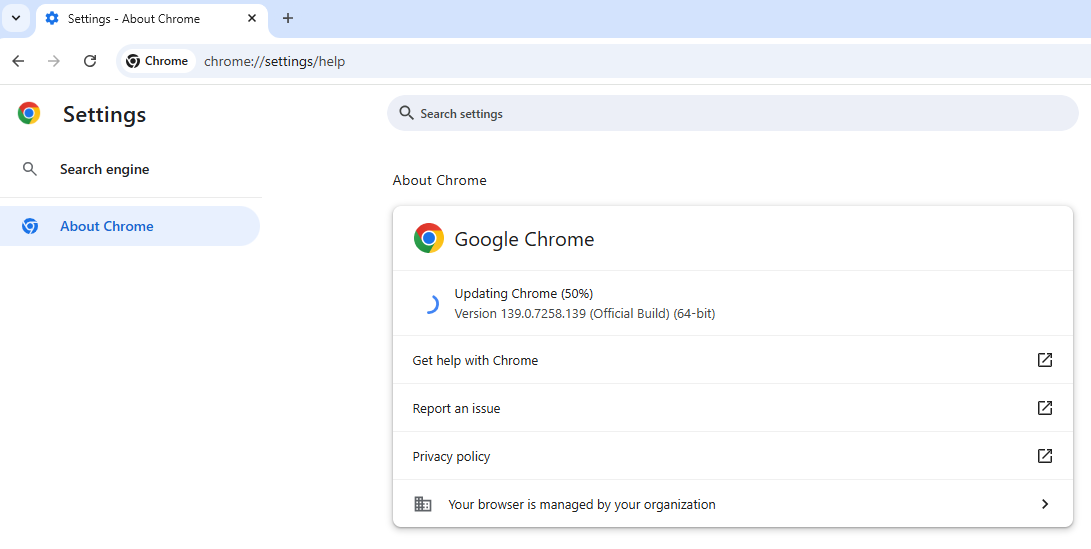
In Chrome, click the three dots (⋮) in the top right corner, go to Help, then About Google Chrome, and the browser will check for updates automatically.
For Microsoft Edge, click the three dots (•••), then Help and feedback, followed by About Microsoft Edge to update.
If you use Safari, check for macOS updates by clicking the Apple icon, then System Settings → General → Software updates.
For Firefox, click the three lines (☰), then Help → About Firefox to update. Keeping your browser updated can solve many connectivity issues.
9. Contact Support or a Network Administrator
If none of the above steps resolve the no healthy upstream error, it is likely a server-side issue that only the service provider or IT administrator can fix. At this point, your best option is to reach out to the customer support team of the app or website you are trying to access. Let them know about the problem; they may not be aware of it yet. If you are facing this issue at work or on a company network, contact your network administrator for help. They can check if the problem is related to internal systems or firewall settings that may be blocking access to healthy servers.
Also know: Best Ways To Delete Temp Files On Mac
Conclusion
To sum it up, the no healthy upstream error means your device or app could not find a working server to process your request. It is usually a server-side issue, but it can also be related to your internet connection or device settings.
We have covered everything from what does no healthy upstream means to how to solve it across different devices and apps, including the common no healthy upstream Spotify scenario. If nothing works, do not hesitate to reach out to support; sometimes the fix is on their end.



![[Fixed] Lenovo Laptop Keyboard Not Working Issue In Windows 10](https://wpcontent.techpout.com/techpout/wp-content/uploads/2021/02/12133150/Fix-Lenovo-Laptop-Keyboard-Not-Working-Issue-in-Windows-10.jpg)