Main LogoLight Logo
  • Reviews
  • Top 10
  • How To
  • Tech News
  • OS
    • Windows
    • MAC
    • iOS
    • Android
  • Categories
    • Driver Updater
    • Cyber Security
    • Games
    • Fitness
    • Entertainment
    • Tips & Tricks
MAC Top 10
by Prachi Dani

13 Best Audio Recording Software For Mac in 2024

May 2, 2024
1

If you are looking for good audio recording software, our blog here has listed some of the most popular and top recording software for macOS. 

Known for its performance, ease of use and stability, Mac is the most preferred platform for audio and video professionals. Although a Mac comes with built-in audio recording software it cannot support high-end recordings like podcasts and music production. 

The powerful macOS together with the best audio recording software will satisfy all your requirements smoothly. So without wasting any more time let’s have a look at some of our picks.

Table of Contents hide
Best Audio Recording Software For macOS 2024
1. Apowersoft
2. WavePad
3. QuickTime
4. Adobe Audition
5. Audacity
6. GarageBand
7. Record Pad
8. Ardour
9. Macsome Audio Recorder
10. Logic Pro
11. Audio Hijack
12. Movavi Screen Recorder
13. Ocenaudio

Best Audio Recording Software For macOS 2024

Here, we have listed the best bunch of sound recorder software that will work perfectly on your Mac device. You can refer to our list and choose one as per your desire.

1. Apowersoft 
Apowersoft 

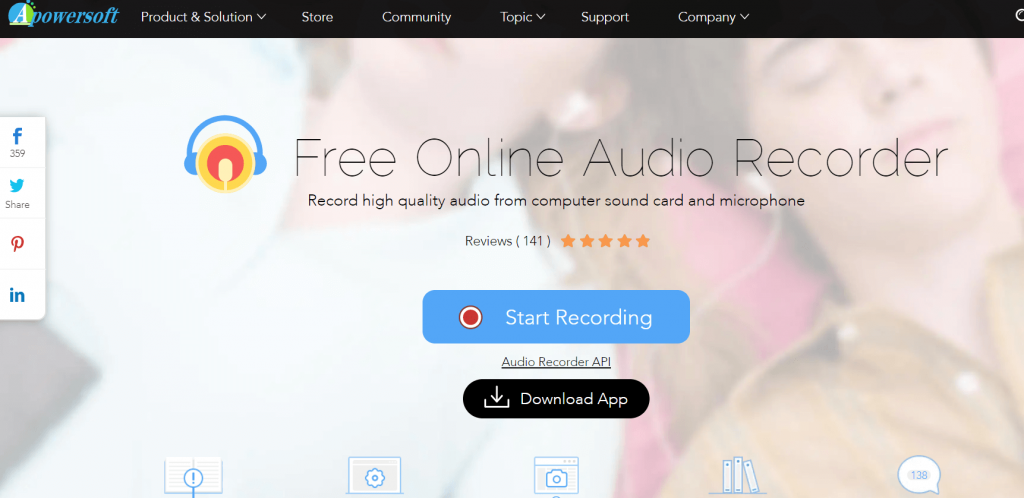
Suitable for both beginners and professionals Apowersoft is great audio recording software for various sorts of sounds. OCG, WAV, AAC are a few file formats supported by it.

It is an indisputable winner in creating and editing HD audio recordings and can also work seamlessly well as a CD ripper and audio converter tool. It is even capable of recording radio, VoIP calls, and streaming audio files. 

It can support audio recording for up to 3 minutes in a go and allows you to download music from online music platforms. Apart from this, you can also use it to add music files to iTunes.

Features of Apowersoft:

  • The app offers unlimited audio recording for free.
  • Apowersoft does not charge any extra money for subscriptions or usage.
  • Whether it is a meeting or a lecture, or any other event or audio, Apowersoft offers advanced recording outputs for all.
  • With the help of the app, you can also play the recorded audio.

Pros

  • Allows audio trimming
  • Simplistic UI
  • Zero cost

Cons

  • Lacks some features that are available in paid alternatives.
  • Low reliability.

Download


2. WavePad

WavePad - Best Audio Recording Software

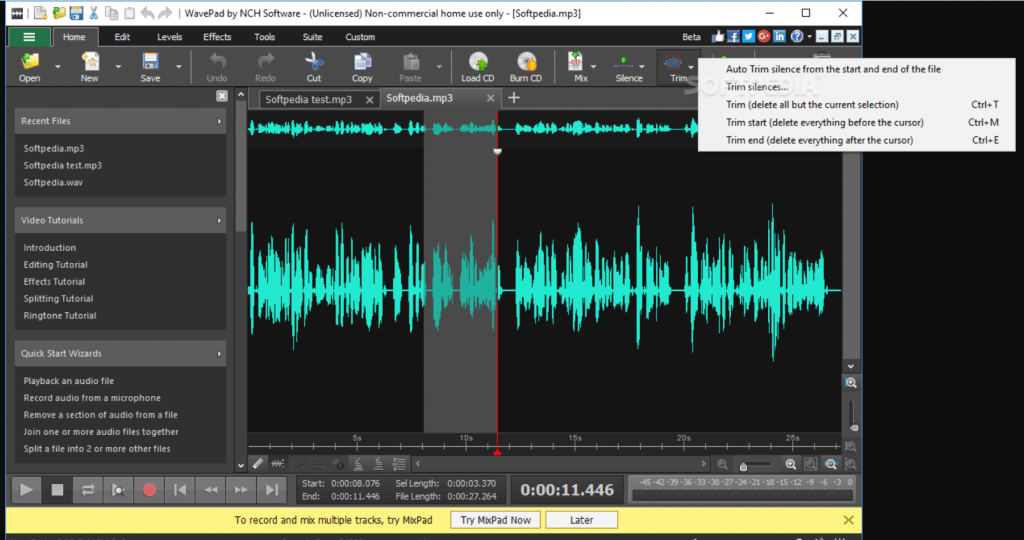
Wavepad tops our list of best audio recording software for Mac for fairly good reasons and is loaded with an array of professional features. It is a great tool if you want to edit and update your audio in a hassle-free manner. 

Read More: 15 Best Free Video Player Apps For MacOS

With its huge basket of editing tools, you can cut, copy, delete, paste compress tour recordings along with pitch shifting. Apart from this it also supports various other audio effects like amplify, reverb, equalizer, and many more. 

This incredible recording software for Mac you can also princess batch files and enjoy noise removal techniques. WMA, VOX, AIF, MP3 are a few of the file formats supported by WavePad.

Features of WavePad

  • The interface of the app is quite understandable.
  • On the app, you will see the inputs in the form of waves for ease that are easy to manage and helps you create precise outputs.
  • You can choose the output frequency from various values ranging from 6 to 192kHz.
  • You can get precise inputs with the help of the app using various filters and effects.

Pros

  • Beginner-friendly UI
  • Smart and helpful features
  • Supports various audio formats
  • 8, 16, 24, and 32-bit audio
  • Autortrim and audio merging features

Cons

  • May contain ads
  • Lacks some effects

Download


3. QuickTime

QuickTime

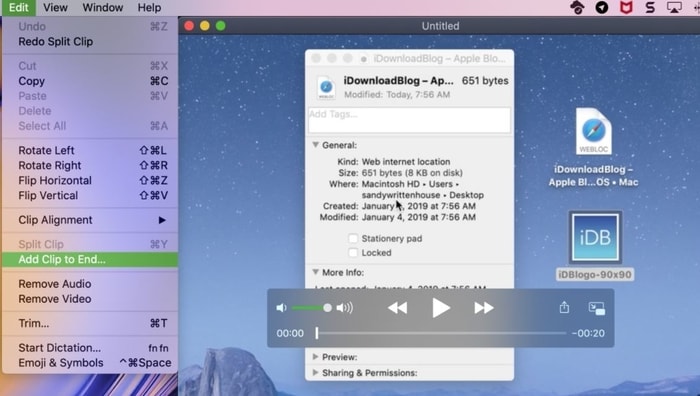
QuickTime is undoubtedly the best audio recording software for Mac. And, as you may know, it is an in-built utility in Mac that is commonly accessed for video or audio playback. With QuickTime, you can also record your own content as well. QuickTime also allows you to record a video using any connected device or a webcam. Everything is super easy to implement with QuickTime. With minimal customization options, QuickTime’s user interface is really very impressive, clean, and easy to use. Plus, whatever you record will be available in a sole file.

Features of QuickTime:

  • This app is more than just a regular audio recording app but a full-fledged multimedia player.
  • The cross-platform tool is available for Windows, Mac, and other operating systems.
  • You can easily navigate to various features and use them.
  • The QuickTime app allows you to use the keyboard for maximum ease.

Pros

  • Multilingual UI
  • Easy to access and use
  • Smart options
  • Various OS version compatibility.

Cons

  • No advanced recording features

4. Adobe Audition
Adobe Audition

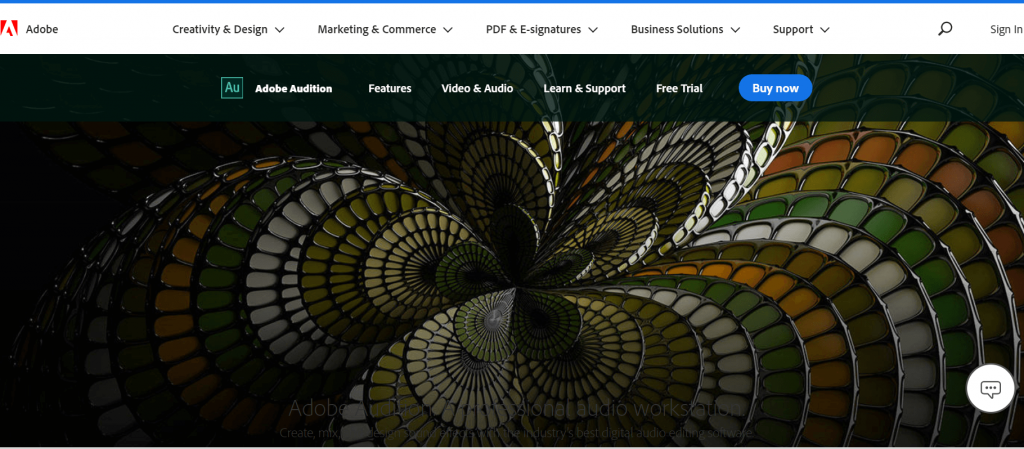
If you are looking for multi-purpose audio recording software for your mac that can help you in recording, editing, and creating background score then there is no better option than Adobe Audition. Its high-end recording and editing capabilities make it a perfect pick for not only home users but also for digital audio stations.

Its restoration tools, audio clean-up feature, and a massive array of plug-ins make it a highly powerful tool. Use its various plug-ins to add audio effects, remove noise with precision, and much more. 

A great waveform editing environment powered with audio ducking features and AI-enhanced tool is perfect for making your audio recording life easy. Its clean and convenient UI also deserves a mention.

Features of Adobe Audition:

  • The app is solely developed for recording and managing audio files.
  • The app is perfect for professional music artists, interviewers, and other such personnel.
  • A couple of clicks on the app allow you to do so much more than any traditional recording app.
  • You can use other audio files as well to remix.
  • You can integrate the app and use it with other ones for better results.

Pros

  • Smart interface perfect for professionals
  • Free sound effects
  • Audio mixing features
  • Noise-reducing options

Cons

  • Limitedness of the trial version
  • Can be tough for beginners

Download


5. Audacity

Audacity

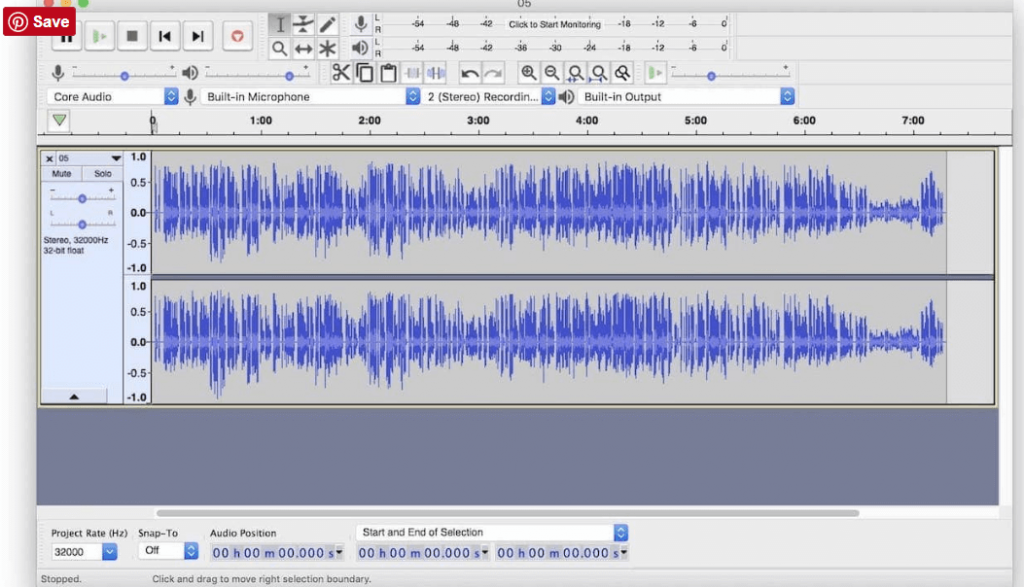
Next on our list of best sound recorder software for Mac is Audacity. It is an open-source freeware tool. In addition to expert features, it is also loaded with live recording capabilities and multi-track editing. If you want to do the audio recording in CD’S, convert various types of audio files and enjoy a hassle-free digital recording experience, then there is no better tool than Audacity.

Use it to cut, copy, paste, and track various audio tracks within seconds. FLAC, MP2, MP3, WAV, WMA, AAC are few file formats supported by this stunning Mac audio recording software.

Features of Audacity:

  • If you want an open-source tool, then Audacity is the best.
  • This cross-platformed solution is perfect for Windows, macOS, GNU/Linux, and various other operating systems.
  • The tool is completely free to use without any hidden or direct charges.
  • You can import or export recordings or other audio files using this tool.
  • The app shares a plethora of effects that you can use and apply.
  • Smart editing options of Audacity are a must to try.

Pros

  • Option to select various audio outputs
  • Keyboard and shortcut compatibility
  • Supports plugins and more
  • Easy to use
  • Multiple themes of the UI

Cons

  • Lack of features than some paid tools
  • Complex at times

Download


6. GarageBand

GarageBand

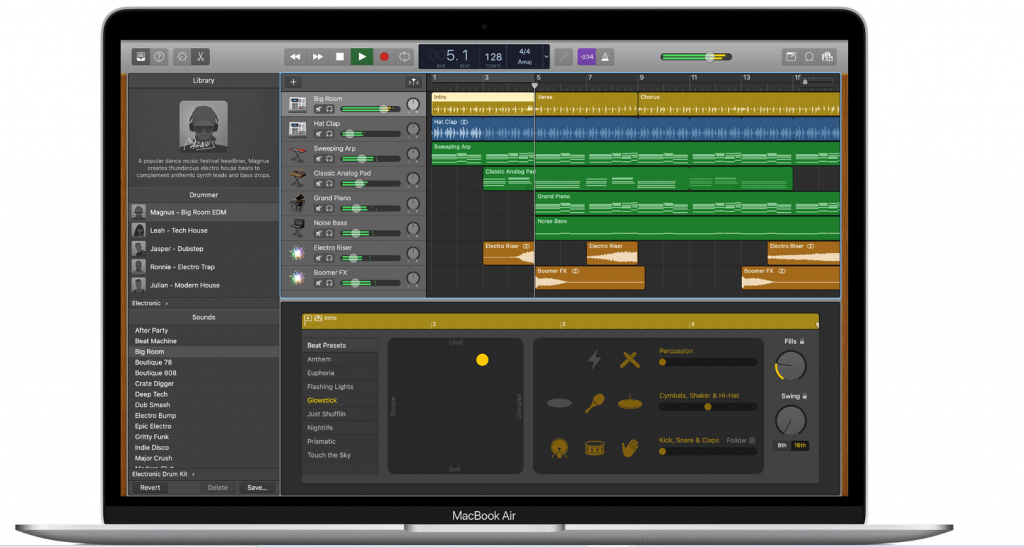
Powered with a professional and convenient user interface, Apple GarageBand surely deserves a spot on our list of best audio recording software for mac in 2024. 

Read More: 13 Best Audio Recording Software For Windows PC

It is a great tool for music enthusiasts if you want to learn online piano and guitar. Enjoy class-apart free artist lessons and instrument classes with this incredible tool. It comes as an in-built feature with every mac device and can be used by both beginners and professionals.

Use it to record and mix audio music with ease. Apart from all the features mentioned above it also supports third-party plug-in along with a 24-bit recording.

Features of GarageBand:

  • GarageBand is a well-designed app with tons of different features and accessibility options.
  • The app allows you to select the sound of your favorite instruments and play their notes for enhanced audio creativity.
  • You can select from a variety of modes for the perfect audio outputs.
  • The app is the perfect choice if you want to use metal audio for outputs.

Pros

  • All-inclusive interface
  • Well-put features and filters
  • A multilingual base for your ease
  • Select multiple audio files

Cons

  • Not for Android

Download


7. Record Pad

Record Pad

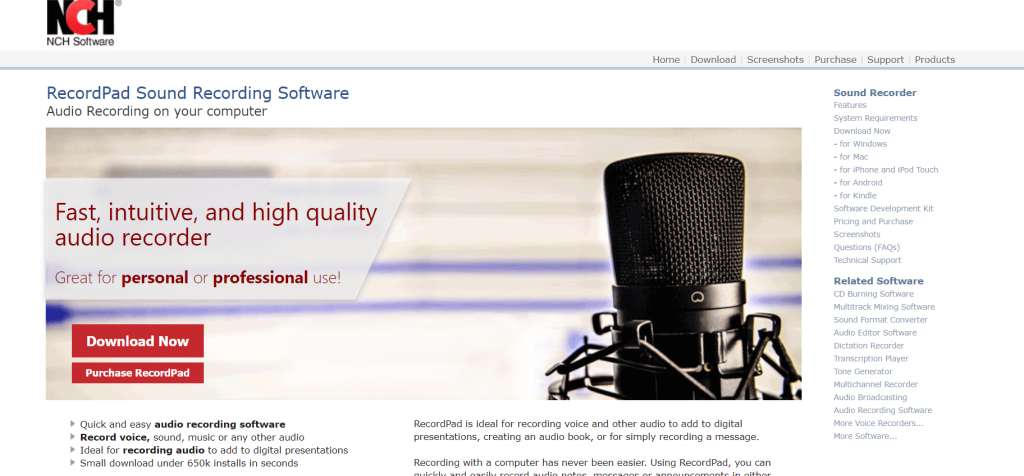
Developed by NCH Software, RecordPad is an ideal choice for all your audio recording needs. It works seamlessly with Mac devices and is fully compatible with Android, Windows, and Linux. 

It is a great tool for recording music and audio files which can be saved in your hard drive as mp3 and AIFF files. You can also share your recordings with others via email. Burn your recording on CD with its built-in express burn feature and use its massive basket of editing features for noise reduction, editing silence, and equalizing your audio clip.

Its clean and convenient UI along with an easy-to-navigate design also deserves a fair mention. It is compatible with multiple music formats including FLAC, MP3, AAC, and WAV.

Features of Record Pad:

  • Both free and paid versions of Record Pad are available to you.
  • You can download and use the tool on Windows, macOS, iPhone, and other operating systems.
  • The app allows you to record fresh audio or edit, merge, trim, or modify existing files in other ways.
  • You can even burn the audio to a CD using the ExpressBurn feature.
  • You get a variety of output options.

Pros

  • Smart encoding with MPEG Layer-3
  • Automated system
  • Supports FTP server

Cons

  • Complicated for beginners
  • Outdated UI

Download


8. Ardour

Ardour

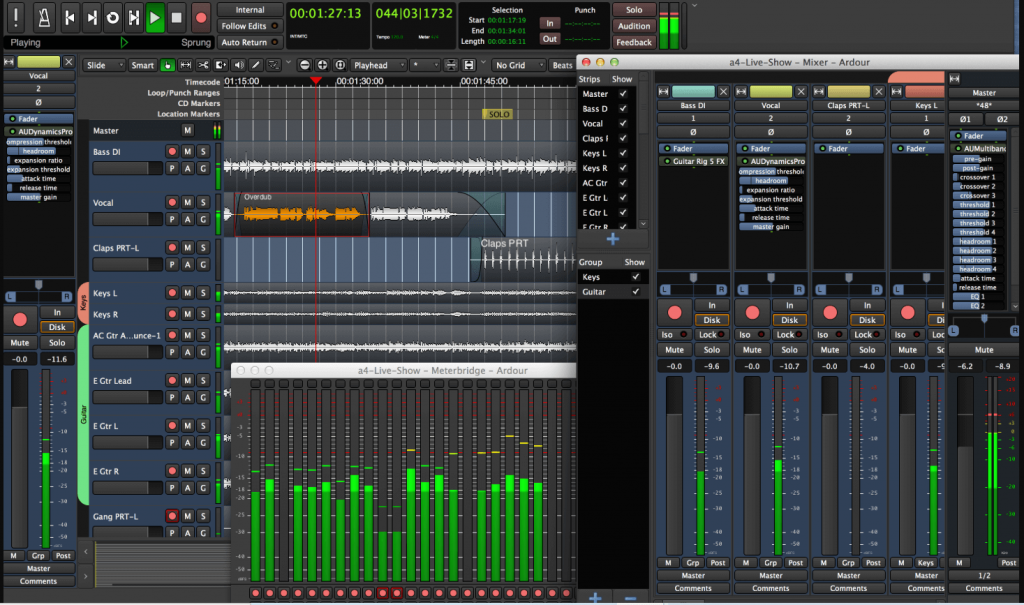
If you are a musician, track editor, or composer, then look no further, Ardour is the ultimate tool for all your audio recording and editing needs. It is highly suitable for MIDI projects and multi-track recording. 

The tool is compatible with a wide range of formats and systems and adds the utmost ease to the tour audio recording experience. 

Features of Ardour:

  • Using Ardour, you can easily record, edit, or modify audio files.
  • The crossfading options of the tool are some of the smartest and strongest you will ever find.
  • The easy undo and redo features are a lifesaver that allows you to try anything and everything.
  • Ardour’s automotive features are top-notch.
  • The interface of the software has numerous external control options.

Pros

  • Supports drag and drop.
  • Flexible mixer settings
  • Supports plugins
  • Open-source

Cons

  • Limited output formats
  • No paid version

Download


9. Macsome Audio Recorder

Macsome Audio Recorder

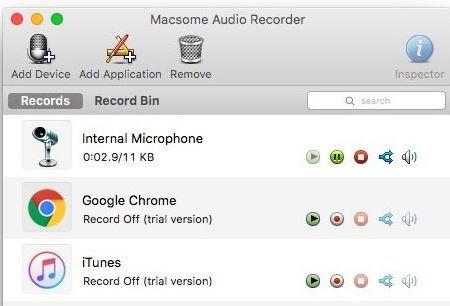
Macsome Audio Recorder is one of the best audio recording software for Mac in 2024. It is an ideal option for recording audio from multiple sources. Macsome Audio Recorder is good enough for organizing all your recording files as well. Plus, you can also use the ID tags to organize your recording files. Apart from this, you can also add distinct recording profiles for applications and hardware. And, within a single click, you can start the recording procedure. Isn’t it something very nice? Without a single doubt, YES! However, the UI of Macsome Audio Recorder is very simple and not so impressive, but it offers productive yet effective features. It is all-in-one audio recorder software for Mac users.

Features of Macsome Audio Recorder

  • Apart from the Mac, you can also install the tool in the form of a browser extension and plugin.
  • The tool allows you to record the audio of your choice in MP3 and/or AAC formats.
  • The software allows you to filter audio files into formats and other settings.

Pros

  • Easy to use
  • Fast interface
  • Quite useful for beginners
  • Advanced options

Cons

  • Offers trial with limited features
  • Not the best tool on the list

Download


10. Logic Pro

Logic Pro

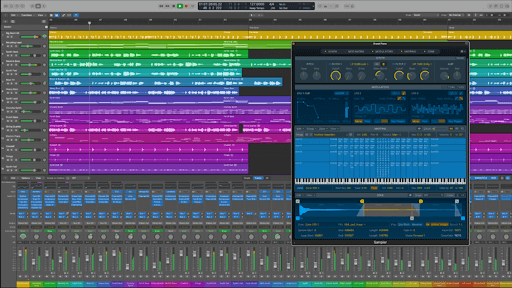
Logic Pro is the next name on this list of the best audio recording software for Mac in 2024. The tool is quite amazing and boasts an easy-to-use interface for all Mac users. Hence, even if you are a beginner to the tool, you can easily understand its performance patterns. Additionally, the learning curve of the software is also quite steep. You can use this all-in-one audio recorder software for Mac to show off your creativity on all kinds of projects.

Features of Logic Pro:

  • Logic Pro is more than just a basic recording tool but an advanced solution for audio creation.
  • The outputs of the software are Dolby Atmos compatible for better quality.
  • The software contains a 3D Object Panner that makes editing feasible.
  • This is an advanced solution with multiple helpful solutions for you.

Pros

  • Support Plug-ins
  • Contains multiple samples
  • Easy to use

Cons

  • The trial version has limited features

Download


11. Audio Hijack

Audio Hijack

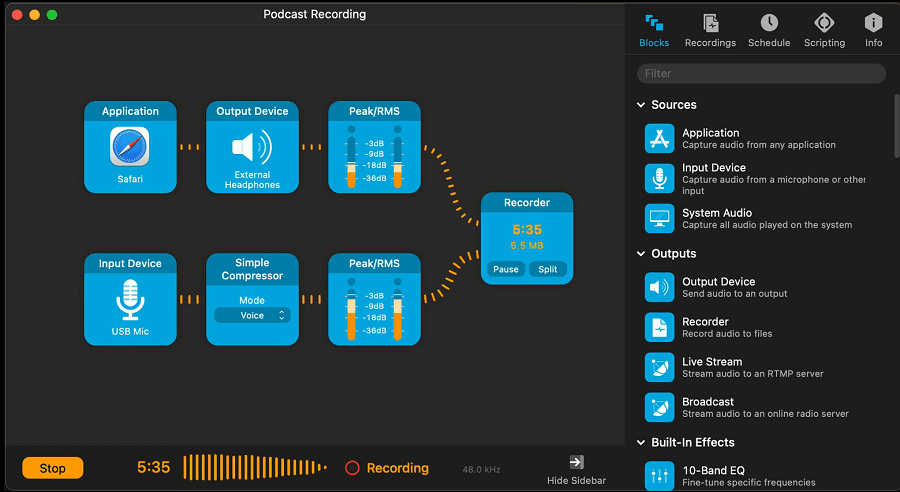
Audio Hijack is the last name on this list of the best audio recording software for Mac in 2024. The tool is suitable for both beginners and professionals for recording and editing audio. You can easily use the tool to create podcasts as well as record your artistic talents with ease. The app also allows you to stream the audio using various spectrums and sources.

Features of Audio Hijack:

  • If you want to extract the audio from some app, then Audio Hijack is the perfect choice for you.
  • You can even record audio from third-party websites for the best results.
  • If there is too much noise in the audio, the tool allows you to remove it.
  • The tool is even more helpful for gamers who want to record live streaming of games and their audio.

Pros

  • Both free and paid versions are available
  • Allows audio recording scheduling
  • Internet broadcasting compatible
  • Smart Scriptwriting features

Cons

  • Only for macOS

Download


12. Movavi Screen Recorder

Movavi Screen Recorder

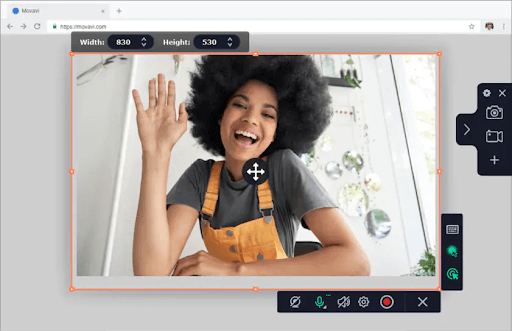
Movavi Screen Recorder is the next best audio recording software for Mac in 2024. The software is an advanced alternative to the tools provided above. Although the tool is a screen recorder, it can also be used to record audio on your Mac without video or screen.

Features of Movavi Screen Recorder:

  • Allows you to apter the screen and audio in multiple ways
  • Supports screenshots.
  • Helps in enhancing videos

Pros

  • Both free and paid versions are available
  • Offers scheduling options
  • Works on Windows and Mac

Cons

  • Limited options in the free version
  • Limited trial period

Download


13. Ocenaudio

Ocenaudio

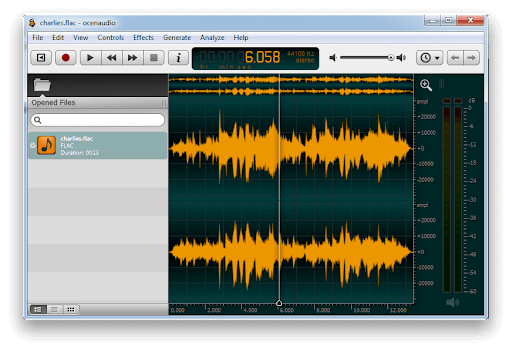
Ocenaudio is another of the best audio recording software for Mac in 2024. The tool is quite efficient and allows you to record real-time audio on your Mac device. The tool offers a plethora of options for recording and more.

Features of Ocenaudio:

  • Free to download and use
  • Offers audio editing
  • Feasible control
  • Play and pause functionality

Pros

  • Entirely free to download
  • Works on Windows and Mac

Cons

  • Lacks some features as available in paid tools

Download


Time to Make a Good Choice For Yourself

The audio recording software mentioned above are some of the best available options for both beginners and professionals. 

We hope that our list of best audio recorder tools for mac has been of great help to you and has been able to answer your questions around “What is the best software that you can use to record audio on your Mac device ”. 

Author

Prachi Dani

Prachi Dani is a technical content writer who specializes in areas of science and technology. She is highly up to date with technological transitions and transformations. Writing is not her passion but the only thing that carries satisfaction in life. If not writing, you may find her engrossed playing action games on her treasured smartphone.

View all posts

Related Posts
FIXED: MacBook Microphone Not Working [Complete Guide]

FIXED: MacBook Microphone Not Working [Complete Guide]

April 30, 2022
0

Check out these 100% working solutions to fix the Mac microphone not working issue. Read the entire guide to know everything in detail! 

Apple MacBooks and various desktop Macs have come with in-built or internal microphones. However, you can also attach headphones and external mics through USB, Bluetooth, or a 3.5mm audio jack. But what if the microphone on a Mac stops working fine as expected. It can be a real-hell-like problem. Isn’t it?

Are you also facing issues with your microphone on Mac? Nothing to worry about, we can help you. The post contains a couple of ways that you can try to fix the Mac mic not working issue, easily & quickly.

Why My Microphone is Not Working on Mac

Well, there could be multiple reasons that prevent your microphone from working properly. Incorrect configuration, conflicts with third-party applications, the microphone is disabled in your device, system junk, and cache settings majorly cause the mac microphone not working issue.

How to Fix a Microphone is Not Working on MacBook

Before getting started, you need to first figure out which mic you are using on your MacBook like an internal microphone, external USB microphone, AirPods, or similar Bluetooth headset. After recognizing this, you can try the solutions shared below to fix the Mac microphone not working.

Fix 1: Check the Sound Input Settings

Incorrect or misconfigured sound input settings is one of the most common causes of the microphone not working on MacBook. To get started, you need to head to the System Preferences. Then, select Sound and click on the Input tab. Here you’ll see a list of devices you can access as a sound source, incorporating the mic you wish to use.

To access a device, like the Internal Microphone, click on it. If everything seems right, you can notice the bars fill up beside the Input Level as you start speaking.

If in case, you don’t see anything, then maximize the Input Volume slider and once again try to speak. If the volume slider is very low, your MacBook won’t recognize any sound.Check the Sound Input Settings

Do you want to utilize your AirPods as your mic? Choose AirPods from the available list. After doing so much, if you observe movement in the Input Level indicator, that is a good sign, but if you think more troubleshooting is needed to get the things functioning correctly, you can try other resolutions.

Also Read: How to Fix Bluetooth Not Working on Mac OS


Fix 2: Check the Microphone Permissions

Another general cause of microphone-related problems is Apple’s extended permissions system. It stops applications from accessing the mic until you particularly allow the permissions. When applications want to access the mic, a pop-up appears asking you to deny or approve the request.

If you deny the request, the app will be unable to access the mac’s microphone. So, it would be better to deny applications access to your hardware until you feel confident that it actually requires permission to work accurately. To do so, follow the steps below:

  • Go to the System Preferences.
  • Then, click Security and Privacy.
  • Switch to the Privacy tab and choose Microphone from the sidebar on the left. Now, you can see a list of apps that have asked for access to your microphone. A checkmark will be shown next to the approved apps.Check the Microphone Permissions
  • After that, make a click on the Padlock icon at the lower left to certify with your admin passcode or touch ID.

Once done, check to see if the Mac microphone not working has disappeared. If not, then try another solution.

Also Read: How to Fix Mac Camera Not Working {SOLVED}


Fix 3: Uninstall Problematic Apps

If a specific app is not working or interfering with the required files, then you may face a MacBook pro microphone not working problem. To test the issue, you can check the app’s preferences to view if there are some separate settings for the input devices. Applications like Audacity and Adobe Audition lets you define an input device distinct from the one that was chosen in the audio “Input” settings under the System Preferences option.Uninstall Problematic Apps

If you find everything is fine, then try to uninstall and reinstall the application. Search for the latest and updated version to download, because the issues were also caused by incompatibility. Unfortunately, if this doesn’t work for you, then try to reboot your Mac as a last resort. This will surely help you.

Also Read: How to Stop your Mac from Sleeping 


MacBook Microphone Not Working: SOLVED

Be it for calls or something else, a microphone is essential. And, ensuring its proper functioning is also crucial in order to have a great user experience. We hope, now your Mac microphone starts functioning fine as you expect. If you have any questions or better ideas about the Mac microphone not working issue, then please tell us in the comments box below.

Additionally, do subscribe to our Newsletter for more information related to technology. Apart from that, you can also follow our Social Media Channels – Facebook, Twitter, Instagram, and Pinterest.

Best Free Rust Server Hosting

7 Best Free Rust Server Hosting in 2024

March 1, 2024
0

There are many server providers to help you get the best Rust experience with your friends. You can read this article to know more about them.

Developed by Facepunch Studios and released in December 2013, Rust is among the most popular survival games. Rightly called one of the cruelest Steam games, the game offers a challenging gameplay experience to take you on a thrilling adventure. However, do you wish to play the game with your friends to make it more enjoyable? If yes, you can use the best Rust server hosting service to do it.

The hosting service creates your own game server on a VPS (Virtual Private Server) or game server to help you play Rust with your friends. However, these services can burn a hole in your pocket, and finding a reliable free hosting service is an uphill task.

Hence, we decided to dive deep into the hosting services to find the best Rust hosting services you can use for free. Let us list them in the following section of this article without wasting your precious time.

List of the Best Rust Server Hosting Services (Free) in 2024

Below you can find the top Rust server hosting platforms to play this exciting survival game with your best buddies.

1. Axenthost

Axenthost - Best Rust Server Hosting Services

Let us introduce you to Axenthost. It is a fast and reliable server host with top-notch game servers, effortless customization options with plugins and mods, and the following remarkable features to justify its position on our list of the best Rust hosting servers.

Key features of Axenthost

  • It is a highly flexible server, i.e., you can customize the RAM, disk, etc., effortlessly
  • Automated backups ensure you never lose the progress you have made
  • The server is available in both North America and Europe
  • It uses high-end NVMe SSDs, CPUs, and DDR4 ECC RAM
  • Axenthost allows you to access all your server files easily

Know More

Also Read: Best Free Website Hosting for Small Business


2. mTxServ

mTxServ - Free Rust Server Hosting Services

You can choose mTxServ if you are looking for a server hosting with premium hardware. mTxServ offers top-notch performance with its powerful DDR4 ECC memory and AMD Ryzen single-thread 7 5800X CPUs. Moreover, here are a few other features that make this service one of the best Rust server providers.

Key features of mTxServ

  • You can use the exclusive panel to configure and administer the server effortlessly
  • mTxServ protects your server with Anti-DDoS L7 Arbor technology
  • It supports all mods
  • mTxServ allows you to effortlessly edit and transfer your files with complete FTP/SFTP access, in-built code editor, and web FTP

Know More


3. Hostari

Hostari

If you are looking for the best Rust server hosting with easy configuration, you can choose Hostari. It offers a seamless automated server setup with a user-friendly control panel for effortless server management, and the following notable features.

Key features of Hostari

  • It offers automatic server backups to prevent data loss
  • Hostari has data centers in multiple locations, including Brazil and the US
  • It has top-notch security to ensure data protection from UDP floods, DDoS, and high-magnitude attacks
  • You can customize the server using custom maps, mods, and plugins

Know More

Also Read: Best Free VPN for Windows 10, 11 PC


4. Nodecraft

Nodecraft - Best Free Rust Server Hosting Services

Let us take a look at Nodecraft. It is among the top Rust server hosting if you wish to effortlessly switch between games without losing your progress. Moreover, cloud backups to save your progress, automation with scheduled tasks, and the following features contribute to justifying Nodecraft’s position on this list.

Key features of Nodecraft

  • It has no player slot limitations
  • You get a dedicated IP for free
  • Nodecraft offers DDoS server protection
  • There are no limits on configuration settings

Know More


5. ArkServers.io

ArkServers.io

Next, we have ArkServers.io on our list of the best Rust server hosting services. We like it because of its in-house customizable control panel that allows you to configure server settings, an option to select from 800 mods, automatic backup creation, and the following praiseworthy features.

Key features of ArkServers.io

  • It offers FTP access and automatic upgrades
  • ArkServers.io facilitates automation by offering a scheduler
  • It ensures the server remains protected with DDoS protection
  • ArkServers.io is popular because of low ping times

Know More

Also Read: Best Podcast Hosting Platforms


6. SparkedHost

SparkedHost

If the availability of sub-user access, uMod and Oxide Installer, and resource usage statistics are your top priorities, you can try SparkedHost. Moreover, SFTP access and the following features are another reason for listing SparkedHost as one of the best free Rust server hosting services (free for 24 hours).

Key features of SparkedHost

  • It protects your server with DDoS protection
  • SparkedHost creates automatic backups
  • It supports automation with task scheduling
  • You get full server access
  • It offers a dedicated IP for free

Know More


7. ScalaCube

ScalaCube

We would like to take this opportunity to talk about ScalaCube. It is among the best Rust server hosting services because of its free domain name, complete FTP access, DDoS protection, and the following incredible features.

Key features of ScalaCube

  • It comes with Oxide support
  • ScalaCube ensures you experience no lag
  • You can effortlessly modify settings

Know More

Also Read: Best Free Image Hosting Sites


Concluding the Best Free Rust Server Hosting Services

This article walked you through the best services for Rust server hosting to make the game playable with friends. You can choose any service from the above list after going through their features and comparing them with your requirements.

However, if you are confused about the service to choose, have any questions, or want to suggest anything about this article, please write us a comment.

1 Comment
    Damien says: Reply
    August 1st 2020, 8:22 am

    Great list! This was really helpful for me to select a program to use with my daughter, I think we will start with Audacity.

Leave a Reply Cancel reply

Your email address will not be published. Required fields are marked *

Sidebar Image bit G ad1

Latest Posts

  • Anytime Astro: Best Website For Online Astrology Consultation
    Anytime Astro: Best Website For Online Astrology Consultation
    by Somya Shrimal / February 13, 2026
  • Best-McAfee-alternative-software-to-use-for-Virus-Protection
    Best McAfee Alternative Software to use for Virus Protection
    by adminuser / February 11, 2026
  • What-is-Flip-Flop-in-Circuite-and-it's-Types
    What is Flip Flop in Circuit and its Types
    by Meet / February 6, 2026
  • Best-Data-Labeling-Software-to-use-in-2026
    Best Data Labeling Software to Use in 2026
    by Meet / February 2, 2026
  • Best-Google-Slides-tools--to-add-as-extension-in-2026
    Best Google Slides Tools to Add as Extension in 2026
    by Meet / January 30, 2026

Categories

  • Cyber Security
  • Driver Updater
  • Entertainment
  • Fitness
  • Games
  • How To
  • laptop
  • OS
  • Reviews
  • Tech News
  • Tips & Tricks
  • Top 10
Sidebar Image bit G ad1
Goodix Fingerprint Driver Download and Update for Windows Goodix Fingerprint Driver for Windows 11, 10 (Download & Update)by Devesh / May 1, 2024
14 Best Calendar Apps for Mac in 2024 [Free & Paid]by Niharika / May 2, 2024Best Calendar Apps for Mac
TechPout Footer Logo

We at TechPout promise to put forth stories that help people to learn and simplify their digital life. Our purpose is to share the true essence of technology with our tech-loving community.

Useful Links

  • About Us
  • Contact us
  • Privacy Policy

Popular Posts

  • Best PC Optimizer Software
  • Best Mac Cleaner Apps
  • Best Driver Updater
  • Duplicate Photo Finder and Cleaner Software
  • Best Free Movie Download Sites
  • Best IPTV Players

Follow us

Copyright © 2026 www.techpout.com. All rights reserved
DMCA.com Protection Status