Main LogoLight Logo
  • Reviews
  • Top 10
  • How To
  • Tech News
  • OS
    • Windows
    • MAC
    • iOS
    • Android
  • Categories
    • Driver Updater
    • Cyber Security
    • Games
    • Fitness
    • Entertainment
    • Tips & Tricks
Android iOS Top 10
by Snigdha

11 Best Free Language Translation Apps For Android & iOS (2024)

January 5, 2024
1

Do you have wanderlust but language limitations prevent you from venturing out? Install a language translation app on your smartphone and break your boundaries. Go beyond the known and experience life in different colors for it is said that “The world is a book and those who do not travel read only a page.”

Translation apps are not just for travellers but also for linguist enthusiasts. These apps can read, speak, and understand a new language for you so simply. These apps can assist you to order food swiftly, book a cab anywhere, communicate with the indigenous people easily and understand them without any difficulty.

We have therefore prepared a blog to look at the best Android & iOS translation apps for travel.

Table of Contents hide
11 Best Language Translation Apps For Android & iOS in 2024
1. Google Translate
2. iTranslate
3. Microsoft Translator
4. Easy Language Translator
5. Translate Now
6. Papago
7. Offline Translator 8 Languages
8. Chat Translator
9. Voice Translator
10. Translate On Screen
11. Snap Trans

11 Best Language Translation Apps For Android & iOS in 2024

Whether you have a knack to discover and explore new regions or travelling is a part of your job, you can use our guide to understand the significant features of each of the 11 language translator apps elaborately and utilize them for your benefit to interact smoothly in foreign lands.

1. Google Translate
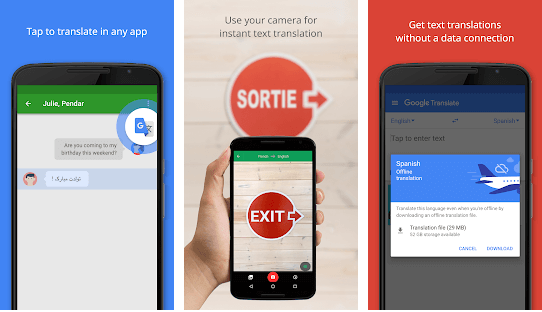
Google Translate - Best Translator Apps

Distinctive Attributes

  • Translates 109 languages.
  • Built into the Google Chrome browser as a default service.
  • Also, integrated into Google Maps, Google Assistant and devices run by it like Google Home and Pixel Buds.

There can be no second thoughts when it comes to labelling Google Translate as the best free language translation app available in the app market. Google’s multilingual translation service was started in 2006 to translate text and websites from one to another language.

It offers language translations offline. The service is offered as a website interface, mobile application, and an application programming interface.

android
ios

Read Also: 7 Best Free Language Learning Apps


2. iTranslate
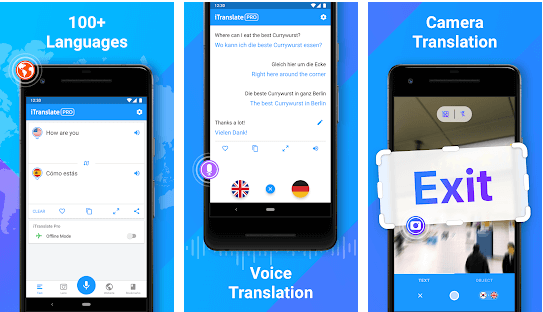
iTranslate - Best Translator Apps

Distinctive Attributes

  • Translates 100+ languages.
  • Appreciated by The Huffington Post and Time.com.

With 70 million downloads, this is the best free translation app. You can listen to verbal translations in a male or female voice. You can easily switch between dialects during translations. 

There is another app of iTranslate for Apple Watch. You can also avail a keyboard extension, iMessage App and voice-to-voice conversations with the help of this app.

The Pro features include the use of Lens That help to translate menus or signs promptly. It also offers to translate in over 40 languages even in offline mode. The Pro version costs around $39.99 per year.

android
ios

3. Microsoft Translator

Microsoft Translator - Best Language Translator Apps

Distinctive Attributes

  • Translates 60+ languages.
  • Supports downloading languages for offline translation while travelling.
  • Integrated with Office products, Bing Search, Skype, and Internet Explorer.

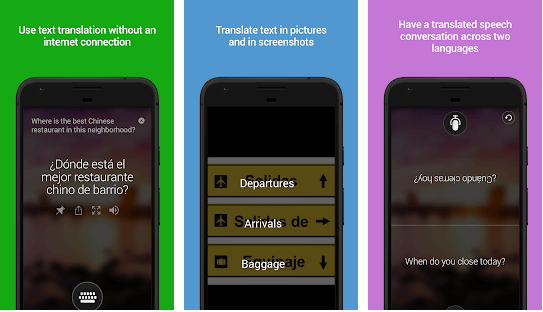
This is a notable free translation app from Microsoft supporting voice translation and camera translations to translate text from photos and screenshots. It is enabled with a multi-person conversation translation feature.

You can share your translation with other apps, view transliterations to help you with distinct pronunciations. 

It contains a phrasebook with verified translations and pronunciation guides to pick up foreign languages easily while travelling to your dream holiday destinations or while undertaking business trips.

android
ios

4. Easy Language Translator

Easy Language Translator Apps

Distinctive Attributes

  • Offers 100+ languages.

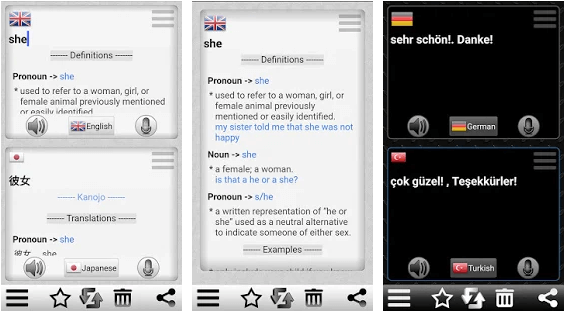
If you are looking for a fast and easy way to translate a language when you are travelling abroad, then install an easy language translator app on your smartphone. 

This is an incredible online language translator app for Android as it can translate text and voice simply. Additionally, the app also supports speech-to-text as well as text-to-speech features. You can also save and share translation as MP3 and copy the translations as well.

android

5. Translate Now

Translate Now - Best Language Translator Apps

Distinctive Attributes

  • Offers text translations in 110+ languages.
  • Available in Dark Mode.
  • Offers Siri shortcuts for faster translations.

With Translate Now, travel the world without any communication barriers. One of the best language translation apps for iOS, this app offers voice translations and camera translations easily.

Another interesting feature that this app offers is AR translation. With AR translations, the app translates the whole world around you with augmented reality effects.

ios

6. Papago 

Papago - Best Language Translator Apps

Distinctive Attributes

  • Supports 13 languages.

You can avail both written and voice translations with this ideal online translator app. Apart from offering real-time translation of the text provided, what is more, appreciable about this app is that you can enjoy the translation on the go by inserting the link of a foreign website.

It can even translate handwritten words and comes with a wonderful dictionary and phrasebook. Papago Mini is an automatic in-screen translation feature that lets you copy the text in any other application.

android
ios

7. Offline Translator 8 Languages

Offline Translator 8 Languages Apps

Distinctive Attributes

  • Unique offline translation technology.
  • Consumes less storage space.

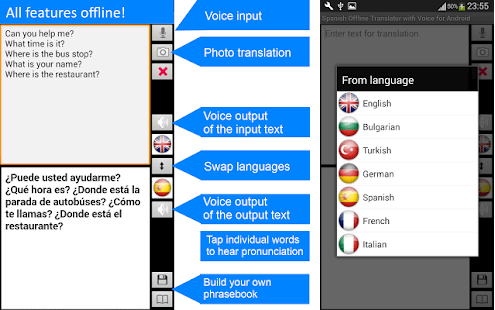
Ever wondered if you are travelling to a remote location like Papua New Guinea, then how would you avail translations without internet facility? Here is a wonderful offline language translator application that can translate full sentences as well as texts in offline mode. It offers offline translations instantly.

Additionally, you can utilize the feature of translating text from a photo swiftly in offline mode too. Text translation from photos is available in English, Spanish, French, German, Italian, Turkish, Chinese, and Bulgarian.

Android
ios

8. Chat Translator

Chat Translator - Best Translator Apps

Distinctive Attributes

  • Offers translations in 38 languages.

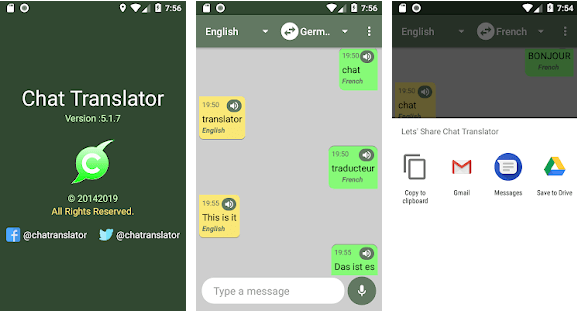
This is the best free language translation app. You can translate any number of words from any speech of any language. It helps you correct punctuations. 

You can directly share your translations with your friends and family. You just need to have an internet connection to ensure that your online transactions are facilitated.

android

9. Voice Translator

Voice Translator - Best Translator Apps

Distinctive Attributes

  • Has a library of 100 languages.

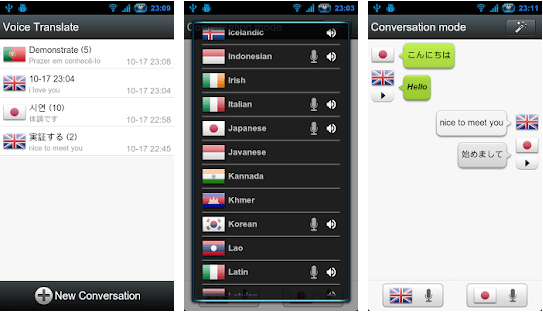
This Android language translator app will help you with speech translations in a fraction of a few seconds. All you have to do is open the app and begin talking. It’s extremely easy to use. 

Dialogues are translated very easily, and this can help you trace your conversations. Do you know that with this app, you can facilitate multi-language translations, all spaced within the same time.

android

10. Translate On Screen

Translate On Screen - Best Language Translator Apps

Distinctive Attributes

  • Supports more than 100 languages.
  • Translates text right on the screen anytime, anywhere.

When you are surfing through the internet, I am sure like anyone else you too suffer from a very indignant problem – that is tackling the language changes on the internet.

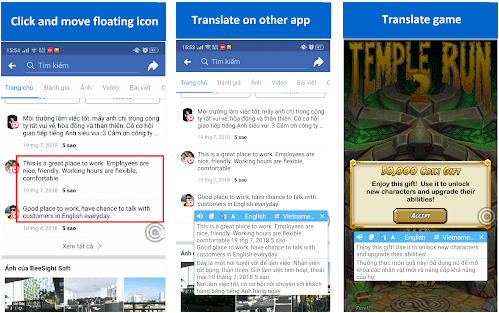
You can translate anything- images, voice, text and literally anything over the internet with this language translation app. The fun part is it can also be used for translating game characters within a game. Floating bubbles can be a real-time help as copied texts can be easily translated.

android

11. Snap Trans

Snap Trans - Best Language Translator Apps

Distinctive Attributes

  • 33 language translations available.

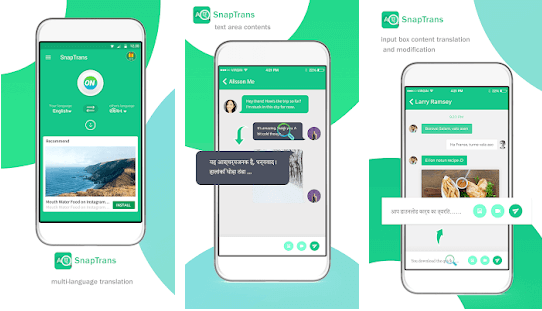
Drag and drop the lines you want to translate and wait a few seconds. It would be translated and it can do the translations from 33 languages. Conversing with foreign friends can get easier. 

Quickstart the process and translate as instantly as possible from one language to the other with this best language translator for Android.

android

Summing Up

Do you deeply desire to travel to far off lands but does it seem daunting to manage life abroad amidst unknown languages. Fear no more! Now we have some highly efficient translation apps that encompass a great deal of features to help you interpret the world around you better.

Mastering a new language in one day is not possible but installing an app in minutes is definitely achievable. I do hope that this article has not only educated you about the utility of language translation apps but also helped you figure out your best match.

Now travel anywhere whether for work or leisure and don’t let language become the inhibiting factor on your path because travelling opens your eyes and helps you develop a new perspective about life.

Image Source: Play Store, App Store

Author

Snigdha

Snigdha is a technical content writer with expertise in the field of science & technology. Though she has a very diverse academic and professional profile yet she finds writing to be a creative form that she was unable to explore so far. When not writing, she can be found indulging in other forms of creativity like painting or travelling.

View all posts

Related Posts
14 Best Encryption Software For Windows In 2024

14 Best Encryption Software For Windows In 2024

January 31, 2024
0

Encryption software is the safest way to prevent hackers and spying entities from gaining access to your computer and steal your most sensitive files and records. 

As financial crimes are increasing at an alarming rate, having the best encryption software installed on your Windows PC is the need of the hour.

However, if you don’t know which software is best for encrypting files, there’s no need to worry, we’ve got you covered. 

Since there are plenty out there, we have prepared a well-researched list of the best apps to encrypt data on Windows to help you make the right choice. 

What Are The Best Encryption Software To Protect Your Privacy

Below are some of the best encryption software for Windows PCs in 2024. Now, let’s just scroll through the list!

1. AxCrypt

AxCrypt

With more than 20 million downloads worldwide, AxCrypt ranks among the best free file encryption software for Windows, Mac, Android, and iOS devices. It seamlessly protects your important files and documents against intrusion by encrypting them with advanced 128-bit or 256-bit AES encryption algorithms. 

It comprises a host of other features, including a password manager, cloud storage, and multilingual support. 


2. CertainSafe

CertainSafe

CertainSafe is undoubtedly one of the best encryption software for Windows in 2024. It is a cloud-based, award-winning digital vault, designed specifically for small and medium-sized businesses to maintain the confidentiality of corporate data.

Read Also: Best Encryption Software For Mac

Whether you already have a small business online or are planning to launch your startup, it is extremely important to have an encryption program like CertainSafe to make sure that your digital assets remain safe from prying eyes. 


3. CryptoExpert 8

CryptoExpert 8

Don’t know how to prevent unauthorized people from gaining access to your Windows 10 PC? But, want to keep your personal and sensitive information private? In order to protect your privacy, all you need is the best file encryption software for Windows 10.

CryptoExpert is one such renowned program that provides secure data vaults to ensure the maximum security of your data. It performs fast on-the-fly encryption using the most powerful algorithms like Blowfish, 3DES, CAST, or the highly acclaimed AES-256 to eliminate the risk of data breaches. 


4. Folder Lock

Folder Lock

One of the most popular options for file encryption tools for Windows is Folder Lock. Developed by New Softwares, Folder Lock comes with a plethora of easy-to-use tools that let you protect your files, folders and drives with passwords, on-the-fly encryption, real-time data backup, and history cleaner, etc.

What’s great about this encryption software compared to other tools is that it comes with an effective file shredder tool that lets you shred your files into million pieces, making it impossible for anyone to recover them.


5. VeraCrypt

VeraCrypt

VeraCrypt is another one of the best encryption software for Windows that aims to keep your important files and folders secure against brute-force attacks. 

Read More: What Are the Best File Compression Software

You also have the option to create virtual encrypted disks, encrypt a specific partition or entire external storage devices. The program is available for free for Windows, Mac, and Linux machines. 


6. Dekart Private Disk

Dekart Private Disk

It is an excellent disk encryption software which uses a NIST-certified 256-bit AES cipher algorithm to prevent cybercriminals from stealing your sensitive data. 

Apart from protecting files and folders from intruders, it also guards your data against the latest computer viruses, trojans, and other malware threats using its powerful ‘disk firewall’ protection. 

Data wiping, encrypted disk backup, and hibernate control are some of its other notable features.


7. DiskCryptor

DiskCryptor

DiskCryptor is an open-source, disk encryption software that either uses industry-acclaimed encryption algorithms like AES-256, Serpent, Twofish or a number of cascades ciphering in XTS mode to encrypt individual partitions or entire hard drives of your computer. 

The program also has an impressive, easy-to-use interface which makes it easy for novices to protect their important files and thwart any intruders.


8. Gpg4win

Gpg4win

GNU Privacy Guard for Windows abbreviated as Gpg4win has been long recognized as the best encryption software for Windows due to its powerful cryptography algorithms.

Being an excellent free software, it offers top-notch solutions to ensure the security of your emails with the help of enterprise-grade encryption and digital signatures.

The program is quite intuitive and easy to configure, and it’s suited for both personal and commercial purposes.

Read More: Best Lightweight Antivirus for Windows 10


9. Bitlocker

Bitlocker

BitLocker is a remarkable encryption feature built into Microsoft Windows editions to help you protect your data with the help of full drive encryption. It is designed to encrypt one or more volumes (drives) of data to protect it from potential brute-force attacks. It uses standard 128-bit or 256-bit AES encryption techniques in XTS or cipher block chaining mode.

It is important to note that BitLocker does not support the Windows 10 Home edition.


10. Encrypto

Encrypto

If you’re looking for the best encryption software for business that can do more than just encrypting data, then Encrypto could be the best tool for your needs.

Encrypto lets you encrypt and share your files via email, instant messages, Dropbox, AirDrop, or other means. One aspect that makes this program a standout is that it lets you secure your files with a unique password that only the recipient would be able to decrypt. Also, it works with all versions of Windows and macOS. 


11. Boxcryptor

Boxcryptor

Boxcryptor is an easy-to-use, cloud-based program that comes with effective end-to-end encryption technology to help you sync and backup your sensitive files and folders on a secure cloud server.

The presence of the strongest encryption algorithms and ultimate data security solutions in this tool is something that makes it one of the best encryption software for Windows. The software is available for free for non-commercial purposes.

Read More: Best Free Spyware Removal Tools For Windows PC


12. NordLocker

NordLocker

The name of this file encryption program may seem familiar to you because it’s developed by the reputable maker of NordVPN. The program is incredibly easy to use, even for less experienced users. Despite its modern-looking appearance, NordLocker is packed with some powerful features that help you encrypt your entire hard drive in seconds to keep it out of hackers’ reach.

Another handy feature of this program is that it automatically creates a backup of your cloud locker data. In the event your device goes missing or gets stolen, you can instantly access your cloud lockers data by signing in to your NordLocker account on a new device. 


 13. CryptoForge

CryptoForge

Anyone who wants to protect their important files and financial records with professional encryption should install this file encryption tool for Windows. Apart from securing data, it lets you delete your sensitive files permanently with the help of its file shredder feature. 

CryptoForge might come last in the list and it may not be without some drawbacks, but overall it does an excellent job. That’s what makes CryptoForge worth a download.


14. Trend Micro Endpoint Encryption

Trend Micro Endpoint Encryption

Another best encryption software for Windows in 2024 is Trend Micro Endpoint Encryption. Not only for Windows but it can also be used to encrypt data on macOS desktops, laptops, removable media, and USB drives. The program is best for encrypting complete files, file folders, and full volumes. It comes with a robust feature i.e., Transparent key management, enabling easy encryption management for both administrators and users.

Trend Micro Endpoint Encryption comes with built-in OS encryption utilities BitLocker for Windows and FileVault 2 for macOS. In sum, if you want complete data protection, threat protection, and regulatory compliance, then Trend Micro Endpoint Encryption is a perfect option.


Secure Your Sensitive Data with Best Encryption Software

One of the most safest and convenient ways to protect your files and folders against intrusion is using the best encryption software for Windows.

It is recommended to use any of these aforementioned programs to hide and encrypt your most valuable data.

Is there any other popular file encryption tool you can add to this list that I may have not mentioned? 

Let us know in the comments section below and we will definitely add them to our list!

12 Best Netflix VPN in 2024 to Watch Movies & Web Series

12 Best Netflix VPN in 2024 to Watch Movies & Web Series

December 28, 2023
0

Is binge-watching your favourite pastime? Do you love watching Netflix but can’t access the US content? You must be in need of the best VPN for Netflix to unlock the content of different regions and countries so that you can watch some of the most trending shows and movies.

Well, copyright agreements cause various Netflix content to be restricted in certain geographic regions. Therefore, at a particular point in time, Netflix will only stream web-based content, movies, and TV shows as per your residing country’s regulations.

The easiest solution to overcome this restriction is to use a VPN service to unblock Netflix by changing your IP address location to a particular nation in which your series or movie is available. 

But Netflix blocks most VPNs. Therefore, it is challenging to find a suitable VPN that works best with Netflix in bypassing the geographical restrictions and accessing geo-blocked content. 

Features to Look for In VPNs for Streaming Netflix:

Following are the essential criteria to look for before installing a VPN service to unblock geo-restricted movies and shows of Netflix:

  • The VPN service should offer a streaming speed of 5 Mbps for HD quality and at least 1.5 to 3 Mbps for SD quality streaming.
  • It should be able to unblock American Netflix as well as Netflix of other regions such as Europe.
  • The VPN service should offer considerable technical support.
  • It should offer cross-platform support and should work well with a wide range of devices.
  • The VPN service should protect your privacy with data encryption techniques and no log retention policy.

We have researched and shortlisted 12 best value VPNs for Netflix that can help you stream your favourite TV show & movies on Netflix. 

What Are the Best VPN Services For Netflix?

Let us now look at the features and functions of the best free VPN for Netflix in 2023.

1. NordVPN

NordVPN - Best VPN for Streaming Netflix

No. of Servers – 5202+ | No. of Server Locations – 62+ 

No. of Supported Devices – 6 

Apps Available For – Windows, macOS, Android, Android TV, iOS, Linux, Web Browsers (Chrome & Firefox)

Did you know that NordVPN is the best value VPN for Netflix? It not only provides access to Netflix’s restricted content from all around the world, but it also protects your online privacy from prying eyes. 

As an exclusive offer, NordVPN supports Netflix accounts and the membership can be bought with the help of cash, card, or cryptocurrencies. This VPN service has no log retention policy and offers a military-grade encryption facility. 

Advanced Standard Encryption (AES) of 256-bit is used to transmit data. It is also enabled with a kill switch to safeguard your data in times of internet connectivity loss issue. The CyberSec feature stops ads and malware domains.

Pros

  • 24/7 technical support available.
  • 30-day money-return guarantee.
  • Double-hop and Tor-over-VPN servers.

Cons

  • Limited discount options.
  • Only a 7-day trial for mobile phones.

Read Full Review of Nord VPN


2. Express VPN

Express VPN - Best VPN for Netflix

No. of Servers – 2000+ | No. of Server Locations – 148+ 

No. of Supported Devices – 3 

Apps Available For – Windows, macOS, Android, Android TV, iOS, Linux, Web Browsers (Chrome & Firefox)

If you are seeking the best VPN to unblock Netflix streaming service, then ExpressVPN is the most appropriate tool that you could get your hands upon for unlocking geo-blocked content and enjoying Netflix up to its ultimate limit.

This VPN service comes with a 30-day money-back guarantee and offers round the clock technical assistance. You could enjoy Netflix shows as it offers fast streaming speed along with the usual benefits of a promising VPN such as online anonymity, government-grade encryption facility, and other privacy features. 

The UI is simple yet effective. Split tunneling feature helps to select specific apps that you wish to protect with this best paid Netflix VPN. The Kill switch feature and leak protection are among its other commendable offerings. 

Pros

  • Easy-to-use application.
  • Works with other streaming services like Amazon Prime, Hulu, etc.
  • Unblocks Netflix app as well as Netflix website.
  • No user logs are retained.

Cons

  • Expensive plans.

Read Full Review of Express VPN


3. Surf Shark

Surf Shark - Best VPN to Unblock Netflix Streaming Service

No. of Servers – 2100+ | No. of Server Locations – 32+ 

No. of Supported Devices – 7 

Apps Available For – Windows, macOS, Android, iOS, Linux

Surf Shark is a commendable VPN application for Netflix. Although, this VPN service is quite new in the market, yet it offers excellent service when it comes to helping you access the geo-restricted content on Netflix and protecting your data and identity.

It can mask your identity with the camouflage mode even from your ISP (Internet Service Provider). You can whitelist apps and websites so that they can bypass the VPN. 

This tool doesn’t monitor your online activities and is therefore absolutely safe to use. Data leaks can be avoided with the help of a private DNS and IPV4 stack.

Pros

  • Unblocks Netflix of a few countries – US, France, Canada, and Japan.
  • All servers are capable of unlocking Netflix.
  • The buffering speed is decent.

Cons

  • The number of servers is less.

Read Full Review of SurfShark VPN


4. VyprVPN

VyprVPN - Best Netflix VPN

No. of Servers – 700+ | No. of Server Locations – 32+ 

No. of Supported Devices – 5

Apps Available For – Windows, macOS, Android, iOS, Linux

This is one of the cheapest Netflix VPNs available for watching Netflix movies and TV shows from regions like the US and the UK. 

It helps in videos streaming at high speed and has a huge range of user-friendly apps for cross-platform support.

VyprVPN offers excellent features such as zero-knowledge DNS, NAT firewall, multiple encryption protocols, DNS leak protection, and chameleon technology. You can also enjoy a 30-day refund in case you are not a satisfied customer.

Pros

  • It’s a completely self-operated server network without any third parties.
  • User-friendly UI.
  • Customer support available via chat and email service.

Cons

  • Doesn’t support cryptocurrency payment options.

5. CyberGhost

CyberGhost - Best VPN Application for Netflix

No. of Servers – 3100+ | No. of Server Locations – 60+ 

No. of Supported Devices – 7

Apps Available For – Windows, macOS, Android, iOS, Linux

Here is the best free VPN for Netflix that unlocks US Netflix in the Netflix app as well as the web browser. You can enjoy a plethora of shows and movies with CyberGhost. 

The best part of this VPN service is that it has a streaming section in which servers are listed down in an orderly manner as per their unblocking ability. Netflix is right on top of the list. Once you click it, it pops open Netflix for you along with turning on the VPN.

Additionally, if you feel dissatisfied with the services, you can claim back your money in 45 days. 256-bit AES encryption, OpenVPN technology along with L2TP-IPSec protocol are its other notable features and offerings.

You can enjoy high-speed streaming and internet service, DNS and IP leak protection, and an automatic kill switch. 

Read Full Review of CyberGhost VPN

Pros

  • Strict policy against user logs and data retention.
  • Technical support is available via chats or calls.
  • Supports running multiple connections smoothly.

Cons

  • Doesn’t function properly within the Chinese territory.

Read More: How To Setup & Use a VPN in Windows


6. Pure VPN

Pure VPN

No. of Servers – 2000+ | No. of Server Locations – 180+ 

No. of Supported Devices – 10

Apps Available For – Windows, macOS, Android, iOS, Linux, Web Browsers (Chrome & Firefox), Android TV, Amazon FireStick, Kodi

Pure VPN is the best VPN for Netflix as it offers an all-round solution for accessing geo-restricted movies, TV shows, and sports events on Netflix at high connection speeds. You can watch US Netflix uninterruptedly with this cheapest Netflix VPN service.

The UI is beautiful and user friendly. No user logs are retained by this VPN service.

This VPN tool is enabled with military-grade encryption, internet kill switch, split tunneling feature, and a lot more. It secures your WiFi network also.

Pros

  • 24/7 customer support available.
  • Get your money back in 31 days.
  • Unblocks US Amazon Prime too.

Cons

  • The trial period is only 7 days.
  • Additional simultaneous connections can’t be purchased.

7. VPNArea

VPNArea - Best Netflix VPN For Streaming Movies

No. of Servers – 200+ | No. of Server Locations – 100+ 

No. of Supported Devices – 6

Apps Available For – Windows, macOS, Android, iOS, Linux

Stay anonymous and enjoy binge-watching with this incredible VPN for streaming Netflix. You can access both US, Canada and the UK Netflix with this program. It comes with Netflix server hubs and helps you watch Netflix content with super-fast HD streaming.

The reason you will love using this app besides its ability to bypass geo-blocking is its best-in-class encryption facility with 256-bit AES CBC cipher, no user log retention policy, IP, and DNS leak protection feature, direct IKEv2 VPN availability (no app setup needed), and double VPN server availability.

You can even download P2P and torrent content with this amazing VPN service.

Pros

  • 30-day money return policy.
  • LiveChat support is available 24/7.
  • Works with BBC iPlayer and other streaming services.
  • Ad Blocking feature.

Cons

  • Offers only a fewer number of Netflix streaming servers.

8. IPVanish

IPVanish - Best Free VPN for Netflix

No. of Servers – 1100+ | No. of Server Locations – 60+ 

No. of Supported Devices – 10

Apps Available For – Windows, macOS, Android, iOS, Linux

Wearing the tag of the World’s best VPN service for the Windows system already, this tool is, in fact, another best VPN that works with Netflix. You can enjoy Netflix on its app as well as the web browser. You can unblock both the US and the UK Netflix with IPVanish.

Additionally, you can encrypt your data with 256-bit AES encryption technology. What’s more appreciable is that this VPN tool provides uninterrupted service with a fast network, unlimited bandwidth, and high-speed internet connectivity.

Read Full Review of IPVanish VPN

Pros

  • 30-day money-back policy.
  • Works on 10 simultaneous devices.

Cons

  • Technical support available isn’t very impressive.

Read More: Best Free Sports Streaming Sites 


9. Hotspot Shield

Hotspot Shield - Best VPN For Netflix

No. of Servers – 2500+ | No. of Server Locations – 25+ 

No. of Supported Devices – 5

Apps Available For – Windows, macOS, Android, iOS

With Hotspot Shield you can safely unblock the Netflix libraries of multiple locations. It not only works for the US Netflix but also with that of the UK, Spain, and Sweden Netflix libraries.

Therefore, undoubtedly this is the best VPN for Netflix in 2023. It also extends its support in streaming Hulu, ITV Hub, and Amazon Prime Video.

With rapid internet speeds and superior security features, this VPN service helps you in more than one way. Your identity is hidden effectively with the aid of virtual tunnel technology.

Pros

  • 45-day money-back guarantee.
  • No user logs retention policy.
  • Live-chat technical support availability.

Cons

  • No app for Linux systems.

Read Full Review of Hotspot Shield


10. Windscribe

Windscribe - VPN for streaming Netflix

No. of Servers – 300+ | No. of Server Locations – 55+ 

No. of Supported Devices – 7

Apps Available For – Windows, macOS, Android, iOS, Linux, Web Browser (Chrome)

Our last pick is Windscribe in the category of best VPN to unblock Netflix streaming service. Windscribe not only works for Netflix but also for other streaming services.

Enabled with OpenDNS to IKEv2 protocols helps you to directly establish a connection with this VPN service without depending on its application.


This tool also offers an ad blocker, firewall, location warp, and time warp feature, along with no data retention policy as automatic deletion of data happens within 3 minutes from the time the user logs out of this service.

Pros

  • 3-day money refund policy.
  • User-friendly interface.

Cons

  • There can be some lag on the internet speed.

Read Full Review of Windscribe


11. Proton VPN

ProtonVPN

No. of Servers – 628 | No. of Server Locations – 44

No. of Supported Devices – 10

Apps Available For – Windows, macOS, Android, iOS, Linux, Web Browsers (Chrome & Firefox)

Here’s another best VPN to unblock Netflix streaming service i.e Proton VPN. The VPN service offers an easy and simple solution to unlock Netflix in your location.
It is amongst the top most powerful VPN alternatives available. It has a No log policy that keeps all your data safe. Core features of the Proton VPN include the ProtonMail bundle, DNS leak prevention, and a simple user interface.

Read Full Review of Proton VPN

Pros

  • Customize plans as per your requirements
  • Tor and Multihop VPN
  • Unblocks Netflix app as well as Netflix website along with other streaming platforms.
  • Security Audits

Cons

  • Expensive when compared to other options
  • Inconsistent performance

Know About Best SolarMovie Alternative for Watch Movies Online


12. Private Internet Access (PIA)

Private Internet Access

No. of Servers – 400+ | No. of Server Locations – 91

No. of Supported Devices – 1+

Apps Available For – Windows, macOS, Linux, Android, Apple iOS, Chrome, Firefox, Opera, Consoles, Routers, and Smart TV

Let’s have a look at the next best Netflix VPN tool for Windows, Android, and other devices. With the help of this tool, you can unlock the content of any demographic using this simple software. The tool works on multiple devices and hence, makes it easy for them to use a single tool to surf and stream Netflix with ease.

Pros

  • Multiple servers and locations,
  • Active support section
  • Multiple streaming servers

Cons

  • Too technical for beginners
  • Better alternatives are available

Frequently Asked Questions (FAQs) About Netflix VPN:

1. How to Watch Netflix with a VPN?

 Here are the steps to watch Netflix with a VPN:

  • Firstly, you need to select an excellent VPN service for streaming that really can bypass the geo-restriction to stream Netflix of another region in your country.
  • Install the VPN program in your device.
  • Then, connect it to a server belonging to the location whose Netflix library you want to unlock.
  • Once the connection is successfully established, begin streaming Netflix, and enjoy your favourite shows and movies.

2. How to Change the Country on Netflix App?

All you need to do is install an effective VPN software on your system and connect to the server of the region whose Netflix library you wish to access. That’s it! You will be able to automatically open Netflix and start streaming your favourite content. 

3. Why Does Netflix Ban VPNs?

Netflix bans majority VPNs due to pressure from large copyright holders who wished to impose further restrictions on the easy access of their licensed content. It’s simply a business policy to extract more money from viewers who are interested in watching some content but cannot, due to geographical limitations.

This is why Netflix rolled out the Netflix VPN ban policy in January 2016 and this came into a full-fledged implementation by January 2017.

4. Do All VPNs Work Well With Netflix?

The simple answer is “No” due to the infamous Netflix VPN ban policy. Most VPN services are banned by Netflix which include the following:

  • Unblock-Us
  • Unlocator
  • Buffered
  • Tunnelbear
  • Getflix
  • Opera VPN
  • Blockless
  • Hide.me
  • SurfEasy
  • ProtonVPN
  • HidelPVPN
  • Overplay

5. Is It illegal to Unblock Netflix with a VPN Service?

Not exactly. If you are a paid customer of Netflix, then it is not illegal to stream Netflix from countries situated abroad. 

It is to be noted here that Netflix doesn’t have geographical restrictions. Only particular shows or movies are geo-restricted as per the copyright regulations of a particular region.

6. Can Netflix be Unblocked with a Smart DNS Proxy?

A smart DNS proxy is nothing but a server able to monitor DNS requests sent from a specific device. When it identifies a DNS request for Netflix, it redirects the browser traffic through the American Netflix server for that particular request. Thus, it changes your IP address as well as the DNS server.

This technique had worked initially for some time but now most smart DNS proxy users are blocked by Netflix.


Final Words: Stream Netflix with the Best VPN Service

We looked at the best VPN for Netflix in this article, which can provide satisfactory service. Though a myriad of VPN applications are available, yet most VPNs are either slow or suffer from the well-known proxy error.

Therefore, you can download a suitable VPN that allows the streaming of American content in HD quality along with that of other regions. 

Additionally, it should safeguard your internet connection with best-in-class encryption features so that you don’t compromise your privacy while enjoying the most happening shows and movies on Netflix. 


1 Comment
    Anushka says: Reply
    April 23rd 2020, 10:11 pm

    Nice article, Very understandable. Thanks for sharing!!

Leave a Reply Cancel reply

Your email address will not be published. Required fields are marked *

Sidebar Image bit G ad1

Latest Posts

  • Best Ways to Fix Facebook Session Expired Loop Error  (1)
    Best Ways to Fix Facebook Session Expired Loop Error 
    by Gunjita Sompura / April 28, 2026
  • React vs Vue
    React vs Vue Detailed Comparison in 2026
    by Gunjita Sompura / April 23, 2026
  • Top Image Resizing software for Windows PC 
    by Dikshika Singh / April 21, 2026
  • How-To-Download-and-Install-Windows-Fax-And-Scan-In-Windows-11
    How To Download and Install Windows Fax and Scan in Windows 11
    by Dikshika Singh / April 15, 2026
  • How-To-Run-Control-Panel-As-Administrator
    How To Run Control Panel as Administrator in Windows 10/11 
    by Dikshika Singh / April 14, 2026

Categories

  • Cyber Security
  • Driver Updater
  • Entertainment
  • Fitness
  • Games
  • How To
  • laptop
  • OS
  • Reviews
  • Tech News
  • Tips & Tricks
  • Top 10
Sidebar Image bit G ad1
Best YTMP3 Alternatives to Convert YouTube Video to MP3 11 Best YTMP3 Alternatives to Convert YouTube Video to MP3by Naavya Pradhan / January 5, 2024
7 Best Bottleneck Calculators for Windows PC in 2024by Niharika / January 5, 2024Best Bottleneck Calculators for PC
TechPout Footer Logo

We at TechPout promise to put forth stories that help people to learn and simplify their digital life. Our purpose is to share the true essence of technology with our tech-loving community.

Useful Links

  • About Us
  • Contact us
  • Privacy Policy

Popular Posts

  • Best PC Optimizer Software
  • Best Mac Cleaner Apps
  • Best Driver Updater
  • Duplicate Photo Finder and Cleaner Software
  • Best Free Movie Download Sites
  • Best IPTV Players

Follow us

Copyright © 2026 www.techpout.com. All rights reserved
DMCA.com Protection Status